Hi guys! As they say... you are my last hope!
Briefly put:
- I updated to 24H2. All network functionality broke [My possibly wrong diagnosis: every IP call gets rerouted onto localhost]
- I tried every fix known, including every single one listed in this thread. No joy
- I reverted to 23H2. Internet connection now works again, but local network remains broken (can see a NAS, for example, but cannot connect to it via Explorer. Https connection seems fine though)
- I tried getting help through every customer care known to man. No joy
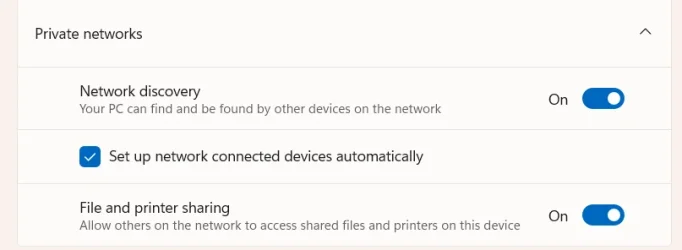
- I've identified a possible cause in the Network Discoverability option, that keeps disabling as soon as I close the Network Options panel
- I tried every fix for that too. Guess what? No joy
- I'd very much love to be able to access my NAS and stuff again. Can anybody help?
Also, I harbor a faint hope that 25H2 might fix this - but would it be possible to skip 24H2 at all when updating? Please note that as soon as 24H2 hits the PC, all traffic including Windows Update stops.
Briefly put:
- I updated to 24H2. All network functionality broke [My possibly wrong diagnosis: every IP call gets rerouted onto localhost]
- I tried every fix known, including every single one listed in this thread. No joy
- I reverted to 23H2. Internet connection now works again, but local network remains broken (can see a NAS, for example, but cannot connect to it via Explorer. Https connection seems fine though)
- I tried getting help through every customer care known to man. No joy
- I've identified a possible cause in the Network Discoverability option, that keeps disabling as soon as I close the Network Options panel
- I tried every fix for that too. Guess what? No joy
- I'd very much love to be able to access my NAS and stuff again. Can anybody help?
Also, I harbor a faint hope that 25H2 might fix this - but would it be possible to skip 24H2 at all when updating? Please note that as soon as 24H2 hits the PC, all traffic including Windows Update stops.
- Windows Build/Version
- Win 11 23H2 - Build 22631.5768 / 1000.22700.1106.0
My Computer
At a glance
Windows 1112th Gen Intel(R) Core(TM) i5-12400F 2.50 GHz64,0 GB
- OS
- Windows 11
- Computer type
- PC/Desktop
- Manufacturer/Model
- Custom
- CPU
- 12th Gen Intel(R) Core(TM) i5-12400F 2.50 GHz
- Motherboard
- Asustek PRIME H610M-A D4
- Memory
- 64,0 GB
- Internet Speed
- 1Gb
- Browser
- Chrome
- Antivirus
- Windows Defender
- Other Info
- Processore 12th Gen Intel(R) Core(TM) i5-12400F 2.50 GHz
RAM installata 64,0 GB (63,8 GB utilizzabile)
Tipo sistema Sistema operativo a 64 bit, processore basato su x64
Penna e tocco Nessun input penna o tocco disponibile per questo schermo
Edizione Windows 11 Home
Versione 23H2
Data installazione: 28/04/2025
Build sistema operativo 22631.5768
Esperienza Pacchetto di esperienze per funzionalità Windows 1000.22700.1106.0