Hi
Over the past few days I've been installing Windows 11 25H2 on a spare PC we have upstairs (it was a clean install since I had no prior installation of Windows 11 already installed). Overall everything has gone well although I do have a problem that so far I've not been able to find a solution to. This involves the installation of a Wacom tablet, a CTL-4100 (small). The PC is a dual boot machine with Windows 10 on which the tablet works fine.
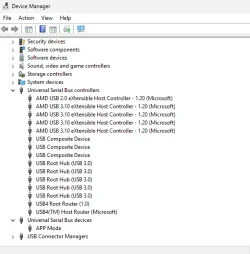
On trying to install the tablet driver everything appears to be going well until I reboot. Once the PC has rebooted the tablet does NOT have the light indicating it has power. In addition the Wacom applet in the Control panel tells me I have no tablet connected. I tried this process four times when finally, in desparation, I unplugged the tablet and replugged it. At this point the driver showed everything was working fine and I could set up the tablet to my liking and carry on using it. However, this only lasted until I had to reboot and once again it would not work until I unplugged and replugged the tablet. Now whilst I am happy to know can get it working, in the long term its not going to do a lot for the connectors(!!!) to say nothing of the inconvenience, I've tried restarting the driver but that has no effect. I've also had need to sign out and back in again and as far as I can tell this DOES work.
Does anyone have any idea what may be going on here or how I can fix this? If any further info is required please ask away and I will do what I can to help. Any help would be very much appreciated.
Tracey
PS If I've posted this message in the wrong place I apologise
Over the past few days I've been installing Windows 11 25H2 on a spare PC we have upstairs (it was a clean install since I had no prior installation of Windows 11 already installed). Overall everything has gone well although I do have a problem that so far I've not been able to find a solution to. This involves the installation of a Wacom tablet, a CTL-4100 (small). The PC is a dual boot machine with Windows 10 on which the tablet works fine.
On trying to install the tablet driver everything appears to be going well until I reboot. Once the PC has rebooted the tablet does NOT have the light indicating it has power. In addition the Wacom applet in the Control panel tells me I have no tablet connected. I tried this process four times when finally, in desparation, I unplugged the tablet and replugged it. At this point the driver showed everything was working fine and I could set up the tablet to my liking and carry on using it. However, this only lasted until I had to reboot and once again it would not work until I unplugged and replugged the tablet. Now whilst I am happy to know can get it working, in the long term its not going to do a lot for the connectors(!!!) to say nothing of the inconvenience, I've tried restarting the driver but that has no effect. I've also had need to sign out and back in again and as far as I can tell this DOES work.
Does anyone have any idea what may be going on here or how I can fix this? If any further info is required please ask away and I will do what I can to help. Any help would be very much appreciated.
Tracey
PS If I've posted this message in the wrong place I apologise
My Computers
-
At a glance
Windows 10/11 (dual boot)Ryzen 5 3600Corsair Vengeance LPX Black 2x16GB 2400MHz`Nvidia GTX1050Ti Mini- OS
- Windows 10/11 (dual boot)
- Computer type
- PC/Desktop
- Manufacturer/Model
- Self-Built
- CPU
- Ryzen 5 3600
- Motherboard
- MSI MPG B550 Gaming Plus ATX
- Memory
- Corsair Vengeance LPX Black 2x16GB 2400MHz`
- Graphics Card(s)
- Nvidia GTX1050Ti Mini
- Sound Card
- RTL ALC892/897
- Monitor(s) Displays
- Philips273V7QDAB 27" + AOCE2470SWH 24"
- Screen Resolution
- 1920 x 1080 (x2)
- Hard Drives
- WD Blue HD 1TB NVMe
Crucial 2TB SSD
- PSU
- Corsair CX650M
- Case
- Corsair Carbide 275R
- Cooling
- Corsair Hydro H60 AIO
- Keyboard
- Logitech K270 (wireless)
- Mouse
- Logitech M185 (wireless) & M100 (wired)
- Internet Speed
- Approx 500Mbs
- Browser
- Librewolf (main) Firefox (reserve)
- Antivirus
- Malwarebytes Premium & MS Defender
- Other Info
- Printers: CutePDF
Wacom Tablet CTL-4100 (small)
-
At a glance
Windows 10/Windows11 Dual BootIntel i7-9700KFCorsair Vengeance LPX 24GB 2400MHzNvidia GTX760- Operating System
- Windows 10/Windows11 Dual Boot
- Computer type
- PC/Desktop
- Manufacturer/Model
- Self-Built
- CPU
- Intel i7-9700KF
- Motherboard
- MSI MPG Z390 Gaming Pro Carbon AC
- Memory
- Corsair Vengeance LPX 24GB 2400MHz
- Graphics card(s)
- Nvidia GTX760
- Sound Card
- RTL ALC1220P
- Monitor(s) Displays
- Philips 273V7QDAB 27" & AOC E2470SWH 24"
- Screen Resolution
- 1920 x 1080 (x2)
- Hard Drives
- WD Blue SSD NVMe M.2 1TB
WD Blue HD 1TB; Toshiba P300 HD 3TB
WD Blue 1TB Ext
- PSU
- Corsair CX650M 650W
- Case
- Corsair Carbide 275R
- Cooling
- Corsair H60 AIO
- Keyboard
- Logitech K270 (wireless)
- Mouse
- Logitech M185 (wireless)
- Internet Speed
- Approx 35-36Mbs
- Browser
- Firefox & Edge
- Antivirus
- W10 - Malwarebytes Premium + MS Defender; W11 - MS Defender
- Other Info
- Wacom Bamboo Tablet (small)