3 Monitors - Off 1st Monitor


gnulab

Well-known member
Local time
5:20 AM
Posts
38
OS
Windows 11
Hi,

I am using a laptop in my workplace and I hook 2 external monitors to it.

How do I make the monitor on my laptop switched off/sleep while it is connected to external monitor?

By the way, how do I access Win + P thru mouse clicks? This still eludes me.


Thank you
Henry
 

My Computer My Computer

At a glance

Windows 11AMD Ryzen AI 7 350 w/ Radeon 860M32.00 GB32.00 GB
OS
Windows 11
Computer type
Laptop
CPU
AMD Ryzen AI 7 350 w/ Radeon 860M
Motherboard
LENOVO LNVNB161216
Memory
32.00 GB
Graphics Card(s)
32.00 GB
Sound Card
AMD Audio Device
Screen Resolution
2880 x 1800 x 32 bits (4294967296 colors) @ 60 Hz
Hard Drives
WD PC SN7100S SDFPMSL-1T00-1101 1TB
You can access the Win + P via the Start Menu Search box by start typing "Duplicate or Extend to a Connected Display" and, sooner or later, the option will appear in the search results. Select the option to launch the settings window.

Alternatively, navigate to Settings > System > Display and the options appear in the right pane of the open window.

When you are there, just select either the "Only on 1" or "Only on 2" options that are available just under the text that reads "Select a Display to change the Settings for it. ..."
 

My Computers My Computers

  • At a glance

    Windows 11AMD Ryzen 5 560016 GBSapphire Radeon RX 6500XT (8 GB version)
    OS
    Windows 11
    Computer type
    PC/Desktop
    CPU
    AMD Ryzen 5 5600
    Motherboard
    MSI B550-A Pro
    Memory
    16 GB
    Graphics Card(s)
    Sapphire Radeon RX 6500XT (8 GB version)
    Monitor(s) Displays
    BenQ Mobuiz EX2710Q QHD, Iiyama ProLite X23377HDS
    Hard Drives
    MSI Spatium M461 4TB
  • At a glance

    Windows 11Intel Celeron N4020
    Operating System
    Windows 11
    Computer type
    Laptop
    Manufacturer/Model
    Acer A114
    CPU
    Intel Celeron N4020
Hi iko22,

Thanks for the info.

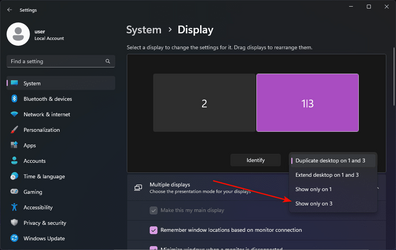
Default setting when you plug in 2 external monitors would be:
"Duplicate desktop on 1 and 3", where
Laptop display (1), Monitor (2), Monitor (3)

So, to off the laptop display, you would choose "Show only on 3 (or 2 whichever is your preference)".

Win + P is more intuitive, but yeah.
 

Attachments

  • 1691984754417.png
    1691984754417.png
    53.2 KB · Views: 1

My Computer My Computer

At a glance

Windows 11AMD Ryzen AI 7 350 w/ Radeon 860M32.00 GB32.00 GB
OS
Windows 11
Computer type
Laptop
CPU
AMD Ryzen AI 7 350 w/ Radeon 860M
Motherboard
LENOVO LNVNB161216
Memory
32.00 GB
Graphics Card(s)
32.00 GB
Sound Card
AMD Audio Device
Screen Resolution
2880 x 1800 x 32 bits (4294967296 colors) @ 60 Hz
Hard Drives
WD PC SN7100S SDFPMSL-1T00-1101 1TB
Back
Top Bottom