adding monitors


corvairbob

Well-known member
Member
VIP
Local time
6:37 AM
Posts
239
OS
win10 64 bit 20h2 ver. now it is 22h2
ok i have a hp laptop and i'm using a hub on this laptop. i have a monitor on it now above the laptop and have it set to turn off the laptop screen when i plug it into the hp hub.

what i want to do if possible is add another monitor to the side so i can put my camera tabs on that other monitor so i can have them showing all the time and still have the current monitor for buzzing around the internet.

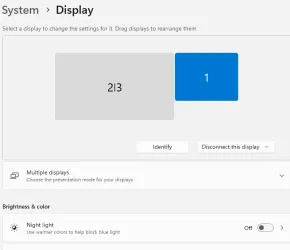
the current monitor is connected via the vga port on the hub and i tried connecting the new monitor via the hdmi port on the hub, but when i do right click on the desktop and go to display settings and then to identify i get the laptop and both added monitors in one id. so is there a way to get 3 monitor to show in the identify section? and to make it so i can have the monitor above the laptop as my main got to screen and the 3rd side monitor as one that i can run the curser over to and then take my camera tabs and slide them over to that side monitor?


so now what i have is the laptop is set to turn off when the laptop is plugged into the hub and the monitor above it turns on. also the side monitor is on and shows the same as the monitor above the laptop. i can take photos of the setup if needed. thanks
 
Windows Build/Version
win11 ver 25h2 build 26200.8457

My Computer

System One

  • OS
    win10 64 bit 20h2 ver. now it is 22h2
    Computer type
    Laptop
    Manufacturer/Model
    hp elitebook
    CPU
    AMD A4-3310MX APU with Ra
    Memory
    16gb
If you have multiple monitors showing as combined such as 1 | 3 there should be a drop down that will say mirror, change that to extend
 

My Computer

System One

  • OS
    Linux Mint
    Computer type
    Laptop
    Manufacturer/Model
    System76 Lemur Pro
i do but this is what it looks like they are combined and when i extend them i get both. what i need is this to show 3 monitors so i can move them to there respective locations when i tap id them the both show or high lite on both monitors. i should say that above the laptop that monitor is a normal type monitor like a desktop may use and i have that working and the laptop screen is turned off when plugged into the hub. the other monitor i would like to use on the side is one of those portible monitors the you can use with a laptop of maybe even a tablet or phone. it has a hdmi port and 2 sub usb c ports. those port have the crooked lighting bolt on them and my guess is that is for power and data inputs also. this side monitor is called a KYY
1779968975628.webp
 

My Computer

System One

  • OS
    win10 64 bit 20h2 ver. now it is 22h2
    Computer type
    Laptop
    Manufacturer/Model
    hp elitebook
    CPU
    AMD A4-3310MX APU with Ra
    Memory
    16gb
Could you please provide the make and model of the hub that you are using as well as the make and model of the laptop? Different hubs have different capabilities, so I'd like to look up the specs. Same is true for the laptop.

There are a lot of potential issues to sort out such as whether the additional ports on the hub are driven by USB-C DisplayPort Alternate mode, if the hub is using DisplayLink Technology or a cheaper similar such technology, etc. I can sort through that for you since I know the things to look for
:-)
 

My Computers

System One System Two

  • OS
    Win11 Pro 25H2 (RTM+)
    Computer type
    PC/Desktop
    Manufacturer/Model
    Acemagic
    CPU
    Intel i7-14650HX
    Memory
    32 GB
    Graphics Card(s)
    No GPU - Built-in Intel Graphics
    Sound Card
    Integrated
    Monitor(s) Displays
    Varies as machine will often be moved to locations with different monitors
    Screen Resolution
    Varies
    Hard Drives
    1 x 1TB Gen 4 NVMe SSD
    PSU
    120W Power Brick
    Keyboard
    Corsair K70 Max RGB Magnetic Keyboard
    Mouse
    Logitech MX Master 3
    Internet Speed
    1Gb Up / 1 Gb Down
    Browser
    Edge
    Antivirus
    Windows Defender
  • Operating System
    Win11 Pro 25H2 (RTM+)
    Computer type
    Laptop
    Manufacturer/Model
    Lenovo ThinkBook 13x Gen 2
    CPU
    Intel i7-1255U
    Memory
    16 GB
    Graphics card(s)
    Intel Iris Xe Graphics
    Sound Card
    Realtek® ALC3306-CG codec
    Monitor(s) Displays
    13.3-inch IPS Display
    Screen Resolution
    WQXGA (2560 x 1600)
    Hard Drives
    2 TB 4 x 4 NVMe SSD
    PSU
    USB-C / Thunderbolt 4 Power / Charging
    Keyboard
    Backlit, spill resistant keyboard
    Mouse
    Buttonless Glass Precision Touchpad
    Internet Speed
    1Gb Up / 1Gb Down
    Browser
    Edge
    Antivirus
    Windows Defender
    Other Info
    WiFi 6e / Bluetooth 5.1 / Facial Recognition / Fingerprint Sensor / ToF (Time of Flight) Human Presence Sensor
Why not use the laptop screen as well so you'll have 2 monitors without needing to add another one? Is your laptop lid closed when using the 2nd monitor?
 

My Computers

System One System Two

  • OS
    Windows 11 Pro
    Computer type
    PC/Desktop
    CPU
    AMD Ryzen 7 9800X3D
    Motherboard
    MSI PRO B850-P Wifi
    Memory
    32GB DDR5 CL30 Kingston Fury
    Graphics Card(s)
    ASUS Prime Radeon RX 9060 XT OC Edition 16GB
    Monitor(s) Displays
    LG Ultrawide 34" + LG 27" 1080p
    Screen Resolution
    3440x1440
    Hard Drives
    Main Boot Drive : 512GB Adata XPG RGB Gen3x4 NVMe M.2 SSD
    PSU
    EVGA 750 Watts 80+ Gold
    Case
    Deepcool Genome II
    Cooling
    Thermalright Burst Assassin 120
    Internet Speed
    1Gbps
    Browser
    Chrome
    Antivirus
    "Moderna"
  • Operating System
    Windows 11 Pro
    Computer type
    PC/Desktop
    CPU
    i7-4790K
    Motherboard
    ASRock Xtreme6 Z97
    Memory
    16GB Corsair Vengeance Pro
    Graphics card(s)
    MSI R9 290
    Monitor(s) Displays
    LG Ultrawide 34"
    Screen Resolution
    3440x1440
    Hard Drives
    500GB Adata SSD (OS Only)
    PSU
    Thermaltake 475 Watts 80 Bronze
    Case
    Thermaltake Commander I Snow Edition
    Cooling
    Deep Cool Archer Air Cooler
    Keyboard
    Armageddon MKA-5R RGB-Hornet
    Mouse
    Logitech G402
    Internet Speed
    1Gbps
    Browser
    Chrome
    Antivirus
    Moderna :)
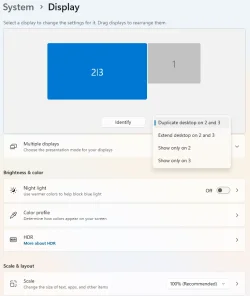
Select the 2|3, in your posted screenshot 'Disconnect this monitor should switch to something like 'Duplicate desktop on 2 and 3', I think it used to say mirrored. Switch it to 'Extend desktop on this display'. Then you should see three separate monitors you can then drag around to suit your needs
 

My Computer

System One

  • OS
    Linux Mint
    Computer type
    Laptop
    Manufacturer/Model
    System76 Lemur Pro
Why not use the laptop screen as well so you'll have 2 monitors without needing to add another one? Is your laptop lid closed when using the 2nd monitor?
the screen is to small for my 75 year old eyes. so i have a 24" monitor setting above the laptop.
 

My Computer

System One

  • OS
    win10 64 bit 20h2 ver. now it is 22h2
    Computer type
    Laptop
    Manufacturer/Model
    hp elitebook
    CPU
    AMD A4-3310MX APU with Ra
    Memory
    16gb
the screen is to small for my 75 year old eyes. so i have a 24" monitor setting above the laptop.
understood. But make sure to keep the lid up so your laptop won't overheat. Keeping the lid up or open helps with heat dissipation. But for camera monitoring, I think the laptop screen should be good enough. Just saying.
 

My Computers

System One System Two

  • OS
    Windows 11 Pro
    Computer type
    PC/Desktop
    CPU
    AMD Ryzen 7 9800X3D
    Motherboard
    MSI PRO B850-P Wifi
    Memory
    32GB DDR5 CL30 Kingston Fury
    Graphics Card(s)
    ASUS Prime Radeon RX 9060 XT OC Edition 16GB
    Monitor(s) Displays
    LG Ultrawide 34" + LG 27" 1080p
    Screen Resolution
    3440x1440
    Hard Drives
    Main Boot Drive : 512GB Adata XPG RGB Gen3x4 NVMe M.2 SSD
    PSU
    EVGA 750 Watts 80+ Gold
    Case
    Deepcool Genome II
    Cooling
    Thermalright Burst Assassin 120
    Internet Speed
    1Gbps
    Browser
    Chrome
    Antivirus
    "Moderna"
  • Operating System
    Windows 11 Pro
    Computer type
    PC/Desktop
    CPU
    i7-4790K
    Motherboard
    ASRock Xtreme6 Z97
    Memory
    16GB Corsair Vengeance Pro
    Graphics card(s)
    MSI R9 290
    Monitor(s) Displays
    LG Ultrawide 34"
    Screen Resolution
    3440x1440
    Hard Drives
    500GB Adata SSD (OS Only)
    PSU
    Thermaltake 475 Watts 80 Bronze
    Case
    Thermaltake Commander I Snow Edition
    Cooling
    Deep Cool Archer Air Cooler
    Keyboard
    Armageddon MKA-5R RGB-Hornet
    Mouse
    Logitech G402
    Internet Speed
    1Gbps
    Browser
    Chrome
    Antivirus
    Moderna :)
understood. But make sure to keep the lid up so your laptop won't overheat. Keeping the lid up or open helps with heat dissipation. But for camera monitoring, I think the laptop screen should be good enough. Just saying.
yes it would but i have them in pinned tabs and i have to click a tab to see them and a lot of times i have to refresh the tab to reopen the camera i want to look at. so by adding a side monitor i can or hope i can have 4 tabs open and keep them from needing tp be refreshed all the time.

the lid is up on the laptop because i'm using the keyboard. if i slide the lock on the hug out it decouples the laptop and the laptop screen then turns on and i can take the laptop away from the desk. but 99.999999% of the time it just stays on the hub.
 

My Computer

System One

  • OS
    win10 64 bit 20h2 ver. now it is 22h2
    Computer type
    Laptop
    Manufacturer/Model
    hp elitebook
    CPU
    AMD A4-3310MX APU with Ra
    Memory
    16gb
Select the 2|3, in your posted screenshot 'Disconnect this monitor should switch to something like 'Duplicate desktop on 2 and 3', I think it used to say mirrored. Switch it to 'Extend desktop on this display'. Then you should see three separate monitors you can then drag around to suit your needs
if i go to advanced i do see 3 displays in the select a display to view or change and i have messed in that section to no good either. i do not have the option to disconnect this monitor in that section. i have unplugged it and it goes away in that section what i need is to get 3 separate monitors to pick from.


1779979820061.webp
 

My Computer

System One

  • OS
    win10 64 bit 20h2 ver. now it is 22h2
    Computer type
    Laptop
    Manufacturer/Model
    hp elitebook
    CPU
    AMD A4-3310MX APU with Ra
    Memory
    16gb
Could you please provide the make and model of the hub that you are using as well as the make and model of the laptop? Different hubs have different capabilities, so I'd like to look up the specs. Same is true for the laptop.

There are a lot of potential issues to sort out such as whether the additional ports on the hub are driven by USB-C DisplayPort Alternate mode, if the hub is using DisplayLink Technology or a cheaper similar such technology, etc. I can sort through that for you since I know the things to look for
:-)
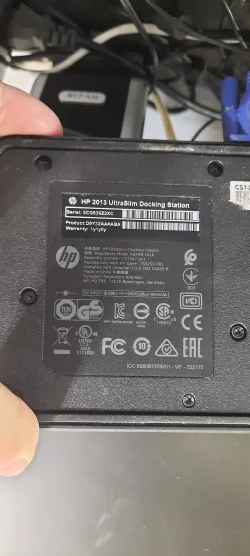
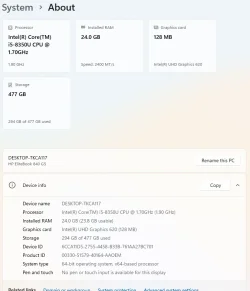
the laptop is a hp elitebook the hub is the hp hub


1779980291765.webp


1779980042115.webp
 

My Computer

System One

  • OS
    win10 64 bit 20h2 ver. now it is 22h2
    Computer type
    Laptop
    Manufacturer/Model
    hp elitebook
    CPU
    AMD A4-3310MX APU with Ra
    Memory
    16gb
ok guys here is what i did to get it to work. it does not like just those small monitors. so i had a 24" pc monito and i now have that connected to test it. it is working, but what a time setting that up for 3 monitors. anyway i'm going to test this out for a bit to see if it works out any better than having those cameras on the main big monitor and taking up needed tab space. if i wind up messing with this setup the same or more then i will forget it and go back the the old way i was doing this. thanks
 

My Computer

System One

  • OS
    win10 64 bit 20h2 ver. now it is 22h2
    Computer type
    Laptop
    Manufacturer/Model
    hp elitebook
    CPU
    AMD A4-3310MX APU with Ra
    Memory
    16gb

Latest Support Threads

Back
Top Bottom