3rd Party Themes in Windows 11


blacxarea

Active member
Member
VIP
Local time
3:58 PM
Posts
207
Location
Indonesia
OS
Windows 11
I tried the updated UltraUXThemePatcher before succeeded to apply themes in Windows 11. It was installed correctly and said that my Windows 11 is patched, but there's nothing shows when I tried to apply a downloaded theme, only changing colors.

Here is the link for that one: UltraUXThemePatcher 4.2.0

Then I tried SecureUXTheme ThemeTool, and YES, it works well. You can apply downloaded Windows 10 Themes for Windows 11. The cons are: Your AV will detect this program as a virus, and you have to run it as Administrator.

Here is the link: ThemeTool V2.1.2
 
Windows Build/Version
Windows 11 Build 22000.65

My Computer My Computer

At a glance

Windows 11AMD Phenom(tm) II X2 555 Processor 3.20 GHzKingston 16GB DDR3NVidia GeForce GTX 650
OS
Windows 11
Computer type
PC/Desktop
Manufacturer/Model
Unbranded
CPU
AMD Phenom(tm) II X2 555 Processor 3.20 GHz
Motherboard
Asus M4A785T-M
Memory
Kingston 16GB DDR3
Graphics Card(s)
NVidia GeForce GTX 650
Sound Card
VIA HD Audio
Monitor(s) Displays
2x LG 20" Display
Screen Resolution
1600 x 900 60MHz
Hard Drives
WD Blue 1TB HDD
ADATA 500GB SSD
Midas Force 500GB SSD
PSU
Enermax 500W
Case
Unbranded
Cooling
Unbranded
Keyboard
Logitech Wired K120
Mouse
Logitech Wired B100
Internet Speed
20MB Download 1,5MB Upload
Browser
Firefox
Antivirus
McAffee, Malwarebytes, Windows Defender
Other Info
Are you sneaking?
I also tried OpenShell, the classic start menu (Windows 7 style or older) doesn't work, but the icons at Windows Explorer (cut, copy, paste etc) work. Customizer God, a utility to change system icons in Windows 8 and 10 doesn't work either in Windows 11. 8gadgetpack, a utility to restore Windows 7 gadgets in Windows 8 and 10, also works in Windows 11. Winaero old calculator also works in Windows 11. Winaero classic Windows games also work in Windows 11. The Registry patch to restore Windows Photo Viewer also works in Windows 11. That's all the customization utilities I have tried. Any further information appreciated.
 

My Computers My Computers

  • At a glance

    Windows 11 Pro 23H2 (7582), 25H2 (9457)Mobile DualCore Intel Core 2 Duo T7250, 2000 MHz4GBMobile Intel(R) GMA 4500M (Mobile 4 series)
    OS
    Windows 11 Pro 23H2 (7582), 25H2 (9457)
    Computer type
    Laptop
    Manufacturer/Model
    Acer Extensa 5630EZ
    CPU
    Mobile DualCore Intel Core 2 Duo T7250, 2000 MHz
    Motherboard
    Acer Extensa 5630
    Memory
    4GB
    Graphics Card(s)
    Mobile Intel(R) GMA 4500M (Mobile 4 series)
    Sound Card
    Realtek ALC268 @ Intel 82801IB ICH9 - High Definition Audio Controller
    Monitor(s) Displays
    1
    Screen Resolution
    1280x800
    Hard Drives
    Samsung SSD 850 EVO 250GB SATA Device (250 GB, SATA-III)
    Internet Speed
    802.11g wireless 54 Mbps
    Browser
    MICROSOFT EDGE
    Antivirus
    WINDOWS DEFENDER
    Other Info
    Legacy MBR installation, no TPM, no Secure Boot, no WDDM 2.0 graphics drivers, no SSE4.2, cannot get more unsupported ;) This is only my test laptop. I had installed Windows 11 here before upgrading my main PC. For my main PC I use everyday see my 2nd system specs.
  • At a glance

    Windows 11 Pro 25H2 (build 26200.9457)Intel Core-i7 3770 3.40GHz s1155 (3rd generat...2x Kingston Hyper-X Blu 8GB DDR3-1600GIGABYTE GeForce RTX 3050 WINDFORCE OC V2 6GB...
    Operating System
    Windows 11 Pro 25H2 (build 26200.9457)
    Computer type
    PC/Desktop
    Manufacturer/Model
    Custom-built PC
    CPU
    Intel Core-i7 3770 3.40GHz s1155 (3rd generation)
    Motherboard
    Asus P8H61 s1155 ATX
    Memory
    2x Kingston Hyper-X Blu 8GB DDR3-1600
    Graphics card(s)
    GIGABYTE GeForce RTX 3050 WINDFORCE OC V2 6GB (GV-N3050WF2OCV2-6GD)
    Sound Card
    Realtek HD audio (ALC887)
    Monitor(s) Displays
    Sony Bravia KDL-19L4000 19" LCD TV via VGA
    Screen Resolution
    1440x900 32-bit 60Hz
    Hard Drives
    WD Blue SA510 2.5 1000GB SSD as system disk, Western Digital Caviar Purple 4TB SATA III (WD40PURZ) as second
    PSU
    Thermaltake Litepower RGB 550W Full Wired
    Case
    SUPERCASE MIDI-TOWER
    Cooling
    Deepcool Gamma Archer CPU cooler, 1x 8cm fan at the back
    Keyboard
    Mitsumi 101-key PS/2
    Mouse
    Microsoft Compact Optical Mouse
    Internet Speed
    802.11ac 5GHz wireless 260Mpbs
    Browser
    Microsoft Edge, Mozilla Firefox
    Antivirus
    Microsoft Windows Defender
    Other Info
    Legacy BIOS (MBR) installation, no TPM, no Secure Boot, WDDM 3.0 graphics drivers, WEI score 7.4
I also tried OpenShell, the classic start menu (Windows 7 style or older) doesn't work, but the icons at Windows Explorer (cut, copy, paste etc) work. Customizer God, a utility to change system icons in Windows 8 and 10 doesn't work either in Windows 11. 8gadgetpack, a utility to restore Windows 7 gadgets in Windows 8 and 10, also works in Windows 11. Winaero old calculator also works in Windows 11. Winaero classic Windows games also work in Windows 11. The Registry patch to restore Windows Photo Viewer also works in Windows 11. That's all the customization utilities I have tried. Any further information appreciated.
Wow, you've been much busier than me :D
 

My Computer My Computer

At a glance

Windows 11AMD Phenom(tm) II X2 555 Processor 3.20 GHzKingston 16GB DDR3NVidia GeForce GTX 650
OS
Windows 11
Computer type
PC/Desktop
Manufacturer/Model
Unbranded
CPU
AMD Phenom(tm) II X2 555 Processor 3.20 GHz
Motherboard
Asus M4A785T-M
Memory
Kingston 16GB DDR3
Graphics Card(s)
NVidia GeForce GTX 650
Sound Card
VIA HD Audio
Monitor(s) Displays
2x LG 20" Display
Screen Resolution
1600 x 900 60MHz
Hard Drives
WD Blue 1TB HDD
ADATA 500GB SSD
Midas Force 500GB SSD
PSU
Enermax 500W
Case
Unbranded
Cooling
Unbranded
Keyboard
Logitech Wired K120
Mouse
Logitech Wired B100
Internet Speed
20MB Download 1,5MB Upload
Browser
Firefox
Antivirus
McAffee, Malwarebytes, Windows Defender
Other Info
Are you sneaking?
Screensavers from Windows XP and newer also work in Windows 11 if you copy-paste the scr file into Windows\System32 folder or you install the screesavers. Of course you can use any old wallpaper and user account pictures if you have kept the images. Winaero Windows Experience Index (WEI) a utility to restore the old Windows score from Windows 7 of how fast is your system, also works in Windows 11.
 

My Computers My Computers

  • At a glance

    Windows 11 Pro 23H2 (7582), 25H2 (9457)Mobile DualCore Intel Core 2 Duo T7250, 2000 MHz4GBMobile Intel(R) GMA 4500M (Mobile 4 series)
    OS
    Windows 11 Pro 23H2 (7582), 25H2 (9457)
    Computer type
    Laptop
    Manufacturer/Model
    Acer Extensa 5630EZ
    CPU
    Mobile DualCore Intel Core 2 Duo T7250, 2000 MHz
    Motherboard
    Acer Extensa 5630
    Memory
    4GB
    Graphics Card(s)
    Mobile Intel(R) GMA 4500M (Mobile 4 series)
    Sound Card
    Realtek ALC268 @ Intel 82801IB ICH9 - High Definition Audio Controller
    Monitor(s) Displays
    1
    Screen Resolution
    1280x800
    Hard Drives
    Samsung SSD 850 EVO 250GB SATA Device (250 GB, SATA-III)
    Internet Speed
    802.11g wireless 54 Mbps
    Browser
    MICROSOFT EDGE
    Antivirus
    WINDOWS DEFENDER
    Other Info
    Legacy MBR installation, no TPM, no Secure Boot, no WDDM 2.0 graphics drivers, no SSE4.2, cannot get more unsupported ;) This is only my test laptop. I had installed Windows 11 here before upgrading my main PC. For my main PC I use everyday see my 2nd system specs.
  • At a glance

    Windows 11 Pro 25H2 (build 26200.9457)Intel Core-i7 3770 3.40GHz s1155 (3rd generat...2x Kingston Hyper-X Blu 8GB DDR3-1600GIGABYTE GeForce RTX 3050 WINDFORCE OC V2 6GB...
    Operating System
    Windows 11 Pro 25H2 (build 26200.9457)
    Computer type
    PC/Desktop
    Manufacturer/Model
    Custom-built PC
    CPU
    Intel Core-i7 3770 3.40GHz s1155 (3rd generation)
    Motherboard
    Asus P8H61 s1155 ATX
    Memory
    2x Kingston Hyper-X Blu 8GB DDR3-1600
    Graphics card(s)
    GIGABYTE GeForce RTX 3050 WINDFORCE OC V2 6GB (GV-N3050WF2OCV2-6GD)
    Sound Card
    Realtek HD audio (ALC887)
    Monitor(s) Displays
    Sony Bravia KDL-19L4000 19" LCD TV via VGA
    Screen Resolution
    1440x900 32-bit 60Hz
    Hard Drives
    WD Blue SA510 2.5 1000GB SSD as system disk, Western Digital Caviar Purple 4TB SATA III (WD40PURZ) as second
    PSU
    Thermaltake Litepower RGB 550W Full Wired
    Case
    SUPERCASE MIDI-TOWER
    Cooling
    Deepcool Gamma Archer CPU cooler, 1x 8cm fan at the back
    Keyboard
    Mitsumi 101-key PS/2
    Mouse
    Microsoft Compact Optical Mouse
    Internet Speed
    802.11ac 5GHz wireless 260Mpbs
    Browser
    Microsoft Edge, Mozilla Firefox
    Antivirus
    Microsoft Windows Defender
    Other Info
    Legacy BIOS (MBR) installation, no TPM, no Secure Boot, WDDM 3.0 graphics drivers, WEI score 7.4
Screensavers from Windows XP and newer also work in Windows 11 if you copy-paste the scr file into Windows\System32 folder or you install the screesavers. Of course you can use any old wallpaper and user account pictures if you have kept the images. Winaero Windows Experience Index (WEI) a utility to restore the old Windows score from Windows 7 of how fast is your system, also works in Windows 11.
Hi there
I'm trying to get the ESCHER screensaver from XP to work but it doesn't want to "play ball" currently. As far as themes for W11 not from the store - there are a load of free ones on various web sites that all seem to install without any problems. All the W10 ones work.

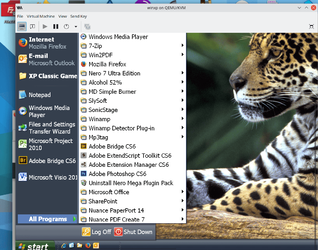
What I would really love is for the Lunar Black XP theme to work with those nice curved taskbar things and sensible menu screen !!! I like the XP menu system much better when you show All applications : Screenshot below With desktop wallpaper used - image of a Brazilian Jaguar.

Screenshot_20210715_090854.png

Cheers
jimbo
 

My Computer My Computer

At a glance

Windows XP,11 Linux Fedora Rawhide pre-releas...2 X Intel i7
OS
Windows XP,11 Linux Fedora Rawhide pre-release 46
Computer type
PC/Desktop
CPU
2 X Intel i7
Screen Resolution
4KUHD X 2
Screensavers from Windows XP and newer also work in Windows 11 if you copy-paste the scr file into Windows\System32 folder or you install the screesavers. Of course you can use any old wallpaper and user account pictures if you have kept the images. Winaero Windows Experience Index (WEI) a utility to restore the old Windows score from Windows 7 of how fast is your system, also works in Windows 11.
Here I have one, using it over 5 different Windows Editions:
 

Attachments

My Computer My Computer

At a glance

Windows 11AMD Phenom(tm) II X2 555 Processor 3.20 GHzKingston 16GB DDR3NVidia GeForce GTX 650
OS
Windows 11
Computer type
PC/Desktop
Manufacturer/Model
Unbranded
CPU
AMD Phenom(tm) II X2 555 Processor 3.20 GHz
Motherboard
Asus M4A785T-M
Memory
Kingston 16GB DDR3
Graphics Card(s)
NVidia GeForce GTX 650
Sound Card
VIA HD Audio
Monitor(s) Displays
2x LG 20" Display
Screen Resolution
1600 x 900 60MHz
Hard Drives
WD Blue 1TB HDD
ADATA 500GB SSD
Midas Force 500GB SSD
PSU
Enermax 500W
Case
Unbranded
Cooling
Unbranded
Keyboard
Logitech Wired K120
Mouse
Logitech Wired B100
Internet Speed
20MB Download 1,5MB Upload
Browser
Firefox
Antivirus
McAffee, Malwarebytes, Windows Defender
Other Info
Are you sneaking?
Hi there
I'm trying to get the ESCHER screensaver from XP to work but it doesn't want to "play ball" currently. As far as themes for W11 not from the store - there are a load of free ones on various web sites that all seem to install without any problems. All the W10 ones work.

What I would really love is for the Lunar Black XP theme to work with those nice curved taskbar things and sensible menu screen !!! I like the XP menu system much better when you show All applications : Screenshot below With desktop wallpaper used - image of a Brazilian Jaguar.

View attachment 3152

Cheers
jimbo
I will not recommend to use themes that directly ported from Windows under Win10.
Even some older Win10 build caused blank screen (I've tried), and need 3rd Party "helper" softwares to work, just like I mentioned in the beginning.

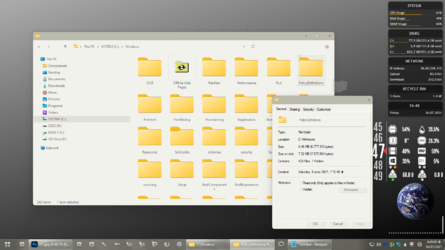
Here I'm using POST theme by Niivu from Deviant Art. Applied using ThemeTool.exe.
Tried to apply directly from personalization window before, with no luck.
1626429001593.png
 

My Computer My Computer

At a glance

Windows 11AMD Phenom(tm) II X2 555 Processor 3.20 GHzKingston 16GB DDR3NVidia GeForce GTX 650
OS
Windows 11
Computer type
PC/Desktop
Manufacturer/Model
Unbranded
CPU
AMD Phenom(tm) II X2 555 Processor 3.20 GHz
Motherboard
Asus M4A785T-M
Memory
Kingston 16GB DDR3
Graphics Card(s)
NVidia GeForce GTX 650
Sound Card
VIA HD Audio
Monitor(s) Displays
2x LG 20" Display
Screen Resolution
1600 x 900 60MHz
Hard Drives
WD Blue 1TB HDD
ADATA 500GB SSD
Midas Force 500GB SSD
PSU
Enermax 500W
Case
Unbranded
Cooling
Unbranded
Keyboard
Logitech Wired K120
Mouse
Logitech Wired B100
Internet Speed
20MB Download 1,5MB Upload
Browser
Firefox
Antivirus
McAffee, Malwarebytes, Windows Defender
Other Info
Are you sneaking?
As far as I know, there is no easy way to change Windows 11 theme. In Windows 10 I used OpenShell (formerly ClassicShell), but as I have already said, it doesn't work in Windows 11.
 

My Computers My Computers

  • At a glance

    Windows 11 Pro 23H2 (7582), 25H2 (9457)Mobile DualCore Intel Core 2 Duo T7250, 2000 MHz4GBMobile Intel(R) GMA 4500M (Mobile 4 series)
    OS
    Windows 11 Pro 23H2 (7582), 25H2 (9457)
    Computer type
    Laptop
    Manufacturer/Model
    Acer Extensa 5630EZ
    CPU
    Mobile DualCore Intel Core 2 Duo T7250, 2000 MHz
    Motherboard
    Acer Extensa 5630
    Memory
    4GB
    Graphics Card(s)
    Mobile Intel(R) GMA 4500M (Mobile 4 series)
    Sound Card
    Realtek ALC268 @ Intel 82801IB ICH9 - High Definition Audio Controller
    Monitor(s) Displays
    1
    Screen Resolution
    1280x800
    Hard Drives
    Samsung SSD 850 EVO 250GB SATA Device (250 GB, SATA-III)
    Internet Speed
    802.11g wireless 54 Mbps
    Browser
    MICROSOFT EDGE
    Antivirus
    WINDOWS DEFENDER
    Other Info
    Legacy MBR installation, no TPM, no Secure Boot, no WDDM 2.0 graphics drivers, no SSE4.2, cannot get more unsupported ;) This is only my test laptop. I had installed Windows 11 here before upgrading my main PC. For my main PC I use everyday see my 2nd system specs.
  • At a glance

    Windows 11 Pro 25H2 (build 26200.9457)Intel Core-i7 3770 3.40GHz s1155 (3rd generat...2x Kingston Hyper-X Blu 8GB DDR3-1600GIGABYTE GeForce RTX 3050 WINDFORCE OC V2 6GB...
    Operating System
    Windows 11 Pro 25H2 (build 26200.9457)
    Computer type
    PC/Desktop
    Manufacturer/Model
    Custom-built PC
    CPU
    Intel Core-i7 3770 3.40GHz s1155 (3rd generation)
    Motherboard
    Asus P8H61 s1155 ATX
    Memory
    2x Kingston Hyper-X Blu 8GB DDR3-1600
    Graphics card(s)
    GIGABYTE GeForce RTX 3050 WINDFORCE OC V2 6GB (GV-N3050WF2OCV2-6GD)
    Sound Card
    Realtek HD audio (ALC887)
    Monitor(s) Displays
    Sony Bravia KDL-19L4000 19" LCD TV via VGA
    Screen Resolution
    1440x900 32-bit 60Hz
    Hard Drives
    WD Blue SA510 2.5 1000GB SSD as system disk, Western Digital Caviar Purple 4TB SATA III (WD40PURZ) as second
    PSU
    Thermaltake Litepower RGB 550W Full Wired
    Case
    SUPERCASE MIDI-TOWER
    Cooling
    Deepcool Gamma Archer CPU cooler, 1x 8cm fan at the back
    Keyboard
    Mitsumi 101-key PS/2
    Mouse
    Microsoft Compact Optical Mouse
    Internet Speed
    802.11ac 5GHz wireless 260Mpbs
    Browser
    Microsoft Edge, Mozilla Firefox
    Antivirus
    Microsoft Windows Defender
    Other Info
    Legacy BIOS (MBR) installation, no TPM, no Secure Boot, WDDM 3.0 graphics drivers, WEI score 7.4
As far as I know, there is no easy way to change Windows 11 theme. In Windows 10 I used OpenShell (formerly ClassicShell), but as I have already said, it doesn't work in Windows 11.
This ThemeTool working fine (mostly) on mine. But you have to make sure that the theme was for the latest Windows 10 Build.
And again, the cons: antiviruses hate this tool.
 

My Computer My Computer

At a glance

Windows 11AMD Phenom(tm) II X2 555 Processor 3.20 GHzKingston 16GB DDR3NVidia GeForce GTX 650
OS
Windows 11
Computer type
PC/Desktop
Manufacturer/Model
Unbranded
CPU
AMD Phenom(tm) II X2 555 Processor 3.20 GHz
Motherboard
Asus M4A785T-M
Memory
Kingston 16GB DDR3
Graphics Card(s)
NVidia GeForce GTX 650
Sound Card
VIA HD Audio
Monitor(s) Displays
2x LG 20" Display
Screen Resolution
1600 x 900 60MHz
Hard Drives
WD Blue 1TB HDD
ADATA 500GB SSD
Midas Force 500GB SSD
PSU
Enermax 500W
Case
Unbranded
Cooling
Unbranded
Keyboard
Logitech Wired K120
Mouse
Logitech Wired B100
Internet Speed
20MB Download 1,5MB Upload
Browser
Firefox
Antivirus
McAffee, Malwarebytes, Windows Defender
Other Info
Are you sneaking?
I tried the updated UltraUXThemePatcher before succeeded to apply themes in Windows 11. It was installed correctly and said that my Windows 11 is patched, but there's nothing shows when I tried to apply a downloaded theme, only changing colors.

Here is the link for that one: UltraUXThemePatcher 4.2.0

Then I tried SecureUXTheme ThemeTool, and YES, it works well. You can apply downloaded Windows 10 Themes for Windows 11. The cons are: Your AV will detect this program as a virus, and you have to run it as Administrator.

Here is the link: ThemeTool V2.1.2
you need the new one UltraUXThemePatcher_4.2.1
Homepage M. Hoefs - UltraUXThemePatcher
 

My Computer My Computer

At a glance

Windows 11 Pro Version 23H2(OS Build 22631.4890)12-Core AMD Ryzen 9 5900X, 4950 MHz (49.5 x 100)4 - G Skill Trident Z Neo F4-3600C16-16GTZNCPCI Express 4.0 x16: PowerColor RX 6800
OS
Windows 11 Pro Version 23H2(OS Build 22631.4890)
Computer type
PC/Desktop
Manufacturer/Model
AMD
CPU
12-Core AMD Ryzen 9 5900X, 4950 MHz (49.5 x 100)
Motherboard
Gigabyte X570 Aorus Master
Memory
4 - G Skill Trident Z Neo F4-3600C16-16GTZNC
Graphics Card(s)
PCI Express 4.0 x16: PowerColor RX 6800
Sound Card
Realtek ALC1220 @ AMD K19.2 - High Definition Audio Controller
Monitor(s) Displays
2 - 27 inch Westinghouse
Screen Resolution
1920 x 1080
Hard Drives
2 SSD - 2 TB each
1 SSD - 4TB
1 HDD - 2TB
Keyboard
logitech
Mouse
logitech
Internet Speed
1 GB
Browser
Firefox
Antivirus
Eset Endpoint Security
I also tried OpenShell, the classic start menu (Windows 7 style or older) doesn't work...

Did you fresh install or upgrade?? Was Open-Shell installed on Win 10 (if you upgraded)?

I had it installed on Win 10 & when i upgraded, a dialog box opened up saying it needed to be configured to new O/S. It would do that every time i started up/restarted computer. What you need to do to perhaps get it working is to uninstall it using a good uninstaller (Advanced Uninstaller Pro/Revo Uninstaller - both free) to delete registry & other files let behind. Restart computer & reinstall - it should work after that.

HTH.
 

My Computer My Computer

At a glance

Windows 11
OS
Windows 11

Latest Support Threads

Back
Top Bottom