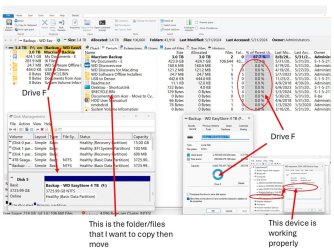
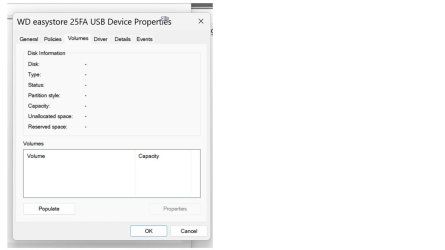
I have a 4 TB USB HDD that doesn't show up in Windows File Explorer but does in Disk Management. Device Manager claims that it's performing properly but the "volumes" tab shows only hash marks (no information). See image. The disk spins fine and is not a "clicker".
I've poked around some system events but I really don't know what I'm looking for or how to interpret what I see.
I'll appreciate any thoughts on further information to provide or where to go from here. I've browsed tutorials but haven't located anything that directs me to what to look for. Any recommendation to a tutorial also will help.
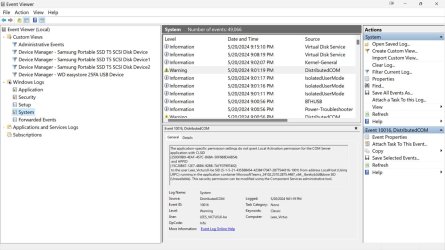
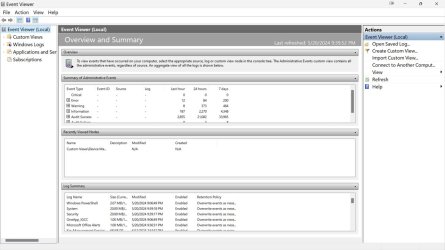
I've poked around some system events but I really don't know what I'm looking for or how to interpret what I see.
I'll appreciate any thoughts on further information to provide or where to go from here. I've browsed tutorials but haven't located anything that directs me to what to look for. Any recommendation to a tutorial also will help.
My Computers
-
At a glance
Windows 1113th Gen Intel(R) Core(TM) i5-13400F 2.50 GHz32.0 GBNVIDIA Gforce RTX 4060- OS
- Windows 11
- Computer type
- PC/Desktop
- Manufacturer/Model
- Device name CyberPowerPC
- CPU
- 13th Gen Intel(R) Core(TM) i5-13400F 2.50 GHz
- Memory
- 32.0 GB
- Graphics Card(s)
- NVIDIA Gforce RTX 4060
- Hard Drives
- 2 TB ADATA Legend 800 Gold SSD and several HDDs
- PSU
- 650W
- Browser
- Chrome
- Other Info
- Windows 11 23H2 10.0.26100 Build 26100
-
At a glance
Windows 10 Home 22H2 19045.4123Intel(R) Core(TM) i7-4790 CPU @ 3.60GHz 3.60 GHz32.0 GBGforce GTX 745- Operating System
- Windows 10 Home 22H2 19045.4123
- Computer type
- PC/Desktop
- Manufacturer/Model
- Acer_Desktop
- CPU
- Intel(R) Core(TM) i7-4790 CPU @ 3.60GHz 3.60 GHz
- Memory
- 32.0 GB
- Graphics card(s)
- Gforce GTX 745
- Sound Card
- ONN24
- Hard Drives
- Many
- Keyboard
- JLAB supports 2 computers/monitors
- Mouse
- Acer wired USB
- Browser
- Chrome
- Antivirus
- Only what W10 installed
- Other Info
- 64-bit operating system, x64-based processor
-
OS Windows 11 Home 25H2, 26200.8894, 5/20/2025
Computer type = PC/Laptop
Manufacturer/Model = HP
Device name = Victus
CPU = 12th Gen Intel(R) Core(TM) i7-12700H (2.30 GHz)
Motherboard
Memory = 16.0 GB (15.7 GB usable)
Graphics Card = NVIDIA GeForce RTX 3050 Laptop GPU (4 GB)
Sound Card = Internal
Monitor(s) Displays = Attached
Screen Resolution = UNK
Hard Drives = 954 GB and several external HDDs
PSU = UNK
Case = NA
Cooling = UNK
Keyboard = NA
Mouse = Wireless Logitech (Touchpad also)
Internet Speed = 31Mbps download; 8.24 Mbps upload
Browser = Chrome
Antivirus=Windows Defender only
Other Info