A quick way to update windows from 11 21H2 to 22H2 using a batch file in installationn media created from Microsoft official website.

  • Thread starter Thread starter e4rr0o
  • Start date Start date

E

e4rr0o

Guest
Please note :- 1. Replace every D: letter in batch file with your installation media usb drive letter .
2. To do this , right click autoexe.bat file>show more options>edit, make changes and save and then move to root drive of your installation media usb drive .
3. To run autoexe.bat file, right click on it, select Run as administrator within installation media usb drive.
4. Click Yes in Notepad prompt and close(x) it.
5. Proceed, Select Keep files and data.
6. It restarts and update goes on.
7. Backup of data is suggested, though not necessary .
NOW ABOUT autoexe.bat file, to make this file , follow these simple commands.
1. Search for CMD, Run as administrator.
2. C:\windows\system32>copy con autoexe.bat (press enter)
Now type all commands one by one and press enter after each command.
3. D:(replace with your installation media usb drive letter)
4. cd sources
5. ren appraiserres.dll appraiserres.dll.old
6. Notepad appraiserres.txt
7. cd\
8. reg add "HKLM\SYSTEM\Setup\LabConfig" /v "BypassTPMCheck" /t REG_DWORD /d 1
9. reg add "HKLM\SYSTEM\Setup\LabConfig" /v "BypassRAMCheck" /t REG_DWORD /d 1
10. reg add "HKLM\SYSTEM\Setup\LabConfig" /v "BypassSecureBootCheck" /t REG_DWORD /d 1
11. reg add "HKLM\SYSTEM\Setup\LabConfig" /v "BypassCPUCheck" /t REG_DWORD /d 1
12 reg add "HKLM\SYSTEM\Setup\LabConfig" /v "BypassStorageCheck" /t REG_DWORD /d 1
13. cd sources
14. ren appraiserres.txt appraiserres.dll
15. del appraiserres.txt
16. cd\
17. setup
18. Control+Z (Press Enter after Ctrl Z)

You will get message 1file copied.
Move this file from c:\windows\system 32 to installation media usb drive letter, attached.
Right click autoexe.bat and Run as administrator.
Keep personal files and data , proceed.
 
Windows Build/Version
Windows 11 v22H2 OS build v22H2
I am attaching the files, please see.
 

Attachments

  • autoexe.bat
    autoexe.bat
    618 bytes · Views: 9
  • IMG-20220929-WA0000.jpg
    IMG-20220929-WA0000.jpg
    69.5 KB · Views: 9

Ramesh Sharma,​

You mentioned on the thread title a Microsoft official website.
Could you please give us the link?
 

My Computers My Computers

  • At a glance

    Windows 11 Pro - Windows 7 HP 64 - Lubuntui5 6600K - 800MHz to 4400MHz4+4G GSkill DDR4 3000IG - Intel 530
    OS
    Windows 11 Pro - Windows 7 HP 64 - Lubuntu
    Computer type
    PC/Desktop
    Manufacturer/Model
    custom build
    CPU
    i5 6600K - 800MHz to 4400MHz
    Motherboard
    GA-Z170-HD3P
    Memory
    4+4G GSkill DDR4 3000
    Graphics Card(s)
    IG - Intel 530
    Monitor(s) Displays
    Samsung 226BW
    Screen Resolution
    1680x1050
    Hard Drives
    (1) -1 SM951 – 128GB M.2 AHCI PCIe SSD drive for Win 11
    (2) -1 WD SATA 3 - 1T for Data
    (3) -1 WD SATA 3 - 1T for backup
    (4) -1 BX500 SSD - 256G for Windows 7 and Lubuntu
    PSU
    Thermaltake 450W TR2 gold
    Keyboard
    Old and good Chicony mechanical keyboard
    Mouse
    Logitech mX performance - 9 buttons (had to disable some)
    Internet Speed
    500 Mb/s
    Browser
    Firefox 64
  • At a glance

    Windows 11 Proi7-4500U 800- 3000MHz(4+4)G DDR3 1600IG intel 4400 + NVIDIA GeForce GT 745M
    Operating System
    Windows 11 Pro
    Computer type
    Laptop
    Manufacturer/Model
    Asus Q550LF
    CPU
    i7-4500U 800- 3000MHz
    Motherboard
    Asus Q550LF
    Memory
    (4+4)G DDR3 1600
    Graphics card(s)
    IG intel 4400 + NVIDIA GeForce GT 745M
    Sound Card
    Realtek
    Monitor(s) Displays
    LG Display LP156WF4-SPH1
    Screen Resolution
    1920 x 1080
    Hard Drives
    BX500 120G SSD for Windows and programs
    & 1T HDD for data
    Internet Speed
    500 Mb/s
    Browser
    Firefox 64
I thought upgrades do not check tpm status etc. If I am correct, all you need to do is download iso, mount as a drive and run setup.exe.

As an aside, your posts will get lost over time. Why not produce tutorials like those in tutorial section and submit for inclusion? You do not have to get exact format - the management team will polish it off.
 

My Computer My Computer

At a glance

Windows 11 Pro + Win11 Canary VM.I9 13th gen i9-13900H 2.60 GHZ16 GB solderedIntegrated Intel Iris XE
OS
Windows 11 Pro + Win11 Canary VM.
Computer type
Laptop
Manufacturer/Model
ASUS Zenbook 14
CPU
I9 13th gen i9-13900H 2.60 GHZ
Motherboard
Yep, Laptop has one.
Memory
16 GB soldered
Graphics Card(s)
Integrated Intel Iris XE
Sound Card
Realtek built in
Monitor(s) Displays
laptop OLED screen
Screen Resolution
2880x1800 touchscreen
Hard Drives
1 TB NVME SSD (only weakness is only one slot)
PSU
Internal + 65W thunderbolt USB4 charger
Case
Yep, got one
Cooling
Stella Artois (UK pint cans - 568 ml) - extra cost.
Keyboard
Built in UK keybd
Mouse
Bluetooth , wireless dongled, wired
Internet Speed
900 mbs (ethernet), wifi 6 typical 350-450 mb/s both up and down
Browser
Edge
Antivirus
Defender
Other Info
TPM 2.0, 2xUSB4 thunderbolt, 1xUsb3 (usb a), 1xUsb-c, hdmi out, 3.5 mm audio out/in combo, ASUS backlit trackpad (inc. switchable number pad)

Macrium Reflect Home V8
Office 365 Family (6 users each 1TB onedrive space)
Hyper-V (a vm runs almost as fast as my older laptop)

Ramesh Sharma,​

You mentioned on the thread title a Microsoft official website.
Could you please give us the link?
I mean prepare installation media usb from Microsoft official website and then manually run this bat file from within usb root drive .
 
I thought upgrades do not check tpm status etc. If I am correct, all you need to do is download iso, mount as a drive and run setup.exe.

As an aside, your posts will get lost over time. Why not produce tutorials like those in tutorial section and submit for inclusion? You do not have to get exact format - the management team will polish it off.
Sir, I am just a student, You all are my teachers.
 
5. ren appraiserres.dll appraiserres.dll.old
6. Notepad appraiserres.txt
14. ren appraiserres.txt appraiserres.dll
15. del appraiserres.txt

There is no appraiserres.txt to delete (you renamed to appraiserres.dll).

The reg keys are not necessary to do an in place upgrade.
They have to be added to WinPE after you begin setup on a clean install


My Computers My Computers

  • At a glance

    Windows 11 Pro - Windows 7 HP 64 - Lubuntui5 6600K - 800MHz to 4400MHz4+4G GSkill DDR4 3000IG - Intel 530
    OS
    Windows 11 Pro - Windows 7 HP 64 - Lubuntu
    Computer type
    PC/Desktop
    Manufacturer/Model
    custom build
    CPU
    i5 6600K - 800MHz to 4400MHz
    Motherboard
    GA-Z170-HD3P
    Memory
    4+4G GSkill DDR4 3000
    Graphics Card(s)
    IG - Intel 530
    Monitor(s) Displays
    Samsung 226BW
    Screen Resolution
    1680x1050
    Hard Drives
    (1) -1 SM951 – 128GB M.2 AHCI PCIe SSD drive for Win 11
    (2) -1 WD SATA 3 - 1T for Data
    (3) -1 WD SATA 3 - 1T for backup
    (4) -1 BX500 SSD - 256G for Windows 7 and Lubuntu
    PSU
    Thermaltake 450W TR2 gold
    Keyboard
    Old and good Chicony mechanical keyboard
    Mouse
    Logitech mX performance - 9 buttons (had to disable some)
    Internet Speed
    500 Mb/s
    Browser
    Firefox 64
  • At a glance

    Windows 11 Proi7-4500U 800- 3000MHz(4+4)G DDR3 1600IG intel 4400 + NVIDIA GeForce GT 745M
    Operating System
    Windows 11 Pro
    Computer type
    Laptop
    Manufacturer/Model
    Asus Q550LF
    CPU
    i7-4500U 800- 3000MHz
    Motherboard
    Asus Q550LF
    Memory
    (4+4)G DDR3 1600
    Graphics card(s)
    IG intel 4400 + NVIDIA GeForce GT 745M
    Sound Card
    Realtek
    Monitor(s) Displays
    LG Display LP156WF4-SPH1
    Screen Resolution
    1920 x 1080
    Hard Drives
    BX500 120G SSD for Windows and programs
    & 1T HDD for data
    Internet Speed
    500 Mb/s
    Browser
    Firefox 64
Sir, I am just a student, You all are my teachers.

I siggest you look in the excellent tutorial sections here and on tenforums to see how the pros do it. Also check if any posts you are making has been already covered.
 

My Computer My Computer

At a glance

Windows 11 Pro + Win11 Canary VM.I9 13th gen i9-13900H 2.60 GHZ16 GB solderedIntegrated Intel Iris XE
OS
Windows 11 Pro + Win11 Canary VM.
Computer type
Laptop
Manufacturer/Model
ASUS Zenbook 14
CPU
I9 13th gen i9-13900H 2.60 GHZ
Motherboard
Yep, Laptop has one.
Memory
16 GB soldered
Graphics Card(s)
Integrated Intel Iris XE
Sound Card
Realtek built in
Monitor(s) Displays
laptop OLED screen
Screen Resolution
2880x1800 touchscreen
Hard Drives
1 TB NVME SSD (only weakness is only one slot)
PSU
Internal + 65W thunderbolt USB4 charger
Case
Yep, got one
Cooling
Stella Artois (UK pint cans - 568 ml) - extra cost.
Keyboard
Built in UK keybd
Mouse
Bluetooth , wireless dongled, wired
Internet Speed
900 mbs (ethernet), wifi 6 typical 350-450 mb/s both up and down
Browser
Edge
Antivirus
Defender
Other Info
TPM 2.0, 2xUSB4 thunderbolt, 1xUsb3 (usb a), 1xUsb-c, hdmi out, 3.5 mm audio out/in combo, ASUS backlit trackpad (inc. switchable number pad)

Macrium Reflect Home V8
Office 365 Family (6 users each 1TB onedrive space)
Hyper-V (a vm runs almost as fast as my older laptop)
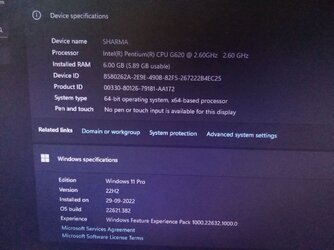
I just updated windows 11 v21H2 to v22H2 on one partition running windows 11 pro v21H2.
Please the image attached herewith.
 

Attachments

  • IMG_20220929_192030_777.jpg
    IMG_20220929_192030_777.jpg
    523.1 KB · Views: 4
5. ren appraiserres.dll appraiserres.dll.old
6. Notepad appraiserres.txt
14. ren appraiserres.txt appraiserres.dll
15. del appraiserres.txt

There is no appraiserres.txt to delete (you renamed to appraiserres.dll).

The reg keys are not necessary to do an in place upgrade.
They have to be added to WinPE after you begin setup on a clean install

Without any error windows 11 upgrade took place.
 
5. ren appraiserres.dll appraiserres.dll.old
6. Notepad appraiserres.txt
14. ren appraiserres.txt appraiserres.dll
15. del appraiserres.txt

There is no appraiserres.txt to delete (you renamed to appraiserres.dll).

The reg keys are not necessary to do an in place upgrade.
They have to be added to WinPE after you begin setup on a clean install

You are correct. But sometimes it remains in D:\sources as appraiserres.txt
Nevertheless, close notepad. And further commands run automatically. You may have to press Y till each registry change takes place.
TPM and other requirements may block upgrades when setup.exe is run , particularly on unsupported hardware as it is in my case.
 
I siggest you look in the excellent tutorial sections here and on tenforums to see how the pros do it. Also check if any posts you are making has been already covered.
He wants us to be his beta testers. It does not matter that there are usually much easier ways of doing things than what he posts.
 

My Computers My Computers

  • At a glance

    Windows 11AMD Ryzen 7 3800XT32GBEVGA GeForce GTX 1080 Ti
    OS
    Windows 11
    Computer type
    PC/Desktop
    Manufacturer/Model
    Homebuilt
    CPU
    AMD Ryzen 7 3800XT
    Motherboard
    ASUS ROG Crosshair VII Hero (WiFi)
    Memory
    32GB
    Graphics Card(s)
    EVGA GeForce GTX 1080 Ti
  • At a glance

    Windows 11 EducationIntel i7-8550U32GBNvidia Geforce MX150
    Operating System
    Windows 11 Education
    Computer type
    Laptop
    Manufacturer/Model
    Dell Inspiron 7773
    CPU
    Intel i7-8550U
    Memory
    32GB
    Graphics card(s)
    Nvidia Geforce MX150
    Sound Card
    Realtek
    Monitor(s) Displays
    17"
    Screen Resolution
    1920 x 1080
    Hard Drives
    Toshiba 512GB NVMe SSD
    SK Hynix 512GB SATA SSD
    Internet Speed
    Fast!
Hey e4rr0o,

Showing gratitude is important in online communities. Use the "like" button to appreciate helpful content. This motivates people to keep sharing knowledge. A "like" gives 1 point, "Helpful" gives 5 points, and "Great support" gives 10 points for exceptional help.

Back
Top Bottom