Solved A severe issue noticed in File Explorer...


GamerUndefeated

Member
Thread Starter
Local time
5:45 PM
Posts
3
OS
Windows 11
If someone can help me with this, then please do. The screenshots and videos below are for a reference to my issue...
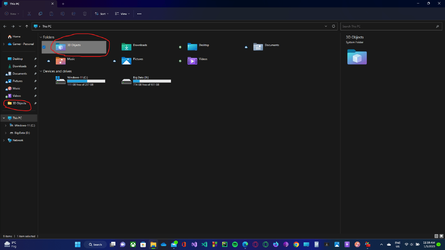
Today, I suddenly noticed that in the Quick Access section of the Navigation Pane, that pinned 3-D Objects, Video, and Music folders were missing, although I had pinned them there earlier. So, I tried to pin them again, and as expected, the option to Pin to Access was still there, but unfunctional for the above-mentioned folders. I repeatedly click again and again on this option after right-clicking on either of the three mentioned files, but none was able to be pinned to Quick Access. 3-D Object did pin, but only with the normal icon of a folder, despite having its own special icon to be clearly viewed on This PC.
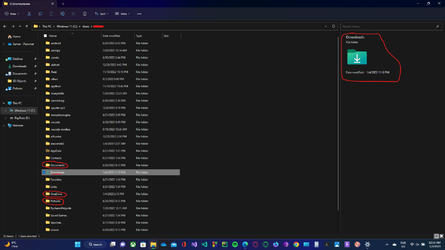
On further detailed search, I found out that the special small icons that are supposed to be represented in Quick Access for every folder pinned (except for normal folders) were missing when I went for it to
Powershell:
This PC > C:/ > Users > "username"
in File Explorer (Screenshot provided). Here, only the Download folder's special icon is displayed; icons for Documents, OneDrive, Pictures, etc are missing.
Whether this is the root of my problem or not, if anyone knows the solution, then please help me get rid of it without the re-installation of Windows.

Screenshots:
1672857921443.png
1672858144681.png
 
Windows Build/Version
Windows 11 Version 22H2 OS Build 22623.1037

My Computer

System One

  • OS
    Windows 11
    Computer type
    Laptop
    Manufacturer/Model
    LENOVO/81W8
    CPU
    Intel(R) Core(TM) i5-1035G4 CPU @1.10GHz, 4 Core(s)
    Motherboard
    LNVNB161216
    Memory
    8 GB
    Graphics Card(s)
    Intel(R) Iris(TM)
    Sound Card
    Realtek(R) Audio
    Monitor(s) Displays
    1
    Screen Resolution
    1920x1080
    Cooling
    1 fan
    Keyboard
    QWERTY
    Mouse
    TouchPad, Dell Mouse
    Internet Speed
    900 Mbps (Avg)
    Browser
    Mozilla Firefox Nightly, Opera GX and TOR
    Antivirus
    Microsoft Defender
    Other Info
    Windows Insider - BETA

It's been a while since I played around with these things, so unable to give you an exact solution. This is something that can be fixed without reinstalling Windows.

1. Try resetting the File Explorer.
2. Try running the Windows Repair tool.
 

My Computer

System One

  • OS
    Windows 11
    Computer type
    Laptop
    Manufacturer/Model
    HP Envy dv7
    CPU
    Intel Core i7 3630QM
    Motherboard
    HP
    Memory
    16 GB
    Graphics Card(s)
    Intel HD Graphics 4000 & Nvidia GeForce GT 635M
    Sound Card
    IDT High Definition
    Screen Resolution
    1080p
    Hard Drives
    1 TB Crucial MX500 on bay 1.
    1 TB Seagate HDD on bay 2.
    Antivirus
    Windows Defender

My Computers

System One System Two

  • OS
    All Branches but Release
    Computer type
    Laptop
    Manufacturer/Model
    Acer Nitro ANV15-51
    CPU
    AMD Ryzen 7 7735HS 3200-4500 Mhz 8 cores x 2
    Motherboard
    Sportage_RBH
    Memory
    32 GB DDR5
    Graphics Card(s)
    Radeon Graphic / NVIDIA GeForce RTX 4060 8 GB GDDR6
    Sound Card
    AMD/Realtek(R) Audio
    Monitor(s) Displays
    Integrated Monitor (15.3"vis)
    Screen Resolution
    FHD 1920X1080 16:9 144Hz
    Hard Drives
    KINGSTON OM8SEP4512Q-AA 1TB
    Western Digital 256GB
    PSU
    19V DC 6.32 A 120 W
    Cooling
    Dual Fans
    Mouse
    MS Bluetooth
    Internet Speed
    Fiber 1GB Cox -us & 1GB Orange-fr
    Browser
    Edge Canary- Firefox Nightly-Chrome Dev-Chrome Dev
    Antivirus
    Windows Defender
  • Operating System
    Windows 11 Beta
    Computer type
    Laptop
    Manufacturer/Model
    Asus X751BP
    CPU
    AMD A9-9420
    Memory
    8 GB of DDR4
    Graphics card(s)
    AMD Radeon R5
    Screen Resolution
    1600x900
    Hard Drives
    Seagate 1 TB
Solution
MS team knows best to make a mess UI very good!!!!! there still so manny UI glitches - issues - and unfixed elements in every aspect of the OS...
im not having high hopes tho..
 

My Computer

System One

  • OS
    Windows 11 22H2
    Computer type
    PC/Desktop
    Manufacturer/Model
    IM A PC TECHNICIAN SO... YEAH...
    CPU
    Intel 10900K
    Motherboard
    ASUS Z490 MAXIMUS XI HERO
    Memory
    64GB CORSAIR VENGEANCE PRO RGB
    Graphics Card(s)
    EVGA 3080 FTW3 ULTRA GAMING
    Sound Card
    TOPPING D90SE - TOPPING A90
    Monitor(s) Displays
    HP OMEN X 27 - LG 55CX
    Screen Resolution
    2K - 4K
    Hard Drives
    NVME CORSAIR MP600 Pro XT 1TB
    PSU
    CORSAIR HX 850W
    Case
    CORSAIR Crystal Series Black 680X RGB
    Cooling
    CORSAIR iCUE H100i Elite Capellix
    Keyboard
    STEELSERIES APEX 7 TKL
    Mouse
    STEELSERIES RIVAL 710
    Internet Speed
    200 MBPS
    Browser
    MS EDGE
    Antivirus
    NONE -NEVER NEEDED-
MS team knows best to make a mess UI very good!!!!! there still so manny UI glitches - issues - and unfixed elements in every aspect of the OS...
im not having high hopes tho..
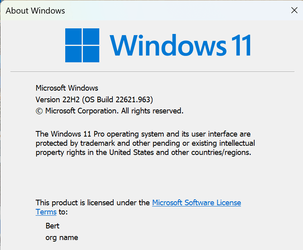
The Version in the first post indicates the Insider Preview which can have problems which should be reported. This is the current RTM/Released To Market/Manufacture:

1672885805005.png
 

My Computers

System One System Two

  • OS
    Win11 Pro RTM Version 24H2 Build 26100.4202
    Computer type
    Laptop
    Manufacturer/Model
    Dell Vostro 3400
    CPU
    Intel Core i5 11th Gen. 2.40GHz
    Memory
    12GB
    Hard Drives
    256GB SSD NVMe M.2
  • Operating System
    Win11 Pro RTM Version 24H2 Build 26100.4202
    Computer type
    PC/Desktop
    Manufacturer/Model
    Dell Vostro 5890
    CPU
    Intel Core i5 10th Gen. 2.90GHz
    Memory
    16GB
    Graphics card(s)
    Onboard, no VGA, using a DisplayPort-to-VGA adapter
    Monitor(s) Displays
    24" Dell
    Hard Drives
    512GB SSD NVMe, 4TB Seagate HDD
    Browser
    Firefox, Edge
    Antivirus
    Windows Defender/Microsoft Security
The icon you see in quick access is the default system folder icon one sees across C: This leads me to believe you went to C:\users\xxxx and pinned the folder from there. If you will unpin the folder and go to This PC (as in your first screenshot) you can pin the folder to quick access and it should retain its Windows 11 icon.
 

My Computers

System One System Two

  • OS
    Windows 11 Pro 25H2 26200.8655
    Computer type
    PC/Desktop
    Manufacturer/Model
    Dell Optiplex 7080
    CPU
    i9-10900 10 core 20 threads
    Motherboard
    DELL 0J37VM
    Memory
    32 gb
    Graphics Card(s)
    none-Intel UHD Graphics 630
    Sound Card
    Integrated Realtek
    Monitor(s) Displays
    Benq 27
    Screen Resolution
    2560x1440
    Hard Drives
    2x1tb Solidigm m.2 nvme /External drives 512gb Samsung m.2 sata+2tb Kingston m2.nvme
    PSU
    500w
    Case
    MT
    Cooling
    Dell Premium
    Keyboard
    Logitech wired
    Mouse
    Logitech wireless
    Internet Speed
    so slow I'm too embarrassed to tell
    Browser
    #1 Edge #2 Firefox
    Antivirus
    Defender+MWB Premium
  • Operating System
    Windows 11 Pro 24H2 26200.8457
    Computer type
    PC/Desktop
    Manufacturer/Model
    Beelink Mini PC SER5
    CPU
    AMD Ryzen 7 6800U
    Memory
    32 gb
    Graphics card(s)
    integrated
    Sound Card
    integrated
    Monitor(s) Displays
    Benq 27
    Screen Resolution
    2560x1440
    Hard Drives
    1TB Crucial nvme
    Keyboard
    Logitech wired
    Mouse
    Logitech wireless
    Internet Speed
    still too embarrassed to tell
    Browser
    Firefox
    Antivirus
    Defender
    Other Info
    System 3 is non compliant Dell 9020 i7-4770/24gb ram Win11 PRO 26200.8457
@glasskuter In the video link given, I clearly show that I'm not trying to pin folders from C: directory, but from This PC only...
 

My Computer

System One

  • OS
    Windows 11
    Computer type
    Laptop
    Manufacturer/Model
    LENOVO/81W8
    CPU
    Intel(R) Core(TM) i5-1035G4 CPU @1.10GHz, 4 Core(s)
    Motherboard
    LNVNB161216
    Memory
    8 GB
    Graphics Card(s)
    Intel(R) Iris(TM)
    Sound Card
    Realtek(R) Audio
    Monitor(s) Displays
    1
    Screen Resolution
    1920x1080
    Cooling
    1 fan
    Keyboard
    QWERTY
    Mouse
    TouchPad, Dell Mouse
    Internet Speed
    900 Mbps (Avg)
    Browser
    Mozilla Firefox Nightly, Opera GX and TOR
    Antivirus
    Microsoft Defender
    Other Info
    Windows Insider - BETA

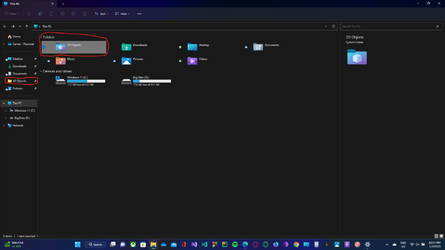
@OAT Thanks man, that solution in the second link worked out and brought the original icon I wanted of the Videos and Music folder to appear in Quick Access. Though the issue with 3-D Folder still exists of it being showing up as a normal folder icon...
Here is a Screenshot below (Imgur link to screenshot - Click here ):

1672898997844.png
 

My Computer

System One

  • OS
    Windows 11
    Computer type
    Laptop
    Manufacturer/Model
    LENOVO/81W8
    CPU
    Intel(R) Core(TM) i5-1035G4 CPU @1.10GHz, 4 Core(s)
    Motherboard
    LNVNB161216
    Memory
    8 GB
    Graphics Card(s)
    Intel(R) Iris(TM)
    Sound Card
    Realtek(R) Audio
    Monitor(s) Displays
    1
    Screen Resolution
    1920x1080
    Cooling
    1 fan
    Keyboard
    QWERTY
    Mouse
    TouchPad, Dell Mouse
    Internet Speed
    900 Mbps (Avg)
    Browser
    Mozilla Firefox Nightly, Opera GX and TOR
    Antivirus
    Microsoft Defender
    Other Info
    Windows Insider - BETA

  • Like
Reactions: OAT
The Version in the first post indicates the Insider Preview which can have problems which should be reported. This is the current RTM/Released To Market/Manufacture:

View attachment 49168

yes i know, i was talking about the general situation tho....
 

My Computer

System One

  • OS
    Windows 11 22H2
    Computer type
    PC/Desktop
    Manufacturer/Model
    IM A PC TECHNICIAN SO... YEAH...
    CPU
    Intel 10900K
    Motherboard
    ASUS Z490 MAXIMUS XI HERO
    Memory
    64GB CORSAIR VENGEANCE PRO RGB
    Graphics Card(s)
    EVGA 3080 FTW3 ULTRA GAMING
    Sound Card
    TOPPING D90SE - TOPPING A90
    Monitor(s) Displays
    HP OMEN X 27 - LG 55CX
    Screen Resolution
    2K - 4K
    Hard Drives
    NVME CORSAIR MP600 Pro XT 1TB
    PSU
    CORSAIR HX 850W
    Case
    CORSAIR Crystal Series Black 680X RGB
    Cooling
    CORSAIR iCUE H100i Elite Capellix
    Keyboard
    STEELSERIES APEX 7 TKL
    Mouse
    STEELSERIES RIVAL 710
    Internet Speed
    200 MBPS
    Browser
    MS EDGE
    Antivirus
    NONE -NEVER NEEDED-
Okay. Don't see how 'general' the situation is, have 3 Win11 computers, 2 Desktops and 1 Notebook with it and no such issues happening on them. One Desktop is 3 years old given me and rehabbed, others were new. And they are pretty much default installations, very little customizations, as I have to see what my clients will see when they get new ones.
 

My Computers

System One System Two

  • OS
    Win11 Pro RTM Version 24H2 Build 26100.4202
    Computer type
    Laptop
    Manufacturer/Model
    Dell Vostro 3400
    CPU
    Intel Core i5 11th Gen. 2.40GHz
    Memory
    12GB
    Hard Drives
    256GB SSD NVMe M.2
  • Operating System
    Win11 Pro RTM Version 24H2 Build 26100.4202
    Computer type
    PC/Desktop
    Manufacturer/Model
    Dell Vostro 5890
    CPU
    Intel Core i5 10th Gen. 2.90GHz
    Memory
    16GB
    Graphics card(s)
    Onboard, no VGA, using a DisplayPort-to-VGA adapter
    Monitor(s) Displays
    24" Dell
    Hard Drives
    512GB SSD NVMe, 4TB Seagate HDD
    Browser
    Firefox, Edge
    Antivirus
    Windows Defender/Microsoft Security
Okay. Don't see how 'general' the situation is, have 3 Win11 computers, 2 Desktops and 1 Notebook with it and no such issues happening on them. One Desktop is 3 years old given me and rehabbed, others were new. And they are pretty much default installations, very little customizations, as I have to see what my clients will see when they get new ones.

:)
 

My Computer

System One

  • OS
    Windows 11 22H2
    Computer type
    PC/Desktop
    Manufacturer/Model
    IM A PC TECHNICIAN SO... YEAH...
    CPU
    Intel 10900K
    Motherboard
    ASUS Z490 MAXIMUS XI HERO
    Memory
    64GB CORSAIR VENGEANCE PRO RGB
    Graphics Card(s)
    EVGA 3080 FTW3 ULTRA GAMING
    Sound Card
    TOPPING D90SE - TOPPING A90
    Monitor(s) Displays
    HP OMEN X 27 - LG 55CX
    Screen Resolution
    2K - 4K
    Hard Drives
    NVME CORSAIR MP600 Pro XT 1TB
    PSU
    CORSAIR HX 850W
    Case
    CORSAIR Crystal Series Black 680X RGB
    Cooling
    CORSAIR iCUE H100i Elite Capellix
    Keyboard
    STEELSERIES APEX 7 TKL
    Mouse
    STEELSERIES RIVAL 710
    Internet Speed
    200 MBPS
    Browser
    MS EDGE
    Antivirus
    NONE -NEVER NEEDED-

Latest Support Threads

Back
Top Bottom