A very basic Drive v Windows v BIOS v ROM?


Markg2

Well-known member
Local time
3:58 AM
Posts
79
Location
Evergreen, CO
OS
Windows 10
When you turn on a computer and the screen result is (paraphrased) the drive is not present/gone/toast. Does that mean that any effort to do BIOS work is also not present? I thought the BIOS lived on the ROM which lives on the CPU which has nothing to do with the drive or Windows until the BIOS loads Windows. I'd be delighted for a link to the best tutorial on this. Thanks, Mark
 

My Computer My Computer

At a glance

Windows 1012th Gen Intel(R) Core(TM) i7-12700H 2.30 GHz32.0 GB (31.7 GB usable)
OS
Windows 10
Computer type
Laptop
Manufacturer/Model
Lenovo Win11 laptop Slim 7 evo i7
CPU
12th Gen Intel(R) Core(TM) i7-12700H 2.30 GHz
Memory
32.0 GB (31.7 GB usable)
Sound Card
Realtek High Definition Audio
Hard Drives
SAMSUNG MZNLN512HCJH-000L1 (SSD)
Browser
Firefox
Antivirus
Bitdefender
Other Info
NORD_VPN -- The previous OS, Win10 will not allow the new Win11 to save.
The BIOS is actually on the motherboard, not within the CPU.

The BIOS has to know the drive is connected and has to know which device to look on for the bootloader to begin loading windows.
 

My Computers My Computers

  • At a glance

    Windows 11 ProIntel Core i5-8279u32GB DDR4 2666MhzIntel Iris Plus 655
    OS
    Windows 11 Pro
    Computer type
    PC/Desktop
    Manufacturer/Model
    Beelink SEI8
    CPU
    Intel Core i5-8279u
    Motherboard
    AZW SEI
    Memory
    32GB DDR4 2666Mhz
    Graphics Card(s)
    Intel Iris Plus 655
    Sound Card
    Intel SST
    Monitor(s) Displays
    Asus ProArt PA278QV
    Screen Resolution
    2560x1440
    Hard Drives
    512GB NVMe
    PSU
    NA
    Case
    NA
    Cooling
    NA
    Keyboard
    NA
    Mouse
    NA
    Internet Speed
    500/50
    Browser
    Edge
    Antivirus
    Defender
    Other Info
    Mini PC used for testing Windows 11.
  • At a glance

    Windows 10 ProRyzen 9 5900x64GB DDR4-3600EVGA GeForce 3080 FT3 Ultra
    Operating System
    Windows 10 Pro
    Computer type
    PC/Desktop
    Manufacturer/Model
    Custom
    CPU
    Ryzen 9 5900x
    Motherboard
    Asus Rog Strix X570-E Gaming
    Memory
    64GB DDR4-3600
    Graphics card(s)
    EVGA GeForce 3080 FT3 Ultra
    Sound Card
    Onboard
    Monitor(s) Displays
    ASUS TUF Gaming VG27AQ. ASUS ProArt Display PA278QV 27” WQHD
    Screen Resolution
    2560x1440
    Hard Drives
    2TB WD SN850 PCI-E Gen 4 NVMe
    2TB Sandisk Ultra 2.5" SATA SSD
    PSU
    Seasonic Focus 850
    Case
    Fractal Meshify S2 in White
    Cooling
    Dark Rock Pro CPU cooler, 3 x 140mm case fans
    Keyboard
    Corsiar K65 RGB Lux
    Mouse
    Logitech G9 Laser Mouse
    Internet Speed
    500/50
    Browser
    Chrome
    Antivirus
    Defender.
Put another way, the BIOS is completely independant of any drives. You could disconnect all drives so that not a single drive is connected to the system, but you would still be able to access the BIOS without any difficulties whatsoever.
 

My Computers My Computers

  • At a glance

    Win11 Pro 25H2 (RTM+)Intel i7-14650HX32 GBNo GPU - Built-in Intel Graphics
    OS
    Win11 Pro 25H2 (RTM+)
    Computer type
    PC/Desktop
    Manufacturer/Model
    Acemagic
    CPU
    Intel i7-14650HX
    Memory
    32 GB
    Graphics Card(s)
    No GPU - Built-in Intel Graphics
    Sound Card
    Integrated
    Monitor(s) Displays
    Varies as machine will often be moved to locations with different monitors
    Screen Resolution
    Varies
    Hard Drives
    1 x 1TB Gen 4 NVMe SSD
    PSU
    120W Power Brick
    Keyboard
    Corsair K70 Max RGB Magnetic Keyboard
    Mouse
    Logitech MX Master 3
    Internet Speed
    1Gb Up / 1 Gb Down
    Browser
    Edge
    Antivirus
    Windows Defender
  • At a glance

    Win11 Pro 25H2 (RTM+)Intel i7-1255U16 GBIntel Iris Xe Graphics
    Operating System
    Win11 Pro 25H2 (RTM+)
    Computer type
    Laptop
    Manufacturer/Model
    Lenovo ThinkBook 13x Gen 2
    CPU
    Intel i7-1255U
    Memory
    16 GB
    Graphics card(s)
    Intel Iris Xe Graphics
    Sound Card
    Realtek® ALC3306-CG codec
    Monitor(s) Displays
    13.3-inch IPS Display
    Screen Resolution
    WQXGA (2560 x 1600)
    Hard Drives
    2 TB 4 x 4 NVMe SSD
    PSU
    USB-C / Thunderbolt 4 Power / Charging
    Keyboard
    Backlit, spill resistant keyboard
    Mouse
    Buttonless Glass Precision Touchpad
    Internet Speed
    1Gb Up / 1Gb Down
    Browser
    Edge
    Antivirus
    Windows Defender
    Other Info
    WiFi 6e / Bluetooth 5.1 / Facial Recognition / Fingerprint Sensor / ToF (Time of Flight) Human Presence Sensor
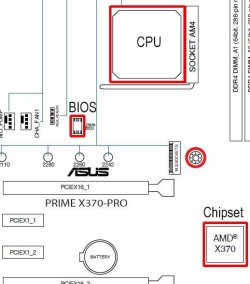
The BIOS chip maintains it programming even without power but its contents can be overwritten with new versions.

Here is where the BIOS chip on my ASUS Prime X370-Pro motherboard is located:

AMD Prime X370-Pro BIOS.jpg
 

My Computers My Computers

  • At a glance

    Windows 11 Pro 25H2 (26200.6901)AMD Ryzen 7 6800H with Radeon 680M GPU (486MB...Crucial DDR5-4800 (2400MHz) 32GB (2 x 16GB)NVIDIA RTX 3060 Laptop (6GB RAM)
    OS
    Windows 11 Pro 25H2 (26200.6901)
    Computer type
    Laptop
    Manufacturer/Model
    ASUS TUF Gaming A15 (2022)
    CPU
    AMD Ryzen 7 6800H with Radeon 680M GPU (486MB RAM)
    Memory
    Crucial DDR5-4800 (2400MHz) 32GB (2 x 16GB)
    Graphics Card(s)
    NVIDIA RTX 3060 Laptop (6GB RAM)
    Sound Card
    n/a
    Monitor(s) Displays
    15.6-inch
    Screen Resolution
    1920x1080 300Hz
    Hard Drives
    2 x Samsung 990 Evo Plus (2TB M.2 NVME SSD)
    PSU
    n/a
    Mouse
    Wireless Mouse M510
    Internet Speed
    2100Mbps/300Mbps
    Browser
    Firefox
    Antivirus
    Malwarebytes
  • At a glance

    Windows 11 Pro 25H2 (26200.8246)AMD Ryzen 7 5700X3DG.SKILL Flare X 32GB (2x16GB) DDR4ASUS ROG-STRIX-RTX3060TI-08G-V2-GAMING (RTX 3...
    Operating System
    Windows 11 Pro 25H2 (26200.8246)
    Computer type
    PC/Desktop
    Manufacturer/Model
    Custom build
    CPU
    AMD Ryzen 7 5700X3D
    Motherboard
    ASUS ROG Strix B550-F Gaming WiFi II
    Memory
    G.SKILL Flare X 32GB (2x16GB) DDR4
    Graphics card(s)
    ASUS ROG-STRIX-RTX3060TI-08G-V2-GAMING (RTX 3060-Ti, 8GB RAM)
    Monitor(s) Displays
    Samsung G50D IPS 27"
    Screen Resolution
    1440p/180Hz
    Hard Drives
    SAMSUNG 990 EVO Plus (2TB] M.2 NVME SSD
    SAMSUNG 990 EVO Plus (4TB) M.2 NVME SSD
    PSU
    Corsair RM750x (750 watts)
    Case
    Cooler Master MasterCase 5
    Cooling
    Scythe Mugen 6
    Keyboard
    Logitech K520 (MK540 keyboard/mouse combo)
    Mouse
    Logitech M310 (MK540 keyboard/mouse combo)
    Internet Speed
    2100 Mbps down / 300 Mbps up
    Browser
    Firefox, Edge, Chrome
    Antivirus
    Malwarebytes (Premium)
    Other Info
    ASUS Blu-ray Burner BW-16D1HT (SATA) || Western Digital Easystore 20TB USB 3.0 external hard drive used with Acronis True Image 2025 backup software || HP OfficeJet Pro 6975 Printer/Scanner
During the power on cycle start hitting the F1 or F2 key(for Lenovo) to enter the bios.
 

My Computer My Computer

At a glance

Win 7/10/11
OS
Win 7/10/11
Computer type
PC/Desktop
Other Info
I'm a computer enthusiast so have quite a few systems that I run. More like an advanced hobby.
v 23H2 - B 22631.3737
A reminder to a now completed thread that now prompted my revisiting the BIOS. In the previous thread no matter what valid option offered by the forum to access the BIOS on boot, the computer seemed to skip and open at the Macrium/Win11 option. The reason turned up on an archived Lenovo forum thread - I changed the monitor connection from Display Port to HDMI. Bam - solved.
The current problem is Macrium boot to rescue USB. I can reorder the boot to USB first or even second but once I remove the USB Flash drive and reboot the boot order falls back to its previous 'automatic' state. Apparently some computers allow for the boot order to be static once set but not ours.
So this was the reason for this thread's question. If Win11 will see the BIOS with a shot hard drive, then I could just insert the USB rescue, F2 to the BIOS, reset the boot order and boot to the Reflect WE.
 

My Computer My Computer

At a glance

Windows 1012th Gen Intel(R) Core(TM) i7-12700H 2.30 GHz32.0 GB (31.7 GB usable)
OS
Windows 10
Computer type
Laptop
Manufacturer/Model
Lenovo Win11 laptop Slim 7 evo i7
CPU
12th Gen Intel(R) Core(TM) i7-12700H 2.30 GHz
Memory
32.0 GB (31.7 GB usable)
Sound Card
Realtek High Definition Audio
Hard Drives
SAMSUNG MZNLN512HCJH-000L1 (SSD)
Browser
Firefox
Antivirus
Bitdefender
Other Info
NORD_VPN -- The previous OS, Win10 will not allow the new Win11 to save.
v 23H2 - B 22631.3737
A reminder to a now completed thread that now prompted my revisiting the BIOS. In the previous thread no matter what valid option offered by the forum to access the BIOS on boot, the computer seemed to skip and open at the Macrium/Win11 option. The reason turned up on an archived Lenovo forum thread - I changed the monitor connection from Display Port to HDMI. Bam - solved.
The current problem is Macrium boot to rescue USB. I can reorder the boot to USB first or even second but once I remove the USB Flash drive and reboot the boot order falls back to its previous 'automatic' state. Apparently some computers allow for the boot order to be static once set but not ours.
So this was the reason for this thread's question. If Win11 will see the BIOS with a shot hard drive, then I could just insert the USB rescue, F2 to the BIOS, reset the boot order and boot to the Reflect WE.
There is a different key you press at bootup that takes you to a boot order menu. Unlike a change in the BIOS this change is only temporary. At the next boot the boot order reverts to that set in the BIOS.
 

My Computers My Computers

  • At a glance

    Windows 11 Pro 25H2 (26200.6901)AMD Ryzen 7 6800H with Radeon 680M GPU (486MB...Crucial DDR5-4800 (2400MHz) 32GB (2 x 16GB)NVIDIA RTX 3060 Laptop (6GB RAM)
    OS
    Windows 11 Pro 25H2 (26200.6901)
    Computer type
    Laptop
    Manufacturer/Model
    ASUS TUF Gaming A15 (2022)
    CPU
    AMD Ryzen 7 6800H with Radeon 680M GPU (486MB RAM)
    Memory
    Crucial DDR5-4800 (2400MHz) 32GB (2 x 16GB)
    Graphics Card(s)
    NVIDIA RTX 3060 Laptop (6GB RAM)
    Sound Card
    n/a
    Monitor(s) Displays
    15.6-inch
    Screen Resolution
    1920x1080 300Hz
    Hard Drives
    2 x Samsung 990 Evo Plus (2TB M.2 NVME SSD)
    PSU
    n/a
    Mouse
    Wireless Mouse M510
    Internet Speed
    2100Mbps/300Mbps
    Browser
    Firefox
    Antivirus
    Malwarebytes
  • At a glance

    Windows 11 Pro 25H2 (26200.8246)AMD Ryzen 7 5700X3DG.SKILL Flare X 32GB (2x16GB) DDR4ASUS ROG-STRIX-RTX3060TI-08G-V2-GAMING (RTX 3...
    Operating System
    Windows 11 Pro 25H2 (26200.8246)
    Computer type
    PC/Desktop
    Manufacturer/Model
    Custom build
    CPU
    AMD Ryzen 7 5700X3D
    Motherboard
    ASUS ROG Strix B550-F Gaming WiFi II
    Memory
    G.SKILL Flare X 32GB (2x16GB) DDR4
    Graphics card(s)
    ASUS ROG-STRIX-RTX3060TI-08G-V2-GAMING (RTX 3060-Ti, 8GB RAM)
    Monitor(s) Displays
    Samsung G50D IPS 27"
    Screen Resolution
    1440p/180Hz
    Hard Drives
    SAMSUNG 990 EVO Plus (2TB] M.2 NVME SSD
    SAMSUNG 990 EVO Plus (4TB) M.2 NVME SSD
    PSU
    Corsair RM750x (750 watts)
    Case
    Cooler Master MasterCase 5
    Cooling
    Scythe Mugen 6
    Keyboard
    Logitech K520 (MK540 keyboard/mouse combo)
    Mouse
    Logitech M310 (MK540 keyboard/mouse combo)
    Internet Speed
    2100 Mbps down / 300 Mbps up
    Browser
    Firefox, Edge, Chrome
    Antivirus
    Malwarebytes (Premium)
    Other Info
    ASUS Blu-ray Burner BW-16D1HT (SATA) || Western Digital Easystore 20TB USB 3.0 external hard drive used with Acronis True Image 2025 backup software || HP OfficeJet Pro 6975 Printer/Scanner

Latest Support Threads

Back
Top Bottom