About performance of an usb ssd


vsub

Active member
Member
VIP
Local time
9:49 AM
Posts
208
OS
Windows 11
Should I enable this option
Can something go wrong if windows crashes
I use the SSD(Samsung PSSD 7 1TB)for my games and I never remove it(I actually wish to hide it from the list in the Safely Removal)
Will I actually get better perfomance(currently it feels like the SSD is not working as good as before)
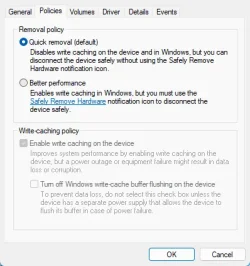
1781671221584.webp1781671491689.webp1781671713917.webp

The drive is connected to my one and only usb-c port
And actually,does that option affects read speed?

In the taskmanager I often see it showing read speeds at bellow 100mb when loading games
 

My Computer My Computer

OS
Windows 11
Computer type
Laptop
Manufacturer/Model
MSI Sword 17 HX
CPU
14700HX
Memory
64GB
Graphics Card(s)
RTX 4070
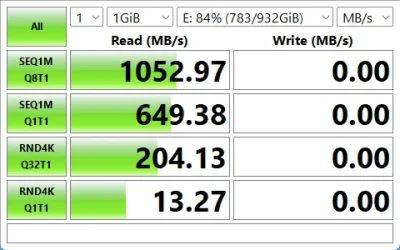
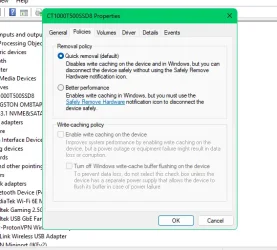
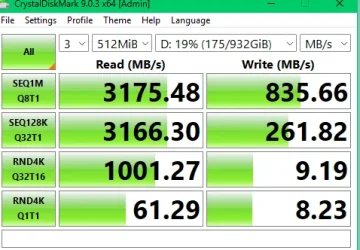
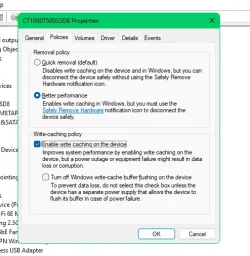
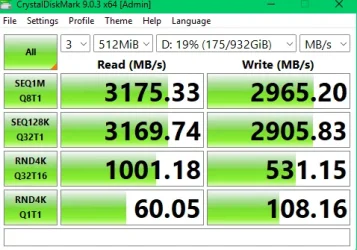
Just for info, USB4 port, USB4 Enclosure and USB4 C cable connected external drive. Difference between write caching and quick removal.

Snipaste_2026-06-17_07-53-37.webpSnipaste_2026-06-17_07-58-04.webp

Snipaste_2026-06-17_08-00-49.webpSnipaste_2026-06-17_08-04-46.webp

Important to use the SRH though. Quite a big gain. Worth checking out.
 

My Computers My Computers

System One System Two

  • OS
    Win 11 Pro
    Computer type
    Laptop
    Manufacturer/Model
    ASUS Vivobook
    CPU
    AMD Ryzen™ 7 7730U
    Motherboard
    M1605YA
    Memory
    24GB Dual-Channel DDR4 @ 1596MHz (22-22-22-52)
    Graphics Card(s)
    512MB ATI AMD Radeon Graphics (ASUStek Computer Inc)
    Monitor(s) Displays
    Generic PnP Monitor (1920x1200@60Hz) - P1 PLUS (1920x1080@59Hz)
    Screen Resolution
    1920 X 1200
    Hard Drives
    953GB Western Digital WD
    PSU
    45 Watts
    Mouse
    Lenovo Bluetooth.
    Internet Speed
    500 Mbps
    Browser
    Edge
    Antivirus
    Defender
  • Operating System
    Windows 11
    Computer type
    Laptop
    Manufacturer/Model
    ACER NITRO
    CPU
    AMD Ryzen 7 5800H / 3.2 GHz
    Motherboard
    CZ Scala_CAS (FP6)
    Memory
    32 GB DDR4 SDRAM 3200 MHz
    Graphics card(s)
    NVIDIA GeForce RTX 3060 6 GB GDDR6 SDRAM
    Sound Card
    Realtek Audio. NVIDIA High Definition Audio
    Monitor(s) Displays
    15.6" LED backlight 1920 x 1080 (Full HD) 144 Hz
    Screen Resolution
    1920 x 1080 (Full HD)
    Hard Drives
    Samsung 970 Evo Plus 2TB NVMe M.2
    PSU
    180 Watt, 19.5 V
    Mouse
    Lenovo Bluetooth
    Internet Speed
    500 Mbps
    Browser
    Edge
    Antivirus
    Defender
Should I enable this option
Can something go wrong if windows crashes
I use the SSD(Samsung PSSD 7 1TB)for my games and I never remove it(I actually wish to hide it from the list in the Safely Removal)
Will I actually get better perfomance(currently it feels like the SSD is not working as good as before)
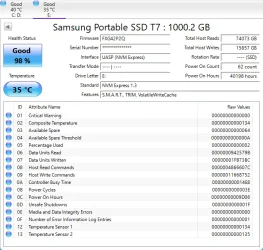
View attachment 174493View attachment 174494View attachment 174495

The drive is connected to my one and only usb-c port
And actually,does that option affects read speed?

In the taskmanager I often see it showing read speeds at bellow 100mb when loading games
You will not be able to detect impact on difference in speed on an SSD enabling that optíon.

Write caching is only intended for drives that are slow in writing data to drive such as older usb flash drives and SD cards.

Just leave it at default setting i.e. disable write caching. Changing it would have no significant impact but theoretically you could lose data if disconnected but highly unlikely.

Basically this is a non issue for an SSD.
 

My Computer My Computer

OS
Windows 11 Pro + Win11 Canary VM.
Computer type
Laptop
Manufacturer/Model
ASUS Zenbook 14
CPU
I9 13th gen i9-13900H 2.60 GHZ
Motherboard
Yep, Laptop has one.
Memory
16 GB soldered
Graphics Card(s)
Integrated Intel Iris XE
Sound Card
Realtek built in
Monitor(s) Displays
laptop OLED screen
Screen Resolution
2880x1800 touchscreen
Hard Drives
1 TB NVME SSD (only weakness is only one slot)
PSU
Internal + 65W thunderbolt USB4 charger
Case
Yep, got one
Cooling
Stella Artois (UK pint cans - 568 ml) - extra cost.
Keyboard
Built in UK keybd
Mouse
Bluetooth , wireless dongled, wired
Internet Speed
900 mbs (ethernet), wifi 6 typical 350-450 mb/s both up and down
Browser
Edge
Antivirus
Defender
Other Info
TPM 2.0, 2xUSB4 thunderbolt, 1xUsb3 (usb a), 1xUsb-c, hdmi out, 3.5 mm audio out/in combo, ASUS backlit trackpad (inc. switchable number pad)

Macrium Reflect Home V8
Office 365 Family (6 users each 1TB onedrive space)
Hyper-V (a vm runs almost as fast as my older laptop)
Back
Top Bottom