About ram and games

  • Thread starter Thread starter Deleted member 8037
  • Start date Start date

D

Deleted member 8037

Guest
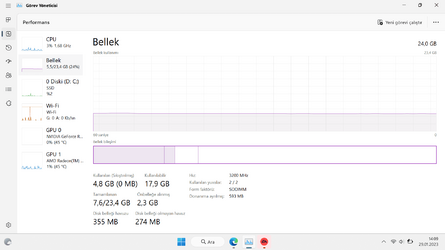
A total of 24gb ram 16 + 8 compatible with each other. I am working with virtual memory turned off, I have not encountered any errors in the games so far and I can run them without any problems. Great fluency even in windows interface, fast and smooth access to backgrounds. what are you thinking?
(while prefetch and memory compression are active)1674990592461.png
 
Games can use thier own form of virtual memory and temporary files, depending on the development, although some games, especially older titles might require Windows virtual memory to be available.
Prefetch and memory compression only affect loading often used apps (so might help with launching a game if used often). Game assets will be decompressed by the CPU then passed to the GPU so it wouldn't make sense to use memory compression on a running games assets and processes.
Lots of other types of Windows processes and apps may well have issues if there is no virtual memory available so it really doesn't make sense to disable it, but you do what you want to with your machine. :-)
Also with two different sized memory modules installed you will have only 16GB running in dual channel mode (if it is indeed working), the other 8GB (the other half of the 16GB module) is running in single channel mode.
Depending on how the iGPU is assigned memory it could well be using single channel mode or if not then it is reducing the amount of dual channel mode memory available to other processes.

 

My Computer My Computer

At a glance

Windows 11 Pro 22H2, build: 22621.521Intel i7-12700K 3.6GHz Base (5.0GHz Turbo)Asus ProArt Creator B660 D464GB DDR 3600Mhz
OS
Windows 11 Pro 22H2, build: 22621.521
Computer type
PC/Desktop
Manufacturer/Model
Scan 3XS Custom 1700
CPU
Intel i7-12700K 3.6GHz Base (5.0GHz Turbo)
Motherboard
Asus ProArt Creator B660 D4
Memory
64GB DDR 3600Mhz
Graphics Card(s)
Asus Tuff RTX 3080 10GB OC
Sound Card
Onboard Realtek
Monitor(s) Displays
Gigabyte G32QC 32inch 16:9 curved @2560 x 1440p 165Hz Freesync Premium Pro/ Dell SE2422H 24inch 16:9 1920 x 1080p 75Hz Freesync
Screen Resolution
2560 x 1440p & 1920 x 1080p
Hard Drives
WD SN570 1TB NVME (Boot), Samsung 870QVO 1TB (SSD), SanDisk 3D Ultra 500Gb (SSD) x2, Seagate 3Tb Expansion Desk (Ext HDD), 2x Toshiba 1Tb P300 (Ext HDD)
PSU
Corsair RM1000X Modular
Case
Corsair 4000D Airflow Desktop
Cooling
Corsair Hydro H150i RGB Pro XT 360mm Liquid Cooler, 3 x 120mm fans, 1x Exhaust
Keyboard
Microsoft Ergonomic
Mouse
Logitech G402
Internet Speed
800Mbs
Browser
Edge Chromium
Antivirus
Defender, Malwarebytes
Hey Deleted member 8037,

Showing gratitude is important in online communities. Use the "like" button to appreciate helpful content. This motivates people to keep sharing knowledge. A "like" gives 1 point, "Helpful" gives 5 points, and "Great support" gives 10 points for exceptional help.

Back
Top Bottom