Act now: Secure Boot certificates expire in June 2026


UPDATE:


 Windows IT Pro Blog:

Prepare for the first global large-scale certificate update to Secure Boot.

The Microsoft certificates used in Secure Boot are the basis of trust for operating system security, and all will be expiring beginning June 2026. The way to automatically get timely updates to new certificates for supported Windows systems is to let Microsoft manage your Windows updates, which include Secure Boot. A close collaboration with original equipment manufacturers (OEMs) who provide Secure Boot firmware updates is also essential.

If you haven't yet, begin evaluating options and start preparing for the rollout of updated certificates across your organization in the coming months. Learn about this effort, its impact, and what you as an IT admin should do to help ensure that your Windows devices can receive updates after June 2026 without compromising system security.

Important: While platforms beyond Windows are affected, this article focuses on the solution for Windows systems. Be sure to monitor the Secure Boot certificate rollout landing page for status and guidance updates.

Recap: Why Secure Boot requires updating​

Secure Boot helps to prevent malware from running early in the startup sequence of a Windows device. Coupled with the Unified Extensible Firmware Interface (UEFI) firmware signing process, Secure Boot uses cryptographic keys, known as certificate authorities (CAs), to validate that firmware modules come from a trusted source.

After 15 years, the Secure Boot certificates that are part of Windows systems will start expiring in June 2026. Windows devices will need new certificates to maintain continuity and protection.
  • Affected: Physical and virtual machines (VMs) on supported versions of Windows 10, Windows 11, Windows Server 2025, Windows Server 2022, Windows Server 2019, Windows Server 2016, Windows Server 2012, Windows Server 2012 R2—the systems released since 2012, including the long-term servicing channel (LTSC)
  • Not affected: Copilot+ PCs released in 2025
Note: Affected third-party OS includes MacOS. However, it's outside the scope of Microsoft support. For Linux systems dual booting with Windows, Windows will update the certificates that Linux relies on.

Secure Boot uses certificate-based trust hierarchy to ensure that only authorized software runs during system startup. At the top of this hierarchy is the Platform Key (PK), typically managed by the OEM or a delegate, which acts as the root of trust. The PK authorizes updates to the Key Enrollment Key (KEK) database, which in turn authorizes updates to two critical signature databases: the Allowed Signature Database (DB) and the Forbidden Signature Database (DBX). This layered structure ensures that only validated updates can modify the system's boot policy, maintaining a secure boot environment. See how it works in Updating Secure Boot keys.

The change: Expiring certificates​

Windows systems released since 2012 might have expiring versions of the certificates listed below. The UEFI Secure Boot DB and KEK need to be updated with the corresponding new certificate versions.

See what new certificates will be available in the coming months to maintain UEFI Secure Boot continuity.

Expiration dateExpiring certificateUpdated certificateWhat it doesStoring location
June 2026Microsoft Corporation KEK CA 2011Microsoft Corporation KEK 2K CA 2023Signs updates to DB and DBXKEK
June 2026Microsoft Corporation UEFI CA 2011 (or third-party UEFI CA)*a) Microsoft Corporation UEFI CA 2023
b) Microsoft Option ROM UEFI CA 2023
a) Signs third-party OS and hardware driver components
b) Signs third-party option ROMs
DB
Oct 2026Microsoft Windows Production PCA 2011Windows UEFI CA 2023Signs the Windows bootloader and boot componentsDB
*You need two new certificates for Microsoft Corporation UEFI CA 2011, which together allow for more granular control.

Microsoft and partner OEMs will be rolling out certificates to add trust for the new DB and KEK certificates in the coming months.

The impact and implications​

The CAs ensure the integrity of the device startup sequence. When these CAs expire, the systems will stop receiving security fixes for the Windows Boot Manager and the Secure Boot components. Compromised security at startup threatens the overall security of affected Windows devices, especially due to bootkit malware. Bootkit malware can be difficult or impossible to detect with standard antivirus software. For example, even today, the unsecured boot path can be used as a cyberattack vector by the BlackLotus UEFI bootkit (CVE-2023-24932).

Every Windows system with Secure Boot enabled includes the same three certificates in support of third-party hardware and Windows ecosystem. Unless prepared, physical devices and VMs will:
  • Lose the ability to install Secure Boot security updates after June 2026.
  • Not trust third-party software signed with new certificates after June 2026.
  • Not receive security fixes for Windows Boot Manager by October 2026.
To prevent this, you'll need to update your organization's entire Windows ecosystem with certificates dated 2023 or newer. This will also help you apply mitigations needed to help secure your systems against the BlackLotus and similar boot-level cyberattacks today.

Take action today​

To begin, bookmark the Secure Boot certificate rollout landing page and take our readiness survey!

Important: Check with your OEMs on the latest available OEM firmware. Apply any available firmware updates to your Windows systems before applying the new certificates. In the Secure Boot flow, firmware updates from OEMs are the foundation for Windows Secure Boot updates to apply correctly.

Microsoft support is only available for supported client versions of Windows 11 and Windows 10. Once Windows 10 reaches end of support in October 2025, consider getting Extended Security Updates (ESU) for Windows 10, version 22H2 if you're not ready to upgrade.

In the coming months, we expect to update the Secure Boot certificates as part of our latest cumulative update cycle.

The solution that requires the least effort is letting Microsoft manage your Windows device updates, including Secure Boot updates. However, you might need to adopt multiple solutions. Your specific next step depends on the Windows systems and how you manage them.

Enterprise IT-managed systems that send diagnostic data​

No action is required if Windows systems at your organization receive Windows updates from Microsoft and send diagnostic data back to Microsoft. This includes devices that receive updates through Windows Autopatch, Microsoft Configuration Manager, or third-party solutions.

Note: Check that your firewall doesn't block diagnostic data. If it does, please take action to help diagnostic data reach Microsoft.

Windows diagnostic data and OEM feedback will help us group devices with similar hardware and firmware profiles to gradually release Secure Boot updates to you. This allows us to intelligently monitor the rollout process, proactively pausing, addressing any issues, and continuing as needed. Just keep your devices updated with the latest Windows updates!

Enterprise IT-managed systems that don't send diagnostic data​

Enable Windows diagnostic data and let Microsoft manage your updates by taking the following steps:
  1. Configure your organizational policies to allow at least the “required” level of diagnostic data. You can use Group Policy or mobile device management (MDM) to do this. See how to do this in Group Policy Management Editor for Windows 11 and Windows 10.
  2. Allow Microsoft to manage Secure Boot-related updates for your devices by setting the following registry key:
  • o Registry path: HKEY_LOCAL_MACHINE\SYSTEM\CurrentControlSet\Control\Secureboot
  • o Key name: MicrosoftUpdateManagedOptIn
  • o Type: DWORD
  • o DWORD value: 0x5944 (opt in to Windows Secure Boot updates)
We recommend setting this key to 0x5944. It indicates that all certificates should be updated in a manner that preserves the security profile of the existing device. It also updates the boot manager to the one signed by the Windows UEFI CA 2023 certificate. Note: If the DWORD value is 0 or the key doesn't exist, Windows diagnostic data is disabled.

If you prefer not to enable diagnostic data, please take this anonymous readiness survey. Help us assess the needs of environments like yours to create future guidance on managing the update process independently. You'll remain fully in control and responsible to execute and monitor these updates.

Air-gapped devices, such as in government scenarios or manufacturing, are a special case. Because Microsoft cannot manage these updates, we can only offer the following limited support:
  • Recommend known steps or methods for deploying these updates
  • Share data gathered from our rollout stream
When available, look for these resources on the Secure Boot certificate rollout landing page.

Systems with Secure Boot disabled​

Windows cannot update the active variables of the Secure Boot certificates if Secure Boot is disabled.

Important: Toggling Secure Boot on or off might erase the updated certificates. If Secure Boot is on, leave it enabled. Turning it off can reset the settings with defaults, which is not desirable.

Share these recommendations with individual users:

  1. Press Windows key + R, type msinfo32, and then press Enter.
  2. In the System Information window, look for Secure Boot State.
  3. If it says On, you're good to go!
If Secure Boot is off or unsupported, the device may not receive the new CAs. For these devices, you may choose to enable Secure Boot with this guidance: Windows 11 and Secure Boot.


Change management considerations​

Don't wait until June 2026! Updating DB and KEK with new 2023 certificates will help prevent your systems from boot-level security vulnerabilities today.

Get the latest OEM firmware updates and let Microsoft manage your Windows updates to receive Secure Boot updates automatically. Otherwise, help us understand your special case by completing this anonymous readiness survey.

Watch the release notes for Windows 11, version 24H2, version 23H2, and Windows 10 in the coming months to know when these updates are available to you. Stay tuned for additional guidance for the LTSC as needed.

Bookmark these additional resources:


 Source:


See also:
 
Last edited:
I am sure if there is a PCA 2023 certificate in the firmware then it is valid. This is valid even if WindowsUEFICA2023Capable is displayed as 1. I did a test and manually deleted the PCA 2023 certificate in the BIOS, and the system failed to boot.
OZXTjit.jpg


So I think I don't need to do any extra steps to get WindowsUEFICA2023Capable to show 2. Just make sure the firmware has the PCA 2023 certificate, and then wait for Microsoft's next step > Windows 11 completely revokes the CA 2011 certificate.

Re-add PCA 2023 and boot into the system again.
 

My Computer

System One

  • OS
    Windows 11, version 25H2 (26200)
    Computer type
    PC/Desktop
    CPU
    AMD Ryzen 9 9950X 16-Core Processor
    Motherboard
    ASRock B650M PG Riptide
    Memory
    DDR5-6000 (CL36) 64.0 GB
    Graphics Card(s)
    NVIDIA GeForce RTX 4090
    PSU
    1200W
    Case
    Phanteks Enthoo Pro 2
    Cooling
    Noctua NH-D12L
Another reason to consider whether to update the BIOS is that we don't know whether the new BIOS firmware will cause damage to the hardware.

Of course, it is safe in most cases, but there are still cases where the update causes CPU failure or other hardware failure.
There's also real reasons to update the BIOS in some cases! Specifically, for the Intel Raptor Lake processors, newer BIOS versions also bring along the new firmware to prevent the processor from cooking itself!

Here's Intel's New Firmware Fix For 14th/13th Gen Raptor Lake Instability

Since that release, there has been yet another firmware release for the Raptor Lake processors! So, not updating the BIOS (and of course the processor firmware) can have bad consequences at times.
 

My Computers

System One System Two

  • OS
    Win 11 Pro 25H2, Build 26200.8524
    Computer type
    PC/Desktop
    Manufacturer/Model
    Home Brew
    CPU
    Intel Core i5 14500
    Motherboard
    Gigabyte B760M G P WIFI
    Memory
    64GB DDR4
    Graphics Card(s)
    GeForce RTX 4060
    Sound Card
    Chipset Realtek
    Monitor(s) Displays
    LG 45" Ultragear, Acer 24" 1080p
    Screen Resolution
    5120x1440, 1920x1080
    Hard Drives
    Crucial P310 2TB 2280 PCIe Gen4 3D NAND NVMe M.2 SSD (O/S)
    Silicon Power 2TB US75 NVMe PCIe Gen4 M.2 2280 SSD (backup)
    Crucial BX500 2TB 3D NAND (2nd backup)
    Seagate 4TB Ironwolf, rotating HDD archive files
    External off-line backup Drives: 2 NVMe 4TB drives in external enclosures
    PSU
    Thermaltake Toughpower GF3 750W
    Case
    LIAN LI LANCOOL 216 E-ATX PC Case
    Cooling
    Lots of fans!
    Keyboard
    Microsoft Comfort Curve 2000
    Mouse
    Logitech G305
    Internet Speed
    Verizon FiOS 1GB
    Browser
    Firefox
    Antivirus
    Malware Bytes & Windows Defender Security
  • Operating System
    Win 11 Pro 25H2, Build 26200.8524
    Computer type
    PC/Desktop
    Manufacturer/Model
    Home Brew
    CPU
    Intel Core i5 14400
    Motherboard
    Gigabyte B760M DS3H AX
    Memory
    32GB DDR5
    Graphics card(s)
    Intel 700 Embedded GPU
    Sound Card
    Realtek Embedded
    Monitor(s) Displays
    27" HP 1080p
    Screen Resolution
    1920x1080
    Hard Drives
    Crucial P310 2TB 2280 PCIe Gen4 eD NAND PCIe SSD
    Samsung EVO 990 2TB NVMe Gen4 SSD
    Samsung 2TB SATA SSD
    PSU
    Thermaltake Smart BM3 650W
    Case
    Okinos Micro ATX Case
    Cooling
    Fans
    Keyboard
    Microsoft Comfort Curve 2000
    Mouse
    Logitech G305
    Internet Speed
    Verizon FiOS 1GB
    Browser
    Firefox
    Antivirus
    Malware Bytes & Windows Defender Security
OR
they don't and user's systems get updated and don't boot, users will go in and turn off secure boot.
And their system will boot.
I doubt the average user would even know about Secure Boot or how to turn it off. If it does happen, I think a lot of computers will be going to the repair shop or the recycle bin.
 

My Computers

System One System Two

  • OS
    Windows 11 Pro 25H2
    Computer type
    PC/Desktop
    Manufacturer/Model
    PowerSpec B746
    CPU
    Intel Core i7-10700K
    Motherboard
    ASRock Z490 Phantom Gaming 4/ax
    Memory
    16GB (8GB PC4-19200 DDR4 SDRAM x2)
    Graphics Card(s)
    NVIDIA GeForce GTX 1050 TI
    Sound Card
    Realtek Audio
    Monitor(s) Displays
    #1. LG ULTRAWIDE 34" #2. AOC Q32G2WG3 32"
    Screen Resolution
    #1. 3440 X 1440 #2. 1920 x 1080
    Hard Drives
    NVMe WDC WDS100T2B0C-00PXH0 1TB
    Samsung SSD 860 EVO 1TB
    PSU
    750 Watts (62.5A)
    Case
    PowerSpec/Lian Li ATX 205
    Keyboard
    Logitech K270
    Mouse
    Logitech M185
    Browser
    Microsoft Edge and Firefox
    Antivirus
    Webroot SecureAnywhere CE 26.1
  • Operating System
    Windows 11 Canary Channel
    Computer type
    PC/Desktop
    Manufacturer/Model
    PowerSpec G156
    CPU
    Intel Core i5-8400 CPU @ 2.80GHz
    Motherboard
    AsusTeK Prime B360M-A
    Memory
    16 MB DDR 4-2666
    Monitor(s) Displays
    23" Speptre HDMI 75Hz
    Screen Resolution
    1920x1080
    Hard Drives
    Samsung 970 EVO 500GB NVMe
    Keyboard
    Logitek K270
    Mouse
    Logitek M185
    Browser
    Firefox, Edge and Edge Canary
    Antivirus
    Windows Defender
AMD AGESA ComboAM5 1.2.0.3e Patched the TPM Vulnerability so all AM5 users should update to this.
 

My Computer

System One

  • OS
    Windows 11 Pro
Users can decide when or whether to update the firmware. ASRock once encountered a problem where a firmware update caused the 9800X3D to fail. Therefore, we should carefully consider the stability of the firmware.
 

My Computer

System One

  • OS
    Windows 11, version 25H2 (26200)
    Computer type
    PC/Desktop
    CPU
    AMD Ryzen 9 9950X 16-Core Processor
    Motherboard
    ASRock B650M PG Riptide
    Memory
    DDR5-6000 (CL36) 64.0 GB
    Graphics Card(s)
    NVIDIA GeForce RTX 4090
    PSU
    1200W
    Case
    Phanteks Enthoo Pro 2
    Cooling
    Noctua NH-D12L
Users can decide when or whether to update the firmware. ASRock once encountered a problem where a firmware update caused the 9800X3D to fail. Therefore, we should carefully consider the stability of the firmware.
I think that was more an ASRock thing. I'm running AGESA 1.2.0.3e on my MSI board without any problems
 

My Computer

System One

  • OS
    Windows 11 Pro 25H2 (RP channel)
    Computer type
    PC/Desktop
    Manufacturer/Model
    MSI
    CPU
    AMD Ryzen 7 9800X3D 8-core
    Motherboard
    MEG X870E Godlike
    Memory
    64GB Corsair Titanium 6000/CL30
    Graphics Card(s)
    MSI Suprim 5080 SOC
    Sound Card
    Soundblaster AE-9
    Monitor(s) Displays
    ASUS TUF Gaming VG289Q
    Screen Resolution
    3840x2160
    Hard Drives
    Samsung 9100 Pro 4TB (gen 5 x4, system drive/games)
    Samsung 990 Pro 2TB
    Samsung 980 Pro 2TB
    Samsung 870 Evo 4TB
    Samsung 870 Evo 2TB
    Samsung T9 4TB
    PSU
    Seasonic PX-2200
    Case
    Bequiet! Dark Base Pro 901
    Cooling
    Noctua NH-D15S Chromax black
    Keyboard
    Logitech G915 X (wired)
    Mouse
    Logitech G903 with PowerPlay charger
    Internet Speed
    900Mb/sec
    Browser
    Microsoft Edge
    Antivirus
    Windows Defender

My Computer

System One

  • OS
    Windows 11, version 25H2 (26200)
    Computer type
    PC/Desktop
    CPU
    AMD Ryzen 9 9950X 16-Core Processor
    Motherboard
    ASRock B650M PG Riptide
    Memory
    DDR5-6000 (CL36) 64.0 GB
    Graphics Card(s)
    NVIDIA GeForce RTX 4090
    PSU
    1200W
    Case
    Phanteks Enthoo Pro 2
    Cooling
    Noctua NH-D12L
This is the equivalent of cutting off your nose to spite your face.
Only if someone knows how but refuses to use Secure Boot.. I asked earlier if MS was going use the Windows updates to make the Secure Boot updates. I think they will because there's a large number of users that would be left vulnerable because they wouldn't know how and/or even that it needs to be done.
 

My Computers

System One System Two

  • OS
    Windows 11 Pro 25H2
    Computer type
    PC/Desktop
    Manufacturer/Model
    PowerSpec B746
    CPU
    Intel Core i7-10700K
    Motherboard
    ASRock Z490 Phantom Gaming 4/ax
    Memory
    16GB (8GB PC4-19200 DDR4 SDRAM x2)
    Graphics Card(s)
    NVIDIA GeForce GTX 1050 TI
    Sound Card
    Realtek Audio
    Monitor(s) Displays
    #1. LG ULTRAWIDE 34" #2. AOC Q32G2WG3 32"
    Screen Resolution
    #1. 3440 X 1440 #2. 1920 x 1080
    Hard Drives
    NVMe WDC WDS100T2B0C-00PXH0 1TB
    Samsung SSD 860 EVO 1TB
    PSU
    750 Watts (62.5A)
    Case
    PowerSpec/Lian Li ATX 205
    Keyboard
    Logitech K270
    Mouse
    Logitech M185
    Browser
    Microsoft Edge and Firefox
    Antivirus
    Webroot SecureAnywhere CE 26.1
  • Operating System
    Windows 11 Canary Channel
    Computer type
    PC/Desktop
    Manufacturer/Model
    PowerSpec G156
    CPU
    Intel Core i5-8400 CPU @ 2.80GHz
    Motherboard
    AsusTeK Prime B360M-A
    Memory
    16 MB DDR 4-2666
    Monitor(s) Displays
    23" Speptre HDMI 75Hz
    Screen Resolution
    1920x1080
    Hard Drives
    Samsung 970 EVO 500GB NVMe
    Keyboard
    Logitek K270
    Mouse
    Logitek M185
    Browser
    Firefox, Edge and Edge Canary
    Antivirus
    Windows Defender
Only if someone knows how but refuses to use Secure Boot.. I asked earlier if MS was going use the Windows updates to make the Secure Boot updates. I think they will because there's a large number of users that would be left vulnerable because they wouldn't know how and/or even that it needs to be done.
I'd say a VAST MAJORITY of Windows users will not only not know about it, but would be frightened to death of touching anything that's labeled BIOS, Secure Boot, Firmware Update, etc.
 

My Computers

System One System Two

  • OS
    Win 11 Pro 25H2, Build 26200.8524
    Computer type
    PC/Desktop
    Manufacturer/Model
    Home Brew
    CPU
    Intel Core i5 14500
    Motherboard
    Gigabyte B760M G P WIFI
    Memory
    64GB DDR4
    Graphics Card(s)
    GeForce RTX 4060
    Sound Card
    Chipset Realtek
    Monitor(s) Displays
    LG 45" Ultragear, Acer 24" 1080p
    Screen Resolution
    5120x1440, 1920x1080
    Hard Drives
    Crucial P310 2TB 2280 PCIe Gen4 3D NAND NVMe M.2 SSD (O/S)
    Silicon Power 2TB US75 NVMe PCIe Gen4 M.2 2280 SSD (backup)
    Crucial BX500 2TB 3D NAND (2nd backup)
    Seagate 4TB Ironwolf, rotating HDD archive files
    External off-line backup Drives: 2 NVMe 4TB drives in external enclosures
    PSU
    Thermaltake Toughpower GF3 750W
    Case
    LIAN LI LANCOOL 216 E-ATX PC Case
    Cooling
    Lots of fans!
    Keyboard
    Microsoft Comfort Curve 2000
    Mouse
    Logitech G305
    Internet Speed
    Verizon FiOS 1GB
    Browser
    Firefox
    Antivirus
    Malware Bytes & Windows Defender Security
  • Operating System
    Win 11 Pro 25H2, Build 26200.8524
    Computer type
    PC/Desktop
    Manufacturer/Model
    Home Brew
    CPU
    Intel Core i5 14400
    Motherboard
    Gigabyte B760M DS3H AX
    Memory
    32GB DDR5
    Graphics card(s)
    Intel 700 Embedded GPU
    Sound Card
    Realtek Embedded
    Monitor(s) Displays
    27" HP 1080p
    Screen Resolution
    1920x1080
    Hard Drives
    Crucial P310 2TB 2280 PCIe Gen4 eD NAND PCIe SSD
    Samsung EVO 990 2TB NVMe Gen4 SSD
    Samsung 2TB SATA SSD
    PSU
    Thermaltake Smart BM3 650W
    Case
    Okinos Micro ATX Case
    Cooling
    Fans
    Keyboard
    Microsoft Comfort Curve 2000
    Mouse
    Logitech G305
    Internet Speed
    Verizon FiOS 1GB
    Browser
    Firefox
    Antivirus
    Malware Bytes & Windows Defender Security
Another reason to consider whether to update the BIOS is that we don't know whether the new BIOS firmware will cause damage to the hardware.
Also the number of older motherboards that no longer get BIOS updates and the number of users that don't know anything about the BIOS or how to update it if they do.
 

My Computers

System One System Two

  • OS
    Windows 11 Pro 25H2
    Computer type
    PC/Desktop
    Manufacturer/Model
    PowerSpec B746
    CPU
    Intel Core i7-10700K
    Motherboard
    ASRock Z490 Phantom Gaming 4/ax
    Memory
    16GB (8GB PC4-19200 DDR4 SDRAM x2)
    Graphics Card(s)
    NVIDIA GeForce GTX 1050 TI
    Sound Card
    Realtek Audio
    Monitor(s) Displays
    #1. LG ULTRAWIDE 34" #2. AOC Q32G2WG3 32"
    Screen Resolution
    #1. 3440 X 1440 #2. 1920 x 1080
    Hard Drives
    NVMe WDC WDS100T2B0C-00PXH0 1TB
    Samsung SSD 860 EVO 1TB
    PSU
    750 Watts (62.5A)
    Case
    PowerSpec/Lian Li ATX 205
    Keyboard
    Logitech K270
    Mouse
    Logitech M185
    Browser
    Microsoft Edge and Firefox
    Antivirus
    Webroot SecureAnywhere CE 26.1
  • Operating System
    Windows 11 Canary Channel
    Computer type
    PC/Desktop
    Manufacturer/Model
    PowerSpec G156
    CPU
    Intel Core i5-8400 CPU @ 2.80GHz
    Motherboard
    AsusTeK Prime B360M-A
    Memory
    16 MB DDR 4-2666
    Monitor(s) Displays
    23" Speptre HDMI 75Hz
    Screen Resolution
    1920x1080
    Hard Drives
    Samsung 970 EVO 500GB NVMe
    Keyboard
    Logitek K270
    Mouse
    Logitek M185
    Browser
    Firefox, Edge and Edge Canary
    Antivirus
    Windows Defender
I'd say a VAST MAJORITY of Windows users will not only not know about it, but would be frightened to death of touching anything that's labeled BIOS, Secure Boot, Firmware Update, etc.
I have been reading this thread and even with the experience I have with computers won't be trying to manually update the certificates. I'm going to wait for MS to update the Secure Boot certificates.
 

My Computers

System One System Two

  • OS
    Windows 11 Pro 25H2
    Computer type
    PC/Desktop
    Manufacturer/Model
    PowerSpec B746
    CPU
    Intel Core i7-10700K
    Motherboard
    ASRock Z490 Phantom Gaming 4/ax
    Memory
    16GB (8GB PC4-19200 DDR4 SDRAM x2)
    Graphics Card(s)
    NVIDIA GeForce GTX 1050 TI
    Sound Card
    Realtek Audio
    Monitor(s) Displays
    #1. LG ULTRAWIDE 34" #2. AOC Q32G2WG3 32"
    Screen Resolution
    #1. 3440 X 1440 #2. 1920 x 1080
    Hard Drives
    NVMe WDC WDS100T2B0C-00PXH0 1TB
    Samsung SSD 860 EVO 1TB
    PSU
    750 Watts (62.5A)
    Case
    PowerSpec/Lian Li ATX 205
    Keyboard
    Logitech K270
    Mouse
    Logitech M185
    Browser
    Microsoft Edge and Firefox
    Antivirus
    Webroot SecureAnywhere CE 26.1
  • Operating System
    Windows 11 Canary Channel
    Computer type
    PC/Desktop
    Manufacturer/Model
    PowerSpec G156
    CPU
    Intel Core i5-8400 CPU @ 2.80GHz
    Motherboard
    AsusTeK Prime B360M-A
    Memory
    16 MB DDR 4-2666
    Monitor(s) Displays
    23" Speptre HDMI 75Hz
    Screen Resolution
    1920x1080
    Hard Drives
    Samsung 970 EVO 500GB NVMe
    Keyboard
    Logitek K270
    Mouse
    Logitek M185
    Browser
    Firefox, Edge and Edge Canary
    Antivirus
    Windows Defender
I have been reading this thread and even with the experience I have with computers won't be trying to manually update the certificates. I'm going to wait for MS to update the Secure Boot certificates.
Well, I have all the boot certificates I need for Windows in place. My laptop for some reason won't let me get the generic 2023 Microsoft certificate installed, but the Windows 2023 one is there. I have Secure Boot enabled on all the machines, so I think I'm in good shape for when they enforce this, Microsoft just have to update Windows to use the 2023 certificate and invalidate the 2011 certificates.
 

My Computers

System One System Two

  • OS
    Win 11 Pro 25H2, Build 26200.8524
    Computer type
    PC/Desktop
    Manufacturer/Model
    Home Brew
    CPU
    Intel Core i5 14500
    Motherboard
    Gigabyte B760M G P WIFI
    Memory
    64GB DDR4
    Graphics Card(s)
    GeForce RTX 4060
    Sound Card
    Chipset Realtek
    Monitor(s) Displays
    LG 45" Ultragear, Acer 24" 1080p
    Screen Resolution
    5120x1440, 1920x1080
    Hard Drives
    Crucial P310 2TB 2280 PCIe Gen4 3D NAND NVMe M.2 SSD (O/S)
    Silicon Power 2TB US75 NVMe PCIe Gen4 M.2 2280 SSD (backup)
    Crucial BX500 2TB 3D NAND (2nd backup)
    Seagate 4TB Ironwolf, rotating HDD archive files
    External off-line backup Drives: 2 NVMe 4TB drives in external enclosures
    PSU
    Thermaltake Toughpower GF3 750W
    Case
    LIAN LI LANCOOL 216 E-ATX PC Case
    Cooling
    Lots of fans!
    Keyboard
    Microsoft Comfort Curve 2000
    Mouse
    Logitech G305
    Internet Speed
    Verizon FiOS 1GB
    Browser
    Firefox
    Antivirus
    Malware Bytes & Windows Defender Security
  • Operating System
    Win 11 Pro 25H2, Build 26200.8524
    Computer type
    PC/Desktop
    Manufacturer/Model
    Home Brew
    CPU
    Intel Core i5 14400
    Motherboard
    Gigabyte B760M DS3H AX
    Memory
    32GB DDR5
    Graphics card(s)
    Intel 700 Embedded GPU
    Sound Card
    Realtek Embedded
    Monitor(s) Displays
    27" HP 1080p
    Screen Resolution
    1920x1080
    Hard Drives
    Crucial P310 2TB 2280 PCIe Gen4 eD NAND PCIe SSD
    Samsung EVO 990 2TB NVMe Gen4 SSD
    Samsung 2TB SATA SSD
    PSU
    Thermaltake Smart BM3 650W
    Case
    Okinos Micro ATX Case
    Cooling
    Fans
    Keyboard
    Microsoft Comfort Curve 2000
    Mouse
    Logitech G305
    Internet Speed
    Verizon FiOS 1GB
    Browser
    Firefox
    Antivirus
    Malware Bytes & Windows Defender Security
I'm trying to get the keys installed on a Nimo laptop now, and it's resisting. Mosby says I'm not in Setup Mode.

From what you report, it looks to me like you did everything required to put your system in Setup Mode, and that your Nimo laptop's UEFI firmware might therefore not be fully UEFI compliant, because, per UEFI specs, there is nothing fancy with regards to detecting if a platform is in Setup mode:
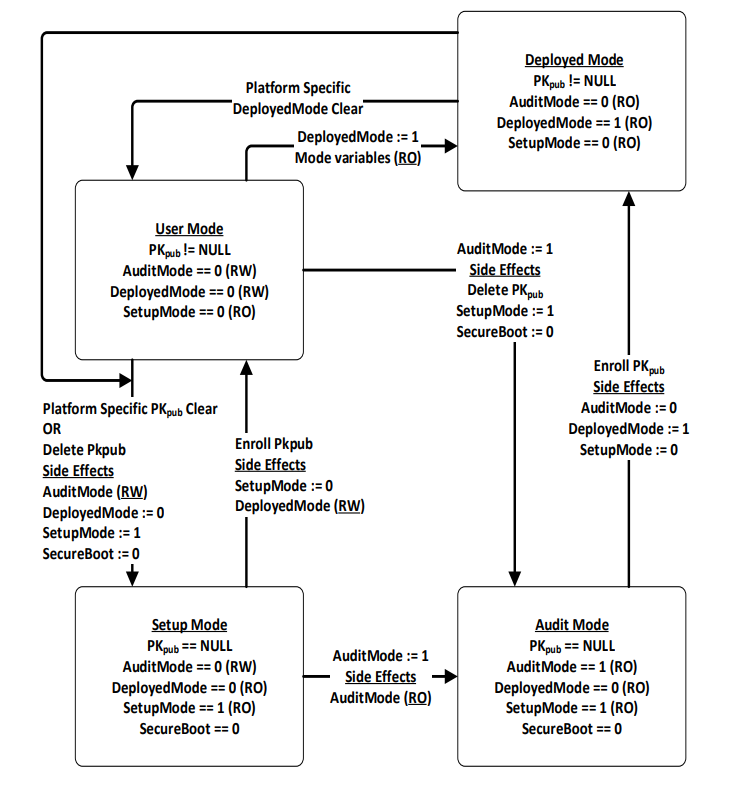
1. The EFI global variable for Secure Boot (officially labelled SecureBoot) should be set to 0.
2. The EFI global variable for Setup Mode (officially labelled SetupMode) should be set to 1.

Per the specs:
While no Platform Key is enrolled, the SetupMode variable shall be equal to 1. While SetupMode == 1, the platform firmware shall not require authentication in order to modify the Platform Key, Key Enrollment Key, OsRecoveryOrder, OsRecovery####, and image security databases.

The following diagram from the specs also indicates how the variables should be set in Setup Mode, which clearly shows that SetupMode should be set to 1 and SecureBoot to 0, which is what Mosby checks to determine if your system is in Setup Mode or not:

Secure_Boot_and_Driver_Signing-5.png


Per our code (which uses a reverse logic to determine if we have the error condition that prints the message you got), IF the SetupMode variable is accessible AND the SecureBoot variable is present and not set to 1 AND the SetupMode variable is set to 1, then we consider that the system is in Setup Mode, which should always the case when Setup Mode is enabled on a UEFI compliant system.

So the fact that you got the error means that, on your system, either:
  1. The SetupMode variable was not accessible, OR
  2. The SecureBoot variable was set to 1 (i.e. Secure Boot was still reported as enabled), OR
  3. The SetupMode variable was not set to 1 (which is not specs compliant for when a system is in Setup Mode).
Therefore, if you are sure that you didn't miss an option in your UEFI settings, you might want to report this issue to your laptop manufacturer, since clearing the keys should put the UEFI system in setup mode, and set the variables in accordance with the specs...

PS: For those who might wonder if possibly the use of the SECURE_BOOT_MODE_ENABLE and SETUP_MODE macros in our code instead of 0 or 1 could be the issue, they are defined there and there and come from EDK2, i.e. the official UEFI reference (and of course, they do match the expected numeric values).
 

My Computer

System One

  • OS
    Windows 11
    Computer type
    PC/Desktop
    Manufacturer/Model
    Home Built
    Screen Resolution
    4k
From what you report, it looks to me like you did everything required to put your system in Setup Mode, and that your Nimo laptop's UEFI firmware might therefore not be fully UEFI compliant, because, per UEFI specs, there is nothing fancy with regards to detecting if a platform is in Setup mode:
1. The EFI global variable for Secure Boot (officially labelled SecureBoot) should be set to 0.
2. The EFI global variable for Setup Mode (officially labelled SetupMode) should be set to 1.

Per the specs:


The following diagram from the specs also indicates how the variables should be set in Setup Mode, which clearly shows that SetupMode should be set to 1 and SecureBoot to 0, which is what Mosby checks to determine if your system is in Setup Mode or not:

Secure_Boot_and_Driver_Signing-5.png


Per our code (which uses a reverse logic to determine if we have the error condition that prints the message you got), IF the SetupMode variable is accessible AND the SecureBoot variable is present and not set to 1 AND the SetupMode variable is set to 1, then we consider that the system is in Setup Mode, which should always the case when Setup Mode is enabled on a UEFI compliant system.

So the fact that you got the error means that, on your system, either:
  1. The SetupMode variable was not accessible, OR
  2. The SecureBoot variable was set to 1 (i.e. Secure Boot was still reported as enabled), OR
  3. The SetupMode variable was not set to 1 (which is not specs compliant for when a system is in Setup Mode).
Therefore, if you are sure that you didn't miss an option in your UEFI settings, you might want to report this issue to your laptop manufacturer, since clearing the keys should put the UEFI system in setup mode, and set the variables in accordance with the specs...

PS: For those who might wonder if possibly the use of the SECURE_BOOT_MODE_ENABLE and SETUP_MODE macros in our code instead of 0 or 1 could be the issue, they are defined there and there and come from EDK2, i.e. the official UEFI reference (and of course, they do match the expected numeric values).
Thanks for the comprehensive reply. I couldn't see what I was doing wrong, but it just wasn't working. It's an AMI BIOS, you'd think they'd have their act together. However, I did note that it was the older interface, not the more modern graphical interface most of the newer machines are using for the BIOS.

I guess my only concern is in the future I may want to boot from a non-Windows platform using Secure Boot, so I wanted to get that certificated loaded. I guess I'll see what Nimo has to say about their BIOS, otherwise cross my fingers that I don't trash Windows to the point I need to boot that image backup! :LOL:
 

My Computers

System One System Two

  • OS
    Win 11 Pro 25H2, Build 26200.8524
    Computer type
    PC/Desktop
    Manufacturer/Model
    Home Brew
    CPU
    Intel Core i5 14500
    Motherboard
    Gigabyte B760M G P WIFI
    Memory
    64GB DDR4
    Graphics Card(s)
    GeForce RTX 4060
    Sound Card
    Chipset Realtek
    Monitor(s) Displays
    LG 45" Ultragear, Acer 24" 1080p
    Screen Resolution
    5120x1440, 1920x1080
    Hard Drives
    Crucial P310 2TB 2280 PCIe Gen4 3D NAND NVMe M.2 SSD (O/S)
    Silicon Power 2TB US75 NVMe PCIe Gen4 M.2 2280 SSD (backup)
    Crucial BX500 2TB 3D NAND (2nd backup)
    Seagate 4TB Ironwolf, rotating HDD archive files
    External off-line backup Drives: 2 NVMe 4TB drives in external enclosures
    PSU
    Thermaltake Toughpower GF3 750W
    Case
    LIAN LI LANCOOL 216 E-ATX PC Case
    Cooling
    Lots of fans!
    Keyboard
    Microsoft Comfort Curve 2000
    Mouse
    Logitech G305
    Internet Speed
    Verizon FiOS 1GB
    Browser
    Firefox
    Antivirus
    Malware Bytes & Windows Defender Security
  • Operating System
    Win 11 Pro 25H2, Build 26200.8524
    Computer type
    PC/Desktop
    Manufacturer/Model
    Home Brew
    CPU
    Intel Core i5 14400
    Motherboard
    Gigabyte B760M DS3H AX
    Memory
    32GB DDR5
    Graphics card(s)
    Intel 700 Embedded GPU
    Sound Card
    Realtek Embedded
    Monitor(s) Displays
    27" HP 1080p
    Screen Resolution
    1920x1080
    Hard Drives
    Crucial P310 2TB 2280 PCIe Gen4 eD NAND PCIe SSD
    Samsung EVO 990 2TB NVMe Gen4 SSD
    Samsung 2TB SATA SSD
    PSU
    Thermaltake Smart BM3 650W
    Case
    Okinos Micro ATX Case
    Cooling
    Fans
    Keyboard
    Microsoft Comfort Curve 2000
    Mouse
    Logitech G305
    Internet Speed
    Verizon FiOS 1GB
    Browser
    Firefox
    Antivirus
    Malware Bytes & Windows Defender Security
Another reason to consider whether to update the BIOS is that we don't know whether the new BIOS firmware will cause damage to the hardware.

Of course, it is safe in most cases, but there are still cases where the update causes CPU failure or other hardware failure.
I guess in all my 25+ years of BIOS updates on a multitude of builds, including the builds in my system specs I've been lucky to never have experienced hardware damage of any kind. Maybe cause I know what I'm doing and also follow instructions. But hay, I'm sure I'm unique here :sneaky:
 

My Computers

System One System Two

  • OS
    Windows 11 Pro 24H2 (Build 26100.4770)
    Computer type
    PC/Desktop
    Manufacturer/Model
    Custom built
    CPU
    Intel Core 9 Ultra 285K
    Motherboard
    Gigabyte Aorus Z890 Xtreme AI Top
    Memory
    64G (4x16) DDR5 Corsair RGB Dominator Platinum (6400Mhz)
    Graphics Card(s)
    Radeon (XFX Mercury) RX 9070XT OC (with Magnetic Fans)
    Sound Card
    Onboard (DTS:X® Ultra Audio: ESS ES9280A DAC)
    Monitor(s) Displays
    27-inch Eizo Color Edge - CG2700X
    Screen Resolution
    3840 x 2160
    Hard Drives
    4 Samsung NVM 990 Pro drives: 1TB (OS), 2TB, 2 X 4TB.
    PSU
    Seasonic TX-1300 (1300 Watts)
    Case
    Cooler Master H500M
    Cooling
    Corsair Link Titan 280 RX RGB
    Keyboard
    Logitech Craft
    Mouse
    Logitech MX Master 3S
    Internet Speed
    1TB Download. 512mb Upload
    Browser
    Microsoft Edge Chromium
    Antivirus
    Windows Security
    Other Info
    System used for gaming, photography, music, school.
  • Operating System
    Windows 11 Pro 24H2 (Build 26100.4061)
    Computer type
    PC/Desktop
    Manufacturer/Model
    Custom built
    CPU
    Intel Core i9-9900K
    Motherboard
    Gigabyte Z390 Aorus Xtreme
    Memory
    32gig (4 x 8) Corsair Dominator Platinum DDR4 3600Mhz (B-Die)
    Graphics card(s)
    Radeon XFX Merc 7900XT (20gig)
    Sound Card
    Onboard
    Monitor(s) Displays
    24-Inch NEC PA242W
    Screen Resolution
    2880 x 1800
    Hard Drives
    2 X NVME, 1 X SATA SSD
    PSU
    EVGA Super Nova 1000 P2 (1000 Watt)
    Case
    Phantek Enthoo Luxe
    Cooling
    Corsair H115i Elite AIO Cooler
    Keyboard
    Logitech Keys
    Mouse
    Logitech MX Master 3
    Internet Speed
    1TB Download. 512mb Upload
    Browser
    Microsoft Edge Chromium
    Antivirus
    Windows Security
    Other Info
    Backup System
I guess in all my 25+ years of BIOS updates on a multitude of builds, including the builds in my system specs I've been lucky to never have experienced hardware damage of any kind. Maybe cause I know what I'm doing and also follow instructions. But hay, I'm sure I'm unique here :sneaky:
I've also never had an unrecoverable issue with any BIOS update. At one time I was putting together a lot of PC's and BIOS updates happened daily. I can't say there was never a time that a specific update didn't fail, but I never bricked anything.
 

My Computers

System One System Two

  • OS
    Win 11 Pro 25H2, Build 26200.8524
    Computer type
    PC/Desktop
    Manufacturer/Model
    Home Brew
    CPU
    Intel Core i5 14500
    Motherboard
    Gigabyte B760M G P WIFI
    Memory
    64GB DDR4
    Graphics Card(s)
    GeForce RTX 4060
    Sound Card
    Chipset Realtek
    Monitor(s) Displays
    LG 45" Ultragear, Acer 24" 1080p
    Screen Resolution
    5120x1440, 1920x1080
    Hard Drives
    Crucial P310 2TB 2280 PCIe Gen4 3D NAND NVMe M.2 SSD (O/S)
    Silicon Power 2TB US75 NVMe PCIe Gen4 M.2 2280 SSD (backup)
    Crucial BX500 2TB 3D NAND (2nd backup)
    Seagate 4TB Ironwolf, rotating HDD archive files
    External off-line backup Drives: 2 NVMe 4TB drives in external enclosures
    PSU
    Thermaltake Toughpower GF3 750W
    Case
    LIAN LI LANCOOL 216 E-ATX PC Case
    Cooling
    Lots of fans!
    Keyboard
    Microsoft Comfort Curve 2000
    Mouse
    Logitech G305
    Internet Speed
    Verizon FiOS 1GB
    Browser
    Firefox
    Antivirus
    Malware Bytes & Windows Defender Security
  • Operating System
    Win 11 Pro 25H2, Build 26200.8524
    Computer type
    PC/Desktop
    Manufacturer/Model
    Home Brew
    CPU
    Intel Core i5 14400
    Motherboard
    Gigabyte B760M DS3H AX
    Memory
    32GB DDR5
    Graphics card(s)
    Intel 700 Embedded GPU
    Sound Card
    Realtek Embedded
    Monitor(s) Displays
    27" HP 1080p
    Screen Resolution
    1920x1080
    Hard Drives
    Crucial P310 2TB 2280 PCIe Gen4 eD NAND PCIe SSD
    Samsung EVO 990 2TB NVMe Gen4 SSD
    Samsung 2TB SATA SSD
    PSU
    Thermaltake Smart BM3 650W
    Case
    Okinos Micro ATX Case
    Cooling
    Fans
    Keyboard
    Microsoft Comfort Curve 2000
    Mouse
    Logitech G305
    Internet Speed
    Verizon FiOS 1GB
    Browser
    Firefox
    Antivirus
    Malware Bytes & Windows Defender Security
I guess in all my 25+ years of BIOS updates on a multitude of builds, including the builds in my system specs I've been lucky to never have experienced hardware damage of any kind. Maybe cause I know what I'm doing and also follow instructions. But hay, I'm sure I'm unique here :sneaky:
I would like to fully respond to that but don't know how to do it without it coming out as being offensive. I'll just say that can and has happened to others. especially in the older days of BIOS updates.
 

My Computers

System One System Two

  • OS
    Windows 11 Pro 25H2
    Computer type
    PC/Desktop
    Manufacturer/Model
    PowerSpec B746
    CPU
    Intel Core i7-10700K
    Motherboard
    ASRock Z490 Phantom Gaming 4/ax
    Memory
    16GB (8GB PC4-19200 DDR4 SDRAM x2)
    Graphics Card(s)
    NVIDIA GeForce GTX 1050 TI
    Sound Card
    Realtek Audio
    Monitor(s) Displays
    #1. LG ULTRAWIDE 34" #2. AOC Q32G2WG3 32"
    Screen Resolution
    #1. 3440 X 1440 #2. 1920 x 1080
    Hard Drives
    NVMe WDC WDS100T2B0C-00PXH0 1TB
    Samsung SSD 860 EVO 1TB
    PSU
    750 Watts (62.5A)
    Case
    PowerSpec/Lian Li ATX 205
    Keyboard
    Logitech K270
    Mouse
    Logitech M185
    Browser
    Microsoft Edge and Firefox
    Antivirus
    Webroot SecureAnywhere CE 26.1
  • Operating System
    Windows 11 Canary Channel
    Computer type
    PC/Desktop
    Manufacturer/Model
    PowerSpec G156
    CPU
    Intel Core i5-8400 CPU @ 2.80GHz
    Motherboard
    AsusTeK Prime B360M-A
    Memory
    16 MB DDR 4-2666
    Monitor(s) Displays
    23" Speptre HDMI 75Hz
    Screen Resolution
    1920x1080
    Hard Drives
    Samsung 970 EVO 500GB NVMe
    Keyboard
    Logitek K270
    Mouse
    Logitek M185
    Browser
    Firefox, Edge and Edge Canary
    Antivirus
    Windows Defender
Never had a UEFi bios update fail in my years of using Computers

Always do the UEFI bios update from within Bios itself from USB flash drive, do not trust MSI Center or any Windows updaters to do it
Do have UPS battery backup connected
After it installs successfully
Then i load Optimized Defaults, let that Restart, then customize settings

So far has been working well for everytime i updated my UEFI bios

Am Running 1.2.03e currently, and waiting til 1.2.0.3f is out of beta before installing that one (was posted on my MSI Bios page on 7/24
 

My Computers

System One System Two

  • OS
    Windows 11 Pro 25H2 26200.8037
    Computer type
    PC/Desktop
    Manufacturer/Model
    PreBuilt
    CPU
    AMD Ryzen 7700X
    Motherboard
    MSI B650 VC WIfi Rev 1.0
    Memory
    32GB DDR 5 RGB 5600Mhz
    Graphics Card(s)
    Radeon 7800XT
    Sound Card
    Onboard Audio
    Monitor(s) Displays
    Asus VG245H
    Screen Resolution
    1920x1080
    Hard Drives
    Samsung 990 Evo Plus NVMe Boot
    Samsung 990 Pro 1TB Game NVMe


    External
    Western Digital Elements 500GB
    Western Digital My Passport 2TB Blue
    Western Digital My Passport 2TB Red
    Toshiba 2TB in External Enclosure
    Seagate 8TB in External Enclosure
    Seagate 1TB Portable USB 3 External Drive
    Western Digital My Book 8TB (Primary Backup drive)
    Western Digital Black 4TB In External Enclosure
    PSU
    750 Watt High Power
    Case
    Lian Li Lan Cool 216 ARGB Airflow
    Cooling
    2 160MM Front, 1 140MM Rear Exhaust
    Keyboard
    Logitech G513
    Mouse
    Logitech G502 X
    Internet Speed
    Gigabit 1100Mb/35 Upload
    Browser
    MS Edge Chromium and Bing Search
    Antivirus
    Windows Defender, Malwarebytes Premium
    Other Info
    UEFI, Secure Boot, TPM 2.0, Macrium Reflect X
  • Operating System
    Windows 11 Pro 25H2 26200.8037
    Computer type
    Laptop
    Manufacturer/Model
    Asus TUF A16 Advantage Edition FA617NT.A16.R7700
    CPU
    Ryzen 7 7735HS
    Motherboard
    OEM Asus Motherboard
    Memory
    16GB DDR 5
    Graphics card(s)
    AMD Radeon™ 680M & Radeon 7700S
    Sound Card
    Onboard
    Monitor(s) Displays
    16inch FHD 165hz
    Screen Resolution
    1920x1080
    Hard Drives
    512GB NVMe Boot Drive
    PSU
    Laptop PSU
    Case
    Laptop Case
    Cooling
    OEM Cooling
    Keyboard
    OEM Laptop Keyboard
    Mouse
    Touchpad & G502 Hero
    Internet Speed
    Gigabit 1100 Download/35 Upload
    Browser
    MS Edge with Bing search
    Antivirus
    Windows Defender & Malwarebytes Premium
    Other Info
    Macrium Reflect X

My Computers

System One System Two

  • OS
    Win 11 Pro 25H2 26200.8524
    Computer type
    PC/Desktop
    Manufacturer/Model
    Self Built
    CPU
    Intel® Core™ i7-14700K
    Motherboard
    ASUS TUF Z690-PLUS WIFI BIOS 4505 11/29/25
    Memory
    G.SKILL Ripjaws S5 Series 64GB (2 x 32GB) DDR5
    Graphics Card(s)
    ASUS GeForce RTX 4070 Super 12GB
    Sound Card
    Sound Blaster AE-5 Plus
    Monitor(s) Displays
    ASUS TUF Gaming 27" 2K HDR Gaming
    Screen Resolution
    2560 x 1440
    Hard Drives
    Samsung 990 Pro 1TB NVMe (Win 11 25H2)
    SK hynix P41 500GB NVMe 25H2 DEV/Games
    SK hynix P41 2TB NVMe (x3)
    Crucial P3 Plus 4TB
    PSU
    Corsair RM850x Shift
    Case
    Antec Dark Phantom DP502 FLUX
    Cooling
    Corsair Nautilus 360 RS AIO
    Keyboard
    Logitech MK 320
    Mouse
    Razer Basilisk V3
    Internet Speed
    350Mbs
    Browser
    Firefox
    Antivirus
    Winows Security
    Other Info
    MR 8.1 Home

    System 3 Specs
    Win 11 Pro 25H2 26200.8524
    ASUS PRIME Z370-P II BIOS 3004 7/12/21
    Intel Core i7-8700 CPU @ 3.20GHz
    32GB DDR4 RAM (4x8)
    iGPU Intel UHD Graphics 630
  • Operating System
    Win 11 Pro 25H2 26200.8524
    Computer type
    PC/Desktop
    Manufacturer/Model
    Self Built
    CPU
    Intel Core i7-11700F
    Motherboard
    Asus TUF Gaming Z590 Plus WiFi (BIOS 2803)
    Memory
    64 GB DDR4
    Graphics card(s)
    MSI GeForce RTX 3060 Ventus 2X 12GB
    Sound Card
    SoundBlaster Audigy Fx V2
    Monitor(s) Displays
    Samsung F27T350
    Screen Resolution
    1920x1080
    Hard Drives
    Samsung 980 Pro 1TB
    Samsung 970 EVO Plus 2TB
    Samsung 870 EVO 500GB SSD
    PSU
    Corsair HX750
    Case
    Cougar MX330-G Window
    Cooling
    Thermalright Frozen Edge 240 Black AIO
    Internet Speed
    350Mbps
    Browser
    Firefox
    Antivirus
    Windows Security
Only thing i can't get to work is the Make2023Bootable.Ps1

Everything else looks to be all good

Do have Malwarebytes Premium 5.3.4.202 if that makes any difference why its not working, not sure

Screenshot 2025-07-27 143122.webp

Screenshot 2025-07-27 143813.webp
 

My Computers

System One System Two

  • OS
    Windows 11 Pro 25H2 26200.8037
    Computer type
    PC/Desktop
    Manufacturer/Model
    PreBuilt
    CPU
    AMD Ryzen 7700X
    Motherboard
    MSI B650 VC WIfi Rev 1.0
    Memory
    32GB DDR 5 RGB 5600Mhz
    Graphics Card(s)
    Radeon 7800XT
    Sound Card
    Onboard Audio
    Monitor(s) Displays
    Asus VG245H
    Screen Resolution
    1920x1080
    Hard Drives
    Samsung 990 Evo Plus NVMe Boot
    Samsung 990 Pro 1TB Game NVMe


    External
    Western Digital Elements 500GB
    Western Digital My Passport 2TB Blue
    Western Digital My Passport 2TB Red
    Toshiba 2TB in External Enclosure
    Seagate 8TB in External Enclosure
    Seagate 1TB Portable USB 3 External Drive
    Western Digital My Book 8TB (Primary Backup drive)
    Western Digital Black 4TB In External Enclosure
    PSU
    750 Watt High Power
    Case
    Lian Li Lan Cool 216 ARGB Airflow
    Cooling
    2 160MM Front, 1 140MM Rear Exhaust
    Keyboard
    Logitech G513
    Mouse
    Logitech G502 X
    Internet Speed
    Gigabit 1100Mb/35 Upload
    Browser
    MS Edge Chromium and Bing Search
    Antivirus
    Windows Defender, Malwarebytes Premium
    Other Info
    UEFI, Secure Boot, TPM 2.0, Macrium Reflect X
  • Operating System
    Windows 11 Pro 25H2 26200.8037
    Computer type
    Laptop
    Manufacturer/Model
    Asus TUF A16 Advantage Edition FA617NT.A16.R7700
    CPU
    Ryzen 7 7735HS
    Motherboard
    OEM Asus Motherboard
    Memory
    16GB DDR 5
    Graphics card(s)
    AMD Radeon™ 680M & Radeon 7700S
    Sound Card
    Onboard
    Monitor(s) Displays
    16inch FHD 165hz
    Screen Resolution
    1920x1080
    Hard Drives
    512GB NVMe Boot Drive
    PSU
    Laptop PSU
    Case
    Laptop Case
    Cooling
    OEM Cooling
    Keyboard
    OEM Laptop Keyboard
    Mouse
    Touchpad & G502 Hero
    Internet Speed
    Gigabit 1100 Download/35 Upload
    Browser
    MS Edge with Bing search
    Antivirus
    Windows Defender & Malwarebytes Premium
    Other Info
    Macrium Reflect X
Back
Top Bottom