Personalization Add or Remove "Copy as path" Context Menu in Windows 11


Copy_as_path_banner.png

This tutorial will show how to add or remove the "Copy as path" context menu and "Copy path" from the File Explorer command bar menu for your account or all users in Windows 11.

Copy path or Copy as path will copy the full path of selected items (files and folders) wrapped in quotes to the Clipboard so you can paste (Ctrl+V) the full path(s) of the item(s) where you like.


Contents

  • Option One: Add or Remove "Copy as path" Context Menu for Current User in Settings
  • Option Two: Add or Remove "Copy as path" Context Menu for Current User using REG file
  • Option Three: Add or Remove "Copy as path" Context Menu for All Users using REG file


EXAMPLE: "Copy as path" and "Copy path" context menu

Copy_as_path_modern_context_menu.webp
Copy_as_path_context_menu-2.png
Copy_as_path_File_Explorer_command_bar_menu.png


Option One

Add or Remove "Copy as path" Context Menu for Current User in Settings


This option is only available starting with Windows 11 build 26340.9212 (Experimental 26H2) for Insiders.

This option only affects the modern context menu.


1 Open Settings (Win+I).

2 Click/tap on Personalization in the left pane, and click/tap on Context menu. (see screenshot below)


Context_menu_Settings-1.webp

3 Under File actions, turn On (add - default) or Off (remove) Copy as path for what you want. (see screenshot below)

Context_menu_Settings-2.webp

4 You can now close Settings if you like.


Option Two

Add or Remove "Copy path" Context Menu for Current User using REG file


This option is only available starting with Windows 11 build 26340.9212 (Experimental 26H2) for Insiders.

This option only affects the modern context menu.


1 Do step 2 (add) or step 3 (remove) below for what you want.


 2. Add "Copy path" Context Menu for Current User

This is the default setting.


A) Click/tap on the Download button below to download the REG file below, and go to step 4 below.​

Add_Copy_as_path_context_menu_for_current_user.reg


(Contents of REG file for reference)
Code:
Windows Registry Editor Version 5.00

[HKEY_CURRENT_USER\Software\Microsoft\Windows\CurrentVersion\Explorer\ContextMenu\Preferences\verbs\copyaspath]
"Enabled"=dword:00000001


 3. Remove "Copy path" Context Menu for Current User

A) Click/tap on the Download button below to download the REG file below, and go to step 4 below.​

Remove_Copy_as_path_context_menu_for_current_user.reg


(Contents of REG file for reference)
Code:
Windows Registry Editor Version 5.00

[HKEY_CURRENT_USER\Software\Microsoft\Windows\CurrentVersion\Explorer\ContextMenu\Preferences\verbs\copyaspath]
"Enabled"=dword:00000000

4 Save the .reg file to your desktop.

5 If you have Smart App Control turned on, you will need to unblock the downloaded REG file.

6 Double click/tap on the downloaded .reg file to merge it.

7 When prompted, click/tap on Run, Yes (UAC), Yes, and OK to approve the merge.

8 You can now delete the downloaded .reg file if you like.


Option Three

Add or Remove "Copy path" Context Menu for All Users using REG file


You must be signed in as an administrator to use this option.

This option will affect both the modern and classic context menus.


1 Do step 2 (add) or step 3 (remove) below for what you would like to do.

2 Add "Copy as path" and "Copy path" context menu for All Users

This is the default setting.


A) Click/tap on the Download button below to download the file below, and go to step 4 below.

Add_Copy_as_path_to_context_menu_for_all_users.reg


(Contents of REG file for reference)
Code:
Windows Registry Editor Version 5.00

[HKEY_LOCAL_MACHINE\SOFTWARE\Classes\AllFilesystemObjects\shellex\ContextMenuHandlers\CopyAsPathMenu]
@="{f3d06e7c-1e45-4a26-847e-f9fcdee59be0}"

3 Remove "Copy as path" and "Copy path" context menu for All Users

A) Click/tap on the Download button below to download the file below, and go to step 4 below.

Remove_Copy_as_path_from_context_menu_for_all_users.reg


(Contents of REG file for reference)
Code:
Windows Registry Editor Version 5.00

[-HKEY_LOCAL_MACHINE\SOFTWARE\Classes\AllFilesystemObjects\shellex\ContextMenuHandlers\CopyAsPathMenu]

4 Save the .reg file to your desktop.

5 If you have Smart App Control turned on, you will need to unblock the downloaded REG file.

6 Double click/tap on the downloaded .reg file to merge it.

7 When prompted, click/tap on Run, Yes (UAC), Yes, and OK to approve the merge.

8 You can now delete the downloaded .reg file if you like.


That's it,
Shawn Brink


Attachments

Last edited:
Hi,
Oops this one the other was for drives :eek:
 

My Computer My Computer

At a glance

Win-7-10-11Pro's10900k & 9940x & 5930kTrident-Z Royal 4000c16 2x16gb & Trident-Z 36...Titan Xp & 1080ti FTW3 & evga 980ti gaming
OS
Win-7-10-11Pro's
Computer type
PC/Desktop
Manufacturer/Model
Acer 17" Nitro 7840sn/ 2x16gb 5600c40/ 4060/ stock 1tb-os/ 4tb sn850x
CPU
10900k & 9940x & 5930k
Motherboard
z490-Apex & x299-Apex & x99-Sabertooth
Memory
Trident-Z Royal 4000c16 2x16gb & Trident-Z 3600c16 4x8gb & 3200c14 4x8gb
Graphics Card(s)
Titan Xp & 1080ti FTW3 & evga 980ti gaming
Sound Card
Onboard Realtek x3
Monitor(s) Displays
1-AOC G2460PG 24"G-Sync 144Hz/ 2nd 1-ASUS VG248QE 24"/ 3rd LG 43" series
Screen Resolution
1920-1080 not sure what the t.v is besides 43" class scales from 1920-1080 perfectly
Hard Drives
2-WD-sn850x 4tb/ 970evo+500gb/ 980 pro 2tb.
PSU
1000p2 & 1200p2 & 850p2
Case
D450 x2 & 1 Test bench in cherry Entertainment center
Cooling
Custom water loops x3 with 2x mora 360mm rads only 980ti gaming air cooled
Keyboard
G710+x3
Mouse
Redragon x3
Internet Speed
xfinity gigabyte
Browser
Firefox
Antivirus
mbam pro
I used your Win 10 instructions on my old laptop & it worked perfectly. I upgraded to a new Dell with Win 11. I've followed your instructions (including being logged in as an admin) to a T & the Copy Path is not appearing on the context menu. Help?
 

My Computer My Computer

At a glance

Windows 11 Home12th Gen Intel(R) Core(TM) i7-1255U, 1700 Mhz16GBIntel(R) Iris(R) Xe Graphics
OS
Windows 11 Home
Computer type
Laptop
Manufacturer/Model
Dell Inspiron 15 (3520)
CPU
12th Gen Intel(R) Core(TM) i7-1255U, 1700 Mhz
Memory
16GB
Graphics Card(s)
Intel(R) Iris(R) Xe Graphics
Sound Card
Cirrus Logic High Definition Audio
Monitor(s) Displays
Intel(R) Iris(R) Xe Graphics
Hard Drives
1TB Solid State
Browser
Firefox
Antivirus
Windows Defender
I used your Win 10 instructions on my old laptop & it worked perfectly. I upgraded to a new Dell with Win 11. I've followed your instructions (including being logged in as an admin) to a T & the Copy Path is not appearing on the context menu. Help?

Hello GMcFall, and welcome. :alien:

Odd. The "Copy as path" context menu should be there by default in Windows 11 when you right click on a file or folder.
 

My Computers My Computers

  • At a glance

    Windows 11 Pro for WorkstationsIntel i7-8700K 5 GHz64 GB (4x16GB) G.SKILL TridentZ RGB DDR4 3600...ASUS ROG-STRIX-GTX1080TI-O11G-GAMING (11GB GD...
    OS
    Windows 11 Pro for Workstations
    Computer type
    PC/Desktop
    Manufacturer/Model
    Custom self build
    CPU
    Intel i7-8700K 5 GHz
    Motherboard
    ASUS ROG Maximus XI Formula Z390
    Memory
    64 GB (4x16GB) G.SKILL TridentZ RGB DDR4 3600 MHz (F4-3600C18D-32GTZR)
    Graphics Card(s)
    ASUS ROG-STRIX-GTX1080TI-O11G-GAMING (11GB GDDR5X)
    Sound Card
    Integrated Digital Audio (S/PDIF)
    Monitor(s) Displays
    2 x Samsung Odyssey G75 27"
    Screen Resolution
    2560x1440
    Hard Drives
    1TB Samsung 990 PRO M.2,
    4TB Samsung 990 PRO M.2,
    TerraMaster F8 SSD Plus NAS
    PSU
    Seasonic Prime Titanium 850W
    Case
    Thermaltake Core P3 wall mounted
    Cooling
    Corsair Hydro H115i
    Keyboard
    Amazon Basics Wired Full Keyboard MD005
    Mouse
    Logitech MX Master 4
    Internet Speed
    2 Gbps Download and 100 Mbps Upload
    Browser
    Chrome and Edge
    Antivirus
    Microsoft Defender
    Other Info
    Logitech Z625 speaker system,
    Logitech BRIO 4K Pro webcam,
    HP Color LaserJet Pro MFP M477fdn,
    CyberPower CP1500PFCLCD
    Galaxy S23 Plus phone
  • At a glance

    Windows 11 ProSnapdragon X Elite (12 core) 3.42 GHz16 GB LPDDR5x-7467 MHz
    Operating System
    Windows 11 Pro
    Computer type
    Laptop
    Manufacturer/Model
    Surface Laptop 7 Copilot+ PC
    CPU
    Snapdragon X Elite (12 core) 3.42 GHz
    Memory
    16 GB LPDDR5x-7467 MHz
    Monitor(s) Displays
    15" HDR
    Screen Resolution
    2496 x 1664
    Hard Drives
    1 TB SSD
    Internet Speed
    Wi-Fi 7 and Bluetooth 5.4
    Browser
    Chrome and Edge
    Antivirus
    Microsoft Defender
The "Copy as path" context menu should be there by default in Windows 11


It's on my context menu... by default.
 

My Computers My Computers

  • At a glance

    Win 11 Home ♦♦♦26300.9278 ♦♦♦♦♦♦♦26H2AMD Ryzen 7 3700XG.Skill (F4-3200C14D-16GTZKW)EVGA RTX 2070 (08G-P4-2171-KR)
    OS
    Win 11 Home ♦♦♦26300.9278 ♦♦♦♦♦♦♦26H2
    Computer type
    PC/Desktop
    Manufacturer/Model
    Built by Ghot® [May 2020]
    CPU
    AMD Ryzen 7 3700X
    Motherboard
    Asus Pro WS X570-ACE (BIOS 5302)
    Memory
    G.Skill (F4-3200C14D-16GTZKW)
    Graphics Card(s)
    EVGA RTX 2070 (08G-P4-2171-KR)
    Sound Card
    Realtek ALC1220P / ALC S1220A
    Monitor(s) Displays
    Dell U3011 30"
    Screen Resolution
    2560 x 1600
    Hard Drives
    2x Samsung 860 EVO 500GB,
    WD 4TB Black FZBX - SATA III,
    WD 8TB Black FZBX - SATA III,
    DRW-24B1ST CD/DVD Burner
    PSU
    PC Power & Cooling 750W Quad EPS12V
    Case
    Cooler Master ATCS 840 Tower
    Cooling
    CM Hyper 212 EVO (push/pull)
    Keyboard
    Ducky DK9008 Shine II Blue LED
    Mouse
    Logitech Optical M-100
    Internet Speed
    300/300
    Browser
    Firefox (latest)
    Antivirus
    Bitdefender Total Security
    Other Info
    Speakers: Klipsch Pro Media 2.1
  • At a glance

    Windows XP Pro 32bit w/SP3AMD Athlon 64 X2 5000+ (OC'd @ 3.2Ghz)TWIN2X2048-6400C4DHX (2 x 1GB, DDR2 800)EVGA 256-P2-N758-TR GeForce 8600GT SSC
    Operating System
    Windows XP Pro 32bit w/SP3
    Computer type
    PC/Desktop
    Manufacturer/Model
    Built by Ghot® (not in use)
    CPU
    AMD Athlon 64 X2 5000+ (OC'd @ 3.2Ghz)
    Motherboard
    ASUS M2N32-SLI Deluxe Wireless Edition
    Memory
    TWIN2X2048-6400C4DHX (2 x 1GB, DDR2 800)
    Graphics card(s)
    EVGA 256-P2-N758-TR GeForce 8600GT SSC
    Sound Card
    Onboard
    Monitor(s) Displays
    ViewSonic G90FB Black 19" Professional (CRT)
    Screen Resolution
    up to 2048 x 1536
    Hard Drives
    WD 36GB 10,000rpm Raptor SATA
    Seagate 80GB 7200rpm SATA
    Lite-On LTR-52246S CD/RW
    Lite-On LH-18A1P CD/DVD Burner
    PSU
    PC Power & Cooling Silencer 750 Quad EPS12V
    Case
    Generic Beige case, 80mm fans
    Cooling
    ZALMAN 9500A 92mm CPU Cooler
    Keyboard
    Logitech Classic Keybooard 200
    Mouse
    Logitech Optical M-BT96a
    Internet Speed
    300/300
    Browser
    Firefox 3.x ??
    Antivirus
    Symantec (Norton)
    Other Info
    Still assembled, still runs. Haven't turned it on for 15 years?
Me too! Me too!
 

My Computers My Computers

  • At a glance

    11 Pro 24H2 26100.2454i7-9700 @ 3.00GHz32GBDDR4 @ 2666MHzIntel HD 630 Graphics onboard
    OS
    11 Pro 24H2 26100.2454
    Computer type
    PC/Desktop
    Manufacturer/Model
    Lenovo ThinkCentre M920S SFF
    CPU
    i7-9700 @ 3.00GHz
    Motherboard
    Lenovo 3132
    Memory
    32GBDDR4 @ 2666MHz
    Graphics Card(s)
    Intel HD 630 Graphics onboard
    Sound Card
    Realtek HD Audio
    Monitor(s) Displays
    LG E2442
    Screen Resolution
    1920x1080
    Hard Drives
    1 x Samsung 970 EVO PLUS 500GB NVMe SSD, 1 x WD_BLACK SN770
    250GB NVMe SSD (OS and programs), 1 x WD_BLACK SN770
    500GB NVMe SSD (Data)
    Case
    Lenovo SFF
    Keyboard
    Cherry Stream TKL JK-8600US-2 Wired
    Mouse
    LogiTech M510 wireless
    Internet Speed
    Fast (for fixed wireless!)
    Browser
    Chrome, sometimes Firefox
    Antivirus
    Malwarebytes Premium & Defender (working together beautifully!)
  • At a glance

    11 Pro 24H2 26100.2454i5-8400 @ 2.80GHz32GB DDR4 @ 2600MHzIntel HD 630 Graphics onboard
    Operating System
    11 Pro 24H2 26100.2454
    Computer type
    PC/Desktop
    Manufacturer/Model
    Lenovo ThinkCentre M920S SFF
    CPU
    i5-8400 @ 2.80GHz
    Motherboard
    Lenovo 3132
    Memory
    32GB DDR4 @ 2600MHz
    Graphics card(s)
    Intel HD 630 Graphics onboard
    Sound Card
    Realtek High Definition Audio onboard
    Monitor(s) Displays
    LG FULL HD (1920x1080@59Hz)
    Screen Resolution
    1920 x 1080
    Hard Drives
    1 x Samsung 970 EVO PLUS NVMe; 1 x Samsung 980 NVMe SSD
    Case
    Lenovo Think Centre SFF
    Keyboard
    Cherry Stream TKL JK-8600US-2 Wired
    Mouse
    LogiTech M510 wireless
    Internet Speed
    Fast (for fixed wireless!)
    Browser
    Chrome
    Antivirus
    Malwarebytes Premium and MS Defender, beautiful together
Nice, thanks.
 

My Computers My Computers

  • At a glance

    Windows 11 Pro 25H2 Build 26200.9168Intel(R) Core(TM) i7-4770K CPU @ 3.50GHz32.0 GB of I forget and the box is in storage.Gigabyte nVidia GeForce GTX 1660 Super OC 6GB
    OS
    Windows 11 Pro 25H2 Build 26200.9168
    Computer type
    PC/Desktop
    Manufacturer/Model
    Sin-built 2013
    CPU
    Intel(R) Core(TM) i7-4770K CPU @ 3.50GHz
    Motherboard
    ASUS ROG Maximus VI Formula
    Memory
    32.0 GB of I forget and the box is in storage.
    Graphics Card(s)
    Gigabyte nVidia GeForce GTX 1660 Super OC 6GB
    Sound Card
    ROG SupremeFX Formula 8-Channel High Definition Audio
    Monitor(s) Displays
    5 x LG 25MS500-B - 1 x 24MK430H-B - 1 x Wacom Pro 22" Touch Screen Tablet
    Screen Resolution
    All over the place
    Hard Drives
    Too many to list. OS on Samsung 1TB 870 QVO SATA
    PSU
    Silverstone 1500
    Case
    NZXT Phantom 820 Full-Tower Case
    Cooling
    Noctua NH-D15 Elite Class Dual Tower CPU Cooler / 6 x EziDIY 120mm / 2 x Corsair 140mm somethings / 1 x 140mm Thermaltake something / 2 x 200mm Corsair.
    Keyboard
    Corsair K95 / Logitech diNovo Edge Wireless
    Mouse
    Logitech: G402 / G502 / Mx Masters / Mx Air Cordless
    Internet Speed
    2000/500Mbps
    Browser
    All sorts
    Antivirus
    Kaspersky Premium
    Other Info
    ㅤㅤㅤㅤㅤㅤㅤㅤㅤㅤㅤㅤㅤㅤㅤㅤㅤㅤㅤㅤㅤㅤㅤㅤㅤㅤㅤㅤㅤㅤㅤㅤㅤㅤㅤㅤㅤㅤㅤㅤ⠀⠀⠀⠀⠀⠀⠀⠀⠀⠀
    TP-Link BE9300 WiFi 7 Bluetooth 5.4 (Archer TBE550E)
    TP-Link TX201 V1 2.5GB Lan

    Grandstream HT812 - VoIP
    ASUS DSL-AX82U - Mesh
    ASUS RT-AC68U - Mesh
    ASUS RT-BE88U Router

    Brother MFC-L2880DW Printer

    I’m on a horse.
  • At a glance

    Windows 11 Pro 25H2 Build 26200.9168 (Wifes)13th Generation Intel® Core™ i5-1340P Process...16GB LPDDR5-52001x Intel® Iris® Xe Graphics
    Operating System
    Windows 11 Pro 25H2 Build 26200.9168 (Wifes)
    Computer type
    Laptop
    Manufacturer/Model
    LENOVO Yoga 7 14IRL8 - Type 82YL
    CPU
    13th Generation Intel® Core™ i5-1340P Processor(Core™ i5-1340P)
    Memory
    16GB LPDDR5-5200
    Graphics card(s)
    1x Intel® Iris® Xe Graphics
    Sound Card
    Optimized with Dolby Atmos®
    Screen Resolution
    QHD 2880 x 1800 OLED
    Hard Drives
    M.2 512 GB SSD PCIe
    Mouse
    Logiteck MX Master 3S
    Internet Speed
    2000/500
    Antivirus
    Defender / Malwarebytes
    Other Info
    …still on a horse.


    Wireless Network: Wi-Fi 6E 2x2 AX; Bluetooth® 5.1 or above
    Ports: 1x 1 Novo button; 2 in 1 Audio Combo jack; Micro SD Card Reader; HDMI 1.4b; 2 x USB Type-C (TBT4)
    USB 3.2 Gen 2 DP 1.4a
    PD 3.0); 1 x USB 3.2 Gen1 Type A
    Camera
    1x 1080P FHD IR/RGB Hybrid with Privacy Shutter and Dual Array Microphone
    Graphics
    1x Intel® Iris® Xe Graphics
    Monitor
    14" WUXGA
    Form Factor
    Convertible Notebook
  • Windows 11 Pro 25H2 Build 26200.9168 (Wifes)

    Yoga 7 2-in-1 14IML9 - Type 83DJ

    Processor: Intel® Core™ Ultra 7 155H Processor(Core™ Ultra 7 155H)

    Memory: 32GB LPD5X-7467

    Hard Drive: 1 TB SSD PCIe

    Wireless Network: 1x Wi-Fi 6E 2x2 AX; Bluetooth® 5.1 or above

    Ports: 1 x HDMI 2.1 TMDS; 1 x Novo Button; 1 x Combo Audio Jack
    2 x USB-C (USB 4.0)
    1 x USB-A 3.2 Gen 1

    Camera: 1080P FHD IR Hybrid with Dual Microphone

    Graphics: Intel® Arc™ Graphics

    Monitor: 14" 2.8K

    ...Where's my horse?
Hello GMcFall, and welcome. :alien:

Odd. The "Copy as path" context menu should be there by default in Windows 11 when you right click on a file or folder.
Thanks for the welcome.

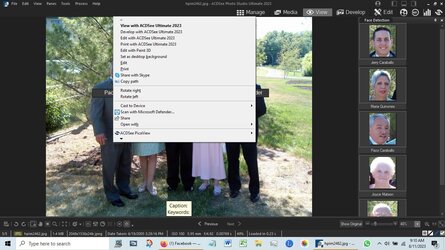
When I had Windows 10, there wasn't a Copy Path option in the ACDSee photo software that I use. I fixed that issue by adding the script in Copy path - Add to Context Menu in Windows 10.

When I upgraded to Win 11, that option disappeared in my software, so I ran the script Add or Remove "Copy as path" Context Menu in Windows 11 Tutorial, thinking that would solve the problem. It didn't, so I reported the issue here as a problem. In hindsight, I should have checked elsewhere in Windows before reporting it. I'll report this to the software vendor as an issue. Sorry for any confusion caused.
 

Attachments

  • Windows10.jpg
    Windows10.jpg
    137.1 KB · Views: 124

My Computer My Computer

At a glance

Windows 11 Home12th Gen Intel(R) Core(TM) i7-1255U, 1700 Mhz16GBIntel(R) Iris(R) Xe Graphics
OS
Windows 11 Home
Computer type
Laptop
Manufacturer/Model
Dell Inspiron 15 (3520)
CPU
12th Gen Intel(R) Core(TM) i7-1255U, 1700 Mhz
Memory
16GB
Graphics Card(s)
Intel(R) Iris(R) Xe Graphics
Sound Card
Cirrus Logic High Definition Audio
Monitor(s) Displays
Intel(R) Iris(R) Xe Graphics
Hard Drives
1TB Solid State
Browser
Firefox
Antivirus
Windows Defender
Thanks for the welcome.

When I had Windows 10, there wasn't a Copy Path option in the ACDSee photo software that I use. I fixed that issue by adding the script in Copy path - Add to Context Menu in Windows 10.

When I upgraded to Win 11, that option disappeared in my software, so I ran the script Add or Remove "Copy as path" Context Menu in Windows 11 Tutorial, thinking that would solve the problem. It didn't, so I reported the issue here as a problem. In hindsight, I should have checked elsewhere in Windows before reporting it. I'll report this to the software vendor as an issue. Sorry for any confusion caused.

No worries.
 

My Computers My Computers

  • At a glance

    Windows 11 Pro for WorkstationsIntel i7-8700K 5 GHz64 GB (4x16GB) G.SKILL TridentZ RGB DDR4 3600...ASUS ROG-STRIX-GTX1080TI-O11G-GAMING (11GB GD...
    OS
    Windows 11 Pro for Workstations
    Computer type
    PC/Desktop
    Manufacturer/Model
    Custom self build
    CPU
    Intel i7-8700K 5 GHz
    Motherboard
    ASUS ROG Maximus XI Formula Z390
    Memory
    64 GB (4x16GB) G.SKILL TridentZ RGB DDR4 3600 MHz (F4-3600C18D-32GTZR)
    Graphics Card(s)
    ASUS ROG-STRIX-GTX1080TI-O11G-GAMING (11GB GDDR5X)
    Sound Card
    Integrated Digital Audio (S/PDIF)
    Monitor(s) Displays
    2 x Samsung Odyssey G75 27"
    Screen Resolution
    2560x1440
    Hard Drives
    1TB Samsung 990 PRO M.2,
    4TB Samsung 990 PRO M.2,
    TerraMaster F8 SSD Plus NAS
    PSU
    Seasonic Prime Titanium 850W
    Case
    Thermaltake Core P3 wall mounted
    Cooling
    Corsair Hydro H115i
    Keyboard
    Amazon Basics Wired Full Keyboard MD005
    Mouse
    Logitech MX Master 4
    Internet Speed
    2 Gbps Download and 100 Mbps Upload
    Browser
    Chrome and Edge
    Antivirus
    Microsoft Defender
    Other Info
    Logitech Z625 speaker system,
    Logitech BRIO 4K Pro webcam,
    HP Color LaserJet Pro MFP M477fdn,
    CyberPower CP1500PFCLCD
    Galaxy S23 Plus phone
  • At a glance

    Windows 11 ProSnapdragon X Elite (12 core) 3.42 GHz16 GB LPDDR5x-7467 MHz
    Operating System
    Windows 11 Pro
    Computer type
    Laptop
    Manufacturer/Model
    Surface Laptop 7 Copilot+ PC
    CPU
    Snapdragon X Elite (12 core) 3.42 GHz
    Memory
    16 GB LPDDR5x-7467 MHz
    Monitor(s) Displays
    15" HDR
    Screen Resolution
    2496 x 1664
    Hard Drives
    1 TB SSD
    Internet Speed
    Wi-Fi 7 and Bluetooth 5.4
    Browser
    Chrome and Edge
    Antivirus
    Microsoft Defender
@Brink is there a way to add an icon to copy as path?
 

My Computer My Computer

At a glance

Windows 11 25H2 Home Single Language (26200.8...Intel Core i3-1115G48GBon-board
OS
Windows 11 25H2 Home Single Language (26200.8037)
Computer type
Laptop
Manufacturer/Model
LENOVO IdeaPad 5 15ITL05
CPU
Intel Core i3-1115G4
Motherboard
There is no such a God, I only know mother-Earth
Memory
8GB
Graphics Card(s)
on-board
Sound Card
on-board
Monitor(s) Displays
(s) is too ambitious for me
Screen Resolution
1920*1080
Hard Drives
256GB (SSD)
PSU
I was very young when I last saw a PSU
Case
...
Cooling
My coldness is enough to cool the computer
Keyboard
A broken and very clean keyboard
Mouse
Rat
Internet Speed
Slowest internet connection in Europe
Browser
ChromePortable / FirefoxPortable / TorBrowser
Antivirus
G-Virus
Other Info
I can simply say that I took the red pill and I am not happy with it.
@Brink is there a way to add an icon to copy as path?

Hello mate, :alien:

Unless you are referring to the full context menu after clicking on "Show more options", it should already have an icon.
 

My Computers My Computers

  • At a glance

    Windows 11 Pro for WorkstationsIntel i7-8700K 5 GHz64 GB (4x16GB) G.SKILL TridentZ RGB DDR4 3600...ASUS ROG-STRIX-GTX1080TI-O11G-GAMING (11GB GD...
    OS
    Windows 11 Pro for Workstations
    Computer type
    PC/Desktop
    Manufacturer/Model
    Custom self build
    CPU
    Intel i7-8700K 5 GHz
    Motherboard
    ASUS ROG Maximus XI Formula Z390
    Memory
    64 GB (4x16GB) G.SKILL TridentZ RGB DDR4 3600 MHz (F4-3600C18D-32GTZR)
    Graphics Card(s)
    ASUS ROG-STRIX-GTX1080TI-O11G-GAMING (11GB GDDR5X)
    Sound Card
    Integrated Digital Audio (S/PDIF)
    Monitor(s) Displays
    2 x Samsung Odyssey G75 27"
    Screen Resolution
    2560x1440
    Hard Drives
    1TB Samsung 990 PRO M.2,
    4TB Samsung 990 PRO M.2,
    TerraMaster F8 SSD Plus NAS
    PSU
    Seasonic Prime Titanium 850W
    Case
    Thermaltake Core P3 wall mounted
    Cooling
    Corsair Hydro H115i
    Keyboard
    Amazon Basics Wired Full Keyboard MD005
    Mouse
    Logitech MX Master 4
    Internet Speed
    2 Gbps Download and 100 Mbps Upload
    Browser
    Chrome and Edge
    Antivirus
    Microsoft Defender
    Other Info
    Logitech Z625 speaker system,
    Logitech BRIO 4K Pro webcam,
    HP Color LaserJet Pro MFP M477fdn,
    CyberPower CP1500PFCLCD
    Galaxy S23 Plus phone
  • At a glance

    Windows 11 ProSnapdragon X Elite (12 core) 3.42 GHz16 GB LPDDR5x-7467 MHz
    Operating System
    Windows 11 Pro
    Computer type
    Laptop
    Manufacturer/Model
    Surface Laptop 7 Copilot+ PC
    CPU
    Snapdragon X Elite (12 core) 3.42 GHz
    Memory
    16 GB LPDDR5x-7467 MHz
    Monitor(s) Displays
    15" HDR
    Screen Resolution
    2496 x 1664
    Hard Drives
    1 TB SSD
    Internet Speed
    Wi-Fi 7 and Bluetooth 5.4
    Browser
    Chrome and Edge
    Antivirus
    Microsoft Defender
Edit: Sorry, early still. Was thinking it was for “copy to folder”. Reg in below post is simple fix.
 
Last edited:

My Computer My Computer

At a glance

Windows 11 Pro
OS
Windows 11 Pro

My Computers My Computers

  • At a glance

    Windows 11 Pro for WorkstationsIntel i7-8700K 5 GHz64 GB (4x16GB) G.SKILL TridentZ RGB DDR4 3600...ASUS ROG-STRIX-GTX1080TI-O11G-GAMING (11GB GD...
    OS
    Windows 11 Pro for Workstations
    Computer type
    PC/Desktop
    Manufacturer/Model
    Custom self build
    CPU
    Intel i7-8700K 5 GHz
    Motherboard
    ASUS ROG Maximus XI Formula Z390
    Memory
    64 GB (4x16GB) G.SKILL TridentZ RGB DDR4 3600 MHz (F4-3600C18D-32GTZR)
    Graphics Card(s)
    ASUS ROG-STRIX-GTX1080TI-O11G-GAMING (11GB GDDR5X)
    Sound Card
    Integrated Digital Audio (S/PDIF)
    Monitor(s) Displays
    2 x Samsung Odyssey G75 27"
    Screen Resolution
    2560x1440
    Hard Drives
    1TB Samsung 990 PRO M.2,
    4TB Samsung 990 PRO M.2,
    TerraMaster F8 SSD Plus NAS
    PSU
    Seasonic Prime Titanium 850W
    Case
    Thermaltake Core P3 wall mounted
    Cooling
    Corsair Hydro H115i
    Keyboard
    Amazon Basics Wired Full Keyboard MD005
    Mouse
    Logitech MX Master 4
    Internet Speed
    2 Gbps Download and 100 Mbps Upload
    Browser
    Chrome and Edge
    Antivirus
    Microsoft Defender
    Other Info
    Logitech Z625 speaker system,
    Logitech BRIO 4K Pro webcam,
    HP Color LaserJet Pro MFP M477fdn,
    CyberPower CP1500PFCLCD
    Galaxy S23 Plus phone
  • At a glance

    Windows 11 ProSnapdragon X Elite (12 core) 3.42 GHz16 GB LPDDR5x-7467 MHz
    Operating System
    Windows 11 Pro
    Computer type
    Laptop
    Manufacturer/Model
    Surface Laptop 7 Copilot+ PC
    CPU
    Snapdragon X Elite (12 core) 3.42 GHz
    Memory
    16 GB LPDDR5x-7467 MHz
    Monitor(s) Displays
    15" HDR
    Screen Resolution
    2496 x 1664
    Hard Drives
    1 TB SSD
    Internet Speed
    Wi-Fi 7 and Bluetooth 5.4
    Browser
    Chrome and Edge
    Antivirus
    Microsoft Defender
Hello mate, :alien:

Unless you are referring to the full context menu after clicking on "Show more options", it should already have an icon.

copy_as_path_context_menu-2-png.53557


I asked about classic context menu.
 

My Computer My Computer

At a glance

Windows 11 25H2 Home Single Language (26200.8...Intel Core i3-1115G48GBon-board
OS
Windows 11 25H2 Home Single Language (26200.8037)
Computer type
Laptop
Manufacturer/Model
LENOVO IdeaPad 5 15ITL05
CPU
Intel Core i3-1115G4
Motherboard
There is no such a God, I only know mother-Earth
Memory
8GB
Graphics Card(s)
on-board
Sound Card
on-board
Monitor(s) Displays
(s) is too ambitious for me
Screen Resolution
1920*1080
Hard Drives
256GB (SSD)
PSU
I was very young when I last saw a PSU
Case
...
Cooling
My coldness is enough to cool the computer
Keyboard
A broken and very clean keyboard
Mouse
Rat
Internet Speed
Slowest internet connection in Europe
Browser
ChromePortable / FirefoxPortable / TorBrowser
Antivirus
G-Virus
Other Info
I can simply say that I took the red pill and I am not happy with it.
If the tweak doesn't work, you can add path copy back to the context menu with the free Path Copy Copy software. Done.
 

My Computers My Computers

  • At a glance

    Windows 11 Education For 25H2Intel® Core i7 5500u8 GBIntel HD Family Graphics 5500 AMD Firepro 4150M
    OS
    Windows 11 Education For 25H2
    Computer type
    Laptop
    Manufacturer/Model
    HP ZBook G2
    CPU
    Intel® Core i7 5500u
    Motherboard
    HP
    Memory
    8 GB
    Graphics Card(s)
    Intel HD Family Graphics 5500 AMD Firepro 4150M
    Sound Card
    Realtek High Audio
    Hard Drives
    1 TB SSD
    Mouse
    HP USB Mouse
    Antivirus
    Windows Defender
  • At a glance

    Windows 11 Pro For Workstations 25H2Xeon 1535m v632 GBAMD Quadro Pro 4100
    Operating System
    Windows 11 Pro For Workstations 25H2
    Computer type
    Laptop
    Manufacturer/Model
    HP Zbook G4
    CPU
    Xeon 1535m v6
    Motherboard
    HP
    Memory
    32 GB
    Graphics card(s)
    AMD Quadro Pro 4100
    Sound Card
    Bang and Olufson Audio
    Hard Drives
    1TB SSD
    Mouse
    HP USB Mouse
    Antivirus
    Windows Defender
Check his link….


I have checked.

I also edited and applied it. It gives me "copy path" with icon when copy as path still exist, it doesnt effect to copy as path.
 

My Computer My Computer

At a glance

Windows 11 25H2 Home Single Language (26200.8...Intel Core i3-1115G48GBon-board
OS
Windows 11 25H2 Home Single Language (26200.8037)
Computer type
Laptop
Manufacturer/Model
LENOVO IdeaPad 5 15ITL05
CPU
Intel Core i3-1115G4
Motherboard
There is no such a God, I only know mother-Earth
Memory
8GB
Graphics Card(s)
on-board
Sound Card
on-board
Monitor(s) Displays
(s) is too ambitious for me
Screen Resolution
1920*1080
Hard Drives
256GB (SSD)
PSU
I was very young when I last saw a PSU
Case
...
Cooling
My coldness is enough to cool the computer
Keyboard
A broken and very clean keyboard
Mouse
Rat
Internet Speed
Slowest internet connection in Europe
Browser
ChromePortable / FirefoxPortable / TorBrowser
Antivirus
G-Virus
Other Info
I can simply say that I took the red pill and I am not happy with it.
Remove “copy as path” from the menu. If you want “as” in there, just edit the other reg entry.
 
Last edited:

My Computer My Computer

At a glance

Windows 11 Pro
OS
Windows 11 Pro
Thanks for suggestions.
 

My Computer My Computer

At a glance

Windows 11 25H2 Home Single Language (26200.8...Intel Core i3-1115G48GBon-board
OS
Windows 11 25H2 Home Single Language (26200.8037)
Computer type
Laptop
Manufacturer/Model
LENOVO IdeaPad 5 15ITL05
CPU
Intel Core i3-1115G4
Motherboard
There is no such a God, I only know mother-Earth
Memory
8GB
Graphics Card(s)
on-board
Sound Card
on-board
Monitor(s) Displays
(s) is too ambitious for me
Screen Resolution
1920*1080
Hard Drives
256GB (SSD)
PSU
I was very young when I last saw a PSU
Case
...
Cooling
My coldness is enough to cool the computer
Keyboard
A broken and very clean keyboard
Mouse
Rat
Internet Speed
Slowest internet connection in Europe
Browser
ChromePortable / FirefoxPortable / TorBrowser
Antivirus
G-Virus
Other Info
I can simply say that I took the red pill and I am not happy with it.
Tutorial updated to add options 1 and 2. :alien:
 

My Computers My Computers

  • At a glance

    Windows 11 Pro for WorkstationsIntel i7-8700K 5 GHz64 GB (4x16GB) G.SKILL TridentZ RGB DDR4 3600...ASUS ROG-STRIX-GTX1080TI-O11G-GAMING (11GB GD...
    OS
    Windows 11 Pro for Workstations
    Computer type
    PC/Desktop
    Manufacturer/Model
    Custom self build
    CPU
    Intel i7-8700K 5 GHz
    Motherboard
    ASUS ROG Maximus XI Formula Z390
    Memory
    64 GB (4x16GB) G.SKILL TridentZ RGB DDR4 3600 MHz (F4-3600C18D-32GTZR)
    Graphics Card(s)
    ASUS ROG-STRIX-GTX1080TI-O11G-GAMING (11GB GDDR5X)
    Sound Card
    Integrated Digital Audio (S/PDIF)
    Monitor(s) Displays
    2 x Samsung Odyssey G75 27"
    Screen Resolution
    2560x1440
    Hard Drives
    1TB Samsung 990 PRO M.2,
    4TB Samsung 990 PRO M.2,
    TerraMaster F8 SSD Plus NAS
    PSU
    Seasonic Prime Titanium 850W
    Case
    Thermaltake Core P3 wall mounted
    Cooling
    Corsair Hydro H115i
    Keyboard
    Amazon Basics Wired Full Keyboard MD005
    Mouse
    Logitech MX Master 4
    Internet Speed
    2 Gbps Download and 100 Mbps Upload
    Browser
    Chrome and Edge
    Antivirus
    Microsoft Defender
    Other Info
    Logitech Z625 speaker system,
    Logitech BRIO 4K Pro webcam,
    HP Color LaserJet Pro MFP M477fdn,
    CyberPower CP1500PFCLCD
    Galaxy S23 Plus phone
  • At a glance

    Windows 11 ProSnapdragon X Elite (12 core) 3.42 GHz16 GB LPDDR5x-7467 MHz
    Operating System
    Windows 11 Pro
    Computer type
    Laptop
    Manufacturer/Model
    Surface Laptop 7 Copilot+ PC
    CPU
    Snapdragon X Elite (12 core) 3.42 GHz
    Memory
    16 GB LPDDR5x-7467 MHz
    Monitor(s) Displays
    15" HDR
    Screen Resolution
    2496 x 1664
    Hard Drives
    1 TB SSD
    Internet Speed
    Wi-Fi 7 and Bluetooth 5.4
    Browser
    Chrome and Edge
    Antivirus
    Microsoft Defender
Back
Top Bottom