Personalization Add or Remove "Customize menu" on Context Menu in Windows 11


Customize_menu_header.webp

This tutorial will show you how to add or remove "Customize menu" on the modern context menu for your account in Windows 11.

A context menu is a graphical user interface (GUI) that appears when you right click or press and hold on an item (ex: desktop, file, folder, drive, etc...) in Windows. A context menu can have menu items and sub-menus with a list of options or actions available for the item you right clicked on.

Starting with Windows 11 build 26200.9818 (25H2) and build 26300.9818 (26H2), Microsoft introduced an updated context menu that is faster, simpler, and more customizable. The updated menu opens more quickly, reduces clutter, and gives you more control over the commands and app extensions that appear when you right-click. The new design reduces top-level clutter, keeps commonly used actions easy to access, and adds a new Settings experience that gives you more control over what appears in the menu. As Microsoft continues refining this experience with Insider feedback, their goal is to make right-click feel more responsive, predictable, and personal.

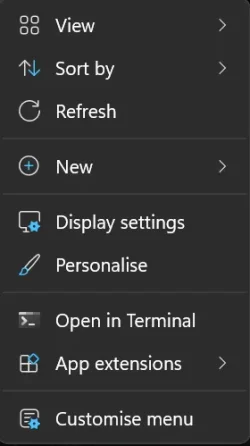
At the bottom of the new context menu, you’ll now find Customize menu, as a shortcut to its Settings page, where you can shape the menu around your preferences, your habits, or the years of muscle memory you’ve built with a specific configuration.

Starting with Windows 11 build 26340.9482 (Experimental 26H2) for Insiders, you can now turn off the customize context menu entry in the new context menu settings.

Reference:

This does not affect the Shift + Right click classic Show more options context menu.


If you don't have the new Customize menu context menu settings feature in the builds above yet and would like to test it now, then you can use the vivetool command below to enable this feature.

vivetool.exe /enable /id:60813048,61934903,49453572



Contents

  • Option One: Add or Remove "Customize menu" on Context Menu in Settings
  • Option Two: Add or Remove "Customize menu" on Context Menu using REG file


EXAMPLE: "Customize menu" on modern context menu

Customize_menu.webp


Option One

Add or Remove "Customize menu" on Context Menu in Settings


1 Open Settings (Win+I).

2 Click/tap on Personalization in the left pane, and click/tap on Context menu. (see screenshot below)


Context_menu_Settings-1.webp

3 Under Additional options, turn On (add - default) or Off (remove) Show "Customize menu" on the context menu for what you want. (see screenshot below)

Context_menu_Settings-2.webp

4 You can now close Settings if you like.


Option Two

Add or Remove "Customize menu" on Context Menu using REG file


1 Do step 2 (on) or step 3 (off) below for what you would like to do.

2 Add "Customize menu" to Context Menu

This is the default setting.


A) Click/tap on the Download button below to download the REG file below, and go to step 4 below.​

Add_Customize_menu_from_context_menu.reg​


(Contents of REG file for reference)
Code:
Windows Registry Editor Version 5.00

[HKEY_CURRENT_USER\Software\Microsoft\Windows\CurrentVersion\Explorer\ContextMenu\Preferences\ShowCustomizeMenu]
"Enabled"=dword:00000001

3 Remove "Customize menu" from Context Menu

A) Click/tap on the Download button below to download the REG file below, and go to step 4 below.​

Remove_Customize_menu_from_context_menu.reg​


(Contents of REG file for reference)
Code:
Windows Registry Editor Version 5.00

[HKEY_CURRENT_USER\Software\Microsoft\Windows\CurrentVersion\Explorer\ContextMenu\Preferences\ShowCustomizeMenu]
"Enabled"=dword:00000000

4 Save the .reg file to your desktop.

5 If you have Smart App Control turned on, you will need to unblock the downloaded REG file.

6 Double click/tap on the downloaded .reg file to merge it.

7 When prompted, click/tap on Run, Yes (UAC), Yes, and OK to approve the merge.

8 You can now delete the downloaded .reg file if you like.


That's it,
Shawn Brink


Attachments

Last edited:
The registry updated, but It did not work for me (26H).
i dont have Personalization > Context menu Settings (may be via ViVeTool? ) at all on my settings:unsure:
maybe new CLSID can do it ....
 
Last edited:

My Computers My Computers

  • At a glance

    win11 proIntel® Core 7 240H, 10C (6P + 4E) / 16T, P-co...16GB SO-DIMM DDR5-5200Integrated Intel® Graphics
    OS
    win11 pro
    Computer type
    PC/Desktop
    Manufacturer/Model
    All-in-One Lenovo IdeaCentre AIO 24IRH9 F0HN00X9IV
    CPU
    Intel® Core 7 240H, 10C (6P + 4E) / 16T, P-core 2.5 / 5
    Motherboard
    All-in-One Lenovo
    Memory
    16GB SO-DIMM DDR5-5200
    Graphics Card(s)
    Integrated Intel® Graphics
    Sound Card
    High Definition (HD) Audio, Realtek® ALC233-CG codec
    Monitor(s) Displays
    23.8" ',IPS, 16:9, Contrast Ratio 1300:1, Color Gamut 99% sRGB, Refresh Rate 100HZ
    Screen Resolution
    FHD (1920x1080)
    Hard Drives
    1TB SSD M.2 2280 PCIe® 4.0x4 NVMe®
    Antivirus
    Defender
    Other Info
    Full CPU details - Intel® Core 7 240H, 10C (6P + 4E) / 16T, P-core 2.5 / 5.2GHz, E-core 1.8 / 4.0GHz, 24MB Intel Smart Cache
  • 98SE/XP/windows7 32bit/ win10
The registry updated, but It did not work for me (26H).
i dont have Personalization > Context menu Settings (may be via ViVeTool? ) at all on my settings:unsure:
maybe new CLSID can do it ....

Hello, :alien:

Just to confirm, do you have the latest Insider Experimental (26H2) build installed?

If so, then you could try the vivetool command at the top of this tutorial to enable to the new Context Menu.
 

My Computers My Computers

  • At a glance

    Windows 11 Pro for WorkstationsIntel i7-8700K 5 GHz64 GB (4x16GB) G.SKILL TridentZ RGB DDR4 3600...ASUS ROG-STRIX-GTX1080TI-O11G-GAMING (11GB GD...
    OS
    Windows 11 Pro for Workstations
    Computer type
    PC/Desktop
    Manufacturer/Model
    Custom self build
    CPU
    Intel i7-8700K 5 GHz
    Motherboard
    ASUS ROG Maximus XI Formula Z390
    Memory
    64 GB (4x16GB) G.SKILL TridentZ RGB DDR4 3600 MHz (F4-3600C18D-32GTZR)
    Graphics Card(s)
    ASUS ROG-STRIX-GTX1080TI-O11G-GAMING (11GB GDDR5X)
    Sound Card
    Integrated Digital Audio (S/PDIF)
    Monitor(s) Displays
    2 x Samsung Odyssey G75 27"
    Screen Resolution
    2560x1440
    Hard Drives
    1TB Samsung 990 PRO M.2,
    4TB Samsung 990 PRO M.2,
    TerraMaster F8 SSD Plus NAS
    PSU
    Seasonic Prime Titanium 850W
    Case
    Thermaltake Core P3 wall mounted
    Cooling
    Corsair Hydro H115i
    Keyboard
    Amazon Basics Wired Full Keyboard MD005
    Mouse
    Logitech MX Master 4
    Internet Speed
    2 Gbps Download and 100 Mbps Upload
    Browser
    Chrome and Edge
    Antivirus
    Microsoft Defender
    Other Info
    Logitech Z625 speaker system,
    Logitech BRIO 4K Pro webcam,
    HP Color LaserJet Pro MFP M477fdn,
    CyberPower CP1500PFCLCD
    Galaxy S23 Plus phone
  • At a glance

    Windows 11 ProSnapdragon X Elite (12 core) 3.42 GHz16 GB LPDDR5x-7467 MHz
    Operating System
    Windows 11 Pro
    Computer type
    Laptop
    Manufacturer/Model
    Surface Laptop 7 Copilot+ PC
    CPU
    Snapdragon X Elite (12 core) 3.42 GHz
    Memory
    16 GB LPDDR5x-7467 MHz
    Monitor(s) Displays
    15" HDR
    Screen Resolution
    2496 x 1664
    Hard Drives
    1 TB SSD
    Internet Speed
    Wi-Fi 7 and Bluetooth 5.4
    Browser
    Chrome and Edge
    Antivirus
    Microsoft Defender
Hi,
i dont think i've the Insider Experimental build.
my os builld is 26300.9711.
think i can use the registry tweak?
i really want to use "Customize menu" option....
 

My Computers My Computers

  • At a glance

    win11 proIntel® Core 7 240H, 10C (6P + 4E) / 16T, P-co...16GB SO-DIMM DDR5-5200Integrated Intel® Graphics
    OS
    win11 pro
    Computer type
    PC/Desktop
    Manufacturer/Model
    All-in-One Lenovo IdeaCentre AIO 24IRH9 F0HN00X9IV
    CPU
    Intel® Core 7 240H, 10C (6P + 4E) / 16T, P-core 2.5 / 5
    Motherboard
    All-in-One Lenovo
    Memory
    16GB SO-DIMM DDR5-5200
    Graphics Card(s)
    Integrated Intel® Graphics
    Sound Card
    High Definition (HD) Audio, Realtek® ALC233-CG codec
    Monitor(s) Displays
    23.8" ',IPS, 16:9, Contrast Ratio 1300:1, Color Gamut 99% sRGB, Refresh Rate 100HZ
    Screen Resolution
    FHD (1920x1080)
    Hard Drives
    1TB SSD M.2 2280 PCIe® 4.0x4 NVMe®
    Antivirus
    Defender
    Other Info
    Full CPU details - Intel® Core 7 240H, 10C (6P + 4E) / 16T, P-core 2.5 / 5.2GHz, E-core 1.8 / 4.0GHz, 24MB Intel Smart Cache
  • 98SE/XP/windows7 32bit/ win10
build is 263 xxx is Insider as far as i know. maybe Lenovo blocked the option?
 

My Computers My Computers

  • At a glance

    win11 proIntel® Core 7 240H, 10C (6P + 4E) / 16T, P-co...16GB SO-DIMM DDR5-5200Integrated Intel® Graphics
    OS
    win11 pro
    Computer type
    PC/Desktop
    Manufacturer/Model
    All-in-One Lenovo IdeaCentre AIO 24IRH9 F0HN00X9IV
    CPU
    Intel® Core 7 240H, 10C (6P + 4E) / 16T, P-core 2.5 / 5
    Motherboard
    All-in-One Lenovo
    Memory
    16GB SO-DIMM DDR5-5200
    Graphics Card(s)
    Integrated Intel® Graphics
    Sound Card
    High Definition (HD) Audio, Realtek® ALC233-CG codec
    Monitor(s) Displays
    23.8" ',IPS, 16:9, Contrast Ratio 1300:1, Color Gamut 99% sRGB, Refresh Rate 100HZ
    Screen Resolution
    FHD (1920x1080)
    Hard Drives
    1TB SSD M.2 2280 PCIe® 4.0x4 NVMe®
    Antivirus
    Defender
    Other Info
    Full CPU details - Intel® Core 7 240H, 10C (6P + 4E) / 16T, P-core 2.5 / 5.2GHz, E-core 1.8 / 4.0GHz, 24MB Intel Smart Cache
  • 98SE/XP/windows7 32bit/ win10
Hi,
i dont think i've the Insider Experimental build.
my os builld is 26300.9711.
think i can use the registry tweak?
i really want to use "Customize menu" option....

Nar, you have the latest public release build. Not Insider.

It shouldn't be too much longer before this is out in the public builds though. Maybe by next preview (Oct. 27) or Patch Tuesday (Nov. 10).
 

My Computers My Computers

  • At a glance

    Windows 11 Pro for WorkstationsIntel i7-8700K 5 GHz64 GB (4x16GB) G.SKILL TridentZ RGB DDR4 3600...ASUS ROG-STRIX-GTX1080TI-O11G-GAMING (11GB GD...
    OS
    Windows 11 Pro for Workstations
    Computer type
    PC/Desktop
    Manufacturer/Model
    Custom self build
    CPU
    Intel i7-8700K 5 GHz
    Motherboard
    ASUS ROG Maximus XI Formula Z390
    Memory
    64 GB (4x16GB) G.SKILL TridentZ RGB DDR4 3600 MHz (F4-3600C18D-32GTZR)
    Graphics Card(s)
    ASUS ROG-STRIX-GTX1080TI-O11G-GAMING (11GB GDDR5X)
    Sound Card
    Integrated Digital Audio (S/PDIF)
    Monitor(s) Displays
    2 x Samsung Odyssey G75 27"
    Screen Resolution
    2560x1440
    Hard Drives
    1TB Samsung 990 PRO M.2,
    4TB Samsung 990 PRO M.2,
    TerraMaster F8 SSD Plus NAS
    PSU
    Seasonic Prime Titanium 850W
    Case
    Thermaltake Core P3 wall mounted
    Cooling
    Corsair Hydro H115i
    Keyboard
    Amazon Basics Wired Full Keyboard MD005
    Mouse
    Logitech MX Master 4
    Internet Speed
    2 Gbps Download and 100 Mbps Upload
    Browser
    Chrome and Edge
    Antivirus
    Microsoft Defender
    Other Info
    Logitech Z625 speaker system,
    Logitech BRIO 4K Pro webcam,
    HP Color LaserJet Pro MFP M477fdn,
    CyberPower CP1500PFCLCD
    Galaxy S23 Plus phone
  • At a glance

    Windows 11 ProSnapdragon X Elite (12 core) 3.42 GHz16 GB LPDDR5x-7467 MHz
    Operating System
    Windows 11 Pro
    Computer type
    Laptop
    Manufacturer/Model
    Surface Laptop 7 Copilot+ PC
    CPU
    Snapdragon X Elite (12 core) 3.42 GHz
    Memory
    16 GB LPDDR5x-7467 MHz
    Monitor(s) Displays
    15" HDR
    Screen Resolution
    2496 x 1664
    Hard Drives
    1 TB SSD
    Internet Speed
    Wi-Fi 7 and Bluetooth 5.4
    Browser
    Chrome and Edge
    Antivirus
    Microsoft Defender
Thanks,
guess I'll wait ;-)
 

My Computers My Computers

  • At a glance

    win11 proIntel® Core 7 240H, 10C (6P + 4E) / 16T, P-co...16GB SO-DIMM DDR5-5200Integrated Intel® Graphics
    OS
    win11 pro
    Computer type
    PC/Desktop
    Manufacturer/Model
    All-in-One Lenovo IdeaCentre AIO 24IRH9 F0HN00X9IV
    CPU
    Intel® Core 7 240H, 10C (6P + 4E) / 16T, P-core 2.5 / 5
    Motherboard
    All-in-One Lenovo
    Memory
    16GB SO-DIMM DDR5-5200
    Graphics Card(s)
    Integrated Intel® Graphics
    Sound Card
    High Definition (HD) Audio, Realtek® ALC233-CG codec
    Monitor(s) Displays
    23.8" ',IPS, 16:9, Contrast Ratio 1300:1, Color Gamut 99% sRGB, Refresh Rate 100HZ
    Screen Resolution
    FHD (1920x1080)
    Hard Drives
    1TB SSD M.2 2280 PCIe® 4.0x4 NVMe®
    Antivirus
    Defender
    Other Info
    Full CPU details - Intel® Core 7 240H, 10C (6P + 4E) / 16T, P-core 2.5 / 5.2GHz, E-core 1.8 / 4.0GHz, 24MB Intel Smart Cache
  • 98SE/XP/windows7 32bit/ win10
So I'm on the new public build build 26300.9818 and I used vivetool to enable the new context menu but the option in Personalize>Context Menu for disabling the Customize Menu entry isn't there.

Also using Remove_Customize_menu_from_context_menu.reg doesn't hide it either it's still there after :(
I confirmed it does make the changes to the registry so weird it's not working.
 
Last edited:

My Computer My Computer

At a glance

Windows 11
OS
Windows 11
Computer type
PC/Desktop
So I'm on the new public build build 26300.9818 and I used vivetool to enable the new context menu but the option in Personalize>Context Menu for disabling the Customize Menu entry isn't there.

Also using Remove_Customize_menu_from_context_menu.reg doesn't hide it either it's still there after :(
I confirmed it does make the changes to the registry so weird it's not working.

Hello, and welcome to the forum. :alien:

Just to confirm, do you have the setting in option 1?

If not, then the reg file will not work yet for you.
 

My Computers My Computers

  • At a glance

    Windows 11 Pro for WorkstationsIntel i7-8700K 5 GHz64 GB (4x16GB) G.SKILL TridentZ RGB DDR4 3600...ASUS ROG-STRIX-GTX1080TI-O11G-GAMING (11GB GD...
    OS
    Windows 11 Pro for Workstations
    Computer type
    PC/Desktop
    Manufacturer/Model
    Custom self build
    CPU
    Intel i7-8700K 5 GHz
    Motherboard
    ASUS ROG Maximus XI Formula Z390
    Memory
    64 GB (4x16GB) G.SKILL TridentZ RGB DDR4 3600 MHz (F4-3600C18D-32GTZR)
    Graphics Card(s)
    ASUS ROG-STRIX-GTX1080TI-O11G-GAMING (11GB GDDR5X)
    Sound Card
    Integrated Digital Audio (S/PDIF)
    Monitor(s) Displays
    2 x Samsung Odyssey G75 27"
    Screen Resolution
    2560x1440
    Hard Drives
    1TB Samsung 990 PRO M.2,
    4TB Samsung 990 PRO M.2,
    TerraMaster F8 SSD Plus NAS
    PSU
    Seasonic Prime Titanium 850W
    Case
    Thermaltake Core P3 wall mounted
    Cooling
    Corsair Hydro H115i
    Keyboard
    Amazon Basics Wired Full Keyboard MD005
    Mouse
    Logitech MX Master 4
    Internet Speed
    2 Gbps Download and 100 Mbps Upload
    Browser
    Chrome and Edge
    Antivirus
    Microsoft Defender
    Other Info
    Logitech Z625 speaker system,
    Logitech BRIO 4K Pro webcam,
    HP Color LaserJet Pro MFP M477fdn,
    CyberPower CP1500PFCLCD
    Galaxy S23 Plus phone
  • At a glance

    Windows 11 ProSnapdragon X Elite (12 core) 3.42 GHz16 GB LPDDR5x-7467 MHz
    Operating System
    Windows 11 Pro
    Computer type
    Laptop
    Manufacturer/Model
    Surface Laptop 7 Copilot+ PC
    CPU
    Snapdragon X Elite (12 core) 3.42 GHz
    Memory
    16 GB LPDDR5x-7467 MHz
    Monitor(s) Displays
    15" HDR
    Screen Resolution
    2496 x 1664
    Hard Drives
    1 TB SSD
    Internet Speed
    Wi-Fi 7 and Bluetooth 5.4
    Browser
    Chrome and Edge
    Antivirus
    Microsoft Defender
Hello, and welcome to the forum. :alien:

Just to confirm, do you have the setting in option 1?

If not, then the reg file will not work yet for you.
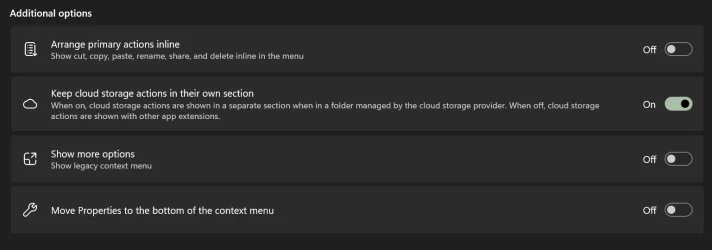
I do have Personalize>Context Menu but not the "Show "Customize menu" on the context menu" On or Off toggle.

Customize menu is in my context menu but I can't hide it. Setting for it isn't there in Personalize>Context Menu and yeah you're right using the reg file doesn't hide it either.

So is there no way to hide it if I don't have that option in Personalize>Context Menu? Guessing if not I'll have to wait for another update to enable that option on public release channel.
 

Attachments

  • PersonalizeContextAdditional.webp
    PersonalizeContextAdditional.webp
    29.4 KB · Views: 1
  • context menu.webp
    context menu.webp
    9.6 KB · Views: 1
Last edited:

My Computer My Computer

At a glance

Windows 11
OS
Windows 11
Computer type
PC/Desktop
I do have Personalize>Context Menu but not the "Show "Customize menu" on the context menu" On or Off toggle.

Customize menu is in my context menu but I can't hide it. Setting for it isn't there in Personalize>Context Menu and yeah you're right using the reg file doesn't hide it either.

So is there no way to hide it if I don't have that option in Personalize>Context Menu? Guessing if not I'll have to wait for another update to enable that option on public release channel.

Yeah, you'll may have to wait until the rest of the settings for it roll out, but you can try the vivetool command below to see if it may enable all the settings.

vivetool.exe /enable /id:60813048,61934903,49453572
 

My Computers My Computers

  • At a glance

    Windows 11 Pro for WorkstationsIntel i7-8700K 5 GHz64 GB (4x16GB) G.SKILL TridentZ RGB DDR4 3600...ASUS ROG-STRIX-GTX1080TI-O11G-GAMING (11GB GD...
    OS
    Windows 11 Pro for Workstations
    Computer type
    PC/Desktop
    Manufacturer/Model
    Custom self build
    CPU
    Intel i7-8700K 5 GHz
    Motherboard
    ASUS ROG Maximus XI Formula Z390
    Memory
    64 GB (4x16GB) G.SKILL TridentZ RGB DDR4 3600 MHz (F4-3600C18D-32GTZR)
    Graphics Card(s)
    ASUS ROG-STRIX-GTX1080TI-O11G-GAMING (11GB GDDR5X)
    Sound Card
    Integrated Digital Audio (S/PDIF)
    Monitor(s) Displays
    2 x Samsung Odyssey G75 27"
    Screen Resolution
    2560x1440
    Hard Drives
    1TB Samsung 990 PRO M.2,
    4TB Samsung 990 PRO M.2,
    TerraMaster F8 SSD Plus NAS
    PSU
    Seasonic Prime Titanium 850W
    Case
    Thermaltake Core P3 wall mounted
    Cooling
    Corsair Hydro H115i
    Keyboard
    Amazon Basics Wired Full Keyboard MD005
    Mouse
    Logitech MX Master 4
    Internet Speed
    2 Gbps Download and 100 Mbps Upload
    Browser
    Chrome and Edge
    Antivirus
    Microsoft Defender
    Other Info
    Logitech Z625 speaker system,
    Logitech BRIO 4K Pro webcam,
    HP Color LaserJet Pro MFP M477fdn,
    CyberPower CP1500PFCLCD
    Galaxy S23 Plus phone
  • At a glance

    Windows 11 ProSnapdragon X Elite (12 core) 3.42 GHz16 GB LPDDR5x-7467 MHz
    Operating System
    Windows 11 Pro
    Computer type
    Laptop
    Manufacturer/Model
    Surface Laptop 7 Copilot+ PC
    CPU
    Snapdragon X Elite (12 core) 3.42 GHz
    Memory
    16 GB LPDDR5x-7467 MHz
    Monitor(s) Displays
    15" HDR
    Screen Resolution
    2496 x 1664
    Hard Drives
    1 TB SSD
    Internet Speed
    Wi-Fi 7 and Bluetooth 5.4
    Browser
    Chrome and Edge
    Antivirus
    Microsoft Defender
Added to Leader Board.
 

My Computers My Computers

  • At a glance

    Win 11 Home 26H2 26300.9818AMD Ryzen 7 3700XG.Skill (F4-3200C14D-16GTZKW)EVGA RTX 2070 (08G-P4-2171-KR)
    OS
    Win 11 Home 26H2 26300.9818
    Computer type
    PC/Desktop
    Manufacturer/Model
    Built by Ghot® [May 2020]
    CPU
    AMD Ryzen 7 3700X
    Motherboard
    Asus Pro WS X570-ACE (BIOS 5302)
    Memory
    G.Skill (F4-3200C14D-16GTZKW)
    Graphics Card(s)
    EVGA RTX 2070 (08G-P4-2171-KR)
    Sound Card
    Realtek ALC1220P / ALC S1220A
    Monitor(s) Displays
    Dell U3011 30"
    Screen Resolution
    2560 x 1600
    Hard Drives
    2x Samsung 860 EVO 500GB,
    WD 4TB Black FZBX - SATA III,
    WD 8TB Black FZBX - SATA III,
    DRW-24B1ST CD/DVD Burner
    PSU
    PC Power & Cooling 750W Quad EPS12V
    Case
    Cooler Master ATCS 840 Tower
    Cooling
    CM Hyper 212 EVO (push/pull)
    Keyboard
    Ducky DK9008 Shine II Blue LED
    Mouse
    Logitech Optical M-100
    Internet Speed
    300/300
    Browser
    Firefox (latest)
    Antivirus
    Bitdefender Total Security
    Other Info
    Speakers: Klipsch Pro Media 2.1
  • At a glance

    Windows XP Pro 32bit w/SP3AMD Athlon 64 X2 5000+ (OC'd @ 3.2Ghz)TWIN2X2048-6400C4DHX (2 x 1GB, DDR2 800)EVGA 256-P2-N758-TR GeForce 8600GT SSC
    Operating System
    Windows XP Pro 32bit w/SP3
    Computer type
    PC/Desktop
    Manufacturer/Model
    Built by Ghot® (not in use)
    CPU
    AMD Athlon 64 X2 5000+ (OC'd @ 3.2Ghz)
    Motherboard
    ASUS M2N32-SLI Deluxe Wireless Edition
    Memory
    TWIN2X2048-6400C4DHX (2 x 1GB, DDR2 800)
    Graphics card(s)
    EVGA 256-P2-N758-TR GeForce 8600GT SSC
    Sound Card
    Onboard
    Monitor(s) Displays
    ViewSonic G90FB Black 19" Professional (CRT)
    Screen Resolution
    up to 2048 x 1536
    Hard Drives
    WD 36GB 10,000rpm Raptor SATA
    Seagate 80GB 7200rpm SATA
    Lite-On LTR-52246S CD/RW
    Lite-On LH-18A1P CD/DVD Burner
    PSU
    PC Power & Cooling Silencer 750 Quad EPS12V
    Case
    Generic Beige case, 80mm fans
    Cooling
    ZALMAN 9500A 92mm CPU Cooler
    Keyboard
    Logitech Classic Keybooard 200
    Mouse
    Logitech Optical M-BT96a
    Internet Speed
    300/300
    Browser
    Firefox 3.x ??
    Antivirus
    Symantec (Norton)
    Other Info
    Still assembled, still runs. Haven't turned it on for 15 years?
vivetool.exe /enable /id:60813048,61934903,49453572

I was able to do it with just:

vivetool.exe /enable /id:60813048

I have the classic win 10 menu and wanted to go back to it so I reset the setting.

vivetool.exe /reset /id:60813048
 

My Computer My Computer

At a glance

Windows 11 Pro
OS
Windows 11 Pro
I also read that if you have the new context menu and want to use the Win 10 style menu hold down Shift then right click.

Screenshot 2026-10-30 122508.webp
 

My Computer My Computer

At a glance

Windows 11 Pro
OS
Windows 11 Pro
Yeah, you'll may have to wait until the rest of the settings for it roll out, but you can try the vivetool command below to see if it may enable all the settings.

vivetool.exe /enable /id:60813048,61934903,49453572

Enabling 49453572 didn't but enabling 61934903 did the trick thank you!
 

My Computer My Computer

At a glance

Windows 11
OS
Windows 11
Computer type
PC/Desktop

My Computers My Computers

  • At a glance

    Windows 11 Pro for WorkstationsIntel i7-8700K 5 GHz64 GB (4x16GB) G.SKILL TridentZ RGB DDR4 3600...ASUS ROG-STRIX-GTX1080TI-O11G-GAMING (11GB GD...
    OS
    Windows 11 Pro for Workstations
    Computer type
    PC/Desktop
    Manufacturer/Model
    Custom self build
    CPU
    Intel i7-8700K 5 GHz
    Motherboard
    ASUS ROG Maximus XI Formula Z390
    Memory
    64 GB (4x16GB) G.SKILL TridentZ RGB DDR4 3600 MHz (F4-3600C18D-32GTZR)
    Graphics Card(s)
    ASUS ROG-STRIX-GTX1080TI-O11G-GAMING (11GB GDDR5X)
    Sound Card
    Integrated Digital Audio (S/PDIF)
    Monitor(s) Displays
    2 x Samsung Odyssey G75 27"
    Screen Resolution
    2560x1440
    Hard Drives
    1TB Samsung 990 PRO M.2,
    4TB Samsung 990 PRO M.2,
    TerraMaster F8 SSD Plus NAS
    PSU
    Seasonic Prime Titanium 850W
    Case
    Thermaltake Core P3 wall mounted
    Cooling
    Corsair Hydro H115i
    Keyboard
    Amazon Basics Wired Full Keyboard MD005
    Mouse
    Logitech MX Master 4
    Internet Speed
    2 Gbps Download and 100 Mbps Upload
    Browser
    Chrome and Edge
    Antivirus
    Microsoft Defender
    Other Info
    Logitech Z625 speaker system,
    Logitech BRIO 4K Pro webcam,
    HP Color LaserJet Pro MFP M477fdn,
    CyberPower CP1500PFCLCD
    Galaxy S23 Plus phone
  • At a glance

    Windows 11 ProSnapdragon X Elite (12 core) 3.42 GHz16 GB LPDDR5x-7467 MHz
    Operating System
    Windows 11 Pro
    Computer type
    Laptop
    Manufacturer/Model
    Surface Laptop 7 Copilot+ PC
    CPU
    Snapdragon X Elite (12 core) 3.42 GHz
    Memory
    16 GB LPDDR5x-7467 MHz
    Monitor(s) Displays
    15" HDR
    Screen Resolution
    2496 x 1664
    Hard Drives
    1 TB SSD
    Internet Speed
    Wi-Fi 7 and Bluetooth 5.4
    Browser
    Chrome and Edge
    Antivirus
    Microsoft Defender
This feature has got a loooooong way to go. I used Vivetool to enable it on my test machine, and I've got two menu items I never use that I can't remove, "Compress to" and "Add to favorites". I don't even know what "Favorites" are WRT the text file I just clicked on. That's not even the worst of it. Most of my extensions aren't available to be managed as App Extensions in Settings. The only one that turned up there was WinRAR, putting a double exclamation point on the unwanted "Compress to", but WinMerge, my custom Hash values submenu, and others don't show. Even "Scan with Microsoft Defender" requires opening the old menu, and it remains quite the overstatement to call it "the legacy menu". I hope they figure it out, because clicking a folder on my main system produces a "legacy" menu that's maybe 70% of my screen height, which is ridiculous.
 

My Computer My Computer

At a glance

Windows 11
OS
Windows 11
Back
Top Bottom