Phone Add or Remove Phone Link Mobile Device on Start Menu in Windows 11


Phone_Link.png

This tutorial will show you how to turn on or off show your Android or iPhone mobile device from Phone Link in the Start menu for your account in Windows 11.

Starting with Windows 11 build 26100.3915 (24H2) and build 22631.5262 (23H2), you can directly access content on your mobile device from the Start menu on your PC. Using this feature, you can view your device’s battery status and connectivity, access your voice messages, calls, and photos, and pick up where you left off with the latest activities on your device. Only Android users who are already connected using Phone Link can get this feature. iOS support will be coming later.

Key features include:
  • Effortless Connectivity: View your phone’s battery status and connectivity right from the Start menu on your Windows 11 PC.
  • Unified Communication: Access your phone messages, calls, and photos directly from Start, ensuring you never miss an important update or moment.
  • Continuity of Experience: Pick up where you left off with the latest activities from your phone, all seamlessly integrated into your Start menu experience.
This feature is gradually rolling out to the Windows Insider community and available only for Android users on Windows 11 who are already connected via Phone Link. iOS support will be coming at a later date.

UPDATE 1/28: Connected iPhone users can now access their phone features directly from the Start menu. This seamless integration allows iPhone users to enjoy the same benefits as Android users, including ability to view phone’s battery status and connectivity, ability to access messages and calls, and keeping track of the latest activities, all conveniently integrated into the Start menu.

Microsoft previewed the ability to share files between your devices in December. Now, you can easily send files across your devices (Android/iPhone and Windows PC) right from the Start menu. Select “Send files” to begin transferring.

Requirements:
  • Your PC must be signed in with a Microsoft account and must have Bluetooth LE capability.
  • Not supported for PCs running Pro Education or Education SKUs.
Starting with Windows 11 build 26200.5622 (Dev 24H2), build 26120.4230 (Beta 24H2), and build 27871.1000 (Canary), the following improvements for Phone Link and phone companion with the Start menu are rolling out to Windows Insiders across all channels:
  • Instantly see notifications from your mobile device apps — grouped by app for easy catch-up, right from your Start menu.
  • Mirror your Android device’s screen with a single click from your Start menu. Simply click on your device’s icon or access the option from the footer menu to quickly launch device screen mirroring.
  • Your iPhone memories are now accessible from the Start menu. Windows iCloud app users can see recently synced photos and quickly access their iCloud photos all within the Start menu.
Starting with Windows 11 build 26100.7019 (24H2) and build 26200.7019 (25H2), you can easily expand and collapse mobile device content using the new mobile device button next to the Search box.

Starting with Windows 11 build 26200.5742 (Dev 25H2), Microsoft has redesigned the mobile device companion with an updated layout that lets you access more right from Start. Now, you can scroll to access more recent activity items so you can stay on top of updates from your mobile device. Users will be able to access messages, calls, photos, mobile app updates and more from this new updated layout.

References:


Contents

  • Option One: Hide or Show Phone Link Mobile Device on Start Menu
  • Option Two: Hide or Show Phone Link Mobile Device on Start Menu using REG file
  • Option Three: Turn On or Off Show Phone Link Mobile Device on Start Menu in Settings
  • Option Fur: Turn On or Off Show Phone Link Mobile Device on Start Menu using REG file


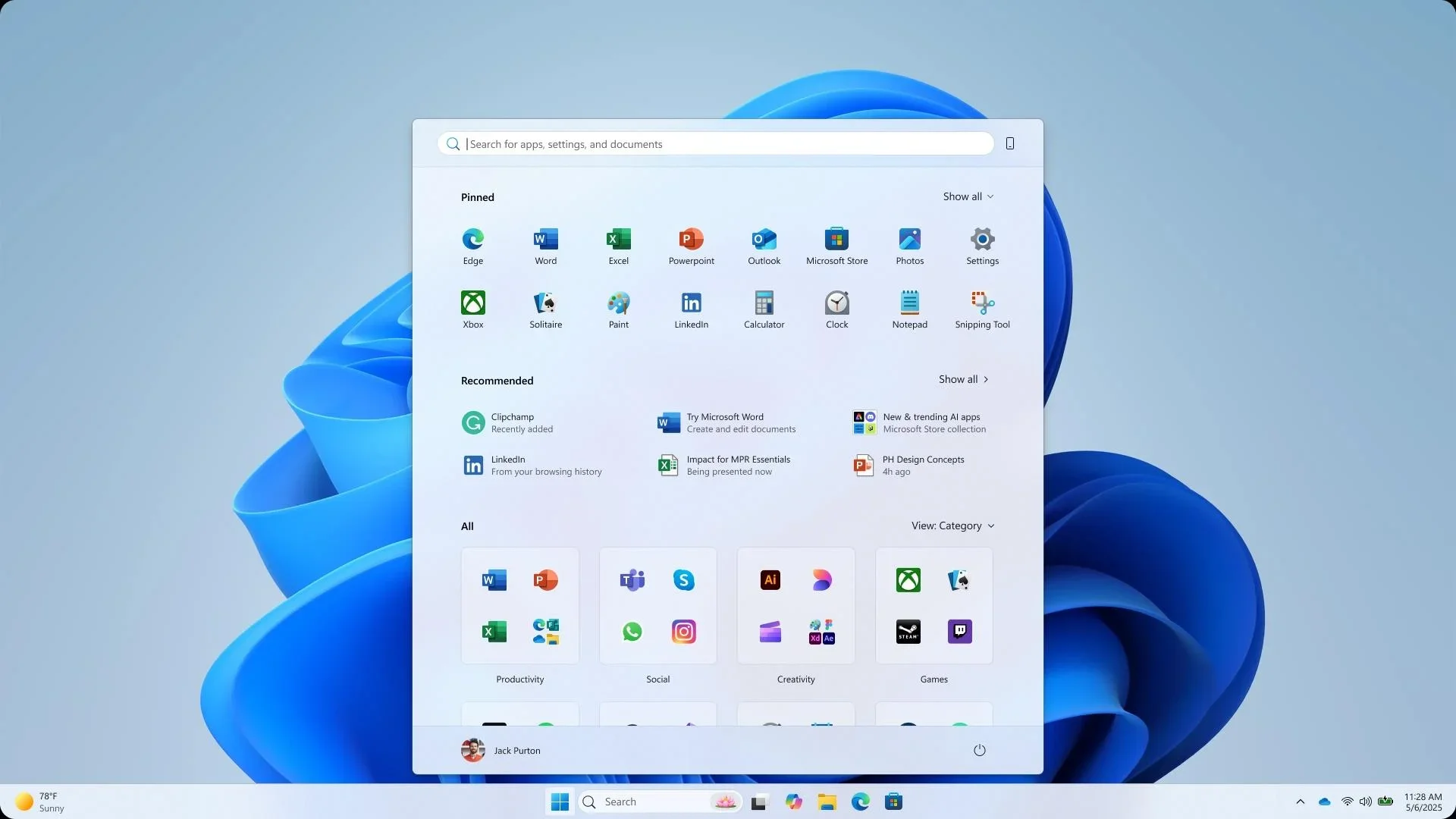
EXAMPLE: Mobile device showing on Start Menu

Show_mobile_device_in_Start.png


Option One

Hide or Show Phone Link Mobile Device on Start Menu


This option requires Show mobile device in Start turned on in either Option Three or Option Four.


1 Open the Start Menu :win:

2 Click/tap on the Mobile device (phone) button to toggle show (default) or hide for what you want. (see screenshots below)

Hide_mobile_device_on_Start.webp
Show_mobile_device_on_Start.webp


Option Two

Hide or Show Phone Link Mobile Device on Start Menu using REG file


This option requires Show mobile device in Start turned on in either Option Three or Option Four.


1 Do step 2 (show) or step 3 (hide) below for what you want.


 2. Show Phone Link Mobile Device on Start Menu

This is the default setting.


A) Click/tap on the Download button below to download the file below, and go to step 4 below.​

Show_mobile_device_right_pane_on_Start.reg


(Contents of REG file for reference)
Code:
Windows Registry Editor Version 5.00

[HKEY_CURRENT_USER\Software\Microsoft\Windows\CurrentVersion\Start]
"RightCompanionToggledOpen"=dword:00000001


 3. Hide Phone Link Mobile Device on Start Menu

A) Click/tap on the Download button below to download the file below, and go to step 4 below.​

Hide_mobile_device_right_pane_on_Start.reg


(Contents of REG file for reference)
Code:
Windows Registry Editor Version 5.00

[HKEY_CURRENT_USER\Software\Microsoft\Windows\CurrentVersion\Start]
"RightCompanionToggledOpen"=dword:00000000

4 Save the .reg file to your desktop.

5 If you have Smart App Control turned on, you will need to unblock the downloaded REG file.

6 Double click/tap on the downloaded .reg file to merge it.

7 When prompted, click/tap on Run, Yes (UAC), Yes, and OK to approve the merge.

8 You could now delete the downloaded .reg file if you like.


Option Three

Turn On or Off Show Phone Link Mobile Device on Start Menu in Settings


1 Open Settings (Win+I).

2 Click/tap on Personalization on the left side, and click/tap on Start on the right side. (see screenshot below)


Show_mobile_device_in_Start-1.png

3 Under Other settings, turn On (add - default) or Off (remove) Show mobile device in Start for what you want. (see screenshot below)

Show_mobile_device_in_Start-2.webp

4 You can now close Settings if you like.


Option Four

Turn On or Off Show Phone Link Mobile Device on Start Menu using REG file


1 Do step 2 (add) or step 3 (remove) below for what you would like to do.

2 Turn On Show Phone Link Mobile Device on Start Menu

This is the default setting.


A) Click/tap on the Download button below to download the file below, and go to step 4 below.​

Turn_ON_Show_mobile_device_in_Start.reg


(Contents of REG file for reference)
Code:
Windows Registry Editor Version 5.00

[HKEY_CURRENT_USER\Software\Microsoft\Windows\CurrentVersion\Start\Companions\Microsoft.YourPhone_8wekyb3d8bbwe]
"IsEnabled"=dword:00000001

3 Turn Off Show Phone Link Mobile Device on Start Menu

A) Click/tap on the Download button below to download the file below, and go to step 4 below.​

Turn_OFF_Show_mobile_device_in_Start.reg


(Contents of REG file for reference)
Code:
Windows Registry Editor Version 5.00

[HKEY_CURRENT_USER\Software\Microsoft\Windows\CurrentVersion\Start\Companions\Microsoft.YourPhone_8wekyb3d8bbwe]
"IsEnabled"=dword:00000000

4 Save the .reg file to your desktop.

5 If you have Smart App Control turned on, you will need to unblock the downloaded REG file.

6 Double click/tap on the downloaded .reg file to merge it.

7 When prompted, click/tap on Run, Yes (UAC), Yes, and OK to approve the merge.

8 You could now delete the downloaded .reg file if you like.


That's it,
Shawn Brink


Attachments

Last edited:
  • Like
Reactions: x_1
There are 3 hours left, let's see, will we all have this phone link at the start?
 

My Computer My Computer

At a glance

Win11Pro Dev 25H2 26220.6972
OS
Win11Pro Dev 25H2 26220.6972
Computer type
PC/Desktop
Screen Resolution
4k
Browser
Microsoft Edge Beta
Antivirus
Eset Smart Security Premium
Hello, :alien:

Have you already tried using the ViVeTool command at the top to enable the feature?
Thanks for replying. I'm hoping to avoid using 3rd party tools. I'll come back to it if I run out of other options.
 

My Computer My Computer

At a glance

Windows 11Intel Core Ultra 9 285K64GB (2x 32GB) G Skill F5-6000J3040G32GROG-Strix-RX6750XT
OS
Windows 11
Computer type
PC/Desktop
Manufacturer/Model
Custom
CPU
Intel Core Ultra 9 285K
Motherboard
ROG MAXIMUS Z890 HERO
Memory
64GB (2x 32GB) G Skill F5-6000J3040G32G
Graphics Card(s)
ROG-Strix-RX6750XT
Sound Card
On Board
Monitor(s) Displays
LG HDR 4K (DisplayPort)
Screen Resolution
3840 x 2160
Hard Drives
SAMSUNG SSD 9100 PRO 1TB | 1TB SAMSUNG HD103SI | 2TB WDC WD2002FAEX-007BA0
PSU
Seasonic Prime TX Series 850W 80+ Titanium
Case
Lian-Li O11 Dynamic EVO
Cooling
Lian Li Galahad II Trinity 360mm AIO
Keyboard
ROG Strix Scope II RX
Mouse
ROG Gladius III
Internet Speed
800Mbs/50Mbs
Browser
Edge
Antivirus
Malwarebytes Pro
Tutorial updated to add new option one. :alien:


My Computers My Computers

  • At a glance

    Windows 11 Pro for WorkstationsIntel i7-8700K 5 GHz64 GB (4x16GB) G.SKILL TridentZ RGB DDR4 3600...ASUS ROG-STRIX-GTX1080TI-O11G-GAMING (11GB GD...
    OS
    Windows 11 Pro for Workstations
    Computer type
    PC/Desktop
    Manufacturer/Model
    Custom self build
    CPU
    Intel i7-8700K 5 GHz
    Motherboard
    ASUS ROG Maximus XI Formula Z390
    Memory
    64 GB (4x16GB) G.SKILL TridentZ RGB DDR4 3600 MHz (F4-3600C18D-32GTZR)
    Graphics Card(s)
    ASUS ROG-STRIX-GTX1080TI-O11G-GAMING (11GB GDDR5X)
    Sound Card
    Integrated Digital Audio (S/PDIF)
    Monitor(s) Displays
    2 x Samsung Odyssey G75 27"
    Screen Resolution
    2560x1440
    Hard Drives
    1TB Samsung 990 PRO M.2,
    4TB Samsung 990 PRO M.2,
    TerraMaster F8 SSD Plus NAS
    PSU
    Seasonic Prime Titanium 850W
    Case
    Thermaltake Core P3 wall mounted
    Cooling
    Corsair Hydro H115i
    Keyboard
    Amazon Basics Wired Full Keyboard MD005
    Mouse
    Logitech MX Master 4
    Internet Speed
    2 Gbps Download and 100 Mbps Upload
    Browser
    Chrome and Edge
    Antivirus
    Microsoft Defender
    Other Info
    Logitech Z625 speaker system,
    Logitech BRIO 4K Pro webcam,
    HP Color LaserJet Pro MFP M477fdn,
    CyberPower CP1500PFCLCD
    Galaxy S23 Plus phone
  • At a glance

    Windows 11 ProSnapdragon X Elite (12 core) 3.42 GHz16 GB LPDDR5x-7467 MHz
    Operating System
    Windows 11 Pro
    Computer type
    Laptop
    Manufacturer/Model
    Surface Laptop 7 Copilot+ PC
    CPU
    Snapdragon X Elite (12 core) 3.42 GHz
    Memory
    16 GB LPDDR5x-7467 MHz
    Monitor(s) Displays
    15" HDR
    Screen Resolution
    2496 x 1664
    Hard Drives
    1 TB SSD
    Internet Speed
    Wi-Fi 7 and Bluetooth 5.4
    Browser
    Chrome and Edge
    Antivirus
    Microsoft Defender
Tutorial updated to add new option two. :alien:
 

My Computers My Computers

  • At a glance

    Windows 11 Pro for WorkstationsIntel i7-8700K 5 GHz64 GB (4x16GB) G.SKILL TridentZ RGB DDR4 3600...ASUS ROG-STRIX-GTX1080TI-O11G-GAMING (11GB GD...
    OS
    Windows 11 Pro for Workstations
    Computer type
    PC/Desktop
    Manufacturer/Model
    Custom self build
    CPU
    Intel i7-8700K 5 GHz
    Motherboard
    ASUS ROG Maximus XI Formula Z390
    Memory
    64 GB (4x16GB) G.SKILL TridentZ RGB DDR4 3600 MHz (F4-3600C18D-32GTZR)
    Graphics Card(s)
    ASUS ROG-STRIX-GTX1080TI-O11G-GAMING (11GB GDDR5X)
    Sound Card
    Integrated Digital Audio (S/PDIF)
    Monitor(s) Displays
    2 x Samsung Odyssey G75 27"
    Screen Resolution
    2560x1440
    Hard Drives
    1TB Samsung 990 PRO M.2,
    4TB Samsung 990 PRO M.2,
    TerraMaster F8 SSD Plus NAS
    PSU
    Seasonic Prime Titanium 850W
    Case
    Thermaltake Core P3 wall mounted
    Cooling
    Corsair Hydro H115i
    Keyboard
    Amazon Basics Wired Full Keyboard MD005
    Mouse
    Logitech MX Master 4
    Internet Speed
    2 Gbps Download and 100 Mbps Upload
    Browser
    Chrome and Edge
    Antivirus
    Microsoft Defender
    Other Info
    Logitech Z625 speaker system,
    Logitech BRIO 4K Pro webcam,
    HP Color LaserJet Pro MFP M477fdn,
    CyberPower CP1500PFCLCD
    Galaxy S23 Plus phone
  • At a glance

    Windows 11 ProSnapdragon X Elite (12 core) 3.42 GHz16 GB LPDDR5x-7467 MHz
    Operating System
    Windows 11 Pro
    Computer type
    Laptop
    Manufacturer/Model
    Surface Laptop 7 Copilot+ PC
    CPU
    Snapdragon X Elite (12 core) 3.42 GHz
    Memory
    16 GB LPDDR5x-7467 MHz
    Monitor(s) Displays
    15" HDR
    Screen Resolution
    2496 x 1664
    Hard Drives
    1 TB SSD
    Internet Speed
    Wi-Fi 7 and Bluetooth 5.4
    Browser
    Chrome and Edge
    Antivirus
    Microsoft Defender
Is it / is not working with latest 24h2 release builds now? I do not have the start menu option visible.
 

My Computer My Computer

At a glance

Windows 11
OS
Windows 11
Computer type
Laptop
Manufacturer/Model
Lenovo T14s
Is it / is not working with latest 24h2 release builds now? I do not have the start menu option visible.

Hello, :alien:

If you meet all the requirements at the top of the tutorial, then you could try using the vivetool command to enable the feature.
 

My Computers My Computers

  • At a glance

    Windows 11 Pro for WorkstationsIntel i7-8700K 5 GHz64 GB (4x16GB) G.SKILL TridentZ RGB DDR4 3600...ASUS ROG-STRIX-GTX1080TI-O11G-GAMING (11GB GD...
    OS
    Windows 11 Pro for Workstations
    Computer type
    PC/Desktop
    Manufacturer/Model
    Custom self build
    CPU
    Intel i7-8700K 5 GHz
    Motherboard
    ASUS ROG Maximus XI Formula Z390
    Memory
    64 GB (4x16GB) G.SKILL TridentZ RGB DDR4 3600 MHz (F4-3600C18D-32GTZR)
    Graphics Card(s)
    ASUS ROG-STRIX-GTX1080TI-O11G-GAMING (11GB GDDR5X)
    Sound Card
    Integrated Digital Audio (S/PDIF)
    Monitor(s) Displays
    2 x Samsung Odyssey G75 27"
    Screen Resolution
    2560x1440
    Hard Drives
    1TB Samsung 990 PRO M.2,
    4TB Samsung 990 PRO M.2,
    TerraMaster F8 SSD Plus NAS
    PSU
    Seasonic Prime Titanium 850W
    Case
    Thermaltake Core P3 wall mounted
    Cooling
    Corsair Hydro H115i
    Keyboard
    Amazon Basics Wired Full Keyboard MD005
    Mouse
    Logitech MX Master 4
    Internet Speed
    2 Gbps Download and 100 Mbps Upload
    Browser
    Chrome and Edge
    Antivirus
    Microsoft Defender
    Other Info
    Logitech Z625 speaker system,
    Logitech BRIO 4K Pro webcam,
    HP Color LaserJet Pro MFP M477fdn,
    CyberPower CP1500PFCLCD
    Galaxy S23 Plus phone
  • At a glance

    Windows 11 ProSnapdragon X Elite (12 core) 3.42 GHz16 GB LPDDR5x-7467 MHz
    Operating System
    Windows 11 Pro
    Computer type
    Laptop
    Manufacturer/Model
    Surface Laptop 7 Copilot+ PC
    CPU
    Snapdragon X Elite (12 core) 3.42 GHz
    Memory
    16 GB LPDDR5x-7467 MHz
    Monitor(s) Displays
    15" HDR
    Screen Resolution
    2496 x 1664
    Hard Drives
    1 TB SSD
    Internet Speed
    Wi-Fi 7 and Bluetooth 5.4
    Browser
    Chrome and Edge
    Antivirus
    Microsoft Defender

Latest Support Threads

Back
Top Bottom