Apps Add or Remove WMIC command Feature in Windows 11

  • Thread starter Thread starter Brink
  • Start date Published: Start date Updated Updated:

Command_prompt_banner.png

This tutorial will show you how to add or remove the WMIC command as an optional feature for all users in Windows 11.

The WMI command-line (WMIC) utility provides a command-line interface for Windows Management Instrumentation (WMI). WMIC is compatible with existing shells and utility commands.

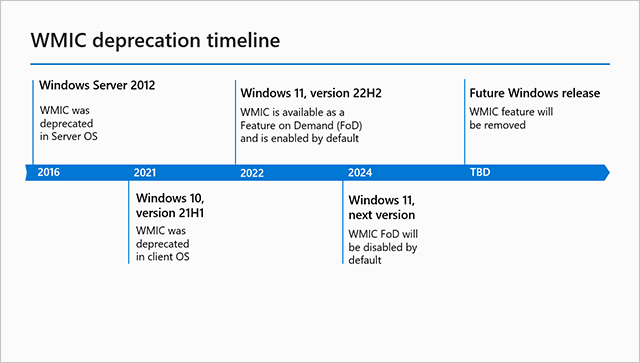
The WMIC tool is deprecated in Windows 10, version 21H1, and the 21H1 General Availability Channel release of Windows Server. This tool is superseded by Windows PowerShell for WMI. Note: This deprecation only applies to the command-line management tool. WMI itself isn't affected.

Starting with Windows 11 build 22572, WMIC is now available as an optional feature that can be uninstalled or reinstalled via Settings > Apps > Optional Features.

Starting with Windows 11 build 26100.9278 (24H2) and build 26200.9278 (25H2), starting in August 2026, Windows 11, versions 24H2 and 25H2 no longer include the Windows Management Instrumentation Command-line (WMIC) utility. WMIC is already removed by default in new installations of Windows 11, versions 24H2 and 25H2, and is no longer available as a Feature on Demand (FoD). This change affects only the WMIC utility. Windows Management Instrumentation (WMI) remains supported. To learn more, see Windows Management Instrumentation Command-line (WMIC) removal from Windows.

References:

You must be signed in as an administrator to add and remove the WMIC optional feature.


Contents

  • Option One: Add or Remove WMIC command Feature in Settings
  • Option Two: Add or Remove WMIC command Feature using Command


EXAMPLE: WMIC command-line

WMIC.png


Option One

Add or Remove WMIC command Feature in Settings


This option is no longer available, but you can still use Option Two.


1 Open Settings (Win+I).

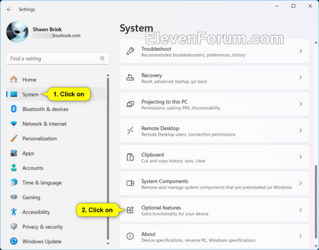
2 Click/tap on System on the left side, and click/tap on Optional features on the right side. (see screenshot below)


Optional_Features_Settings-1b.webp

3 Do step 4 (add) or step 5 (remove) below for what you want.

4 Add WMIC command Feature

This is the default setting.


A) Click/tap on the View features button. (see screenshot below)​

Optional_Features_Settings-2.webp

B) Check WMIC, and click/tap on Next. (see screenshot below)​

WMIC_Settings-3.png

C) Click/tap on Install to confirm. (see screenshot below)​

WMIC_Settings-4.png

D) You can now close Settings if you like.​

5 Remove WMIC command Feature

A) Under Installed features, click/tap on WMIC to expand it open, and click/tap on the Uninstall button. (see screenshot below)​

WMIC_Settings-5.png

B) You can now close Settings if you like.​


Option Two

Add or Remove WMIC command Feature using Command


1 Open Windows Terminal (Admin), and select Windows PowerShell or Command Prompt.

2 Copy and paste the command below you want to use into Windows Terminal (Admin), and press Enter. (see screenshots below)

(Add WMIC)
DISM /Online /Add-Capability /CapabilityName:WMIC~~~~

OR​

(Remove WMIC)
DISM /Online /Remove-Capability /CapabilityName:WMIC~~~~

3 You can now close Windows Terminal (Admin) if you like.

Add_WMIC_command.png

Remove_WMIC_command.png


That's it,
Shawn Brink
 

Attachments

  • Optional_Features_Settings-1b.png
    Optional_Features_Settings-1b.png
    59.9 KB · Views: 183
Last edited:

My Computers My Computers

  • At a glance

    Windows 11 Pro for WorkstationsIntel i7-8700K 5 GHz64 GB (4x16GB) G.SKILL TridentZ RGB DDR4 3600...ASUS ROG-STRIX-GTX1080TI-O11G-GAMING (11GB GD...
    OS
    Windows 11 Pro for Workstations
    Computer type
    PC/Desktop
    Manufacturer/Model
    Custom self build
    CPU
    Intel i7-8700K 5 GHz
    Motherboard
    ASUS ROG Maximus XI Formula Z390
    Memory
    64 GB (4x16GB) G.SKILL TridentZ RGB DDR4 3600 MHz (F4-3600C18D-32GTZR)
    Graphics Card(s)
    ASUS ROG-STRIX-GTX1080TI-O11G-GAMING (11GB GDDR5X)
    Sound Card
    Integrated Digital Audio (S/PDIF)
    Monitor(s) Displays
    2 x Samsung Odyssey G75 27"
    Screen Resolution
    2560x1440
    Hard Drives
    1TB Samsung 990 PRO M.2,
    4TB Samsung 990 PRO M.2,
    TerraMaster F8 SSD Plus NAS
    PSU
    Seasonic Prime Titanium 850W
    Case
    Thermaltake Core P3 wall mounted
    Cooling
    Corsair Hydro H115i
    Keyboard
    Amazon Basics Wired Full Keyboard MD005
    Mouse
    Logitech MX Master 4
    Internet Speed
    2 Gbps Download and 100 Mbps Upload
    Browser
    Chrome and Edge
    Antivirus
    Microsoft Defender
    Other Info
    Logitech Z625 speaker system,
    Logitech BRIO 4K Pro webcam,
    HP Color LaserJet Pro MFP M477fdn,
    CyberPower CP1500PFCLCD
    Galaxy S23 Plus phone
  • At a glance

    Windows 11 ProSnapdragon X Elite (12 core) 3.42 GHz16 GB LPDDR5x-7467 MHz
    Operating System
    Windows 11 Pro
    Computer type
    Laptop
    Manufacturer/Model
    Surface Laptop 7 Copilot+ PC
    CPU
    Snapdragon X Elite (12 core) 3.42 GHz
    Memory
    16 GB LPDDR5x-7467 MHz
    Monitor(s) Displays
    15" HDR
    Screen Resolution
    2496 x 1664
    Hard Drives
    1 TB SSD
    Internet Speed
    Wi-Fi 7 and Bluetooth 5.4
    Browser
    Chrome and Edge
    Antivirus
    Microsoft Defender
Jumbo size wasn't an option?

In case anyone was asking, for the current 24H2 builds the WMIC status is:
- When you perform an in-place upgrade, WMIC is enabled by default (no changes to Windows).
- When you perform a clean install, WMIC is disabled right after installation. Because MS hates you. This might change (?), since they're still rolling out updates before the official RTM.
 

My Computer My Computer

At a glance

Windows 7
OS
Windows 7
10/26/2024

Just had the first thread in which the WMIC script commands (in Tuneup plus) reported:

'wmic' is not recognized as an internal or external command,
operable program or batch file.


Windows 11 IoT Enterprise LTSC 64-bit (10.0, Build 26100) (26100.ge_release.240331-1435)


Option #2 step#2 was successful.


Thx.
 

My Computer My Computer

At a glance

Windows 10Intel(R) Core(TM) i7-4800MQ CPU @ 2.70GHz16 GB Total: Manufacturer : Samsung MemoryTyp...NVIDIA Quadro K3100M; Intel(R) HD Graphics 4600
OS
Windows 10
Computer type
Laptop
Manufacturer/Model
HP
CPU
Intel(R) Core(TM) i7-4800MQ CPU @ 2.70GHz
Motherboard
Product : 190A Version : KBC Version 94.56
Memory
16 GB Total: Manufacturer : Samsung MemoryType : DDR3 FormFactor : SODIMM Capacity : 8GB Speed : 1600
Graphics Card(s)
NVIDIA Quadro K3100M; Intel(R) HD Graphics 4600
Sound Card
IDT High Definition Audio CODEC; PNP Device ID HDAUDIO\FUNC_01&VEN_111D&DEV_76E0
Hard Drives
Model Hitachi HTS727575A9E364
Antivirus
Microsoft Defender
Other Info
Mobile Workstation

My Computer My Computer

At a glance

Windows 10Intel(R) Core(TM) i7-4800MQ CPU @ 2.70GHz16 GB Total: Manufacturer : Samsung MemoryTyp...NVIDIA Quadro K3100M; Intel(R) HD Graphics 4600
OS
Windows 10
Computer type
Laptop
Manufacturer/Model
HP
CPU
Intel(R) Core(TM) i7-4800MQ CPU @ 2.70GHz
Motherboard
Product : 190A Version : KBC Version 94.56
Memory
16 GB Total: Manufacturer : Samsung MemoryType : DDR3 FormFactor : SODIMM Capacity : 8GB Speed : 1600
Graphics Card(s)
NVIDIA Quadro K3100M; Intel(R) HD Graphics 4600
Sound Card
IDT High Definition Audio CODEC; PNP Device ID HDAUDIO\FUNC_01&VEN_111D&DEV_76E0
Hard Drives
Model Hitachi HTS727575A9E364
Antivirus
Microsoft Defender
Other Info
Mobile Workstation
If you're customizing a 24H2 ISO, removing the OOBEFodSetup scheduled task will prevent OOBE from disabling WMIC (otherwise it's already enabled in the offline image).
I imagine this allows existing legacy scripts to finish their work, while discouraging WMIC's active use after you're signed on.

Add this XML block to your autounattend.xml:
Code:
        <settings pass="specialize">
                <component name="Microsoft-Windows-Deployment" processorArchitecture="amd64" publicKeyToken="31bf3856ad364e35" language="neutral" versionScope="nonSxS" xmlns:wcm="http://schemas.microsoft.com/WMIConfig/2002/State" xmlns:xsi="http://www.w3.org/2001/XMLSchema-instance">
                        <RunSynchronous>
                                <RunSynchronousCommand wcm:action="add">
                                        <Order>1</Order>
                                        <Description>Keep WMIC</Description>
                                        <Path>schtasks /delete /tn "\Microsoft\Windows\Servicing\OOBEFodSetup" /f</Path>
                                </RunSynchronousCommand>
                        </RunSynchronous>
                </component>
        </settings>

HT to abbodi1406.
 

My Computer My Computer

At a glance

Windows 7
OS
Windows 7
View attachment 103738


Option Two

Add or Remove WMIC command Feature using Command


1 Open Windows Terminal (Admin), and select Windows PowerShell or Command Prompt.

2 Copy and paste the command below you want to use into Windows Terminal (Admin), and press Enter. (see screenshots below)

(Add WMIC)
DISM /Online /Add-Capability /CapabilityName:WMIC~~~~


3 You can now close Windows Terminal (Admin) if you like.


That's it,
Shawn Brink
I tried both options. Option 1 was a bust, there is no Optional Features in my panel, Windows 11 Pro.

Option 2 just hangs after the Image Version, I never get the progress bar or the completion message.


WMIC N1.webp
WMIC N2.webp
 

My Computers My Computers

  • At a glance

    Win 11 Pro 25H2, Build 26200.9278Intel Core i5 14500, 14th Generation64GB DDR4GeForce RTX 4060
    OS
    Win 11 Pro 25H2, Build 26200.9278
    Computer type
    PC/Desktop
    Manufacturer/Model
    Home Brew
    CPU
    Intel Core i5 14500, 14th Generation
    Motherboard
    Gigabyte B760M G P WIFI
    Memory
    64GB DDR4
    Graphics Card(s)
    GeForce RTX 4060
    Sound Card
    Chipset Realtek
    Monitor(s) Displays
    LG 45" Ultragear & Acer 24" 1080p
    Screen Resolution
    5120x1440 & 1920x1080
    Hard Drives
    Crucial P310 2TB 2280 PCIe Gen4 3D NAND NVMe M.2 SSD (O/S)
    Silicon Power 2TB US75 NVMe PCIe Gen4 M.2 2280 SSD (backup)
    Crucial BX500 2TB 3D NAND (2nd backup)
    Seagate 4TB Ironwolf, rotating HDD secondary backup
    External off-line backup Drives: 2 NVMe 4TB drives in external enclosures
    PSU
    Thermaltake Toughpower GF3 750W
    Case
    LIAN LI LANCOOL 216 E-ATX PC Case
    Cooling
    Lots of fans!
    Keyboard
    Microsoft Comfort Curve 2000
    Mouse
    Logitech G305
    Internet Speed
    Verizon FiOS 1GB
    Browser
    Firefox
    Antivirus
    Malware Bytes & Windows Defender Security
  • At a glance

    Win 11 Pro 25H2, Build 26200.9168Intel Core i5 1440032GB DDR5Intel 700 Embedded GPU
    Operating System
    Win 11 Pro 25H2, Build 26200.9168
    Computer type
    PC/Desktop
    Manufacturer/Model
    Home Brew
    CPU
    Intel Core i5 14400
    Motherboard
    Gigabyte B760M DS3H AX
    Memory
    32GB DDR5
    Graphics card(s)
    Intel 700 Embedded GPU
    Sound Card
    Realtek Embedded
    Monitor(s) Displays
    27" HP 1080p
    Screen Resolution
    1920x1080
    Hard Drives
    Crucial P310 2TB NVMe Gen4 SSD
    Samsung EVO 990 2TB NVMe Gen4 SSD
    Samsung 2TB SATA SSD
    Seagate 4TB Ironwolf, rotating HDD secondary backup
    PSU
    Thermaltake Smart BM3 650W
    Case
    Okinos Micro ATX Case
    Cooling
    Fans
    Keyboard
    Microsoft Comfort Curve 2000
    Mouse
    Logitech G305
    Internet Speed
    Verizon FiOS 1GB
    Browser
    Firefox
    Antivirus
    Malware Bytes & Windows Defender Security
  • Nimo N171 17" Laptop, (Intel i3-1215U, 16GB RAM, 2TB NVMe, Win11 Pro)
    Acemagic Vista Mini PC V1 (Intel N150, 16GB RAM, 1TB NVMe, Win11 Pro)
    HP ENVY h8-1540t, (24GB RAM, 2TB SSD, 2TB HDD, Win11 Pro)
Are you running a clean, untouched W11 24H2? With no debloating done by a script or tool?
 

My Computer My Computer

At a glance

Windows 7
OS
Windows 7
Are you running a clean, untouched W11 24H2? With no debloating done by a script or tool?
Brand new whistle clean Win 11 Pro installation with all the current updates.
 

My Computers My Computers

  • At a glance

    Win 11 Pro 25H2, Build 26200.9278Intel Core i5 14500, 14th Generation64GB DDR4GeForce RTX 4060
    OS
    Win 11 Pro 25H2, Build 26200.9278
    Computer type
    PC/Desktop
    Manufacturer/Model
    Home Brew
    CPU
    Intel Core i5 14500, 14th Generation
    Motherboard
    Gigabyte B760M G P WIFI
    Memory
    64GB DDR4
    Graphics Card(s)
    GeForce RTX 4060
    Sound Card
    Chipset Realtek
    Monitor(s) Displays
    LG 45" Ultragear & Acer 24" 1080p
    Screen Resolution
    5120x1440 & 1920x1080
    Hard Drives
    Crucial P310 2TB 2280 PCIe Gen4 3D NAND NVMe M.2 SSD (O/S)
    Silicon Power 2TB US75 NVMe PCIe Gen4 M.2 2280 SSD (backup)
    Crucial BX500 2TB 3D NAND (2nd backup)
    Seagate 4TB Ironwolf, rotating HDD secondary backup
    External off-line backup Drives: 2 NVMe 4TB drives in external enclosures
    PSU
    Thermaltake Toughpower GF3 750W
    Case
    LIAN LI LANCOOL 216 E-ATX PC Case
    Cooling
    Lots of fans!
    Keyboard
    Microsoft Comfort Curve 2000
    Mouse
    Logitech G305
    Internet Speed
    Verizon FiOS 1GB
    Browser
    Firefox
    Antivirus
    Malware Bytes & Windows Defender Security
  • At a glance

    Win 11 Pro 25H2, Build 26200.9168Intel Core i5 1440032GB DDR5Intel 700 Embedded GPU
    Operating System
    Win 11 Pro 25H2, Build 26200.9168
    Computer type
    PC/Desktop
    Manufacturer/Model
    Home Brew
    CPU
    Intel Core i5 14400
    Motherboard
    Gigabyte B760M DS3H AX
    Memory
    32GB DDR5
    Graphics card(s)
    Intel 700 Embedded GPU
    Sound Card
    Realtek Embedded
    Monitor(s) Displays
    27" HP 1080p
    Screen Resolution
    1920x1080
    Hard Drives
    Crucial P310 2TB NVMe Gen4 SSD
    Samsung EVO 990 2TB NVMe Gen4 SSD
    Samsung 2TB SATA SSD
    Seagate 4TB Ironwolf, rotating HDD secondary backup
    PSU
    Thermaltake Smart BM3 650W
    Case
    Okinos Micro ATX Case
    Cooling
    Fans
    Keyboard
    Microsoft Comfort Curve 2000
    Mouse
    Logitech G305
    Internet Speed
    Verizon FiOS 1GB
    Browser
    Firefox
    Antivirus
    Malware Bytes & Windows Defender Security
  • Nimo N171 17" Laptop, (Intel i3-1215U, 16GB RAM, 2TB NVMe, Win11 Pro)
    Acemagic Vista Mini PC V1 (Intel N150, 16GB RAM, 1TB NVMe, Win11 Pro)
    HP ENVY h8-1540t, (24GB RAM, 2TB SSD, 2TB HDD, Win11 Pro)
1) optional features is under SYSTEM > Optional Features, not Apps >

2) yeah the wmic can take some time depending... but 15 mins is a little long.

3) if it does not install via cmd or ps, its a perms issue

you can try step 4 from here:
.https://windowsreport.com/install-wmic-feature-on-demand-windows-11/
OK, I see that I confused the two pictures. However, that didn't work anyway. When I enter WMIC in the search box, it never allows me to move on, I'm stuck there.

I think I don't need it back bad enough to keep screwing around with this. :D
 

My Computers My Computers

  • At a glance

    Win 11 Pro 25H2, Build 26200.9278Intel Core i5 14500, 14th Generation64GB DDR4GeForce RTX 4060
    OS
    Win 11 Pro 25H2, Build 26200.9278
    Computer type
    PC/Desktop
    Manufacturer/Model
    Home Brew
    CPU
    Intel Core i5 14500, 14th Generation
    Motherboard
    Gigabyte B760M G P WIFI
    Memory
    64GB DDR4
    Graphics Card(s)
    GeForce RTX 4060
    Sound Card
    Chipset Realtek
    Monitor(s) Displays
    LG 45" Ultragear & Acer 24" 1080p
    Screen Resolution
    5120x1440 & 1920x1080
    Hard Drives
    Crucial P310 2TB 2280 PCIe Gen4 3D NAND NVMe M.2 SSD (O/S)
    Silicon Power 2TB US75 NVMe PCIe Gen4 M.2 2280 SSD (backup)
    Crucial BX500 2TB 3D NAND (2nd backup)
    Seagate 4TB Ironwolf, rotating HDD secondary backup
    External off-line backup Drives: 2 NVMe 4TB drives in external enclosures
    PSU
    Thermaltake Toughpower GF3 750W
    Case
    LIAN LI LANCOOL 216 E-ATX PC Case
    Cooling
    Lots of fans!
    Keyboard
    Microsoft Comfort Curve 2000
    Mouse
    Logitech G305
    Internet Speed
    Verizon FiOS 1GB
    Browser
    Firefox
    Antivirus
    Malware Bytes & Windows Defender Security
  • At a glance

    Win 11 Pro 25H2, Build 26200.9168Intel Core i5 1440032GB DDR5Intel 700 Embedded GPU
    Operating System
    Win 11 Pro 25H2, Build 26200.9168
    Computer type
    PC/Desktop
    Manufacturer/Model
    Home Brew
    CPU
    Intel Core i5 14400
    Motherboard
    Gigabyte B760M DS3H AX
    Memory
    32GB DDR5
    Graphics card(s)
    Intel 700 Embedded GPU
    Sound Card
    Realtek Embedded
    Monitor(s) Displays
    27" HP 1080p
    Screen Resolution
    1920x1080
    Hard Drives
    Crucial P310 2TB NVMe Gen4 SSD
    Samsung EVO 990 2TB NVMe Gen4 SSD
    Samsung 2TB SATA SSD
    Seagate 4TB Ironwolf, rotating HDD secondary backup
    PSU
    Thermaltake Smart BM3 650W
    Case
    Okinos Micro ATX Case
    Cooling
    Fans
    Keyboard
    Microsoft Comfort Curve 2000
    Mouse
    Logitech G305
    Internet Speed
    Verizon FiOS 1GB
    Browser
    Firefox
    Antivirus
    Malware Bytes & Windows Defender Security
  • Nimo N171 17" Laptop, (Intel i3-1215U, 16GB RAM, 2TB NVMe, Win11 Pro)
    Acemagic Vista Mini PC V1 (Intel N150, 16GB RAM, 1TB NVMe, Win11 Pro)
    HP ENVY h8-1540t, (24GB RAM, 2TB SSD, 2TB HDD, Win11 Pro)

My Computer My Computer

At a glance

Windows 11 Pro
OS
Windows 11 Pro
I entered the text into Terminal. It didn't find it, but when I removed the space at the end, it did. Then it hung at 37.8 until I gave up.

About RAID: I just ran Speccy and copied the summary. That's what it found.

Well I'll be darned. I rebooted and ran the WMIC line again, and it immediately said 100%, completed successfully. Weird.
 
Last edited:

My Computer My Computer

At a glance

Windows 11
OS
Windows 11

Latest Support Threads

Back
Top Bottom