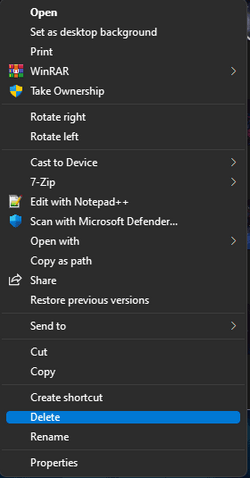
add/remove stuff from right click


smoothnobody

Well-known member
Local time
8:02 AM
Posts
137
OS
windows 11
i saw something that added the control panel to right click menu. was wondering if i can add anything i want or if i can remove some of the default microsoft stuff.
 

My Computer My Computer

At a glance

windows 11
OS
windows 11
With a Right Click on a desktop item, for instance, I would get the complete Context Menu, with all the older OS's. But now, with Win-11, I get a short menu, from which I can elect to advance to the complete menu.
It sure would be nice, if I (we) could just add something like "Delete" or "Pin to Task Bar" to the first Right Click menu, and save the extra step.

I'll bet that there is a programmer somewhere that could write a .reg script to perform that function.
Just because I can't, doesn't mean it can't be done.
I have and use many scripts, written by well known persons, that make dramatic alterations/Improvements to Windows.

Hurry up and wait! (old Army saying)

TM :cool:
 
from which I can elect to advance to the complete menu.
It sure would be nice, if I (we) could just add something like "Delete" or "Pin to Task Bar" to the first Right Click menu, and save the extra step.
If what you are referring to is the "old" context menu like in Windows 10, you can get it back. Here's how. (Note that with 22H2 around the corner, at this time we do not know if this regedit fix will still work once it's released.) It better or I will be lost.

IF IT MAKES YOU FEEL BETTER ABOUT MY REG FILE, THIS POST HAS BEEN CORRECTED TO ADD BRINK"S TUTORIAL WHICH SAYS AND DOES EXACTLY THE SAME THING AS I POSTED.

Get back old context menu

Open regedit as admin

Navigate to HKEY_CURRENT_USER\SOFTWARE\CLASSES\CLSID\

Create a new registry key called {86ca1aa0-34aa-4e8b-a509-50c905bae2a2} underneath CLSID. You can create keys by right-clicking in the right window pane and selecting New->Key then entering the correct name for the folder.

Create a new key called InprocServer32 underneath {86ca1aa0-34aa-4e8b-a509-50c905bae2a2}.

Open the (Default) key in InprocServer32 and set its value to blank, then click OK.

You will notice that the Data which was originally "(value not set)" is now shown as blank.

7. Close registry editor and reboot.

You can add this key as described above or attached is a regedit file that will add it for you. Unzip the file and double click on the .reg file to add the key.
Restart computer.

You will now see the classic-style context menu.

NOTE: If you want to revert back to the default, limited context menu, delete the InProc32 key you created and restart.
 

Attachments

My Computers My Computers

  • At a glance

    Windows 11 Pro 25H2 26200.8875i9-10900 10 core 20 threads32 gbnone-Intel UHD Graphics 630
    OS
    Windows 11 Pro 25H2 26200.8875
    Computer type
    PC/Desktop
    Manufacturer/Model
    Dell Optiplex 7080
    CPU
    i9-10900 10 core 20 threads
    Motherboard
    DELL 0J37VM
    Memory
    32 gb
    Graphics Card(s)
    none-Intel UHD Graphics 630
    Sound Card
    Integrated Realtek
    Monitor(s) Displays
    Benq 27
    Screen Resolution
    2560x1440
    Hard Drives
    2x1tb Solidigm m.2 nvme /External drives 512gb Samsung m.2 sata+2tb Kingston m2.nvme
    PSU
    500w
    Case
    MT
    Cooling
    Dell Premium
    Keyboard
    Logitech wired
    Mouse
    Logitech wireless
    Internet Speed
    so slow I'm too embarrassed to tell
    Browser
    #1 Edge #2 Firefox
    Antivirus
    Defender+MWB Premium
  • At a glance

    Windows 11 Pro 24H2 26200.8875AMD Ryzen 7 6800U32 gbintegrated
    Operating System
    Windows 11 Pro 24H2 26200.8875
    Computer type
    PC/Desktop
    Manufacturer/Model
    Beelink Mini PC SER5
    CPU
    AMD Ryzen 7 6800U
    Memory
    32 gb
    Graphics card(s)
    integrated
    Sound Card
    integrated
    Monitor(s) Displays
    Benq 27
    Screen Resolution
    2560x1440
    Hard Drives
    1TB Crucial nvme
    Keyboard
    Logitech wired
    Mouse
    Logitech wireless
    Internet Speed
    still too embarrassed to tell
    Browser
    Firefox
    Antivirus
    Defender
    Other Info
    System 3 is non compliant Dell 9020 i7-4770/24gb ram Win11 PRO 26200.8875
You can remove almost everything from the context menu, just googe "remove <some item> from context menu", and a guide will pop up. I've personally removed a bunch of things, so the menu is sleek. Both the new and old menus are connected so removing an item does it for both. As for adding, don't know how but I'm pretty sure it's possible.
 

My Computer My Computer

At a glance

Windows 11
OS
Windows 11
If what you are referring to is the "old" context menu like in Windows 10, you can get it back. Here's how. (Note that with 22H2 around the corner, at this time we do not know if this regedit fix will still work once it's released.) It better or I will be lost.

IF IT MAKES YOU FEEL BETTER ABOUT MY REG FILE, THIS POST HAS BEEN CORRECTED TO ADD BRINK"S TUTORIAL WHICH SAYS AND DOES EXACTLY THE SAME THING AS I POSTED.

Get back old context menu

Open regedit as admin

Navigate to HKEY_CURRENT_USER\SOFTWARE\CLASSES\CLSID\

Create a new registry key called {86ca1aa0-34aa-4e8b-a509-50c905bae2a2} underneath CLSID. You can create keys by right-clicking in the right window pane and selecting New->Key then entering the correct name for the folder.

Create a new key called InprocServer32 underneath {86ca1aa0-34aa-4e8b-a509-50c905bae2a2}.

Open the (Default) key in InprocServer32 and set its value to blank, then click OK.

You will notice that the Data which was originally "(value not set)" is now shown as blank.

7. Close registry editor and reboot.

You can add this key as described above or attached is a regedit file that will add it for you. Unzip the file and double click on the .reg file to add the key.
Restart computer.

You will now see the classic-style context menu.

NOTE: If you want to revert back to the default, limited context menu, delete the InProc32 key you created and restart.
Works fine for me on 22h2 at the moment.
 

My Computer My Computer

At a glance

11[email protected]Viper Steelseries 32gb@ 3600mhzGigabyte 2070 Super 8GB, +200 core + 600 memory
OS
11
Computer type
PC/Desktop
Manufacturer/Model
Custom
CPU
[email protected]
Motherboard
Gigabyte Gaming X Z490
Memory
Viper Steelseries 32gb@ 3600mhz
Graphics Card(s)
Gigabyte 2070 Super 8GB, +200 core + 600 memory
Monitor(s) Displays
ASUS 4k HDR, Two 1080p Benq and Samsung
Screen Resolution
3840x2160/2560x1440/1920x1080
Hard Drives
Adata XPG SX8200 PRO 1tb
Samsung EVO 870 500GB
PSU
Corsair RX 650
Case
NZXT h510
Cooling
CM HYPER 212 RGB
Keyboard
Razer Ornata Chroma
Mouse
Steelseries Rival 710
Here's what I got after using @Brink tutorial:

1663262411074.png
 

My Computers My Computers

  • At a glance

    Win 11 Pro 25H2 26200.8737Intel® Core™ i7-14700KG.SKILL Ripjaws S5 Series 64GB (2 x 32GB) DDR5ASUS GeForce RTX 4070 Super 12GB
    OS
    Win 11 Pro 25H2 26200.8737
    Computer type
    PC/Desktop
    Manufacturer/Model
    Self Built
    CPU
    Intel® Core™ i7-14700K
    Motherboard
    ASUS TUF Z690-PLUS WIFI (BIOS 4505)
    Memory
    G.SKILL Ripjaws S5 Series 64GB (2 x 32GB) DDR5
    Graphics Card(s)
    ASUS GeForce RTX 4070 Super 12GB
    Sound Card
    Sound Blaster AE-5 Plus
    Monitor(s) Displays
    ASUS TUF Gaming 27" 2K HDR Gaming
    Screen Resolution
    2560 x 1440
    Hard Drives
    Samsung 990 Pro 1TB NVMe (Win 11 25H2)
    SK hynix P41 500GB NVMe
    SK hynix P41 2TB NVMe (x3)
    Crucial P3 Plus 4TB
    PSU
    Corsair RM850x Shift
    Case
    Antec Dark Phantom DP502 FLUX
    Cooling
    Corsair Nautilus 360 RS AIO
    Keyboard
    Logitech MK 320
    Mouse
    Razer Basilisk V3
    Internet Speed
    750Mbs
    Browser
    Firefox
    Antivirus
    Winows Security
    Other Info
    MR 8.1 Home
  • At a glance

    Win 11 Pro 25H2 26200.8737Intel Core i5-1140064 GB DDR4MSI GeForce RTX 3060 Ventus 2X 12GB
    Operating System
    Win 11 Pro 25H2 26200.8737
    Computer type
    PC/Desktop
    Manufacturer/Model
    Self Built
    CPU
    Intel Core i5-11400
    Motherboard
    Asus TUF Gaming Z590 Plus WiFi (BIOS 2803)
    Memory
    64 GB DDR4
    Graphics card(s)
    MSI GeForce RTX 3060 Ventus 2X 12GB
    Sound Card
    SoundBlaster Audigy Fx V2
    Monitor(s) Displays
    Samsung F27T350
    Screen Resolution
    1920x1080
    Hard Drives
    Samsung 980 Pro 1TB
    Samsung 970 EVO Plus 2TB
    Samsung 870 EVO 500GB SSD
    PSU
    Corsair HX750
    Case
    Cougar MX330-G Window
    Cooling
    Thermalright Frozen Edge 240 Black AIO
    Internet Speed
    350Mbps
    Browser
    Firefox
    Antivirus
    Windows Security
  • System Three
    Win 11 Pro 25H2 26200.8737
    ASUS PRIME Z370-P II BIOS 3004 7/12/21
    Intel Core i7-8700 CPU @ 3.20GHz
    32GB DDR4 RAM (4x8)
    iGPU Intel UHD Graphics 630
    Mid-Tower Desktop
just to be clear, i'm not asking about getting the old context menu back.
 

My Computer My Computer

At a glance

windows 11
OS
windows 11
The new menu is kinda weird, as in I don't know how it decides what goes in the main part and what goes in the "overflow" aka "show more options". I'm not sure if you can tweak that somehow. That would be interesting. But as I said, whatever you add to the context menu should show up in both the new and the old one, so no worries.
 

My Computer My Computer

At a glance

Windows 11
OS
Windows 11
Back
Top Bottom