- Local time
- 9:38 AM
- Posts
- 56
- OS
- Windows 11 Pro 25H2 OS Build 26200.7705
Hello-
We belong to some non Windows Forums that we were able to add connect links in Android app drawer- for example, Intlwaters Forum (dedicated to the radio control boat racing community), as depicted in screenshot below.
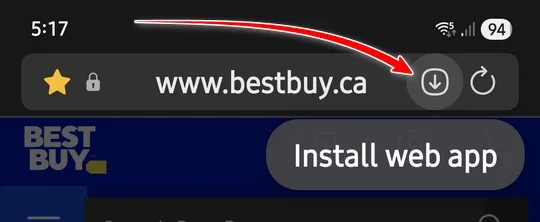
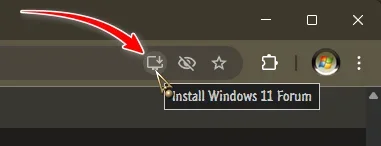
It somehow connects via Google Chrome browser....my question is, how can I do the same for this elevenforum.com?....
I tried, briefly, to find a 'how to' thread here to do such, but was unsuccessful.
We appreciate any/all direction on this matter....Thanks!
Regards-
Tim
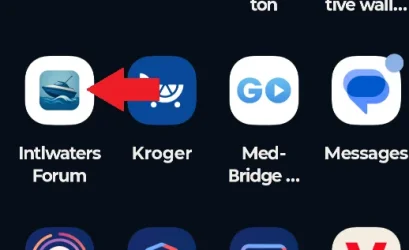
We belong to some non Windows Forums that we were able to add connect links in Android app drawer- for example, Intlwaters Forum (dedicated to the radio control boat racing community), as depicted in screenshot below.
It somehow connects via Google Chrome browser....my question is, how can I do the same for this elevenforum.com?....
I tried, briefly, to find a 'how to' thread here to do such, but was unsuccessful.
We appreciate any/all direction on this matter....Thanks!
Regards-
Tim
My Computers
-
At a glance
Windows 11 Pro 25H2 OS Build 26200.7705Gen 5 Haswell i7-477032 GB G. SKILL DDR-3 Ripjaws X- 8GB x 4Integrated Intel 4600 (112MB)- OS
- Windows 11 Pro 25H2 OS Build 26200.7705
- Computer type
- PC/Desktop
- Manufacturer/Model
- HP ENVY 700-515xt CTO (mATX platform)
- CPU
- Gen 5 Haswell i7-4770
- Motherboard
- OEM (Asus)
- Memory
- 32 GB G. SKILL DDR-3 Ripjaws X- 8GB x 4
- Graphics Card(s)
- Integrated Intel 4600 (112MB)
- Sound Card
- OEM
- Monitor(s) Displays
- HP 27eb
- Screen Resolution
- 1920 x 1080
- Hard Drives
- Samsung 860 PRO 256GB, SG ST1000DM003-1CH162, Barracuda 7200.14 Series, 1 TB storage, 64MB cache and a SATA 6Gb/s interface (Hard drive is used for Storage only)
- PSU
- OEM 350W
- Case
- OEM
- Cooling
- OEM (ACPI fans)
- Keyboard
- Logitech K120
- Mouse
- Logitech M100
- Internet Speed
- 440.1 Down/ 11.2 Up, 13 ms latency, server based in Chicago, IP- Spectrum in Midland, MI
- Browser
- Google Chrome
- Antivirus
- MS Defender
-
At a glance
Android 15Qualcomm Snapdragon 8 Gen 28GB LPDDR5X (ramped to 12GB, borrowed from 51...Integrated Adreno 740 GPU- Operating System
- Android 15
- Manufacturer/Model
- Motorola Edge+ 2023
- CPU
- Qualcomm Snapdragon 8 Gen 2
- Motherboard
- What's that???.....
- Memory
- 8GB LPDDR5X (ramped to 12GB, borrowed from 512GB UFS 4.0 storage)
- Graphics card(s)
- Integrated Adreno 740 GPU
- Sound Card
- Dolby Atmos
- Monitor(s) Displays
- Display Technology - pOLED, HDR10+, 10-bit; Over a billion shades of color, DCI-P3 color space, Dolby Vision®, 165Hz refresh rate, Touch rate: 360Hz, Peak Brightness: 1300 nits
- Screen Resolution
- Resolution - FHD+ (2400 x 1080) | 394ppi
- Hard Drives
- UFS 4.0 internal storage, which is the standard type of high-speed flash storage for modern flagship smartphones.
- PSU
- 5100mAh Li-Ion, Charging - 68W TurboPower™ charging | 15W wireless charging | 5W wireless power sharing
- Case
- Sandblasted aluminum
- Keyboard
- GBoard and Google Voice typing
- Mouse
- Yep.....primarily rt. index finger
- Internet Speed
- 499.23 down, 11.53 up, 12 ms latency
- Browser
- Chrome
- Antivirus
- Nah......built in Motorola Security
- Other Info
- This device smokes the Samsung Galaxy S25 Ultra, for $400-$500 less, except the Camera specs. My eyes can't tell the difference!
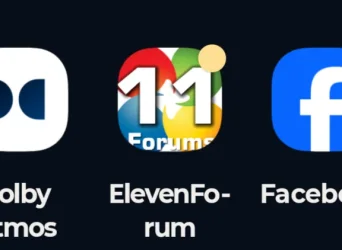
 .....DUH!..... elevenforum.com does it the same as the r/c boat forum we alluded to in OP!....