
Solved Adding MediaInfo to the context menu (again)


Jose Hidalgo

Active member
Member
Local time
4:32 AM
Posts
150
Location
France
OS
Windows 11
Hi everybody,

Well, this is my fault (probably).

To my surprise, today I have noticed that MediaInfo doesn't appear anymore in the context menu when I right-click on a video file (mp4, mkv, etc).
I use MediaInfo a lot, so this is a real problem for me.
Drag-n-dropping the file on MediaInfo works, so this is really about the context menu.

I figure this is related to me messing with the context menu a few days ago (although I can't be sure of that). For the record I was trying to remove some unwanted entries (I managed to remove two or three), using Easy Context Menu 1.6 and FileMenu Tools. I'm pretty sure I didn't remove anything MediaInfo-related, so I don't understand.

I don't have a system restore point (well, I have one from Dec. 28th, but me messing with the context menu happened on Dec. 25th, so...)
I have tried manually uninstalling AND reinstalling MediaInfo. Doesn't work either.
I have checked MediaInfo preferences, and the context menu option is checked as it should.

Could you guys walk me through this, so I can add MediaInfo again to my context menu?
Many thanks in advance, and Happy New Year! :D
 

My Computer My Computer

At a glance

Windows 11AMD Ryzen 7700DDR5 = 32 GB = 2x16 GB (Corsair Dominator - D...Not yet
OS
Windows 11
Computer type
PC/Desktop
Manufacturer/Model
Personal build
CPU
AMD Ryzen 7700
Motherboard
Asus TUF Gaming B650M-Plus WiFi
Memory
DDR5 = 32 GB = 2x16 GB (Corsair Dominator - DDR5 RGB - 6000 MT/s)
Graphics Card(s)
Not yet
Sound Card
No
Monitor(s) Displays
Philips BDM3270QP2
Screen Resolution
2560x1440
Hard Drives
M.2 = 2 TB (Samsung 990 Pro)
SATA = 12 TB (Western Digital Red - WD120EFAX - 5400 rpm)
PSU
Corsair RM850e (850W - ATX 3.0)
Case
Corsair Crystal 280X TG (White, RGB)
Cooling
Intake = 2x120mm fans (Corsair LL120 RGB) / Exhaust = 2x120mm AIO (Aerocool Mirage L240)
Keyboard
Corsair K55 RGB
Mouse
Vertical mouse from AliExpress, very good for the price and a lifesaver for my wrist :)
Internet Speed
Fiber
Browser
Firefox, Brave, Tor
Antivirus
Windows Defender
Other Info
UPS = 1000VA (Nitram PB1000 LCD), protecting PC + Monitor + Speakers
Hi Jose,

Are you choosing "Show more options" at the bottom of the context menu? MediaInfo shows up for me after choosing "Show more options" but I do have K-Lite Codec Pack installed.
 

Attachments

  • mediainfo.webp
    mediainfo.webp
    16.1 KB · Views: 1
Last edited:

My Computer My Computer

At a glance

Windows 11 Pro 25H2 build 26200.7462AMD Ryzen 5 5600G32GB Crucial DDR4Onboard Radeon Graphics
OS
Windows 11 Pro 25H2 build 26200.7462
Computer type
PC/Desktop
Manufacturer/Model
AMD Budget Build
CPU
AMD Ryzen 5 5600G
Motherboard
MSI PRO B550M-VC WIFI
Memory
32GB Crucial DDR4
Graphics Card(s)
Onboard Radeon Graphics
Sound Card
Onboard
Monitor(s) Displays
LG
Screen Resolution
1920X1080
Hard Drives
Solidigm P41 Plus 1TB M.2 PCIe Gen4 NVMe
PSU
Cooler Master 500W
Case
Cooler Master
Cooling
Stock AMD CPU Fan
Keyboard
Dell QuiteKey Wired
Mouse
Logitech Wired
Internet Speed
50 Mbps
Browser
Chrome
Antivirus
Windows Security
Hi Steve, happy new year :-)
I don't have any "show more options": I'm using StartAllBack with classic context menu.
It all used to work perfectly until a few days ago, so I'm pretty sure that it was me messing with the context menu.
Maybe someone could help me check the Registry and see what's happening?

BTW here's two pictures: one of my current context menu (with MediaInfo missing), and one of what I'd like my context menu to be (which I can't achieve apparently, because Microsoft has made their goddamn context menu un-customizable 🤦‍♂️)

2025.01.01 - 18.22.20.webp..............................2025.01.01 - 18.22.20.webp
 

My Computer My Computer

At a glance

Windows 11AMD Ryzen 7700DDR5 = 32 GB = 2x16 GB (Corsair Dominator - D...Not yet
OS
Windows 11
Computer type
PC/Desktop
Manufacturer/Model
Personal build
CPU
AMD Ryzen 7700
Motherboard
Asus TUF Gaming B650M-Plus WiFi
Memory
DDR5 = 32 GB = 2x16 GB (Corsair Dominator - DDR5 RGB - 6000 MT/s)
Graphics Card(s)
Not yet
Sound Card
No
Monitor(s) Displays
Philips BDM3270QP2
Screen Resolution
2560x1440
Hard Drives
M.2 = 2 TB (Samsung 990 Pro)
SATA = 12 TB (Western Digital Red - WD120EFAX - 5400 rpm)
PSU
Corsair RM850e (850W - ATX 3.0)
Case
Corsair Crystal 280X TG (White, RGB)
Cooling
Intake = 2x120mm fans (Corsair LL120 RGB) / Exhaust = 2x120mm AIO (Aerocool Mirage L240)
Keyboard
Corsair K55 RGB
Mouse
Vertical mouse from AliExpress, very good for the price and a lifesaver for my wrist :)
Internet Speed
Fiber
Browser
Firefox, Brave, Tor
Antivirus
Windows Defender
Other Info
UPS = 1000VA (Nitram PB1000 LCD), protecting PC + Monitor + Speakers
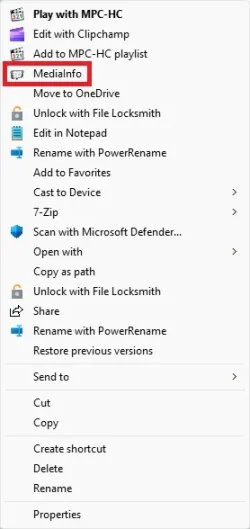
You didn't mention whether you also have K-Lite Codec Pack, which bundles a basic version of MediaInfo. That's where I started, but since I was in the same mess and got out of it, I'll describe it here in case it helps.

-I'd used the Pack for years but recently realized that the full version of MediaInfo has more features than MediaInfo Lite bundled with the Pack.
-I installed MediaInfo and configured it, but I soon noticed that MediaInfo was no longer on the context menu. This was likely a Registry thing, and since MediaInfo is all over the Registry, I didn't want to try battling it that way.
-I uninstalled MediaInfo and manually deleted its profile directory under the Roaming directory in case it mattered to the situation.
-I then ran the K-Lite Codec Pack installer and did a "Fast Update" reinstall of it, which is quick and easy. This restored my context menu for MediaInfo, though of course it was for the version in the Pack, so I was just back to where I started.
-I now extracted the portable version of MediaInfo and configured it. This automatically inherits the context menu item for MediaInfo, so when I use that now I get this one and not the Lite version.

I don't actually know whether users of K-Lite Codec Pack are meant to be able to use the installed version of MediaInfo and it was just my bad luck that it didn't work, or whether the portable version is recommended, but that's the only one that worked for me.
 

My Computer My Computer

At a glance

Windows 11
OS
Windows 11
Oh wow @rseiler , you just made my day! THANK YOU!! :D

I now understand what was going on:
  • I have indeed the K-Lite Codec Pack (I would never have realized this was the cause :oops:)
  • I remember that around Christmas (so around the same time when I messed with the context menu), UniGetUI told me about a new version of MediaInfo (24.12)
  • So I just updated it, forgetting that it was the Lite version bundled with the K-Lite Codec Pack
  • That's probably what made my context menu option disappear, so I guess something must be wrong within MediaInfo installer

I have followed your method and it has restored my context menu option perfectly. MANY THANKS!!! (y)

EDIT - I have also disabled MediaInfo updates via UniGetUI, to prevent this from happening again. I'm curious about what will happen with MediaInfo and the next K-Lite Codec Pack update. Will it revert me to the Lite version? Will it update my full version? :unsure:
 
Last edited:

My Computer My Computer

At a glance

Windows 11AMD Ryzen 7700DDR5 = 32 GB = 2x16 GB (Corsair Dominator - D...Not yet
OS
Windows 11
Computer type
PC/Desktop
Manufacturer/Model
Personal build
CPU
AMD Ryzen 7700
Motherboard
Asus TUF Gaming B650M-Plus WiFi
Memory
DDR5 = 32 GB = 2x16 GB (Corsair Dominator - DDR5 RGB - 6000 MT/s)
Graphics Card(s)
Not yet
Sound Card
No
Monitor(s) Displays
Philips BDM3270QP2
Screen Resolution
2560x1440
Hard Drives
M.2 = 2 TB (Samsung 990 Pro)
SATA = 12 TB (Western Digital Red - WD120EFAX - 5400 rpm)
PSU
Corsair RM850e (850W - ATX 3.0)
Case
Corsair Crystal 280X TG (White, RGB)
Cooling
Intake = 2x120mm fans (Corsair LL120 RGB) / Exhaust = 2x120mm AIO (Aerocool Mirage L240)
Keyboard
Corsair K55 RGB
Mouse
Vertical mouse from AliExpress, very good for the price and a lifesaver for my wrist :)
Internet Speed
Fiber
Browser
Firefox, Brave, Tor
Antivirus
Windows Defender
Other Info
UPS = 1000VA (Nitram PB1000 LCD), protecting PC + Monitor + Speakers
It will most likely replace the current MediaInfo entry with it's own (the one you call "lite version"). But you can simply run the portable version of MediaInfo and it will replace the context menu entry again with the full version. At least that's how it works on my system.
 

My Computer My Computer

At a glance

Windows 11AMD Ryzen 9 5950XCorsair Vengeance LPX CMK32GX4M2B3200C16 (64 GB)Asus ProArt RTX 5070 Ti OC
OS
Windows 11
Computer type
PC/Desktop
Manufacturer/Model
Custom
CPU
AMD Ryzen 9 5950X
Motherboard
Asus ROG Strix X570-F Gaming
Memory
Corsair Vengeance LPX CMK32GX4M2B3200C16 (64 GB)
Graphics Card(s)
Asus ProArt RTX 5070 Ti OC
Sound Card
Sound Blaster AE-9
Monitor(s) Displays
2 x Dell UltraSharp U2413f
Screen Resolution
1920 x 1200
Hard Drives
Samsung 990 Pro (2000 GB, M.2 2280)
Seagate Barracuda Pro (12TB, 3.5")
Seagate Exos X12 512E (12TB, 3.5")
WD Red Plus (12 TB, 3.5", CMR)
Corsair Force MP510 M.2 NVME SSD (1788 GB)
Samsung SSD 870 EVO 2TB (SATA)
PSU
Seasonic Vertex PX-1000 (1000 W)
Case
Corsair Obsidian 750D
Cooling
Deepcool GamerStorm Captain 240 Pro (12cm)
Keyboard
Logitech G910
Mouse
Logitech G502
Internet Speed
1000 Mbit/s (synchronous)
Browser
Firefox, Vivaldi
Antivirus
GDATA Internet Security
On the question of what the next install of the Codec Pack will do, it does revert it. But one way around that is to run the Codec Pack installer in its Update/Modify mode and on the first screen of the wizard deselect Mediainfo Lite and finish stepping through the wizard to remove Lite. There's no point in having it as long as you have the full version of Mediainfo, which also handles the context menu (with no interference now).

For future Codec Pack updates you can just do a "Fast update" type install and not have to think about it again.
 

My Computer My Computer

At a glance

Windows 11
OS
Windows 11
Just another example of the mess and confusion that totally unnecessary codec packs can wreak on a system

Using Daum Potplayer (and on the extremely very rare occasion, VLC player) I have never ever needed a codec pack of any kind, and simply use MediaInfo in its own right. No other bells and whistles are needed.
 

My Computers My Computers

  • At a glance

    Windows 11 2xH2 (latest update ... forever anal)Intel i5-124008GBNVIDIA GeForce GT730
    OS
    Windows 11 2xH2 (latest update ... forever anal)
    Computer type
    PC/Desktop
    Manufacturer/Model
    HP Slim S01
    CPU
    Intel i5-12400
    Memory
    8GB
    Graphics Card(s)
    NVIDIA GeForce GT730
    Sound Card
    OOBE
    Monitor(s) Displays
    Acer 32"
    Screen Resolution
    1920x1080
    Hard Drives
    512GB KIOXIA NVMe
    1TB SATA SSD
    PSU
    OOBE
    Case
    OOBE
    Cooling
    OOBE
    Keyboard
    BT
    Mouse
    BT
    Browser
    Brave FFox Chrome Opera
    Antivirus
    KIS
  • At a glance

    Windows 11 Pro 2xH2 (latest update ... 4ever ...i7-1165G7 @ 2.80GHzIntel Iris Xe Graphics
    Operating System
    Windows 11 Pro 2xH2 (latest update ... 4ever anal)
    Computer type
    Laptop
    Manufacturer/Model
    HP Pavillion 15
    CPU
    i7-1165G7 @ 2.80GHz
    Graphics card(s)
    Intel Iris Xe Graphics
    Hard Drives
    Samsung NVMe 512GB
    + numerous/multiple SSD Type C USB enclosures
    Internet Speed
    NBN FTTN 50
    Browser
    Brave
    Antivirus
    KIS
Please refrain from pointlessly criticizing when you don't know the specifics.
Thank you.
 

My Computer My Computer

At a glance

Windows 11AMD Ryzen 7700DDR5 = 32 GB = 2x16 GB (Corsair Dominator - D...Not yet
OS
Windows 11
Computer type
PC/Desktop
Manufacturer/Model
Personal build
CPU
AMD Ryzen 7700
Motherboard
Asus TUF Gaming B650M-Plus WiFi
Memory
DDR5 = 32 GB = 2x16 GB (Corsair Dominator - DDR5 RGB - 6000 MT/s)
Graphics Card(s)
Not yet
Sound Card
No
Monitor(s) Displays
Philips BDM3270QP2
Screen Resolution
2560x1440
Hard Drives
M.2 = 2 TB (Samsung 990 Pro)
SATA = 12 TB (Western Digital Red - WD120EFAX - 5400 rpm)
PSU
Corsair RM850e (850W - ATX 3.0)
Case
Corsair Crystal 280X TG (White, RGB)
Cooling
Intake = 2x120mm fans (Corsair LL120 RGB) / Exhaust = 2x120mm AIO (Aerocool Mirage L240)
Keyboard
Corsair K55 RGB
Mouse
Vertical mouse from AliExpress, very good for the price and a lifesaver for my wrist :)
Internet Speed
Fiber
Browser
Firefox, Brave, Tor
Antivirus
Windows Defender
Other Info
UPS = 1000VA (Nitram PB1000 LCD), protecting PC + Monitor + Speakers
Back
Top Bottom




