Solved Adding touchpad driver to rescue ISO


@PoPEBoP ,

Apologies for only replying now after almost 2 months. I never saw your post and just stumbled upon it now.

Did you ever this sorted out? If not, please let me know and I will guide you through this and I promise to give the issue my full attention.
Hey there. Thanks for replying. Now worries.

Don't have it sorted out yet. I've just resorted to using a wired mouse with Macrium just to work done.

I can only assume there are driver dependencies that I've missed, and still need to inject other drivers. I just can't figure out what those are beyond the aforementioned IC2 drivers.

I could try injecting all the HID and/of USB drivers and try again. Just haven't had time to try this guessing approach.

Of course, there's the option of injecting all the laptop's drivers into a WinRE image and building Macrium from that, albeit, creating a rather large .iso, which is not my preference.

Any suggestions?
 

My Computer

System One

  • OS
    win10
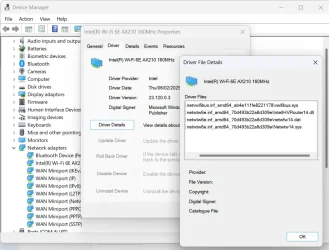
If you go into device manager find the device, pick the driver tab and then select driver details, it will list the drivers used.

1743780156000.webp
 

My Computers

System One System Two

  • OS
    Windows 11 Pro 25H2 26200.8655
    Computer type
    Laptop
    Manufacturer/Model
    Acemagic LX15PRO
    CPU
    AMD Ryzen 7 5825U with Radeon Graphics
    Memory
    16GB
    Screen Resolution
    1920 x 1080
    Hard Drives
    SSD 2TB
    Internet Speed
    30 Mbps
    Browser
    Brave
    Antivirus
    Webroot Secure Anywhere
    Other Info
    System 3

    Acer Swift SF114-34 laptop
    OS Windows 11 Pro 26200.8524
    CPU Pentium Silver N6000
    RAM 4GB
    SSD Samsung 970 EVO Plus SSD 2TB (an upgrade)
  • Operating System
    Windows 11 Pro 23H2 22631.2506
    Computer type
    Laptop
    Manufacturer/Model
    HP Mini 210-1090NR PC (bought in late 2009!)
    CPU
    Atom N450 1.66GHz
    Memory
    2GB
    Browser
    Brave
    Antivirus
    Webroot
Could you just remind me of what your goal is? I want to be sure I fully understand the issue so I'm not giving you wrong information.

Is your goal to simply get your touchpad working with the Macrium Reflect recovery disk or was there more to it than that?

As for the idea of adding all drivers - don't do that! I was experimenting with something similar just 2 days ago. I was trying to load my touchpad driver as well as the I2C driver and loading just those drivers worked fine. I added another driver that turned out to be inappropriate for WinPE or WinRE and not only did that fail to load but it caused my I2C and Touchpad driver to not load as well.
 

My Computers

System One System Two

  • OS
    Win11 Pro 25H2 (RTM+)
    Computer type
    PC/Desktop
    Manufacturer/Model
    Acemagic
    CPU
    Intel i7-14650HX
    Memory
    32 GB
    Graphics Card(s)
    No GPU - Built-in Intel Graphics
    Sound Card
    Integrated
    Monitor(s) Displays
    Varies as machine will often be moved to locations with different monitors
    Screen Resolution
    Varies
    Hard Drives
    1 x 1TB Gen 4 NVMe SSD
    PSU
    120W Power Brick
    Keyboard
    Corsair K70 Max RGB Magnetic Keyboard
    Mouse
    Logitech MX Master 3
    Internet Speed
    1Gb Up / 1 Gb Down
    Browser
    Edge
    Antivirus
    Windows Defender
  • Operating System
    Win11 Pro 25H2 (RTM+)
    Computer type
    Laptop
    Manufacturer/Model
    Lenovo ThinkBook 13x Gen 2
    CPU
    Intel i7-1255U
    Memory
    16 GB
    Graphics card(s)
    Intel Iris Xe Graphics
    Sound Card
    Realtek® ALC3306-CG codec
    Monitor(s) Displays
    13.3-inch IPS Display
    Screen Resolution
    WQXGA (2560 x 1600)
    Hard Drives
    2 TB 4 x 4 NVMe SSD
    PSU
    USB-C / Thunderbolt 4 Power / Charging
    Keyboard
    Backlit, spill resistant keyboard
    Mouse
    Buttonless Glass Precision Touchpad
    Internet Speed
    1Gb Up / 1Gb Down
    Browser
    Edge
    Antivirus
    Windows Defender
    Other Info
    WiFi 6e / Bluetooth 5.1 / Facial Recognition / Fingerprint Sensor / ToF (Time of Flight) Human Presence Sensor
I could not do a Macrrium Restore because my touchpad wasn't working and I could not navigate to many of the selections. But a corded mouse or a Bluetooth mouse with its USB dongle did work.
 

My Computers

System One System Two

  • OS
    Windows 11 Pro 25H2 26200.8655
    Computer type
    Laptop
    Manufacturer/Model
    Acemagic LX15PRO
    CPU
    AMD Ryzen 7 5825U with Radeon Graphics
    Memory
    16GB
    Screen Resolution
    1920 x 1080
    Hard Drives
    SSD 2TB
    Internet Speed
    30 Mbps
    Browser
    Brave
    Antivirus
    Webroot Secure Anywhere
    Other Info
    System 3

    Acer Swift SF114-34 laptop
    OS Windows 11 Pro 26200.8524
    CPU Pentium Silver N6000
    RAM 4GB
    SSD Samsung 970 EVO Plus SSD 2TB (an upgrade)
  • Operating System
    Windows 11 Pro 23H2 22631.2506
    Computer type
    Laptop
    Manufacturer/Model
    HP Mini 210-1090NR PC (bought in late 2009!)
    CPU
    Atom N450 1.66GHz
    Memory
    2GB
    Browser
    Brave
    Antivirus
    Webroot
If you go into device manager find the device, pick the driver tab and then select driver details, it will list the drivers used.
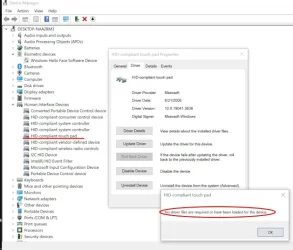
I checked the driver details for my laptop's HID-compliant touchpad, but I get message, "No driver files are required or have been loaded for this device."

So, I thought that was the only device driver I needed to inject into WinRE, well, at least until I came across this thread and saw you or someone mention the IC2 drivers as necessary.

Maybe I injected the drivers incorrectly?

I'll try again to get this working perhaps later today when I have time to work on it.
 

My Computer

System One

  • OS
    win10
Try looking under Mice and other pointing devices. This is where my actual touchpad drivers are shown.
 

My Computers

System One System Two

  • OS
    Windows 11 Pro 25H2 26200.8655
    Computer type
    Laptop
    Manufacturer/Model
    Acemagic LX15PRO
    CPU
    AMD Ryzen 7 5825U with Radeon Graphics
    Memory
    16GB
    Screen Resolution
    1920 x 1080
    Hard Drives
    SSD 2TB
    Internet Speed
    30 Mbps
    Browser
    Brave
    Antivirus
    Webroot Secure Anywhere
    Other Info
    System 3

    Acer Swift SF114-34 laptop
    OS Windows 11 Pro 26200.8524
    CPU Pentium Silver N6000
    RAM 4GB
    SSD Samsung 970 EVO Plus SSD 2TB (an upgrade)
  • Operating System
    Windows 11 Pro 23H2 22631.2506
    Computer type
    Laptop
    Manufacturer/Model
    HP Mini 210-1090NR PC (bought in late 2009!)
    CPU
    Atom N450 1.66GHz
    Memory
    2GB
    Browser
    Brave
    Antivirus
    Webroot
@PoPEBoP,

My last post was directed toward you. I think that @kelper responded just before me so it may have looked like I was requesting info from him, but I was not.

If you reply back I would appreciate it.

In the meantime, kelper, you may want to check this:

For many systems (especially newer systems), the touchpad is no longer connected internally via USB. They often use the I2C interface now. As a result you may simply need to load the I2C driver (if your system has that interface). That may be enough to get basic touchpad functionality. It's possible that some things like scrolling using 2 fingers does not work. If you want full functionality then you load not only the I2C driver but add the touchpad driver itself.

If you still cannot get it to work, let me know. If you are willing to do so, I may then ask you to export all drivers form system, ZIP them up, and share them on OneDrive or elsewhere and share them so that I can take a peek at what you have.

EDIT: Kelper, to start, a directory listing of the exported drivers may be sufficient. The folder names alone are typically enough for me to pick out what is needed. To export the drivers, run these two commands:

MD C:\Drivers_Backup < You can use any folder location in place of what I use here.
pnputil /export-driver * C:\Drivers_Backup
 

My Computers

System One System Two

  • OS
    Win11 Pro 25H2 (RTM+)
    Computer type
    PC/Desktop
    Manufacturer/Model
    Acemagic
    CPU
    Intel i7-14650HX
    Memory
    32 GB
    Graphics Card(s)
    No GPU - Built-in Intel Graphics
    Sound Card
    Integrated
    Monitor(s) Displays
    Varies as machine will often be moved to locations with different monitors
    Screen Resolution
    Varies
    Hard Drives
    1 x 1TB Gen 4 NVMe SSD
    PSU
    120W Power Brick
    Keyboard
    Corsair K70 Max RGB Magnetic Keyboard
    Mouse
    Logitech MX Master 3
    Internet Speed
    1Gb Up / 1 Gb Down
    Browser
    Edge
    Antivirus
    Windows Defender
  • Operating System
    Win11 Pro 25H2 (RTM+)
    Computer type
    Laptop
    Manufacturer/Model
    Lenovo ThinkBook 13x Gen 2
    CPU
    Intel i7-1255U
    Memory
    16 GB
    Graphics card(s)
    Intel Iris Xe Graphics
    Sound Card
    Realtek® ALC3306-CG codec
    Monitor(s) Displays
    13.3-inch IPS Display
    Screen Resolution
    WQXGA (2560 x 1600)
    Hard Drives
    2 TB 4 x 4 NVMe SSD
    PSU
    USB-C / Thunderbolt 4 Power / Charging
    Keyboard
    Backlit, spill resistant keyboard
    Mouse
    Buttonless Glass Precision Touchpad
    Internet Speed
    1Gb Up / 1Gb Down
    Browser
    Edge
    Antivirus
    Windows Defender
    Other Info
    WiFi 6e / Bluetooth 5.1 / Facial Recognition / Fingerprint Sensor / ToF (Time of Flight) Human Presence Sensor
I'll look into this. My touchpad works in some cases but now I can't remember. It depends on whether I start MR from the boot menu or from an external device. But I don't want to use up your time when it could be better used to help others. As I have a good workaround, it doesn't really affect me. But your offer is appreciated.
 

My Computers

System One System Two

  • OS
    Windows 11 Pro 25H2 26200.8655
    Computer type
    Laptop
    Manufacturer/Model
    Acemagic LX15PRO
    CPU
    AMD Ryzen 7 5825U with Radeon Graphics
    Memory
    16GB
    Screen Resolution
    1920 x 1080
    Hard Drives
    SSD 2TB
    Internet Speed
    30 Mbps
    Browser
    Brave
    Antivirus
    Webroot Secure Anywhere
    Other Info
    System 3

    Acer Swift SF114-34 laptop
    OS Windows 11 Pro 26200.8524
    CPU Pentium Silver N6000
    RAM 4GB
    SSD Samsung 970 EVO Plus SSD 2TB (an upgrade)
  • Operating System
    Windows 11 Pro 23H2 22631.2506
    Computer type
    Laptop
    Manufacturer/Model
    HP Mini 210-1090NR PC (bought in late 2009!)
    CPU
    Atom N450 1.66GHz
    Memory
    2GB
    Browser
    Brave
    Antivirus
    Webroot
I'll look into this. My touchpad works in some cases but now I can't remember. It depends on whether I start MR from the boot menu or from an external device. But I don't want to use up your time when it could be better used to help others. As I have a good workaround, it doesn't really affect me. But your offer is appreciated.
If you change your mind, do let me know. It would not bother me in the very least to help. It's the least I could do for a fellow geek :-)
 

My Computers

System One System Two

  • OS
    Win11 Pro 25H2 (RTM+)
    Computer type
    PC/Desktop
    Manufacturer/Model
    Acemagic
    CPU
    Intel i7-14650HX
    Memory
    32 GB
    Graphics Card(s)
    No GPU - Built-in Intel Graphics
    Sound Card
    Integrated
    Monitor(s) Displays
    Varies as machine will often be moved to locations with different monitors
    Screen Resolution
    Varies
    Hard Drives
    1 x 1TB Gen 4 NVMe SSD
    PSU
    120W Power Brick
    Keyboard
    Corsair K70 Max RGB Magnetic Keyboard
    Mouse
    Logitech MX Master 3
    Internet Speed
    1Gb Up / 1 Gb Down
    Browser
    Edge
    Antivirus
    Windows Defender
  • Operating System
    Win11 Pro 25H2 (RTM+)
    Computer type
    Laptop
    Manufacturer/Model
    Lenovo ThinkBook 13x Gen 2
    CPU
    Intel i7-1255U
    Memory
    16 GB
    Graphics card(s)
    Intel Iris Xe Graphics
    Sound Card
    Realtek® ALC3306-CG codec
    Monitor(s) Displays
    13.3-inch IPS Display
    Screen Resolution
    WQXGA (2560 x 1600)
    Hard Drives
    2 TB 4 x 4 NVMe SSD
    PSU
    USB-C / Thunderbolt 4 Power / Charging
    Keyboard
    Backlit, spill resistant keyboard
    Mouse
    Buttonless Glass Precision Touchpad
    Internet Speed
    1Gb Up / 1Gb Down
    Browser
    Edge
    Antivirus
    Windows Defender
    Other Info
    WiFi 6e / Bluetooth 5.1 / Facial Recognition / Fingerprint Sensor / ToF (Time of Flight) Human Presence Sensor
My laptop does use IC2 so I might try again and add these drivers and the touchpad drivers to MR.
 

My Computers

System One System Two

  • OS
    Windows 11 Pro 25H2 26200.8655
    Computer type
    Laptop
    Manufacturer/Model
    Acemagic LX15PRO
    CPU
    AMD Ryzen 7 5825U with Radeon Graphics
    Memory
    16GB
    Screen Resolution
    1920 x 1080
    Hard Drives
    SSD 2TB
    Internet Speed
    30 Mbps
    Browser
    Brave
    Antivirus
    Webroot Secure Anywhere
    Other Info
    System 3

    Acer Swift SF114-34 laptop
    OS Windows 11 Pro 26200.8524
    CPU Pentium Silver N6000
    RAM 4GB
    SSD Samsung 970 EVO Plus SSD 2TB (an upgrade)
  • Operating System
    Windows 11 Pro 23H2 22631.2506
    Computer type
    Laptop
    Manufacturer/Model
    HP Mini 210-1090NR PC (bought in late 2009!)
    CPU
    Atom N450 1.66GHz
    Memory
    2GB
    Browser
    Brave
    Antivirus
    Webroot
Gonna bail a little while to watch that Microsoft event. Hope it is not some waste of time.
 

My Computers

System One System Two

  • OS
    Win11 Pro 25H2 (RTM+)
    Computer type
    PC/Desktop
    Manufacturer/Model
    Acemagic
    CPU
    Intel i7-14650HX
    Memory
    32 GB
    Graphics Card(s)
    No GPU - Built-in Intel Graphics
    Sound Card
    Integrated
    Monitor(s) Displays
    Varies as machine will often be moved to locations with different monitors
    Screen Resolution
    Varies
    Hard Drives
    1 x 1TB Gen 4 NVMe SSD
    PSU
    120W Power Brick
    Keyboard
    Corsair K70 Max RGB Magnetic Keyboard
    Mouse
    Logitech MX Master 3
    Internet Speed
    1Gb Up / 1 Gb Down
    Browser
    Edge
    Antivirus
    Windows Defender
  • Operating System
    Win11 Pro 25H2 (RTM+)
    Computer type
    Laptop
    Manufacturer/Model
    Lenovo ThinkBook 13x Gen 2
    CPU
    Intel i7-1255U
    Memory
    16 GB
    Graphics card(s)
    Intel Iris Xe Graphics
    Sound Card
    Realtek® ALC3306-CG codec
    Monitor(s) Displays
    13.3-inch IPS Display
    Screen Resolution
    WQXGA (2560 x 1600)
    Hard Drives
    2 TB 4 x 4 NVMe SSD
    PSU
    USB-C / Thunderbolt 4 Power / Charging
    Keyboard
    Backlit, spill resistant keyboard
    Mouse
    Buttonless Glass Precision Touchpad
    Internet Speed
    1Gb Up / 1Gb Down
    Browser
    Edge
    Antivirus
    Windows Defender
    Other Info
    WiFi 6e / Bluetooth 5.1 / Facial Recognition / Fingerprint Sensor / ToF (Time of Flight) Human Presence Sensor
I'm going to watch that Val Kilmer movie Top Secret, which I'd never heard of.
 

My Computers

System One System Two

  • OS
    Windows 11 Pro 25H2 26200.8655
    Computer type
    Laptop
    Manufacturer/Model
    Acemagic LX15PRO
    CPU
    AMD Ryzen 7 5825U with Radeon Graphics
    Memory
    16GB
    Screen Resolution
    1920 x 1080
    Hard Drives
    SSD 2TB
    Internet Speed
    30 Mbps
    Browser
    Brave
    Antivirus
    Webroot Secure Anywhere
    Other Info
    System 3

    Acer Swift SF114-34 laptop
    OS Windows 11 Pro 26200.8524
    CPU Pentium Silver N6000
    RAM 4GB
    SSD Samsung 970 EVO Plus SSD 2TB (an upgrade)
  • Operating System
    Windows 11 Pro 23H2 22631.2506
    Computer type
    Laptop
    Manufacturer/Model
    HP Mini 210-1090NR PC (bought in late 2009!)
    CPU
    Atom N450 1.66GHz
    Memory
    2GB
    Browser
    Brave
    Antivirus
    Webroot
@PoPEBoP,

My last post was directed toward you. I think that @kelper responded just before me so it may have looked like I was requesting info from him, but I was not.

If you reply back I would appreciate it.
@hsehestedt

Hi. Thanks for your continued assistance. Just got busy with some other sniggly issues with my new laptop.

Okay. Totally understand about the IC2 drivers. I had injected those into the Macrium WinRE image (.iso), or so I thought, along with the aforementioned HD-Compliant Touch Pad driver.

However, I can't recall if I also injected the HD-compliant mouse driver, under Mice and other pointing devices.

So let me go back and start with a fresh and clean WinRE image and inject all three of those and report back.
 

My Computer

System One

  • OS
    win10
@hsehestedt

Hi. Thanks for your continued assistance. Just got busy with some other sniggly issues with my new laptop.

Okay. Totally understand about the IC2 drivers. I had injected those into the Macrium WinRE image (.iso), or so I thought, along with the aforementioned HD-Compliant Touch Pad driver.

However, I can't recall if I also injected the HD-compliant mouse driver, under Mice and other pointing devices.

So let me go back and start with a fresh and clean WinRE image and inject all three of those and report back.
Sounds good. Just reach out if you need any help.
 

My Computers

System One System Two

  • OS
    Win11 Pro 25H2 (RTM+)
    Computer type
    PC/Desktop
    Manufacturer/Model
    Acemagic
    CPU
    Intel i7-14650HX
    Memory
    32 GB
    Graphics Card(s)
    No GPU - Built-in Intel Graphics
    Sound Card
    Integrated
    Monitor(s) Displays
    Varies as machine will often be moved to locations with different monitors
    Screen Resolution
    Varies
    Hard Drives
    1 x 1TB Gen 4 NVMe SSD
    PSU
    120W Power Brick
    Keyboard
    Corsair K70 Max RGB Magnetic Keyboard
    Mouse
    Logitech MX Master 3
    Internet Speed
    1Gb Up / 1 Gb Down
    Browser
    Edge
    Antivirus
    Windows Defender
  • Operating System
    Win11 Pro 25H2 (RTM+)
    Computer type
    Laptop
    Manufacturer/Model
    Lenovo ThinkBook 13x Gen 2
    CPU
    Intel i7-1255U
    Memory
    16 GB
    Graphics card(s)
    Intel Iris Xe Graphics
    Sound Card
    Realtek® ALC3306-CG codec
    Monitor(s) Displays
    13.3-inch IPS Display
    Screen Resolution
    WQXGA (2560 x 1600)
    Hard Drives
    2 TB 4 x 4 NVMe SSD
    PSU
    USB-C / Thunderbolt 4 Power / Charging
    Keyboard
    Backlit, spill resistant keyboard
    Mouse
    Buttonless Glass Precision Touchpad
    Internet Speed
    1Gb Up / 1Gb Down
    Browser
    Edge
    Antivirus
    Windows Defender
    Other Info
    WiFi 6e / Bluetooth 5.1 / Facial Recognition / Fingerprint Sensor / ToF (Time of Flight) Human Presence Sensor
I solved this for Macrium Reflect at least, by using the RE option when making the Rescue disk/iso.

My current setup does not have a recovery portion so I had to restore from and old backup and use DiskGenius to copy the winre.wim from the recovery partition. This incorporates the driver(s) for the touchpad. I used this with the custom wim option in MR 8.1.

When I boot from a USB device, the touchpad and wifi work! But when I boot from the Windows boot menu, only the touchpad works.
Hi. I also created recovery media with Macrium Reflect. I tried WinRE, WinPE11, WinPE10, WinPE5.0, etc., but I couldn't get the laptop's touchpad to work. I also injected I2C driver to boot.wim using DISM. Also it didn't work. I am having this problem not only with MR, but any program bootable WinPE media. Touchpad only works in Clonezilla bootable media. Touchpad does not work in any x64 WinPe bootable media. What do you advise me? I also couldn't find any video for the solution.
 

My Computer

System One

  • OS
    Windows 11 Pro
    Computer type
    Laptop
    Manufacturer/Model
    Lenovo Yoga Pro 9 16IMH9
    CPU
    Intel Core Ultra 9 185H
    Memory
    64 GB
    Graphics Card(s)
    NVIDIA GeForce RTX 4070
    Monitor(s) Displays
    Mini Led
    Screen Resolution
    3200x2000
Hi. I also created recovery media with Macrium Reflect. I tried WinRE, WinPE11, WinPE10, WinPE5.0, etc., but I couldn't get the laptop's touchpad to work. I also injected I2C driver to boot.wim using DISM. Also it didn't work. I am having this problem not only with MR, but any program bootable WinPE media. Touchpad only works in Clonezilla bootable media. Touchpad does not work in any x64 WinPe bootable media. What do you advise me? I also couldn't find any video for the solution.

Welcome to ElevenForum!

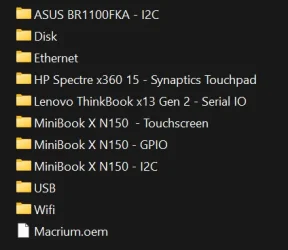
You can add boot critical drivers (including those for the touchpad) to your Macrium Reflect boot image like this:

1) Determine where Reflect is staging the drivers that it uses for creating the Reflect rescue media. Typically this is located in "C:\boot\macrium\WinREDrivers\64Bit". Check to see if you have this folder. If not, let me know and I can help you locate this folder.

2) Drop your boot critical drivers into subfolders in this location. You may see that there are already folders in this location with names like Disk, Ethernet, USB, WiFi, etc. Create a separate subfolder for each driver and drop the associated driver into that folder. The driver must be extracted (not in a .ZIP, .CAB, or any other container format) and the .INF must be available in this folder.

3) Recreate the Reflect Rescue Media from within Reflect.

As an example, here is what the above folder looks like on my system where you can clearly see the folders that I have added:

Image1.webp

Let me know if you need an additional help with this.
 

My Computers

System One System Two

  • OS
    Win11 Pro 25H2 (RTM+)
    Computer type
    PC/Desktop
    Manufacturer/Model
    Acemagic
    CPU
    Intel i7-14650HX
    Memory
    32 GB
    Graphics Card(s)
    No GPU - Built-in Intel Graphics
    Sound Card
    Integrated
    Monitor(s) Displays
    Varies as machine will often be moved to locations with different monitors
    Screen Resolution
    Varies
    Hard Drives
    1 x 1TB Gen 4 NVMe SSD
    PSU
    120W Power Brick
    Keyboard
    Corsair K70 Max RGB Magnetic Keyboard
    Mouse
    Logitech MX Master 3
    Internet Speed
    1Gb Up / 1 Gb Down
    Browser
    Edge
    Antivirus
    Windows Defender
  • Operating System
    Win11 Pro 25H2 (RTM+)
    Computer type
    Laptop
    Manufacturer/Model
    Lenovo ThinkBook 13x Gen 2
    CPU
    Intel i7-1255U
    Memory
    16 GB
    Graphics card(s)
    Intel Iris Xe Graphics
    Sound Card
    Realtek® ALC3306-CG codec
    Monitor(s) Displays
    13.3-inch IPS Display
    Screen Resolution
    WQXGA (2560 x 1600)
    Hard Drives
    2 TB 4 x 4 NVMe SSD
    PSU
    USB-C / Thunderbolt 4 Power / Charging
    Keyboard
    Backlit, spill resistant keyboard
    Mouse
    Buttonless Glass Precision Touchpad
    Internet Speed
    1Gb Up / 1Gb Down
    Browser
    Edge
    Antivirus
    Windows Defender
    Other Info
    WiFi 6e / Bluetooth 5.1 / Facial Recognition / Fingerprint Sensor / ToF (Time of Flight) Human Presence Sensor
Welcome to ElevenForum!

You can add boot critical drivers (including those for the touchpad) to your Macrium Reflect boot image like this:

1) Determine where Reflect is staging the drivers that it uses for creating the Reflect rescue media. Typically this is located in "C:\boot\macrium\WinREDrivers\64Bit". Check to see if you have this folder. If not, let me know and I can help you locate this folder.

2) Drop your boot critical drivers into subfolders in this location. You may see that there are already folders in this location with names like Disk, Ethernet, USB, WiFi, etc. Create a separate subfolder for each driver and drop the associated driver into that folder. The driver must be extracted (not in a .ZIP, .CAB, or any other container format) and the .INF must be available in this folder.

3) Recreate the Reflect Rescue Media from within Reflect.

As an example, here is what the above folder looks like on my system where you can clearly see the folders that I have added:

View attachment 143950

Let me know if you need an additional help with this.
Thank you for reply. I have already done this. But nothing has changed. For this reason, I began to doubt whether I had installed the correct driver for the touchpad. My Laptop is

Lenovo Yoga Pro 9 16IMH9 - Type 83DN​

And there is no a dedicated driver for the touchpad in Lenovo's support page. So I tried the Intel Human Interface Device (HID) Driver. But nothing changed.
I have both created a rescue flash disk and MR rescue boot option.
 

My Computer

System One

  • OS
    Windows 11 Pro
    Computer type
    Laptop
    Manufacturer/Model
    Lenovo Yoga Pro 9 16IMH9
    CPU
    Intel Core Ultra 9 185H
    Memory
    64 GB
    Graphics Card(s)
    NVIDIA GeForce RTX 4070
    Monitor(s) Displays
    Mini Led
    Screen Resolution
    3200x2000
I just use a USB mouse!
 

My Computers

System One System Two

  • OS
    Windows 11 Pro 25H2 26200.8655
    Computer type
    Laptop
    Manufacturer/Model
    Acemagic LX15PRO
    CPU
    AMD Ryzen 7 5825U with Radeon Graphics
    Memory
    16GB
    Screen Resolution
    1920 x 1080
    Hard Drives
    SSD 2TB
    Internet Speed
    30 Mbps
    Browser
    Brave
    Antivirus
    Webroot Secure Anywhere
    Other Info
    System 3

    Acer Swift SF114-34 laptop
    OS Windows 11 Pro 26200.8524
    CPU Pentium Silver N6000
    RAM 4GB
    SSD Samsung 970 EVO Plus SSD 2TB (an upgrade)
  • Operating System
    Windows 11 Pro 23H2 22631.2506
    Computer type
    Laptop
    Manufacturer/Model
    HP Mini 210-1090NR PC (bought in late 2009!)
    CPU
    Atom N450 1.66GHz
    Memory
    2GB
    Browser
    Brave
    Antivirus
    Webroot
I just use a USB mouse!
Me too. :cool:. Otherwise I couldn't install Windows on this laptop. (Windows was not preinstalled). But why it is not working in any WinPe environment?
 

My Computer

System One

  • OS
    Windows 11 Pro
    Computer type
    Laptop
    Manufacturer/Model
    Lenovo Yoga Pro 9 16IMH9
    CPU
    Intel Core Ultra 9 185H
    Memory
    64 GB
    Graphics Card(s)
    NVIDIA GeForce RTX 4070
    Monitor(s) Displays
    Mini Led
    Screen Resolution
    3200x2000

Latest Support Threads

Back
Top Bottom