ADMINI\~1 folder and RetailDemo Offline Content, What is this?


likerain

Active member
Local time
2:04 AM
Posts
42
OS
Windows 11
Hello, I bought a new PC today, but there are a few things I’m concerned about.

In C:\Users there is a folder named "ADMINI~1." Is it safe to delete this?
Inside this folder, there is only a Temp folder(C:\Users\ADMINI~1\AppData\Local\Temp), and in it, there are two files: "LoginId.dll" and "CrimsonUtil.dll."
When I run "net user" in cmd, I get the following result:

Administrator (my name) DefaultAccount
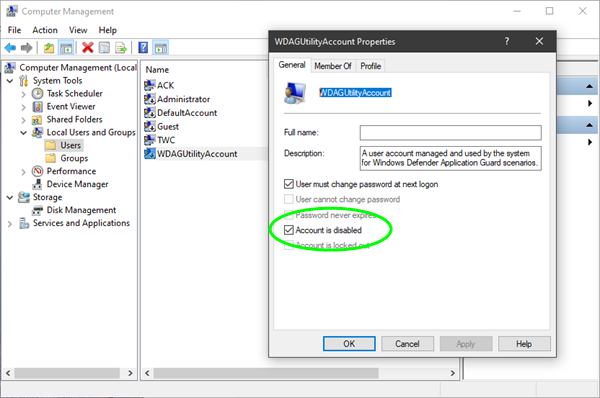
Guest WDAGUtilityAccount

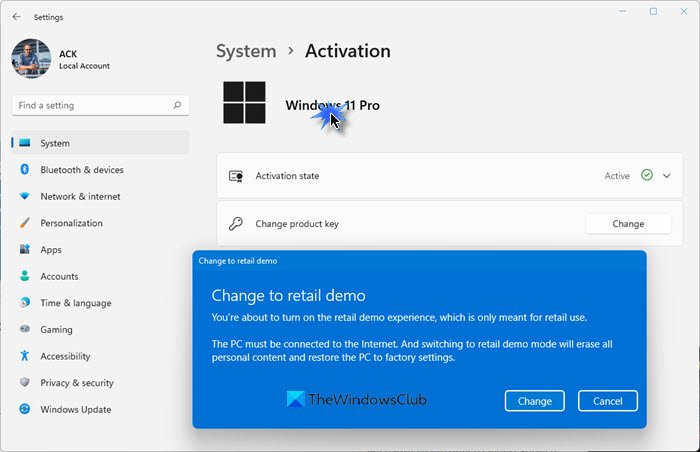
There is one more thing I’m concerned about. When I run Disk Cleanup, an item called "RetailDemo Offline Content" appears. Is it safe to delete this?

Thank you.
 
Windows Build/Version
26100.6584

My Computer

System One

  • OS
    Windows 11
    Computer type
    PC/Desktop
These items might help,


My Computers

System One System Two

  • OS
    Win 11 Pro
    Computer type
    Laptop
    Manufacturer/Model
    ASUS Vivobook
    CPU
    AMD Ryzen™ 7 7730U
    Motherboard
    M1605YA
    Memory
    24GB Dual-Channel DDR4 @ 1596MHz (22-22-22-52)
    Graphics Card(s)
    512MB ATI AMD Radeon Graphics (ASUStek Computer Inc)
    Monitor(s) Displays
    Generic PnP Monitor (1920x1200@60Hz) - P1 PLUS (1920x1080@59Hz)
    Screen Resolution
    1920 X 1200
    Hard Drives
    953GB Western Digital WD
    PSU
    45 Watts
    Mouse
    Lenovo Bluetooth.
    Internet Speed
    500 Mbps
    Browser
    Edge
    Antivirus
    Defender
  • Operating System
    Windows 11
    Computer type
    Laptop
    Manufacturer/Model
    ACER NITRO
    CPU
    AMD Ryzen 7 5800H / 3.2 GHz
    Motherboard
    CZ Scala_CAS (FP6)
    Memory
    32 GB DDR4 SDRAM 3200 MHz
    Graphics card(s)
    NVIDIA GeForce RTX 3060 6 GB GDDR6 SDRAM
    Sound Card
    Realtek Audio. NVIDIA High Definition Audio
    Monitor(s) Displays
    15.6" LED backlight 1920 x 1080 (Full HD) 144 Hz
    Screen Resolution
    1920 x 1080 (Full HD)
    Hard Drives
    Samsung 970 Evo Plus 2TB NVMe M.2
    PSU
    180 Watt, 19.5 V
    Mouse
    Lenovo Bluetooth
    Internet Speed
    500 Mbps
    Browser
    Edge
    Antivirus
    Defender
These items might help,


Thank you for your reply.
Sorry if I wasn’t very clear before. I’m not concerned about the existence of WDAGUtilityAccount, since I’ve seen it on several PCs I’ve used.

When I check with *net user*, there is no user called ADMINI~1. In other words, the user folder exists, but it doesn’t seem to exist as a user profile. That’s why I’m not sure whether it’s safe to delete ADMINI~1. I tried researching it, but I couldn’t find enough information.

As for RetailDemo, I believe it’s probably safe to delete?
Thank you for the information. But in the article you shared, there was a comment. Could you explain what that comment means?
1758527836924.webp
Is it advice for people who can’t remove the Demo through Disk Cleanup?
 

My Computer

System One

  • OS
    Windows 11
    Computer type
    PC/Desktop
As for ADMINI~1 it’s the system’s short-name alias for the Administrator folder. Do not delete it. As for why the retail demo was used you might wish to contact the seller for information.
 

My Computers

System One System Two

  • OS
    Win 11 Pro
    Computer type
    Laptop
    Manufacturer/Model
    ASUS Vivobook
    CPU
    AMD Ryzen™ 7 7730U
    Motherboard
    M1605YA
    Memory
    24GB Dual-Channel DDR4 @ 1596MHz (22-22-22-52)
    Graphics Card(s)
    512MB ATI AMD Radeon Graphics (ASUStek Computer Inc)
    Monitor(s) Displays
    Generic PnP Monitor (1920x1200@60Hz) - P1 PLUS (1920x1080@59Hz)
    Screen Resolution
    1920 X 1200
    Hard Drives
    953GB Western Digital WD
    PSU
    45 Watts
    Mouse
    Lenovo Bluetooth.
    Internet Speed
    500 Mbps
    Browser
    Edge
    Antivirus
    Defender
  • Operating System
    Windows 11
    Computer type
    Laptop
    Manufacturer/Model
    ACER NITRO
    CPU
    AMD Ryzen 7 5800H / 3.2 GHz
    Motherboard
    CZ Scala_CAS (FP6)
    Memory
    32 GB DDR4 SDRAM 3200 MHz
    Graphics card(s)
    NVIDIA GeForce RTX 3060 6 GB GDDR6 SDRAM
    Sound Card
    Realtek Audio. NVIDIA High Definition Audio
    Monitor(s) Displays
    15.6" LED backlight 1920 x 1080 (Full HD) 144 Hz
    Screen Resolution
    1920 x 1080 (Full HD)
    Hard Drives
    Samsung 970 Evo Plus 2TB NVMe M.2
    PSU
    180 Watt, 19.5 V
    Mouse
    Lenovo Bluetooth
    Internet Speed
    500 Mbps
    Browser
    Edge
    Antivirus
    Defender
As for why the retail demo was used you might wish to contact the seller for information.

And tell them you want a discount because they sold you a floor model, that every Tom, Dick or Harry who walked past it, touched and punished the keyboard & laptop hinges on.

I was sold a floor model TV once, it was set to floor model & had fingerprints all over the screen. I complained and they were so apologetic, they gave me a Home Theatre system to make up for it. You may not be so lucky but if you didn’t know, ask for a discount.

Or maybe better still, return it for a new one.
 

My Computers

System One System Two

  • OS
    Windows 11 Pro 25H2 Build 26200.8655
    Computer type
    PC/Desktop
    Manufacturer/Model
    Sin-built 2013
    CPU
    Intel(R) Core(TM) i7-4770K CPU @ 3.50GHz
    Motherboard
    ASUS ROG Maximus VI Formula
    Memory
    32.0 GB of I forget and the box is in storage.
    Graphics Card(s)
    Gigabyte nVidia GeForce GTX 1660 Super OC 6GB
    Sound Card
    Onboard thingy
    Monitor(s) Displays
    5 x LG 25MS500-B - 1 x 24MK430H-B - 1 x Wacom Pro 22" Touch Screen Tablet
    Screen Resolution
    All over the place
    Hard Drives
    Too many to list.
    OS on Samsung 1TB 870 QVO SATA
    PSU
    Silverstone 1500
    Case
    NZXT Phantom 820 Full-Tower Case
    Cooling
    Noctua NH-D15 Elite Class Dual Tower CPU Cooler / 6 x EziDIY 120mm / 2 x Corsair 140mm somethings / 1 x 140mm Thermaltake something / 2 x 200mm Corsair.
    Keyboard
    Corsair K95 / Logitech diNovo Edge Wireless
    Mouse
    Logitech: G402 / G502 / Mx Masters / Mx Air Cordless
    Internet Speed
    2000/500Mbps
    Browser
    All sorts
    Antivirus
    Kaspersky Premium
    Other Info
    ㅤㅤㅤㅤㅤㅤㅤㅤㅤㅤㅤㅤㅤㅤㅤㅤㅤㅤㅤㅤㅤㅤㅤㅤㅤㅤㅤㅤㅤㅤㅤㅤㅤㅤㅤㅤㅤㅤㅤㅤ⠀⠀⠀⠀⠀⠀⠀⠀⠀⠀
    TP-Link BE9300 WiFi 7 Bluetooth 5.4 (Archer TBE550E)
    TP-Link TX201 V1 2.5GB Lan

    Grandstream HT812 - VoIP
    ASUS DSL-AX82U - Mesh
    ASUS RT-AC68U - Mesh
    ASUS RT-BE88U Router

    Brother MFC-L2880DW Printer

    I’m on a horse.
  • Operating System
    Windows 11 Pro 25H2 Build 26200.8655
    Computer type
    Laptop
    Manufacturer/Model
    LENOVO Yoga 7 14IRL8 - 7i EVO OLED 14" Touchscreen i5 12 Core 16GB/512GB
    CPU
    Intel Core 12th Gen i5-1240P Processor (1.7 - 4.4GHz)
    Memory
    16GB LPDDR5 RAM
    Graphics card(s)
    Intel Iris Xe Graphics Processor
    Sound Card
    Optimized with Dolby Atmos®
    Screen Resolution
    QHD 2880 x 1800 OLED
    Hard Drives
    M.2 512GB
    Antivirus
    Defender / Malwarebytes
    Other Info
    …still on a horse.
As for ADMINI~1 it’s the system’s short-name alias for the Administrator folder. Do not delete it. As for why the retail demo was used you might wish to contact the seller for information.
And tell them you want a discount because they sold you a floor model, that every Tom, Dick or Harry who walked past it, touched and punished the keyboard & laptop hinges on.

I was sold a floor model TV once, it was set to floor model & had fingerprints all over the screen. I complained and they were so apologetic, they gave me a Home Theatre system to make up for it. You may not be so lucky but if you didn’t know, ask for a discount.

Or maybe better still, return it for a new one.
I contacted the PC manufacturer just to be safe. They said the PCs are assembled after an order is placed, so it is not a display unit.

I bought this PC from a major manufacturer, but I’m a little uneasy.
I think a clean install will be better for my peace of mind, so I will do that. It will probably also resolve the ADMIN~1 issue.

May I ask one last question?
After a clean install, how do you install drivers? Do you install them one by one from the manufacturer’s website, or do you leave everything to Windows Update?
 

My Computer

System One

  • OS
    Windows 11
    Computer type
    PC/Desktop
Since you already have a working system, I would export the drivers from the current install, back them up to a USB drive or something, and then install them after Windows is back up. I don't let my PCs get drivers from Windows Update.

The thread is about Tiny11, but the same method works on non-shady installs of Windows 11 also.


My Computer

System One

  • OS
    Windows 11 Pro 25H2
    Computer type
    PC/Desktop
    Manufacturer/Model
    Intel NUC12WSHi7
    CPU
    12th Gen Core i7-1260P
    Motherboard
    NUC12WSBi7
    Memory
    64 GB Micron PC4-25600
    Graphics Card(s)
    Intel Iris Xe Graphics
    Sound Card
    on-board Realtek HD Audio
    Monitor(s) Displays
    Dell U3219Q
    Screen Resolution
    3840 x 2160
    Hard Drives
    Samsung SSD 990 PRO 1TB
    Crucial MX500 2 TB
    Antivirus
    Microsoft Defender
Back
Top Bottom