Solved Adobe CS6 on Win 11 upgrade?


11Dude

Member
Local time
6:48 AM
Posts
28
OS
Windows 11 Pro (25H2)
I am thinking about upgrading from Win 10 Pro to Win 11 Pro on my desktop computer. I presently have the Adobe CS6 suite on my Win 10 machine and it works great. When I upgrade to Win 11, will it automatically continue to work well?
 

My Computer

System One

  • OS
    Windows 11 Pro (25H2)
    Computer type
    PC/Desktop
 

My Computer

System One

  • OS
    Windows 11
    Computer type
    PC/Desktop
    Manufacturer/Model
    HP Pavilion
    CPU
    AMD Ryzen 7 5700G
    Motherboard
    Erica6
    Memory
    Micron Technology DDR4-3200 16GB
    Graphics Card(s)
    NVIDIA GeForce RTX 3060
    Sound Card
    Realtek ALC671
    Monitor(s) Displays
    Samsung SyncMaster U28E590
    Screen Resolution
    3840 x 2160
    Hard Drives
    SAMSUNG MZVLQ1T0HALB-000H1
Well, since I still have my CS 6 DVD, I looked at this point. Unfortunately most of the good stuff in CS6 can't be installed.

In any case, I use the subscription versions of Lightroom Classic and Photoshop. They are vastly improved over the CS 6 versions. Yes, I also hate paying for subscriptions, but it's either a subscription or extremely expensive upgrades each major release. Pay them now or pay them later.
 

My Computer

System One

  • OS
    Windows 11 2H25
    Computer type
    PC/Desktop
    Manufacturer/Model
    DIY
    CPU
    AMD 9900X
    Motherboard
    MSI X870E Carbon
    Memory
    64 GB
    Graphics Card(s)
    AMD 9070 XT
    Sound Card
    built-in
    Monitor(s) Displays
    Dell 24"
    Hard Drives
    Sabrent 1 TB NVMe, 4 x SSD (need to check models), 4 x 3.5" HDD, 8-16 TB, all WD
    PSU
    Seasonic 850
    Case
    Fractal Design North XL (which I likw)
    Cooling
    Corsair AIO for CPU, fans for case
    Keyboard
    Das Keyboard 4
    Mouse
    Corsair M65 (white)
    Internet Speed
    1 TB download
    Browser
    Firefox
    Antivirus
    Bitdefender
    Other Info
    Also have Lenovo T14S laptop (me) and Lenovo Slim 71 (wife)
Yes, I also hate paying for subscriptions, but it's either a subscription or extremely expensive upgrades each major release. Pay them now or pay them later.

Don't know what kind of work you do with Photoshop but I too hate subscriptions, even though I still have a copy of CS6 that I still have and works on 11 , I have also taken to using the Affinity Suite, for $165 you can get Designer , Photo and Publisher and it's a one off license, no subscription. Or for $70 you can just get Affinity Photo with the same license agreement.
IMO it is every bit as good as Photoshop, and it also works well with .psd files.

I'll keep my copy of CS6 until it no longer works , but Adobe will no longer be getting anymore of my money.
 

My Computer

System One

  • OS
    Windows 11 Pro 25H2 v26200.7171
    Computer type
    PC/Desktop
    Manufacturer/Model
    self built
    CPU
    Intel I9-12900k Adler Lake
    Motherboard
    Gigabyte Z790 Gaming Plus AX
    Memory
    Corsair Vengeance 64GB DDR5
    Graphics Card(s)
    Realtek
    Monitor(s) Displays
    Samsung Curved 23"
    Screen Resolution
    1920x1080
    Hard Drives
    9 Drives total: Two 1TB M.2 SSD's, Three internal Seagate Barracuda 1TB HDD's , 4 Western Digital External removable drives , 3 @ 1TB each and 1 8TB
    Case
    Antec Flux Pro
    Cooling
    ID Cooling FX 240 Pro
    Browser
    Firefox
    Antivirus
    Bitdefender
Well, since I still have my CS 6 DVD, I looked at this point. Unfortunately most of the good stuff in CS6 can't be installed.

In any case, I use the subscription versions of Lightroom Classic and Photoshop. They are vastly improved over the CS 6 versions. Yes, I also hate paying for subscriptions, but it's either a subscription or extremely expensive upgrades each major release. Pay them now or pay them later.
I have Adobe Photoshop, Adobe Audition installed on my Windows 11 works without issues.
 

My Computer

System One

  • OS
    Windows 11
    Computer type
    PC/Desktop
    Manufacturer/Model
    HP Pavilion
    CPU
    AMD Ryzen 7 5700G
    Motherboard
    Erica6
    Memory
    Micron Technology DDR4-3200 16GB
    Graphics Card(s)
    NVIDIA GeForce RTX 3060
    Sound Card
    Realtek ALC671
    Monitor(s) Displays
    Samsung SyncMaster U28E590
    Screen Resolution
    3840 x 2160
    Hard Drives
    SAMSUNG MZVLQ1T0HALB-000H1
Adobe Photoshop CS6 still works perfectly on W11 - even latest 25H2 Canary build with the last CS6 updates.
If you are though still using Camera RAW files the latest cameras probably won't work - so what you can do in that case is convert the RAW files to TIFF via the camera's own software (in the case of Canon it's usually pretty horrible - great hardware but hideous software !) and then do your post processing etc with Photoshop. PNG and jpeg formats work OK as do layers, curves, white balance, load of filters etc.

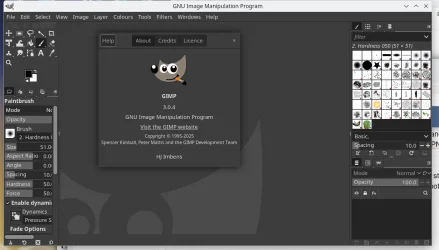
It's worth looking at though these days a free software package for this type of stuff with almost as many functions as photoshop -- the GIMP (works on both Linux and Windows --identical GUI on both OS'es).


Screenshot_20250928_094636.webp

Cheers
jimbo
 

My Computer

System One

  • OS
    Windows XP,11 Linux Fedora Rawhide pre-release 45
    Computer type
    PC/Desktop
    CPU
    2 X Intel i7
    Screen Resolution
    4KUHD X 2
If you keep the application installed and just upgrade to Windows 11, it shouldn't be affected. In worst case you may need to activate it again.
 

My Computers

System One System Two

  • OS
    Windows 11 Pro 23H2 (5699), 25H2 (8457)
    Computer type
    Laptop
    Manufacturer/Model
    Acer Extensa 5630EZ
    CPU
    Mobile DualCore Intel Core 2 Duo T7250, 2000 MHz
    Motherboard
    Acer Extensa 5630
    Memory
    4GB
    Graphics Card(s)
    Mobile Intel(R) GMA 4500M (Mobile 4 series)
    Sound Card
    Realtek ALC268 @ Intel 82801IB ICH9 - High Definition Audio Controller
    Monitor(s) Displays
    1
    Screen Resolution
    1280x800
    Hard Drives
    Samsung SSD 850 EVO 250GB SATA Device (250 GB, SATA-III)
    Internet Speed
    VDSL 50 Mbps
    Browser
    MICROSOFT EDGE
    Antivirus
    WINDOWS DEFENDER
    Other Info
    Legacy MBR installation, no TPM, no Secure Boot, no WDDM 2.0 graphics drivers, no SSE4.2, cannot get more unsupported ;) This is only my test laptop. I had installed Windows 11 here before upgrading my main PC. For my main PC I use everyday see my 2nd system specs.
  • Operating System
    Windows 11 Pro v25H2 (build 26200.8457)
    Computer type
    PC/Desktop
    Manufacturer/Model
    Custom-built PC
    CPU
    Intel Core-i7 3770 3.40GHz s1155 (3rd generation)
    Motherboard
    Asus P8H61 s1155 ATX
    Memory
    2x Kingston Hyper-X Blu 8GB DDR3-1600
    Graphics card(s)
    GIGABYTE GeForce RTX 3050 WINDFORCE OC V2 6GB (GV-N3050WF2OCV2-6GD)
    Sound Card
    Realtek HD audio (ALC887)
    Monitor(s) Displays
    Sony Bravia KDL-19L4000 19" LCD TV via VGA
    Screen Resolution
    1440x900 32-bit 60Hz
    Hard Drives
    WD Blue SA510 2.5 1000GB SSD as system disk, Western Digital Caviar Purple 4TB SATA III (WD40PURZ) as second
    PSU
    Thermaltake Litepower RGB 550W Full Wired
    Case
    SUPERCASE MIDI-TOWER
    Cooling
    Deepcool Gamma Archer CPU cooler, 1x 8cm fan at the back
    Keyboard
    Mitsumi 101-key PS/2
    Mouse
    Sunnyline OptiEye PS/2
    Internet Speed
    100Mbps
    Browser
    Microsoft Edge, Mozilla Firefox
    Antivirus
    Microsoft Windows Defender
    Other Info
    Legacy BIOS (MBR) installation, no TPM, no Secure Boot, WDDM 3.0 graphics drivers, WEI score 7.4
If you keep the application installed and just upgrade to Windows 11, it shouldn't be affected. In worst case you may need to activate it again.
Thanks! Yes, it's an upgrade, and CS6 is already installed on Win 10.
 

My Computer

System One

  • OS
    Windows 11 Pro (25H2)
    Computer type
    PC/Desktop
So it shouldn't be affected. However, I would backup the whole disk or clone it to a spare disk with Acronis or Macrium Reflect or other utility before upgrading. If anything goes wrong you restore your old system. Most utilities can create a USB flash drive and then boot from it and do it outside Windows, as usually the Windows version is paid or it will ask you to restart anyway. With the bootable USB flash drive, you can restore to any disk in case Windows upgrade fails and you cannot boot to your old system to restore. Otherwise you will have to clean install Windows 10 or 11, install the utility again and then restore which is just a waste of time.
 

My Computers

System One System Two

  • OS
    Windows 11 Pro 23H2 (5699), 25H2 (8457)
    Computer type
    Laptop
    Manufacturer/Model
    Acer Extensa 5630EZ
    CPU
    Mobile DualCore Intel Core 2 Duo T7250, 2000 MHz
    Motherboard
    Acer Extensa 5630
    Memory
    4GB
    Graphics Card(s)
    Mobile Intel(R) GMA 4500M (Mobile 4 series)
    Sound Card
    Realtek ALC268 @ Intel 82801IB ICH9 - High Definition Audio Controller
    Monitor(s) Displays
    1
    Screen Resolution
    1280x800
    Hard Drives
    Samsung SSD 850 EVO 250GB SATA Device (250 GB, SATA-III)
    Internet Speed
    VDSL 50 Mbps
    Browser
    MICROSOFT EDGE
    Antivirus
    WINDOWS DEFENDER
    Other Info
    Legacy MBR installation, no TPM, no Secure Boot, no WDDM 2.0 graphics drivers, no SSE4.2, cannot get more unsupported ;) This is only my test laptop. I had installed Windows 11 here before upgrading my main PC. For my main PC I use everyday see my 2nd system specs.
  • Operating System
    Windows 11 Pro v25H2 (build 26200.8457)
    Computer type
    PC/Desktop
    Manufacturer/Model
    Custom-built PC
    CPU
    Intel Core-i7 3770 3.40GHz s1155 (3rd generation)
    Motherboard
    Asus P8H61 s1155 ATX
    Memory
    2x Kingston Hyper-X Blu 8GB DDR3-1600
    Graphics card(s)
    GIGABYTE GeForce RTX 3050 WINDFORCE OC V2 6GB (GV-N3050WF2OCV2-6GD)
    Sound Card
    Realtek HD audio (ALC887)
    Monitor(s) Displays
    Sony Bravia KDL-19L4000 19" LCD TV via VGA
    Screen Resolution
    1440x900 32-bit 60Hz
    Hard Drives
    WD Blue SA510 2.5 1000GB SSD as system disk, Western Digital Caviar Purple 4TB SATA III (WD40PURZ) as second
    PSU
    Thermaltake Litepower RGB 550W Full Wired
    Case
    SUPERCASE MIDI-TOWER
    Cooling
    Deepcool Gamma Archer CPU cooler, 1x 8cm fan at the back
    Keyboard
    Mitsumi 101-key PS/2
    Mouse
    Sunnyline OptiEye PS/2
    Internet Speed
    100Mbps
    Browser
    Microsoft Edge, Mozilla Firefox
    Antivirus
    Microsoft Windows Defender
    Other Info
    Legacy BIOS (MBR) installation, no TPM, no Secure Boot, WDDM 3.0 graphics drivers, WEI score 7.4

Latest Support Threads

Back
Top Bottom