

On a home network (workgroup) with Windows 7. Here is the situation:
0- The network is functioning well on both sides.
1- In the Windows 7 network window, you can see the Windows 7 computer and also the Windows 11 computer.
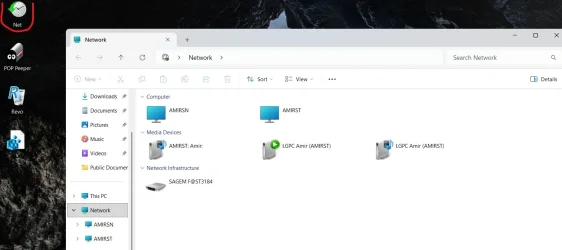
2- In the Windows 11 network window, you can see the Windows 7 computer but not the Windows 11 computer.
I tried several solutions, including changes to Services.msc and the firewall, but nothing helped until we came up with a solution using Gemini that includes creating a BAT with a shortcut to the desktop (maybe it is also possible to make a shortcut to START when the computer starts).
What the command does is initialize/refresh the Network Discovery rule group in the firewall and causes the Windows 11 computer to appear in the Network window in Windows 11.
Here is the command:
netsh advfirewall firewall set rule group="Network Discovery" new enable=No
netsh advfirewall firewall set rule group="Network Discovery" new enable=Yes
0- The network is functioning well on both sides.
1- In the Windows 7 network window, you can see the Windows 7 computer and also the Windows 11 computer.
2- In the Windows 11 network window, you can see the Windows 7 computer but not the Windows 11 computer.
I tried several solutions, including changes to Services.msc and the firewall, but nothing helped until we came up with a solution using Gemini that includes creating a BAT with a shortcut to the desktop (maybe it is also possible to make a shortcut to START when the computer starts).
What the command does is initialize/refresh the Network Discovery rule group in the firewall and causes the Windows 11 computer to appear in the Network window in Windows 11.
Here is the command:
netsh advfirewall firewall set rule group="Network Discovery" new enable=No
netsh advfirewall firewall set rule group="Network Discovery" new enable=Yes
Attachments
Last edited:
My Computers
-
At a glance
win11 proIntel® Core 7 240H, 10C (6P + 4E) / 16T, P-co...16GB SO-DIMM DDR5-5200Integrated Intel® Graphics- OS
- win11 pro
- Computer type
- PC/Desktop
- Manufacturer/Model
- All-in-One Lenovo IdeaCentre AIO 24IRH9 F0HN00X9IV
- CPU
- Intel® Core 7 240H, 10C (6P + 4E) / 16T, P-core 2.5 / 5
- Motherboard
- All-in-One Lenovo
- Memory
- 16GB SO-DIMM DDR5-5200
- Graphics Card(s)
- Integrated Intel® Graphics
- Sound Card
- High Definition (HD) Audio, Realtek® ALC233-CG codec
- Monitor(s) Displays
- 23.8" ',IPS, 16:9, Contrast Ratio 1300:1, Color Gamut 99% sRGB, Refresh Rate 100HZ
- Screen Resolution
- FHD (1920x1080)
- Hard Drives
- 1TB SSD M.2 2280 PCIe® 4.0x4 NVMe®
- Antivirus
- Defender
- Other Info
- Full CPU details - Intel® Core 7 240H, 10C (6P + 4E) / 16T, P-core 2.5 / 5.2GHz, E-core 1.8 / 4.0GHz, 24MB Intel Smart Cache
-
98SE/XP/windows7 32bit/ win10






