
If you don't see your computer on a home network


prukeyhi

Member
Local time
11:01 PM
Posts
11
Location
Haifa-IL
OS
win11 pro
On a home network (workgroup) with Windows 7. Here is the situation:
0- The network is functioning well on both sides.
1- In the Windows 7 network window, you can see the Windows 7 computer and also the Windows 11 computer.
2- In the Windows 11 network window, you can see the Windows 7 computer but not the Windows 11 computer.
I tried several solutions, including changes to Services.msc and the firewall, but nothing helped until we came up with a solution using Gemini that includes creating a BAT with a shortcut to the desktop (maybe it is also possible to make a shortcut to START when the computer starts).
What the command does is initialize/refresh the Network Discovery rule group in the firewall and causes the Windows 11 computer to appear in the Network window in Windows 11.
Here is the command:

netsh advfirewall firewall set rule group="Network Discovery" new enable=No
netsh advfirewall firewall set rule group="Network Discovery" new enable=Yes
 

Attachments
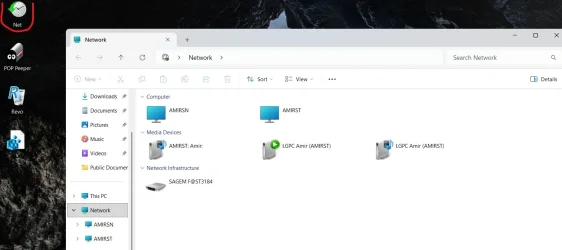
  • Screenshot 2026-10-29 211746.webp
    Screenshot 2026-10-29 211746.webp
    60.9 KB · Views: 1
Last edited:

My Computers My Computers

  • At a glance

    win11 proIntel® Core 7 240H, 10C (6P + 4E) / 16T, P-co...16GB SO-DIMM DDR5-5200Integrated Intel® Graphics
    OS
    win11 pro
    Computer type
    PC/Desktop
    Manufacturer/Model
    All-in-One Lenovo IdeaCentre AIO 24IRH9 F0HN00X9IV
    CPU
    Intel® Core 7 240H, 10C (6P + 4E) / 16T, P-core 2.5 / 5
    Motherboard
    All-in-One Lenovo
    Memory
    16GB SO-DIMM DDR5-5200
    Graphics Card(s)
    Integrated Intel® Graphics
    Sound Card
    High Definition (HD) Audio, Realtek® ALC233-CG codec
    Monitor(s) Displays
    23.8" ',IPS, 16:9, Contrast Ratio 1300:1, Color Gamut 99% sRGB, Refresh Rate 100HZ
    Screen Resolution
    FHD (1920x1080)
    Hard Drives
    1TB SSD M.2 2280 PCIe® 4.0x4 NVMe®
    Antivirus
    Defender
    Other Info
    Full CPU details - Intel® Core 7 240H, 10C (6P + 4E) / 16T, P-core 2.5 / 5.2GHz, E-core 1.8 / 4.0GHz, 24MB Intel Smart Cache
  • 98SE/XP/windows7 32bit/ win10

Not trying to pee in your Cheerios or anything, neat trick, etc., but just in general... I've never understood why people need to see the computer they're on in the network section of Explorer. You're on the computer already.
 

My Computer My Computer

At a glance

Win11 Ent. 25H2
OS
Win11 Ent. 25H2
For example, to transfer files from computer to computer in the same window, have you thought about that?
 

My Computers My Computers

  • At a glance

    win11 proIntel® Core 7 240H, 10C (6P + 4E) / 16T, P-co...16GB SO-DIMM DDR5-5200Integrated Intel® Graphics
    OS
    win11 pro
    Computer type
    PC/Desktop
    Manufacturer/Model
    All-in-One Lenovo IdeaCentre AIO 24IRH9 F0HN00X9IV
    CPU
    Intel® Core 7 240H, 10C (6P + 4E) / 16T, P-core 2.5 / 5
    Motherboard
    All-in-One Lenovo
    Memory
    16GB SO-DIMM DDR5-5200
    Graphics Card(s)
    Integrated Intel® Graphics
    Sound Card
    High Definition (HD) Audio, Realtek® ALC233-CG codec
    Monitor(s) Displays
    23.8" ',IPS, 16:9, Contrast Ratio 1300:1, Color Gamut 99% sRGB, Refresh Rate 100HZ
    Screen Resolution
    FHD (1920x1080)
    Hard Drives
    1TB SSD M.2 2280 PCIe® 4.0x4 NVMe®
    Antivirus
    Defender
    Other Info
    Full CPU details - Intel® Core 7 240H, 10C (6P + 4E) / 16T, P-core 2.5 / 5.2GHz, E-core 1.8 / 4.0GHz, 24MB Intel Smart Cache
  • 98SE/XP/windows7 32bit/ win10

  • Sad
Reactions: OAT
For example, to transfer files from computer to computer in the same window, have you thought about that?
But you appear to be talking about not seeing the (same) computer you're already on, on the network. That's not computer to computer?

I would agree with above, why should you want to see the home/base/same computer on the computer being used. Sufficient to be able to identify other computers on the network anyway

I suspect that's why it doesn't show up and that Windows 11 networking has removed that redundancy, and it's an unnecessary anachronism in the Windows 7 networking

EDIT
In any case, networking between versions of Windows is a nightmare, as many posts in many forums demonstrate. Why knows why? That's why a lot of users resort to cloud-based sharing.
 

My Computers My Computers

  • At a glance

    Windows 11 2xH2 (latest update ... forever anal)Intel i5-124008GBNVIDIA GeForce GT730
    OS
    Windows 11 2xH2 (latest update ... forever anal)
    Computer type
    PC/Desktop
    Manufacturer/Model
    HP Slim S01
    CPU
    Intel i5-12400
    Memory
    8GB
    Graphics Card(s)
    NVIDIA GeForce GT730
    Sound Card
    OOBE
    Monitor(s) Displays
    Acer 32"
    Screen Resolution
    1920x1080
    Hard Drives
    512GB KIOXIA NVMe
    1TB SATA SSD
    PSU
    OOBE
    Case
    OOBE
    Cooling
    OOBE
    Keyboard
    BT
    Mouse
    BT
    Browser
    Brave FFox Chrome Opera
    Antivirus
    KIS
  • At a glance

    Windows 11 Pro 2xH2 (latest update ... 4ever ...i7-1165G7 @ 2.80GHzIntel Iris Xe Graphics
    Operating System
    Windows 11 Pro 2xH2 (latest update ... 4ever anal)
    Computer type
    Laptop
    Manufacturer/Model
    HP Pavillion 15
    CPU
    i7-1165G7 @ 2.80GHz
    Graphics card(s)
    Intel Iris Xe Graphics
    Hard Drives
    Samsung NVMe 512GB
    + numerous/multiple SSD Type C USB enclosures
    Internet Speed
    NBN FTTN 50
    Browser
    Brave
    Antivirus
    KIS
For example, to transfer files from computer to computer in the same window, have you thought about that?
I've not only thought about it, I've actually transferred files from one computer to another at least twice in my lifetime, maybe more. If I'm on computer A, I grab the files from a folder on computer A, and copy them to a share on computer B. I have no idea why I would go through the share on computer A, if the folder is even shared, and send them to a share on B.
 

My Computer My Computer

At a glance

Win11 Ent. 25H2
OS
Win11 Ent. 25H2
At the time, I managed to create a network with 98SE and Vista just for the challenge and fun.
 

My Computers My Computers

  • At a glance

    win11 proIntel® Core 7 240H, 10C (6P + 4E) / 16T, P-co...16GB SO-DIMM DDR5-5200Integrated Intel® Graphics
    OS
    win11 pro
    Computer type
    PC/Desktop
    Manufacturer/Model
    All-in-One Lenovo IdeaCentre AIO 24IRH9 F0HN00X9IV
    CPU
    Intel® Core 7 240H, 10C (6P + 4E) / 16T, P-core 2.5 / 5
    Motherboard
    All-in-One Lenovo
    Memory
    16GB SO-DIMM DDR5-5200
    Graphics Card(s)
    Integrated Intel® Graphics
    Sound Card
    High Definition (HD) Audio, Realtek® ALC233-CG codec
    Monitor(s) Displays
    23.8" ',IPS, 16:9, Contrast Ratio 1300:1, Color Gamut 99% sRGB, Refresh Rate 100HZ
    Screen Resolution
    FHD (1920x1080)
    Hard Drives
    1TB SSD M.2 2280 PCIe® 4.0x4 NVMe®
    Antivirus
    Defender
    Other Info
    Full CPU details - Intel® Core 7 240H, 10C (6P + 4E) / 16T, P-core 2.5 / 5.2GHz, E-core 1.8 / 4.0GHz, 24MB Intel Smart Cache
  • 98SE/XP/windows7 32bit/ win10

I tried several solutions
We all have to try solutions or workarounds. This fault has existed for eight years and there's no sign of MS ever doing anything about it.

a shortcut to the desktop
Using shortcuts as an alternative to File manager's Network section is fairly common. It's what I've been doing for years.
On each network computer, I have shortcuts to the shared folders of all other network computers & several specific folders within them. It's easy for me to organise the shortcuts because I use Taskbar Toolbars:-
My ExplorerPatcher guide to Windows 11 Taskbar Toolbars [post #2225] - ElevenForum

initialize/refresh the Network Discovery
I've seen reports of people trying that fix but finding that it does not work for long.
What I've also seen reports of people trying [and, so far, I have not seen any adverse reports about it] is
File manager network section FDResPub solution - glasskuter #3 - ElevenForum
so I suggest you try that if shortcuts do not appeal to you.


Best of luck,
Denis
 

My Computer My Computer

At a glance

Windows 11 Home x64 Version 26H2 Build 26300....
OS
Windows 11 Home x64 Version 26H2 Build 26300.9457
In the Windows 11 network window, you can see the Windows 7 computer but not the Windows 11 computer.
Been an issue for several years...

Experimenting, I can get it to display for a short period of time by running ipconfig /release and then ipconfig /renew.

Disconnecting and reconnecting the the ethernet cable on the system will also get it to display (for a short period of time).

I came up with a fix when we were on Windows 7 and Windows 10, but it no longer works in Windows 11.

For me, it's not an issue...other computers on the LAN can see it, and access based on their permissions.
 

My Computer My Computer

At a glance

Windows 11 Pro 26H2
OS
Windows 11 Pro 26H2
Computer type
Laptop
Manufacturer/Model
Toshiba
Antivirus
Defender
Back
Top Bottom

