If you don't see your computer on a home network


prukeyhi

Member
Local time
3:42 AM
Posts
11
Location
Haifa-IL
OS
win11 pro
On a home network (workgroup) with Windows 7. Here is the situation:
0- The network is functioning well on both sides.
1- In the Windows 7 network window, you can see the Windows 7 computer and also the Windows 11 computer.
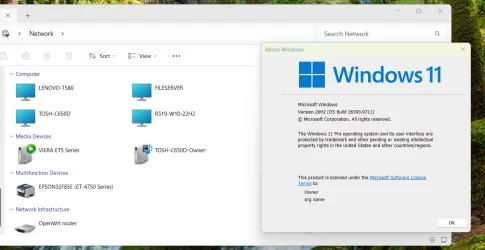
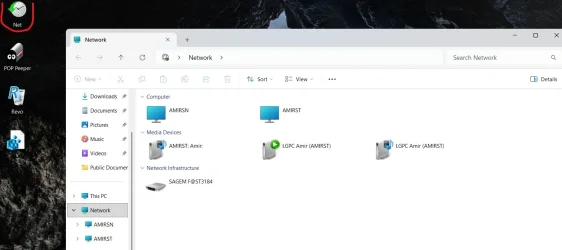
2- In the Windows 11 network window, you can see the Windows 7 computer but not the Windows 11 computer.
I tried several solutions, including changes to Services.msc and the firewall, but nothing helped until we came up with a solution using Gemini that includes creating a BAT with a shortcut to the desktop (maybe it is also possible to make a shortcut to START when the computer starts).
What the command does is initialize/refresh the Network Discovery rule group in the firewall and causes the Windows 11 computer to appear in the Network window in Windows 11.
Here is the command:

netsh advfirewall firewall set rule group="Network Discovery" new enable=No
netsh advfirewall firewall set rule group="Network Discovery" new enable=Yes
 

Attachments
  • Screenshot 2026-10-29 211746.webp
    Screenshot 2026-10-29 211746.webp
    60.9 KB · Views: 1
Last edited:

My Computers My Computers

  • At a glance

    win11 proIntel® Core 7 240H, 10C (6P + 4E) / 16T, P-co...16GB SO-DIMM DDR5-5200Integrated Intel® Graphics
    OS
    win11 pro
    Computer type
    PC/Desktop
    Manufacturer/Model
    All-in-One Lenovo IdeaCentre AIO 24IRH9 F0HN00X9IV
    CPU
    Intel® Core 7 240H, 10C (6P + 4E) / 16T, P-core 2.5 / 5
    Motherboard
    All-in-One Lenovo
    Memory
    16GB SO-DIMM DDR5-5200
    Graphics Card(s)
    Integrated Intel® Graphics
    Sound Card
    High Definition (HD) Audio, Realtek® ALC233-CG codec
    Monitor(s) Displays
    23.8" ',IPS, 16:9, Contrast Ratio 1300:1, Color Gamut 99% sRGB, Refresh Rate 100HZ
    Screen Resolution
    FHD (1920x1080)
    Hard Drives
    1TB SSD M.2 2280 PCIe® 4.0x4 NVMe®
    Antivirus
    Defender
    Other Info
    Full CPU details - Intel® Core 7 240H, 10C (6P + 4E) / 16T, P-core 2.5 / 5.2GHz, E-core 1.8 / 4.0GHz, 24MB Intel Smart Cache
  • 98SE/XP/windows7 32bit/ win10
Not trying to pee in your Cheerios or anything, neat trick, etc., but just in general... I've never understood why people need to see the computer they're on in the network section of Explorer. You're on the computer already.
 

My Computer My Computer

At a glance

Win11 Ent. 25H2
OS
Win11 Ent. 25H2
For example, to transfer files from computer to computer in the same window, have you thought about that?
 

My Computers My Computers

  • At a glance

    win11 proIntel® Core 7 240H, 10C (6P + 4E) / 16T, P-co...16GB SO-DIMM DDR5-5200Integrated Intel® Graphics
    OS
    win11 pro
    Computer type
    PC/Desktop
    Manufacturer/Model
    All-in-One Lenovo IdeaCentre AIO 24IRH9 F0HN00X9IV
    CPU
    Intel® Core 7 240H, 10C (6P + 4E) / 16T, P-core 2.5 / 5
    Motherboard
    All-in-One Lenovo
    Memory
    16GB SO-DIMM DDR5-5200
    Graphics Card(s)
    Integrated Intel® Graphics
    Sound Card
    High Definition (HD) Audio, Realtek® ALC233-CG codec
    Monitor(s) Displays
    23.8" ',IPS, 16:9, Contrast Ratio 1300:1, Color Gamut 99% sRGB, Refresh Rate 100HZ
    Screen Resolution
    FHD (1920x1080)
    Hard Drives
    1TB SSD M.2 2280 PCIe® 4.0x4 NVMe®
    Antivirus
    Defender
    Other Info
    Full CPU details - Intel® Core 7 240H, 10C (6P + 4E) / 16T, P-core 2.5 / 5.2GHz, E-core 1.8 / 4.0GHz, 24MB Intel Smart Cache
  • 98SE/XP/windows7 32bit/ win10
  • Sad
Reactions: OAT
For example, to transfer files from computer to computer in the same window, have you thought about that?
But you appear to be talking about not seeing the (same) computer you're already on, on the network. That's not computer to computer?

I would agree with above, why should you want to see the home/base/same computer on the computer being used. Sufficient to be able to identify other computers on the network anyway

I suspect that's why it doesn't show up and that Windows 11 networking has removed that redundancy, and it's an unnecessary anachronism in the Windows 7 networking

EDIT
In any case, networking between versions of Windows is a nightmare, as many posts in many forums demonstrate. Why knows why? That's why a lot of users resort to cloud-based sharing.
 

My Computers My Computers

  • At a glance

    Windows 11 2xH2 (latest update ... forever anal)Intel i5-124008GBNVIDIA GeForce GT730
    OS
    Windows 11 2xH2 (latest update ... forever anal)
    Computer type
    PC/Desktop
    Manufacturer/Model
    HP Slim S01
    CPU
    Intel i5-12400
    Memory
    8GB
    Graphics Card(s)
    NVIDIA GeForce GT730
    Sound Card
    OOBE
    Monitor(s) Displays
    Acer 32"
    Screen Resolution
    1920x1080
    Hard Drives
    512GB KIOXIA NVMe
    1TB SATA SSD
    PSU
    OOBE
    Case
    OOBE
    Cooling
    OOBE
    Keyboard
    BT
    Mouse
    BT
    Browser
    Brave FFox Chrome Opera
    Antivirus
    KIS
  • At a glance

    Windows 11 Pro 2xH2 (latest update ... 4ever ...i7-1165G7 @ 2.80GHzIntel Iris Xe Graphics
    Operating System
    Windows 11 Pro 2xH2 (latest update ... 4ever anal)
    Computer type
    Laptop
    Manufacturer/Model
    HP Pavillion 15
    CPU
    i7-1165G7 @ 2.80GHz
    Graphics card(s)
    Intel Iris Xe Graphics
    Hard Drives
    Samsung NVMe 512GB
    + numerous/multiple SSD Type C USB enclosures
    Internet Speed
    NBN FTTN 50
    Browser
    Brave
    Antivirus
    KIS
For example, to transfer files from computer to computer in the same window, have you thought about that?
I've not only thought about it, I've actually transferred files from one computer to another at least twice in my lifetime, maybe more. If I'm on computer A, I grab the files from a folder on computer A, and copy them to a share on computer B. I have no idea why I would go through the share on computer A, if the folder is even shared, and send them to a share on B.
 

My Computer My Computer

At a glance

Win11 Ent. 25H2
OS
Win11 Ent. 25H2
At the time, I managed to create a network with 98SE and Vista just for the challenge and fun.
 

My Computers My Computers

  • At a glance

    win11 proIntel® Core 7 240H, 10C (6P + 4E) / 16T, P-co...16GB SO-DIMM DDR5-5200Integrated Intel® Graphics
    OS
    win11 pro
    Computer type
    PC/Desktop
    Manufacturer/Model
    All-in-One Lenovo IdeaCentre AIO 24IRH9 F0HN00X9IV
    CPU
    Intel® Core 7 240H, 10C (6P + 4E) / 16T, P-core 2.5 / 5
    Motherboard
    All-in-One Lenovo
    Memory
    16GB SO-DIMM DDR5-5200
    Graphics Card(s)
    Integrated Intel® Graphics
    Sound Card
    High Definition (HD) Audio, Realtek® ALC233-CG codec
    Monitor(s) Displays
    23.8" ',IPS, 16:9, Contrast Ratio 1300:1, Color Gamut 99% sRGB, Refresh Rate 100HZ
    Screen Resolution
    FHD (1920x1080)
    Hard Drives
    1TB SSD M.2 2280 PCIe® 4.0x4 NVMe®
    Antivirus
    Defender
    Other Info
    Full CPU details - Intel® Core 7 240H, 10C (6P + 4E) / 16T, P-core 2.5 / 5.2GHz, E-core 1.8 / 4.0GHz, 24MB Intel Smart Cache
  • 98SE/XP/windows7 32bit/ win10
I tried several solutions
We all have to try solutions or workarounds. This fault has existed for eight years and there's no sign of MS ever doing anything about it.

a shortcut to the desktop
Using shortcuts as an alternative to File manager's Network section is fairly common. It's what I've been doing for years.
On each network computer, I have shortcuts to the shared folders of all other network computers & several specific folders within them. It's easy for me to organise the shortcuts because I use Taskbar Toolbars:-
My ExplorerPatcher guide to Windows 11 Taskbar Toolbars [post #2225] - ElevenForum

initialize/refresh the Network Discovery
I've seen reports of people trying that fix but finding that it does not work for long.
What I've also seen reports of people trying [and, so far, I have not seen any adverse reports about it] is
File manager network section FDResPub solution - glasskuter #3 - ElevenForum
so I suggest you try that if shortcuts do not appeal to you.


Best of luck,
Denis
 

My Computer My Computer

At a glance

Windows 11 Home x64 Version 26H2 Build 26300....
OS
Windows 11 Home x64 Version 26H2 Build 26300.9457
In the Windows 11 network window, you can see the Windows 7 computer but not the Windows 11 computer.
Been an issue for several years...

Experimenting, I can get it to display for a short period of time by running ipconfig /release and then ipconfig /renew.

Disconnecting and reconnecting the ethernet cable on the system will also get it to display (for a short period of time).

I came up with a fix when we were on Windows 7 and Windows 10, but it no longer works in Windows 11.

For me, it's not an issue...other computers on the LAN can see it, and access based on their permissions.
 
Last edited:

My Computer My Computer

At a glance

Windows 11 Pro 26H2
OS
Windows 11 Pro 26H2
Computer type
Laptop
Manufacturer/Model
Toshiba
Antivirus
Defender
why should you want to see the home/base/same computer on the computer being used. Sufficient to be able to identify other computers on the network anyway

I suspect that's why it doesn't show up and that Windows 11 networking has removed that redundancy, and it's an unnecessary anachronism in the Windows 7 networking
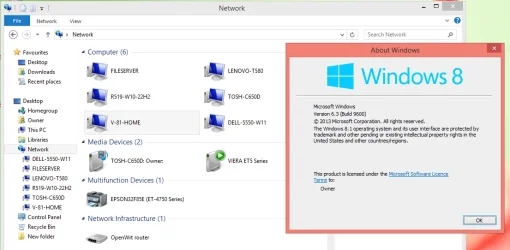
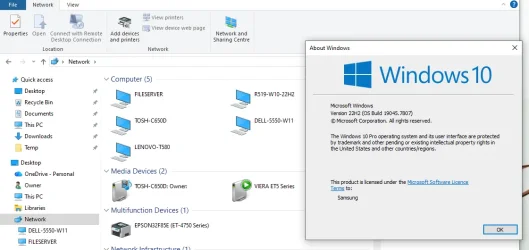
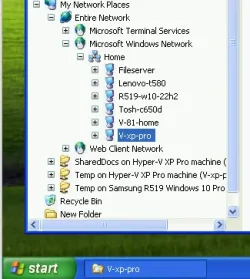
It's not just Windows 7 that can see itself on the network, every version of Windows EXCEPT Windows 11 can see itself. Demonstration attached.
 

Attachments

  • W8 network.webp
    W8 network.webp
    56.6 KB · Views: 1
  • W10 network.webp
    W10 network.webp
    54.6 KB · Views: 1
  • W11 network.webp
    W11 network.webp
    72.3 KB · Views: 1
  • XP network.webp
    XP network.webp
    19.8 KB · Views: 1

My Computers My Computers

  • At a glance

    Windows 11 HomeAMD Athlon Silver 3050U8GBRadeon Graphics
    OS
    Windows 11 Home
    Computer type
    Laptop
    Manufacturer/Model
    Acer Aspire 3 A315-23-R9VY
    CPU
    AMD Athlon Silver 3050U
    Memory
    8GB
    Graphics Card(s)
    Radeon Graphics
    Monitor(s) Displays
    laptop screen
    Screen Resolution
    1366x768 native resolution, up to 2560x1440 with Radeon Virtual Super Resolution
    Hard Drives
    1TB Samsung EVO 870 SSD (from April 2026: 250GB EVO 850)
    Internet Speed
    150 Mbps
    Browser
    Edge, Firefox
    Antivirus
    Defender
    Other Info
    UPDATE - 11 April 2026: due to lid hinges starting to break up this laptop has been retired from active duty. The OS with all software and files has been migrated to my System Seven in 'Other systems' to carry on as my general purpose 'main machine'.

    I've now clean installed 25H2 and used Garlin's scripts to update Secure Boot to CA 2023 and revoke the PCA 2011 certificates. It's new role is to test secure boot issues.

    Info for 2021-2026:
    fully 'Windows 11 ready' laptop. Windows 10 C: partition migrated from my old unsupported 'main machine' then upgraded to 11. A test migration ran Insider builds for 2 months. When 11 was released on 5th October 2021 it was re-imaged back to 10 and was offered the upgrade in Windows Update on 20th October. Windows Update offered the 22H2 Feature Update on 20th September 2022. It got the 23H2 Feature Update on 4th November 2023 through Windows Update, 24H2 on 3rd October 2024 through Windows Update by setting the Target Release Version for 24H2, and 25H2 on 30th September 2025 through Windows Update by setting the Target Release Version for 25H2.
  • At a glance

    Windows 11 ProIntel® Core™ i5-520M8GB(integrated graphics) Intel HD Graphics
    Operating System
    Windows 11 Pro
    Computer type
    Laptop
    Manufacturer/Model
    Dell Latitude E4310
    CPU
    Intel® Core™ i5-520M
    Motherboard
    0T6M8G
    Memory
    8GB
    Graphics card(s)
    (integrated graphics) Intel HD Graphics
    Screen Resolution
    1366x768
    Hard Drives
    500GB Crucial MX500 SSD
    Browser
    Firefox, Edge
    Antivirus
    Defender
    Other Info
    unsupported machine: Legacy bios, MBR, TPM 1.2, upgraded from W10 to W11 using W10/W11 hybrid install media workaround.

    In-place upgrade to 22H2 using ISO and a workaround.
    Feature Update to 23H2 by manually installing the Enablement Package.
    In-place upgrade to 24H2 using hybrid 23H2/24H2 install media.
    Upgraded to 25H2 by Enablement Package.
    Upgraded to 26H2 by Enablement Package.

    Also running Insider Experimental 263xx and 29xxx builds and Windows 10 as native boot .vhdx.
  • My SYSTEM THREE is a Dell Latitude 5410, i7-10610U, 32GB RAM, 512GB NVMe ssd, supported device running Windows 11 Pro.

    My SYSTEM FOUR was a 2-in-1 convertible Lenovo Yoga 11e (1st gen) type 20DA, Celeron N2930, 8GB RAM, 256GB ssd. Unsupported device. This has now been sold. It has been replaced by my System Eight.

    My SYSTEM FIVE is a Dell Latitude 3190 2-in-1, Pentium Silver N5030, 8GB RAM, 1TB NVMe ssd, supported device running Windows 11 Pro, plus Insider Beta, Experimental 263xx and 29xxx builds (and a few others) as a native boot .vhdx.

    My SYSTEM SIX is a Dell Latitude 5550, Core Ultra 7 165H, 64GB RAM, 1TB NVMe SSD, supported device, Windows 11 Pro, Hyper-V host machine. Updated to 25H2 on 30th September 2025, 26H2 on 29th September 2026.

    My SYSTEM SEVEN is a Lenovo Thinkpad T580, 1920x1080 touchscreen, Intel Core i7-8650U, 16GB RAM, 512GB NVMe SSD + 2nd 512GB NVMe SSD, a supported device for Windows 11. This is my current general purpose 'main machine'. The installed Windows 11 Home from my System One has been migrated to this machine. As its new home has an existing digital licence for Pro I've been able to upgrade the migrated OS from Home to Pro.
    29 Sept. 2026 Feature Update to 26H2 through Windows Update.

    My SYSTEM EIGHT is a 2-in-1 convertible Lenovo Yoga 11e (5th gen) type 20LN, Celeron N4120, 8GB RAM, 512GB NVMe ssd, a supported device for Windows 11. Currently running Windows 11 Pro, plus Insider Beta, Experimental 263xx and 29xxx builds as native boot vhdx.
every version of Windows EXCEPT Windows 11 can see itself
When Windows 11's File explorer-related components are behaving themselves, each Windows 11 network computer also lists itself in the File explorer Network section just as earlier Windows versions did.
I have just double-checked this and it remains true in 26H2.


All the best,
Denis
 

My Computer My Computer

At a glance

Windows 11 Home x64 Version 26H2 Build 26300....
OS
Windows 11 Home x64 Version 26H2 Build 26300.9457
You don't have to care whether a computer shows up in File Explorer > Network if you use a shortcut to each network computer.

On all my Computers I have a folder on the desktop called "My Network".

MyComputer1.webp


In that folder I have shortcuts to all the computers on my network. That even includes the computer the folder is on.
For example the shortcut for computer DarkMatter is \\DarkMatter.

MyComputert2.webp


Once I created the folder on one computer I didn't need to recreate it on each computer. All I had to do was copy the original folder onto the desktop of all the other computers.

I use this method on all my computers including those with Windows 7, 10 and 11. It even worked when I had computers with Windows XP.
 

My Computers My Computers

  • At a glance

    Windows 11 Pro 26H2 (26300.9547)AMD Ryzen 7 6800H with Radeon 680M GPU (486MB...Crucial DDR5-4800 (2400MHz) 32GB (2 x 16GB)NVIDIA RTX 3060 Laptop (6GB RAM)
    OS
    Windows 11 Pro 26H2 (26300.9547)
    Computer type
    Laptop
    Manufacturer/Model
    ASUS TUF Gaming A15 (2022)
    CPU
    AMD Ryzen 7 6800H with Radeon 680M GPU (486MB RAM)
    Memory
    Crucial DDR5-4800 (2400MHz) 32GB (2 x 16GB)
    Graphics Card(s)
    NVIDIA RTX 3060 Laptop (6GB RAM)
    Sound Card
    n/a
    Monitor(s) Displays
    15.6-inch
    Screen Resolution
    1920x1080 300Hz
    Hard Drives
    2 x Samsung 990 Evo Plus (2TB M.2 NVME SSD)
    PSU
    n/a
    Mouse
    Wireless Mouse M510
    Internet Speed
    2100Mbps/300Mbps
    Browser
    Firefox
    Antivirus
    Malwarebytes
  • At a glance

    Windows 11 Pro 26H2 (26300.9547)AMD Ryzen 7 5700X3DG.SKILL Flare X 32GB (2x16GB) DDR4ASUS ROG-STRIX-RTX3060TI-08G-V2-GAMING (RTX 3...
    Operating System
    Windows 11 Pro 26H2 (26300.9547)
    Computer type
    PC/Desktop
    Manufacturer/Model
    Custom build
    CPU
    AMD Ryzen 7 5700X3D
    Motherboard
    ASUS ROG Strix B550-F Gaming WiFi II
    Memory
    G.SKILL Flare X 32GB (2x16GB) DDR4
    Graphics card(s)
    ASUS ROG-STRIX-RTX3060TI-08G-V2-GAMING (RTX 3060-Ti, 8GB RAM)
    Monitor(s) Displays
    Samsung G50D IPS 27"
    Screen Resolution
    1440p/180Hz
    Hard Drives
    SAMSUNG 990 EVO Plus (2TB] M.2 NVME SSD
    SAMSUNG 990 EVO Plus (4TB) M.2 NVME SSD
    PSU
    Corsair RM750x (750 watts)
    Case
    Cooler Master MasterCase 5
    Cooling
    Scythe Mugen 6
    Keyboard
    Logitech K520 (MK540 keyboard/mouse combo)
    Mouse
    Logitech M310 (MK540 keyboard/mouse combo)
    Internet Speed
    2100 Mbps down / 300 Mbps up
    Browser
    Firefox, Edge, Chrome
    Antivirus
    Malwarebytes (Premium)
    Other Info
    ASUS Blu-ray Burner BW-16D1HT (SATA) || Western Digital Easystore 20TB USB 3.0 external hard drive used with Acronis True Image 2025 backup software || HP OfficeJet Pro 6975 Printer/Scanner
Back
Top Bottom