Microsoft OneDrive Blog:
If you’ve ever wished Copilot could remember the context of a project, understand the documents your team already relies on, or answer repeat questions without retracing your steps, Agents in OneDrive were built for you.
Rather than asking Copilot the same questions across individual files, you can now create an Agent that understands an entire set of documents, project plans, specs, meeting notes, research, or decks, and responds with answers grounded in your content.
What is an agent in OneDrive?
Think of an agent as a focused AI teammate built from your own files and folders. You choose the content, and the agent uses it to:- Answer questions across multiple documents at once
- Summarize discussions, decisions, and key takeaways
- Surface owners, deadlines, risks, and action items
- Keep shared context intact as work evolves
See Agents in Action
The capabilities highlighted here are demonstrated in a video walkthrough featuring Mithuna Soundararaj, Akash Ravi, and Vesa Juvonen.Creating an Agent in OneDrive
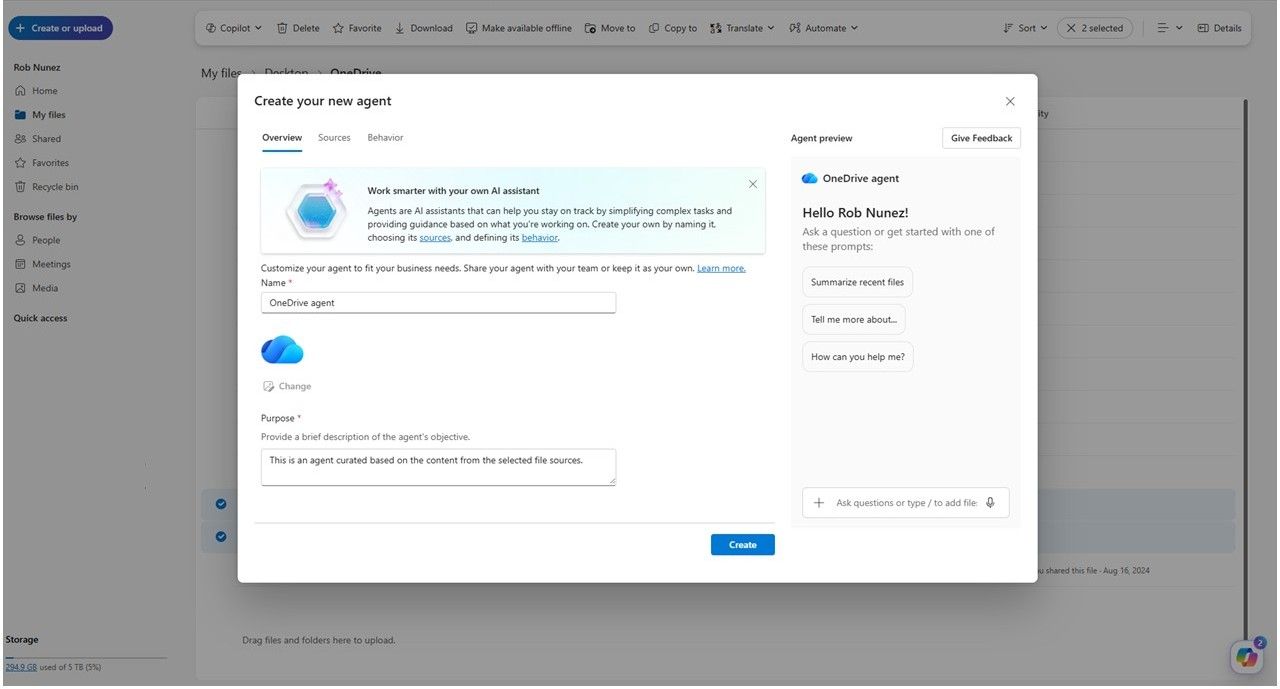
Getting started is simple and requires no special admin setup.You’ll need OneDrive on the web and a Microsoft 365 Copilot license. From there, you can:
- Select + Create or upload and choose Create an agent
- Or select files and choose Create an agent from the toolbar or right‑click menu
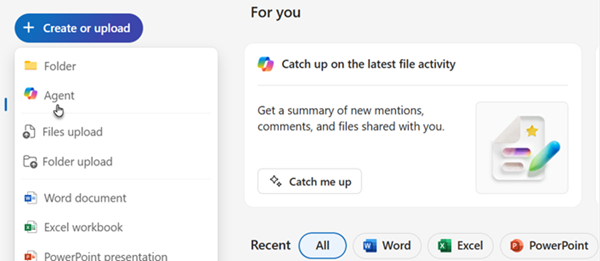
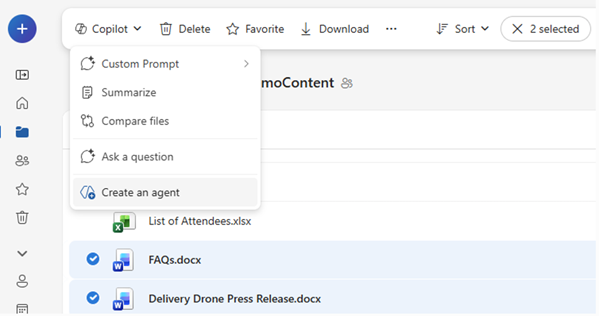
Agents in OneDrive are now generally available worldwide for OneDrive on the web. A Microsoft 365 Copilot license is required.
Where agents shine
Because agents stay tied to the content you select, they’re especially powerful for work that spans people, time, and files.Project coordination
Get clarity fast without digging through folders:- “What decisions have we made so far?”
- “What’s still open, and who owns it?”
Onboarding and knowledge transfer
Help teammates ramp up using the content that already exists:- “Explain how this team operates based on these docs.”
- “Summarize how we ship new features.”
Meeting prep and follow-up
Keep momentum without re-reading notes:- “What did we agree to in recent reviews?”
- “What risks keep coming up?”
Research and synthesis
Turn collections of material into insights:- “What themes show up across these reports?”
- “What did we learn from this research?”
Agents behave like any other file in OneDrive. You can search for them, filter by file type, open them, and update them as work progresses. As projects change, you can add or remove files or refine instructions, so your agent stays aligned with the latest information.
Sharing an agent is just as easy. Share it with teammates like a regular OneDrive file. As long as collaborators have access to the source documents, the agent can provide complete, grounded responses keeping everyone aligned without extra handoffs.
We’re excited to see how Agents in OneDrive fit into your daily work and your feedback directly informs what comes next.
Tell us how you’re using agents
Share your thoughts through your usual Microsoft feedback channels or in the comments.- What types of work are you using Agents for?
- What insights surprised you?
- What would make Agents even more valuable?
- Get started with OneDrive agents
- Create and use an agent in OneDrive
- Find your agent files in OneDrive
- Share an agent in OneDrive
Source:
Agents in OneDrive Now Generally Available: Your AI Assistant Built with Your Own Content | Microsoft Community Hub
If you've ever found yourself asking Copilot the same questions about the same set of files, project plans, meeting notes, specs, decks, you're going to...
 techcommunity.microsoft.com