AkelPad


Stigg

Well-known member
Pro User
VIP
Local time
12:10 AM
Posts
3,127
OS
Windows 11 Pro
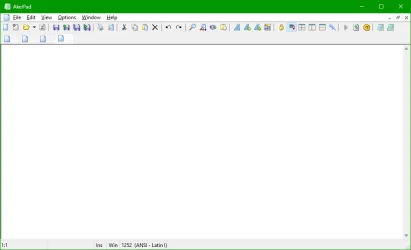
AkelPad is a free, small, powerful and plugin expandable tabbed text editor.

AkelPad Version 4.9.9 (October 16, 2024)


AkelPad Screenshot 01.webp
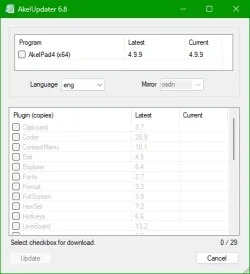
AkelPad Updater Screenshot 01.webp
 
Last edited:

My Computers

System One System Two

  • OS
    Windows 11 Pro
    Computer type
    PC/Desktop
    Manufacturer/Model
    Stigg's Build
    CPU
    Intel Core i9-10900X
    Motherboard
    GIGABYTE X299X DESIGNARE 10G
    Memory
    Corsair 64 GB (4 x 16 GB) CMW64GX4M4C3000C15 Vengeance RGB Pro 3000Mhz DDR4
    Graphics Card(s)
    GIGABYTE GeForce GTX 1660 Super Mini ITX 6 GB OC
    Sound Card
    Realtek ALC1220
    Monitor(s) Displays
    Samsung 27" FHD LED FreeSync Gaming Monitor (LS27F350FHEXXY)
    Screen Resolution
    1920 x 1080
    Hard Drives
    Samsung 970 Pro Series 1TB M.2 2280 NVMe SSD
    Western Digital Red Pro WD8003FFBX-68B9AN0 8 TB, 7200 RPM, SATA-III
    Western Digital Red Pro WD8003FFBX-68B9AN0 8 TB, 7200 RPM, SATA-III
    PSU
    Corsair HX1200 1200W 80 Plus Platinum
    Case
    Fractal Design Define 7 Black Solid Case
    Cooling
    Noctua NH-D15 Chromax Black
    Keyboard
    Razer Ornata V2
    Mouse
    Razer DeathAdder Essential
    Internet Speed
    FTTN 100Mbps / 40Mbps
    Browser
    Mozilla Firefox
    Antivirus
    N/A
    Other Info
    Logitech BRIO 4k Ultra HD USB-C Webcam
  • Operating System
    Windows 10 Pro
    Computer type
    Laptop
    Manufacturer/Model
    ASUS ROG Zephyrus M GM501GS
    CPU
    Core i7-8750H
    Motherboard
    Zephyrus M GM501GS
    Memory
    SK Hynix 32 GB (2 x 16 GB) HMA82GS6CJR8N-VK 16 GB DDR4-2666 DDR4 SDRAM
    Graphics card(s)
    NVIDIA GeForce GTX 1070
    Sound Card
    Realtek ALC294
    Monitor(s) Displays
    AU Optronics B156HAN07.1 [15.6" LCD]
    Screen Resolution
    1920 x 1080
    Hard Drives
    Samsung MZVKW512HMJP-00000 512 GB, PCI-E 3.0 x4
    Samsung SSD 860 QVO 4TB 4 TB, SATA-III
    PSU
    N/A
    Case
    N/A
    Cooling
    N/A
    Keyboard
    PC/AT Enhanced PS2 Keyboard (101/102-Key)
    Mouse
    Razer DeathAdder Essential
    Internet Speed
    FTTN 100Mbps / 40Mbps
    Browser
    Mozilla Firefox
    Antivirus
    N/A
    Other Info
    USB2.0 HD UVC Webcam
my default text editor is gedit for Windows.

best of luck, Steve ..
 

My Computers

System One System Two

  • OS
    Windows 11 Home
    Computer type
    PC/Desktop
    Manufacturer/Model
    HP 24" AiO
    CPU
    Ryzen 7 5825u
    Motherboard
    HP
    Memory
    64GB DDR4 3200
    Graphics Card(s)
    Ryzen 7 5825u
    Sound Card
    RealTek
    Monitor(s) Displays
    24" HP AiO
    Screen Resolution
    1920 x 1080 @60 Hz
    Hard Drives
    1TB WD Blue SN580 M2 SSD Partitioned.
    2x 1TB USB HDD External Backup/Storage.
    PSU
    90W external power brick
    Case
    24" All in One
    Cooling
    Default Air Cooling
    Keyboard
    HP WiFi UK extended
    Mouse
    HP WiFi 3 Button
    Internet Speed
    1GB full fibre
    Browser
    Edge & Firefox
    Antivirus
    AVG Internet Security/Windows Defender
    Other Info
    Mainly Open Source Software
  • Operating System
    Ubuntu 22.04.5 LTS
    Computer type
    Laptop
    Manufacturer/Model
    Dell 13" Latitude 2017
    CPU
    i5 7200u
    Motherboard
    Dell
    Memory
    16GB DDR4
    Graphics card(s)
    Intel
    Sound Card
    Intel
    Monitor(s) Displays
    13" Dell Laptop
    Hard Drives
    250GB Crucial 2.5" SSD
    Mouse
    Generic WiFi 3 button
    Internet Speed
    WiFi only
    Browser
    Firefox
    Antivirus
    ClamAV TK
    Other Info
    Mainly Open Source Software

My Computers

System One System Two

  • OS
    Windows 11 Pro
    Computer type
    PC/Desktop
    Manufacturer/Model
    Stigg's Build
    CPU
    Intel Core i9-10900X
    Motherboard
    GIGABYTE X299X DESIGNARE 10G
    Memory
    Corsair 64 GB (4 x 16 GB) CMW64GX4M4C3000C15 Vengeance RGB Pro 3000Mhz DDR4
    Graphics Card(s)
    GIGABYTE GeForce GTX 1660 Super Mini ITX 6 GB OC
    Sound Card
    Realtek ALC1220
    Monitor(s) Displays
    Samsung 27" FHD LED FreeSync Gaming Monitor (LS27F350FHEXXY)
    Screen Resolution
    1920 x 1080
    Hard Drives
    Samsung 970 Pro Series 1TB M.2 2280 NVMe SSD
    Western Digital Red Pro WD8003FFBX-68B9AN0 8 TB, 7200 RPM, SATA-III
    Western Digital Red Pro WD8003FFBX-68B9AN0 8 TB, 7200 RPM, SATA-III
    PSU
    Corsair HX1200 1200W 80 Plus Platinum
    Case
    Fractal Design Define 7 Black Solid Case
    Cooling
    Noctua NH-D15 Chromax Black
    Keyboard
    Razer Ornata V2
    Mouse
    Razer DeathAdder Essential
    Internet Speed
    FTTN 100Mbps / 40Mbps
    Browser
    Mozilla Firefox
    Antivirus
    N/A
    Other Info
    Logitech BRIO 4k Ultra HD USB-C Webcam
  • Operating System
    Windows 10 Pro
    Computer type
    Laptop
    Manufacturer/Model
    ASUS ROG Zephyrus M GM501GS
    CPU
    Core i7-8750H
    Motherboard
    Zephyrus M GM501GS
    Memory
    SK Hynix 32 GB (2 x 16 GB) HMA82GS6CJR8N-VK 16 GB DDR4-2666 DDR4 SDRAM
    Graphics card(s)
    NVIDIA GeForce GTX 1070
    Sound Card
    Realtek ALC294
    Monitor(s) Displays
    AU Optronics B156HAN07.1 [15.6" LCD]
    Screen Resolution
    1920 x 1080
    Hard Drives
    Samsung MZVKW512HMJP-00000 512 GB, PCI-E 3.0 x4
    Samsung SSD 860 QVO 4TB 4 TB, SATA-III
    PSU
    N/A
    Case
    N/A
    Cooling
    N/A
    Keyboard
    PC/AT Enhanced PS2 Keyboard (101/102-Key)
    Mouse
    Razer DeathAdder Essential
    Internet Speed
    FTTN 100Mbps / 40Mbps
    Browser
    Mozilla Firefox
    Antivirus
    N/A
    Other Info
    USB2.0 HD UVC Webcam
I like it! (y)

8605.webp
 

My Computers

System One System Two

  • OS
    Windows 11 Pro
    Computer type
    PC/Desktop
    Manufacturer/Model
    ASUS ROG Strix
  • Operating System
    Windows 11 Pro
    Computer type
    Laptop
    Manufacturer/Model
    ASUS VivoBook
@Edwin
Check out all the plugins to enhance functionality. Most are just DLLs that you simply copy to the "Plugs" folder.
The installer comes with a certain amount of plugins and an "Open With" context menu, but you can just download the standalone .Zip and run it portably and add your own selection of plugins.

I also recommend adding AkelUpdater, which goes in the "AkelFiles" folder. It's not essential, but it makes it easy to keep the program and plugins up to date. Otherwise, you can update everything manually. You can run the updater from the Help menu, or if you have the Toolbar plugin installed, you can run it from there.

AkelPad Screenshot 02.webp
 

My Computers

System One System Two

  • OS
    Windows 11 Pro
    Computer type
    PC/Desktop
    Manufacturer/Model
    Stigg's Build
    CPU
    Intel Core i9-10900X
    Motherboard
    GIGABYTE X299X DESIGNARE 10G
    Memory
    Corsair 64 GB (4 x 16 GB) CMW64GX4M4C3000C15 Vengeance RGB Pro 3000Mhz DDR4
    Graphics Card(s)
    GIGABYTE GeForce GTX 1660 Super Mini ITX 6 GB OC
    Sound Card
    Realtek ALC1220
    Monitor(s) Displays
    Samsung 27" FHD LED FreeSync Gaming Monitor (LS27F350FHEXXY)
    Screen Resolution
    1920 x 1080
    Hard Drives
    Samsung 970 Pro Series 1TB M.2 2280 NVMe SSD
    Western Digital Red Pro WD8003FFBX-68B9AN0 8 TB, 7200 RPM, SATA-III
    Western Digital Red Pro WD8003FFBX-68B9AN0 8 TB, 7200 RPM, SATA-III
    PSU
    Corsair HX1200 1200W 80 Plus Platinum
    Case
    Fractal Design Define 7 Black Solid Case
    Cooling
    Noctua NH-D15 Chromax Black
    Keyboard
    Razer Ornata V2
    Mouse
    Razer DeathAdder Essential
    Internet Speed
    FTTN 100Mbps / 40Mbps
    Browser
    Mozilla Firefox
    Antivirus
    N/A
    Other Info
    Logitech BRIO 4k Ultra HD USB-C Webcam
  • Operating System
    Windows 10 Pro
    Computer type
    Laptop
    Manufacturer/Model
    ASUS ROG Zephyrus M GM501GS
    CPU
    Core i7-8750H
    Motherboard
    Zephyrus M GM501GS
    Memory
    SK Hynix 32 GB (2 x 16 GB) HMA82GS6CJR8N-VK 16 GB DDR4-2666 DDR4 SDRAM
    Graphics card(s)
    NVIDIA GeForce GTX 1070
    Sound Card
    Realtek ALC294
    Monitor(s) Displays
    AU Optronics B156HAN07.1 [15.6" LCD]
    Screen Resolution
    1920 x 1080
    Hard Drives
    Samsung MZVKW512HMJP-00000 512 GB, PCI-E 3.0 x4
    Samsung SSD 860 QVO 4TB 4 TB, SATA-III
    PSU
    N/A
    Case
    N/A
    Cooling
    N/A
    Keyboard
    PC/AT Enhanced PS2 Keyboard (101/102-Key)
    Mouse
    Razer DeathAdder Essential
    Internet Speed
    FTTN 100Mbps / 40Mbps
    Browser
    Mozilla Firefox
    Antivirus
    N/A
    Other Info
    USB2.0 HD UVC Webcam
Stumbled across this thread and have to comment even though it's old. Akelpad is sheer awesomeness. For some reason Notepad++ seems to be the most popular Notepad replacement, but having used both, let me state categorically that Akelpad is just as good at doing anything Notepad++ can do, at least that I tried, and furthermore I find Akelpad much better in some crucial respects.

Akelpad is easy to use right out out of the box, so if you're not a "power user" but you still don't like Notepad and want to try an alternative, fear not, you can just accept Akelpad's defaults and start using it, just the way you do with Notepad (or ++). But if you are even the teeniest bit a customizer, then Akelpad is the text editor for you--certainly a far better alternative for this purpose than Notepad++. And you don't have to be anything more than a run-of-the-mill power user. If you're at all comfortable with the command line or Windows batch files and you use Notepad++, you should ditch the latter right now and switch to Akelpad posthaste. Its menu, both top and right-click, can be fully customized to your heart's content with easy-to-understand syntax. Again, no real programming skill needed, just a bit of familiarity with how Windows batch files work, and you can get rid of all menu options you never use and add ones you do use but might not even be there by default.

And shortcuts. Ah, the shortcuts! All Akelpad's keystrokes are fully customizable through its Hotkeys plugin (get rid of any you don't like or which cause you problems, change to whatever combination you want, etc.). What's awesome about this feature is that Akelpad has keyboard shortcuts for almost anything the program itself can do.

So who wins in Akelpad-vs.-Notepad++? For the past year-and-a-half at work I've been forced to use Notepad++. Better than regular Notepad, yes, but can't hold a candle to Akelpad. Believe me, I've tried. When I initially started using Notepad++ and came up against features/defaults that weren't good for me, I spent hours reading documentation and searching the web for ways to make it do what I wanted. All too often the answer was no, Notepad++ can't do that, or Too bad, you can't change that keystroke or option. Oh, good news! there is this one thing you can do...oh no, turns out only in a mediocre sort of way. And so it went.

Here's just one example. Akelpad's clip utility, via a plugin called Clipboard, is waaaay better than Notepad++'s half-baked equivalent (I forget what it's called, but it's when text you cut/copy is displayed line by line in a pane to the window's right). Akelpad accumulates your copied/cut text snippets differentiated by hard returns or special text signs you designate or whatever combination of the two you like; and it does so in their own accompanying subwindow over which you have realtime editorial control (you can type into it, modifying the snippets after they're added, space them out further with additional hard returns or whatever, reorder them by cutting and pasting, then continue adding more snippets). And the cherry on top: if you're copying/cutting from Akelpad itself rather than another program, either the current file or another one you have open in a different tab or separate Akelpad window, its toggle Autocopy function automatically copies the text to the clipboard when you merely select it--no need to do Ctrl-C, just highlight and ta-da, it's in the subwindow. Awesome!

Another few miscellaneous observations: Akelpad gives you perfect, absolute control over automatically saving your work--at any time interval you choose, or whenever you switch to some other program. I've found this to be a lifesaver. Akelpad can also split the window when you're working on a file, allowing you to edit the same document in two different places simultaneously (great when cutting and pasting to restructure a document). And if you are a programmer, note that Akelpad was originally written for you. It has a whole suite of programming features and plugins that I've never touched b/c I don't develop, but which I have no doubt would be amazing. At least give it a try.

It is true that Akelpad's defaults out of the box bug me in various ways (some of its default keystrokes can be downright harmful for my workflow when I hit them by accident), but that's no problem because every single feature of Akelpad that matters, as far as I can tell after using it heavily for well over a decade, can be straight-up eliminated. Or else I can customize it so it works better for me. And that means you can make it work exactly the way you want, too.

A quick digression to finish up. Last summer when I moved from Windows 10 to 11, I spent a horrendous amount of time trying to configure Windows 11 into what I considered a workable state. The effort has been horrifically frustrating; although what we really should ask for are the halcyon days of Windows 7, Windows 11 is so bad that I'd settle for going back to Win9x even with its daily BSOD's. Anyway, I've finally decided that next time I have to get a new computer, it won't have Windows on it. I'm making the jump to Linux. So what does that have to do with Akelpad? Alas, Akelpad does not have a Linux version, and the developer has confirmed that he doesn't plan to ever create one. Last April/May I did toy with the idea of moving to Linux rather than "upgrading" to Windows 11, but losing Akelpad (as well as Corel WordPerfect, by far the best word-processing package available because of Reveal Codes, with which MS Word's ripoff feature of same name cannot compare) was one of the factors in my decision to continue with Windows. I just didn't want to live without the incredible Akelpad. Unfortunately, Micro$oft has now driven me over the edge, so in another couple of years, when Redmond forces everyone to Windows 12 (or whatever they decide to call it), it'll be goodby to Akelpad. And that's really gonna suck.

Long live Akelpad!

 
Last edited:

My Computer

System One

  • OS
    Windows 11
    Computer type
    Laptop
    Manufacturer/Model
    ASUS
    CPU
    Intel i7-13620H 10-Core
    Motherboard
    ASUS TUF FX507
    Memory
    32GB DDR5
    Graphics Card(s)
    GeForce RTX 4070
    Sound Card
    onboard
    Monitor(s) Displays
    laptop screen or Dell U3223QE
    Screen Resolution
    1980 or 2160, depending on laptop screen or desktop monitor
    Hard Drives
    SSD
    PSU
    laptop
    Case
    laptop
    Cooling
    laptop
    Keyboard
    laptop
    Mouse
    logitech M525
    Internet Speed
    5g
    Browser
    Firefox
Back
Top Bottom