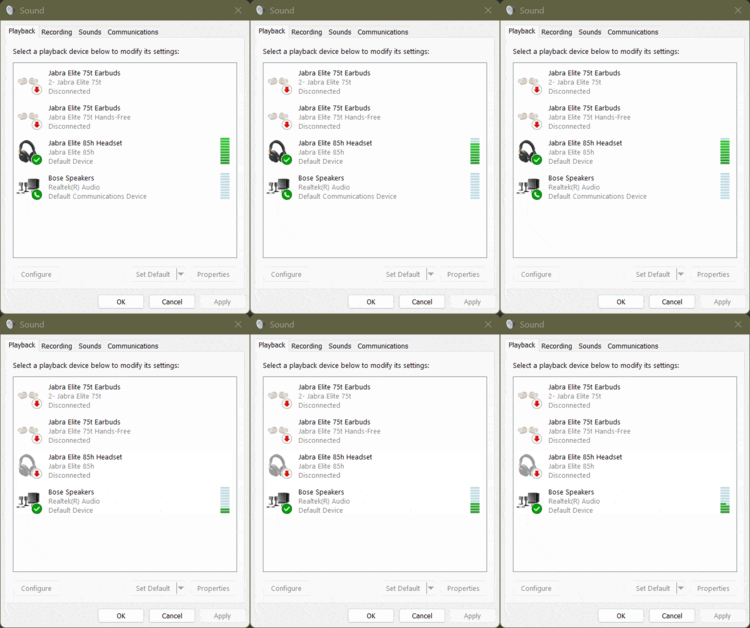
Solved All bluetooth headphones are being set as headsets


Another method:
Go to Control Panel --> Hardware and Sound --> Devices and Printers
Find your BT headset --> select Properties
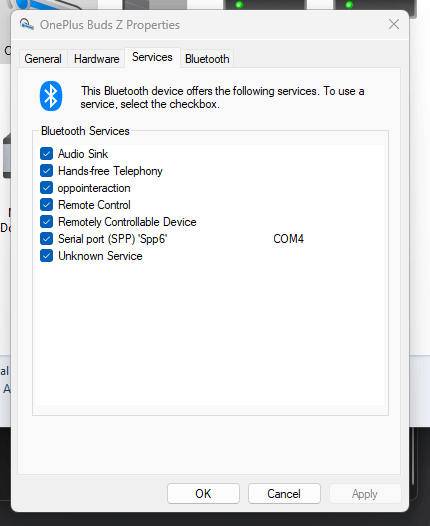
In Properties window navigate to Services TAB and disable Hands-Free Telephony

Try to reconnect to the headset
21d3cea2-c684-41f6-aad1-28dc7ce3c546


To use the mic in conferencing, you have to re-enable this service.
Tried that too still will not connect to the headphones.
 

My Computer My Computer

At a glance

Windows 11 Pro 22H2 22621.1413Intel i9-12900k4x Corsair CMK32GX5M2A4800C40 DDR5 16gb 4800mhzEVGA RTX 3060 4gb
OS
Windows 11 Pro 22H2 22621.1413
Computer type
PC/Desktop
Manufacturer/Model
Custom Build
CPU
Intel i9-12900k
Motherboard
MSI MEG Z690 Unify Bios Version 1A0 Release 01/10/2023
Memory
4x Corsair CMK32GX5M2A4800C40 DDR5 16gb 4800mhz
Graphics Card(s)
EVGA RTX 3060 4gb
Sound Card
Onboard Realtek USB Audio /w Nahimic 3
Monitor(s) Displays
65" 4k LG TV
Screen Resolution
3840x2160
Hard Drives
2x Samsung 980 Pro NVMe 1tb Raid 0
PSU
1200w
Case
Thermaltake
Cooling
Corsair H150i Elite LCD Liquid Cooled
Internet Speed
1gb down 50mb up
Browser
Chrome
Antivirus
WIndows Defender
BTW, I am using the exact same Intel driver on my laptop, on an bit older Intel card than yours, as I just posted. It works great. So it is not a Windows 11/BT driver issue. It must have to do with your BT mic audio routing...or something. Your system, for some reason, is trying to always use Hands-free mode. I don't have this issue...but if I recall correctly, I have ran into this sort of stuff before...
 

My Computers My Computers

  • At a glance

    Win 11 Pro 25H2 26200.9168 / Linux Mint 22.3Ryzen 7 2700U Pro32GBiGPU Vega 10
    OS
    Win 11 Pro 25H2 26200.9168 / Linux Mint 22.3
    Computer type
    Laptop
    Manufacturer/Model
    Lenovo A485
    CPU
    Ryzen 7 2700U Pro
    Motherboard
    Lenovo (WiFi/BT module upgraded to Intel Wireless-AC-9260)
    Memory
    32GB
    Graphics Card(s)
    iGPU Vega 10
    Sound Card
    Realtek
    Monitor(s) Displays
    14" FHD (built-in) + 14" Lenovo Thinkvision M14t (touch+pen) + 32" Asus PB328
    Screen Resolution
    FHD + FHD + 1440p
    Hard Drives
    Intel 660p m.2 nVME PCIe3.0 x2 512GB
    PSU
    125W(Dock)/65W(Travel Adapter)
    Keyboard
    Thinkpad / Logitech MX Keys
    Mouse
    Logitech MX Master 2S
    Internet Speed
    1/1Gbit
    Browser
    Firefox
    Antivirus
    Windows Defender
    Other Info
    SecureBoot: Enabled
    TPM2.0: Enabled
    AMD-V: Enabled
  • At a glance

    Win 11 Pro 25H2 26200.9267(RP)i7-7700k @4.8GHz32GB 2x16GB 2133MHz CL15EVGA GTX1080Ti FTW 11GB
    Operating System
    Win 11 Pro 25H2 26200.9267(RP)
    Computer type
    PC/Desktop
    Manufacturer/Model
    Custom
    CPU
    i7-7700k @4.8GHz
    Motherboard
    Asus PRIME Z270-A
    Memory
    32GB 2x16GB 2133MHz CL15
    Graphics card(s)
    EVGA GTX1080Ti FTW 11GB
    Sound Card
    Integrated
    Monitor(s) Displays
    32" 10-bit Asus PB328Q
    Screen Resolution
    WQHD 2560x1440
    Hard Drives
    512GB ADATA SX8000NP NVMe PCIe Gen 3 x4
    PSU
    850W
    Case
    Fractal Design Define 7
    Cooling
    Noctua NH-D15 chromax.black
    Keyboard
    Logitech MX Keys
    Mouse
    Logitech MX Master 2S
    Internet Speed
    1/1Gbit
    Browser
    Firefox
    Antivirus
    Windows Defender
    Other Info
    AC WiFi Card
  • Asus U46SV (laptop), i5-2410M, 8GB RAM, 500GB SSD, 750GB HDD, Windows 10. (used as a local Minecraft server and data dump)

My Computers My Computers

  • At a glance

    Win 11 Pro 25H2 26200.9168 / Linux Mint 22.3Ryzen 7 2700U Pro32GBiGPU Vega 10
    OS
    Win 11 Pro 25H2 26200.9168 / Linux Mint 22.3
    Computer type
    Laptop
    Manufacturer/Model
    Lenovo A485
    CPU
    Ryzen 7 2700U Pro
    Motherboard
    Lenovo (WiFi/BT module upgraded to Intel Wireless-AC-9260)
    Memory
    32GB
    Graphics Card(s)
    iGPU Vega 10
    Sound Card
    Realtek
    Monitor(s) Displays
    14" FHD (built-in) + 14" Lenovo Thinkvision M14t (touch+pen) + 32" Asus PB328
    Screen Resolution
    FHD + FHD + 1440p
    Hard Drives
    Intel 660p m.2 nVME PCIe3.0 x2 512GB
    PSU
    125W(Dock)/65W(Travel Adapter)
    Keyboard
    Thinkpad / Logitech MX Keys
    Mouse
    Logitech MX Master 2S
    Internet Speed
    1/1Gbit
    Browser
    Firefox
    Antivirus
    Windows Defender
    Other Info
    SecureBoot: Enabled
    TPM2.0: Enabled
    AMD-V: Enabled
  • At a glance

    Win 11 Pro 25H2 26200.9267(RP)i7-7700k @4.8GHz32GB 2x16GB 2133MHz CL15EVGA GTX1080Ti FTW 11GB
    Operating System
    Win 11 Pro 25H2 26200.9267(RP)
    Computer type
    PC/Desktop
    Manufacturer/Model
    Custom
    CPU
    i7-7700k @4.8GHz
    Motherboard
    Asus PRIME Z270-A
    Memory
    32GB 2x16GB 2133MHz CL15
    Graphics card(s)
    EVGA GTX1080Ti FTW 11GB
    Sound Card
    Integrated
    Monitor(s) Displays
    32" 10-bit Asus PB328Q
    Screen Resolution
    WQHD 2560x1440
    Hard Drives
    512GB ADATA SX8000NP NVMe PCIe Gen 3 x4
    PSU
    850W
    Case
    Fractal Design Define 7
    Cooling
    Noctua NH-D15 chromax.black
    Keyboard
    Logitech MX Keys
    Mouse
    Logitech MX Master 2S
    Internet Speed
    1/1Gbit
    Browser
    Firefox
    Antivirus
    Windows Defender
    Other Info
    AC WiFi Card
  • Asus U46SV (laptop), i5-2410M, 8GB RAM, 500GB SSD, 750GB HDD, Windows 10. (used as a local Minecraft server and data dump)
Can you connect to the headset at all after disabling the hands-free service?
 

My Computers My Computers

  • At a glance

    Win 11 Pro 25H2 26200.9168 / Linux Mint 22.3Ryzen 7 2700U Pro32GBiGPU Vega 10
    OS
    Win 11 Pro 25H2 26200.9168 / Linux Mint 22.3
    Computer type
    Laptop
    Manufacturer/Model
    Lenovo A485
    CPU
    Ryzen 7 2700U Pro
    Motherboard
    Lenovo (WiFi/BT module upgraded to Intel Wireless-AC-9260)
    Memory
    32GB
    Graphics Card(s)
    iGPU Vega 10
    Sound Card
    Realtek
    Monitor(s) Displays
    14" FHD (built-in) + 14" Lenovo Thinkvision M14t (touch+pen) + 32" Asus PB328
    Screen Resolution
    FHD + FHD + 1440p
    Hard Drives
    Intel 660p m.2 nVME PCIe3.0 x2 512GB
    PSU
    125W(Dock)/65W(Travel Adapter)
    Keyboard
    Thinkpad / Logitech MX Keys
    Mouse
    Logitech MX Master 2S
    Internet Speed
    1/1Gbit
    Browser
    Firefox
    Antivirus
    Windows Defender
    Other Info
    SecureBoot: Enabled
    TPM2.0: Enabled
    AMD-V: Enabled
  • At a glance

    Win 11 Pro 25H2 26200.9267(RP)i7-7700k @4.8GHz32GB 2x16GB 2133MHz CL15EVGA GTX1080Ti FTW 11GB
    Operating System
    Win 11 Pro 25H2 26200.9267(RP)
    Computer type
    PC/Desktop
    Manufacturer/Model
    Custom
    CPU
    i7-7700k @4.8GHz
    Motherboard
    Asus PRIME Z270-A
    Memory
    32GB 2x16GB 2133MHz CL15
    Graphics card(s)
    EVGA GTX1080Ti FTW 11GB
    Sound Card
    Integrated
    Monitor(s) Displays
    32" 10-bit Asus PB328Q
    Screen Resolution
    WQHD 2560x1440
    Hard Drives
    512GB ADATA SX8000NP NVMe PCIe Gen 3 x4
    PSU
    850W
    Case
    Fractal Design Define 7
    Cooling
    Noctua NH-D15 chromax.black
    Keyboard
    Logitech MX Keys
    Mouse
    Logitech MX Master 2S
    Internet Speed
    1/1Gbit
    Browser
    Firefox
    Antivirus
    Windows Defender
    Other Info
    AC WiFi Card
  • Asus U46SV (laptop), i5-2410M, 8GB RAM, 500GB SSD, 750GB HDD, Windows 10. (used as a local Minecraft server and data dump)
Bluetooth is still horrendously finicky!
There are so many different devices and controllers with different capabilities.
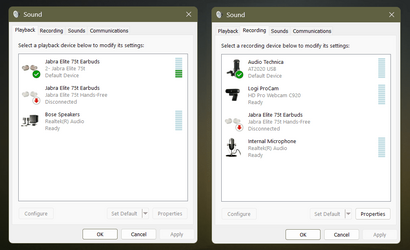
I've tried so many different devices on my laptop..., then, miraculously, my Jabra Earbuds were the only ones to connect properly as soon as I take them out of the case, so I Disabled the rest. 🤷‍♂️
Works flawlessly now! Gotta play around with it a lot.

000217.png
 

My Computers My Computers

  • At a glance

    Windows 11 Pro
    OS
    Windows 11 Pro
    Computer type
    PC/Desktop
    Manufacturer/Model
    ASUS ROG Strix
  • At a glance

    Windows 11 Pro
    Operating System
    Windows 11 Pro
    Computer type
    Laptop
    Manufacturer/Model
    ASUS VivoBook
  • ASUS VivoBook 'Lite' ~ Windows 11 Home

My Computers My Computers

  • At a glance

    Win 11 Pro 25H2 26200.9168 / Linux Mint 22.3Ryzen 7 2700U Pro32GBiGPU Vega 10
    OS
    Win 11 Pro 25H2 26200.9168 / Linux Mint 22.3
    Computer type
    Laptop
    Manufacturer/Model
    Lenovo A485
    CPU
    Ryzen 7 2700U Pro
    Motherboard
    Lenovo (WiFi/BT module upgraded to Intel Wireless-AC-9260)
    Memory
    32GB
    Graphics Card(s)
    iGPU Vega 10
    Sound Card
    Realtek
    Monitor(s) Displays
    14" FHD (built-in) + 14" Lenovo Thinkvision M14t (touch+pen) + 32" Asus PB328
    Screen Resolution
    FHD + FHD + 1440p
    Hard Drives
    Intel 660p m.2 nVME PCIe3.0 x2 512GB
    PSU
    125W(Dock)/65W(Travel Adapter)
    Keyboard
    Thinkpad / Logitech MX Keys
    Mouse
    Logitech MX Master 2S
    Internet Speed
    1/1Gbit
    Browser
    Firefox
    Antivirus
    Windows Defender
    Other Info
    SecureBoot: Enabled
    TPM2.0: Enabled
    AMD-V: Enabled
  • At a glance

    Win 11 Pro 25H2 26200.9267(RP)i7-7700k @4.8GHz32GB 2x16GB 2133MHz CL15EVGA GTX1080Ti FTW 11GB
    Operating System
    Win 11 Pro 25H2 26200.9267(RP)
    Computer type
    PC/Desktop
    Manufacturer/Model
    Custom
    CPU
    i7-7700k @4.8GHz
    Motherboard
    Asus PRIME Z270-A
    Memory
    32GB 2x16GB 2133MHz CL15
    Graphics card(s)
    EVGA GTX1080Ti FTW 11GB
    Sound Card
    Integrated
    Monitor(s) Displays
    32" 10-bit Asus PB328Q
    Screen Resolution
    WQHD 2560x1440
    Hard Drives
    512GB ADATA SX8000NP NVMe PCIe Gen 3 x4
    PSU
    850W
    Case
    Fractal Design Define 7
    Cooling
    Noctua NH-D15 chromax.black
    Keyboard
    Logitech MX Keys
    Mouse
    Logitech MX Master 2S
    Internet Speed
    1/1Gbit
    Browser
    Firefox
    Antivirus
    Windows Defender
    Other Info
    AC WiFi Card
  • Asus U46SV (laptop), i5-2410M, 8GB RAM, 500GB SSD, 750GB HDD, Windows 10. (used as a local Minecraft server and data dump)
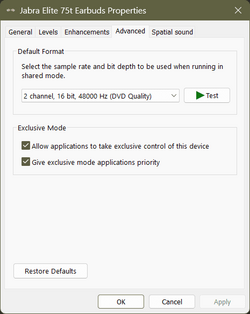
I've had all kinds of weird connection issues with other devices, but, with the Jabra's, I got lucky!
I did set them as Default Device as soon as they made connection, and checked Allow applications to take exclusive control of this device, after that, they cooperate flawlessly so I left it the hell alone!
Other devices, not so lucky! Whaddaya gonna do!? 🤷‍♂️

000220.png
 

My Computers My Computers

  • At a glance

    Windows 11 Pro
    OS
    Windows 11 Pro
    Computer type
    PC/Desktop
    Manufacturer/Model
    ASUS ROG Strix
  • At a glance

    Windows 11 Pro
    Operating System
    Windows 11 Pro
    Computer type
    Laptop
    Manufacturer/Model
    ASUS VivoBook
  • ASUS VivoBook 'Lite' ~ Windows 11 Home
Ok, I just paired my Sony WF-1000XM4 earbuds to my Windows 11 laptop and it works flawlessly.
Started playing audio in Spotify and it was full DVD audio quality. Went into Sound Setting in control panel and checked which playback device was used. It was indeed connected as headphones. Then I switched to the Recording tab and the audio switched straight away to HF mode (conferencing mode). Which was expected. Went back to Playback tab and audio went back to full DVD quality.

I get exact same behavior using my Sony WH-1000XM3 headphones, which I have been using for years.
 

My Computers My Computers

  • At a glance

    Win 11 Pro 25H2 26200.9168 / Linux Mint 22.3Ryzen 7 2700U Pro32GBiGPU Vega 10
    OS
    Win 11 Pro 25H2 26200.9168 / Linux Mint 22.3
    Computer type
    Laptop
    Manufacturer/Model
    Lenovo A485
    CPU
    Ryzen 7 2700U Pro
    Motherboard
    Lenovo (WiFi/BT module upgraded to Intel Wireless-AC-9260)
    Memory
    32GB
    Graphics Card(s)
    iGPU Vega 10
    Sound Card
    Realtek
    Monitor(s) Displays
    14" FHD (built-in) + 14" Lenovo Thinkvision M14t (touch+pen) + 32" Asus PB328
    Screen Resolution
    FHD + FHD + 1440p
    Hard Drives
    Intel 660p m.2 nVME PCIe3.0 x2 512GB
    PSU
    125W(Dock)/65W(Travel Adapter)
    Keyboard
    Thinkpad / Logitech MX Keys
    Mouse
    Logitech MX Master 2S
    Internet Speed
    1/1Gbit
    Browser
    Firefox
    Antivirus
    Windows Defender
    Other Info
    SecureBoot: Enabled
    TPM2.0: Enabled
    AMD-V: Enabled
  • At a glance

    Win 11 Pro 25H2 26200.9267(RP)i7-7700k @4.8GHz32GB 2x16GB 2133MHz CL15EVGA GTX1080Ti FTW 11GB
    Operating System
    Win 11 Pro 25H2 26200.9267(RP)
    Computer type
    PC/Desktop
    Manufacturer/Model
    Custom
    CPU
    i7-7700k @4.8GHz
    Motherboard
    Asus PRIME Z270-A
    Memory
    32GB 2x16GB 2133MHz CL15
    Graphics card(s)
    EVGA GTX1080Ti FTW 11GB
    Sound Card
    Integrated
    Monitor(s) Displays
    32" 10-bit Asus PB328Q
    Screen Resolution
    WQHD 2560x1440
    Hard Drives
    512GB ADATA SX8000NP NVMe PCIe Gen 3 x4
    PSU
    850W
    Case
    Fractal Design Define 7
    Cooling
    Noctua NH-D15 chromax.black
    Keyboard
    Logitech MX Keys
    Mouse
    Logitech MX Master 2S
    Internet Speed
    1/1Gbit
    Browser
    Firefox
    Antivirus
    Windows Defender
    Other Info
    AC WiFi Card
  • Asus U46SV (laptop), i5-2410M, 8GB RAM, 500GB SSD, 750GB HDD, Windows 10. (used as a local Minecraft server and data dump)
... Sony WF-1000XM4 earbuds
Damn it! I came this 🤏 close to buying those yesterday! Couldn't do it! :cool:
They are the best!

0004382.png

My apologies for hijacking the thread momentarily!

1679226892044.gif
 

My Computers My Computers

  • At a glance

    Windows 11 Pro
    OS
    Windows 11 Pro
    Computer type
    PC/Desktop
    Manufacturer/Model
    ASUS ROG Strix
  • At a glance

    Windows 11 Pro
    Operating System
    Windows 11 Pro
    Computer type
    Laptop
    Manufacturer/Model
    ASUS VivoBook
  • ASUS VivoBook 'Lite' ~ Windows 11 Home
Tried that too still will not connect to the headphones.
You still have not responded to this. Did it connect at all, or still connecting in HF mode?
 

My Computers My Computers

  • At a glance

    Win 11 Pro 25H2 26200.9168 / Linux Mint 22.3Ryzen 7 2700U Pro32GBiGPU Vega 10
    OS
    Win 11 Pro 25H2 26200.9168 / Linux Mint 22.3
    Computer type
    Laptop
    Manufacturer/Model
    Lenovo A485
    CPU
    Ryzen 7 2700U Pro
    Motherboard
    Lenovo (WiFi/BT module upgraded to Intel Wireless-AC-9260)
    Memory
    32GB
    Graphics Card(s)
    iGPU Vega 10
    Sound Card
    Realtek
    Monitor(s) Displays
    14" FHD (built-in) + 14" Lenovo Thinkvision M14t (touch+pen) + 32" Asus PB328
    Screen Resolution
    FHD + FHD + 1440p
    Hard Drives
    Intel 660p m.2 nVME PCIe3.0 x2 512GB
    PSU
    125W(Dock)/65W(Travel Adapter)
    Keyboard
    Thinkpad / Logitech MX Keys
    Mouse
    Logitech MX Master 2S
    Internet Speed
    1/1Gbit
    Browser
    Firefox
    Antivirus
    Windows Defender
    Other Info
    SecureBoot: Enabled
    TPM2.0: Enabled
    AMD-V: Enabled
  • At a glance

    Win 11 Pro 25H2 26200.9267(RP)i7-7700k @4.8GHz32GB 2x16GB 2133MHz CL15EVGA GTX1080Ti FTW 11GB
    Operating System
    Win 11 Pro 25H2 26200.9267(RP)
    Computer type
    PC/Desktop
    Manufacturer/Model
    Custom
    CPU
    i7-7700k @4.8GHz
    Motherboard
    Asus PRIME Z270-A
    Memory
    32GB 2x16GB 2133MHz CL15
    Graphics card(s)
    EVGA GTX1080Ti FTW 11GB
    Sound Card
    Integrated
    Monitor(s) Displays
    32" 10-bit Asus PB328Q
    Screen Resolution
    WQHD 2560x1440
    Hard Drives
    512GB ADATA SX8000NP NVMe PCIe Gen 3 x4
    PSU
    850W
    Case
    Fractal Design Define 7
    Cooling
    Noctua NH-D15 chromax.black
    Keyboard
    Logitech MX Keys
    Mouse
    Logitech MX Master 2S
    Internet Speed
    1/1Gbit
    Browser
    Firefox
    Antivirus
    Windows Defender
    Other Info
    AC WiFi Card
  • Asus U46SV (laptop), i5-2410M, 8GB RAM, 500GB SSD, 750GB HDD, Windows 10. (used as a local Minecraft server and data dump)
Damn it! I came this 🤏 close to buying those yesterday! Couldn't do it! :cool:
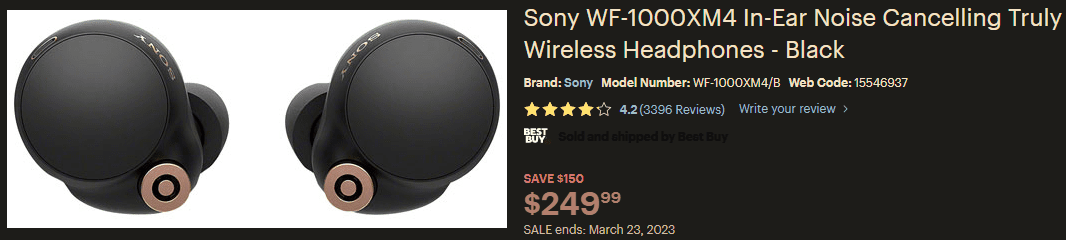
View attachment 55739
lol, they are a bit pricey. I closed my eyes and pressed BUY, and then never looked back. Same situation when I paid 350€ for my XM3 😂
 

My Computers My Computers

  • At a glance

    Win 11 Pro 25H2 26200.9168 / Linux Mint 22.3Ryzen 7 2700U Pro32GBiGPU Vega 10
    OS
    Win 11 Pro 25H2 26200.9168 / Linux Mint 22.3
    Computer type
    Laptop
    Manufacturer/Model
    Lenovo A485
    CPU
    Ryzen 7 2700U Pro
    Motherboard
    Lenovo (WiFi/BT module upgraded to Intel Wireless-AC-9260)
    Memory
    32GB
    Graphics Card(s)
    iGPU Vega 10
    Sound Card
    Realtek
    Monitor(s) Displays
    14" FHD (built-in) + 14" Lenovo Thinkvision M14t (touch+pen) + 32" Asus PB328
    Screen Resolution
    FHD + FHD + 1440p
    Hard Drives
    Intel 660p m.2 nVME PCIe3.0 x2 512GB
    PSU
    125W(Dock)/65W(Travel Adapter)
    Keyboard
    Thinkpad / Logitech MX Keys
    Mouse
    Logitech MX Master 2S
    Internet Speed
    1/1Gbit
    Browser
    Firefox
    Antivirus
    Windows Defender
    Other Info
    SecureBoot: Enabled
    TPM2.0: Enabled
    AMD-V: Enabled
  • At a glance

    Win 11 Pro 25H2 26200.9267(RP)i7-7700k @4.8GHz32GB 2x16GB 2133MHz CL15EVGA GTX1080Ti FTW 11GB
    Operating System
    Win 11 Pro 25H2 26200.9267(RP)
    Computer type
    PC/Desktop
    Manufacturer/Model
    Custom
    CPU
    i7-7700k @4.8GHz
    Motherboard
    Asus PRIME Z270-A
    Memory
    32GB 2x16GB 2133MHz CL15
    Graphics card(s)
    EVGA GTX1080Ti FTW 11GB
    Sound Card
    Integrated
    Monitor(s) Displays
    32" 10-bit Asus PB328Q
    Screen Resolution
    WQHD 2560x1440
    Hard Drives
    512GB ADATA SX8000NP NVMe PCIe Gen 3 x4
    PSU
    850W
    Case
    Fractal Design Define 7
    Cooling
    Noctua NH-D15 chromax.black
    Keyboard
    Logitech MX Keys
    Mouse
    Logitech MX Master 2S
    Internet Speed
    1/1Gbit
    Browser
    Firefox
    Antivirus
    Windows Defender
    Other Info
    AC WiFi Card
  • Asus U46SV (laptop), i5-2410M, 8GB RAM, 500GB SSD, 750GB HDD, Windows 10. (used as a local Minecraft server and data dump)
When the same happened to me with my Beats headphones I tried everything (updating drivers, rolling back drivers, restoring an 11 image to before I noticed the problem, removing the headphones from BT) including pairing other headphones. I had to return to Windows 10 (via image) then upgrade to 11 again before they would work. Others have said they noticed the problem after using CCleaner to update the BT driver but I hadn’t used this.
 

My Computers My Computers

  • At a glance

    Windows 11 Pro 64bit6th Gen Intel Core i7-6700HQ Quad Core proces...16GB HyperX IMPACT 1600MHz SODIMM DDR3 (2 x 8GB)NVIDIA® GeForce® GTX 960M - 2.0GB DDR5 Video ...
    OS
    Windows 11 Pro 64bit
    Computer type
    Laptop
    Manufacturer/Model
    PC Specialist Optimus VII V17-960 Gaming Laptop.
    CPU
    6th Gen Intel Core i7-6700HQ Quad Core processor.
    Memory
    16GB HyperX IMPACT 1600MHz SODIMM DDR3 (2 x 8GB)
    Graphics Card(s)
    NVIDIA® GeForce® GTX 960M - 2.0GB DDR5 Video RAM - DirectX® 12
    Sound Card
    Intel 2 Channel High Def. Audio + SoundBlaster™ Cinema 2 & Realtek
    Monitor(s) Displays
    Optimus Series: 17.3" Matte Full HD IPS LED Widescreen (1920x1080)
    Screen Resolution
    Full HD IPS display (1920 x 1080).
    Hard Drives
    4TB SSD (internal).
    1x 1TB & 1x 5TB external HDDs.
    Cooling
    STANDARD THERMAL PASTE FOR SUFFICIENT COOLING
    Keyboard
    Logitech K800 wireless keyboard
    Mouse
    Logitech M705 wireless mouse
    Internet Speed
    Upto 100Mbps
    Browser
    Edge.
    Antivirus
    Windows Defender & MalwareBytes pro.
  • At a glance

    IOS 14.6
    Operating System
    IOS 14.6
    Computer type
    Tablet
    Manufacturer/Model
    Apple
Bluetooth is still horrendously finicky!
There are so many different devices and controllers with different capabilities.
I've tried so many different devices on my laptop..., then, miraculously, my Jabra Earbuds were the only ones to connect properly as soon as I take them out of the case, so I Disabled the rest. 🤷‍♂️
Works flawlessly now! Gotta play around with it a lot.

View attachment 55734
My Bose Soundbar works too good with my desktop. I had to unpair them from my computer. Every time I started my computer they would disconnect from the TV and connect to the computer.
 

My Computers My Computers

  • At a glance

    Windows 11 Pro 25H2Intel Core i7-10700K16GB (8GB PC4-19200 DDR4 SDRAM x2)NVIDIA GeForce GTX 1050 TI
    OS
    Windows 11 Pro 25H2
    Computer type
    PC/Desktop
    Manufacturer/Model
    PowerSpec B746
    CPU
    Intel Core i7-10700K
    Motherboard
    ASRock Z490 Phantom Gaming 4/ax
    Memory
    16GB (8GB PC4-19200 DDR4 SDRAM x2)
    Graphics Card(s)
    NVIDIA GeForce GTX 1050 TI
    Sound Card
    Realtek Audio
    Monitor(s) Displays
    #1. LG ULTRAWIDE 34" #2. AOC Q32G2WG3 32"
    Screen Resolution
    #1. 3440 X 1440 #2. 1920 x 1080
    Hard Drives
    NVMe WDC WDS100T2B0C-00PXH0 1TB
    Samsung SSD 860 EVO 1TB
    PSU
    750 Watts (62.5A)
    Case
    PowerSpec/Lian Li ATX 205
    Keyboard
    Logitech K270
    Mouse
    Logitech M185
    Browser
    Microsoft Edge and Firefox
    Antivirus
    Webroot SecureAnywhere CE 26.1
  • At a glance

    Windows 11 Canary ChannelIntel Core i5-8400 CPU @ 2.80GHz16 MB DDR 4-2666
    Operating System
    Windows 11 Canary Channel
    Computer type
    PC/Desktop
    Manufacturer/Model
    PowerSpec G156
    CPU
    Intel Core i5-8400 CPU @ 2.80GHz
    Motherboard
    AsusTeK Prime B360M-A
    Memory
    16 MB DDR 4-2666
    Monitor(s) Displays
    23" Speptre HDMI 75Hz
    Screen Resolution
    1920x1080
    Hard Drives
    Samsung 970 EVO 500GB NVMe
    Keyboard
    Logitek K270
    Mouse
    Logitek M185
    Browser
    Firefox, Edge and Edge Canary
    Antivirus
    Windows Defender
To the OP: Disable Bluetooth from the switch or key combination if any. If you have neither, disable it from Settings. Then go at Device Manager, reveal hidden devices and uninstall ALL Bluetooth devices, including speakers, earphones, services, everything. Restart the computer. Go to Device Manager again and confirm there is no Bluetooth devices (if switched off by switch or key combination). If you had disabled from Settings, Windows might have installed it again. Test to see if it works properly. If it was disabled by switch or key combination, enable it again and let Windows install drivers. See if it works properly. Next you can install the official manufacturer drivers and check functionality again.
 

My Computers My Computers

  • At a glance

    Windows 11 Pro 23H2 (5699), 25H2 (9168)Mobile DualCore Intel Core 2 Duo T7250, 2000 MHz4GBMobile Intel(R) GMA 4500M (Mobile 4 series)
    OS
    Windows 11 Pro 23H2 (5699), 25H2 (9168)
    Computer type
    Laptop
    Manufacturer/Model
    Acer Extensa 5630EZ
    CPU
    Mobile DualCore Intel Core 2 Duo T7250, 2000 MHz
    Motherboard
    Acer Extensa 5630
    Memory
    4GB
    Graphics Card(s)
    Mobile Intel(R) GMA 4500M (Mobile 4 series)
    Sound Card
    Realtek ALC268 @ Intel 82801IB ICH9 - High Definition Audio Controller
    Monitor(s) Displays
    1
    Screen Resolution
    1280x800
    Hard Drives
    Samsung SSD 850 EVO 250GB SATA Device (250 GB, SATA-III)
    Internet Speed
    802.11g wireless 54 Mbps
    Browser
    MICROSOFT EDGE
    Antivirus
    WINDOWS DEFENDER
    Other Info
    Legacy MBR installation, no TPM, no Secure Boot, no WDDM 2.0 graphics drivers, no SSE4.2, cannot get more unsupported ;) This is only my test laptop. I had installed Windows 11 here before upgrading my main PC. For my main PC I use everyday see my 2nd system specs.
  • At a glance

    Windows 11 Pro v25H2 (build 26200.9168)Intel Core-i7 3770 3.40GHz s1155 (3rd generat...2x Kingston Hyper-X Blu 8GB DDR3-1600GIGABYTE GeForce RTX 3050 WINDFORCE OC V2 6GB...
    Operating System
    Windows 11 Pro v25H2 (build 26200.9168)
    Computer type
    PC/Desktop
    Manufacturer/Model
    Custom-built PC
    CPU
    Intel Core-i7 3770 3.40GHz s1155 (3rd generation)
    Motherboard
    Asus P8H61 s1155 ATX
    Memory
    2x Kingston Hyper-X Blu 8GB DDR3-1600
    Graphics card(s)
    GIGABYTE GeForce RTX 3050 WINDFORCE OC V2 6GB (GV-N3050WF2OCV2-6GD)
    Sound Card
    Realtek HD audio (ALC887)
    Monitor(s) Displays
    Sony Bravia KDL-19L4000 19" LCD TV via VGA
    Screen Resolution
    1440x900 32-bit 60Hz
    Hard Drives
    WD Blue SA510 2.5 1000GB SSD as system disk, Western Digital Caviar Purple 4TB SATA III (WD40PURZ) as second
    PSU
    Thermaltake Litepower RGB 550W Full Wired
    Case
    SUPERCASE MIDI-TOWER
    Cooling
    Deepcool Gamma Archer CPU cooler, 1x 8cm fan at the back
    Keyboard
    Mitsumi 101-key PS/2
    Mouse
    Microsoft Compact Optical Mouse
    Internet Speed
    802.11ac 5GHz wireless 260Mpbs
    Browser
    Microsoft Edge, Mozilla Firefox
    Antivirus
    Microsoft Windows Defender
    Other Info
    Legacy BIOS (MBR) installation, no TPM, no Secure Boot, WDDM 3.0 graphics drivers, WEI score 7.4
This is really weird. Maybe your BT module is broken...

Can you connect to the headset at all after disabling the hands-free service?

You still have not responded to this. Did it connect at all, or still connecting in HF mode?

To the OP: Disable Bluetooth from the switch or key combination if any. If you have neither, disable it from Settings. Then go at Device Manager, reveal hidden devices and uninstall ALL Bluetooth devices, including speakers, earphones, services, everything. Restart the computer. Go to Device Manager again and confirm there is no Bluetooth devices (if switched off by switch or key combination). If you had disabled from Settings, Windows might have installed it again. Test to see if it works properly. If it was disabled by switch or key combination, enable it again and let Windows install drivers. See if it works properly. Next you can install the official manufacturer drivers and check functionality again.
If it were the Bluetooth module being broken than disabling in bios and installing the addon Bluetooth adapter should have fixed it but it did not.

No they still don’t connect to headphones after handsfree has been disconnected.

And tried that last recommendation as well no luck.
 

My Computer My Computer

At a glance

Windows 11 Pro 22H2 22621.1413Intel i9-12900k4x Corsair CMK32GX5M2A4800C40 DDR5 16gb 4800mhzEVGA RTX 3060 4gb
OS
Windows 11 Pro 22H2 22621.1413
Computer type
PC/Desktop
Manufacturer/Model
Custom Build
CPU
Intel i9-12900k
Motherboard
MSI MEG Z690 Unify Bios Version 1A0 Release 01/10/2023
Memory
4x Corsair CMK32GX5M2A4800C40 DDR5 16gb 4800mhz
Graphics Card(s)
EVGA RTX 3060 4gb
Sound Card
Onboard Realtek USB Audio /w Nahimic 3
Monitor(s) Displays
65" 4k LG TV
Screen Resolution
3840x2160
Hard Drives
2x Samsung 980 Pro NVMe 1tb Raid 0
PSU
1200w
Case
Thermaltake
Cooling
Corsair H150i Elite LCD Liquid Cooled
Internet Speed
1gb down 50mb up
Browser
Chrome
Antivirus
WIndows Defender
I just got lucky pairing my Jabra cans as well. When I take them off and fold them, they disconnect and shut off, then Windows switches to speakers (as Default) automatically and back.
And, I didn't even need to enable HandsFree mode on the Recording Tab.
@bensimpson1981 Maybe check with the headset manufacturer to see if they're defective.

000237.gif
 
Last edited:

My Computers My Computers

  • At a glance

    Windows 11 Pro
    OS
    Windows 11 Pro
    Computer type
    PC/Desktop
    Manufacturer/Model
    ASUS ROG Strix
  • At a glance

    Windows 11 Pro
    Operating System
    Windows 11 Pro
    Computer type
    Laptop
    Manufacturer/Model
    ASUS VivoBook
  • ASUS VivoBook 'Lite' ~ Windows 11 Home
This is really a weird issue.
Is it possible that you have one bluetooth device connected to your PC that messes up with all the other bluetooth? Have you tried disconnecting all your bluetooth devices and just connect one headphone?
 

My Computers My Computers

  • At a glance

    Windows 11 ProAMD Ryzen 7 9800X3D32GB DDR5 CL30 Kingston FuryASUS Prime Radeon RX 9060 XT OC Edition 16GB
    OS
    Windows 11 Pro
    Computer type
    PC/Desktop
    CPU
    AMD Ryzen 7 9800X3D
    Motherboard
    MSI PRO B850-P Wifi
    Memory
    32GB DDR5 CL30 Kingston Fury
    Graphics Card(s)
    ASUS Prime Radeon RX 9060 XT OC Edition 16GB
    Monitor(s) Displays
    LG Ultrawide 34" 1440p+ MSI 27" 4K UHD
    Screen Resolution
    3440x1440
    Hard Drives
    Main Boot Drive : 512GB Adata XPG RGB Gen3x4 NVMe M.2 SSD
    PSU
    EVGA 750 Watts 80+ Gold
    Case
    Deepcool Genome II
    Cooling
    Thermalright Burst Assassin 120
    Internet Speed
    FTTH 3Gbps
    Browser
    Chrome
    Antivirus
    "Moderna"
  • At a glance

    Windows 11 Proi7-4790K16GB Corsair Vengeance ProMSI R9 290
    Operating System
    Windows 11 Pro
    Computer type
    PC/Desktop
    CPU
    i7-4790K
    Motherboard
    ASRock Xtreme6 Z97
    Memory
    16GB Corsair Vengeance Pro
    Graphics card(s)
    MSI R9 290
    Monitor(s) Displays
    LG Ultrawide 34"
    Screen Resolution
    3440x1440
    Hard Drives
    500GB Adata SSD (OS Only)
    PSU
    Thermaltake 475 Watts 80 Bronze
    Case
    Thermaltake Commander I Snow Edition
    Cooling
    Deep Cool Archer Air Cooler
    Keyboard
    Armageddon MKA-5R RGB-Hornet
    Mouse
    Logitech G402
    Internet Speed
    1Gbps
    Browser
    Chrome
    Antivirus
    Moderna :)
I just got lucky pairing my Jabra cans as well. When I take them off and fold them, they disconnect and shut off, then Windows switches to speakers (as Default) automatically and back.
And, I didn't even need to enable HandsFree mode on the Recording Tab.
@bensimpson1981 Maybe check with the headset manufacturer to see if they're defective.

View attachment 55810

This is really a weird issue.
Is it possible that you have one bluetooth device connected to your PC that messes up with all the other bluetooth? Have you tried disconnecting all your bluetooth devices and just connect one headphone?
All six headphone tried work flawlessly on any other pc. It is not the headphones.

Yeah I have tried disconnecting absolutely but the headphone with no luck, still run into the same problem. It is really weird.
 

My Computer My Computer

At a glance

Windows 11 Pro 22H2 22621.1413Intel i9-12900k4x Corsair CMK32GX5M2A4800C40 DDR5 16gb 4800mhzEVGA RTX 3060 4gb
OS
Windows 11 Pro 22H2 22621.1413
Computer type
PC/Desktop
Manufacturer/Model
Custom Build
CPU
Intel i9-12900k
Motherboard
MSI MEG Z690 Unify Bios Version 1A0 Release 01/10/2023
Memory
4x Corsair CMK32GX5M2A4800C40 DDR5 16gb 4800mhz
Graphics Card(s)
EVGA RTX 3060 4gb
Sound Card
Onboard Realtek USB Audio /w Nahimic 3
Monitor(s) Displays
65" 4k LG TV
Screen Resolution
3840x2160
Hard Drives
2x Samsung 980 Pro NVMe 1tb Raid 0
PSU
1200w
Case
Thermaltake
Cooling
Corsair H150i Elite LCD Liquid Cooled
Internet Speed
1gb down 50mb up
Browser
Chrome
Antivirus
WIndows Defender
All six headphone tried work flawlessly on any other pc. It is not the headphones.

Yeah I have tried disconnecting absolutely but the headphone with no luck, still run into the same problem. It is really weird.
I'm at a loss! Sorry chief, keep pluggin away at it, you'll sort it eventually! 🤞
 

My Computers My Computers

  • At a glance

    Windows 11 Pro
    OS
    Windows 11 Pro
    Computer type
    PC/Desktop
    Manufacturer/Model
    ASUS ROG Strix
  • At a glance

    Windows 11 Pro
    Operating System
    Windows 11 Pro
    Computer type
    Laptop
    Manufacturer/Model
    ASUS VivoBook
  • ASUS VivoBook 'Lite' ~ Windows 11 Home
It is not the headphones.
I am not just referring to bluetooth headphones. Any other bluetooth device that you might have connected as well. Maybe a mouse or keyboard. I don't know. Just wondering if you have any other bluetooth devices besides headphones.
 

My Computers My Computers

  • At a glance

    Windows 11 ProAMD Ryzen 7 9800X3D32GB DDR5 CL30 Kingston FuryASUS Prime Radeon RX 9060 XT OC Edition 16GB
    OS
    Windows 11 Pro
    Computer type
    PC/Desktop
    CPU
    AMD Ryzen 7 9800X3D
    Motherboard
    MSI PRO B850-P Wifi
    Memory
    32GB DDR5 CL30 Kingston Fury
    Graphics Card(s)
    ASUS Prime Radeon RX 9060 XT OC Edition 16GB
    Monitor(s) Displays
    LG Ultrawide 34" 1440p+ MSI 27" 4K UHD
    Screen Resolution
    3440x1440
    Hard Drives
    Main Boot Drive : 512GB Adata XPG RGB Gen3x4 NVMe M.2 SSD
    PSU
    EVGA 750 Watts 80+ Gold
    Case
    Deepcool Genome II
    Cooling
    Thermalright Burst Assassin 120
    Internet Speed
    FTTH 3Gbps
    Browser
    Chrome
    Antivirus
    "Moderna"
  • At a glance

    Windows 11 Proi7-4790K16GB Corsair Vengeance ProMSI R9 290
    Operating System
    Windows 11 Pro
    Computer type
    PC/Desktop
    CPU
    i7-4790K
    Motherboard
    ASRock Xtreme6 Z97
    Memory
    16GB Corsair Vengeance Pro
    Graphics card(s)
    MSI R9 290
    Monitor(s) Displays
    LG Ultrawide 34"
    Screen Resolution
    3440x1440
    Hard Drives
    500GB Adata SSD (OS Only)
    PSU
    Thermaltake 475 Watts 80 Bronze
    Case
    Thermaltake Commander I Snow Edition
    Cooling
    Deep Cool Archer Air Cooler
    Keyboard
    Armageddon MKA-5R RGB-Hornet
    Mouse
    Logitech G402
    Internet Speed
    1Gbps
    Browser
    Chrome
    Antivirus
    Moderna :)
Back
Top Bottom