All the "things" being talked about windows 11. Security, spyware, and etc.


I'm sure you believe what you're saying, but I really do know what I'm talking about. I do have some qualifications. I retired as a Microsoft Windows Systems engineer.
So you think cookies are not a security and privacy problem? How naive. I've 50 years in the industry. I don't believe, I know. It's what is spearheading current tech for hacking. You might want to brush up on current tech....

 
Last edited:

My Computer

System One

  • OS
    Windows 11
    Computer type
    PC/Desktop
    Manufacturer/Model
    Asus

My Computers

System One System Two

  • OS
    Windows 11 Pro 25H2 (OS Build 26200.8246)
    Computer type
    Laptop
    Manufacturer/Model
    Dell Precision Mobile Workstation
    CPU
    Intel(R) Xeon(R) CPU E3-1535M v5 @ 2.90 Max Turbo 3.80
    Motherboard
    00V5FJ
    Memory
    64GB DDR4 ECC (Error-Correcting Code memory)
    Graphics Card(s)
    NVIDIA Quadro M2000M 4GB GDDR5 & Intel(R) HD Graphics P530
    Sound Card
    Realtek Audio
    Monitor(s) Displays
    15.6" 4K UltraHD
    Screen Resolution
    4K UHD 3840x2160
    Hard Drives
    2TB Crucial NVMe & 2TB Seagate SATA
    PSU
    Dell 180W 19.5V-9.23A
    Keyboard
    Backlit
    Mouse
    Logitech G703 & Logitech G305
    Internet Speed
    WIFI: Intel(R) Wi-Fi 6E AX210NGW(Gig+) 160MHz Bands 2.4GHz(574Mbps), 5GHz 2.4Gbps, 6 GHz (160MHz) 2.4Gbps
    Browser
    Mozilla Firefox
    Antivirus
    Windows Defender/Microsoft Security + additional Anti Spyware, Anti Malware, etc.
    Other Info
    Thunderbolt 3
  • Operating System
    Windows 11 Pro 24H2 (OS Build 26100.6725)
    Computer type
    PC/Desktop
    Manufacturer/Model
    Dell Precision Workstation T5610
    CPU
    Dual (X2) Intel(R) Xeon(R) CPU E5-2690 0 @ 2.90GHz Max Turbo 3.80
    Motherboard
    0WN7Y6
    Memory
    64GB DDR3 ECC (Error-Correcting Code memory)
    Graphics card(s)
    NVIDIA GeForce GTX 970 4GB of GDDR5
    Sound Card
    Realtek Audio & NVIDIA High Definition Audio
    Monitor(s) Displays
    3 Acer Monitors
    Screen Resolution
    1920x1080
    Hard Drives
    2 Seagate Barracuda ST2000DM008-2UB102 (RAID)
    Mouse
    Logitech G305
From Copilot:

Microsoft Edge includes multiple layers of protection against cookie-related vulnerabilities, including tracking prevention, secure cookie handling, and real-time threat detection

🛡️ Key Cookie Security Features in Microsoft Edge (2025)
  • Tracking Prevention: Edge offers three levels of tracking prevention (Basic, Balanced, and Strict), which block third-party cookies and trackers that follow users across websites.
  • SameSite Cookie Enforcement: Edge enforces the SameSite attribute for cookies, which restricts cross-site cookie access unless explicitly allowed. This helps prevent cross-site request forgery (CSRF) attacks.
  • Secure and HttpOnly Flags: Cookies in Edge are marked with Secure and HttpOnly flags by default when appropriate, ensuring they’re only transmitted over HTTPS and inaccessible via JavaScript.
  • Scareware Blocker: Introduced in Edge version 142, this feature uses machine learning to detect and block tech support scams and malicious sites that may attempt to steal cookies or session data.
  • Defender SmartScreen Integration: Edge integrates with Microsoft Defender SmartScreen to block known phishing and malware sites that distribute infostealers targeting cookies.
  • Security Baselines: Microsoft provides downloadable security baselines for Edge, including cookie handling policies, which organizations can enforce across devices.
🔧 How to Strengthen Cookie Protection in Edge
  • Enable Strict tracking prevention in Edge settings.
  • Use InPrivate browsing for sensitive sessions.
  • Regularly clear cookies and site data.
  • Keep Edge updated to the latest version for new security patches.
Edge is designed to be one of the most secure browsers available, especially for enterprise and privacy-conscious users.
 

My Computers

System One System Two

  • OS
    Windows 11 Pro
    Computer type
    Laptop
    Manufacturer/Model
    Dell XPS 16 DA16260
    CPU
    Intel Series 3 Core Ultra X9 388H
    Memory
    64GB LPDDR5x 9600 MT/s
    Graphics Card(s)
    Intel Arc graphics B390 Panther Lake
    Monitor(s) Displays
    16" 3.2K Tandem OLED Infinity Edge
    Screen Resolution
    3200 x 2000 16:10 236 PPI
    Hard Drives
    1 Terabyte M.2 PCIe NVMe SSD
    Case
    Black Anodized Aluminum
    Cooling
    Vapor Chamber Cooling
    Mouse
    None
    Internet Speed
    942 Mbps Netgear Mesh + 2 Satellites
    Browser
    Microsoft Edge (Chromium)
    Antivirus
    Windows Security (Defender)
    Other Info
    NPU delivering 67 TOPS
    Microsoft 365 subscription
    Microsoft OneDrive 1TB Cloud
    Microsoft Visual Studio
    Microsoft Visual Studio Code
    Microsoft Sysinternals Suite
    Microsoft BitLocker
    Microsoft Copilot
    Dell Support Assist
    Dell Command | Update
    Macrium Reflect X subscription
    1Password Password Manager
    Amazon Kindle for PC
    Lightroom/Photoshop subscription
    Interactive Brokers Trader Workstation
  • Operating System
    Windows 11 Pro
    Computer type
    Laptop
    Manufacturer/Model
    Microsoft Surface Laptop 7
    CPU
    Snapdragon® X Elite (12 Core) with Hexagon NPU delivering 45 TOPS
    Memory
    32GB LPDDR5x 8448 MT/s
    Graphics card(s)
    Integrated Adreno GPU
    Sound Card
    Omnisonic speakers with Dolby Atmos spatial sound
    Monitor(s) Displays
    13.8″ PixelSense Flow touchscreen 120 Hz 600 NIT
    Screen Resolution
    2304 × 1536 (201 PPI), 3:2 aspect ratio
    Hard Drives
    1 TB PCIe NVMe Gen 4 SSD
    Case
    Black Anodized Aluminum
    Cooling
    Vapor Chamber Cooling
    Mouse
    None
    Internet Speed
    942 Mbps Netgear Mesh + 2 Satellites
    Browser
    Microsoft Edge (Chromium)
    Antivirus
    Windows Security (Defender)
    Other Info
    Microsoft 365 subscription (Office)
    Microsoft OneDrive 1TB Cloud
    Microsoft Visual Studio 2026
    Microsoft Visual Studio Code
    Interactive Brokers Trader Workstation
    Lightroom/Photoshop subscription
    1Password Password Manager
    Microsoft Sysinternals
    Amazon Kindle for PC
    Microsoft BitLocker
    Microsoft Copilot

My Computers

System One System Two

  • OS
    Windows 11 Pro
    Computer type
    Laptop
    Manufacturer/Model
    Dell XPS 16 DA16260
    CPU
    Intel Series 3 Core Ultra X9 388H
    Memory
    64GB LPDDR5x 9600 MT/s
    Graphics Card(s)
    Intel Arc graphics B390 Panther Lake
    Monitor(s) Displays
    16" 3.2K Tandem OLED Infinity Edge
    Screen Resolution
    3200 x 2000 16:10 236 PPI
    Hard Drives
    1 Terabyte M.2 PCIe NVMe SSD
    Case
    Black Anodized Aluminum
    Cooling
    Vapor Chamber Cooling
    Mouse
    None
    Internet Speed
    942 Mbps Netgear Mesh + 2 Satellites
    Browser
    Microsoft Edge (Chromium)
    Antivirus
    Windows Security (Defender)
    Other Info
    NPU delivering 67 TOPS
    Microsoft 365 subscription
    Microsoft OneDrive 1TB Cloud
    Microsoft Visual Studio
    Microsoft Visual Studio Code
    Microsoft Sysinternals Suite
    Microsoft BitLocker
    Microsoft Copilot
    Dell Support Assist
    Dell Command | Update
    Macrium Reflect X subscription
    1Password Password Manager
    Amazon Kindle for PC
    Lightroom/Photoshop subscription
    Interactive Brokers Trader Workstation
  • Operating System
    Windows 11 Pro
    Computer type
    Laptop
    Manufacturer/Model
    Microsoft Surface Laptop 7
    CPU
    Snapdragon® X Elite (12 Core) with Hexagon NPU delivering 45 TOPS
    Memory
    32GB LPDDR5x 8448 MT/s
    Graphics card(s)
    Integrated Adreno GPU
    Sound Card
    Omnisonic speakers with Dolby Atmos spatial sound
    Monitor(s) Displays
    13.8″ PixelSense Flow touchscreen 120 Hz 600 NIT
    Screen Resolution
    2304 × 1536 (201 PPI), 3:2 aspect ratio
    Hard Drives
    1 TB PCIe NVMe Gen 4 SSD
    Case
    Black Anodized Aluminum
    Cooling
    Vapor Chamber Cooling
    Mouse
    None
    Internet Speed
    942 Mbps Netgear Mesh + 2 Satellites
    Browser
    Microsoft Edge (Chromium)
    Antivirus
    Windows Security (Defender)
    Other Info
    Microsoft 365 subscription (Office)
    Microsoft OneDrive 1TB Cloud
    Microsoft Visual Studio 2026
    Microsoft Visual Studio Code
    Interactive Brokers Trader Workstation
    Lightroom/Photoshop subscription
    1Password Password Manager
    Microsoft Sysinternals
    Amazon Kindle for PC
    Microsoft BitLocker
    Microsoft Copilot
Recently there has been ALOT of noise about security, privacy and overall meddling by MS in windows 11 and their involvement with Ai everything.

Depends on how paranoid one is. I, for one, am not freaked out about any of it. There's not one thing in my run of the mill, boring, computer habits I have to hide. I'll leave all the gloom, doom, and fretting to everyone else.
 

My Computers

System One System Two

  • OS
    Windows 11 Pro 25H2
    Computer type
    PC/Desktop
    Manufacturer/Model
    Dell Optiplex 7080
    CPU
    i9-10900 10 core 20 threads
    Motherboard
    DELL 0J37VM
    Memory
    32 gb
    Graphics Card(s)
    none-Intel UHD Graphics 630
    Sound Card
    Integrated Realtek
    Monitor(s) Displays
    Benq 27
    Screen Resolution
    2560x1440
    Hard Drives
    2x1tb Solidigm m.2 nvme /External drives 512gb Samsung m.2 sata+2tb Kingston m2.nvme
    PSU
    500w
    Case
    MT
    Cooling
    Dell Premium
    Keyboard
    Logitech wired
    Mouse
    Logitech wireless
    Internet Speed
    so slow I'm too embarrassed to tell
    Browser
    #1 Edge #2 Firefox
    Antivirus
    Defender+MWB Premium
  • Operating System
    Windows 11 Pro 24H2 26200.8457
    Computer type
    PC/Desktop
    Manufacturer/Model
    Beelink Mini PC SER5
    CPU
    AMD Ryzen 7 6800U
    Memory
    32 gb
    Graphics card(s)
    integrated
    Sound Card
    integrated
    Monitor(s) Displays
    Benq 27
    Screen Resolution
    2560x1440
    Hard Drives
    1TB Crucial nvme
    Keyboard
    Logitech wired
    Mouse
    Logitech wireless
    Internet Speed
    still too embarrassed to tell
    Browser
    Firefox
    Antivirus
    Defender
    Other Info
    System 3 is non compliant Dell 9020 i7-4770/24gb ram Win11 PRO 26200.8457
Depends on how paranoid one is. I, for one, am not freaked out about any of it. There's not one thing in my run of the mill, boring, computer habits I have to hide. I'll leave all the gloom, doom, and fretting to everyone else.
Me too, although I do like to hide my banking and broker passwords! :cool:
 

My Computers

System One System Two

  • OS
    Windows 11 Pro
    Computer type
    Laptop
    Manufacturer/Model
    Dell XPS 16 DA16260
    CPU
    Intel Series 3 Core Ultra X9 388H
    Memory
    64GB LPDDR5x 9600 MT/s
    Graphics Card(s)
    Intel Arc graphics B390 Panther Lake
    Monitor(s) Displays
    16" 3.2K Tandem OLED Infinity Edge
    Screen Resolution
    3200 x 2000 16:10 236 PPI
    Hard Drives
    1 Terabyte M.2 PCIe NVMe SSD
    Case
    Black Anodized Aluminum
    Cooling
    Vapor Chamber Cooling
    Mouse
    None
    Internet Speed
    942 Mbps Netgear Mesh + 2 Satellites
    Browser
    Microsoft Edge (Chromium)
    Antivirus
    Windows Security (Defender)
    Other Info
    NPU delivering 67 TOPS
    Microsoft 365 subscription
    Microsoft OneDrive 1TB Cloud
    Microsoft Visual Studio
    Microsoft Visual Studio Code
    Microsoft Sysinternals Suite
    Microsoft BitLocker
    Microsoft Copilot
    Dell Support Assist
    Dell Command | Update
    Macrium Reflect X subscription
    1Password Password Manager
    Amazon Kindle for PC
    Lightroom/Photoshop subscription
    Interactive Brokers Trader Workstation
  • Operating System
    Windows 11 Pro
    Computer type
    Laptop
    Manufacturer/Model
    Microsoft Surface Laptop 7
    CPU
    Snapdragon® X Elite (12 Core) with Hexagon NPU delivering 45 TOPS
    Memory
    32GB LPDDR5x 8448 MT/s
    Graphics card(s)
    Integrated Adreno GPU
    Sound Card
    Omnisonic speakers with Dolby Atmos spatial sound
    Monitor(s) Displays
    13.8″ PixelSense Flow touchscreen 120 Hz 600 NIT
    Screen Resolution
    2304 × 1536 (201 PPI), 3:2 aspect ratio
    Hard Drives
    1 TB PCIe NVMe Gen 4 SSD
    Case
    Black Anodized Aluminum
    Cooling
    Vapor Chamber Cooling
    Mouse
    None
    Internet Speed
    942 Mbps Netgear Mesh + 2 Satellites
    Browser
    Microsoft Edge (Chromium)
    Antivirus
    Windows Security (Defender)
    Other Info
    Microsoft 365 subscription (Office)
    Microsoft OneDrive 1TB Cloud
    Microsoft Visual Studio 2026
    Microsoft Visual Studio Code
    Interactive Brokers Trader Workstation
    Lightroom/Photoshop subscription
    1Password Password Manager
    Microsoft Sysinternals
    Amazon Kindle for PC
    Microsoft BitLocker
    Microsoft Copilot
I don't think they are security or privacy issues (unless possibly you use One Drive - possibly) - I think they are just annoying marketing issues with all platforms competing for market share and the latest features.

Windows and Linux are both rubbish in many respects, but Windows 11 is less rubbish (although more annoying to set up from scratch and do all the settings you want).

Kubuntu is pretty good out of the box and very windows-like - but you can't use Windows programs like Photoshop or Powerdirector and the equivalent programs aren't as good and have stupid names - especially the kubuntu names that all begin with K (Konsole) which is very annoying.

Surprised how many positive comments about Zorin as I thought that was particularly rubbish, slow and very buggy.

You can turn off your location on any device.

AI "privacy" isn't a Windows issue really - it's an internet issue. Plenty of websites and authors complaining AI is plagiarising their work. But I don't think Windows is using AI to compromise privacy - just for AI market share profits to do better or as well as other AI.

As for security - never had an issue on any Windows computer with third party AV since I started using computers. The only issue I ever had was from a usb transmitted trojan and that wasn't on my main computer (but it nearly got into the network).

So network security is important, and security habits are important - regardless of what you use.
 

My Computers

System One System Two

  • OS
    Windows 11 Home 25H2
    Computer type
    Laptop
    Manufacturer/Model
    HP Pavilion 14-ce3606sa
    CPU
    Core i5-1035G1
    Memory
    32gb
    Hard Drives
    Samsung 870 evo sata ssd
    Cooling
    Could be better
    Internet Speed
    50 mbps Starlink
    Browser
    Firefox
    Other Info
    Originally came installed with a 500gb H10 Optane ssd
  • Operating System
    Windows 11 Home
    Computer type
    Laptop
    Manufacturer/Model
    HP Pavilion ce3606sa
    CPU
    Intel Core i5-1035G1
    Memory
    16gb
    Hard Drives
    Hynix Gold P31 2TB
    Internet Speed
    200mbps Starlink
    Browser
    Firefox
    Antivirus
    Defender
I do like to hide my banking and broker passwords
I know you use a password manager Gary....don't you? You're just too careful not to.
For anyone concerned about security, password managers are the only way to go. Delete all those saved passwords in your browser.
 

My Computers

System One System Two

  • OS
    Windows 11 Pro 25H2
    Computer type
    PC/Desktop
    Manufacturer/Model
    Dell Optiplex 7080
    CPU
    i9-10900 10 core 20 threads
    Motherboard
    DELL 0J37VM
    Memory
    32 gb
    Graphics Card(s)
    none-Intel UHD Graphics 630
    Sound Card
    Integrated Realtek
    Monitor(s) Displays
    Benq 27
    Screen Resolution
    2560x1440
    Hard Drives
    2x1tb Solidigm m.2 nvme /External drives 512gb Samsung m.2 sata+2tb Kingston m2.nvme
    PSU
    500w
    Case
    MT
    Cooling
    Dell Premium
    Keyboard
    Logitech wired
    Mouse
    Logitech wireless
    Internet Speed
    so slow I'm too embarrassed to tell
    Browser
    #1 Edge #2 Firefox
    Antivirus
    Defender+MWB Premium
  • Operating System
    Windows 11 Pro 24H2 26200.8457
    Computer type
    PC/Desktop
    Manufacturer/Model
    Beelink Mini PC SER5
    CPU
    AMD Ryzen 7 6800U
    Memory
    32 gb
    Graphics card(s)
    integrated
    Sound Card
    integrated
    Monitor(s) Displays
    Benq 27
    Screen Resolution
    2560x1440
    Hard Drives
    1TB Crucial nvme
    Keyboard
    Logitech wired
    Mouse
    Logitech wireless
    Internet Speed
    still too embarrassed to tell
    Browser
    Firefox
    Antivirus
    Defender
    Other Info
    System 3 is non compliant Dell 9020 i7-4770/24gb ram Win11 PRO 26200.8457
I know you use a password manager Gary....don't you? You're just too careful not to.
For anyone concerned about security, password managers are the only way to go. Delete all those saved passwords in your browser.
You bet! I currently use 1Password. :cool:
 

My Computers

System One System Two

  • OS
    Windows 11 Pro
    Computer type
    Laptop
    Manufacturer/Model
    Dell XPS 16 DA16260
    CPU
    Intel Series 3 Core Ultra X9 388H
    Memory
    64GB LPDDR5x 9600 MT/s
    Graphics Card(s)
    Intel Arc graphics B390 Panther Lake
    Monitor(s) Displays
    16" 3.2K Tandem OLED Infinity Edge
    Screen Resolution
    3200 x 2000 16:10 236 PPI
    Hard Drives
    1 Terabyte M.2 PCIe NVMe SSD
    Case
    Black Anodized Aluminum
    Cooling
    Vapor Chamber Cooling
    Mouse
    None
    Internet Speed
    942 Mbps Netgear Mesh + 2 Satellites
    Browser
    Microsoft Edge (Chromium)
    Antivirus
    Windows Security (Defender)
    Other Info
    NPU delivering 67 TOPS
    Microsoft 365 subscription
    Microsoft OneDrive 1TB Cloud
    Microsoft Visual Studio
    Microsoft Visual Studio Code
    Microsoft Sysinternals Suite
    Microsoft BitLocker
    Microsoft Copilot
    Dell Support Assist
    Dell Command | Update
    Macrium Reflect X subscription
    1Password Password Manager
    Amazon Kindle for PC
    Lightroom/Photoshop subscription
    Interactive Brokers Trader Workstation
  • Operating System
    Windows 11 Pro
    Computer type
    Laptop
    Manufacturer/Model
    Microsoft Surface Laptop 7
    CPU
    Snapdragon® X Elite (12 Core) with Hexagon NPU delivering 45 TOPS
    Memory
    32GB LPDDR5x 8448 MT/s
    Graphics card(s)
    Integrated Adreno GPU
    Sound Card
    Omnisonic speakers with Dolby Atmos spatial sound
    Monitor(s) Displays
    13.8″ PixelSense Flow touchscreen 120 Hz 600 NIT
    Screen Resolution
    2304 × 1536 (201 PPI), 3:2 aspect ratio
    Hard Drives
    1 TB PCIe NVMe Gen 4 SSD
    Case
    Black Anodized Aluminum
    Cooling
    Vapor Chamber Cooling
    Mouse
    None
    Internet Speed
    942 Mbps Netgear Mesh + 2 Satellites
    Browser
    Microsoft Edge (Chromium)
    Antivirus
    Windows Security (Defender)
    Other Info
    Microsoft 365 subscription (Office)
    Microsoft OneDrive 1TB Cloud
    Microsoft Visual Studio 2026
    Microsoft Visual Studio Code
    Interactive Brokers Trader Workstation
    Lightroom/Photoshop subscription
    1Password Password Manager
    Microsoft Sysinternals
    Amazon Kindle for PC
    Microsoft BitLocker
    Microsoft Copilot
just something to know about passwords if you are using Microsoft Edge Browser

all passwords are encrypted also Edge runs on an encrypted drive
there is a fine line between security working for you and security making it impossible to work.
best of luck Steve ..
 

My Computers

System One System Two

  • OS
    Windows 11 Home
    Computer type
    PC/Desktop
    Manufacturer/Model
    HP 24" AiO
    CPU
    Ryzen 7 5825u
    Motherboard
    HP
    Memory
    64GB DDR4 3200
    Graphics Card(s)
    Ryzen 7 5825u
    Sound Card
    RealTek
    Monitor(s) Displays
    24" HP AiO
    Screen Resolution
    1920 x 1080 @60 Hz
    Hard Drives
    1TB WD Blue SN580 M2 SSD Partitioned.
    2x 1TB USB HDD External Backup/Storage.
    PSU
    90W external power brick
    Case
    24" All in One
    Cooling
    Default Air Cooling
    Keyboard
    HP WiFi UK extended
    Mouse
    HP WiFi 3 Button
    Internet Speed
    1GB full fibre
    Browser
    Edge & Firefox
    Antivirus
    AVG Internet Security/Windows Defender
    Other Info
    Mainly Open Source Software
  • Operating System
    Ubuntu 22.04.5 LTS
    Computer type
    Laptop
    Manufacturer/Model
    Dell 13" Latitude 2017
    CPU
    i5 7200u
    Motherboard
    Dell
    Memory
    16GB DDR4
    Graphics card(s)
    Intel
    Sound Card
    Intel
    Monitor(s) Displays
    13" Dell Laptop
    Hard Drives
    250GB Crucial 2.5" SSD
    Mouse
    Generic WiFi 3 button
    Internet Speed
    WiFi only
    Browser
    Firefox
    Antivirus
    ClamAV TK
    Other Info
    Mainly Open Source Software
Anyone turning on BitLocker for security? Since I'm always mobile, both my System One and System Two have BitLocker turned ON. In my backpack I carry two 4TB Samsung T9 Portable SSD drives using BitLocker To Go for making my daily Macrium Reflect X drive C: images.

With my computers I don't notice any speed difference using BitLocker.
 

My Computers

System One System Two

  • OS
    Windows 11 Pro
    Computer type
    Laptop
    Manufacturer/Model
    Dell XPS 16 DA16260
    CPU
    Intel Series 3 Core Ultra X9 388H
    Memory
    64GB LPDDR5x 9600 MT/s
    Graphics Card(s)
    Intel Arc graphics B390 Panther Lake
    Monitor(s) Displays
    16" 3.2K Tandem OLED Infinity Edge
    Screen Resolution
    3200 x 2000 16:10 236 PPI
    Hard Drives
    1 Terabyte M.2 PCIe NVMe SSD
    Case
    Black Anodized Aluminum
    Cooling
    Vapor Chamber Cooling
    Mouse
    None
    Internet Speed
    942 Mbps Netgear Mesh + 2 Satellites
    Browser
    Microsoft Edge (Chromium)
    Antivirus
    Windows Security (Defender)
    Other Info
    NPU delivering 67 TOPS
    Microsoft 365 subscription
    Microsoft OneDrive 1TB Cloud
    Microsoft Visual Studio
    Microsoft Visual Studio Code
    Microsoft Sysinternals Suite
    Microsoft BitLocker
    Microsoft Copilot
    Dell Support Assist
    Dell Command | Update
    Macrium Reflect X subscription
    1Password Password Manager
    Amazon Kindle for PC
    Lightroom/Photoshop subscription
    Interactive Brokers Trader Workstation
  • Operating System
    Windows 11 Pro
    Computer type
    Laptop
    Manufacturer/Model
    Microsoft Surface Laptop 7
    CPU
    Snapdragon® X Elite (12 Core) with Hexagon NPU delivering 45 TOPS
    Memory
    32GB LPDDR5x 8448 MT/s
    Graphics card(s)
    Integrated Adreno GPU
    Sound Card
    Omnisonic speakers with Dolby Atmos spatial sound
    Monitor(s) Displays
    13.8″ PixelSense Flow touchscreen 120 Hz 600 NIT
    Screen Resolution
    2304 × 1536 (201 PPI), 3:2 aspect ratio
    Hard Drives
    1 TB PCIe NVMe Gen 4 SSD
    Case
    Black Anodized Aluminum
    Cooling
    Vapor Chamber Cooling
    Mouse
    None
    Internet Speed
    942 Mbps Netgear Mesh + 2 Satellites
    Browser
    Microsoft Edge (Chromium)
    Antivirus
    Windows Security (Defender)
    Other Info
    Microsoft 365 subscription (Office)
    Microsoft OneDrive 1TB Cloud
    Microsoft Visual Studio 2026
    Microsoft Visual Studio Code
    Interactive Brokers Trader Workstation
    Lightroom/Photoshop subscription
    1Password Password Manager
    Microsoft Sysinternals
    Amazon Kindle for PC
    Microsoft BitLocker
    Microsoft Copilot
AI will be the greatest probably already is the greatest security threat.. so easy to see something and think it genuinely punctuation still bad but getting better voice also getting better... A scammer paradise..
 

My Computer

System One

  • OS
    Windows 11 IoT Enterprise LTSC 64-bit
    Computer type
    PC/Desktop
    Manufacturer/Model
    HP Z640
    CPU
    Intel Xeon E5 2699 v3 @ 2.30GHz x2
    Motherboard
    Hewlett-Packard 212A (CPU0)
    Memory
    128GB Single-Channel DDR4 @ 1064MHz (10-10-10-28)
    Graphics Card(s)
    4095MB NVIDIA GeForce RTX 2080 SUPER
    Keyboard
    HP wired
    Mouse
    HP wired
    Browser
    FF
    Antivirus
    windows defender
Last edited:

My Computer

System One

  • OS
    Windows 11
    Computer type
    PC/Desktop
    Manufacturer/Model
    Asus
Edge is reasonable but doesn't mitigate cookie poisoning. Deleting cookies means you will have to re enter passwords etc so not practical. If you want a private, secure OS, it's Qubes or Tails. Again, check here :


on Edge i use an extension called Cookie Auto Delete. you are able to protect the cookies you wish to keep site by site
for the sites that you wish to save the cookies for but any other cookies and site data that are not protected are auto deleted after 10 seconds.

this way the log on details for your protected sites remains intact.
best of luck Steve ..
 

My Computers

System One System Two

  • OS
    Windows 11 Home
    Computer type
    PC/Desktop
    Manufacturer/Model
    HP 24" AiO
    CPU
    Ryzen 7 5825u
    Motherboard
    HP
    Memory
    64GB DDR4 3200
    Graphics Card(s)
    Ryzen 7 5825u
    Sound Card
    RealTek
    Monitor(s) Displays
    24" HP AiO
    Screen Resolution
    1920 x 1080 @60 Hz
    Hard Drives
    1TB WD Blue SN580 M2 SSD Partitioned.
    2x 1TB USB HDD External Backup/Storage.
    PSU
    90W external power brick
    Case
    24" All in One
    Cooling
    Default Air Cooling
    Keyboard
    HP WiFi UK extended
    Mouse
    HP WiFi 3 Button
    Internet Speed
    1GB full fibre
    Browser
    Edge & Firefox
    Antivirus
    AVG Internet Security/Windows Defender
    Other Info
    Mainly Open Source Software
  • Operating System
    Ubuntu 22.04.5 LTS
    Computer type
    Laptop
    Manufacturer/Model
    Dell 13" Latitude 2017
    CPU
    i5 7200u
    Motherboard
    Dell
    Memory
    16GB DDR4
    Graphics card(s)
    Intel
    Sound Card
    Intel
    Monitor(s) Displays
    13" Dell Laptop
    Hard Drives
    250GB Crucial 2.5" SSD
    Mouse
    Generic WiFi 3 button
    Internet Speed
    WiFi only
    Browser
    Firefox
    Antivirus
    ClamAV TK
    Other Info
    Mainly Open Source Software
What browser do you use? Do you delete all cookies and site data when closing your browser?
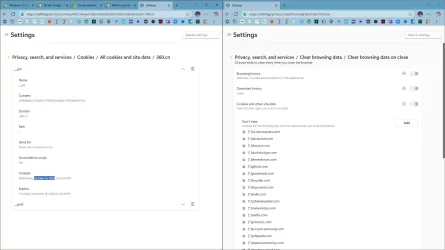
That feature is broken for the past month. If you have cookie exceptions, no cookies get deleted.

The cookie is from 15th of October, it lingers along with ~300 others.

capture_11062025_140819.webp

on Edge i use an extension called Auto Cookie Delete.
It was not updated in 3 years and it poses a security risk. Abandoned extensions tend to get hijacked by malware authors.
 

My Computer

System One

  • OS
    Home26H2Can
    Computer type
    PC/Desktop
    CPU
    AMD Ryzen 5 8600G (07/24)
    Motherboard
    ASROCK B650M-HDV/M.2 (07/24) BIOS 4.21 AGESA ComboAM5 1.3.0.1 (04/26)
    Memory
    2x32GB Kingston FURY DDR5 5600 MHz CL36 @5200 CL36 (07/24)
    Graphics Card(s)
    ASROCK Radeon RX 6600 Challenger D 8G @48FPS (08/24)
    Sound Card
    Creative Sound BlasterX AE-5 Plus (05/24)
    Monitor(s) Displays
    24" Philips 24M1N3200ZS/00 (05/24)
    Screen Resolution
    1920×1080@165Hz via DP1.4
    Hard Drives
    Kingston KC3000 NVMe 2TB (05/24)
    ADATA XPG GAMMIX S11 Pro 512GB (07/19)
    PSU
    Seasonic Core GM 550 Gold (04/24)
    Case
    Fractal Design Define 7 Mini with 3x Noctua NF-P14s/12@555rpm (04/24)
    Cooling
    Noctua NH-U12S with Noctua NF-P12 (04/24)
    Keyboard
    HP Pavilion Wired Keyboard 300 (07/24) + Rabalux 76017 Parker (01/24)
    Mouse
    Logitech M330 Silent Plus (01/26)
    Internet Speed
    500/100 Mbps via RouterOS (05/21) & TCP Optimizer
    Browser
    Edge, Brave for YouTube, LibreWolf for FB
    Antivirus
    NextDNS blocking 1/3 Traffic
    Other Info
    Phone: Motorola Moto G86 (02/26)
    Backup: Hasleo Backup Suite (PreOS)
    Headphones: Sennheiser RS170 (09/10)
    Chair: Huzaro Force 4.4 Grey Mesh (05/24)
    Notifier: Xiaomi Mi Band 9 Milanese (10/24)
    FlexCore USB-C 3.2 Gen 1 (M) to LAN (F) (08/25)
That feature is broken for the past month. If you have cookie exceptions, no cookies get deleted.

The cookie is from 15th of October, it lingers along with ~300 others.

View attachment 151772


It was not updated in 3 years and it poses a security risk. Abandoned extensions tend to get hijacked by malware authors.

its working just fine on my two desktops with no issues to date.
best of luck Steve ..
 

My Computers

System One System Two

  • OS
    Windows 11 Home
    Computer type
    PC/Desktop
    Manufacturer/Model
    HP 24" AiO
    CPU
    Ryzen 7 5825u
    Motherboard
    HP
    Memory
    64GB DDR4 3200
    Graphics Card(s)
    Ryzen 7 5825u
    Sound Card
    RealTek
    Monitor(s) Displays
    24" HP AiO
    Screen Resolution
    1920 x 1080 @60 Hz
    Hard Drives
    1TB WD Blue SN580 M2 SSD Partitioned.
    2x 1TB USB HDD External Backup/Storage.
    PSU
    90W external power brick
    Case
    24" All in One
    Cooling
    Default Air Cooling
    Keyboard
    HP WiFi UK extended
    Mouse
    HP WiFi 3 Button
    Internet Speed
    1GB full fibre
    Browser
    Edge & Firefox
    Antivirus
    AVG Internet Security/Windows Defender
    Other Info
    Mainly Open Source Software
  • Operating System
    Ubuntu 22.04.5 LTS
    Computer type
    Laptop
    Manufacturer/Model
    Dell 13" Latitude 2017
    CPU
    i5 7200u
    Motherboard
    Dell
    Memory
    16GB DDR4
    Graphics card(s)
    Intel
    Sound Card
    Intel
    Monitor(s) Displays
    13" Dell Laptop
    Hard Drives
    250GB Crucial 2.5" SSD
    Mouse
    Generic WiFi 3 button
    Internet Speed
    WiFi only
    Browser
    Firefox
    Antivirus
    ClamAV TK
    Other Info
    Mainly Open Source Software
Anyone turning on BitLocker for security? Since I'm always mobile, both my System One and System Two have BitLocker turned ON. In my backpack I carry two 4TB Samsung T9 Portable SSD drives using BitLocker To Go for making my daily Macrium Reflect X drive C: images.

With my computers I don't notice any speed difference using BitLocker.
On my work computer, BitLocker has always been enabled. I've had no problems whatsoever with that configuration. We have 10's of thousands of Windows laptops in our organization, all Bitlocker protected.
 

My Computers

System One System Two

  • OS
    Windows 11 Pro
    Computer type
    PC/Desktop
    Manufacturer/Model
    Beelink SEI8
    CPU
    Intel Core i5-8279u
    Motherboard
    AZW SEI
    Memory
    32GB DDR4 2666Mhz
    Graphics Card(s)
    Intel Iris Plus 655
    Sound Card
    Intel SST
    Monitor(s) Displays
    Asus ProArt PA278QV
    Screen Resolution
    2560x1440
    Hard Drives
    512GB NVMe
    PSU
    NA
    Case
    NA
    Cooling
    NA
    Keyboard
    NA
    Mouse
    NA
    Internet Speed
    500/50
    Browser
    Edge
    Antivirus
    Defender
    Other Info
    Mini PC used for testing Windows 11.
  • Operating System
    Windows 10 Pro
    Computer type
    PC/Desktop
    Manufacturer/Model
    Custom
    CPU
    Ryzen 9 5900x
    Motherboard
    Asus Rog Strix X570-E Gaming
    Memory
    64GB DDR4-3600
    Graphics card(s)
    EVGA GeForce 3080 FT3 Ultra
    Sound Card
    Onboard
    Monitor(s) Displays
    ASUS TUF Gaming VG27AQ. ASUS ProArt Display PA278QV 27” WQHD
    Screen Resolution
    2560x1440
    Hard Drives
    2TB WD SN850 PCI-E Gen 4 NVMe
    2TB Sandisk Ultra 2.5" SATA SSD
    PSU
    Seasonic Focus 850
    Case
    Fractal Meshify S2 in White
    Cooling
    Dark Rock Pro CPU cooler, 3 x 140mm case fans
    Keyboard
    Corsiar K65 RGB Lux
    Mouse
    Logitech G9 Laser Mouse
    Internet Speed
    500/50
    Browser
    Chrome
    Antivirus
    Defender.
Back
Top Bottom