An Extremely Annoying Wi-Fi Issue


OP says one laptop works fine but other does not in SAME location!

As I stated earlier and reiterated by @Helmut, issue is almost certainly due to hardware differences - one laptop has a strong adaptor, the other a poorer adaptor. This is borne out by fact both work fine when close to router.

As I said earlier, add new adaptor (internal or external (easier)) or create new wifi access point.
Not necessarily, if the one that works in both locations is using a lower frequency.
 

My Computer

System One

  • OS
    Windows 11 Pro 25H2
    Computer type
    PC/Desktop
    Manufacturer/Model
    Intel NUC12WSHi7
    CPU
    12th Gen Core i7-1260P
    Motherboard
    NUC12WSBi7
    Memory
    64 GB Micron PC4-25600
    Graphics Card(s)
    Intel Iris Xe Graphics
    Sound Card
    on-board Realtek HD Audio
    Monitor(s) Displays
    Dell U3219Q
    Screen Resolution
    3840 x 2160
    Hard Drives
    Samsung SSD 990 PRO 1TB
    Crucial MX500 2 TB
    Antivirus
    Microsoft Defender
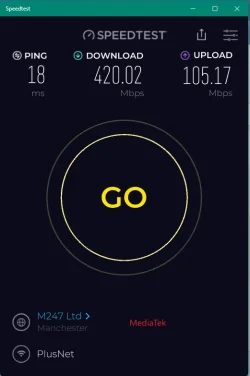
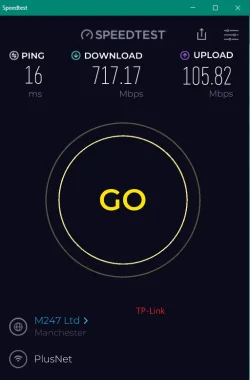
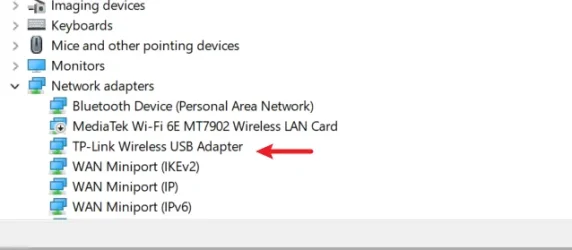
I hope the OP doesn't have a MediaTek card. Substandard performance so I got one of TP-Link's USB 3 wireless adapters.

Snipaste_2025-07-29_17-09-21.webp Snipaste_2025-07-29_17-04-36.webp Snipaste_2025-07-29_17-11-56.webp
 

My Computers

System One System Two

  • OS
    Win 11 Pro
    Computer type
    Laptop
    Manufacturer/Model
    ASUS Vivobook
    CPU
    AMD Ryzen™ 7 7730U
    Motherboard
    M1605YA
    Memory
    24GB Dual-Channel DDR4 @ 1596MHz (22-22-22-52)
    Graphics Card(s)
    512MB ATI AMD Radeon Graphics (ASUStek Computer Inc)
    Monitor(s) Displays
    Generic PnP Monitor (1920x1200@60Hz) - P1 PLUS (1920x1080@59Hz)
    Screen Resolution
    1920 X 1200
    Hard Drives
    953GB Western Digital WD
    PSU
    45 Watts
    Mouse
    Lenovo Bluetooth.
    Internet Speed
    500 Mbps
    Browser
    Edge
    Antivirus
    Defender
  • Operating System
    Windows 11
    Computer type
    Laptop
    Manufacturer/Model
    ACER NITRO
    CPU
    AMD Ryzen 7 5800H / 3.2 GHz
    Motherboard
    CZ Scala_CAS (FP6)
    Memory
    32 GB DDR4 SDRAM 3200 MHz
    Graphics card(s)
    NVIDIA GeForce RTX 3060 6 GB GDDR6 SDRAM
    Sound Card
    Realtek Audio. NVIDIA High Definition Audio
    Monitor(s) Displays
    15.6" LED backlight 1920 x 1080 (Full HD) 144 Hz
    Screen Resolution
    1920 x 1080 (Full HD)
    Hard Drives
    Samsung 970 Evo Plus 2TB NVMe M.2
    PSU
    180 Watt, 19.5 V
    Mouse
    Lenovo Bluetooth
    Internet Speed
    500 Mbps
    Browser
    Edge
    Antivirus
    Defender
That MediTek chipset is 1x1, more normal would be a more capable 2x2 chipset, twice the number of channels.

The laptop manufacturer has cheaped out rather than MediaTek being bad.
So the comparison is false.
 

My Computer

System One

  • OS
    Windows 11
That MediTek chipset is 1x1, more normal would be a more capable 2x2 chipset, twice the number of channels.

The laptop manufacturer has cheaped out rather than MediaTek being bad.
So the comparison is false.
As you say @Helmut ASUS using cheapest wlan cards :poop:

MediaTek Wi-Fi 6E MT7902 Wireless LAN Card is a 1x1 chipset configuration


Feature MT7902 (1x1)
Wi-Fi Standard Wi-Fi 6E (802.11ax)
Max Bandwidth Up to ~1200 Mbps (HE160)
Bluetooth 5.0 LE
Interface M.2 2230 (Key E), PCIe 2.1


TP-Link Archer TXE70UH AXE5400 Wi-Fi 6E USB adapter uses a 2x2 MIMO configuration:


Wi-Fi Standard Wi-Fi 6E (802.11ax)
Bands Supported Tri-band: 2.4 GHz, 5 GHz, 6 GHz
Max Speeds Up to 2402 Mbps (6 GHz)
Antenna Setup Dual high-gain antennas + Beamforming
MIMO Support MU-MIMO (2x2)
Interface USB 3.0 (Type-A)
OS Compatibility Windows 10/11

The comparison is good as I've got the answer to overcome slower wi-fi speeds on any future (cheapish) laptops I buy by simply connecting a decent USB wlan card.
 

My Computers

System One System Two

  • OS
    Win 11 Pro
    Computer type
    Laptop
    Manufacturer/Model
    ASUS Vivobook
    CPU
    AMD Ryzen™ 7 7730U
    Motherboard
    M1605YA
    Memory
    24GB Dual-Channel DDR4 @ 1596MHz (22-22-22-52)
    Graphics Card(s)
    512MB ATI AMD Radeon Graphics (ASUStek Computer Inc)
    Monitor(s) Displays
    Generic PnP Monitor (1920x1200@60Hz) - P1 PLUS (1920x1080@59Hz)
    Screen Resolution
    1920 X 1200
    Hard Drives
    953GB Western Digital WD
    PSU
    45 Watts
    Mouse
    Lenovo Bluetooth.
    Internet Speed
    500 Mbps
    Browser
    Edge
    Antivirus
    Defender
  • Operating System
    Windows 11
    Computer type
    Laptop
    Manufacturer/Model
    ACER NITRO
    CPU
    AMD Ryzen 7 5800H / 3.2 GHz
    Motherboard
    CZ Scala_CAS (FP6)
    Memory
    32 GB DDR4 SDRAM 3200 MHz
    Graphics card(s)
    NVIDIA GeForce RTX 3060 6 GB GDDR6 SDRAM
    Sound Card
    Realtek Audio. NVIDIA High Definition Audio
    Monitor(s) Displays
    15.6" LED backlight 1920 x 1080 (Full HD) 144 Hz
    Screen Resolution
    1920 x 1080 (Full HD)
    Hard Drives
    Samsung 970 Evo Plus 2TB NVMe M.2
    PSU
    180 Watt, 19.5 V
    Mouse
    Lenovo Bluetooth
    Internet Speed
    500 Mbps
    Browser
    Edge
    Antivirus
    Defender
So I'm not sure what to do now. My warranty has expired.
 

My Computer

System One

  • OS
    Windows 11 Home
    Computer type
    Laptop
    Manufacturer/Model
    HP
    Browser
    Chrome
Called my ISP and they upgraded my modem and there is a pod coming this week just in case. I just wanted to thank you all very much for taking the time to help me. I'll try my best to help folks here but I'll warn you all in advance that I'm no Bill Gates at the keyboard. lol
 

My Computer

System One

  • OS
    Windows 11 Home
    Computer type
    Laptop
    Manufacturer/Model
    HP
    Browser
    Chrome

Latest Support Threads

Back
Top Bottom