JavaScript is disabled. For a better experience, please enable JavaScript in your browser before proceeding.
You are using an out of date browser. It may not display this or other websites correctly.
You should upgrade or use an
alternative browser .
An Outgoing Email From My Desktop Starts Randomly
In July I've begun seeing the 'automatic' display of an outgoing email.
Windows Build/Version
25H2 26200.8737
win11/pro Intel Core i7-9700K Kingston HyperX DDR4-3000 4 x 16 GB ASUS TUF-GTX1660-06G win11/pro PC/Desktop gamepc/custom Intel Core i7-9700K ASRock Z390 Taichi Ultimate//ASRK Kingston HyperX DDR4-3000 4 x 16 GB ASUS TUF-GTX1660-06G Roland Edirol UA-1AX Acer V277 bmix 1920 x 1080 Samsung 970 Pro NVMe M.2 512 GB SSD (Sys/Prog) Silverstone ST65F_PT 650W Fractal Design Define R5 Black Dell SK HPX4000 Community Wireless 268 Mbps down/ 230 up SeaMonkey Windows
"No need to be anybody but oneself"
Guru
VIP
In July I've begun seeing the 'automatic' display of an outgoing email.
It should be in your 'Sent' box if it was outgoing.
All Branches but Release AMD Ryzen 7 7735HS 3200-4500 Mhz 8 cores x 2 32 GB DDR5 Radeon Graphic / NVIDIA GeForce RTX 4060 8 GB... All Branches but Release Laptop Acer Nitro ANV15-51 AMD Ryzen 7 7735HS 3200-4500 Mhz 8 cores x 2 Sportage_RBH 32 GB DDR5 Radeon Graphic / NVIDIA GeForce RTX 4060 8 GB GDDR6 AMD/Realtek(R) Audio Integrated Monitor (15.3"vis) FHD 1920X1080 16:9 144Hz KINGSTON OM8SEP4512Q-AA 1TB 19V DC 6.32 A 120 W Dual Fans MS Bluetooth Fiber 1GB Cox -us & 1GB Orange-fr Edge Canary- Firefox Nightly-Chrome Dev-Chrome Dev Windows Defender
Windows 11 Beta AMD A9-9420 8 GB of DDR4 AMD Radeon R5 Windows 11 Beta Laptop Asus X751BP AMD A9-9420 8 GB of DDR4 AMD Radeon R5 1600x900 Seagate 1 TB
Well-known member
Pro User
VIP
I don't understand; can you post a screenshot?
Windows 11 Pro 25H2 26200.8737 AMD Ryzen 7 5825U with Radeon Graphics 16GB Windows 11 Pro 25H2 26200.8737 Laptop Acemagic LX15PRO AMD Ryzen 7 5825U with Radeon Graphics BIOS CT_BI_AMI_LX15PRO_AB8139_A-004 16GB 1920 x 1080 SSD 2TB 30 Mbps Brave Webroot SecureAnywhere Complete beta
Windows 11 Pro 23H2 22631.2506 Atom N450 1.66GHz 2GB Windows 11 Pro 23H2 22631.2506 Laptop HP Mini 210-1090NR PC (bought in late 2009!) Atom N450 1.66GHz 2GB Brave Webroot
Acer Swift SF114-34 laptop
In July I've begun seeing the 'automatic' display of an outgoing email.
Is this by chance a draft email that you accidentally created and is being opened by the program when you start Windows?
Windows 11 25H2 Broadwell-e 6850K 4.5ghz @1.36v 32GB Corsair LPM 3600 C16 EVGA RTX 3080Ti FTW Windows 11 25H2 PC/Desktop EVGA home brew Broadwell-e 6850K 4.5ghz @1.36v EVGA X99 FTW K 32GB Corsair LPM 3600 C16 EVGA RTX 3080Ti FTW Asus Centurion true 7.1 headset. (5 speakers in each earpeice) LG C4 55" 4K 144hz Various models of SSDs ~10TB No HDDs installed. be quiet! BN516 Straight Power 12-1000w 80 Plus Platinum Corsair 780T modified to dual 200mm intake fans Corsair H110i Corsair K95 Platinum Corsair M65 RGB Elite 50Mbs
I was thinking the same as above poster. Delete everything in your drafts folder. I would also clear browser cookies and cache.
Windows 11 Pro 25H2 26200.8655 i9-10900 10 core 20 threads 32 gb none-Intel UHD Graphics 630 Windows 11 Pro 25H2 26200.8655 PC/Desktop Dell Optiplex 7080 i9-10900 10 core 20 threads DELL 0J37VM 32 gb none-Intel UHD Graphics 630 Integrated Realtek Benq 27 2560x1440 2x1tb Solidigm m.2 nvme /External drives 512gb Samsung m.2 sata+2tb Kingston m2.nvme 500w MT Dell Premium Logitech wired Logitech wireless so slow I'm too embarrassed to tell #1 Edge #2 Firefox Defender+MWB Premium
Windows 11 Pro 24H2 26200.8457 AMD Ryzen 7 6800U 32 gb integrated Windows 11 Pro 24H2 26200.8457 PC/Desktop Beelink Mini PC SER5 AMD Ryzen 7 6800U 32 gb integrated integrated Benq 27 2560x1440 1TB Crucial nvme Logitech wired Logitech wireless still too embarrassed to tell Firefox Defender System 3 is non compliant Dell 9020 i7-4770/24gb ram Win11 PRO 26200.8457
Active member
Member
Thread Starter
Thanks for the ideas. I see I should have been more specific.
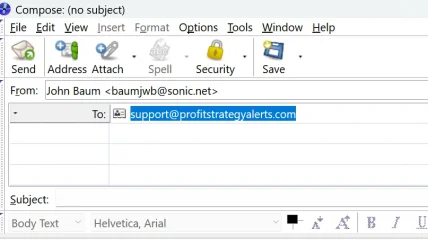
I have the desktop running. Sometimes before I can do anything, an outgoing email appears; sometimes I'm engaged with doing something.
A new outgoing email appears that is always to:
[email protected] .
A search gives
profitstrategyalerts.com an approximately 50% trust rating.
Thanks
baumgrenze
win11/pro Intel Core i7-9700K Kingston HyperX DDR4-3000 4 x 16 GB ASUS TUF-GTX1660-06G win11/pro PC/Desktop gamepc/custom Intel Core i7-9700K ASRock Z390 Taichi Ultimate//ASRK Kingston HyperX DDR4-3000 4 x 16 GB ASUS TUF-GTX1660-06G Roland Edirol UA-1AX Acer V277 bmix 1920 x 1080 Samsung 970 Pro NVMe M.2 512 GB SSD (Sys/Prog) Silverstone ST65F_PT 650W Fractal Design Define R5 Black Dell SK HPX4000 Community Wireless 268 Mbps down/ 230 up SeaMonkey Windows
Active member
Member
Thread Starter
The compose box appears unbidden.
Perhaps I used the wrong term. Here is what I see.
Is this perhaps a 'push notification' that I somehow permitted?
If true, how do I withdraw permission?
Thanks
baumgrenze
win11/pro Intel Core i7-9700K Kingston HyperX DDR4-3000 4 x 16 GB ASUS TUF-GTX1660-06G win11/pro PC/Desktop gamepc/custom Intel Core i7-9700K ASRock Z390 Taichi Ultimate//ASRK Kingston HyperX DDR4-3000 4 x 16 GB ASUS TUF-GTX1660-06G Roland Edirol UA-1AX Acer V277 bmix 1920 x 1080 Samsung 970 Pro NVMe M.2 512 GB SSD (Sys/Prog) Silverstone ST65F_PT 650W Fractal Design Define R5 Black Dell SK HPX4000 Community Wireless 268 Mbps down/ 230 up SeaMonkey Windows
Well-known member
Power User
VIP
You should take away your mailadress from the picture. And because only have restricted time to edit your post, I advice you to delete the whole pic from your post as soon as possible and put it back with blended mailaddres lateron.
Windows 11 Pro 25H2 AMD Ryzen 7 5700G Kingston FURY Beast 2x16GB DIMM DDR4 2666 CL16 MSI GeForce GT 730 2GB LP V1 Windows 11 Pro 25H2 PC/Desktop Build by vendor to my specs AMD Ryzen 7 5700G MSI PRO B550M-P Gen3 Kingston FURY Beast 2x16GB DIMM DDR4 2666 CL16 MSI GeForce GT 730 2GB LP V1 Creative Sound Blaster Audigy FX Samsung S24E450F 24" 1920 x 1080 1. SSD Crucial P5 Plus 500GB PCIe M.2 Corsair CV650W Cooler Master Silencio S400 Cooler Master Hyper H412R with Be Quiet Pure Wings 2 PWM BL038 fan Cherry Stream (wired, scissor keys) Asus WT465 (wireless) 70 Mbps down / 80 Mbps up Firefox 130.0 F-Secure (Internetprovider version) Router: FRITZBox 7490