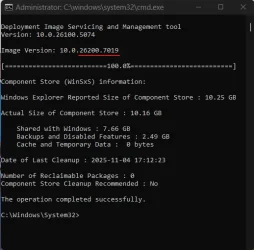
Analyze Component Store - 2 reclaimable packages?


DO NOT REMOVE THEM.

These left overs from 1742 are required for 6901 and later to install correctly.

Only my DEV build had an issue without them.
My public builds don't seem to care if they're there or not.
We'll see what happens next Tuesday.

1762312837568.webp
 

My Computers

System One System Two

  • OS
    Win 11 Pro 25H2 26200.8524
    Computer type
    PC/Desktop
    Manufacturer/Model
    Self Built
    CPU
    Intel® Core™ i7-14700K
    Motherboard
    ASUS TUF Z690-PLUS WIFI BIOS 4505 11/29/25
    Memory
    G.SKILL Ripjaws S5 Series 64GB (2 x 32GB) DDR5
    Graphics Card(s)
    ASUS GeForce RTX 4070 Super 12GB
    Sound Card
    Sound Blaster AE-5 Plus
    Monitor(s) Displays
    ASUS TUF Gaming 27" 2K HDR Gaming
    Screen Resolution
    2560 x 1440
    Hard Drives
    Samsung 990 Pro 1TB NVMe (Win 11 25H2)
    SK hynix P41 500GB NVMe 25H2 DEV/Games
    SK hynix P41 2TB NVMe (x3)
    Crucial P3 Plus 4TB
    PSU
    Corsair RM850x Shift
    Case
    Antec Dark Phantom DP502 FLUX
    Cooling
    Corsair Nautilus 360 RS AIO
    Keyboard
    Logitech MK 320
    Mouse
    Razer Basilisk V3
    Internet Speed
    350Mbs
    Browser
    Firefox
    Antivirus
    Winows Security
    Other Info
    MR 8.1 Home

    System 3 Specs
    Win 11 Pro 25H2 26200.8524
    ASUS PRIME Z370-P II BIOS 3004 7/12/21
    Intel Core i7-8700 CPU @ 3.20GHz
    32GB DDR4 RAM (4x8)
    iGPU Intel UHD Graphics 630
  • Operating System
    Win 11 Pro 25H2 26200.8524
    Computer type
    PC/Desktop
    Manufacturer/Model
    Self Built
    CPU
    Intel Core i7-11700F
    Motherboard
    Asus TUF Gaming Z590 Plus WiFi (BIOS 2803)
    Memory
    64 GB DDR4
    Graphics card(s)
    MSI GeForce RTX 3060 Ventus 2X 12GB
    Sound Card
    SoundBlaster Audigy Fx V2
    Monitor(s) Displays
    Samsung F27T350
    Screen Resolution
    1920x1080
    Hard Drives
    Samsung 980 Pro 1TB
    Samsung 970 EVO Plus 2TB
    Samsung 870 EVO 500GB SSD
    PSU
    Corsair HX750
    Case
    Cougar MX330-G Window
    Cooling
    Thermalright Frozen Edge 240 Black AIO
    Internet Speed
    350Mbps
    Browser
    Firefox
    Antivirus
    Windows Security
Only my DEV build had an issue without them.

i was on Release 26200 which had managed to make it to 6899, but then wouldn't go further,

DISM deployed 7019 updated a few files in the system folders, but left an inconsistent pending.xml in winsxs, clearing that and reverting with WinRE to beforee 7019 was attempted (1742 was also attempted AFTER 7019, but the stuck state persisted) continued to fail the two updates ubtil 1742 was reintroduced with dism.

What is the argument to get that info from dism, thanks.
 

My Computer

System One

  • OS
    Windows
I had hope that with the introduction of 25H2 this problem was solved. They call it 26200.xxxx but looking at the Component Store and the packages in there; They are still all called 26100.xxxxx. Basically it's then under the hood still 24H2. So I would call 25H2 not a version but it's more a servicepack for 24H2. It looks that 25H2 has issues from the start. First the WinRE issue that was introduced with 26100/26200.6899, solved with 26100/26200.6901 and now the problem with the taskmanager issue producing ghost processes when closed. Introduced with 26100/26200.7019. No solution for it yet but can be fixed by using the Vivetool at Github. Can be solved by turning on some features that MS forgot to roll out; The fix is already there inside 26100/26200.xxxx!!

ViVeTool.exe /enable /id:57048231
ViVeTool.exe /enable /id:49407484

And those 2 packages? They are still there. I don't bother anymore. It's just is a cosmetical problem. When you do an In-Place-Installment they will be back again. There are more pressing issues that are popping up the during the last 2 builds.

In the mean time 25H2 also introduced a CA2023 issue. The old certificate issued in 2011 is expiring in 2026. Saw some TPM errors in my system logbook. Came from the source: TPM-WMI. That CA2023 update is not automatically implemented in Windows 11 26100/26200.xxxx for some reason. Can be fixed manually. Found the solution at: [INFORMATION] Secure Boot : Windows UEFI CA 2023 Update Downloaded some scripts. Read the manual and by running a few steps and those TPM errors disappears. Not a well know issue....

All with all more pressing matters are popping up with 25H2. Those 2 packages are there and are not that important anymore. We have to watch which problems are introduced with the next builds that MS is pushing through our throats.

 
Last edited:

My Computer

System One

  • OS
    Win 11 Pro "25H2" Build 26200.8524, Zorin OS Pro
    Computer type
    PC/Desktop
    Manufacturer/Model
    Self built
    CPU
    Intel® Core™ i7-12700KF 12th Gen.
    Motherboard
    ASUS Prime Z690-A, BIOS v4505
    Memory
    32GB DDR5 5600-36 Vengeance
    Graphics Card(s)
    PCIe4.0 Asus NVIDIA RTX3060Ti
    Sound Card
    Onboard; Realtek
    Monitor(s) Displays
    34" LG 34UC79G-B Curved 21:9 144Hz
    Screen Resolution
    2560x1080 (No HDR)
    Hard Drives
    250Gb Samsung 870PRO NVMe (Win 11 Pro)
    1Tb Samsung 980PRO NVMe
    1Tb Samsung 970EVO NVMe
    2Tb Samsung 990PRO NVMe with heatsink.
    4Tb WDC WD40EZRZ Blue SATA (Int.)
    4Tb WDC WD40EZRZ Blue SATA (Int.)
    3Tb WDC WD30EFRZ Red SATA (Int.)
    256Gb Samsung 840PRO SSD (RHEL 9,5)
    256Gb Samsung 850PRO SSD (Zorin OS Pro 18)
    PSU
    Coolermaster 850W V2 Gold with internal 12cm exaust fan
    Case
    Be-Quiet Pure Base 600.
    Cooling
    3x Be-Quiet! 12/14cm "Silent Wings 4" casefans, 1x Arctic Freezer i35 CPU towerblock with fan.
    Keyboard
    Steelseries APEX 7 keyboard.
    Mouse
    Logitech G-502 Hero
    Internet Speed
    1Gb
    Browser
    Brave
    Antivirus
    F-Secure
    Other Info
    No Noise system.
    256Gb Kingston Travler USB 3.0 drive.
    64Gb Sandisk USB 3.2 drive. (Ventoy)
    8Gb Philips USB 3.0 drive. (Win. Inst.)
    8Gb Philips USB 3.0 drive. (Rescue disk)
    2Tb WD USB 3.0 Passport drive.
    USB Ext. 500Gb WD SATA drive.
    External USB 3.0 C.A. CD/DVD* burner.
I had hope that with the introduction of 25H2 this problem was solved. They call it 26200.xxxx but looking at the Component Store and the packages in there; They are still all called 26100.xxxxx. Basically it's then under the hood still 24H2. So I would call 25H2 not a version but it's more a servicepack for 24H2. It looks that 25H2 has issues from the start. First the WinRE issue that was introduced with 26100/26200.6899, solved with 26100/26200.6901 and now the problem with the taskmanager issue producing ghost processes when closed. Introduced with 26100/26200.7019. No solution for it yet but can be fixed by using the Vivetool at Github. Can be solved by turning on some features that MS forgot to roll out; The fix is already there inside 26100/26200.xxxx!!

ViVeTool.exe /enable /id:57048231
ViVeTool.exe /enable /id:49407484

And those 2 packages? They are still there. I don't bother anymore. It's just is a cosmetical problem. When you do an In-Place-Installment they will be back again. There are more pressing issues that are popping up the during the last 2 builds.

In the mean time 25H2 also introduced a CA2023 issue. The old certificate issued in 2011 is expiring in 2026. Saw some TPM errors in my system logbook. Came from the source: TPM-WMI. That CA2023 update is not automatically implemented in Windows 11 26100/26200.xxxx for some reason. Can be fixed manually. Found the solution at: [INFORMATION] Secure Boot : Windows UEFI CA 2023 Update Downloaded some scripts. Read the manual and by running a few steps and those TPM errors disappears. Not a well know issue....

All with all more pressing matters are popping up with 25H2. Those 2 packages are there and are not that important anymore. We have to watch which problems are introduced with the next builds that MS is pushing through our throats.
I'm still running 23H2 on this work station because 24H2 would involve too much tweaking and cheating and I don't need to go there again. Yes, my friend, the X99 restoration is complete and I'm typing on it right now! The old 2011 certificate is a more pressing concern for me. IF all else fails I'll just install Linux on this old 7/11 and see what I can get away with on the X299.

I feel badly for those folks who really MUST use Co-Pilot and AI. I don't need it and I don't want it. I already have 24H2 on the X299 and I'm seriously debating leaving it at that. MS is getting so sloppy these days one wonders who's really running it. AI?? I'll keep watching but methinks it'll be a while before I attempt installing anything beyond 24H2. Sometimes I wish MS would just make a simple bare-bones OS without all the glitz and frills for simple domestic end users like myself. Clearly that ain't gonna happen. Good to see you again, Hader.
 

My Computer

System One

  • OS
    WIN 11, WIN 10, WIN 8.1, WIN 7 U, WIN 7 PRO, WIN 7 HOME (32 Bit), LINUX MINT
    Computer type
    PC/Desktop
    Manufacturer/Model
    DIY, ASUS, and DELL
    CPU
    Intel i7 6900K and i9-7960X / AMD 3800X (8 core)
    Motherboard
    ASUS X99E-WS USB 3.1 and ASUS X299 SAGE
    Memory
    128 GB CORSAIR DOMINATOR PLATINUM (B DIE)
    Graphics Card(s)
    NVIDIA 1070 and RTX 3070
    Sound Card
    Crystal Sound (onboard)
    Monitor(s) Displays
    single Samsung 30" 4K and 8" aux monitor
    Screen Resolution
    4K and something equally attrocious. I'll be working on this.
    Hard Drives
    A, B, C, D, E, F, G, H, I, J, K, L, M, N, O, P, Q, R, S, T, U, V, W

    Ports X, Y, and Z are reserved for USB access and removable drives.

    Drive types consist of the following: Various mechanical hard drives bearing the brand names, Seagate, Toshiba, and Western Digital. Various NVMe drives bearing the brand names Kingston, Intel, Silicon Power, Crucial, Western Digital, and Team Group. Various SATA SSDs bearing various different brand names.

    RAID arrays included:

    LSI RAID 10 (WD Velociraptors) 1115.72 GB
    LSI RAID 10 (WD SSDS) 463.80 GB

    INTEL RAID 0 (KINGSTON HYPER X) System 447.14 GB
    INTEL RAID 1 TOSHIBA ENTERPRIZE class Data 2794.52 GB
    INTEL RAID 1 SEAGATE HYBRID 931.51 GB
    PSU
    SEVERAL. I prefer my Corsair Platinum HX1000i but I also like EVGA power supplies
    Case
    ThermalTake Level 10 GT (among others)
    Cooling
    Noctua is my favorite and I use it in my main. I also own various other coolers.
    Keyboard
    all kinds.
    Mouse
    all kinds
    Internet Speed
    360 mbps - 1 gbps (depending)
    Browser
    FIREFOX
    Antivirus
    KASPERSKY (no apologies)
    Other Info
    Gave Dell touch screen with Windows 11 to daughter and got me an OTVOC. Being a PC builder I own many desktop PCs as well. I am a father of five providing PCs, laptops, and tablets for all my family, most of which I have modified, rebuilt, or simply built from scratch. I do not own a cell phone, never have, never will.
In the mean time 25H2 also introduced a CA2023 issue. The old certificate issued in 2011 is expiring in 2026. Saw some TPM errors in my system logbook. Came from the source: TPM-WMI. That CA2023 update is not automatically implemented in Windows 11 26100/26200.xxxx for some reason. Can be fixed manually. Found the solution at: [INFORMATION] Secure Boot : Windows UEFI CA 2023 Update Downloaded some scripts. Read the manual and by running a few steps and those TPM errors disappears. Not a well know issue....
24H2 and 25H2 share the same code base, and have identical Monthly CU's. The Sep. 2025 update introduced a new TPI alarm for added visibility to the upcoming CA 2023 migration.

You're not expected to fix anything right now, unless you choose to apply CA 2023 certs now before Windows does for you automatically in 2026. This alarm exists for all currently supported systems (W10 22H2 under ESU, 24H2 and 25H2).

The only surprise is MS introduced the event alarm without advertising it. It's probably there for domain-managed PC's, so admins can begin scanning for event codes.
 

My Computer

System One

  • OS
    Windows 7
I'm still running 23H2 on this work station because 24H2 would involve too much tweaking and cheating and I don't need to go there again. Yes, my friend, the X99 restoration is complete and I'm typing on it right now! The old 2011 certificate is a more pressing concern for me. IF all else fails I'll just install Linux on this old 7/11 and see what I can get away with on the X299.

I feel badly for those folks who really MUST use Co-Pilot and AI. I don't need it and I don't want it. I already have 24H2 on the X299 and I'm seriously debating leaving it at that. MS is getting so sloppy these days one wonders who's really running it. AI?? I'll keep watching but methinks it'll be a while before I attempt installing anything beyond 24H2. Sometimes I wish MS would just make a simple bare-bones OS without all the glitz and frills for simple domestic end users like myself. Clearly that ain't gonna happen. Good to see you again, Hader.
Hi Scannerman good to hear from you also again. Hope you're fine. Yes. I understand that your not stepping over to 25H2 or 24H2 for that matter. My old system is still running also 23H2. That the support ended with 23H2 is. Just progress I think. Every OS WIndows/Linux etc. has a shelf lifetime. You would be amazed how many people run old OS that are long out of service. Estimated 0,4% runs Windows XP and 3,34% still are running Windows 7 worldwide. And we are talking about homeusers. And that on a total base of 2 Billion PC on the planet. And they are not looking at independent machines used in the business world. I saw electronic billboards with one big display which shows ads and a ATM machine who were stuck with a Windows error screen from XP.

Anyway 23H2 is not out of service. There is a ESU (Extended Security Updates) program which allow to get updates until next year. after that they will use it for another 2 years. Until 2028 that is. Then is really finished. In the US you have to pay for it (a small amount) but in Europe it's automatically and for free. This because we have European laws that prohibit this from a big tech company.

As for my next project I am trying to upgrade my old system with 23H2 towards 25H2 in on go. The 4Gb, TPM and secure boot I can skip with Rufus. My CPU is on the not supported list. MS will complain over it. Saw a video from CyberCPU Tech that that only was a warning screen where you can click on OK to ignore it.
I will dispense the need for a OneDrive and have to use a MS-account. My modern PC has a more current version of OneDrive. No need to have on a second system also. Will make a backup in advance so I can go back if things go wrong. My old system still receives security updates without have to use ESU. So what they said about Europe is true it seems. That video:
and how to remove unwanted stuff;
. Have a nice day.
 

My Computer

System One

  • OS
    Win 11 Pro "25H2" Build 26200.8524, Zorin OS Pro
    Computer type
    PC/Desktop
    Manufacturer/Model
    Self built
    CPU
    Intel® Core™ i7-12700KF 12th Gen.
    Motherboard
    ASUS Prime Z690-A, BIOS v4505
    Memory
    32GB DDR5 5600-36 Vengeance
    Graphics Card(s)
    PCIe4.0 Asus NVIDIA RTX3060Ti
    Sound Card
    Onboard; Realtek
    Monitor(s) Displays
    34" LG 34UC79G-B Curved 21:9 144Hz
    Screen Resolution
    2560x1080 (No HDR)
    Hard Drives
    250Gb Samsung 870PRO NVMe (Win 11 Pro)
    1Tb Samsung 980PRO NVMe
    1Tb Samsung 970EVO NVMe
    2Tb Samsung 990PRO NVMe with heatsink.
    4Tb WDC WD40EZRZ Blue SATA (Int.)
    4Tb WDC WD40EZRZ Blue SATA (Int.)
    3Tb WDC WD30EFRZ Red SATA (Int.)
    256Gb Samsung 840PRO SSD (RHEL 9,5)
    256Gb Samsung 850PRO SSD (Zorin OS Pro 18)
    PSU
    Coolermaster 850W V2 Gold with internal 12cm exaust fan
    Case
    Be-Quiet Pure Base 600.
    Cooling
    3x Be-Quiet! 12/14cm "Silent Wings 4" casefans, 1x Arctic Freezer i35 CPU towerblock with fan.
    Keyboard
    Steelseries APEX 7 keyboard.
    Mouse
    Logitech G-502 Hero
    Internet Speed
    1Gb
    Browser
    Brave
    Antivirus
    F-Secure
    Other Info
    No Noise system.
    256Gb Kingston Travler USB 3.0 drive.
    64Gb Sandisk USB 3.2 drive. (Ventoy)
    8Gb Philips USB 3.0 drive. (Win. Inst.)
    8Gb Philips USB 3.0 drive. (Rescue disk)
    2Tb WD USB 3.0 Passport drive.
    USB Ext. 500Gb WD SATA drive.
    External USB 3.0 C.A. CD/DVD* burner.
Hi Scannerman good to hear from you also again. Hope you're fine. Yes. I understand that your not stepping over to 25H2 or 24H2 for that matter. My old system is still running also 23H2. That the support ended with 23H2 is. Just progress I think. Every OS WIndows/Linux etc. has a shelf lifetime. You would be amazed how many people run old OS that are long out of service. Estimated 0,4% runs Windows XP and 3,34% still are running Windows 7 worldwide. And we are talking about homeusers. And that on a total base of 2 Billion PC on the planet. And they are not looking at independent machines used in the business world. I saw electronic billboards with one big display which shows ads and a ATM machine who were stuck with a Windows error screen from XP.

Anyway 23H2 is not out of service. There is a ESU (Extended Security Updates) program which allow to get updates until next year. after that they will use it for another 2 years. Until 2028 that is. Then is really finished. In the US you have to pay for it (a small amount) but in Europe it's automatically and for free. This because we have European laws that prohibit this from a big tech company.

As for my next project I am trying to upgrade my old system with 23H2 towards 25H2 in on go. The 4Gb, TPM and secure boot I can skip with Rufus. My CPU is on the not supported list. MS will complain over it. Saw a video from CyberCPU Tech that that only was a warning screen where you can click on OK to ignore it.
I will dispense the need for a OneDrive and have to use a MS-account. My modern PC has a more current version of OneDrive. No need to have on a second system also. Will make a backup in advance so I can go back if things go wrong. My old system still receives security updates without have to use ESU. So what they said about Europe is true it seems. That video:
and how to remove unwanted stuff;
. Have a nice day.
Part of the reason the X99 (that I'm typing on right now) is still running 23H2 is because it wasn't on Microsnots approval list for Win 11 despite the CPU only being 5 years old when Win 11 was first released. I was pretty choked about that but I'm over it now. They want to roll with the monetary push for AI and large language models. I get it. I just wish they had the foresight to comprehend that not everybody needs this and they would keep more of their customer base if they had provided reasonable options for those who aren't keen on AI and the forever failing TPM protocols. These should have remained optional. It's starting to look like Linux couldn't ask for a better friend because people are crossing over like never before.

I never ran windows 10 for any length of time on my Work Stations because I reasoned that if I had to resort to that much surgery just to trim it down to a safe and reasonable OS it just wasn't worth having. That's how I wound up with a 7/11. Windows 7 still runs fine on this unit and I keep it as a reminder of what a good operating system looks like. No Cortana, no key logger, no advertising, no bloatware, no nonsense. Manually installing a few drivers doesn't bother me, but some folks just want Mama Microsoft to do everything for them. Seems a shame, really, but I'm gettin' old and I suppose it's the way of things. Pretty soon we won't need to think about anything at all except how to push a button that plugs us into grid I suppose. Let AI do the rest of the thinking for us while we keep on reaping those dopamine hits. IMO the future looks grim. Even coders are taking a back seat to the machine. What could possibly go wrong?
 

My Computer

System One

  • OS
    WIN 11, WIN 10, WIN 8.1, WIN 7 U, WIN 7 PRO, WIN 7 HOME (32 Bit), LINUX MINT
    Computer type
    PC/Desktop
    Manufacturer/Model
    DIY, ASUS, and DELL
    CPU
    Intel i7 6900K and i9-7960X / AMD 3800X (8 core)
    Motherboard
    ASUS X99E-WS USB 3.1 and ASUS X299 SAGE
    Memory
    128 GB CORSAIR DOMINATOR PLATINUM (B DIE)
    Graphics Card(s)
    NVIDIA 1070 and RTX 3070
    Sound Card
    Crystal Sound (onboard)
    Monitor(s) Displays
    single Samsung 30" 4K and 8" aux monitor
    Screen Resolution
    4K and something equally attrocious. I'll be working on this.
    Hard Drives
    A, B, C, D, E, F, G, H, I, J, K, L, M, N, O, P, Q, R, S, T, U, V, W

    Ports X, Y, and Z are reserved for USB access and removable drives.

    Drive types consist of the following: Various mechanical hard drives bearing the brand names, Seagate, Toshiba, and Western Digital. Various NVMe drives bearing the brand names Kingston, Intel, Silicon Power, Crucial, Western Digital, and Team Group. Various SATA SSDs bearing various different brand names.

    RAID arrays included:

    LSI RAID 10 (WD Velociraptors) 1115.72 GB
    LSI RAID 10 (WD SSDS) 463.80 GB

    INTEL RAID 0 (KINGSTON HYPER X) System 447.14 GB
    INTEL RAID 1 TOSHIBA ENTERPRIZE class Data 2794.52 GB
    INTEL RAID 1 SEAGATE HYBRID 931.51 GB
    PSU
    SEVERAL. I prefer my Corsair Platinum HX1000i but I also like EVGA power supplies
    Case
    ThermalTake Level 10 GT (among others)
    Cooling
    Noctua is my favorite and I use it in my main. I also own various other coolers.
    Keyboard
    all kinds.
    Mouse
    all kinds
    Internet Speed
    360 mbps - 1 gbps (depending)
    Browser
    FIREFOX
    Antivirus
    KASPERSKY (no apologies)
    Other Info
    Gave Dell touch screen with Windows 11 to daughter and got me an OTVOC. Being a PC builder I own many desktop PCs as well. I am a father of five providing PCs, laptops, and tablets for all my family, most of which I have modified, rebuilt, or simply built from scratch. I do not own a cell phone, never have, never will.
...Windows 7 still runs fine on this unit and I keep it as a reminder of what a good operating system looks like. No Cortana, no key logger, no advertising, no bloatware, no nonsense....
Yes i must agree. Found XP a great Windows version but Windows 7 was much nicer. Down to earth with no so much bloatware. Windows 10 was a welcome edition at first. But it started to go downhill with Windows 11. Forced rules onto everybody. If you didn't have the right system; sorry you are left behind. I hate that company's are forcing us to buy new hardware while the "old" systems where still capable of running Windows 11. So was the case with Windows 11 23H2. I installed it with some fix to skip the demands. No TPM, an old CPU. It just ran as smooth as Windows 10 did. No degradation of speed. With 24H2 the specs became more demanding. I bought new hardware because my new RTX3060Ti would not run on my old hardware. Video's said it would run on my old hardware but I was confronted with blue screens. 24H2 and 25H2 run fine on my new hardware. But in the mean time the sizes of the ISO's kept increasing. Crap like Cortana (did not work only the English version was available and in the end they just dumped it because it did live up to the expectations) All the AI stuff doesn't work either. If you want to use it; you must have office 365 subscription which i despise. So that went out the windows. CoPiliot, ClipChamp etc. it's all a bunch of crap also. There are many programs that do a better job of things. CyberCPU Tech has also that opinion and showed us how to get rid of all that bloatware which you never will be using in the first place. This while some programs are running in the background taking up resources. Unnecessary. The introduction of 25H2 is not what we expected. 2 bugs were introduced (WinRE and Taskmanager ghost processes and a certificate CA2023 rubbish that gave TMP-WMI errors because they could not introduce CA2023 automatically. You have to correct it by hand. Will be fixed in a future update) But we have had 4 build update since it's release and 2 off them where introducing bugs. MS is getting sloppy. Why do they have an insider program then with a Canary, Dev and Beta channels? To test the releases so the are errorfree when they are released for the general public.
 

My Computer

System One

  • OS
    Win 11 Pro "25H2" Build 26200.8524, Zorin OS Pro
    Computer type
    PC/Desktop
    Manufacturer/Model
    Self built
    CPU
    Intel® Core™ i7-12700KF 12th Gen.
    Motherboard
    ASUS Prime Z690-A, BIOS v4505
    Memory
    32GB DDR5 5600-36 Vengeance
    Graphics Card(s)
    PCIe4.0 Asus NVIDIA RTX3060Ti
    Sound Card
    Onboard; Realtek
    Monitor(s) Displays
    34" LG 34UC79G-B Curved 21:9 144Hz
    Screen Resolution
    2560x1080 (No HDR)
    Hard Drives
    250Gb Samsung 870PRO NVMe (Win 11 Pro)
    1Tb Samsung 980PRO NVMe
    1Tb Samsung 970EVO NVMe
    2Tb Samsung 990PRO NVMe with heatsink.
    4Tb WDC WD40EZRZ Blue SATA (Int.)
    4Tb WDC WD40EZRZ Blue SATA (Int.)
    3Tb WDC WD30EFRZ Red SATA (Int.)
    256Gb Samsung 840PRO SSD (RHEL 9,5)
    256Gb Samsung 850PRO SSD (Zorin OS Pro 18)
    PSU
    Coolermaster 850W V2 Gold with internal 12cm exaust fan
    Case
    Be-Quiet Pure Base 600.
    Cooling
    3x Be-Quiet! 12/14cm "Silent Wings 4" casefans, 1x Arctic Freezer i35 CPU towerblock with fan.
    Keyboard
    Steelseries APEX 7 keyboard.
    Mouse
    Logitech G-502 Hero
    Internet Speed
    1Gb
    Browser
    Brave
    Antivirus
    F-Secure
    Other Info
    No Noise system.
    256Gb Kingston Travler USB 3.0 drive.
    64Gb Sandisk USB 3.2 drive. (Ventoy)
    8Gb Philips USB 3.0 drive. (Win. Inst.)
    8Gb Philips USB 3.0 drive. (Rescue disk)
    2Tb WD USB 3.0 Passport drive.
    USB Ext. 500Gb WD SATA drive.
    External USB 3.0 C.A. CD/DVD* burner.
X99 restoration is complete
My X99 is happily running 25H2, i bought a plug in TPM. It was happy with my XEON processor as i just upgraded the CPU by reusing the original OS drive.
 

My Computers

System One System Two

  • OS
    Windows 11 Enterprise 25H2 26200 7462
    Computer type
    PC/Desktop
    Manufacturer/Model
    Custom Build
    CPU
    Intel XEON E5-2699 v3
    Motherboard
    ASUS X99-A
    Memory
    64GB Teamgroup UD4-3600
    Graphics Card(s)
    NVIDIA GeForce GTX 1080 Ti
    Sound Card
    Integrated
    Monitor(s) Displays
    ACER X34 Predator
    Screen Resolution
    3440 x 1440
    Hard Drives
    Crucial CT1000P 3P SSD8 1TB
    Crucial CT1000 BX500 SSD 1TB
    PSU
    GameMax Pro
    Case
    Fractal Design
    Cooling
    Corsair H110iGT + 6 140mm Fans
    Keyboard
    Corsair K4
    Mouse
    G-Skill G502
    Internet Speed
    300MBs
    Browser
    Chrome
    Antivirus
    OEM
    Other Info
    ASUS RT-AC87U Router
  • Operating System
    25H2 26200.5074
    Computer type
    Laptop
    Manufacturer/Model
    ASUS X555LA
    Memory
    8GB
    Browser
    Chrome
    Antivirus
    OEM
My X99 is happily running 25H2, i bought a plug in TPM. It was happy with my XEON processor as i just upgraded the CPU by reusing the original OS drive.
This is good to know. I'm running a 6900K chip in this unit (although Intel has it classified as an X series CPU). I also installed a TPM module and the system recognizes it. Perhaps I'll give it another go at some point but there is a chance that you can upgrade to 25H2 because you're using a XEON. Win 11 really doesn't like this CPU I'm using at all. I also had similar issues with the i9 7960X on my X299 system board but I managed to get 24H2 installed after resorting to a couple of 'stand alones' from the catalog.
 

My Computer

System One

  • OS
    WIN 11, WIN 10, WIN 8.1, WIN 7 U, WIN 7 PRO, WIN 7 HOME (32 Bit), LINUX MINT
    Computer type
    PC/Desktop
    Manufacturer/Model
    DIY, ASUS, and DELL
    CPU
    Intel i7 6900K and i9-7960X / AMD 3800X (8 core)
    Motherboard
    ASUS X99E-WS USB 3.1 and ASUS X299 SAGE
    Memory
    128 GB CORSAIR DOMINATOR PLATINUM (B DIE)
    Graphics Card(s)
    NVIDIA 1070 and RTX 3070
    Sound Card
    Crystal Sound (onboard)
    Monitor(s) Displays
    single Samsung 30" 4K and 8" aux monitor
    Screen Resolution
    4K and something equally attrocious. I'll be working on this.
    Hard Drives
    A, B, C, D, E, F, G, H, I, J, K, L, M, N, O, P, Q, R, S, T, U, V, W

    Ports X, Y, and Z are reserved for USB access and removable drives.

    Drive types consist of the following: Various mechanical hard drives bearing the brand names, Seagate, Toshiba, and Western Digital. Various NVMe drives bearing the brand names Kingston, Intel, Silicon Power, Crucial, Western Digital, and Team Group. Various SATA SSDs bearing various different brand names.

    RAID arrays included:

    LSI RAID 10 (WD Velociraptors) 1115.72 GB
    LSI RAID 10 (WD SSDS) 463.80 GB

    INTEL RAID 0 (KINGSTON HYPER X) System 447.14 GB
    INTEL RAID 1 TOSHIBA ENTERPRIZE class Data 2794.52 GB
    INTEL RAID 1 SEAGATE HYBRID 931.51 GB
    PSU
    SEVERAL. I prefer my Corsair Platinum HX1000i but I also like EVGA power supplies
    Case
    ThermalTake Level 10 GT (among others)
    Cooling
    Noctua is my favorite and I use it in my main. I also own various other coolers.
    Keyboard
    all kinds.
    Mouse
    all kinds
    Internet Speed
    360 mbps - 1 gbps (depending)
    Browser
    FIREFOX
    Antivirus
    KASPERSKY (no apologies)
    Other Info
    Gave Dell touch screen with Windows 11 to daughter and got me an OTVOC. Being a PC builder I own many desktop PCs as well. I am a father of five providing PCs, laptops, and tablets for all my family, most of which I have modified, rebuilt, or simply built from scratch. I do not own a cell phone, never have, never will.
I was running an i5 when i first upgraded to 23H2, i bought the XEON and dropped it in the board and hit the power button and the machine configured itself. I've since updated eventually to 25H2.
 

My Computers

System One System Two

  • OS
    Windows 11 Enterprise 25H2 26200 7462
    Computer type
    PC/Desktop
    Manufacturer/Model
    Custom Build
    CPU
    Intel XEON E5-2699 v3
    Motherboard
    ASUS X99-A
    Memory
    64GB Teamgroup UD4-3600
    Graphics Card(s)
    NVIDIA GeForce GTX 1080 Ti
    Sound Card
    Integrated
    Monitor(s) Displays
    ACER X34 Predator
    Screen Resolution
    3440 x 1440
    Hard Drives
    Crucial CT1000P 3P SSD8 1TB
    Crucial CT1000 BX500 SSD 1TB
    PSU
    GameMax Pro
    Case
    Fractal Design
    Cooling
    Corsair H110iGT + 6 140mm Fans
    Keyboard
    Corsair K4
    Mouse
    G-Skill G502
    Internet Speed
    300MBs
    Browser
    Chrome
    Antivirus
    OEM
    Other Info
    ASUS RT-AC87U Router
  • Operating System
    25H2 26200.5074
    Computer type
    Laptop
    Manufacturer/Model
    ASUS X555LA
    Memory
    8GB
    Browser
    Chrome
    Antivirus
    OEM
I'm curious as to what generation CPU you are using. There was also a way to get X99 run Win 11 by first installing it on a Win 11 approved system and just transferring the drive but that was some time ago. Myself, I got it to run following instructions laid out on the MS official web site. Of course, they saw fit to provide a hefty disclaimer and the installation did not go without a hitch or two, TBMT being only one of those failures. TBMT also utterly failed on the "Windows 11 Ready" SAGE X299 platform and Intel has done precious little to remedy this. Hardware virtualisation is still an issue.

I rather doubt that I'll ever be impressed with Win 11. It would seem that MS keeps pointing me to the EXIT sign and I'm just too stubborn to take the hint. If this should be the case then I'll just continue with what I have and focus more on Linux. I don't need One Drive, I have no use for Co Pilot, and TPM2 is more trouble than it's worth.
 

My Computer

System One

  • OS
    WIN 11, WIN 10, WIN 8.1, WIN 7 U, WIN 7 PRO, WIN 7 HOME (32 Bit), LINUX MINT
    Computer type
    PC/Desktop
    Manufacturer/Model
    DIY, ASUS, and DELL
    CPU
    Intel i7 6900K and i9-7960X / AMD 3800X (8 core)
    Motherboard
    ASUS X99E-WS USB 3.1 and ASUS X299 SAGE
    Memory
    128 GB CORSAIR DOMINATOR PLATINUM (B DIE)
    Graphics Card(s)
    NVIDIA 1070 and RTX 3070
    Sound Card
    Crystal Sound (onboard)
    Monitor(s) Displays
    single Samsung 30" 4K and 8" aux monitor
    Screen Resolution
    4K and something equally attrocious. I'll be working on this.
    Hard Drives
    A, B, C, D, E, F, G, H, I, J, K, L, M, N, O, P, Q, R, S, T, U, V, W

    Ports X, Y, and Z are reserved for USB access and removable drives.

    Drive types consist of the following: Various mechanical hard drives bearing the brand names, Seagate, Toshiba, and Western Digital. Various NVMe drives bearing the brand names Kingston, Intel, Silicon Power, Crucial, Western Digital, and Team Group. Various SATA SSDs bearing various different brand names.

    RAID arrays included:

    LSI RAID 10 (WD Velociraptors) 1115.72 GB
    LSI RAID 10 (WD SSDS) 463.80 GB

    INTEL RAID 0 (KINGSTON HYPER X) System 447.14 GB
    INTEL RAID 1 TOSHIBA ENTERPRIZE class Data 2794.52 GB
    INTEL RAID 1 SEAGATE HYBRID 931.51 GB
    PSU
    SEVERAL. I prefer my Corsair Platinum HX1000i but I also like EVGA power supplies
    Case
    ThermalTake Level 10 GT (among others)
    Cooling
    Noctua is my favorite and I use it in my main. I also own various other coolers.
    Keyboard
    all kinds.
    Mouse
    all kinds
    Internet Speed
    360 mbps - 1 gbps (depending)
    Browser
    FIREFOX
    Antivirus
    KASPERSKY (no apologies)
    Other Info
    Gave Dell touch screen with Windows 11 to daughter and got me an OTVOC. Being a PC builder I own many desktop PCs as well. I am a father of five providing PCs, laptops, and tablets for all my family, most of which I have modified, rebuilt, or simply built from scratch. I do not own a cell phone, never have, never will.
I rather doubt that I'll ever be impressed with Win 11. It would seem that MS keeps pointing me to the EXIT sign and I'm just too stubborn to take the hint. If this should be the case then I'll just continue with what I have and focus more on Linux. I don't need One Drive, I have no use for Co Pilot, and TPM2 is more trouble than it's worth.
Well I predict that Windows 12 will be cloud based. And this is not what I want. NVIDIA has a cloud service also for games. For a subscription you "order" a powerful machine in the cloud. Playing games on that virtual machine and it's screen is send to your monitor. Oracle did that also; powerful oracle managed database machines in the cloud with an application server also in the cloud attached to it. Even their Database software goes AI so it it can manage itself automatically en basically there is no need for a DBA'er like me. Not many company's like these options; all your data in the cloud. What if somebody breaks in?????

On the Linux side of things. I still use RHEL to keep my Linux skills in order. It is mainly a business OS where unbreakable, cheap and fast are the demands now. In the past I have worked with an Unix version that Siemens made. During the time the Linux variant was coming up. I remember that I bought an SuSe early distribution in the past (6 CD's. Wow) and yes there it was. A terminal prompt was waiting on you... What want you me to do now? :LOL:

There was a movement to produce also a Home distribution and the number of distributions went through the roof. Now? Their are listening. They try to mimic Windows in their way. Standard Libre Office in stead of Windows Office. The KDE has been upgraded also. One distribution for home users you already have; Linux mint. But there are other who also are trying the same thing; Unbuntu etc. Kali Linux is also a nice distribution. Lately I am looking at Nobara. (They try to give this distribution a look like Windows. And the made a good job of it!) A very nice distribution that offers more than one variants. And supped-up version of KDE, Gnome, with Nvidia capability's or not. Even a Steam ready version for gamers. An other distribution is dedicated to Steam; Bazzite that has the capability to use Steam also
Not that I am interested; Saw also an other Linux distribution; Batocera
that could emulate many consoles. (Amazing!) So on the gamer side of things there are real alternatives for Windows. I was a bit amazed by this. (Will try Batocera on VMWare for fun and to take a look at. There is a Windows version also that is capable to emulate many old PC games; The distribution is quite large >500Gb for the full version. There is also a lite version of it. eXoDOS; 25 Gb. I have played some old MSDOS games. (no games are available with the Lite version. But if you want to play it; it will download them through torrent. The sizes of each game is ridiculous small. In the range of Mb's. Yes that was the normal amount back in those days) Took me back through memory lane!! and... There is also a Linux distribution of this. )

But what version you want to use; you still have some deep understanding of Linux. They smooth out as much as possible. But the Terminal is needed (and root) if you want do some changes on it's lower level. So Linux is getting better and better al the time; their goal is to be a serious contender against Windows. It all boils down to user-friendliness. The amount of distributions is staggering. To much to choose from. And the biggest thing; It's all free of charge. It's from the start an open source project and anyone in the world can contribute to it.
 

My Computer

System One

  • OS
    Win 11 Pro "25H2" Build 26200.8524, Zorin OS Pro
    Computer type
    PC/Desktop
    Manufacturer/Model
    Self built
    CPU
    Intel® Core™ i7-12700KF 12th Gen.
    Motherboard
    ASUS Prime Z690-A, BIOS v4505
    Memory
    32GB DDR5 5600-36 Vengeance
    Graphics Card(s)
    PCIe4.0 Asus NVIDIA RTX3060Ti
    Sound Card
    Onboard; Realtek
    Monitor(s) Displays
    34" LG 34UC79G-B Curved 21:9 144Hz
    Screen Resolution
    2560x1080 (No HDR)
    Hard Drives
    250Gb Samsung 870PRO NVMe (Win 11 Pro)
    1Tb Samsung 980PRO NVMe
    1Tb Samsung 970EVO NVMe
    2Tb Samsung 990PRO NVMe with heatsink.
    4Tb WDC WD40EZRZ Blue SATA (Int.)
    4Tb WDC WD40EZRZ Blue SATA (Int.)
    3Tb WDC WD30EFRZ Red SATA (Int.)
    256Gb Samsung 840PRO SSD (RHEL 9,5)
    256Gb Samsung 850PRO SSD (Zorin OS Pro 18)
    PSU
    Coolermaster 850W V2 Gold with internal 12cm exaust fan
    Case
    Be-Quiet Pure Base 600.
    Cooling
    3x Be-Quiet! 12/14cm "Silent Wings 4" casefans, 1x Arctic Freezer i35 CPU towerblock with fan.
    Keyboard
    Steelseries APEX 7 keyboard.
    Mouse
    Logitech G-502 Hero
    Internet Speed
    1Gb
    Browser
    Brave
    Antivirus
    F-Secure
    Other Info
    No Noise system.
    256Gb Kingston Travler USB 3.0 drive.
    64Gb Sandisk USB 3.2 drive. (Ventoy)
    8Gb Philips USB 3.0 drive. (Win. Inst.)
    8Gb Philips USB 3.0 drive. (Rescue disk)
    2Tb WD USB 3.0 Passport drive.
    USB Ext. 500Gb WD SATA drive.
    External USB 3.0 C.A. CD/DVD* burner.
I'm not an intensive gamer and my girls like to use STEAM although they do like some online games. As the insanity increases gaming on Linux continues to correspond. While MS continues to snub its own gaming community Wine and Bottles continues to grow in popularity. Personally, this is one of my least concerns but the gaming community needs to pay attention.


My Computer

System One

  • OS
    WIN 11, WIN 10, WIN 8.1, WIN 7 U, WIN 7 PRO, WIN 7 HOME (32 Bit), LINUX MINT
    Computer type
    PC/Desktop
    Manufacturer/Model
    DIY, ASUS, and DELL
    CPU
    Intel i7 6900K and i9-7960X / AMD 3800X (8 core)
    Motherboard
    ASUS X99E-WS USB 3.1 and ASUS X299 SAGE
    Memory
    128 GB CORSAIR DOMINATOR PLATINUM (B DIE)
    Graphics Card(s)
    NVIDIA 1070 and RTX 3070
    Sound Card
    Crystal Sound (onboard)
    Monitor(s) Displays
    single Samsung 30" 4K and 8" aux monitor
    Screen Resolution
    4K and something equally attrocious. I'll be working on this.
    Hard Drives
    A, B, C, D, E, F, G, H, I, J, K, L, M, N, O, P, Q, R, S, T, U, V, W

    Ports X, Y, and Z are reserved for USB access and removable drives.

    Drive types consist of the following: Various mechanical hard drives bearing the brand names, Seagate, Toshiba, and Western Digital. Various NVMe drives bearing the brand names Kingston, Intel, Silicon Power, Crucial, Western Digital, and Team Group. Various SATA SSDs bearing various different brand names.

    RAID arrays included:

    LSI RAID 10 (WD Velociraptors) 1115.72 GB
    LSI RAID 10 (WD SSDS) 463.80 GB

    INTEL RAID 0 (KINGSTON HYPER X) System 447.14 GB
    INTEL RAID 1 TOSHIBA ENTERPRIZE class Data 2794.52 GB
    INTEL RAID 1 SEAGATE HYBRID 931.51 GB
    PSU
    SEVERAL. I prefer my Corsair Platinum HX1000i but I also like EVGA power supplies
    Case
    ThermalTake Level 10 GT (among others)
    Cooling
    Noctua is my favorite and I use it in my main. I also own various other coolers.
    Keyboard
    all kinds.
    Mouse
    all kinds
    Internet Speed
    360 mbps - 1 gbps (depending)
    Browser
    FIREFOX
    Antivirus
    KASPERSKY (no apologies)
    Other Info
    Gave Dell touch screen with Windows 11 to daughter and got me an OTVOC. Being a PC builder I own many desktop PCs as well. I am a father of five providing PCs, laptops, and tablets for all my family, most of which I have modified, rebuilt, or simply built from scratch. I do not own a cell phone, never have, never will.
I'm not an intensive gamer and my girls like to use STEAM although they do like some online games. As the insanity increases gaming on Linux continues to correspond. While MS continues to snub its own gaming community Wine and Bottles continues to grow in popularity. Personally, this is one of my least concerns but the gaming community needs to pay attention.
Well as old as I am; I love playing games so now and than. I let my modern system including my ASUS RTX3060Ti work really hard. Manly FPS action/adventure games the most. The graphics and the reality in the games with DLSS is getting bigger and bigger. They all have puzzles to solve and the storytelling must be great so you can identify with the main characters. I loved Half Life series, Fallout 4, The Far Cry series, Indiana Jones and the great circle, Some Call of Duty games. Also games like Still Wakes the Deep, Senuas Saga - Hellblade 1 and 2, Echoes of the End are graphically stunning to watch. Which windows version is not that important. Win10,11. Basically if you have the latest videodrivers, DirectX and the correct C++ Library installed they all work just fine. It is just depending on having a modern CPU (12th gen), GPU and enough DDR5 memory. (32Gb will do) Once in a while I just want to do something else to ease my mind. Playing games is one, watching the latest movies on my 55" 4K TV using a NAS is an other. (Note I don't like multiplayer games. The kids are more faster than yourself so in competition I loose every time. :eek1: Only single player or campaign for me, no pressure there. *Sometimes because the game ask you to make a fast and quick decision* :LOL: )
 

My Computer

System One

  • OS
    Win 11 Pro "25H2" Build 26200.8524, Zorin OS Pro
    Computer type
    PC/Desktop
    Manufacturer/Model
    Self built
    CPU
    Intel® Core™ i7-12700KF 12th Gen.
    Motherboard
    ASUS Prime Z690-A, BIOS v4505
    Memory
    32GB DDR5 5600-36 Vengeance
    Graphics Card(s)
    PCIe4.0 Asus NVIDIA RTX3060Ti
    Sound Card
    Onboard; Realtek
    Monitor(s) Displays
    34" LG 34UC79G-B Curved 21:9 144Hz
    Screen Resolution
    2560x1080 (No HDR)
    Hard Drives
    250Gb Samsung 870PRO NVMe (Win 11 Pro)
    1Tb Samsung 980PRO NVMe
    1Tb Samsung 970EVO NVMe
    2Tb Samsung 990PRO NVMe with heatsink.
    4Tb WDC WD40EZRZ Blue SATA (Int.)
    4Tb WDC WD40EZRZ Blue SATA (Int.)
    3Tb WDC WD30EFRZ Red SATA (Int.)
    256Gb Samsung 840PRO SSD (RHEL 9,5)
    256Gb Samsung 850PRO SSD (Zorin OS Pro 18)
    PSU
    Coolermaster 850W V2 Gold with internal 12cm exaust fan
    Case
    Be-Quiet Pure Base 600.
    Cooling
    3x Be-Quiet! 12/14cm "Silent Wings 4" casefans, 1x Arctic Freezer i35 CPU towerblock with fan.
    Keyboard
    Steelseries APEX 7 keyboard.
    Mouse
    Logitech G-502 Hero
    Internet Speed
    1Gb
    Browser
    Brave
    Antivirus
    F-Secure
    Other Info
    No Noise system.
    256Gb Kingston Travler USB 3.0 drive.
    64Gb Sandisk USB 3.2 drive. (Ventoy)
    8Gb Philips USB 3.0 drive. (Win. Inst.)
    8Gb Philips USB 3.0 drive. (Rescue disk)
    2Tb WD USB 3.0 Passport drive.
    USB Ext. 500Gb WD SATA drive.
    External USB 3.0 C.A. CD/DVD* burner.
As for my next project I am trying to upgrade my old system with 23H2 towards 25H2 in on go. The 4Gb, TPM and secure boot I can skip with Rufus. My CPU is on the not supported list.
Just finished. It went very smooth. No errors or complaining. Prepares an USB stick with Rufus and 25H2. At the end enabled all options in Rufus except for the Certificate last option. Placed it into my old system with an i7-6700K, 64-bit, 4-core (Skylake 6th gen) 4GHz CPU and an old Geforce GTX1080 graphics card and 32Gb DDR4 Memory. Got a local account no OneDrive and the system is performing like 23H2. MS was not complaining over my not supported CPU to my surprise. Is automaticaly activated because 23H2 already was also. It was once a Win10 (which I bought) machine. Could upgrade to Win11 for free stepped over and uses the same Win10 to progress to 24H2 for free on my new system. It does have some issues with some ASUS software (ASUS AI Suite 3) but already knew that. It's old software and 25H2 don't want to see any drivers that are old and obsolete. ASUS refuses to update their drivers because it belongs to an old Speed-suite that was for my old ASUS Maximus VIII Ranger motherboard with an Z170 chipset. 23H2 didn't complain, 25H2 does. So deinstalling the software and bye bye.

You asked about my current CPU; an i7-12700KF 64-bit, 12-core (Alder Lake 12th gen) 5Ghz CPU. The new motherboard is a ASUS Prime Z690-A. (without onboard WiFi. Everything is connected with CAT6 cables using 2 Netgear ProSafe GS108 and GS105 (last number is # of ports) unmanaged switches to complete my 1Gb internal network incl. 2 NAS devices. (6Tb Synology Raid-0 and 250Gb IOmega Raid-5) The only thing that uses WiFi is my Canon TS6300 Printer. That's connected with WiFi to my 1Gb modem.) Z790 was a bit more expensive and brought no improvement. The Z890 chipset did. But was not available at the time) Am a tech nerd also....
 

My Computer

System One

  • OS
    Win 11 Pro "25H2" Build 26200.8524, Zorin OS Pro
    Computer type
    PC/Desktop
    Manufacturer/Model
    Self built
    CPU
    Intel® Core™ i7-12700KF 12th Gen.
    Motherboard
    ASUS Prime Z690-A, BIOS v4505
    Memory
    32GB DDR5 5600-36 Vengeance
    Graphics Card(s)
    PCIe4.0 Asus NVIDIA RTX3060Ti
    Sound Card
    Onboard; Realtek
    Monitor(s) Displays
    34" LG 34UC79G-B Curved 21:9 144Hz
    Screen Resolution
    2560x1080 (No HDR)
    Hard Drives
    250Gb Samsung 870PRO NVMe (Win 11 Pro)
    1Tb Samsung 980PRO NVMe
    1Tb Samsung 970EVO NVMe
    2Tb Samsung 990PRO NVMe with heatsink.
    4Tb WDC WD40EZRZ Blue SATA (Int.)
    4Tb WDC WD40EZRZ Blue SATA (Int.)
    3Tb WDC WD30EFRZ Red SATA (Int.)
    256Gb Samsung 840PRO SSD (RHEL 9,5)
    256Gb Samsung 850PRO SSD (Zorin OS Pro 18)
    PSU
    Coolermaster 850W V2 Gold with internal 12cm exaust fan
    Case
    Be-Quiet Pure Base 600.
    Cooling
    3x Be-Quiet! 12/14cm "Silent Wings 4" casefans, 1x Arctic Freezer i35 CPU towerblock with fan.
    Keyboard
    Steelseries APEX 7 keyboard.
    Mouse
    Logitech G-502 Hero
    Internet Speed
    1Gb
    Browser
    Brave
    Antivirus
    F-Secure
    Other Info
    No Noise system.
    256Gb Kingston Travler USB 3.0 drive.
    64Gb Sandisk USB 3.2 drive. (Ventoy)
    8Gb Philips USB 3.0 drive. (Win. Inst.)
    8Gb Philips USB 3.0 drive. (Rescue disk)
    2Tb WD USB 3.0 Passport drive.
    USB Ext. 500Gb WD SATA drive.
    External USB 3.0 C.A. CD/DVD* burner.
Well I predict that Windows 12 will be cloud based. And this is not what I want.
If Windows 12 is cloud based, that's where me and Windows will permanently part company! Having my computer a slave to an on-line connection to be able to do anything ain't happening!
 

My Computers

System One System Two

  • OS
    Win 11 Pro 25H2, Build 26200.8524
    Computer type
    PC/Desktop
    Manufacturer/Model
    Home Brew
    CPU
    Intel Core i5 14500
    Motherboard
    Gigabyte B760M G P WIFI
    Memory
    64GB DDR4
    Graphics Card(s)
    GeForce RTX 4060
    Sound Card
    Chipset Realtek
    Monitor(s) Displays
    LG 45" Ultragear, Acer 24" 1080p
    Screen Resolution
    5120x1440, 1920x1080
    Hard Drives
    Crucial P310 2TB 2280 PCIe Gen4 3D NAND NVMe M.2 SSD (O/S)
    Silicon Power 2TB US75 NVMe PCIe Gen4 M.2 2280 SSD (backup)
    Crucial BX500 2TB 3D NAND (2nd backup)
    Seagate 4TB Ironwolf, rotating HDD archive files
    External off-line backup Drives: 2 NVMe 4TB drives in external enclosures
    PSU
    Thermaltake Toughpower GF3 750W
    Case
    LIAN LI LANCOOL 216 E-ATX PC Case
    Cooling
    Lots of fans!
    Keyboard
    Microsoft Comfort Curve 2000
    Mouse
    Logitech G305
    Internet Speed
    Verizon FiOS 1GB
    Browser
    Firefox
    Antivirus
    Malware Bytes & Windows Defender Security
  • Operating System
    Win 11 Pro 25H2, Build 26200.8524
    Computer type
    PC/Desktop
    Manufacturer/Model
    Home Brew
    CPU
    Intel Core i5 14400
    Motherboard
    Gigabyte B760M DS3H AX
    Memory
    32GB DDR5
    Graphics card(s)
    Intel 700 Embedded GPU
    Sound Card
    Realtek Embedded
    Monitor(s) Displays
    27" HP 1080p
    Screen Resolution
    1920x1080
    Hard Drives
    Crucial P310 2TB 2280 PCIe Gen4 eD NAND PCIe SSD
    Samsung EVO 990 2TB NVMe Gen4 SSD
    Samsung 2TB SATA SSD
    PSU
    Thermaltake Smart BM3 650W
    Case
    Okinos Micro ATX Case
    Cooling
    Fans
    Keyboard
    Microsoft Comfort Curve 2000
    Mouse
    Logitech G305
    Internet Speed
    Verizon FiOS 1GB
    Browser
    Firefox
    Antivirus
    Malware Bytes & Windows Defender Security
Just finished. It went very smooth. No errors or complaining. Prepares an USB stick with Rufus and 25H2. At the end enabled all options in Rufus except for the Certificate last option. Placed it into my old system with an i7-6700K, 64-bit, 4-core (Skylake 6th gen) 4GHz CPU and an old Geforce GTX1080 graphics card and 32Gb DDR4 Memory. Got a local account no OneDrive and the system is performing like 23H2. MS was not complaining over my not supported CPU to my surprise. Is automaticaly activated because 23H2 already was also. It was once a Win10 (which I bought) machine. Could upgrade to Win11 for free stepped over and uses the same Win10 to progress to 24H2 for free on my new system. It does have some issues with some ASUS software (ASUS AI Suite 3) but already knew that. It's old software and 25H2 don't want to see any drivers that are old and obsolete. ASUS refuses to update their drivers because it belongs to an old Speed-suite that was for my old ASUS Maximus VIII Ranger motherboard with an Z170 chipset. 23H2 didn't complain, 25H2 does. So deinstalling the software and bye bye.

You asked about my current CPU; an i7-12700KF 64-bit, 12-core (Alder Lake 12th gen) 5Ghz CPU. The new motherboard is a ASUS Prime Z690-A. (without onboard WiFi. Everything is connected with CAT6 cables using 2 Netgear ProSafe GS108 and GS105 (last number is # of ports) unmanaged switches to complete my 1Gb internal network incl. 2 NAS devices. (6Tb Synology Raid-0 and 250Gb IOmega Raid-5) The only thing that uses WiFi is my Canon TS6300 Printer. That's connected with WiFi to my 1Gb modem.) Z790 was a bit more expensive and brought no improvement. The Z890 chipset did. But was not available at the time) Am a tech nerd also....
TBH I was interested in what Rollback_Jockey was using for a chip because they were using a Xeon and I'm guessing it would be a 6th. or 7th. gen CPU. This is not to suggest that I'm considering getting a Xeon. My i9 7960X is also a Skylake (7th. Gen) chip but what I'm typing with right now is a 6900K (Broadwell) so I'm guessing 25H2 may not be such a smooth transition on this platform. I'm still running AI Suite on my AMD build but not with Win 11. I have yet to get that build on board with Win 11 because I'm letting my daughter tear down my HERO to put in a different case. When we finally get around to that rebuild AI suite may not be a thing on that build. I like the fan UI control that comes with it.

I think it's funny that Skylake is both 6th. and 7th. gen. Nice to see I'm not the only guy using RAID. I can't say how many times RAID has saved my bacon and spared me the trouble of resorting to a backup to get back my data. Sure, RAID is not backup (until you put a backup on a RAID array) but it sure comes in handy when a hard drive dies.
 

My Computer

System One

  • OS
    WIN 11, WIN 10, WIN 8.1, WIN 7 U, WIN 7 PRO, WIN 7 HOME (32 Bit), LINUX MINT
    Computer type
    PC/Desktop
    Manufacturer/Model
    DIY, ASUS, and DELL
    CPU
    Intel i7 6900K and i9-7960X / AMD 3800X (8 core)
    Motherboard
    ASUS X99E-WS USB 3.1 and ASUS X299 SAGE
    Memory
    128 GB CORSAIR DOMINATOR PLATINUM (B DIE)
    Graphics Card(s)
    NVIDIA 1070 and RTX 3070
    Sound Card
    Crystal Sound (onboard)
    Monitor(s) Displays
    single Samsung 30" 4K and 8" aux monitor
    Screen Resolution
    4K and something equally attrocious. I'll be working on this.
    Hard Drives
    A, B, C, D, E, F, G, H, I, J, K, L, M, N, O, P, Q, R, S, T, U, V, W

    Ports X, Y, and Z are reserved for USB access and removable drives.

    Drive types consist of the following: Various mechanical hard drives bearing the brand names, Seagate, Toshiba, and Western Digital. Various NVMe drives bearing the brand names Kingston, Intel, Silicon Power, Crucial, Western Digital, and Team Group. Various SATA SSDs bearing various different brand names.

    RAID arrays included:

    LSI RAID 10 (WD Velociraptors) 1115.72 GB
    LSI RAID 10 (WD SSDS) 463.80 GB

    INTEL RAID 0 (KINGSTON HYPER X) System 447.14 GB
    INTEL RAID 1 TOSHIBA ENTERPRIZE class Data 2794.52 GB
    INTEL RAID 1 SEAGATE HYBRID 931.51 GB
    PSU
    SEVERAL. I prefer my Corsair Platinum HX1000i but I also like EVGA power supplies
    Case
    ThermalTake Level 10 GT (among others)
    Cooling
    Noctua is my favorite and I use it in my main. I also own various other coolers.
    Keyboard
    all kinds.
    Mouse
    all kinds
    Internet Speed
    360 mbps - 1 gbps (depending)
    Browser
    FIREFOX
    Antivirus
    KASPERSKY (no apologies)
    Other Info
    Gave Dell touch screen with Windows 11 to daughter and got me an OTVOC. Being a PC builder I own many desktop PCs as well. I am a father of five providing PCs, laptops, and tablets for all my family, most of which I have modified, rebuilt, or simply built from scratch. I do not own a cell phone, never have, never will.
TBH I was interested in what Rollback_Jockey was using for a chip because they were using a Xeon and I'm guessing it would be a 6th. or 7th. gen CPU. This is not to suggest that I'm considering getting a Xeon. My i9 7960X is also a Skylake (7th. Gen) chip but what I'm typing with right now is a 6900K (Broadwell) so I'm guessing 25H2 may not be such a smooth transition on this platform. I'm still running AI Suite on my AMD build but not with Win 11. I have yet to get that build on board with Win 11 because I'm letting my daughter tear down my HERO to put in a different case. When we finally get around to that rebuild AI suite may not be a thing on that build. I like the fan UI control that comes with it.

I think it's funny that Skylake is both 6th. and 7th. gen. Nice to see I'm not the only guy using RAID. I can't say how many times RAID has saved my bacon and spared me the trouble of resorting to a backup to get back my data. Sure, RAID is not backup (until you put a backup on a RAID array) but it sure comes in handy when a hard drive dies.
Well a Xeon CPU is not a home costumer product. And yes at the time that I bought my current PC. I saw the i9 prices and those of the i7 ones. The i9 was a very expensive product for me. To much. And had it more power than a i7? No. Only the top range with many core has. An i7 is one of the most priced and powerful product that Intel made. Now Intel? Sounds from the market is that AMD producing more powerful CPU than Intel does. Whenever you look you will look at these 2 company's. I wasn't always an Intel guy. Bought my first AMD Athlon after I had a Pentium III in that weird and strange package; "stick-it-into-your-motherboard" solution. The AMD versions after that were faster. Went after a few generations back to Intel with their i7. Both are struggling to keep ahead. Intel is staring into space after the i9. (Still a leader) AMD is going ahead now and their popularity is rising with their Ryzen 5 and 7 solutions.

Yes. Forgot to mention that I know what's the reason behind that driver issue. Is basically very plain and simple. Inside C:\Windows\System32\drivers you will find mainly all .sys drivers. Most have a digital signature behind them. The issue arose with that AsIO.sys driver because of 2 reasons; Expired certificate signature date (2012) and the use of SHA-1 encryption method. Since 2013 Windows would not see it as a secure driver anymore. Was implemented as soon as Windows 11 was launched. Windows 10 had no problem with it. (With Windows 11 MS just turned the security demands a bit tighter) All the MS drivers inside that directory are valid from 2024 and are using SHA-256. Other software manufactures like VMWare (now Broadcom) have also drivers inside that directory but are not signed. So avoiding scrutiny.... If ASUS didn't sign their AsIO.sys driver also there was no problem.

I always run get-filehash option when I download important ISO's. Powershell as admin: Get-FileHash <Location and name of the (ISO) file> -Algorithm <EncryptionMethod> That last one can be SHA1, SHA256, SHA384, SHA512, MD5. MS notes that SHA1 and MD5 should not be used anymore because off security reasons. Why Get-FileHash still supports is of backwards compatibility reasons. SHA-1 must be gone in 2030. A method to check what you downloaded isn't corrupted or tempert with.

And yes RAID. It's still there. Have seen many solutions in my working days. Database servers with RAID-5 (did design database servers so they met the customer demands now and in the future) even 10 (combo of 0 and 1) disk inside. Very hugh diskfarms where your data is somewhere inside that farm. They are now replacing the disks in such a farm by many TB NMVE's SSD disks. And together with fiber they are getting lightning fast! The RAID-0 solution on my Synology 2-disk NAS was a difficult decision. 2 NAS disks of 3 Tb. In a RAID-1 I only get 3Tb, in a RAID-0 setup; 6Tb. If one fails everything is gone. I took the risk and was relying solely on those WD NAS Disks. Many years of contant power it and they have not failed me once. (knock on wood....) :LOL:
 

My Computer

System One

  • OS
    Win 11 Pro "25H2" Build 26200.8524, Zorin OS Pro
    Computer type
    PC/Desktop
    Manufacturer/Model
    Self built
    CPU
    Intel® Core™ i7-12700KF 12th Gen.
    Motherboard
    ASUS Prime Z690-A, BIOS v4505
    Memory
    32GB DDR5 5600-36 Vengeance
    Graphics Card(s)
    PCIe4.0 Asus NVIDIA RTX3060Ti
    Sound Card
    Onboard; Realtek
    Monitor(s) Displays
    34" LG 34UC79G-B Curved 21:9 144Hz
    Screen Resolution
    2560x1080 (No HDR)
    Hard Drives
    250Gb Samsung 870PRO NVMe (Win 11 Pro)
    1Tb Samsung 980PRO NVMe
    1Tb Samsung 970EVO NVMe
    2Tb Samsung 990PRO NVMe with heatsink.
    4Tb WDC WD40EZRZ Blue SATA (Int.)
    4Tb WDC WD40EZRZ Blue SATA (Int.)
    3Tb WDC WD30EFRZ Red SATA (Int.)
    256Gb Samsung 840PRO SSD (RHEL 9,5)
    256Gb Samsung 850PRO SSD (Zorin OS Pro 18)
    PSU
    Coolermaster 850W V2 Gold with internal 12cm exaust fan
    Case
    Be-Quiet Pure Base 600.
    Cooling
    3x Be-Quiet! 12/14cm "Silent Wings 4" casefans, 1x Arctic Freezer i35 CPU towerblock with fan.
    Keyboard
    Steelseries APEX 7 keyboard.
    Mouse
    Logitech G-502 Hero
    Internet Speed
    1Gb
    Browser
    Brave
    Antivirus
    F-Secure
    Other Info
    No Noise system.
    256Gb Kingston Travler USB 3.0 drive.
    64Gb Sandisk USB 3.2 drive. (Ventoy)
    8Gb Philips USB 3.0 drive. (Win. Inst.)
    8Gb Philips USB 3.0 drive. (Rescue disk)
    2Tb WD USB 3.0 Passport drive.
    USB Ext. 500Gb WD SATA drive.
    External USB 3.0 C.A. CD/DVD* burner.

Latest Support Threads

Back
Top Bottom