Any way to change the screensaver, even load the screen save app, from the sys tray?


Zoloft

Well-known member
Member
Local time
12:47 PM
Posts
91
OS
Windows 11 Pro x64 24H2 26100.8524
thanks as always for reading!
 

My Computer

System One

  • OS
    Windows 11 Pro x64 24H2 26100.8524
    Computer type
    PC/Desktop
    Manufacturer/Model
    HP
    CPU
    Intel Core i5 9400 @ 2.90GHz
    Motherboard
    HP 8653 (U3E1) A (SMVB)
    Memory
    DDR4 16384 MBytes
    Graphics Card(s)
    Intel UHD Graphics 630

You can change a screensaver. Search for "screensaver" from search results select "change screensaver".

But are you sure you mean screensaver and not lockscreen? Settings>personalization>lock screen
 

My Computers

System One System Two

  • OS
    Windows 11 Pro 25H2
    Computer type
    PC/Desktop
    Manufacturer/Model
    Dell Optiplex 7080
    CPU
    i9-10900 10 core 20 threads
    Motherboard
    DELL 0J37VM
    Memory
    32 gb
    Graphics Card(s)
    none-Intel UHD Graphics 630

    Sound Card
    Integrated Realtek
    Monitor(s) Displays
    Benq 27
    Screen Resolution
    2560x1440
    Hard Drives
    2x1tb Solidigm m.2 nvme /External drives 512gb Samsung m.2 sata+2tb Kingston m2.nvme
    PSU
    500w
    Case
    MT
    Cooling
    Dell Premium
    Keyboard
    Logitech wired
    Mouse
    Logitech wireless
    Internet Speed
    so slow I'm too embarrassed to tell
    Browser
    #1 Edge #2 Firefox
    Antivirus
    Defender+MWB Premium
  • Operating System
    Windows 11 Pro 24H2 26200.8457
    Computer type
    PC/Desktop
    Manufacturer/Model
    Beelink Mini PC SER5
    CPU
    AMD Ryzen 7 6800U
    Memory
    32 gb
    Graphics card(s)
    integrated
    Sound Card
    integrated
    Monitor(s) Displays
    Benq 27
    Screen Resolution
    2560x1440
    Hard Drives
    1TB Crucial nvme
    Keyboard
    Logitech wired
    Mouse
    Logitech wireless
    Internet Speed
    still too embarrassed to tell
    Browser
    Firefox
    Antivirus
    Defender
    Other Info
    System 3 is non compliant Dell 9020 i7-4770/24gb ram Win11 PRO 26200.8457
No, no, I mean screensaver. I find myself turning on and off the screensaver a few times a day since I've started working from home, and it's certainly easy enough to load it via the start menu, but for apps I access frequently, I like having them in the systray as my first choice.
 

My Computer

System One

  • OS
    Windows 11 Pro x64 24H2 26100.8524
    Computer type
    PC/Desktop
    Manufacturer/Model
    HP
    CPU
    Intel Core i5 9400 @ 2.90GHz
    Motherboard
    HP 8653 (U3E1) A (SMVB)
    Memory
    DDR4 16384 MBytes
    Graphics Card(s)
    Intel UHD Graphics 630

AutoHotkey app (configuring keyboard shortcuts) is the only way I would know to do it but it involves scripting and that's not my jam. It's my understanding that it worked in AutoHotKey 1.1. I don't now about AutoHotkey 2 which is latest version. You might ask over on the AutoHotKey forum if @pseymour @dacrone or @garlin can't help you create a script or have an idea I don't know about..
 

My Computers

System One System Two

  • OS
    Windows 11 Pro 25H2
    Computer type
    PC/Desktop
    Manufacturer/Model
    Dell Optiplex 7080
    CPU
    i9-10900 10 core 20 threads
    Motherboard
    DELL 0J37VM
    Memory
    32 gb
    Graphics Card(s)
    none-Intel UHD Graphics 630

    Sound Card
    Integrated Realtek
    Monitor(s) Displays
    Benq 27
    Screen Resolution
    2560x1440
    Hard Drives
    2x1tb Solidigm m.2 nvme /External drives 512gb Samsung m.2 sata+2tb Kingston m2.nvme
    PSU
    500w
    Case
    MT
    Cooling
    Dell Premium
    Keyboard
    Logitech wired
    Mouse
    Logitech wireless
    Internet Speed
    so slow I'm too embarrassed to tell
    Browser
    #1 Edge #2 Firefox
    Antivirus
    Defender+MWB Premium
  • Operating System
    Windows 11 Pro 24H2 26200.8457
    Computer type
    PC/Desktop
    Manufacturer/Model
    Beelink Mini PC SER5
    CPU
    AMD Ryzen 7 6800U
    Memory
    32 gb
    Graphics card(s)
    integrated
    Sound Card
    integrated
    Monitor(s) Displays
    Benq 27
    Screen Resolution
    2560x1440
    Hard Drives
    1TB Crucial nvme
    Keyboard
    Logitech wired
    Mouse
    Logitech wireless
    Internet Speed
    still too embarrassed to tell
    Browser
    Firefox
    Antivirus
    Defender
    Other Info
    System 3 is non compliant Dell 9020 i7-4770/24gb ram Win11 PRO 26200.8457
No, no, I mean screensaver. I find myself turning on and off the screensaver a few times a day since I've started working from home, and it's certainly easy enough to load it via the start menu, but for apps I access frequently, I like having them in the systray as my first choice.
You want a hotkey or just double click a tray icon to start screensaver?
Attached is an exe. Will sit in your system tray. Can launch screensaver from double click or right click and select it. If you want a hotkey, I can add that too...
*since its an exe, will have to authorize it in windows defender most likely... just a heads up.
 

Attachments

Last edited:

My Computer

System One

  • OS
    Windows 11 Pro
AutoHotkey app (configuring keyboard shortcuts) is the only way I would know to do it but it involves scripting and that's not my jam. It's my understanding that it worked in AutoHotKey 1.1. I don't now about AutoHotkey 2 which is latest version. You might ask over on the AutoHotKey forum if @pseymour @dacrone or @garlin can't help you create a script or have an idea I don't know about..
thank you!
 

My Computer

System One

  • OS
    Windows 11 Pro x64 24H2 26100.8524
    Computer type
    PC/Desktop
    Manufacturer/Model
    HP
    CPU
    Intel Core i5 9400 @ 2.90GHz
    Motherboard
    HP 8653 (U3E1) A (SMVB)
    Memory
    DDR4 16384 MBytes
    Graphics Card(s)
    Intel UHD Graphics 630

You want a hotkey or just double click a tray icon to start screensaver?
I honestly never considered using a hotkey, maybe a unassigned F key to launch the screensaver control panel, that's an excellent idea, so I guess either would do, and see what I like best! Thank you!
 

My Computer

System One

  • OS
    Windows 11 Pro x64 24H2 26100.8524
    Computer type
    PC/Desktop
    Manufacturer/Model
    HP
    CPU
    Intel Core i5 9400 @ 2.90GHz
    Motherboard
    HP 8653 (U3E1) A (SMVB)
    Memory
    DDR4 16384 MBytes
    Graphics Card(s)
    Intel UHD Graphics 630
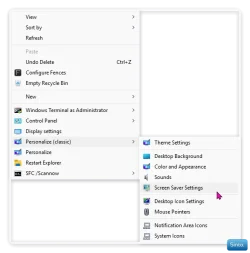
I don't like messing with my System Tray, I just use Personalize Classic in the context menu.


Clip-1923.webp


My Computers

System One System Two

  • OS
    Windows 11 Pro 25H2 Build 26200.8524
    Computer type
    PC/Desktop
    Manufacturer/Model
    Sin-built 2013
    CPU
    Intel(R) Core(TM) i7-4770K CPU @ 3.50GHz
    Motherboard
    ASUS ROG Maximus VI Formula
    Memory
    32.0 GB of I forget and the box is in storage.
    Graphics Card(s)
    Gigabyte nVidia GeForce GTX 1660 Super OC 6GB
    Sound Card
    Onboard thingy
    Monitor(s) Displays
    5 x LG 25MS500-B - 1 x 24MK430H-B - 1 x Wacom Pro 22" Touch Screen Tablet
    Screen Resolution
    All over the place
    Hard Drives
    Too many to list.
    OS on Samsung 1TB 870 QVO SATA
    PSU
    Silverstone 1500
    Case
    NZXT Phantom 820 Full-Tower Case
    Cooling
    Noctua NH-D15 Elite Class Dual Tower CPU Cooler / 6 x EziDIY 120mm / 2 x Corsair 140mm somethings / 1 x 140mm Thermaltake something / 2 x 200mm Corsair.
    Keyboard
    Corsair K95 / Logitech diNovo Edge Wireless
    Mouse
    Logitech: G402 / G502 / Mx Masters / Mx Air Cordless
    Internet Speed
    2000/500Mbps
    Browser
    All sorts
    Antivirus
    Kaspersky Premium
    Other Info
    ㅤㅤㅤㅤㅤㅤㅤㅤㅤㅤㅤㅤㅤㅤㅤㅤㅤㅤㅤㅤㅤㅤㅤㅤㅤㅤㅤㅤㅤㅤㅤㅤㅤㅤㅤㅤㅤㅤㅤㅤ⠀⠀⠀⠀⠀⠀⠀⠀⠀⠀
    TP-Link BE9300 WiFi 7 Bluetooth 5.4 (Archer TBE550E)
    TP-Link TX201 V1 2.5GB Lan

    Grandstream HT812 - VoIP
    ASUS DSL-AX82U - Mesh
    ASUS RT-AC68U - Mesh
    ASUS RT-BE88U Router

    Brother MFC-L2880DW Printer

    I’m on a horse.
  • Operating System
    Windows 11 Pro 25H2 Build 26200.8524
    Computer type
    Laptop
    Manufacturer/Model
    LENOVO Yoga 7 14IRL8 - 7i EVO OLED 14" Touchscreen i5 12 Core 16GB/512GB
    CPU
    Intel Core 12th Gen i5-1240P Processor (1.7 - 4.4GHz)
    Memory
    16GB LPDDR5 RAM
    Graphics card(s)
    Intel Iris Xe Graphics Processor
    Sound Card
    Optimized with Dolby Atmos®
    Screen Resolution
    QHD 2880 x 1800 OLED
    Hard Drives
    M.2 512GB
    Antivirus
    Defender / Malwarebytes
    Other Info
    …still on a horse.
I honestly never considered using a hotkey, maybe a unassigned F key to launch the screensaver control panel, that's an excellent idea, so I guess either would do, and see what I like best! Thank you!
in the properties of the exe, set a hotkey. if you decide you want to go that route i can bake it into the code easily. let me know.
 

My Computer

System One

  • OS
    Windows 11 Pro
Back
Top Bottom