- Local time
- 7:44 PM
- Posts
- 23
- OS
- Windows 11 Pro
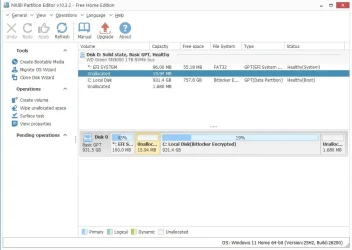
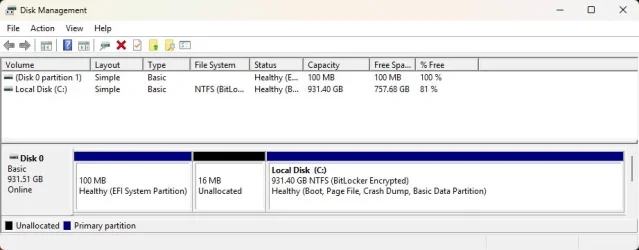
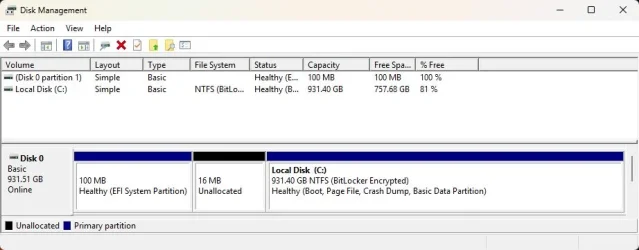
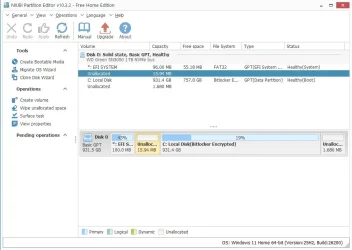
I have 16 MB of unallocated space between the EFI System Partition and the primary "Local Disk (C:)" partition. I would like to move unallocated space to the right of the primary partition, so that I can extend the drive (C:) and use the wasted space (see attached pic). I tried moving the unallocated space with "NIUBI Partition Editor," but it fails. I also cannot extend the primary partition to absorb the 1.680 MB space after it that NIUBI shows. I'm wondering if Macrium Reflect is the culprit as my PC woes started after I unsuccessfully tried cloning with the program. Is there a way to unlock the apparent restrictions to move and extend the 16 MB of unallocated space?
Attachments
My Computer
At a glance
Windows 11 ProIntel Core Ultra 7 155H, 16 cores, 22 threads...64GB DDR5-5600 MT/sIntel Arc Graphics
- OS
- Windows 11 Pro
- Computer type
- Laptop
- Manufacturer/Model
- HP Envy 17t da000
- CPU
- Intel Core Ultra 7 155H, 16 cores, 22 threads, 4.8GHz.
- Motherboard
- HP?
- Memory
- 64GB DDR5-5600 MT/s
- Graphics Card(s)
- Intel Arc Graphics
- Sound Card
- Realtek Hi-def/Intel Smart Sound
- Monitor(s) Displays
- 17.3" touch screen
- Screen Resolution
- 1920 x 1080
- Hard Drives
- 1TB SSD
- PSU
- 20VDC, 3.25A.
- Case
- Silver
- Cooling
- Fans
- Keyboard
- Numeric
- Mouse
- Logitech wireless
- Internet Speed
- Upload: 330 Mb/s; Download: 438 Mb/s.
- Browser
- Avast Secure
- Antivirus
- Avast One
- Other Info
- My cat's name is Mr. Scruffins.