Jay B
Member
- Local time
- 12:11 PM
- Posts
- 2
- OS
- Windows 10
Hi,
I'm running Windows 11 Pro, 25H2, Build 26200.9168
I have a little issue that’s been bugging me, so here goes: I uninstalled Adobe Acrobat Reader using Revo, then used Everything to make sure nothing was left behind—and it wasn’t. I manually deleted whatever was left, and then I searched the Windows Registry and deleted the entries related to Adobe. I restarted my laptop and went back to my usual routine.
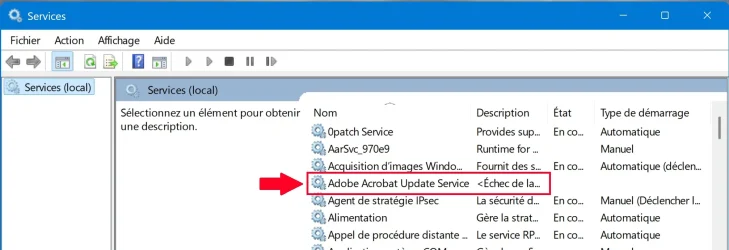
This morning, I had to check if a service was actually disabled, and that’s when I discovered that an Adobe service (armsvc.exe) was still listed in services.msc!
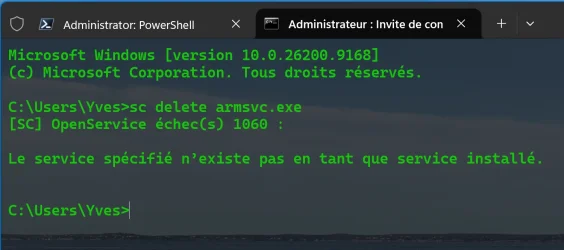
I opened the Command Prompt as an administrator and ran the following command: “sc delete armsvc.exe” (see screenshot below):
And it returned the following message: that the service does not exist as an installed service?
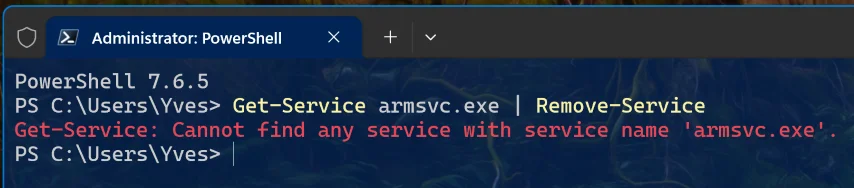
I tried using PowerShell as an administrator, with the following command (see the screenshot below), along with the result I received:
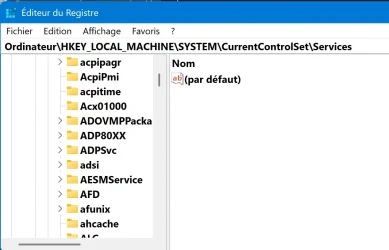
So, I went to the Windows Registry by following this path: HKLM\SYSTEM\CurrentControlSet\Services, and there was no trace of an entry for Adobe Update!
Then I checked the “Startup” tab in msconfig, and Adobe isn't there, but it is listed in services.msc
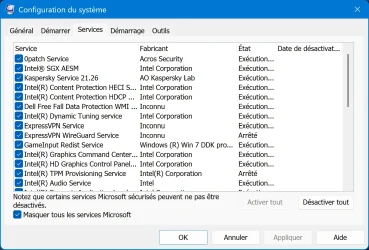
How can I remove this entry from services.msc?
Is there another location in the Registry where I might find this entry?
Or maybe one of these days this entry will just disappear on its own?
Thank you in advance for your responses.
I'm running Windows 11 Pro, 25H2, Build 26200.9168
I have a little issue that’s been bugging me, so here goes: I uninstalled Adobe Acrobat Reader using Revo, then used Everything to make sure nothing was left behind—and it wasn’t. I manually deleted whatever was left, and then I searched the Windows Registry and deleted the entries related to Adobe. I restarted my laptop and went back to my usual routine.
This morning, I had to check if a service was actually disabled, and that’s when I discovered that an Adobe service (armsvc.exe) was still listed in services.msc!
I opened the Command Prompt as an administrator and ran the following command: “sc delete armsvc.exe” (see screenshot below):
And it returned the following message: that the service does not exist as an installed service?
I tried using PowerShell as an administrator, with the following command (see the screenshot below), along with the result I received:
So, I went to the Windows Registry by following this path: HKLM\SYSTEM\CurrentControlSet\Services, and there was no trace of an entry for Adobe Update!
Then I checked the “Startup” tab in msconfig, and Adobe isn't there, but it is listed in services.msc
How can I remove this entry from services.msc?
Is there another location in the Registry where I might find this entry?
Or maybe one of these days this entry will just disappear on its own?
Thank you in advance for your responses.
My Computer
At a glance
Windows 10
- OS
- Windows 10
- Computer type
- Laptop
- Manufacturer/Model
- DELL