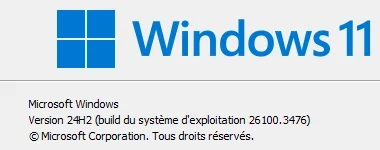
Application popup Event 26 - Windows 11 24H2


Winback

Well-known member
Local time
6:36 PM
Posts
57
OS
Windows 11
Hello,

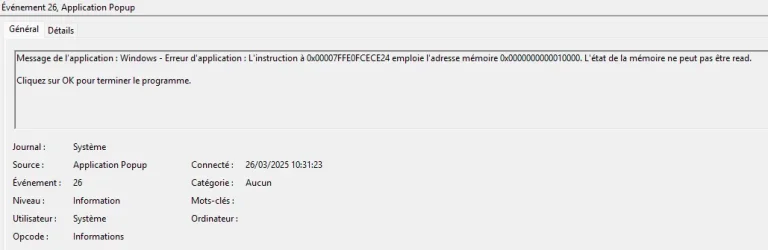
Since yesterday, I've been receiving very frequent information messages of this type in the systems event viewer :

"Application message: Windows - Application error: The instruction at 0x00007FFD1B96CE24 uses memory address 0x0000000000010000. Memory status cannot be read.
Click OK to end the program"

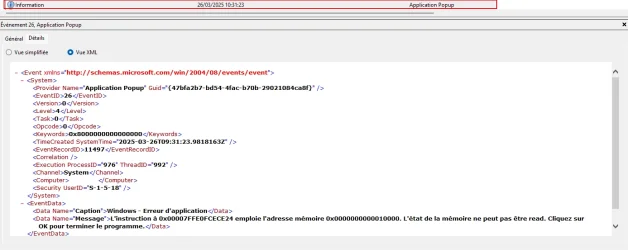
<Provider Name="Application Popup" Guid="{47bfa2b7-bd54-4fac-b70b-29021084ca8f}" />

Have you noticed the same symptoms ?

I can't figure out which application is causing these messages.

Should I ignore it ?

Best regards.
2.webp

1.webp

3.webp
 

My Computer My Computer

At a glance

Windows 11
OS
Windows 11
Are you having any issues with your system? If not, STAY OUT OF EVENT VIEWER.
 

My Computer My Computer

At a glance

W11
OS
W11
Computer type
PC/Desktop
Manufacturer/Model
2 HP Desktops, 1 Dell Desktop, 2 Dell XPS Laptops, 1 HP Laptop
Keyboard
Logitech
Mouse
Logitech MX Master 4 & 3
Internet Speed
500 mps
Browser
Firefox
Antivirus
Bitdefender

My Computers My Computers

  • At a glance

    All Branches but ReleaseAMD Ryzen 7 7735HS 3200-4500 Mhz 8 cores x 232 GB DDR5Radeon Graphic / NVIDIA GeForce RTX 4060 8 GB...
    OS
    All Branches but Release
    Computer type
    Laptop
    Manufacturer/Model
    Acer Nitro ANV15-51
    CPU
    AMD Ryzen 7 7735HS 3200-4500 Mhz 8 cores x 2
    Motherboard
    Sportage_RBH
    Memory
    32 GB DDR5
    Graphics Card(s)
    Radeon Graphic / NVIDIA GeForce RTX 4060 8 GB GDDR6
    Sound Card
    AMD/Realtek(R) Audio
    Monitor(s) Displays
    Integrated Monitor (15.3"vis)
    Screen Resolution
    FHD 1920X1080 16:9 144Hz
    Hard Drives
    KINGSTON OM8SEP4512Q-AA 1TB
    Western Digital 256GB
    PSU
    19V DC 6.32 A 120 W
    Cooling
    Dual Fans
    Mouse
    MS Bluetooth
    Internet Speed
    Fiber 1GB Cox -us & 1GB Orange-fr
    Browser
    Edge Canary- Firefox Nightly-Chrome Dev-Chrome Dev
    Antivirus
    Windows Defender
  • At a glance

    Windows 11 BetaAMD A9-94208 GB of DDR4AMD Radeon R5
    Operating System
    Windows 11 Beta
    Computer type
    Laptop
    Manufacturer/Model
    Asus X751BP
    CPU
    AMD A9-9420
    Memory
    8 GB of DDR4
    Graphics card(s)
    AMD Radeon R5
    Screen Resolution
    1600x900
    Hard Drives
    Seagate 1 TB
Thank you for your answers.

I haven't had any problems with the system since these messages appeared.

For information DSIM or sfc gives nothing, everything is ok.

But I've never seen this before, so I'm wondering. Hopefully it doesn't corrupt files or anything.
 

My Computer My Computer

At a glance

Windows 11
OS
Windows 11
I agree. Stay out of event viewer unless you are having a problem. It can drive you insane and make you think there is a problem when there is not. Even occassional events marked as error usually recover automatically

But to answer your question:
Usually you can right click on the event, select event properties to find the name of the application that is triggering the event.
You can also find what application is associated with the GUID referenced in the event using the registry in one of the following 4 locations.

For x64 apps - installed per machine HKLM\SOFTWARE\Microsoft\Windows\CurrentVersion\Uninstall
installed per user HKCU\SOFTWARE\Microsoft\Windows\CurrentVersion\Uninstall

For x86 apps - installed per machine HKLM\SOFTWARE\WOW6432Node\Microsoft\Windows\CurrentVersion\Uninstall
installed per user HKCU\SOFTWARE\ WOW6432Node\Microsoft\Windows\CurrentVersion\Uninstall
 

My Computers My Computers

  • At a glance

    Windows 11 Pro 25H2 26200.8655i9-10900 10 core 20 threads32 gbnone-Intel UHD Graphics 630
    OS
    Windows 11 Pro 25H2 26200.8655
    Computer type
    PC/Desktop
    Manufacturer/Model
    Dell Optiplex 7080
    CPU
    i9-10900 10 core 20 threads
    Motherboard
    DELL 0J37VM
    Memory
    32 gb
    Graphics Card(s)
    none-Intel UHD Graphics 630
    Sound Card
    Integrated Realtek
    Monitor(s) Displays
    Benq 27
    Screen Resolution
    2560x1440
    Hard Drives
    2x1tb Solidigm m.2 nvme /External drives 512gb Samsung m.2 sata+2tb Kingston m2.nvme
    PSU
    500w
    Case
    MT
    Cooling
    Dell Premium
    Keyboard
    Logitech wired
    Mouse
    Logitech wireless
    Internet Speed
    so slow I'm too embarrassed to tell
    Browser
    #1 Edge #2 Firefox
    Antivirus
    Defender+MWB Premium
  • At a glance

    Windows 11 Pro 24H2 26200.8457AMD Ryzen 7 6800U32 gbintegrated
    Operating System
    Windows 11 Pro 24H2 26200.8457
    Computer type
    PC/Desktop
    Manufacturer/Model
    Beelink Mini PC SER5
    CPU
    AMD Ryzen 7 6800U
    Memory
    32 gb
    Graphics card(s)
    integrated
    Sound Card
    integrated
    Monitor(s) Displays
    Benq 27
    Screen Resolution
    2560x1440
    Hard Drives
    1TB Crucial nvme
    Keyboard
    Logitech wired
    Mouse
    Logitech wireless
    Internet Speed
    still too embarrassed to tell
    Browser
    Firefox
    Antivirus
    Defender
    Other Info
    System 3 is non compliant Dell 9020 i7-4770/24gb ram Win11 PRO 26200.8457
I agree. Stay out of event viewer unless you are having a problem. It can drive you insane and make you think there is a problem when there is not. Even occassional events marked as error usually recover automatically

But to answer your question:
Usually you can right click on the event, select event properties to find the name of the application that is triggering the event.
You can also find what application is associated with the GUID referenced in the event using the registry in one of the following 4 locations.

For x64 apps - installed per machine HKLM\SOFTWARE\Microsoft\Windows\CurrentVersion\Uninstall
installed per user HKCU\SOFTWARE\Microsoft\Windows\CurrentVersion\Uninstall

For x86 apps - installed per machine HKLM\SOFTWARE\WOW6432Node\Microsoft\Windows\CurrentVersion\Uninstall
installed per user HKCU\SOFTWARE\ WOW6432Node\Microsoft\Windows\CurrentVersion\Uninstall
Hello,

Thank you for taking the time to reply, that's very reassuring.

I'll take a closer look at the GUID reference in the registry to try and find the name of the application that's causing these messages.
So far I haven't found one :

Application Popup" Guid="{47bfa2b7-bd54-4fac-b70b-29021084ca8f}

I haven't had any particular problems since these messages on Windows, everything seems to be working fine.

But like all of you, we wonder when we see this kind of message (which we've never seen before) and it would always be annoying to lose something, file or other, even if I think my message has nothing to do with that and is aimed more at an application.

Better safe than sorry.
 

My Computer My Computer

At a glance

Windows 11
OS
Windows 11

Latest Support Threads

Back
Top Bottom