Cable Management. Does It Really Matter???


Lance1

Well-known member
Power User
VIP
Local time
6:53 PM
Posts
1,012
OS
Windows 11 Pro 25H2
I can see making space for the cabling so you can put the panl back in but other then that... You never see it! So why is Cable Management a think?? Like I said. YOU NEVER SEE IT.. I do not care what it looks like in the back panl.

Who is obsessed with Cable Management and why.
 

My Computers My Computers

  • At a glance

    Windows 11 Pro 25H2Intel 12th Gen Intel Core i5-12600KF, 3686 MHzCORSAIR Vengeance 32GB (2 x 16GB) 288-Pin PC ...GIGABYTE GeForce RTX 4060, 3x Fans, 8GB GDDR6 OC
    OS
    Windows 11 Pro 25H2
    Computer type
    PC/Desktop
    Manufacturer/Model
    Custom Build By Lance1
    CPU
    Intel 12th Gen Intel Core i5-12600KF, 3686 MHz
    Motherboard
    GIGABYTE Z790 AORUS ELITE AX LGA 1700 Intel Z790 ATX
    Memory
    CORSAIR Vengeance 32GB (2 x 16GB) 288-Pin PC RAM DDR5 6400 (PC5 51200) Dual-Channel
    Graphics Card(s)
    GIGABYTE GeForce RTX 4060, 3x Fans, 8GB GDDR6 OC
    Sound Card
    AMD High Definition
    Monitor(s) Displays
    Samsung 32" 60Hz 4ms Curved PLS LED
    Screen Resolution
    1920 X 1080
    Hard Drives
    WD Blue NVME M.2 1T Boot Drive
    WD Blue SSD 1T
    WD Blue NVME M.2 2T
    PSU
    EVGA SuperNOVA 850 GT, 80 Plus Gold 850W, Fully Modular,
    Case
    Fractal Design Pop XL Air RGB Black TG ATX High-Airflow Clear Tempered Glass Window Full Tower
    Cooling
    Noctua NH-D15 chromax black, Dual Tower CPU Cooler with Dual NF-A15 PWM 140mm Fans (Black)
    Keyboard
    Devistator 3
    Mouse
    Inphic PM6 Pro
    Internet Speed
    Telus Fiber Optic: Download 332.7 Mbps / Upload 331.5 Mbps
    Browser
    Vivaldi (64bit)
    Antivirus
    Windows Defender
  • At a glance

    Window 11 ProIntel(R) Core(TM) i3-2310M CPU @ 2.10GHz4 GB DDR3Intel(R) HD Graphics 3000
    Operating System
    Window 11 Pro
    Computer type
    Laptop
    Manufacturer/Model
    DELL Inspiron N7110
    CPU
    Intel(R) Core(TM) i3-2310M CPU @ 2.10GHz
    Motherboard
    Dell Inc. 0YH79Y
    Memory
    4 GB DDR3
    Graphics card(s)
    Intel(R) HD Graphics 3000
    Sound Card
    High Definition Audio
    Monitor(s) Displays
    17.3 Inch Display
    Screen Resolution
    1600 X 900
    Hard Drives
    Samsung SSD 860 EVO 500GB
    Internet Speed
    Fiber Optic: Download 332.7 Mbps / Upload 331.5 Mbps
    Browser
    Vivaldi 64 bit
    Antivirus
    Windows Defender
    Other Info
    YA! This the old backup. In case things go south. It'll give me access to everything I need.
I can see making space for the cabling so you can put the panl back in but other then that... You never see it! So why is Cable Management a think?? Like I said. YOU NEVER SEE IT.. I do not care what it looks like in the back panl.

Who is obsessed with Cable Management and why.
I wouldn't say obsessed, but cable management generally accomplishes two things, ease of maintenance and allows better airflow for cooling.
Secondarily, what is wrong with taking an extra few minutes so it actually looks like you care about what you built?
 

My Computer My Computer

At a glance

Windows 11 25H2Broadwell-e 6850K 4.5ghz @1.36v32GB Corsair LPM 3600 C16EVGA RTX 3080Ti FTW
OS
Windows 11 25H2
Computer type
PC/Desktop
Manufacturer/Model
EVGA home brew
CPU
Broadwell-e 6850K 4.5ghz @1.36v
Motherboard
EVGA X99 FTW K
Memory
32GB Corsair LPM 3600 C16
Graphics Card(s)
EVGA RTX 3080Ti FTW
Sound Card
Asus Centurion true 7.1 headset. (5 speakers in each earpeice)
Monitor(s) Displays
LG C4 55"
Screen Resolution
4K 144hz
Hard Drives
Various models of SSDs ~10TB No HDDs installed.
PSU
be quiet! BN516 Straight Power 12-1000w 80 Plus Platinum
Case
Corsair 780T modified to dual 200mm intake fans
Cooling
Corsair H110i
Keyboard
Corsair K95 Platinum
Mouse
Corsair M65 RGB Elite
Internet Speed
50Mbs
I wouldn't say obsessed, but cable management generally accomplishes two things, ease of maintenance and allows better airflow for cooling.
Secondarily, what is wrong with taking an extra few minutes so it actually looks like you care about what you built?
But... maybe I just don't care. 🤣
 

My Computers My Computers

  • At a glance

    Win 11 Pro 25H2, Build 26200.9168Intel Core i5 14500, 14th Generation64GB DDR4GeForce RTX 4060
    OS
    Win 11 Pro 25H2, Build 26200.9168
    Computer type
    PC/Desktop
    Manufacturer/Model
    Home Brew
    CPU
    Intel Core i5 14500, 14th Generation
    Motherboard
    Gigabyte B760M G P WIFI
    Memory
    64GB DDR4
    Graphics Card(s)
    GeForce RTX 4060
    Sound Card
    Chipset Realtek
    Monitor(s) Displays
    LG 45" Ultragear & Acer 24" 1080p
    Screen Resolution
    5120x1440 & 1920x1080
    Hard Drives
    Crucial P310 2TB 2280 PCIe Gen4 3D NAND NVMe M.2 SSD (O/S)
    Silicon Power 2TB US75 NVMe PCIe Gen4 M.2 2280 SSD (backup)
    Crucial BX500 2TB 3D NAND (2nd backup)
    Seagate 4TB Ironwolf, rotating HDD archive files
    External off-line backup Drives: 2 NVMe 4TB drives in external enclosures
    PSU
    Thermaltake Toughpower GF3 750W
    Case
    LIAN LI LANCOOL 216 E-ATX PC Case
    Cooling
    Lots of fans!
    Keyboard
    Microsoft Comfort Curve 2000
    Mouse
    Logitech G305
    Internet Speed
    Verizon FiOS 1GB
    Browser
    Firefox
    Antivirus
    Malware Bytes & Windows Defender Security
  • At a glance

    Win 11 Pro 25H2, Build 26200.9168Intel Core i5 1440032GB DDR5Intel 700 Embedded GPU
    Operating System
    Win 11 Pro 25H2, Build 26200.9168
    Computer type
    PC/Desktop
    Manufacturer/Model
    Home Brew
    CPU
    Intel Core i5 14400
    Motherboard
    Gigabyte B760M DS3H AX
    Memory
    32GB DDR5
    Graphics card(s)
    Intel 700 Embedded GPU
    Sound Card
    Realtek Embedded
    Monitor(s) Displays
    27" HP 1080p
    Screen Resolution
    1920x1080
    Hard Drives
    Crucial P310 2TB 2280 PCIe Gen4 eD NAND PCIe SSD
    Samsung EVO 990 2TB NVMe Gen4 SSD
    Samsung 2TB SATA SSD
    PSU
    Thermaltake Smart BM3 650W
    Case
    Okinos Micro ATX Case
    Cooling
    Fans
    Keyboard
    Microsoft Comfort Curve 2000
    Mouse
    Logitech G305
    Internet Speed
    Verizon FiOS 1GB
    Browser
    Firefox
    Antivirus
    Malware Bytes & Windows Defender Security
  • Nimo N171 17" Laptop, (Intel i3-1215U, 16GB RAM, 2TB NVMe, Win11 Pro)
    Acemagic Vista Mini PC V1 (Intel N150, 16GB RAM, 1TB NVMe, Win11 Pro)
    HP ENVY h8-1540t, (24GB RAM, 2TB SSD, 2TB HDD, Win11 Pro)
I am like you. If I can get the sides on the computer that is all that matters.

I like to tinker with computers too much. I found out a long time ago if I spent a lot of time doing cable management and I had to work on the computer I would have to undue the cable management and then redo it when finished. That's too much work.

Now that I am up in years I really don't care anymore.

A person who I used to watch on YouTube said it was his OCD that made him do cable management.

Google AI search "why compulsive computer cable management"

Compulsive cable management improves system airflow, prevents dust traps, simplifies future hardware upgrades, and satisfies a deep desire for visual order and control.

System and Hardware Benefits
  • Better airflow: Tidy wires stop blockages inside the PC case. Cool air flows smoothly over hot parts.
  • Less dust: Tangled wires catch dust, pet hair, and lint. Clean spaces keep components cleaner.
  • Physical safety: Loose cords cannot drift into spinning fan blades and break them.
Maintenance Benefits
  • Easy troubleshooting: You can trace a faulty wire instantly when something breaks.
  • Simple upgrades: Swapping a hard drive or RAM stick takes minutes without a web of plastic in the way.
Psychological and Aesthetic Reasons
  • Visual calm: A clean desk and tidy PC reduce everyday mental clutter and stress.
  • Sense of control: Perfect alignment gives builders a strong sense of accomplishment and pride.
The Drawback
  • Too much time: Extreme zip-tying turns a simple part replacement into a frustrating chore because you must cut ties to swap a single wire.
 

My Computers My Computers

  • At a glance

    Windows 11 Pro 25H2 (26200.6901)AMD Ryzen 7 6800H with Radeon 680M GPU (486MB...Crucial DDR5-4800 (2400MHz) 32GB (2 x 16GB)NVIDIA RTX 3060 Laptop (6GB RAM)
    OS
    Windows 11 Pro 25H2 (26200.6901)
    Computer type
    Laptop
    Manufacturer/Model
    ASUS TUF Gaming A15 (2022)
    CPU
    AMD Ryzen 7 6800H with Radeon 680M GPU (486MB RAM)
    Memory
    Crucial DDR5-4800 (2400MHz) 32GB (2 x 16GB)
    Graphics Card(s)
    NVIDIA RTX 3060 Laptop (6GB RAM)
    Sound Card
    n/a
    Monitor(s) Displays
    15.6-inch
    Screen Resolution
    1920x1080 300Hz
    Hard Drives
    2 x Samsung 990 Evo Plus (2TB M.2 NVME SSD)
    PSU
    n/a
    Mouse
    Wireless Mouse M510
    Internet Speed
    2100Mbps/300Mbps
    Browser
    Firefox
    Antivirus
    Malwarebytes
  • At a glance

    Windows 11 Pro 25H2 (26200.8246)AMD Ryzen 7 5700X3DG.SKILL Flare X 32GB (2x16GB) DDR4ASUS ROG-STRIX-RTX3060TI-08G-V2-GAMING (RTX 3...
    Operating System
    Windows 11 Pro 25H2 (26200.8246)
    Computer type
    PC/Desktop
    Manufacturer/Model
    Custom build
    CPU
    AMD Ryzen 7 5700X3D
    Motherboard
    ASUS ROG Strix B550-F Gaming WiFi II
    Memory
    G.SKILL Flare X 32GB (2x16GB) DDR4
    Graphics card(s)
    ASUS ROG-STRIX-RTX3060TI-08G-V2-GAMING (RTX 3060-Ti, 8GB RAM)
    Monitor(s) Displays
    Samsung G50D IPS 27"
    Screen Resolution
    1440p/180Hz
    Hard Drives
    SAMSUNG 990 EVO Plus (2TB] M.2 NVME SSD
    SAMSUNG 990 EVO Plus (4TB) M.2 NVME SSD
    PSU
    Corsair RM750x (750 watts)
    Case
    Cooler Master MasterCase 5
    Cooling
    Scythe Mugen 6
    Keyboard
    Logitech K520 (MK540 keyboard/mouse combo)
    Mouse
    Logitech M310 (MK540 keyboard/mouse combo)
    Internet Speed
    2100 Mbps down / 300 Mbps up
    Browser
    Firefox, Edge, Chrome
    Antivirus
    Malwarebytes (Premium)
    Other Info
    ASUS Blu-ray Burner BW-16D1HT (SATA) || Western Digital Easystore 20TB USB 3.0 external hard drive used with Acronis True Image 2025 backup software || HP OfficeJet Pro 6975 Printer/Scanner
I'm pretty darn particular about managing the rats nest of cables both inside and OUTSIDE my computers. Zip ties are a puter user's best friend.
 

My Computers My Computers

  • At a glance

    Windows 11 Pro 25H2 26200.9168i9-10900 10 core 20 threads32 gbnone-Intel UHD Graphics 630
    OS
    Windows 11 Pro 25H2 26200.9168
    Computer type
    PC/Desktop
    Manufacturer/Model
    Dell Optiplex 7080
    CPU
    i9-10900 10 core 20 threads
    Motherboard
    DELL 0J37VM
    Memory
    32 gb
    Graphics Card(s)
    none-Intel UHD Graphics 630
    Sound Card
    Integrated Realtek
    Monitor(s) Displays
    Benq 27
    Screen Resolution
    2560x1440
    Hard Drives
    2x1tb Solidigm m.2 nvme /External drives 512gb Samsung m.2 sata+2tb Kingston m2.nvme
    PSU
    500w
    Case
    MT
    Cooling
    Dell Premium
    Keyboard
    Logitech wired
    Mouse
    Logitech wireless
    Internet Speed
    so slow I'm too embarrassed to tell
    Browser
    #1 Edge #2 Firefox
    Antivirus
    Defender+MWB Premium
  • At a glance

    Windows 11 Pro 24H2 26200.9168AMD Ryzen 7 6800U32 gbintegrated
    Operating System
    Windows 11 Pro 24H2 26200.9168
    Computer type
    PC/Desktop
    Manufacturer/Model
    Beelink Mini PC SER5
    CPU
    AMD Ryzen 7 6800U
    Memory
    32 gb
    Graphics card(s)
    integrated
    Sound Card
    integrated
    Monitor(s) Displays
    Benq 27
    Screen Resolution
    2560x1440
    Hard Drives
    1TB Crucial nvme
    Keyboard
    Logitech wired
    Mouse
    Logitech wireless
    Internet Speed
    still too embarrassed to tell
    Browser
    Firefox
    Antivirus
    Defender
  • System 3 is non compliant Dell 9020 i7-4770/24gb ram Win11 PRO 26200.9168
It takes me at most an extra few minutes to tuck the cables away. I guess if you start out with a sloppy build and don't start out organized it might take longer to clean it up. The framing that ONLY COMPLUSIVES actually bother to avoid a sloppy mess for a computer seems extreme. There's an infinite range.
Simple cable management done from the start should not take any longer than doing a not very nice job and will make repairs and upgrades easier.
I guess I just give a rubbish about what I build.

edit Ha... I just realized this forum has a filter.
 

My Computer My Computer

At a glance

Windows 11 25H2Broadwell-e 6850K 4.5ghz @1.36v32GB Corsair LPM 3600 C16EVGA RTX 3080Ti FTW
OS
Windows 11 25H2
Computer type
PC/Desktop
Manufacturer/Model
EVGA home brew
CPU
Broadwell-e 6850K 4.5ghz @1.36v
Motherboard
EVGA X99 FTW K
Memory
32GB Corsair LPM 3600 C16
Graphics Card(s)
EVGA RTX 3080Ti FTW
Sound Card
Asus Centurion true 7.1 headset. (5 speakers in each earpeice)
Monitor(s) Displays
LG C4 55"
Screen Resolution
4K 144hz
Hard Drives
Various models of SSDs ~10TB No HDDs installed.
PSU
be quiet! BN516 Straight Power 12-1000w 80 Plus Platinum
Case
Corsair 780T modified to dual 200mm intake fans
Cooling
Corsair H110i
Keyboard
Corsair K95 Platinum
Mouse
Corsair M65 RGB Elite
Internet Speed
50Mbs
Buy modular PSU then you can reduce the number of cables in the case.
 

My Computer My Computer

At a glance

Windows 11 Pro
OS
Windows 11 Pro
Fun thread. :D Cable Management. 😁

Here i will start using the boring words... "It depends" 🤓

One computer standing on my workbench i use for testing disks and data recovery.. that one have zero cable management.. not the cables inside or the cables to and from the computer. It is always open so i have easy access to all controller cards.. the only cable i have strapped down is from the PSU to the motherboard as that one otherwise get in my way. (irritation moment 1A)*lol*

Cables inside my desktop and servers.. it isn't so many they have an affect on the airflow, so often i dont strap them down.. it depends on if they might interfere with something..

But my rack and all my retro computers that is hooked up.. there i have good cable management, not for the airflow and not for it to look good.. as no one then me normally sees it, so i dont care about the look itself... it's just that i dont want to spend 20 minutes untangle one cable that take one minute to switch out. I have two 24 port switches and two 8 port KVM switches... it is a lot of cables. :rolleyes:
Also my main work desk has cable management as it is two desktops (+ one failover), 6 screens with three small 4port KVM switches to easy switch in the failover computer. two keyboards and two mouses, one printer and one scanner.. its a lot of cables there too.. again i dont care about the look, but the maintenece.

My two laptops i have on my living-room table.. there i dont care about cable management.. one powercable and one Ethernet cable to each one.. not something that will create a 20 minute untangle fight. *lol*

My TV, home cinema system, DVD, VCR, PS1+N64 and my Multimedia computer... that is a lot of cables.. so i didn't have management on those cables at first.. after i rearrange my living room 10 years ago.. and i spend eeeeasy over an hour to untangle cables... i did cable management after that, as i never-ever wanted to experience that horror hour ever again. :eek1: *LOL* 🤣

So.... Cable Management.... yeah..."It depends" 🤓😁😅
 

My Computers My Computers

  • At a glance

    Linux: Debian, Kali-linux, Alma, Win:7,10IoT,...i3, i5 and i7 From 2gen to 9th gen... Server ...
    OS
    Linux: Debian, Kali-linux, Alma, Win:7,10IoT,2012R
    Manufacturer/Model
    HP Elitebook 840, AsusX53, Aspire E1-572. AsusUX32A, HP Pro3130mt+3010mt, HP Proliant ML150, 3xCustom-PC, i3, i5, i7
    CPU
    i3, i5 and i7 From 2gen to 9th gen... Server dual Xenon
    Hard Drives
    Sata, M.2, SAS
  • At a glance

    Retro: 2003server.XPpro, Win2000, Win98SE, Wi...Oldest intel 8088 up to P4 dual core
    Operating System
    Retro: 2003server.XPpro, Win2000, Win98SE, Win95, Win3.11, MS-DOS, IBM-DOS
    Manufacturer/Model
    Commodore, AST, Fujitsu, Compaq, etc etc. etc Around 15 desktops and 20 laptops in the collection
    CPU
    Oldest intel 8088 up to P4 dual core
    Hard Drives
    MFM, IDE, SCSI
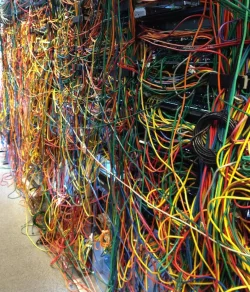
Discussions like this always remind me of my time crawling around network closets. (not my photo, but representative)

IMG_2159.webp
 

My Computer My Computer

At a glance

Windows 11 Enterprise 25H2
OS
Windows 11 Enterprise 25H2

My Computers My Computers

  • At a glance

    Linux: Debian, Kali-linux, Alma, Win:7,10IoT,...i3, i5 and i7 From 2gen to 9th gen... Server ...
    OS
    Linux: Debian, Kali-linux, Alma, Win:7,10IoT,2012R
    Manufacturer/Model
    HP Elitebook 840, AsusX53, Aspire E1-572. AsusUX32A, HP Pro3130mt+3010mt, HP Proliant ML150, 3xCustom-PC, i3, i5, i7
    CPU
    i3, i5 and i7 From 2gen to 9th gen... Server dual Xenon
    Hard Drives
    Sata, M.2, SAS
  • At a glance

    Retro: 2003server.XPpro, Win2000, Win98SE, Wi...Oldest intel 8088 up to P4 dual core
    Operating System
    Retro: 2003server.XPpro, Win2000, Win98SE, Win95, Win3.11, MS-DOS, IBM-DOS
    Manufacturer/Model
    Commodore, AST, Fujitsu, Compaq, etc etc. etc Around 15 desktops and 20 laptops in the collection
    CPU
    Oldest intel 8088 up to P4 dual core
    Hard Drives
    MFM, IDE, SCSI
Discussions like this always remind me of my time crawling around network closets. (not my photo, but representative)
When I started working in online services, our racks looked exactly like that.

It was always "I hope I'm unplugging the right network cable from this (retired) computer, because there's no free ports on the switch". About 10 min. later you'd get a call from network operations asking if you're still in the DC and did you touch anything?

These days, they just hire cabling experts to neatly bundle everything. It's time consuming, but if they do it right, it only needs to happen once.

Another trick is they started ordering entire 42U cabinets from HP, with all the systems already racked and cabled. They would roll the cabinets into place, lock them into the floor, and string the power and network links. Plus HP would send us a complete HW manifest with every S/N and MAC address in an Excel spreadsheet so the asset management team was happy.
 

My Computer My Computer

At a glance

Windows 7
OS
Windows 7
These days, they just hire cabling experts to neatly bundle everything. It's time consuming, but if they do it right, it only needs to happen once.
There you go. Just pay someone else to do your cable management. (y)
 

My Computers My Computers

  • At a glance

    Windows 11 Pro 25H2 (26200.6901)AMD Ryzen 7 6800H with Radeon 680M GPU (486MB...Crucial DDR5-4800 (2400MHz) 32GB (2 x 16GB)NVIDIA RTX 3060 Laptop (6GB RAM)
    OS
    Windows 11 Pro 25H2 (26200.6901)
    Computer type
    Laptop
    Manufacturer/Model
    ASUS TUF Gaming A15 (2022)
    CPU
    AMD Ryzen 7 6800H with Radeon 680M GPU (486MB RAM)
    Memory
    Crucial DDR5-4800 (2400MHz) 32GB (2 x 16GB)
    Graphics Card(s)
    NVIDIA RTX 3060 Laptop (6GB RAM)
    Sound Card
    n/a
    Monitor(s) Displays
    15.6-inch
    Screen Resolution
    1920x1080 300Hz
    Hard Drives
    2 x Samsung 990 Evo Plus (2TB M.2 NVME SSD)
    PSU
    n/a
    Mouse
    Wireless Mouse M510
    Internet Speed
    2100Mbps/300Mbps
    Browser
    Firefox
    Antivirus
    Malwarebytes
  • At a glance

    Windows 11 Pro 25H2 (26200.8246)AMD Ryzen 7 5700X3DG.SKILL Flare X 32GB (2x16GB) DDR4ASUS ROG-STRIX-RTX3060TI-08G-V2-GAMING (RTX 3...
    Operating System
    Windows 11 Pro 25H2 (26200.8246)
    Computer type
    PC/Desktop
    Manufacturer/Model
    Custom build
    CPU
    AMD Ryzen 7 5700X3D
    Motherboard
    ASUS ROG Strix B550-F Gaming WiFi II
    Memory
    G.SKILL Flare X 32GB (2x16GB) DDR4
    Graphics card(s)
    ASUS ROG-STRIX-RTX3060TI-08G-V2-GAMING (RTX 3060-Ti, 8GB RAM)
    Monitor(s) Displays
    Samsung G50D IPS 27"
    Screen Resolution
    1440p/180Hz
    Hard Drives
    SAMSUNG 990 EVO Plus (2TB] M.2 NVME SSD
    SAMSUNG 990 EVO Plus (4TB) M.2 NVME SSD
    PSU
    Corsair RM750x (750 watts)
    Case
    Cooler Master MasterCase 5
    Cooling
    Scythe Mugen 6
    Keyboard
    Logitech K520 (MK540 keyboard/mouse combo)
    Mouse
    Logitech M310 (MK540 keyboard/mouse combo)
    Internet Speed
    2100 Mbps down / 300 Mbps up
    Browser
    Firefox, Edge, Chrome
    Antivirus
    Malwarebytes (Premium)
    Other Info
    ASUS Blu-ray Burner BW-16D1HT (SATA) || Western Digital Easystore 20TB USB 3.0 external hard drive used with Acronis True Image 2025 backup software || HP OfficeJet Pro 6975 Printer/Scanner

Latest Support Threads

Back
Top Bottom