Solved Are fixes done by chkdsk permanent?


imeem

Well-known member
Member
Local time
7:10 PM
Posts
34
OS
11, (10 as a test secondary)
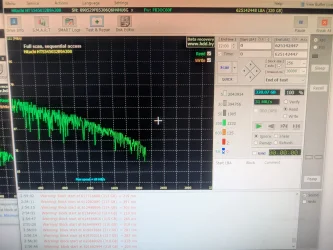
I want to run chkdsk /f /r /x on the following drive in the picture since Victoria says there's some block issues.

If chkdsk does fix anything, would the fix still be there if I boot into a different OS or reformat this drive? I'm still noob to chkdsk.
 

Attachments
  • PXL_20260107_215427972.webp
    PXL_20260107_215427972.webp
    1.8 MB · Views: 2

My Computer

System One

  • OS
    11, (10 as a test secondary)
    Computer type
    PC/Desktop
    CPU
    AMD Ryzen 9 7950X3D
    Motherboard
    MSI MPG X670E CARBON WIFI
    Memory
    Kingston FURY Beast 32 GB (2 x 16 GB) DDR5-5600 CL36
    Graphics Card(s)
    RTX 5080
    Hard Drives
    C drive: Samsung SSD 870 EVO 4TB (win 11)
    C Drive: Hitachi HTS545032B9A300 (win 10)
    -WD WD1002FAEX 1tb
    -Seagate ST3160812AS 160 gb
    PSU
    SeaSonic PRIME 1300 Gold 1300 W 80+ Gold
    Case
    Phanteks Enthoo Pro Tempered Glass ATX Full Tower Case
    Cooling
    Noctua NH-D15S
Microsoft's reference for CHKDSK importantly doesn't make any claims that it will fix any of the following:
  • Physical damage
  • Failing sectors that continue to degrade
  • Underlying hardware faults
  • Severe corruption caused by hardware failure
From this rather detailed long winded Microsoft reference:
 

My Computers

System One System Two

  • OS
    Windows 11 Pro 25H2
    Computer type
    PC/Desktop
    Manufacturer/Model
    Homebuilt
    CPU
    Intel Core i9 13900K
    Motherboard
    Asus ProArt Z790 Creator WiFi - Bios 3107
    Memory
    Corsair Dominator Platinum 64gb 5600MT/s DDR5 Dual Channel
    Graphics Card(s)
    Sapphire NITRO+ AMD Radeon RX 7900 XTX Vapor-X 24GB
    Sound Card
    External DAC: Cambridge Audio DACMagic200M - Headphone Amp: Topping L50
    Monitor(s) Displays
    Panasonic MX950 Mini LED 55" TV 120hz
    Screen Resolution
    3840 x 2160 120hz
    Hard Drives
    Samsung 980 Pro 2TB (OS)
    Samsung 980 Pro 1TB (Files)
    Lexar NZ790 4TB
    LaCie d2 Professional 6TB external - USB 3.1
    Seagate Expansion 16TB external - USB 3.2
    Seagate One Touch 18TB external HD - USB 3.0
    PSU
    Corsair RM1200x Shift
    Case
    Corsair RGB Smart Case 5000x (white)
    Cooling
    Corsair iCue H150i Elite Capellix XT
    Keyboard
    Incase Ergonomic USB (Microsoft clone)
    Mouse
    Logitech MX Master 3S
    Internet Speed
    Fibre 900/500 Mbps
    Browser
    Microsoft Edge Chromium
    Antivirus
    Bitdefender Total Security
    Other Info
    AMD Radeon Software & Drivers 26.1.1
    Hasleo Backup Suite
    Dashlane password manager
    Kensington Verimark fingerprint reader
    Logitech Brio 4K webcam
    Orico 10-port powered USB 3.0 hub
  • Operating System
    Windows 11 Pro 25H2
    Computer type
    Laptop
    Manufacturer/Model
    Asus Vivobook X1605VA
    CPU
    Intel® Core™ i9-13900H
    Motherboard
    Asus X1605VA bios 309
    Memory
    32GB DDR4-3200 Dual channel
    Graphics card(s)
    *Intel Iris Xᵉ Graphics G7
    Sound Card
    Realtek | Intel SST Bluetooth & USB
    Monitor(s) Displays
    16.0-inch, WUXGA 16:10 aspect ratio, IPS-level Panel
    Screen Resolution
    1920 x 1200 60hz
    Hard Drives
    512GB M.2 NVMe™ PCIe® 3.0 SSD
    Mouse
    Logitech MX Ergo Trackball
    Antivirus
    Bitdefender Total Security
    Other Info
    720p Webcam
    WiFi & USB to ethernet
Microsoft's reference for CHKDSK importantly doesn't make any claims that it will fix any of the following:
  • Physical damage
  • Failing sectors that continue to degrade
  • Underlying hardware faults
  • Severe corruption caused by hardware failure
From this rather detailed long winded Microsoft reference:
I see so chkdsk isn't applicable to what I think it would do. . But google says this on chkdsk and bad blocks: "marking them as unusable and attempting to recover readable data". I guess this is still helpful no?
 

My Computer

System One

  • OS
    11, (10 as a test secondary)
    Computer type
    PC/Desktop
    CPU
    AMD Ryzen 9 7950X3D
    Motherboard
    MSI MPG X670E CARBON WIFI
    Memory
    Kingston FURY Beast 32 GB (2 x 16 GB) DDR5-5600 CL36
    Graphics Card(s)
    RTX 5080
    Hard Drives
    C drive: Samsung SSD 870 EVO 4TB (win 11)
    C Drive: Hitachi HTS545032B9A300 (win 10)
    -WD WD1002FAEX 1tb
    -Seagate ST3160812AS 160 gb
    PSU
    SeaSonic PRIME 1300 Gold 1300 W 80+ Gold
    Case
    Phanteks Enthoo Pro Tempered Glass ATX Full Tower Case
    Cooling
    Noctua NH-D15S
I see so chkdsk isn't applicable to what I think it would do. . But google says this on chkdsk and bad blocks: "marking them as unusable and attempting to recover readable data". I guess this is still helpful no?
It is very helpful as it marks the blocks as unwritable and prevent data corruption.
The data recovery of those bad blocks can be a hit & miss though.
 

My Computers

System One System Two

  • OS
    All Branches but Release
    Computer type
    Laptop
    Manufacturer/Model
    Acer Nitro ANV15-51
    CPU
    AMD Ryzen 7 7735HS 3200-4500 Mhz 8 cores x 2
    Motherboard
    Sportage_RBH
    Memory
    32 GB DDR5
    Graphics Card(s)
    Radeon Graphic / NVIDIA GeForce RTX 4060 8 GB GDDR6
    Sound Card
    AMD/Realtek(R) Audio
    Monitor(s) Displays
    Integrated Monitor (15.3"vis)
    Screen Resolution
    FHD 1920X1080 16:9 144Hz
    Hard Drives
    KINGSTON OM8SEP4512Q-AA 1TB
    Western Digital 256GB
    PSU
    19V DC 6.32 A 120 W
    Cooling
    Dual Fans
    Mouse
    MS Bluetooth
    Internet Speed
    Fiber 1GB Cox -us & 1GB Orange-fr
    Browser
    Edge Canary- Firefox Nightly-Chrome Dev-Chrome Dev
    Antivirus
    Windows Defender
  • Operating System
    Windows 11 Beta
    Computer type
    Laptop
    Manufacturer/Model
    Asus X751BP
    CPU
    AMD A9-9420
    Memory
    8 GB of DDR4
    Graphics card(s)
    AMD Radeon R5
    Screen Resolution
    1600x900
    Hard Drives
    Seagate 1 TB
Please test the drive using Sea Tools Long generic test:


My Computer

System One

  • OS
    Windows 10
    Computer type
    Laptop
    Manufacturer/Model
    HP
    CPU
    Intel(R) Core(TM) i7-4800MQ CPU @ 2.70GHz
    Motherboard
    Product : 190A Version : KBC Version 94.56
    Memory
    16 GB Total: Manufacturer : Samsung MemoryType : DDR3 FormFactor : SODIMM Capacity : 8GB Speed : 1600
    Graphics Card(s)
    NVIDIA Quadro K3100M; Intel(R) HD Graphics 4600
    Sound Card
    IDT High Definition Audio CODEC; PNP Device ID HDAUDIO\FUNC_01&VEN_111D&DEV_76E0
    Hard Drives
    Model Hitachi HTS727575A9E364
    Antivirus
    Microsoft Defender
    Other Info
    Mobile Workstation
Occasionally when I am making a Macrium image it stops and gives some error message,

I then go to properties ->Tools->Check

It finds errors, it corrects them and then recommends reboot.

This always cures the problem.

It happened to me 30 minutes ago when I was doing my weekly Macrium image.

My boot disk NVME disk Samsung SSD 980 PRO 500GB
 

My Computer

System One

  • OS
    windows 11 ,Ubuntu Cinnamon - for tinkering only
    Computer type
    PC/Desktop
    Manufacturer/Model
    No Name - Assembled by a Compute shop in a Strip Mall.
    CPU
    Intel i511400
    Motherboard
    ASUS PRIME B560-PLUS motherboard
    Memory
    16 GB
    Graphics Card(s)
    0
    Sound Card
    0
    Monitor(s) Displays
    25 in BenQ
    Screen Resolution
    1920 x 1080
    Hard Drives
    9 SSDs 4 Nvme, 2 in M.2 slot and 2 in PCIE with adapter + 5 Sata. DVD drive
    PSU
    600w
    Case
    Antec- VSK4000E-U3 Mid Tower
    Internet Speed
    Bell pure fibre optic. 3 GB package. 6E Wireless adapter 750/500
    Browser
    Firefox, Microsoft Edge
    Antivirus
    Defender
Please test the drive using Sea Tools Long generic test:

Yea I used it before. I ran both extended test. Didn't say anything iIRC
 

My Computer

System One

  • OS
    11, (10 as a test secondary)
    Computer type
    PC/Desktop
    CPU
    AMD Ryzen 9 7950X3D
    Motherboard
    MSI MPG X670E CARBON WIFI
    Memory
    Kingston FURY Beast 32 GB (2 x 16 GB) DDR5-5600 CL36
    Graphics Card(s)
    RTX 5080
    Hard Drives
    C drive: Samsung SSD 870 EVO 4TB (win 11)
    C Drive: Hitachi HTS545032B9A300 (win 10)
    -WD WD1002FAEX 1tb
    -Seagate ST3160812AS 160 gb
    PSU
    SeaSonic PRIME 1300 Gold 1300 W 80+ Gold
    Case
    Phanteks Enthoo Pro Tempered Glass ATX Full Tower Case
    Cooling
    Noctua NH-D15S
It is very helpful as it marks the blocks as unwritable and prevent data corruption.
The data recovery of those bad blocks can be a hit & miss though.
So my main question is if it is marked, will it still be marked if I reformat the drive or use the drive on another OS (currently I have Win 10 and Win 11 on seperate drives)
 

My Computer

System One

  • OS
    11, (10 as a test secondary)
    Computer type
    PC/Desktop
    CPU
    AMD Ryzen 9 7950X3D
    Motherboard
    MSI MPG X670E CARBON WIFI
    Memory
    Kingston FURY Beast 32 GB (2 x 16 GB) DDR5-5600 CL36
    Graphics Card(s)
    RTX 5080
    Hard Drives
    C drive: Samsung SSD 870 EVO 4TB (win 11)
    C Drive: Hitachi HTS545032B9A300 (win 10)
    -WD WD1002FAEX 1tb
    -Seagate ST3160812AS 160 gb
    PSU
    SeaSonic PRIME 1300 Gold 1300 W 80+ Gold
    Case
    Phanteks Enthoo Pro Tempered Glass ATX Full Tower Case
    Cooling
    Noctua NH-D15S
So my main question is if it is marked, will it still be marked if I reformat the drive or use the drive on another OS (currently I have Win 10 and Win 11 on seperate drives)
Yes , bad sectors are permanent since their damages are physical on HDDs.
A reformat will actually bypass those sectors.
Keep in mind that SSDs & NVMEs are solid state and as such are not subject to the physical damages a HDD platter can.
 
Last edited:

My Computers

System One System Two

  • OS
    All Branches but Release
    Computer type
    Laptop
    Manufacturer/Model
    Acer Nitro ANV15-51
    CPU
    AMD Ryzen 7 7735HS 3200-4500 Mhz 8 cores x 2
    Motherboard
    Sportage_RBH
    Memory
    32 GB DDR5
    Graphics Card(s)
    Radeon Graphic / NVIDIA GeForce RTX 4060 8 GB GDDR6
    Sound Card
    AMD/Realtek(R) Audio
    Monitor(s) Displays
    Integrated Monitor (15.3"vis)
    Screen Resolution
    FHD 1920X1080 16:9 144Hz
    Hard Drives
    KINGSTON OM8SEP4512Q-AA 1TB
    Western Digital 256GB
    PSU
    19V DC 6.32 A 120 W
    Cooling
    Dual Fans
    Mouse
    MS Bluetooth
    Internet Speed
    Fiber 1GB Cox -us & 1GB Orange-fr
    Browser
    Edge Canary- Firefox Nightly-Chrome Dev-Chrome Dev
    Antivirus
    Windows Defender
  • Operating System
    Windows 11 Beta
    Computer type
    Laptop
    Manufacturer/Model
    Asus X751BP
    CPU
    AMD A9-9420
    Memory
    8 GB of DDR4
    Graphics card(s)
    AMD Radeon R5
    Screen Resolution
    1600x900
    Hard Drives
    Seagate 1 TB
Also, you only need to run chkdsk /r

/r implies /f, and if the drive needs to un-mount it will tell you that, and tell you to reboot.
 

My Computers

System One System Two

  • OS
    Win 11 Home ♦♦♦26200.8655 ♦♦♦♦♦♦♦25H2
    Computer type
    PC/Desktop
    Manufacturer/Model
    Built by Ghot® [May 2020]
    CPU
    AMD Ryzen 7 3700X
    Motherboard
    Asus Pro WS X570-ACE (BIOS 5302)
    Memory
    G.Skill (F4-3200C14D-16GTZKW)
    Graphics Card(s)
    EVGA RTX 2070 (08G-P4-2171-KR)
    Sound Card
    Realtek ALC1220P / ALC S1220A
    Monitor(s) Displays
    Dell U3011 30"
    Screen Resolution
    2560 x 1600
    Hard Drives
    2x Samsung 860 EVO 500GB,
    WD 4TB Black FZBX - SATA III,
    WD 8TB Black FZBX - SATA III,
    DRW-24B1ST CD/DVD Burner
    PSU
    PC Power & Cooling 750W Quad EPS12V
    Case
    Cooler Master ATCS 840 Tower
    Cooling
    CM Hyper 212 EVO (push/pull)
    Keyboard
    Ducky DK9008 Shine II Blue LED
    Mouse
    Logitech Optical M-100
    Internet Speed
    300/300
    Browser
    Firefox (latest)
    Antivirus
    Bitdefender Total Security
    Other Info
    Speakers: Klipsch Pro Media 2.1
  • Operating System
    Windows XP Pro 32bit w/SP3
    Computer type
    PC/Desktop
    Manufacturer/Model
    Built by Ghot® (not in use)
    CPU
    AMD Athlon 64 X2 5000+ (OC'd @ 3.2Ghz)
    Motherboard
    ASUS M2N32-SLI Deluxe Wireless Edition
    Memory
    TWIN2X2048-6400C4DHX (2 x 1GB, DDR2 800)
    Graphics card(s)
    EVGA 256-P2-N758-TR GeForce 8600GT SSC
    Sound Card
    Onboard
    Monitor(s) Displays
    ViewSonic G90FB Black 19" Professional (CRT)
    Screen Resolution
    up to 2048 x 1536
    Hard Drives
    WD 36GB 10,000rpm Raptor SATA
    Seagate 80GB 7200rpm SATA
    Lite-On LTR-52246S CD/RW
    Lite-On LH-18A1P CD/DVD Burner
    PSU
    PC Power & Cooling Silencer 750 Quad EPS12V
    Case
    Generic Beige case, 80mm fans
    Cooling
    ZALMAN 9500A 92mm CPU Cooler
    Keyboard
    Logitech Classic Keybooard 200
    Mouse
    Logitech Optical M-BT96a
    Internet Speed
    300/300
    Browser
    Firefox 3.x ??
    Antivirus
    Symantec (Norton)
    Other Info
    Still assembled, still runs. Haven't turned it on for 15 years?

My Computer

System One

  • OS
    Windows 10
    Computer type
    Laptop
    Manufacturer/Model
    HP
    CPU
    Intel(R) Core(TM) i7-4800MQ CPU @ 2.70GHz
    Motherboard
    Product : 190A Version : KBC Version 94.56
    Memory
    16 GB Total: Manufacturer : Samsung MemoryType : DDR3 FormFactor : SODIMM Capacity : 8GB Speed : 1600
    Graphics Card(s)
    NVIDIA Quadro K3100M; Intel(R) HD Graphics 4600
    Sound Card
    IDT High Definition Audio CODEC; PNP Device ID HDAUDIO\FUNC_01&VEN_111D&DEV_76E0
    Hard Drives
    Model Hitachi HTS727575A9E364
    Antivirus
    Microsoft Defender
    Other Info
    Mobile Workstation
You need to use storage drive diagnostic software to mark bad sectors.

IBM - Hitachi Drive Fitness Test​


My Computer

System One

  • OS
    Windows 11
    Computer type
    PC/Desktop
    Manufacturer/Model
    HP Pavilion
    CPU
    AMD Ryzen 7 5700G
    Motherboard
    Erica6
    Memory
    Micron Technology DDR4-3200 16GB
    Graphics Card(s)
    NVIDIA GeForce RTX 3060
    Sound Card
    Realtek ALC671
    Monitor(s) Displays
    Samsung SyncMaster U28E590
    Screen Resolution
    3840 x 2160
    Hard Drives
    SAMSUNG MZVLQ1T0HALB-000H1
Back
Top Bottom