Solved Are Portable SSD's Good for Backup Purposes? How long will they last? And what about 'bit-rot'?


BuddhaNature

Well-known member
Member
VIP
Local time
1:55 PM
Posts
136
Location
Scotland
OS
Win 11 Pro. 25H2
I had two small portable HHDs which I had used for the last 11 years solely for backup purposes. One of them gave a file corruption error a little while ago so I decided I had got my money's worth out of them time to ditch them and get something else.

In the end I got two of these: Samsung T7 Portable SSD - 2 TB - USB 3.2 Gen.2 External SSD

I've started using them, they work fine, and are considerably quicker than backing up to my old spinning disk drives. However, now I'm wondering if I have made a good choice in going over to SSDs. So the following questions:

Are portable SSDs a good choice for backup purposes? Are they reliable for this?

A friend of mine, though not a computer geek (nor am I) mentioned that he had read somewhere about 'bit-rot' with SSDs. He was really vague on this just saying that they made them not a good choice for backup purposes when compared to HDDs as the data on the SSD can 'rot' over time. So will my use of the SSDs suffer bit-rot over time?

I should add that my use of the drives will be restricted to once-weekly backups, the rest of the time they'll be detached from the PC and just sitting in a drawer.
 

My Computers My Computers

  • At a glance

    Win 11 Pro. 25H2Intel Core i7-14700 (Raptor Lake)32GB Corsair Vengeance LPX (DDR4)Intel UHD 770 — onboard standard as supplied ...
    OS
    Win 11 Pro. 25H2
    Computer type
    PC/Desktop
    Manufacturer/Model
    Customised "Chillblast Apex Intel Core i7 Office PC"
    CPU
    Intel Core i7-14700 (Raptor Lake)
    Motherboard
    ASUS Prime B760M-A WiFi D4
    Memory
    32GB Corsair Vengeance LPX (DDR4)
    Graphics Card(s)
    Intel UHD 770 — onboard standard as supplied by Intel/Asus
    Monitor(s) Displays
    Dell P2421 24 inch WUXGA (1920x1200) 16:10 Monitor
    Screen Resolution
    1920x1200
    Hard Drives
    First (Boot Drive Only): 2TB Samsung SSD 990 Pro.
    Second (Data Drive) 2TB Samsung SSD 990 Pro.
    PSU
    850W Corsair RM850x 80 Plus Gold
    Cooling
    Just standard fans for both the case and CPU.
    Keyboard
    Unicomp Model M (IBM Style keyboard)
    Mouse
    Wired Mouse
    Internet Speed
    1.6 MB/s
    Browser
    Firefox
    Antivirus
    Microsoft's Defender

  • At a glance

    Win 11 Pro. 25H214th Generation Intel® Core™ i9-14900HX32 GB DDR5-5600MHzNVIDIA® GeForce RTX™ 4080 Laptop GPU 12GB GDDR6
    Operating System
    Win 11 Pro. 25H2
    Computer type
    Laptop
    Manufacturer/Model
    Lenovo Legion Pro 7i Gen 9 (16" Intel)
    CPU
    14th Generation Intel® Core™ i9-14900HX
    Memory
    32 GB DDR5-5600MHz
    Graphics card(s)
    NVIDIA® GeForce RTX™ 4080 Laptop GPU 12GB GDDR6
    Monitor(s) Displays
    16" WQXGA (2560 x 1600), IPS, Anti-Glare, Non-Touch, HDR 40
    Screen Resolution
    2560 x 1600
    Hard Drives
    First (Boot): 1 TB SSD M.2 2280 PCIe Gen4 TLC
    Second (Data): 1 TB SSD M.2 2280 PCIe Gen4 TLC
    Keyboard
    Per-Key RGB-Coloured Backlit - English (UK)
    Mouse
    Wired Mouse
    Internet Speed
    1.6 MB/s
    Browser
    Firefox
    Antivirus
    Microsoft's Defender

I've read something about that too and very recently. It might even have been on here. I think one point was that SSD's should be powered up relatively frequently to 'refresh' them since they work by retaining microscopic levels of electrical charge on the mosfet transistors that make up each cell... a little bit like a capacitor that holds charge. If that charge leaks away then the logic state of the cell is lost meaning the date (whether it was a 1 or a 0 is lost). The drive is still good but the data lost. In other words they are not suitable to use for storing data over many many months and years without ever being powered up unlike traditional HDD's. If you are using them frequently (few times a year) there should be no issue.
 

My Computer My Computer

At a glance

W11 Pro x64 ongoing Canary 29500 latest buildsIntel i58GbIntel HD Graphics
OS
W11 Pro x64 ongoing Canary 29500 latest builds
Computer type
Laptop
Manufacturer/Model
Dell 7760 Mobile Precision 17"
CPU
Intel i5
Motherboard
Unknown
Memory
8Gb
Graphics Card(s)
Intel HD Graphics
Sound Card
Realtek
Monitor(s) Displays
Internal
Hard Drives
2 x 256Gb SSD
PSU
Dell 240 watt
Mouse
Dell Premier Bluetooth
Internet Speed
50Mbps
Browser
Edge
Antivirus
Default Microsoft Security
Every storage medium has its version of bit rot: magnetic spinny platters, flash-based memory, optical media, tape, etc. No one's immune, but it happens in different ways for different media types.

Use your flash-based media every so often, so that it receives electricity. Store them someplace with a temperature range of 60-75 degrees Fahrenheit*, and decent human humidity, like 30-50%. Under those conditions, you would have to not use your SSD for several years before it "rots."


* = That's about 15-24 degrees in rest-of-the-world units.
 

My Computer My Computer

At a glance

Windows 11 Pro 25H212th Gen Core i7-1260P64 GB Micron PC4-25600Intel Iris Xe Graphics
OS
Windows 11 Pro 25H2
Computer type
PC/Desktop
Manufacturer/Model
Intel NUC12WSHi7
CPU
12th Gen Core i7-1260P
Motherboard
NUC12WSBi7
Memory
64 GB Micron PC4-25600
Graphics Card(s)
Intel Iris Xe Graphics
Sound Card
on-board Realtek HD Audio
Monitor(s) Displays
Dell U3219Q
Screen Resolution
3840 x 2160
Hard Drives
Samsung SSD 990 PRO 1TB
Crucial MX500 2 TB
Keyboard
CODE 104-Key mechanical with Cherry MX Clears
Antivirus
Microsoft Defender
Hi!
I own a T7 and have owned it for about 3 years now. I used it as storage before I installed a bigger nvme in my notebook.
It sat for about 7 or 8 months without being used and when I powered it up the other month, it still had all of it's files and programs on it
and nothing was lost.
I think that you might want to make sure that the TRIM has done it's work before removing it from the PC.
To make sure TRIM is active on your drive, use this command in a CMD prompt as Admin.(right click on CMD and choose Run as Admin).
Hit enter after entering the command.

TRIM ON Samsung T7 (verify that TRIM is active.)
fsutil behavior query DisableDeleteNotify
 

My Computers My Computers

  • At a glance

    windows 11 22631.5039Core i9 12th gen 12900HK 2.9 MHz (overcloked:...32 Gigs DDR5-4800nVidia RTX 3070 Ti / 8 Gigs DDR6
    OS
    windows 11 22631.5039
    Computer type
    Laptop
    Manufacturer/Model
    MSI Raider GE76
    CPU
    Core i9 12th gen 12900HK 2.9 MHz (overcloked: 3890.48)
    Motherboard
    MSI
    Memory
    32 Gigs DDR5-4800
    Graphics Card(s)
    nVidia RTX 3070 Ti / 8 Gigs DDR6
    Sound Card
    DYNAUDIO - Steelsries Arena 7- Sound Effects by Nahimic 3
    Monitor(s) Displays
    17.3" 1920 x 1080 360 Hz 3 ms, IPS / Connected to MSI 32 inch curved @ 165 Hz
    Screen Resolution
    1920 x 1080 / Both
    Hard Drives
    Samsung 990 Pro 2TB (OS) - Solidigm P41 2TB (Storage)
    PSU
    280 watts
    Case
    MSI GE series
    Cooling
    internal
    Keyboard
    Steelseries
    Mouse
    G903 Lightspeed
    Internet Speed
    1000 Mbps
    Browser
    Firefox / Opera GX- Do not like Edge
    Antivirus
    Malwarebytes'
    Other Info
    just ask.
  • At a glance

    Windows 10 22H2Intel Core i7 7820HK 2.9 Ghz16 Gigs DDR4 2400 MhznVidia 1070 8GB RAM
    Operating System
    Windows 10 22H2
    Computer type
    Laptop
    Manufacturer/Model
    MSI GT73 7RE VR Titan
    CPU
    Intel Core i7 7820HK 2.9 Ghz
    Motherboard
    MSI
    Memory
    16 Gigs DDR4 2400 Mhz
    Graphics card(s)
    nVidia 1070 8GB RAM
    Sound Card
    DYNAUDIO / Nahimic 2
    Monitor(s) Displays
    IPS / 120HZ
    Screen Resolution
    1920x1080P
    Hard Drives
    Samsung NVME EVO 970 1TB / Samsung SSD (SATA) 1TB
    PSU
    240 watts
    Case
    MSI
    Cooling
    Internal
    Keyboard
    Steelseries
    Mouse
    Logitech G903 Lightspeed
    Internet Speed
    1 Gb/s
    Browser
    Firefox / Vivaldi
    Antivirus
    MalwareBytes'
    Other Info
    none.
I use SSD's where they're certain to get powered within a couple of weeks between power cycles. However, they should retain their data much longer between power cycles.

The JEDEC standard specifies that an SSD must retain data unpowered for 1 year at up to 30 degrees Celsius. That's a minimum, typically it would be several years before it starts forgetting things.

Higher storage and operating temperatures will greatly accelerate the forgetfulness of any FLASH memory technology.
 

My Computers My Computers

  • At a glance

    Win 11 Pro 25H2, Build 26200.8737Intel Core i5 1450064GB DDR4GeForce RTX 4060
    OS
    Win 11 Pro 25H2, Build 26200.8737
    Computer type
    PC/Desktop
    Manufacturer/Model
    Home Brew
    CPU
    Intel Core i5 14500
    Motherboard
    Gigabyte B760M G P WIFI
    Memory
    64GB DDR4
    Graphics Card(s)
    GeForce RTX 4060
    Sound Card
    Chipset Realtek
    Monitor(s) Displays
    LG 45" Ultragear, Acer 24" 1080p
    Screen Resolution
    5120x1440, 1920x1080
    Hard Drives
    Crucial P310 2TB 2280 PCIe Gen4 3D NAND NVMe M.2 SSD (O/S)
    Silicon Power 2TB US75 NVMe PCIe Gen4 M.2 2280 SSD (backup)
    Crucial BX500 2TB 3D NAND (2nd backup)
    Seagate 4TB Ironwolf, rotating HDD archive files
    External off-line backup Drives: 2 NVMe 4TB drives in external enclosures
    PSU
    Thermaltake Toughpower GF3 750W
    Case
    LIAN LI LANCOOL 216 E-ATX PC Case
    Cooling
    Lots of fans!
    Keyboard
    Microsoft Comfort Curve 2000
    Mouse
    Logitech G305
    Internet Speed
    Verizon FiOS 1GB
    Browser
    Firefox
    Antivirus
    Malware Bytes & Windows Defender Security
  • At a glance

    Win 11 Pro 25H2, Build 26200.8655Intel Core i5 1440032GB DDR5Intel 700 Embedded GPU
    Operating System
    Win 11 Pro 25H2, Build 26200.8655
    Computer type
    PC/Desktop
    Manufacturer/Model
    Home Brew
    CPU
    Intel Core i5 14400
    Motherboard
    Gigabyte B760M DS3H AX
    Memory
    32GB DDR5
    Graphics card(s)
    Intel 700 Embedded GPU
    Sound Card
    Realtek Embedded
    Monitor(s) Displays
    27" HP 1080p
    Screen Resolution
    1920x1080
    Hard Drives
    Crucial P310 2TB 2280 PCIe Gen4 eD NAND PCIe SSD
    Samsung EVO 990 2TB NVMe Gen4 SSD
    Samsung 2TB SATA SSD
    PSU
    Thermaltake Smart BM3 650W
    Case
    Okinos Micro ATX Case
    Cooling
    Fans
    Keyboard
    Microsoft Comfort Curve 2000
    Mouse
    Logitech G305
    Internet Speed
    Verizon FiOS 1GB
    Browser
    Firefox
    Antivirus
    Malware Bytes & Windows Defender Security
  • Nimo N171 17" Laptop, (Intel i3-1215U, 16GB RAM, 2TB NVMe, Win11 Pro)
    Acemagic Vista Mini PC V1 (Intel N150, 16GB RAM, 1TB NVMe, Win11 Pro)
    HP ENVY h8-1540t, (24GB RAM, 2TB SSD, 2TB HDD, Win11 Pro)
I buy Samsung EVO/QVO SSD’s and external casings. I have quite a few.
I’ll never by a Portable External SSD ever again. Especially not a WD or Seagate. But if I had to, the T7’s get good mentions. As do LaCie’s.

EDIT:

I also have one of these with 4 x 1TB SSD’s. Houses all my System Images and can be taken away, stored or used as a football if needed. It also doubles up as an Airfryer.

SABRENT USB 3.0 4 Bay 2.5” Hard Drive/SSD Docking Station (with fan)
 

My Computers My Computers

  • At a glance

    Windows 11 Pro 25H2 Build 26200.8655Intel(R) Core(TM) i7-4770K CPU @ 3.50GHz32.0 GB of I forget and the box is in storage.Gigabyte nVidia GeForce GTX 1660 Super OC 6GB
    OS
    Windows 11 Pro 25H2 Build 26200.8655
    Computer type
    PC/Desktop
    Manufacturer/Model
    Sin-built 2013
    CPU
    Intel(R) Core(TM) i7-4770K CPU @ 3.50GHz
    Motherboard
    ASUS ROG Maximus VI Formula
    Memory
    32.0 GB of I forget and the box is in storage.
    Graphics Card(s)
    Gigabyte nVidia GeForce GTX 1660 Super OC 6GB
    Sound Card
    ROG SupremeFX Formula 8-Channel High Definition Audio
    Monitor(s) Displays
    5 x LG 25MS500-B - 1 x 24MK430H-B - 1 x Wacom Pro 22" Touch Screen Tablet
    Screen Resolution
    All over the place
    Hard Drives
    Too many to list. OS on Samsung 1TB 870 QVO SATA
    PSU
    Silverstone 1500
    Case
    NZXT Phantom 820 Full-Tower Case
    Cooling
    Noctua NH-D15 Elite Class Dual Tower CPU Cooler / 6 x EziDIY 120mm / 2 x Corsair 140mm somethings / 1 x 140mm Thermaltake something / 2 x 200mm Corsair.
    Keyboard
    Corsair K95 / Logitech diNovo Edge Wireless
    Mouse
    Logitech: G402 / G502 / Mx Masters / Mx Air Cordless
    Internet Speed
    2000/500Mbps
    Browser
    All sorts
    Antivirus
    Kaspersky Premium
    Other Info
    ㅤㅤㅤㅤㅤㅤㅤㅤㅤㅤㅤㅤㅤㅤㅤㅤㅤㅤㅤㅤㅤㅤㅤㅤㅤㅤㅤㅤㅤㅤㅤㅤㅤㅤㅤㅤㅤㅤㅤㅤ⠀⠀⠀⠀⠀⠀⠀⠀⠀⠀
    TP-Link BE9300 WiFi 7 Bluetooth 5.4 (Archer TBE550E)
    TP-Link TX201 V1 2.5GB Lan

    Grandstream HT812 - VoIP
    ASUS DSL-AX82U - Mesh
    ASUS RT-AC68U - Mesh
    ASUS RT-BE88U Router

    Brother MFC-L2880DW Printer

    I’m on a horse.
  • At a glance

    Windows 11 Pro 25H2 Build 26200.8655 (Wifes)13th Generation Intel® Core™ i5-1340P Process...16GB LPDDR5-52001x Intel® Iris® Xe Graphics
    Operating System
    Windows 11 Pro 25H2 Build 26200.8655 (Wifes)
    Computer type
    Laptop
    Manufacturer/Model
    LENOVO Yoga 7 14IRL8 - Type 82YL
    CPU
    13th Generation Intel® Core™ i5-1340P Processor(Core™ i5-1340P)
    Memory
    16GB LPDDR5-5200
    Graphics card(s)
    1x Intel® Iris® Xe Graphics
    Sound Card
    Optimized with Dolby Atmos®
    Screen Resolution
    QHD 2880 x 1800 OLED
    Hard Drives
    M.2 512 GB SSD PCIe
    Mouse
    Logiteck MX Master 3S
    Internet Speed
    2000/500
    Antivirus
    Defender / Malwarebytes
    Other Info
    …still on a horse.


    Wireless Network: Wi-Fi 6E 2x2 AX; Bluetooth® 5.1 or above
    Ports: 1x 1 Novo button; 2 in 1 Audio Combo jack; Micro SD Card Reader; HDMI 1.4b; 2 x USB Type-C (TBT4)
    USB 3.2 Gen 2 DP 1.4a
    PD 3.0); 1 x USB 3.2 Gen1 Type A
    Camera
    1x 1080P FHD IR/RGB Hybrid with Privacy Shutter and Dual Array Microphone
    Graphics
    1x Intel® Iris® Xe Graphics
    Monitor
    14" WUXGA
    Form Factor
    Convertible Notebook
  • Windows 11 Pro 25H2 Build 26200.8655 (Wifes)

    Yoga 7 2-in-1 14IML9 - Type 83DJ

    Processor: Intel® Core™ Ultra 7 155H Processor(Core™ Ultra 7 155H)

    Memory: 32GB LPD5X-7467

    Hard Drive: 1 TB SSD PCIe

    Wireless Network: 1x Wi-Fi 6E 2x2 AX; Bluetooth® 5.1 or above

    Ports: 1 x HDMI 2.1 TMDS; 1 x Novo Button; 1 x Combo Audio Jack
    2 x USB-C (USB 4.0)
    1 x USB-A 3.2 Gen 1

    Camera: 1080P FHD IR Hybrid with Dual Microphone

    Graphics: Intel® Arc™ Graphics

    Monitor: 14" 2.8K

    ...Where's my horse?
I’ll never by a Portable External SSD ever again. Especially not a WD or Seagate. But if I had to, the T7’s get good mentions. As do LaCie’s.
Seagate bought LaCie a looong time ago. :(
 

My Computer My Computer

At a glance

Windows 11 Pro 25H212th Gen Core i7-1260P64 GB Micron PC4-25600Intel Iris Xe Graphics
OS
Windows 11 Pro 25H2
Computer type
PC/Desktop
Manufacturer/Model
Intel NUC12WSHi7
CPU
12th Gen Core i7-1260P
Motherboard
NUC12WSBi7
Memory
64 GB Micron PC4-25600
Graphics Card(s)
Intel Iris Xe Graphics
Sound Card
on-board Realtek HD Audio
Monitor(s) Displays
Dell U3219Q
Screen Resolution
3840 x 2160
Hard Drives
Samsung SSD 990 PRO 1TB
Crucial MX500 2 TB
Keyboard
CODE 104-Key mechanical with Cherry MX Clears
Antivirus
Microsoft Defender
Seagate bought LaCie a looong time ago. :(


Noooooooooooooooo!

As long as they didn’t change the drive, I suppose it wouldn’t matter?
 

My Computers My Computers

  • At a glance

    Windows 11 Pro 25H2 Build 26200.8655Intel(R) Core(TM) i7-4770K CPU @ 3.50GHz32.0 GB of I forget and the box is in storage.Gigabyte nVidia GeForce GTX 1660 Super OC 6GB
    OS
    Windows 11 Pro 25H2 Build 26200.8655
    Computer type
    PC/Desktop
    Manufacturer/Model
    Sin-built 2013
    CPU
    Intel(R) Core(TM) i7-4770K CPU @ 3.50GHz
    Motherboard
    ASUS ROG Maximus VI Formula
    Memory
    32.0 GB of I forget and the box is in storage.
    Graphics Card(s)
    Gigabyte nVidia GeForce GTX 1660 Super OC 6GB
    Sound Card
    ROG SupremeFX Formula 8-Channel High Definition Audio
    Monitor(s) Displays
    5 x LG 25MS500-B - 1 x 24MK430H-B - 1 x Wacom Pro 22" Touch Screen Tablet
    Screen Resolution
    All over the place
    Hard Drives
    Too many to list. OS on Samsung 1TB 870 QVO SATA
    PSU
    Silverstone 1500
    Case
    NZXT Phantom 820 Full-Tower Case
    Cooling
    Noctua NH-D15 Elite Class Dual Tower CPU Cooler / 6 x EziDIY 120mm / 2 x Corsair 140mm somethings / 1 x 140mm Thermaltake something / 2 x 200mm Corsair.
    Keyboard
    Corsair K95 / Logitech diNovo Edge Wireless
    Mouse
    Logitech: G402 / G502 / Mx Masters / Mx Air Cordless
    Internet Speed
    2000/500Mbps
    Browser
    All sorts
    Antivirus
    Kaspersky Premium
    Other Info
    ㅤㅤㅤㅤㅤㅤㅤㅤㅤㅤㅤㅤㅤㅤㅤㅤㅤㅤㅤㅤㅤㅤㅤㅤㅤㅤㅤㅤㅤㅤㅤㅤㅤㅤㅤㅤㅤㅤㅤㅤ⠀⠀⠀⠀⠀⠀⠀⠀⠀⠀
    TP-Link BE9300 WiFi 7 Bluetooth 5.4 (Archer TBE550E)
    TP-Link TX201 V1 2.5GB Lan

    Grandstream HT812 - VoIP
    ASUS DSL-AX82U - Mesh
    ASUS RT-AC68U - Mesh
    ASUS RT-BE88U Router

    Brother MFC-L2880DW Printer

    I’m on a horse.
  • At a glance

    Windows 11 Pro 25H2 Build 26200.8655 (Wifes)13th Generation Intel® Core™ i5-1340P Process...16GB LPDDR5-52001x Intel® Iris® Xe Graphics
    Operating System
    Windows 11 Pro 25H2 Build 26200.8655 (Wifes)
    Computer type
    Laptop
    Manufacturer/Model
    LENOVO Yoga 7 14IRL8 - Type 82YL
    CPU
    13th Generation Intel® Core™ i5-1340P Processor(Core™ i5-1340P)
    Memory
    16GB LPDDR5-5200
    Graphics card(s)
    1x Intel® Iris® Xe Graphics
    Sound Card
    Optimized with Dolby Atmos®
    Screen Resolution
    QHD 2880 x 1800 OLED
    Hard Drives
    M.2 512 GB SSD PCIe
    Mouse
    Logiteck MX Master 3S
    Internet Speed
    2000/500
    Antivirus
    Defender / Malwarebytes
    Other Info
    …still on a horse.


    Wireless Network: Wi-Fi 6E 2x2 AX; Bluetooth® 5.1 or above
    Ports: 1x 1 Novo button; 2 in 1 Audio Combo jack; Micro SD Card Reader; HDMI 1.4b; 2 x USB Type-C (TBT4)
    USB 3.2 Gen 2 DP 1.4a
    PD 3.0); 1 x USB 3.2 Gen1 Type A
    Camera
    1x 1080P FHD IR/RGB Hybrid with Privacy Shutter and Dual Array Microphone
    Graphics
    1x Intel® Iris® Xe Graphics
    Monitor
    14" WUXGA
    Form Factor
    Convertible Notebook
  • Windows 11 Pro 25H2 Build 26200.8655 (Wifes)

    Yoga 7 2-in-1 14IML9 - Type 83DJ

    Processor: Intel® Core™ Ultra 7 155H Processor(Core™ Ultra 7 155H)

    Memory: 32GB LPD5X-7467

    Hard Drive: 1 TB SSD PCIe

    Wireless Network: 1x Wi-Fi 6E 2x2 AX; Bluetooth® 5.1 or above

    Ports: 1 x HDMI 2.1 TMDS; 1 x Novo Button; 1 x Combo Audio Jack
    2 x USB-C (USB 4.0)
    1 x USB-A 3.2 Gen 1

    Camera: 1080P FHD IR Hybrid with Dual Microphone

    Graphics: Intel® Arc™ Graphics

    Monitor: 14" 2.8K

    ...Where's my horse?
They're all IBM Winchester drives underneath. 🤫
 

My Computer My Computer

At a glance

Windows 11 Pro 25H212th Gen Core i7-1260P64 GB Micron PC4-25600Intel Iris Xe Graphics
OS
Windows 11 Pro 25H2
Computer type
PC/Desktop
Manufacturer/Model
Intel NUC12WSHi7
CPU
12th Gen Core i7-1260P
Motherboard
NUC12WSBi7
Memory
64 GB Micron PC4-25600
Graphics Card(s)
Intel Iris Xe Graphics
Sound Card
on-board Realtek HD Audio
Monitor(s) Displays
Dell U3219Q
Screen Resolution
3840 x 2160
Hard Drives
Samsung SSD 990 PRO 1TB
Crucial MX500 2 TB
Keyboard
CODE 104-Key mechanical with Cherry MX Clears
Antivirus
Microsoft Defender
Pull them apart and play Frisbee when they die? Make Ninja throwing stars out of them.
 

My Computers My Computers

  • At a glance

    Windows 11 Pro 25H2 Build 26200.8655Intel(R) Core(TM) i7-4770K CPU @ 3.50GHz32.0 GB of I forget and the box is in storage.Gigabyte nVidia GeForce GTX 1660 Super OC 6GB
    OS
    Windows 11 Pro 25H2 Build 26200.8655
    Computer type
    PC/Desktop
    Manufacturer/Model
    Sin-built 2013
    CPU
    Intel(R) Core(TM) i7-4770K CPU @ 3.50GHz
    Motherboard
    ASUS ROG Maximus VI Formula
    Memory
    32.0 GB of I forget and the box is in storage.
    Graphics Card(s)
    Gigabyte nVidia GeForce GTX 1660 Super OC 6GB
    Sound Card
    ROG SupremeFX Formula 8-Channel High Definition Audio
    Monitor(s) Displays
    5 x LG 25MS500-B - 1 x 24MK430H-B - 1 x Wacom Pro 22" Touch Screen Tablet
    Screen Resolution
    All over the place
    Hard Drives
    Too many to list. OS on Samsung 1TB 870 QVO SATA
    PSU
    Silverstone 1500
    Case
    NZXT Phantom 820 Full-Tower Case
    Cooling
    Noctua NH-D15 Elite Class Dual Tower CPU Cooler / 6 x EziDIY 120mm / 2 x Corsair 140mm somethings / 1 x 140mm Thermaltake something / 2 x 200mm Corsair.
    Keyboard
    Corsair K95 / Logitech diNovo Edge Wireless
    Mouse
    Logitech: G402 / G502 / Mx Masters / Mx Air Cordless
    Internet Speed
    2000/500Mbps
    Browser
    All sorts
    Antivirus
    Kaspersky Premium
    Other Info
    ㅤㅤㅤㅤㅤㅤㅤㅤㅤㅤㅤㅤㅤㅤㅤㅤㅤㅤㅤㅤㅤㅤㅤㅤㅤㅤㅤㅤㅤㅤㅤㅤㅤㅤㅤㅤㅤㅤㅤㅤ⠀⠀⠀⠀⠀⠀⠀⠀⠀⠀
    TP-Link BE9300 WiFi 7 Bluetooth 5.4 (Archer TBE550E)
    TP-Link TX201 V1 2.5GB Lan

    Grandstream HT812 - VoIP
    ASUS DSL-AX82U - Mesh
    ASUS RT-AC68U - Mesh
    ASUS RT-BE88U Router

    Brother MFC-L2880DW Printer

    I’m on a horse.
  • At a glance

    Windows 11 Pro 25H2 Build 26200.8655 (Wifes)13th Generation Intel® Core™ i5-1340P Process...16GB LPDDR5-52001x Intel® Iris® Xe Graphics
    Operating System
    Windows 11 Pro 25H2 Build 26200.8655 (Wifes)
    Computer type
    Laptop
    Manufacturer/Model
    LENOVO Yoga 7 14IRL8 - Type 82YL
    CPU
    13th Generation Intel® Core™ i5-1340P Processor(Core™ i5-1340P)
    Memory
    16GB LPDDR5-5200
    Graphics card(s)
    1x Intel® Iris® Xe Graphics
    Sound Card
    Optimized with Dolby Atmos®
    Screen Resolution
    QHD 2880 x 1800 OLED
    Hard Drives
    M.2 512 GB SSD PCIe
    Mouse
    Logiteck MX Master 3S
    Internet Speed
    2000/500
    Antivirus
    Defender / Malwarebytes
    Other Info
    …still on a horse.


    Wireless Network: Wi-Fi 6E 2x2 AX; Bluetooth® 5.1 or above
    Ports: 1x 1 Novo button; 2 in 1 Audio Combo jack; Micro SD Card Reader; HDMI 1.4b; 2 x USB Type-C (TBT4)
    USB 3.2 Gen 2 DP 1.4a
    PD 3.0); 1 x USB 3.2 Gen1 Type A
    Camera
    1x 1080P FHD IR/RGB Hybrid with Privacy Shutter and Dual Array Microphone
    Graphics
    1x Intel® Iris® Xe Graphics
    Monitor
    14" WUXGA
    Form Factor
    Convertible Notebook
  • Windows 11 Pro 25H2 Build 26200.8655 (Wifes)

    Yoga 7 2-in-1 14IML9 - Type 83DJ

    Processor: Intel® Core™ Ultra 7 155H Processor(Core™ Ultra 7 155H)

    Memory: 32GB LPD5X-7467

    Hard Drive: 1 TB SSD PCIe

    Wireless Network: 1x Wi-Fi 6E 2x2 AX; Bluetooth® 5.1 or above

    Ports: 1 x HDMI 2.1 TMDS; 1 x Novo Button; 1 x Combo Audio Jack
    2 x USB-C (USB 4.0)
    1 x USB-A 3.2 Gen 1

    Camera: 1080P FHD IR Hybrid with Dual Microphone

    Graphics: Intel® Arc™ Graphics

    Monitor: 14" 2.8K

    ...Where's my horse?
All this angst about drives deteriorating over time is silly.

Backups are really there to protect against failure of a live system.

If you have critical data that you really want to keep for many years, store it on one or more decent cloud services which have redundancy built in to avoid such issues.

I seriously cannot think of any data that is so critical that I would want it to last in digital format for many years.

In the end, it is only documents like birth certicates that I would keep forever, and of course I use real paper for these, and even if lost can be re-obtained from Government agencies.

I bet most people never look at data more than two or three years old.

To me I bet most people hoard data "because they can".
 

My Computer My Computer

At a glance

Windows 11 Pro + Win11 Canary VM.I9 13th gen i9-13900H 2.60 GHZ16 GB solderedIntegrated Intel Iris XE
OS
Windows 11 Pro + Win11 Canary VM.
Computer type
Laptop
Manufacturer/Model
ASUS Zenbook 14
CPU
I9 13th gen i9-13900H 2.60 GHZ
Motherboard
Yep, Laptop has one.
Memory
16 GB soldered
Graphics Card(s)
Integrated Intel Iris XE
Sound Card
Realtek built in
Monitor(s) Displays
laptop OLED screen
Screen Resolution
2880x1800 touchscreen
Hard Drives
1 TB NVME SSD (only weakness is only one slot)
PSU
Internal + 65W thunderbolt USB4 charger
Case
Yep, got one
Cooling
Stella Artois (UK pint cans - 568 ml) - extra cost.
Keyboard
Built in UK keybd
Mouse
Bluetooth , wireless dongled, wired
Internet Speed
900 mbs (ethernet), wifi 6 typical 350-450 mb/s both up and down
Browser
Edge
Antivirus
Defender
Other Info
TPM 2.0, 2xUSB4 thunderbolt, 1xUsb3 (usb a), 1xUsb-c, hdmi out, 3.5 mm audio out/in combo, ASUS backlit trackpad (inc. switchable number pad)

Macrium Reflect Home V8
Office 365 Family (6 users each 1TB onedrive space)
Hyper-V (a vm runs almost as fast as my older laptop)
Are portable SSDs a good choice for backup purposes? Are they reliable for this?

A friend of mine, though not a computer geek (nor am I) mentioned that he had read somewhere about 'bit-rot' with SSDs. He was really vague on this just saying that they made them not a good choice for backup purposes when compared to HDDs as the data on the SSD can 'rot' over time. So will my use of the SSDs suffer bit-rot over time?

I should add that my use of the drives will be restricted to once-weekly backups, the rest of the time they'll be detached from the PC and just sitting in a drawer.
Portable SSD are fine for backup purposes even though bit-rot is real. Bit-rot occurs when the charge in a cell drops because of write inactivity. Reading the data or powering on the drive is not enough to prevent this happening. Writing restores the cells.
Do the following to keep you drive in good condition:
- initially run CrystalDiskInfo on it and record the read performance. It should show fairly consistent speeds across the drive
- run this performance activity every six months to check for any changes
- run DiskFresh or restore the backup from your second backup source every year or two
This last step writes the cells used making them fully charged.
 

My Computer My Computer

At a glance

Windows 11 ProIntel Core Ultra16GBIntel(R) Arc Graphics
OS
Windows 11 Pro
Computer type
Laptop
Manufacturer/Model
ASUS Zenbook 14 OLED
CPU
Intel Core Ultra
Memory
16GB
Graphics Card(s)
Intel(R) Arc Graphics
Sound Card
Realtek High Definition Audio(SST)
Screen Resolution
2880 x 1800
Hard Drives
500 GB NVMe SSD
Internet Speed
1,500Mbps
Browser
Firefox, Edge
Antivirus
Windows Defender
I bet most people never look at data more than two or three years old.

To me I bet most people hoard data "because they can".
In my case, you'd be wrong. I have electronic products that are close to 20 years old, just recently I did a redesign of a couple of them. Besides new PCB layouts and design changes, they got new software as well. That being the case, data that I hadn't looked at for many years suddenly got looked at. I also have had to keep up with changes in the development software for the software and hardware, that entails changes at times as well.
 

My Computers My Computers

  • At a glance

    Win 11 Pro 25H2, Build 26200.8737Intel Core i5 1450064GB DDR4GeForce RTX 4060
    OS
    Win 11 Pro 25H2, Build 26200.8737
    Computer type
    PC/Desktop
    Manufacturer/Model
    Home Brew
    CPU
    Intel Core i5 14500
    Motherboard
    Gigabyte B760M G P WIFI
    Memory
    64GB DDR4
    Graphics Card(s)
    GeForce RTX 4060
    Sound Card
    Chipset Realtek
    Monitor(s) Displays
    LG 45" Ultragear, Acer 24" 1080p
    Screen Resolution
    5120x1440, 1920x1080
    Hard Drives
    Crucial P310 2TB 2280 PCIe Gen4 3D NAND NVMe M.2 SSD (O/S)
    Silicon Power 2TB US75 NVMe PCIe Gen4 M.2 2280 SSD (backup)
    Crucial BX500 2TB 3D NAND (2nd backup)
    Seagate 4TB Ironwolf, rotating HDD archive files
    External off-line backup Drives: 2 NVMe 4TB drives in external enclosures
    PSU
    Thermaltake Toughpower GF3 750W
    Case
    LIAN LI LANCOOL 216 E-ATX PC Case
    Cooling
    Lots of fans!
    Keyboard
    Microsoft Comfort Curve 2000
    Mouse
    Logitech G305
    Internet Speed
    Verizon FiOS 1GB
    Browser
    Firefox
    Antivirus
    Malware Bytes & Windows Defender Security
  • At a glance

    Win 11 Pro 25H2, Build 26200.8655Intel Core i5 1440032GB DDR5Intel 700 Embedded GPU
    Operating System
    Win 11 Pro 25H2, Build 26200.8655
    Computer type
    PC/Desktop
    Manufacturer/Model
    Home Brew
    CPU
    Intel Core i5 14400
    Motherboard
    Gigabyte B760M DS3H AX
    Memory
    32GB DDR5
    Graphics card(s)
    Intel 700 Embedded GPU
    Sound Card
    Realtek Embedded
    Monitor(s) Displays
    27" HP 1080p
    Screen Resolution
    1920x1080
    Hard Drives
    Crucial P310 2TB 2280 PCIe Gen4 eD NAND PCIe SSD
    Samsung EVO 990 2TB NVMe Gen4 SSD
    Samsung 2TB SATA SSD
    PSU
    Thermaltake Smart BM3 650W
    Case
    Okinos Micro ATX Case
    Cooling
    Fans
    Keyboard
    Microsoft Comfort Curve 2000
    Mouse
    Logitech G305
    Internet Speed
    Verizon FiOS 1GB
    Browser
    Firefox
    Antivirus
    Malware Bytes & Windows Defender Security
  • Nimo N171 17" Laptop, (Intel i3-1215U, 16GB RAM, 2TB NVMe, Win11 Pro)
    Acemagic Vista Mini PC V1 (Intel N150, 16GB RAM, 1TB NVMe, Win11 Pro)
    HP ENVY h8-1540t, (24GB RAM, 2TB SSD, 2TB HDD, Win11 Pro)
If you worry about the data becoming corrupt on one drive then have multiple backup drives. That way if one drive fails then you have the other drive to fall back on.

I trust external SSDs as much or more than external HDDs.

I also don't use external USB flash drives for long term storage. They are best used for temporary storage only.
 

My Computers My Computers

  • At a glance

    Windows 11 Pro 25H2 (26200.6901)AMD Ryzen 7 6800H with Radeon 680M GPU (486MB...Crucial DDR5-4800 (2400MHz) 32GB (2 x 16GB)NVIDIA RTX 3060 Laptop (6GB RAM)
    OS
    Windows 11 Pro 25H2 (26200.6901)
    Computer type
    Laptop
    Manufacturer/Model
    ASUS TUF Gaming A15 (2022)
    CPU
    AMD Ryzen 7 6800H with Radeon 680M GPU (486MB RAM)
    Memory
    Crucial DDR5-4800 (2400MHz) 32GB (2 x 16GB)
    Graphics Card(s)
    NVIDIA RTX 3060 Laptop (6GB RAM)
    Sound Card
    n/a
    Monitor(s) Displays
    15.6-inch
    Screen Resolution
    1920x1080 300Hz
    Hard Drives
    2 x Samsung 990 Evo Plus (2TB M.2 NVME SSD)
    PSU
    n/a
    Mouse
    Wireless Mouse M510
    Internet Speed
    2100Mbps/300Mbps
    Browser
    Firefox
    Antivirus
    Malwarebytes
  • At a glance

    Windows 11 Pro 25H2 (26200.8246)AMD Ryzen 7 5700X3DG.SKILL Flare X 32GB (2x16GB) DDR4ASUS ROG-STRIX-RTX3060TI-08G-V2-GAMING (RTX 3...
    Operating System
    Windows 11 Pro 25H2 (26200.8246)
    Computer type
    PC/Desktop
    Manufacturer/Model
    Custom build
    CPU
    AMD Ryzen 7 5700X3D
    Motherboard
    ASUS ROG Strix B550-F Gaming WiFi II
    Memory
    G.SKILL Flare X 32GB (2x16GB) DDR4
    Graphics card(s)
    ASUS ROG-STRIX-RTX3060TI-08G-V2-GAMING (RTX 3060-Ti, 8GB RAM)
    Monitor(s) Displays
    Samsung G50D IPS 27"
    Screen Resolution
    1440p/180Hz
    Hard Drives
    SAMSUNG 990 EVO Plus (2TB] M.2 NVME SSD
    SAMSUNG 990 EVO Plus (4TB) M.2 NVME SSD
    PSU
    Corsair RM750x (750 watts)
    Case
    Cooler Master MasterCase 5
    Cooling
    Scythe Mugen 6
    Keyboard
    Logitech K520 (MK540 keyboard/mouse combo)
    Mouse
    Logitech M310 (MK540 keyboard/mouse combo)
    Internet Speed
    2100 Mbps down / 300 Mbps up
    Browser
    Firefox, Edge, Chrome
    Antivirus
    Malwarebytes (Premium)
    Other Info
    ASUS Blu-ray Burner BW-16D1HT (SATA) || Western Digital Easystore 20TB USB 3.0 external hard drive used with Acronis True Image 2025 backup software || HP OfficeJet Pro 6975 Printer/Scanner
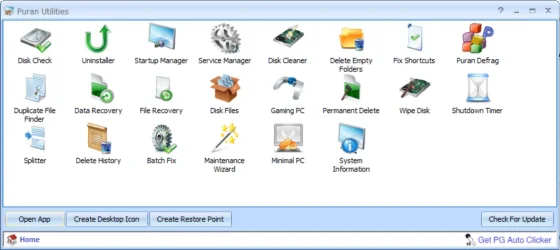
- run DiskFresh or restore the backup from your second backup source every year or two
This last step writes the cells used making them fully charged.
Why doesn't' that appear in the menu of the utilities?

1747529039300.webp
 

My Computers My Computers

  • At a glance

    Win 11 Pro 25H2, Build 26200.8737Intel Core i5 1450064GB DDR4GeForce RTX 4060
    OS
    Win 11 Pro 25H2, Build 26200.8737
    Computer type
    PC/Desktop
    Manufacturer/Model
    Home Brew
    CPU
    Intel Core i5 14500
    Motherboard
    Gigabyte B760M G P WIFI
    Memory
    64GB DDR4
    Graphics Card(s)
    GeForce RTX 4060
    Sound Card
    Chipset Realtek
    Monitor(s) Displays
    LG 45" Ultragear, Acer 24" 1080p
    Screen Resolution
    5120x1440, 1920x1080
    Hard Drives
    Crucial P310 2TB 2280 PCIe Gen4 3D NAND NVMe M.2 SSD (O/S)
    Silicon Power 2TB US75 NVMe PCIe Gen4 M.2 2280 SSD (backup)
    Crucial BX500 2TB 3D NAND (2nd backup)
    Seagate 4TB Ironwolf, rotating HDD archive files
    External off-line backup Drives: 2 NVMe 4TB drives in external enclosures
    PSU
    Thermaltake Toughpower GF3 750W
    Case
    LIAN LI LANCOOL 216 E-ATX PC Case
    Cooling
    Lots of fans!
    Keyboard
    Microsoft Comfort Curve 2000
    Mouse
    Logitech G305
    Internet Speed
    Verizon FiOS 1GB
    Browser
    Firefox
    Antivirus
    Malware Bytes & Windows Defender Security
  • At a glance

    Win 11 Pro 25H2, Build 26200.8655Intel Core i5 1440032GB DDR5Intel 700 Embedded GPU
    Operating System
    Win 11 Pro 25H2, Build 26200.8655
    Computer type
    PC/Desktop
    Manufacturer/Model
    Home Brew
    CPU
    Intel Core i5 14400
    Motherboard
    Gigabyte B760M DS3H AX
    Memory
    32GB DDR5
    Graphics card(s)
    Intel 700 Embedded GPU
    Sound Card
    Realtek Embedded
    Monitor(s) Displays
    27" HP 1080p
    Screen Resolution
    1920x1080
    Hard Drives
    Crucial P310 2TB 2280 PCIe Gen4 eD NAND PCIe SSD
    Samsung EVO 990 2TB NVMe Gen4 SSD
    Samsung 2TB SATA SSD
    PSU
    Thermaltake Smart BM3 650W
    Case
    Okinos Micro ATX Case
    Cooling
    Fans
    Keyboard
    Microsoft Comfort Curve 2000
    Mouse
    Logitech G305
    Internet Speed
    Verizon FiOS 1GB
    Browser
    Firefox
    Antivirus
    Malware Bytes & Windows Defender Security
  • Nimo N171 17" Laptop, (Intel i3-1215U, 16GB RAM, 2TB NVMe, Win11 Pro)
    Acemagic Vista Mini PC V1 (Intel N150, 16GB RAM, 1TB NVMe, Win11 Pro)
    HP ENVY h8-1540t, (24GB RAM, 2TB SSD, 2TB HDD, Win11 Pro)
I run the following for my backup drives (probably too much lol)

Seagate Portable 1TB External Drive ( Believe just 2.5inch HDD External)
Western Digital My Passport 2TB (Blue)
Western Digital My Passport 2TB (Red)
Western Digital Elements Desktop 500GB (Purchased 2003)
Western Digital My Book HDD 8TB Drive (Primary Backup drive)
Seagate 8TB in External Enclosure (Secondary Backup Drive

as well in another enclosure WD Black 1TB HDD, and WD Black 4TB HDD

Too much external storage? I'm thinking maybe so lol

Gonna clean off my USB flash drives tomorrow, maybe store on 8TB those files

though i'll be nervous for the first year on losing any data if i do swap over to External SSD lol, but thinks maybe i should soon, it takes hours to backup sometimes to these HDD drives lol


Someday i may invest in a External SSD Drive, and reduce my data hoarding lifestyle lol

I tend to worry on drive corruption alot--major worrier

So i don't know for me if an external ssd yet a good choice or not lol
 

My Computers My Computers

  • At a glance

    Windows 11 Pro 25H2 26200.8037AMD Ryzen 7700X32GB DDR 5 RGB 5600MhzRadeon 7800XT
    OS
    Windows 11 Pro 25H2 26200.8037
    Computer type
    PC/Desktop
    Manufacturer/Model
    PreBuilt
    CPU
    AMD Ryzen 7700X
    Motherboard
    MSI B650 VC WIfi Rev 1.0
    Memory
    32GB DDR 5 RGB 5600Mhz
    Graphics Card(s)
    Radeon 7800XT
    Sound Card
    Onboard Audio
    Monitor(s) Displays
    Asus VG245H
    Screen Resolution
    1920x1080
    Hard Drives
    Samsung 990 Evo Plus NVMe Boot
    Samsung 990 Pro 1TB Game NVMe


    External
    Western Digital Elements 500GB
    Western Digital My Passport 2TB Blue
    Western Digital My Passport 2TB Red
    Toshiba 2TB in External Enclosure
    Seagate 8TB in External Enclosure
    Seagate 1TB Portable USB 3 External Drive
    Western Digital My Book 8TB (Primary Backup drive)
    Western Digital Black 4TB In External Enclosure
    PSU
    750 Watt High Power
    Case
    Lian Li Lan Cool 216 ARGB Airflow
    Cooling
    2 160MM Front, 1 140MM Rear Exhaust
    Keyboard
    Logitech G513
    Mouse
    Logitech G502 X
    Internet Speed
    Gigabit 1100Mb/35 Upload
    Browser
    MS Edge Chromium and Bing Search
    Antivirus
    Windows Defender, Malwarebytes Premium
    Other Info
    UEFI, Secure Boot, TPM 2.0, Macrium Reflect X
  • At a glance

    Windows 11 Pro 25H2 26200.8037Ryzen 7 7735HS16GB DDR 5AMD Radeon™ 680M & Radeon 7700S
    Operating System
    Windows 11 Pro 25H2 26200.8037
    Computer type
    Laptop
    Manufacturer/Model
    Asus TUF A16 Advantage Edition FA617NT.A16.R7700
    CPU
    Ryzen 7 7735HS
    Motherboard
    OEM Asus Motherboard
    Memory
    16GB DDR 5
    Graphics card(s)
    AMD Radeon™ 680M & Radeon 7700S
    Sound Card
    Onboard
    Monitor(s) Displays
    16inch FHD 165hz
    Screen Resolution
    1920x1080
    Hard Drives
    512GB NVMe Boot Drive
    PSU
    Laptop PSU
    Case
    Laptop Case
    Cooling
    OEM Cooling
    Keyboard
    OEM Laptop Keyboard
    Mouse
    Touchpad & G502 Hero
    Internet Speed
    Gigabit 1100 Download/35 Upload
    Browser
    MS Edge with Bing search
    Antivirus
    Windows Defender & Malwarebytes Premium
    Other Info
    Macrium Reflect X
I use two Samsung portable SSD drives in my backup strategy. I used two Samsung 2TB T7 drives for several years with never any problems. I needed larger drives for my current backup strategy so I'm now using two Samsung T9 4TB SSD drives.

Here's my current backup strategy:

I work entirely from my local 1 Terabyte C: Drive and all my data and photos are kept in my OneDrive folder. I'm a Microsoft 365 subscriber which includes 1 Terabyte of OneDrive cloud storage. I have OneDrive set to mirror my local OneDrive folder; thus I always have all my work backed up throughout the day in real-time as I work. This is vitally important to me as I don't ever want to lose anything I'm working on.

I make a Macrium Reflect image every night before shutting down, alternating between two Samsung T9 4TB Portable SSD's each containing 7 rotating daily images. The image currently only takes about 3 minutes to make. This results in always having a full image of my drive going back every day for two weeks.
 

My Computers My Computers

  • At a glance

    Windows 11 ProIntel Series 3 Core Ultra X9 388H64GB LPDDR5x 9600 MT/sIntel Arc graphics B390 Panther Lake
    OS
    Windows 11 Pro
    Computer type
    Laptop
    Manufacturer/Model
    Dell XPS 16 DA16260
    CPU
    Intel Series 3 Core Ultra X9 388H
    Memory
    64GB LPDDR5x 9600 MT/s
    Graphics Card(s)
    Intel Arc graphics B390 Panther Lake
    Monitor(s) Displays
    16" 3.2K Tandem OLED Infinity Edge
    Screen Resolution
    3200 x 2000 16:10 236 PPI
    Hard Drives
    1 Terabyte M.2 PCIe NVMe SSD
    Case
    Black Anodized Aluminum
    Cooling
    Vapor Chamber Cooling
    Mouse
    None
    Internet Speed
    942 Mbps Netgear Mesh + 2 Satellites
    Browser
    Microsoft Edge (Chromium)
    Antivirus
    Windows Security (Defender)
    Other Info
    NPU delivering 67 TOPS
    Microsoft 365 subscription
    Microsoft Office 365
    Microsoft OneDrive 1TB Cloud
    Microsoft Visual Studio
    Microsoft Visual Studio Code
    Microsoft Sysinternals Suite
    Microsoft BitLocker
    Microsoft Copilot
    Dell Support Assist
    Dell Command | Update
    Macrium Reflect X subscription
    1Password Password Manager
    Amazon Kindle for PC
    Lightroom/Photoshop subscription
    Interactive Brokers Trader Workstation
  • At a glance

    Windows 11 ProSnapdragon® X Elite (12 Core) with Hexagon NP...32GB LPDDR5x 8448 MT/sIntegrated Adreno GPU
    Operating System
    Windows 11 Pro
    Computer type
    Laptop
    Manufacturer/Model
    Microsoft Surface Laptop 7
    CPU
    Snapdragon® X Elite (12 Core) with Hexagon NPU delivering 45 TOPS
    Memory
    32GB LPDDR5x 8448 MT/s
    Graphics card(s)
    Integrated Adreno GPU
    Sound Card
    Omnisonic speakers with Dolby Atmos spatial sound
    Monitor(s) Displays
    13.8″ PixelSense Flow touchscreen 120 Hz 600 NIT
    Screen Resolution
    2304 × 1536 (201 PPI), 3:2 aspect ratio
    Hard Drives
    1 TB PCIe NVMe Gen 4 SSD
    Case
    Black Anodized Aluminum
    Cooling
    Vapor Chamber Cooling
    Mouse
    None
    Internet Speed
    942 Mbps Netgear Mesh + 2 Satellites
    Browser
    Microsoft Edge (Chromium)
    Antivirus
    Windows Security (Defender)
    Other Info
    Microsoft 365 subscription (Office)
    Microsoft Office 365
    Microsoft OneDrive 1TB Cloud
    Microsoft Visual Studio 2026
    Microsoft Visual Studio Code
    Interactive Brokers Trader Workstation
    Lightroom/Photoshop subscription
    1Password Password Manager
    Microsoft Sysinternals
    Amazon Kindle for PC
    Microsoft BitLocker
    Microsoft Copilot
In my case, you'd be wrong. I have electronic products that are close to 20 years old, just recently I did a redesign of a couple of them. Besides new PCB layouts and design changes, they got new software as well.
Same for me. Simulation files, data sheets, designs.

I came down to the wire once with backups and at the last minute remembered I had an old Vista image containing the simulation files I wanted. Had to install Vista and the backup program and was able to recover the file I wanted. Never again. Lessons were learned.
 

My Computer My Computer

At a glance

W11 Pro x64 ongoing Canary 29500 latest buildsIntel i58GbIntel HD Graphics
OS
W11 Pro x64 ongoing Canary 29500 latest builds
Computer type
Laptop
Manufacturer/Model
Dell 7760 Mobile Precision 17"
CPU
Intel i5
Motherboard
Unknown
Memory
8Gb
Graphics Card(s)
Intel HD Graphics
Sound Card
Realtek
Monitor(s) Displays
Internal
Hard Drives
2 x 256Gb SSD
PSU
Dell 240 watt
Mouse
Dell Premier Bluetooth
Internet Speed
50Mbps
Browser
Edge
Antivirus
Default Microsoft Security
Lifetimes of SSD's are into multiple petabytes (1PB = 1,000TB) so that's a LOT of read/write use before they start to go bad.
5-10 years or more depending on use. Advantages - low power, shock resistance. Disadvantages - high price. No 22TB SSD's out there for <$1k. :mad:
 

My Computer My Computer

At a glance

Windows 11 Pro 24H2i7 Ultra16GBIntel
OS
Windows 11 Pro 24H2
Computer type
Laptop
Manufacturer/Model
LG
CPU
i7 Ultra
Memory
16GB
Graphics Card(s)
Intel
Sound Card
Intel Realtek
Monitor(s) Displays
Laptop 17" & TB4 Dell 27" QHD Ultrasharp w/integral TB4 hub
Screen Resolution
2560x1600
Hard Drives
1TB SSD, 5 external WDs
Mouse
Logitech Master MX 3S
Browser
Vivaldi
Antivirus
Kaspersky Premium Suite
All this angst about drives deteriorating over time is silly.

Backups are really there to protect against failure of a live system.

If you have critical data that you really want to keep for many years, store it on one or more decent cloud services which have redundancy built in to avoid such issues.

I seriously cannot think of any data that is so critical that I would want it to last in digital format for many years.

In the end, it is only documents like birth certicates that I would keep forever, and of course I use real paper for these, and even if lost can be re-obtained from Government agencies.

I bet most people never look at data more than two or three years old.

To me I bet most people hoard data "because they can".
I use Microsoft Money from 2005. The data file I use daily has 25 years of transactions which I have wish to lose. Treasured photos and videos fall into the same category.
 

My Computer My Computer

At a glance

Windows 11 ProCore i7-13700K64 GB Kingston Fury Beast DDR5Gigabyte GeForce RTX 2060 Super Gaming OC 8G
OS
Windows 11 Pro
Computer type
PC/Desktop
Manufacturer/Model
Self build
CPU
Core i7-13700K
Motherboard
Asus TUF Gaming Plus WiFi Z790
Memory
64 GB Kingston Fury Beast DDR5
Graphics Card(s)
Gigabyte GeForce RTX 2060 Super Gaming OC 8G
Sound Card
Realtek S1200A
Monitor(s) Displays
Viewsonic VP2770 & Dell (secondary)
Screen Resolution
2560 x 1440
Hard Drives
Kingston KC3000 2TB NVME SSD & SATA HDDs & SSD
PSU
EVGA SuperNova G2 850W
Case
Nanoxia Deep Silence 1
Cooling
Noctua NH-D14
Keyboard
Microsoft Digital Media Pro
Mouse
Logitech Wireless
Internet Speed
80 Mb / s
Browser
Chrome
Antivirus
Defender, Malwarebytes Free & AdwCleaner
Back
Top Bottom