ASUS ROG Strix Z790-E WIFI USB Port Reset Failed


Hi @kalo86

I retired from posting here quite a while ago, but I saw your frustrating issue.

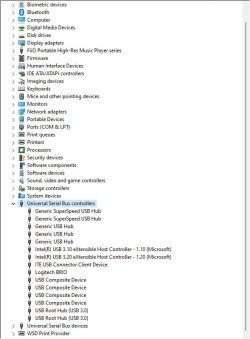
The only thing I noticed in the screenshots from Windows and Linux you posted is that in Linux you have two USB xHCI Compliant Host Controller's. In Windows you only have one. In the Windows Device Manager on my Z790 Asus board (different model, same generation) they're called Intel(R) eXtensible Host Controller 1.10 and 1.20. They're USB 3 ports. On my system they have a Microsoft driver.

There are lots of posts on the internet about this but I'm sure you've read quite a few already so I won't quote them back at you.

Think this has been mentioned, but I would recheck any connections on the motherboard for USB and run the Update Driver command from the devices right click menu if you haven't done so.

Good luck
Hello Marcus, thanks for posting your message.
Can you please upload the screenshot of your Device Manager and tell me your motherboard model?
On another forum, a user posted the Device Manager using an identical motherboard and he has similar output except for the ITE device (which is the Serial I/O, installed from Asus website).
 

My Computer My Computer

At a glance

Windows 11 ProfessionalIntel Core i9-14900KF64GB (2x 32GB Kit) DDR5-6000 CL30, G.Skill Tr...ASUS TUF RX RADEON 7900 XTX 24GB OC Edition
OS
Windows 11 Professional
Computer type
PC/Desktop
Manufacturer/Model
ASUS
CPU
Intel Core i9-14900KF
Motherboard
ASUS ROG STRIX Z790-E GAMING WIFI
Memory
64GB (2x 32GB Kit) DDR5-6000 CL30, G.Skill Trident Z5 RGB
Graphics Card(s)
ASUS TUF RX RADEON 7900 XTX 24GB OC Edition
Sound Card
Integrated Realtek USB Audio
Monitor(s) Displays
LG UltraWide 38WN95CP-W
Screen Resolution
3840x1600
Hard Drives
1TB Samsung 990 Pro, M.2 PCIe 4.0
PSU
1000W ASUS ROG Strix Gold Aura
Case
Corsair AirFlow 7000d
Cooling
Corsair iCUE LINK H170i RGB, AIO
Keyboard
Logitech K295 Silent
Mouse
Logitech M220 Silent
Here is a couple of screen captures
Device Manager and Hardware ID of the aforementioned USB Device.
NB: I also have an Orico Powered Hub.

My mainboard is this:

Device Manager.jpg

Intel USB 3.10 eXtensible Host Controller - 1.10.jpg
 

My Computers My Computers

  • At a glance

    Windows 11 Pro 25H2Intel Core i9 13900KCorsair Dominator Platinum 64gb 5600MT/s DDR5...Sapphire NITRO+ AMD Radeon RX 7900 XTX Vapor-...
    OS
    Windows 11 Pro 25H2
    Computer type
    PC/Desktop
    Manufacturer/Model
    Homebuilt
    CPU
    Intel Core i9 13900K
    Motherboard
    Asus ProArt Z790 Creator WiFi - Bios 3107
    Memory
    Corsair Dominator Platinum 64gb 5600MT/s DDR5 Dual Channel
    Graphics Card(s)
    Sapphire NITRO+ AMD Radeon RX 7900 XTX Vapor-X 24GB
    Sound Card
    External DAC: Cambridge Audio DACMagic200M - Headphone Amp: Topping L50
    Monitor(s) Displays
    Panasonic MX950 Mini LED 55" TV 120hz
    Screen Resolution
    3840 x 2160 120hz
    Hard Drives
    Samsung 980 Pro 2TB (OS)
    Samsung 980 Pro 1TB (Files)
    Lexar NZ790 4TB
    LaCie d2 Professional 6TB external - USB 3.1
    Seagate Expansion 16TB external - USB 3.2
    Seagate One Touch 18TB external HD - USB 3.0
    PSU
    Corsair RM1200x Shift
    Case
    Corsair RGB Smart Case 5000x (white)
    Cooling
    Corsair iCue H150i Elite Capellix XT
    Keyboard
    Incase Ergonomic USB (Microsoft clone)
    Mouse
    Logitech MX Master 3S
    Internet Speed
    Fibre 900/500 Mbps
    Browser
    Microsoft Edge Chromium
    Antivirus
    Bitdefender Total Security
    Other Info
    AMD Radeon Software & Drivers 26.1.1
    Hasleo Backup Suite
    Dashlane password manager
    Kensington Verimark fingerprint reader
    Logitech Brio 4K webcam
    Orico 10-port powered USB 3.0 hub
  • At a glance

    Windows 11 Pro 25H2Intel® Core™ i9-13900H32GB DDR4-3200 Dual channel*Intel Iris Xᵉ Graphics G7
    Operating System
    Windows 11 Pro 25H2
    Computer type
    Laptop
    Manufacturer/Model
    Asus Vivobook X1605VA
    CPU
    Intel® Core™ i9-13900H
    Motherboard
    Asus X1605VA bios 309
    Memory
    32GB DDR4-3200 Dual channel
    Graphics card(s)
    *Intel Iris Xᵉ Graphics G7
    Sound Card
    Realtek | Intel SST Bluetooth & USB
    Monitor(s) Displays
    16.0-inch, WUXGA 16:10 aspect ratio, IPS-level Panel
    Screen Resolution
    1920 x 1200 60hz
    Hard Drives
    512GB M.2 NVMe™ PCIe® 3.0 SSD
    Mouse
    Logitech MX Ergo Trackball
    Antivirus
    Bitdefender Total Security
    Other Info
    720p Webcam
    WiFi & USB to ethernet
I don't have this device, and I don't know how to trigger it... The only available drivers are listed in the Asus product page. I think this hardware is not present in the Strix Z790-E.
I continue to struggle with this warning and I don't receive any support from Asus.
 

My Computer My Computer

At a glance

Windows 11 ProfessionalIntel Core i9-14900KF64GB (2x 32GB Kit) DDR5-6000 CL30, G.Skill Tr...ASUS TUF RX RADEON 7900 XTX 24GB OC Edition
OS
Windows 11 Professional
Computer type
PC/Desktop
Manufacturer/Model
ASUS
CPU
Intel Core i9-14900KF
Motherboard
ASUS ROG STRIX Z790-E GAMING WIFI
Memory
64GB (2x 32GB Kit) DDR5-6000 CL30, G.Skill Trident Z5 RGB
Graphics Card(s)
ASUS TUF RX RADEON 7900 XTX 24GB OC Edition
Sound Card
Integrated Realtek USB Audio
Monitor(s) Displays
LG UltraWide 38WN95CP-W
Screen Resolution
3840x1600
Hard Drives
1TB Samsung 990 Pro, M.2 PCIe 4.0
PSU
1000W ASUS ROG Strix Gold Aura
Case
Corsair AirFlow 7000d
Cooling
Corsair iCUE LINK H170i RGB, AIO
Keyboard
Logitech K295 Silent
Mouse
Logitech M220 Silent
Have you tried deleting the offending usb device in the device manager and rebooting and see if the device manager picks it up and installs the drivers correctly?
 

My Computers My Computers

  • At a glance

    Windows 11 Pro 25H2Intel Core i9 13900KCorsair Dominator Platinum 64gb 5600MT/s DDR5...Sapphire NITRO+ AMD Radeon RX 7900 XTX Vapor-...
    OS
    Windows 11 Pro 25H2
    Computer type
    PC/Desktop
    Manufacturer/Model
    Homebuilt
    CPU
    Intel Core i9 13900K
    Motherboard
    Asus ProArt Z790 Creator WiFi - Bios 3107
    Memory
    Corsair Dominator Platinum 64gb 5600MT/s DDR5 Dual Channel
    Graphics Card(s)
    Sapphire NITRO+ AMD Radeon RX 7900 XTX Vapor-X 24GB
    Sound Card
    External DAC: Cambridge Audio DACMagic200M - Headphone Amp: Topping L50
    Monitor(s) Displays
    Panasonic MX950 Mini LED 55" TV 120hz
    Screen Resolution
    3840 x 2160 120hz
    Hard Drives
    Samsung 980 Pro 2TB (OS)
    Samsung 980 Pro 1TB (Files)
    Lexar NZ790 4TB
    LaCie d2 Professional 6TB external - USB 3.1
    Seagate Expansion 16TB external - USB 3.2
    Seagate One Touch 18TB external HD - USB 3.0
    PSU
    Corsair RM1200x Shift
    Case
    Corsair RGB Smart Case 5000x (white)
    Cooling
    Corsair iCue H150i Elite Capellix XT
    Keyboard
    Incase Ergonomic USB (Microsoft clone)
    Mouse
    Logitech MX Master 3S
    Internet Speed
    Fibre 900/500 Mbps
    Browser
    Microsoft Edge Chromium
    Antivirus
    Bitdefender Total Security
    Other Info
    AMD Radeon Software & Drivers 26.1.1
    Hasleo Backup Suite
    Dashlane password manager
    Kensington Verimark fingerprint reader
    Logitech Brio 4K webcam
    Orico 10-port powered USB 3.0 hub
  • At a glance

    Windows 11 Pro 25H2Intel® Core™ i9-13900H32GB DDR4-3200 Dual channel*Intel Iris Xᵉ Graphics G7
    Operating System
    Windows 11 Pro 25H2
    Computer type
    Laptop
    Manufacturer/Model
    Asus Vivobook X1605VA
    CPU
    Intel® Core™ i9-13900H
    Motherboard
    Asus X1605VA bios 309
    Memory
    32GB DDR4-3200 Dual channel
    Graphics card(s)
    *Intel Iris Xᵉ Graphics G7
    Sound Card
    Realtek | Intel SST Bluetooth & USB
    Monitor(s) Displays
    16.0-inch, WUXGA 16:10 aspect ratio, IPS-level Panel
    Screen Resolution
    1920 x 1200 60hz
    Hard Drives
    512GB M.2 NVMe™ PCIe® 3.0 SSD
    Mouse
    Logitech MX Ergo Trackball
    Antivirus
    Bitdefender Total Security
    Other Info
    720p Webcam
    WiFi & USB to ethernet
Have you tried deleting the offending usb device in the device manager and rebooting and see if the device manager picks it up and installs the drivers correctly?
Of course I did it. Doing this I also lose the mouse and keyboard operations and I'm forced to press the reset button on the case. This process is not leading to any noticeable change. I think it's not normal that I need to struggle so much if I correctly install all the drivers.
 

My Computer My Computer

At a glance

Windows 11 ProfessionalIntel Core i9-14900KF64GB (2x 32GB Kit) DDR5-6000 CL30, G.Skill Tr...ASUS TUF RX RADEON 7900 XTX 24GB OC Edition
OS
Windows 11 Professional
Computer type
PC/Desktop
Manufacturer/Model
ASUS
CPU
Intel Core i9-14900KF
Motherboard
ASUS ROG STRIX Z790-E GAMING WIFI
Memory
64GB (2x 32GB Kit) DDR5-6000 CL30, G.Skill Trident Z5 RGB
Graphics Card(s)
ASUS TUF RX RADEON 7900 XTX 24GB OC Edition
Sound Card
Integrated Realtek USB Audio
Monitor(s) Displays
LG UltraWide 38WN95CP-W
Screen Resolution
3840x1600
Hard Drives
1TB Samsung 990 Pro, M.2 PCIe 4.0
PSU
1000W ASUS ROG Strix Gold Aura
Case
Corsair AirFlow 7000d
Cooling
Corsair iCUE LINK H170i RGB, AIO
Keyboard
Logitech K295 Silent
Mouse
Logitech M220 Silent

My Computer My Computer

At a glance

Windows 11 ProfessionalIntel Core i9-14900KF64GB (2x 32GB Kit) DDR5-6000 CL30, G.Skill Tr...ASUS TUF RX RADEON 7900 XTX 24GB OC Edition
OS
Windows 11 Professional
Computer type
PC/Desktop
Manufacturer/Model
ASUS
CPU
Intel Core i9-14900KF
Motherboard
ASUS ROG STRIX Z790-E GAMING WIFI
Memory
64GB (2x 32GB Kit) DDR5-6000 CL30, G.Skill Trident Z5 RGB
Graphics Card(s)
ASUS TUF RX RADEON 7900 XTX 24GB OC Edition
Sound Card
Integrated Realtek USB Audio
Monitor(s) Displays
LG UltraWide 38WN95CP-W
Screen Resolution
3840x1600
Hard Drives
1TB Samsung 990 Pro, M.2 PCIe 4.0
PSU
1000W ASUS ROG Strix Gold Aura
Case
Corsair AirFlow 7000d
Cooling
Corsair iCUE LINK H170i RGB, AIO
Keyboard
Logitech K295 Silent
Mouse
Logitech M220 Silent
If you have done all of that, I can only assume it is a hardware fault of some kind. The USB device is clearly not enumerating properly and not starting.

You could measure the VBUS pin (+5 Volts) of your USB connectors and make sure that they are all putting out 5 Volts. It's possible that one of them isn't, which means that any USB device connected will not start properly. Whatever is happening, Windows is not reading the VID and PID of the USB port properly, as you showed in a previous screen shot.
 

My Computer My Computer

At a glance

Win 11 Pro 25H2Intel i7 13700KF32 GB Team Group DDR5 - 6000 CL 30ASUS TUF GAMING RTX 3070 Ti
OS
Win 11 Pro 25H2
Computer type
PC/Desktop
Manufacturer/Model
Self build
CPU
Intel i7 13700KF
Motherboard
Gigabyte Z790 UD AC
Memory
32 GB Team Group DDR5 - 6000 CL 30
Graphics Card(s)
ASUS TUF GAMING RTX 3070 Ti
Sound Card
On board Realtek
Monitor(s) Displays
ACER 34 inch
Screen Resolution
4K
Hard Drives
1 TB Samsung 980 Pro Nvme, 1 TB Samsung 970 EVO Nvme, 2 x Samsung 970 2TB SSD SATA
PSU
EVGA 1000Q
Case
Rosewill something or other
Cooling
Noctua NH-D15. A whole schwak of Noctua case fans. $$$
Keyboard
Logitech G815
Mouse
Logitech G502 Hero
Internet Speed
700 up, 600 down
Browser
Firefox
Antivirus
MalwareBytes
If you have done all of that, I can only assume it is a hardware fault of some kind. The USB device is clearly not enumerating properly and not starting.

You could measure the VBUS pin (+5 Volts) of your USB connectors and make sure that they are all putting out 5 Volts. It's possible that one of them isn't, which means that any USB device connected will not start properly. Whatever is happening, Windows is not reading the VID and PID of the USB port properly, as you showed in a previous screen shot.
I tried to plug-in the USB Logitech receiver in all the available USB-A ports.
I also tested the 3x Type-C ports using an adapter.
The result is that the USB mouse & keyboard are working. Same story when I plug in the USB drive.
It's really incredible because there is a warning but all the ports are working "fine".
I opened a ticket at Asus customer case, let's see what happens...
 

My Computer My Computer

At a glance

Windows 11 ProfessionalIntel Core i9-14900KF64GB (2x 32GB Kit) DDR5-6000 CL30, G.Skill Tr...ASUS TUF RX RADEON 7900 XTX 24GB OC Edition
OS
Windows 11 Professional
Computer type
PC/Desktop
Manufacturer/Model
ASUS
CPU
Intel Core i9-14900KF
Motherboard
ASUS ROG STRIX Z790-E GAMING WIFI
Memory
64GB (2x 32GB Kit) DDR5-6000 CL30, G.Skill Trident Z5 RGB
Graphics Card(s)
ASUS TUF RX RADEON 7900 XTX 24GB OC Edition
Sound Card
Integrated Realtek USB Audio
Monitor(s) Displays
LG UltraWide 38WN95CP-W
Screen Resolution
3840x1600
Hard Drives
1TB Samsung 990 Pro, M.2 PCIe 4.0
PSU
1000W ASUS ROG Strix Gold Aura
Case
Corsair AirFlow 7000d
Cooling
Corsair iCUE LINK H170i RGB, AIO
Keyboard
Logitech K295 Silent
Mouse
Logitech M220 Silent
I tried Slackware Linux live (booted from USB drive) and run the
Code:
dmesg -w
command (see attachment).
If I'm not wrong, in Linux this issue is not present.

View attachment 87887
As a thought, although it could be simply that Linux(whichever flavor) might not be supplying the correct drivers in the first place to generate a hardware error, but how about trying another clean install of Win11? Or even a clean install of Win10! I still recommend pulling the board from the case and running it aka motherboard boxtop operation. Just use the iGPU.
 

My Computer My Computer

At a glance

Win 7/10/11
OS
Win 7/10/11
Computer type
PC/Desktop
Other Info
I'm a computer enthusiast so have quite a few systems that I run. More like an advanced hobby.
As a thought, although it could be simply that Linux(whichever flavor) might not be supplying the correct drivers in the first place to generate a hardware error, but how about trying another clean install of Win11? Or even a clean install of Win10! I still recommend pulling the board from the case and running it aka motherboard boxtop operation. Just use the iGPU.
Thanks again for your answers, I really appreciate all the help I'm receiving in this Forum!
The full story of this PC is that I bought it from Mifcom, I customized the configuration, an expert agent checked my configuration, confirmed it and I received it. I selected "no OS installation". This means that after unboxing I had to install Windows 11 from zero.
I made it for the first time, noticing this problem. After trying to install "everything possible", I decided to format the SSD and reinstall Windows 11 again.
Unfortunately the new Windows 11 installation is reproducing the same issue.
Now I'm trying to install Windows 10 on a USB pen drive using WinToUSB.
I want to see the hardware behavior under Windows 10 without formatting again the SSD.

The CPU i9-14900KF has not integrated graphics because I personally wanted a CPU without the Intel graphic card.
 

My Computer My Computer

At a glance

Windows 11 ProfessionalIntel Core i9-14900KF64GB (2x 32GB Kit) DDR5-6000 CL30, G.Skill Tr...ASUS TUF RX RADEON 7900 XTX 24GB OC Edition
OS
Windows 11 Professional
Computer type
PC/Desktop
Manufacturer/Model
ASUS
CPU
Intel Core i9-14900KF
Motherboard
ASUS ROG STRIX Z790-E GAMING WIFI
Memory
64GB (2x 32GB Kit) DDR5-6000 CL30, G.Skill Trident Z5 RGB
Graphics Card(s)
ASUS TUF RX RADEON 7900 XTX 24GB OC Edition
Sound Card
Integrated Realtek USB Audio
Monitor(s) Displays
LG UltraWide 38WN95CP-W
Screen Resolution
3840x1600
Hard Drives
1TB Samsung 990 Pro, M.2 PCIe 4.0
PSU
1000W ASUS ROG Strix Gold Aura
Case
Corsair AirFlow 7000d
Cooling
Corsair iCUE LINK H170i RGB, AIO
Keyboard
Logitech K295 Silent
Mouse
Logitech M220 Silent
Now I'm trying to install Windows 10 on a USB pen drive using WinToUSB.
I want to see the hardware behavior under Windows 10 without formatting again the SSD.

The CPU i9-14900KF has not integrated graphics because I personally wanted a CPU without the Intel graphic card.
Ah...KF...missed that. As far as Win10 just use the Media Creation Tool for Win10 from Microsoft. It will build the bootable Win10 installer on a flash drive for you.
 

My Computer My Computer

At a glance

Win 7/10/11
OS
Win 7/10/11
Computer type
PC/Desktop
Other Info
I'm a computer enthusiast so have quite a few systems that I run. More like an advanced hobby.
Ah...KF...missed that. As far as Win10 just use the Media Creation Tool for Win10 from Microsoft. It will build the bootable Win10 installer on a flash drive for you.
Yes, but I don't want to format the SSD again for nothing. There is no point to use a version of the OS of which I don't have a license.
 

My Computer My Computer

At a glance

Windows 11 ProfessionalIntel Core i9-14900KF64GB (2x 32GB Kit) DDR5-6000 CL30, G.Skill Tr...ASUS TUF RX RADEON 7900 XTX 24GB OC Edition
OS
Windows 11 Professional
Computer type
PC/Desktop
Manufacturer/Model
ASUS
CPU
Intel Core i9-14900KF
Motherboard
ASUS ROG STRIX Z790-E GAMING WIFI
Memory
64GB (2x 32GB Kit) DDR5-6000 CL30, G.Skill Trident Z5 RGB
Graphics Card(s)
ASUS TUF RX RADEON 7900 XTX 24GB OC Edition
Sound Card
Integrated Realtek USB Audio
Monitor(s) Displays
LG UltraWide 38WN95CP-W
Screen Resolution
3840x1600
Hard Drives
1TB Samsung 990 Pro, M.2 PCIe 4.0
PSU
1000W ASUS ROG Strix Gold Aura
Case
Corsair AirFlow 7000d
Cooling
Corsair iCUE LINK H170i RGB, AIO
Keyboard
Logitech K295 Silent
Mouse
Logitech M220 Silent
OIC you want to run Windows from a Thumb drive. Rufus has an option to build one using something called Windows To Go. For Win11 only however. Another consideration to is to use a Hiren's BootCD running it from a bootable flash drive. The latest version(v1.04) uses Win11 PE.
 

My Computer My Computer

At a glance

Win 7/10/11
OS
Win 7/10/11
Computer type
PC/Desktop
Other Info
I'm a computer enthusiast so have quite a few systems that I run. More like an advanced hobby.
OIC you want to run Windows from a Thumb drive. Rufus has an option to build one using something called Windows To Go. For Win11 only however. Another consideration to is to use a Hiren's BootCD running it from a bootable flash drive. The latest version(v1.04) uses Win11 PE.
That's why I'm not able to complete the creation of the usb drive with Win 10... Ok, I will wait Asus for the next steps.
 

My Computer My Computer

At a glance

Windows 11 ProfessionalIntel Core i9-14900KF64GB (2x 32GB Kit) DDR5-6000 CL30, G.Skill Tr...ASUS TUF RX RADEON 7900 XTX 24GB OC Edition
OS
Windows 11 Professional
Computer type
PC/Desktop
Manufacturer/Model
ASUS
CPU
Intel Core i9-14900KF
Motherboard
ASUS ROG STRIX Z790-E GAMING WIFI
Memory
64GB (2x 32GB Kit) DDR5-6000 CL30, G.Skill Trident Z5 RGB
Graphics Card(s)
ASUS TUF RX RADEON 7900 XTX 24GB OC Edition
Sound Card
Integrated Realtek USB Audio
Monitor(s) Displays
LG UltraWide 38WN95CP-W
Screen Resolution
3840x1600
Hard Drives
1TB Samsung 990 Pro, M.2 PCIe 4.0
PSU
1000W ASUS ROG Strix Gold Aura
Case
Corsair AirFlow 7000d
Cooling
Corsair iCUE LINK H170i RGB, AIO
Keyboard
Logitech K295 Silent
Mouse
Logitech M220 Silent
That's why I'm not able to complete the creation of the usb drive with Win 10... Ok, I will wait Asus for the next steps.
@kalo86

Sorry to necro this thread but have you found anything on this?

I too have an Asus ROG Strix Z790 Gaming-E Wifi, but have an Intel 13900k and have the same USB issue you've described over this thread. It started maybe 6 months after my build and notifies me several seconds after booting every time. I've mostly ignored it but have recently had my Corsair Node Pro stop responding and is causing me to re-investigate this issue.

In addition to what I've seen in this thread I've also disabled legacy usb devices in UEFI, and disabled XHCI handoff (I may be mis-remembering the exact name of this option).

Did you ever hear back from Asus support or resolve this?
 

My Computer My Computer

At a glance

Windows 11Intel 13900kG.SKILL Trident Z5 DDR5 48GB (2x24GB) 7200MT/...nVidia Founders Edition 4090
OS
Windows 11
Computer type
PC/Desktop
Manufacturer/Model
Custom
CPU
Intel 13900k
Motherboard
ASUS ROG STRIX z790 Gaming-E Wifi
Memory
G.SKILL Trident Z5 DDR5 48GB (2x24GB) 7200MT/s CL36-46-46-115
Graphics Card(s)
nVidia Founders Edition 4090
Sound Card
Onboard
Monitor(s) Displays
Alienware AW3423DW
Screen Resolution
3440x1440
Hard Drives
WDBlack SN750 NVME
Sabrent Rocket 2TB (SB-ROCKET-2TB)
PSU
Corsair RM1000X
Case
Fractal Meshify v2
Cooling
Custom loop
Internet Speed
1GB symmetric fiber

Latest Support Threads

Back
Top Bottom