Solved Automatic Windows Updates Not Installing Automatically?


win11freak

Well-known member
Member
Local time
9:47 PM
Posts
219
OS
Windows 11 Pro 22H2
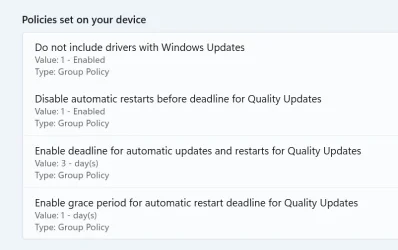
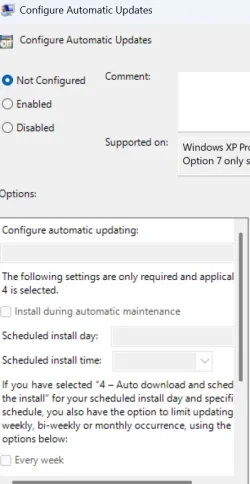
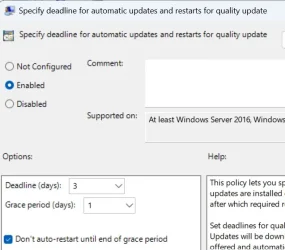
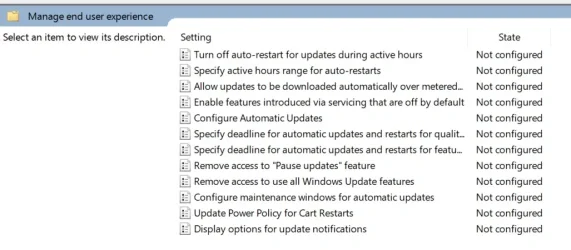
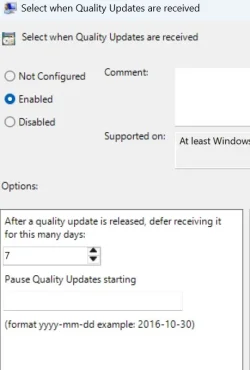
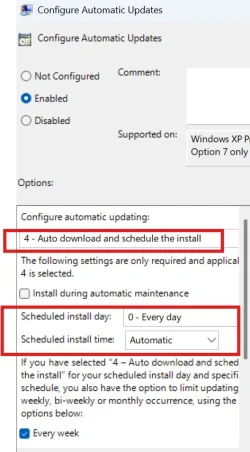
Please see attached images.

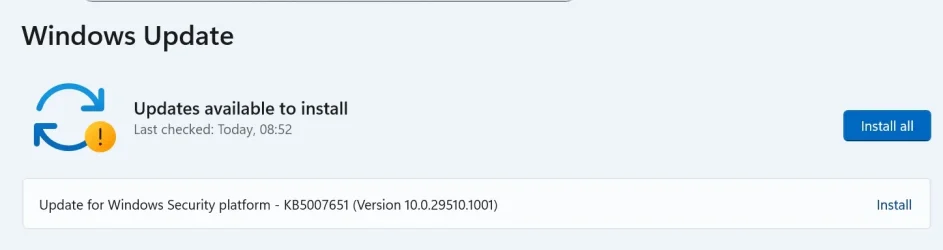
I just opened the Windows Updates from the Settings app and I noticed a Pending Installation of an Update.

Now I do not know what i am doing wrong here, but my goal is to have ALL Windows related Updates to Download and Install Automatically in the background and then notify me to Restart the PC in 3 days deadline time.

Can someone please review the Group Policy settings if I had missed something here?

All I want, is to have ALL Windows Updates to Download and Install automatically in the background and then notify to schedule a Restart.
 

Attachments
  • Screenshot 2026-02-14 170904.webp
    Screenshot 2026-02-14 170904.webp
    19.5 KB · Views: 1
  • Screenshot 2026-02-14 171453.webp
    Screenshot 2026-02-14 171453.webp
    26.6 KB · Views: 1
  • gpo.webp
    gpo.webp
    37.6 KB · Views: 1
  • Screenshot 2026-02-14 170838.webp
    Screenshot 2026-02-14 170838.webp
    32.6 KB · Views: 1

My Computer My Computer

At a glance

Windows 11 Pro 22H2
OS
Windows 11 Pro 22H2
In the group policy editor, Windows Update policies for computer-based configuration are located in the path Computer Configuration > Policies > Administrative Templates > Windows Components > Windows Update.

Allow Automatic Updates Immediate Installation.


Specifies whether Automatic Updates should automatically install certain updates that neither interrupt Windows services nor restart Windows.
 

My Computer My Computer

At a glance

Windows 11AMD Ryzen 7 5700GMicron Technology DDR4-3200 16GBNVIDIA GeForce RTX 3060
OS
Windows 11
Computer type
PC/Desktop
Manufacturer/Model
HP Pavilion
CPU
AMD Ryzen 7 5700G
Motherboard
Erica6
Memory
Micron Technology DDR4-3200 16GB
Graphics Card(s)
NVIDIA GeForce RTX 3060
Sound Card
Realtek ALC671
Monitor(s) Displays
Samsung SyncMaster U28E590
Screen Resolution
3840 x 2160
Hard Drives
SAMSUNG MZVLQ1T0HALB-000H1
KB5007651 is a newer version of Windows Security Center. It's a system App (Microsoft.SecHealthUI), and not a quality (Monthly) update.

Honestly I dunno if the GPO covers it. It falls into the same category as Defender definition and platform updates (as far as WU is concerned).
 

My Computer My Computer

At a glance

Windows 7
OS
Windows 7
Ok, well, I just reverted most of the GPO settings to its default except to receive Quality Updates set to 7 days just incase MS pushes out buggy updates in which sometimes does happen.

So i gave it 7 days to receive Quality Updates.

So basically I reverted most of my settings in GPO back to Not Configured.....

The "Allow Automatic Updates Immediate Installation." option are under the Legacy GPO Settings.
So I left that alone.

Thanks for the support.
 

Attachments

  • Screenshot 2026-02-14 174752.webp
    Screenshot 2026-02-14 174752.webp
    54.8 KB · Views: 1
  • Screenshot 2026-02-14 174822.webp
    Screenshot 2026-02-14 174822.webp
    23 KB · Views: 1

My Computer My Computer

At a glance

Windows 11 Pro 22H2
OS
Windows 11 Pro 22H2
KB5007651 is a newer version of Windows Security Center. It's a system App (Microsoft.SecHealthUI), and not a quality (Monthly) update.

Honestly I dunno if the GPO covers it. It falls into the same category as Defender definition and platform updates (as far as WU is concerned).
Is there an option in Group Policy to install Windows Defender updates automatically? As pointed out, I don't really like to use the Group Policy Legacy settings.
 

My Computer My Computer

At a glance

Windows 11 Pro 22H2
OS
Windows 11 Pro 22H2
In the group policy editor, Windows Update policies for computer-based configuration are located in the path Computer Configuration > Policies > Administrative Templates > Windows Components > Windows Update.

Allow Automatic Updates Immediate Installation.


Specifies whether Automatic Updates should automatically install certain updates that neither interrupt Windows services nor restart Windows.
Instead, this setting/policy should be used instead. But i do not know. See my image here.

Like you mentioned above, I try not to use the Legacy settings because those settings and policies should become obsolete in the future.
 

Attachments

  • Screenshot 2026-02-15 072740.webp
    Screenshot 2026-02-15 072740.webp
    43.3 KB · Views: 2

My Computer My Computer

At a glance

Windows 11 Pro 22H2
OS
Windows 11 Pro 22H2
The way I understand is that "Allow Automatic Updates Immediate Installation" is the only policy that controls "miscellaneous" updates.

We have specific policies for quality updates (Monthly CU), feature updates (ie. 25H2 Enablement or a full upgrade), and drivers. Defender has its own settings for update frequency. This leaves a gap for other updates that don't fit the listed categories. So the only thing that manages them would be the global behavior for all updates in general.
 

My Computer My Computer

At a glance

Windows 7
OS
Windows 7
Ok so why is it under the Legacy Policies. That is only my concern.
 

My Computer My Computer

At a glance

Windows 11 Pro 22H2
OS
Windows 11 Pro 22H2
It's not "because" of a legacy policy. MS never created neat policies to track the newer update types they created. Updates like KB5007651 are infrequent. Typically the same changes would have been rolled into the Monthly CU, instead of being a separate update.

MS probably has a business reason for why they're doing it his way. They're also probably don't want to make it easier for you to block this change (critical security update)
 

My Computer My Computer

At a glance

Windows 7
OS
Windows 7
Back
Top Bottom