autounattend.xml generator


kelper

Well-known member
Pro User
VIP
Local time
5:32 AM
Posts
4,085
Location
Hawes, North Yorkshire
OS
Windows 11 Pro 25H2 26200.8655

My Computers

System One System Two

  • OS
    Windows 11 Pro 25H2 26200.8655
    Computer type
    Laptop
    Manufacturer/Model
    Acemagic LX15PRO
    CPU
    AMD Ryzen 7 5825U with Radeon Graphics
    Memory
    16GB
    Screen Resolution
    1920 x 1080
    Hard Drives
    SSD 2TB
    Internet Speed
    30 Mbps
    Browser
    Brave
    Antivirus
    Webroot Secure Anywhere
    Other Info
    System 3

    Acer Swift SF114-34 laptop
    OS Windows 11 Pro 26200.8524
    CPU Pentium Silver N6000
    RAM 4GB
    SSD Samsung 970 EVO Plus SSD 2TB (an upgrade)
  • Operating System
    Windows 11 Pro 23H2 22631.2506
    Computer type
    Laptop
    Manufacturer/Model
    HP Mini 210-1090NR PC (bought in late 2009!)
    CPU
    Atom N450 1.66GHz
    Memory
    2GB
    Browser
    Brave
    Antivirus
    Webroot
I gave *great support for your use of the word “pernickety”
 

My Computers

System One System Two

  • OS
    Windows 11 Pro 25H2 Build 26200.8655
    Computer type
    PC/Desktop
    Manufacturer/Model
    Sin-built 2013
    CPU
    Intel(R) Core(TM) i7-4770K CPU @ 3.50GHz
    Motherboard
    ASUS ROG Maximus VI Formula
    Memory
    32.0 GB of I forget and the box is in storage.
    Graphics Card(s)
    Gigabyte nVidia GeForce GTX 1660 Super OC 6GB
    Sound Card
    Onboard thingy
    Monitor(s) Displays
    5 x LG 25MS500-B - 1 x 24MK430H-B - 1 x Wacom Pro 22" Touch Screen Tablet
    Screen Resolution
    All over the place
    Hard Drives
    Too many to list.
    OS on Samsung 1TB 870 QVO SATA
    PSU
    Silverstone 1500
    Case
    NZXT Phantom 820 Full-Tower Case
    Cooling
    Noctua NH-D15 Elite Class Dual Tower CPU Cooler / 6 x EziDIY 120mm / 2 x Corsair 140mm somethings / 1 x 140mm Thermaltake something / 2 x 200mm Corsair.
    Keyboard
    Corsair K95 / Logitech diNovo Edge Wireless
    Mouse
    Logitech: G402 / G502 / Mx Masters / Mx Air Cordless
    Internet Speed
    2000/500Mbps
    Browser
    All sorts
    Antivirus
    Kaspersky Premium
    Other Info
    ㅤㅤㅤㅤㅤㅤㅤㅤㅤㅤㅤㅤㅤㅤㅤㅤㅤㅤㅤㅤㅤㅤㅤㅤㅤㅤㅤㅤㅤㅤㅤㅤㅤㅤㅤㅤㅤㅤㅤㅤ⠀⠀⠀⠀⠀⠀⠀⠀⠀⠀
    TP-Link BE9300 WiFi 7 Bluetooth 5.4 (Archer TBE550E)
    TP-Link TX201 V1 2.5GB Lan

    Grandstream HT812 - VoIP
    ASUS DSL-AX82U - Mesh
    ASUS RT-AC68U - Mesh
    ASUS RT-BE88U Router

    Brother MFC-L2880DW Printer

    I’m on a horse.
  • Operating System
    Windows 11 Pro 25H2 Build 26200.8655
    Computer type
    Laptop
    Manufacturer/Model
    LENOVO Yoga 7 14IRL8 - 7i EVO OLED 14" Touchscreen i5 12 Core 16GB/512GB
    CPU
    Intel Core 12th Gen i5-1240P Processor (1.7 - 4.4GHz)
    Memory
    16GB LPDDR5 RAM
    Graphics card(s)
    Intel Iris Xe Graphics Processor
    Sound Card
    Optimized with Dolby Atmos®
    Screen Resolution
    QHD 2880 x 1800 OLED
    Hard Drives
    M.2 512GB
    Antivirus
    Defender / Malwarebytes
    Other Info
    …still on a horse.
What about the application of autoattend.xml with future in-place build upgrades? Someone mentioned that I rename the autoattend.xml to unattend.xml and import it in the Windows\System32\Sysprep\ folder of the ISO build (using Anyburn) before doing an in-place upgrade with the newer build ISO. Would this work from preventing future in-place Win11 build upgrades from modifying Win11 from the clean installation state of Win11 that was initially set by the clean-install autoattend.xml ?
 

My Computers

System One System Two

  • OS
    Windows 11 Pro 24H2 build 26100.712
    Computer type
    PC/Desktop
    Manufacturer/Model
    Acer Aspire T3-715A
    CPU
    Intel(R) Core(TM) i7-6700 CPU @ 3.40GHz 3.40 GHz
    Motherboard
    Acer Aspire T3-715A
    Memory
    64 GBytes
    Graphics Card(s)
    AMD Radeon RX 7600
    Sound Card
    Intel Skylake PCH-H - High Definition Audio Controller
    Monitor(s) Displays
    Dual, Acer H236HL
    Screen Resolution
    1920x1080
    Hard Drives
    Samsung SSD 850 EVO 1TB
    Seagate ST2000DM001-1ER164
    WDC WD20NMVW-11AV3S2
    PSU
    500 Watt
    Case
    Tower
    Cooling
    Fan
    Keyboard
    Logitech K800
    Mouse
    Logitech M570
    Internet Speed
    512 Mbps, with VPN active
    Browser
    Brave
    Antivirus
    BitDefender Total Security
  • Operating System
    Windows 11 Pro 22H2 build 22621.382
    Computer type
    PC/Desktop
    Manufacturer/Model
    HP EliteDesk 705 G3 Microtower
    CPU
    AMD PRO A6-8570 R5, 8 COMPUTE CORES 2C+6G 3.50 Ghz
    Motherboard
    HP 8265
    Memory
    40.0 GB
    Graphics card(s)
    AMD Radeon RX 460
    Sound Card
    AMD Family 15h Models 60h-6Fh CPU
    Monitor(s) Displays
    Insignia NS-22E400NA14
    Screen Resolution
    1920x1080
    Hard Drives
    SAMSUNG SSD 860 EVO 1TB
    PSU
    650 Watt
    Case
    Tower
    Cooling
    Fan
    Keyboard
    Logitech K330
    Mouse
    M570
    Internet Speed
    125 Mbps, with VPN active
    Browser
    Brave
    Antivirus
    BitDefender Total Security
What about the application of autoattend.xml with future in-place build upgrades?
Help me understand - why would you want to use an answer file for an in-place upgrade? An answer file is intended for a clean installation of Windows, not an upgrade.

With an answer file, you provide all the details to setup that you would normally supply manually. For example, what language do you want to use, what keyboard layout do you wish to use, what is your time zone, what is the name of the user account that you want to create, etc.

With an upgrade, none of that information is needed because it has already been supplied and Windows has been installed with those options. When performing an upgrade, Windows will simply carry-over those existing options so there is no need to supply that information once again using an answer file.

If I'm misunderstanding, please do let me know.
 

My Computers

System One System Two

  • OS
    Win11 Pro 25H2 (RTM+)
    Computer type
    PC/Desktop
    Manufacturer/Model
    Acemagic
    CPU
    Intel i7-14650HX
    Memory
    32 GB
    Graphics Card(s)
    No GPU - Built-in Intel Graphics
    Sound Card
    Integrated
    Monitor(s) Displays
    Varies as machine will often be moved to locations with different monitors
    Screen Resolution
    Varies
    Hard Drives
    1 x 1TB Gen 4 NVMe SSD
    PSU
    120W Power Brick
    Keyboard
    Corsair K70 Max RGB Magnetic Keyboard
    Mouse
    Logitech MX Master 3
    Internet Speed
    1Gb Up / 1 Gb Down
    Browser
    Edge
    Antivirus
    Windows Defender
  • Operating System
    Win11 Pro 25H2 (RTM+)
    Computer type
    Laptop
    Manufacturer/Model
    Lenovo ThinkBook 13x Gen 2
    CPU
    Intel i7-1255U
    Memory
    16 GB
    Graphics card(s)
    Intel Iris Xe Graphics
    Sound Card
    Realtek® ALC3306-CG codec
    Monitor(s) Displays
    13.3-inch IPS Display
    Screen Resolution
    WQXGA (2560 x 1600)
    Hard Drives
    2 TB 4 x 4 NVMe SSD
    PSU
    USB-C / Thunderbolt 4 Power / Charging
    Keyboard
    Backlit, spill resistant keyboard
    Mouse
    Buttonless Glass Precision Touchpad
    Internet Speed
    1Gb Up / 1Gb Down
    Browser
    Edge
    Antivirus
    Windows Defender
    Other Info
    WiFi 6e / Bluetooth 5.1 / Facial Recognition / Fingerprint Sensor / ToF (Time of Flight) Human Presence Sensor
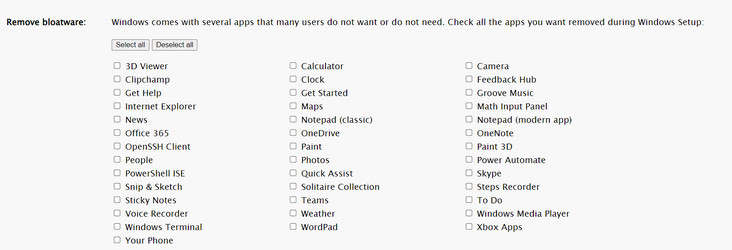
You answered my question perfectly. Thank you. I was concerned that performing a later in-place upgrade to a later build would install a good deal of the bloat back which was blocked by the initial boot installation autounattend.xml file.
 

My Computers

System One System Two

  • OS
    Windows 11 Pro 24H2 build 26100.712
    Computer type
    PC/Desktop
    Manufacturer/Model
    Acer Aspire T3-715A
    CPU
    Intel(R) Core(TM) i7-6700 CPU @ 3.40GHz 3.40 GHz
    Motherboard
    Acer Aspire T3-715A
    Memory
    64 GBytes
    Graphics Card(s)
    AMD Radeon RX 7600
    Sound Card
    Intel Skylake PCH-H - High Definition Audio Controller
    Monitor(s) Displays
    Dual, Acer H236HL
    Screen Resolution
    1920x1080
    Hard Drives
    Samsung SSD 850 EVO 1TB
    Seagate ST2000DM001-1ER164
    WDC WD20NMVW-11AV3S2
    PSU
    500 Watt
    Case
    Tower
    Cooling
    Fan
    Keyboard
    Logitech K800
    Mouse
    Logitech M570
    Internet Speed
    512 Mbps, with VPN active
    Browser
    Brave
    Antivirus
    BitDefender Total Security
  • Operating System
    Windows 11 Pro 22H2 build 22621.382
    Computer type
    PC/Desktop
    Manufacturer/Model
    HP EliteDesk 705 G3 Microtower
    CPU
    AMD PRO A6-8570 R5, 8 COMPUTE CORES 2C+6G 3.50 Ghz
    Motherboard
    HP 8265
    Memory
    40.0 GB
    Graphics card(s)
    AMD Radeon RX 460
    Sound Card
    AMD Family 15h Models 60h-6Fh CPU
    Monitor(s) Displays
    Insignia NS-22E400NA14
    Screen Resolution
    1920x1080
    Hard Drives
    SAMSUNG SSD 860 EVO 1TB
    PSU
    650 Watt
    Case
    Tower
    Cooling
    Fan
    Keyboard
    Logitech K330
    Mouse
    M570
    Internet Speed
    125 Mbps, with VPN active
    Browser
    Brave
    Antivirus
    BitDefender Total Security
You answered my question perfectly. Thank you. I was concerned that performing a later in-place upgrade to a later build would install a good deal of the bloat back which was blocked by the initial boot installation autounattend.xml file.
That may still happen, but it should take mere seconds to uninstall those few items that it adds.
 

My Computers

System One System Two

  • OS
    Win11 Pro 25H2 (RTM+)
    Computer type
    PC/Desktop
    Manufacturer/Model
    Acemagic
    CPU
    Intel i7-14650HX
    Memory
    32 GB
    Graphics Card(s)
    No GPU - Built-in Intel Graphics
    Sound Card
    Integrated
    Monitor(s) Displays
    Varies as machine will often be moved to locations with different monitors
    Screen Resolution
    Varies
    Hard Drives
    1 x 1TB Gen 4 NVMe SSD
    PSU
    120W Power Brick
    Keyboard
    Corsair K70 Max RGB Magnetic Keyboard
    Mouse
    Logitech MX Master 3
    Internet Speed
    1Gb Up / 1 Gb Down
    Browser
    Edge
    Antivirus
    Windows Defender
  • Operating System
    Win11 Pro 25H2 (RTM+)
    Computer type
    Laptop
    Manufacturer/Model
    Lenovo ThinkBook 13x Gen 2
    CPU
    Intel i7-1255U
    Memory
    16 GB
    Graphics card(s)
    Intel Iris Xe Graphics
    Sound Card
    Realtek® ALC3306-CG codec
    Monitor(s) Displays
    13.3-inch IPS Display
    Screen Resolution
    WQXGA (2560 x 1600)
    Hard Drives
    2 TB 4 x 4 NVMe SSD
    PSU
    USB-C / Thunderbolt 4 Power / Charging
    Keyboard
    Backlit, spill resistant keyboard
    Mouse
    Buttonless Glass Precision Touchpad
    Internet Speed
    1Gb Up / 1Gb Down
    Browser
    Edge
    Antivirus
    Windows Defender
    Other Info
    WiFi 6e / Bluetooth 5.1 / Facial Recognition / Fingerprint Sensor / ToF (Time of Flight) Human Presence Sensor
Back
Top Bottom