Avira antivirus - I can't uninstall, or repair it!


Unfortunately, Windows Defender still doesn't work:
I would suspect the problems lies co-incidentally in the system with Defender, rather than related to Avira

Mind you, having said that, nothing about Avira (and Avast) would surprise me, they're both (et al) more interested in the marketing side of their software than they are in system protection.

Irrespective of the current issues, you're better off without it. Although you've learnt at your expense, you've probably provided a salient warning for others.
 

My Computers

System One System Two

  • OS
    Windows 11 2xH2 (latest update ... forever anal)
    Computer type
    PC/Desktop
    Manufacturer/Model
    HP Slim S01
    CPU
    Intel i5-12400
    Memory
    8GB
    Graphics Card(s)
    NVIDIA GeForce GT730
    Sound Card
    OOBE
    Monitor(s) Displays
    Acer 32"
    Screen Resolution
    1920x1080
    Hard Drives
    512GB KIOXIA NVMe
    1TB SATA SSD
    PSU
    OOBE
    Case
    OOBE
    Cooling
    OOBE
    Keyboard
    BT
    Mouse
    BT
    Browser
    Brave FFox Chrome Opera
    Antivirus
    KIS
  • Operating System
    Windows 11 Pro 2xH2 (latest update ... 4ever anal)
    Computer type
    Laptop
    Manufacturer/Model
    HP Pavillion 15
    CPU
    i7-1165G7 @ 2.80GHz
    Graphics card(s)
    Intel Iris Xe Graphics
    Hard Drives
    Samsung NVMe 512GB
    + numerous/multiple SSD Type C USB enclosures
    Internet Speed
    NBN FTTN 50
    Browser
    Brave
    Antivirus
    KIS

My Computers

System One System Two

  • OS
    Win 11 Home ♦♦♦26200.8457 ♦♦♦♦♦♦♦25H2
    Computer type
    PC/Desktop
    Manufacturer/Model
    Built by Ghot® [May 2020]
    CPU
    AMD Ryzen 7 3700X
    Motherboard
    Asus Pro WS X570-ACE (BIOS 5302)
    Memory
    G.Skill (F4-3200C14D-16GTZKW)
    Graphics Card(s)
    EVGA RTX 2070 (08G-P4-2171-KR)
    Sound Card
    Realtek ALC1220P / ALC S1220A
    Monitor(s) Displays
    Dell U3011 30"
    Screen Resolution
    2560 x 1600
    Hard Drives
    2x Samsung 860 EVO 500GB,
    WD 4TB Black FZBX - SATA III,
    WD 8TB Black FZBX - SATA III,
    DRW-24B1ST CD/DVD Burner
    PSU
    PC Power & Cooling 750W Quad EPS12V
    Case
    Cooler Master ATCS 840 Tower
    Cooling
    CM Hyper 212 EVO (push/pull)
    Keyboard
    Ducky DK9008 Shine II Blue LED
    Mouse
    Logitech Optical M-100
    Internet Speed
    300/300
    Browser
    Firefox (latest)
    Antivirus
    Bitdefender Total Security
    Other Info
    Speakers: Klipsch Pro Media 2.1
  • Operating System
    Windows XP Pro 32bit w/SP3
    Computer type
    PC/Desktop
    Manufacturer/Model
    Built by Ghot® (not in use)
    CPU
    AMD Athlon 64 X2 5000+ (OC'd @ 3.2Ghz)
    Motherboard
    ASUS M2N32-SLI Deluxe Wireless Edition
    Memory
    TWIN2X2048-6400C4DHX (2 x 1GB, DDR2 800)
    Graphics card(s)
    EVGA 256-P2-N758-TR GeForce 8600GT SSC
    Sound Card
    Onboard
    Monitor(s) Displays
    ViewSonic G90FB Black 19" Professional (CRT)
    Screen Resolution
    up to 2048 x 1536
    Hard Drives
    WD 36GB 10,000rpm Raptor SATA
    Seagate 80GB 7200rpm SATA
    Lite-On LTR-52246S CD/RW
    Lite-On LH-18A1P CD/DVD Burner
    PSU
    PC Power & Cooling Silencer 750 Quad EPS12V
    Case
    Generic Beige case, 80mm fans
    Cooling
    ZALMAN 9500A 92mm CPU Cooler
    Keyboard
    Logitech Classic Keybooard 200
    Mouse
    Logitech Optical M-BT96a
    Internet Speed
    300/300
    Browser
    Firefox 3.x ??
    Antivirus
    Symantec (Norton)
    Other Info
    Still assembled, still runs. Haven't turned it on for 15 years?
Yes, I did use the advanced option.

It seems that the blank Windows Security screen is a very common problem - I have spent an hour reading through threads and it seems that it is a Windows 11 bug. Thousands of people, according to Microsoft agent, have been afffected, in 23H2. I have tried several suggestions, running supposed scripts in PowerShell/admin, but no change.

I can post links to some of the forum threads, if anyone is interested?
 

My Computer

System One

  • OS
    Windows 11 23H2
    Computer type
    PC/Desktop
    CPU
    i9-11900KF
    Motherboard
    Intel Z590-PLUS
    Memory
    64GB DDR4
    Graphics Card(s)
    Asus ProArt RTX 4070 Ti Super 16GB
    Hard Drives
    1 x Evo 860 2TB + 2 x Evo 850 500GB SSDs
    PSU
    Corsair 850W
    Cooling
    Corsair H100i AIO
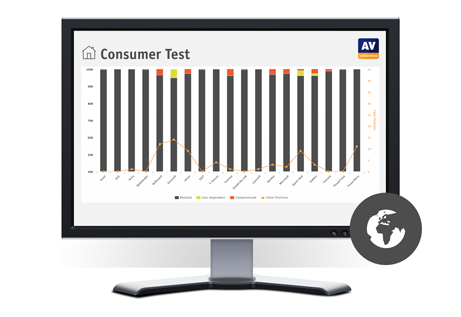
Scroll down to the Test Results chart.

(y).. Yes, BitDefender and Malwarebytes look good. I have the setup.exe for the former, but haven't installed it yet.

I would suspect the problems lies co-incidentally in the system with Defender, rather than related to Avira

Seems so (as per my previous post). :rolleyes:
 

My Computer

System One

  • OS
    Windows 11 23H2
    Computer type
    PC/Desktop
    CPU
    i9-11900KF
    Motherboard
    Intel Z590-PLUS
    Memory
    64GB DDR4
    Graphics Card(s)
    Asus ProArt RTX 4070 Ti Super 16GB
    Hard Drives
    1 x Evo 860 2TB + 2 x Evo 850 500GB SSDs
    PSU
    Corsair 850W
    Cooling
    Corsair H100i AIO
Avira and Avast were the 2 AV I recommended for years. They quietly just did their job. But no more and not for quite a while. They have become so invasive that IMO they themselves are malware. If one does not use Revo or another similar uninstaller that will fully scan and clean the registry, I strongly suggest you manually search for and remove all the crap either of those AV apps leave behind.....and they leave behind a lot. The last time I tried to get rid of Avira for a friend who had installed 3 different AV apps, I ended up backing up everything and clean installing. On a side note, another AV that is almost as bad now is AVG.
 

My Computers

System One System Two

  • OS
    Windows 11 Pro 25H2
    Computer type
    PC/Desktop
    Manufacturer/Model
    Dell Optiplex 7080
    CPU
    i9-10900 10 core 20 threads
    Motherboard
    DELL 0J37VM
    Memory
    32 gb
    Graphics Card(s)
    none-Intel UHD Graphics 630
    Sound Card
    Integrated Realtek
    Monitor(s) Displays
    Benq 27
    Screen Resolution
    2560x1440
    Hard Drives
    2x1tb Solidigm m.2 nvme /External drives 512gb Samsung m.2 sata+2tb Kingston m2.nvme
    PSU
    500w
    Case
    MT
    Cooling
    Dell Premium
    Keyboard
    Logitech wired
    Mouse
    Logitech wireless
    Internet Speed
    so slow I'm too embarrassed to tell
    Browser
    #1 Edge #2 Firefox
    Antivirus
    Defender+MWB Premium
  • Operating System
    Windows 11 Pro 24H2 26200.8457
    Computer type
    PC/Desktop
    Manufacturer/Model
    Beelink Mini PC SER5
    CPU
    AMD Ryzen 7 6800U
    Memory
    32 gb
    Graphics card(s)
    integrated
    Sound Card
    integrated
    Monitor(s) Displays
    Benq 27
    Screen Resolution
    2560x1440
    Hard Drives
    1TB Crucial nvme
    Keyboard
    Logitech wired
    Mouse
    Logitech wireless
    Internet Speed
    still too embarrassed to tell
    Browser
    Firefox
    Antivirus
    Defender
    Other Info
    System 3 is non compliant Dell 9020 i7-4770/24gb ram Win11 PRO 26200.8457
Yes, a shame. As I said, I let 'Everything' search for any remnants and Revo to clear the registry: about as 'clean' as I am going to get it, I think. The Defender problem looks to be a known bug - I have wasted a lot of time trying to fix it, to no avail. It works fine on the Windows 10 part of the PC: I guess I could use that to scan the Windows 11 disc - but more effective to just install something like BitDefender.
 

My Computer

System One

  • OS
    Windows 11 23H2
    Computer type
    PC/Desktop
    CPU
    i9-11900KF
    Motherboard
    Intel Z590-PLUS
    Memory
    64GB DDR4
    Graphics Card(s)
    Asus ProArt RTX 4070 Ti Super 16GB
    Hard Drives
    1 x Evo 860 2TB + 2 x Evo 850 500GB SSDs
    PSU
    Corsair 850W
    Cooling
    Corsair H100i AIO
Yes, BitDefender and Malwarebytes look good. I have the setup.exe for the former, but haven't installed it yet.


I use Bitdefender Total Security (paid) ($60/year)

It included a firewall, which actually does what a firewall should, and isn't an MS firewall.
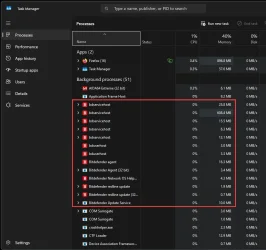
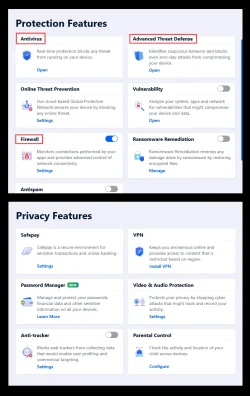
It is bloated though. I only use three of the thirteen modules... (RED boxes)

000000 Bitdefender Modules.webp


It seems to be a lot cheaper at Amazon...
Bitdefender Total Security 2026


Btw, it also comes with 24/7 human phone support.

I've been using it since 2013 with NO problems.

It does use some resources, but not as much as Firefox, for example...

Image1.webp
 
Last edited:

My Computers

System One System Two

  • OS
    Win 11 Home ♦♦♦26200.8457 ♦♦♦♦♦♦♦25H2
    Computer type
    PC/Desktop
    Manufacturer/Model
    Built by Ghot® [May 2020]
    CPU
    AMD Ryzen 7 3700X
    Motherboard
    Asus Pro WS X570-ACE (BIOS 5302)
    Memory
    G.Skill (F4-3200C14D-16GTZKW)
    Graphics Card(s)
    EVGA RTX 2070 (08G-P4-2171-KR)
    Sound Card
    Realtek ALC1220P / ALC S1220A
    Monitor(s) Displays
    Dell U3011 30"
    Screen Resolution
    2560 x 1600
    Hard Drives
    2x Samsung 860 EVO 500GB,
    WD 4TB Black FZBX - SATA III,
    WD 8TB Black FZBX - SATA III,
    DRW-24B1ST CD/DVD Burner
    PSU
    PC Power & Cooling 750W Quad EPS12V
    Case
    Cooler Master ATCS 840 Tower
    Cooling
    CM Hyper 212 EVO (push/pull)
    Keyboard
    Ducky DK9008 Shine II Blue LED
    Mouse
    Logitech Optical M-100
    Internet Speed
    300/300
    Browser
    Firefox (latest)
    Antivirus
    Bitdefender Total Security
    Other Info
    Speakers: Klipsch Pro Media 2.1
  • Operating System
    Windows XP Pro 32bit w/SP3
    Computer type
    PC/Desktop
    Manufacturer/Model
    Built by Ghot® (not in use)
    CPU
    AMD Athlon 64 X2 5000+ (OC'd @ 3.2Ghz)
    Motherboard
    ASUS M2N32-SLI Deluxe Wireless Edition
    Memory
    TWIN2X2048-6400C4DHX (2 x 1GB, DDR2 800)
    Graphics card(s)
    EVGA 256-P2-N758-TR GeForce 8600GT SSC
    Sound Card
    Onboard
    Monitor(s) Displays
    ViewSonic G90FB Black 19" Professional (CRT)
    Screen Resolution
    up to 2048 x 1536
    Hard Drives
    WD 36GB 10,000rpm Raptor SATA
    Seagate 80GB 7200rpm SATA
    Lite-On LTR-52246S CD/RW
    Lite-On LH-18A1P CD/DVD Burner
    PSU
    PC Power & Cooling Silencer 750 Quad EPS12V
    Case
    Generic Beige case, 80mm fans
    Cooling
    ZALMAN 9500A 92mm CPU Cooler
    Keyboard
    Logitech Classic Keybooard 200
    Mouse
    Logitech Optical M-BT96a
    Internet Speed
    300/300
    Browser
    Firefox 3.x ??
    Antivirus
    Symantec (Norton)
    Other Info
    Still assembled, still runs. Haven't turned it on for 15 years?
I'll go with the free version for now (not a fan of annual subscription purchases). I shouldn't tempt fate by saying so, but the last time I had any issues with malware or viruses must be over 15 years ago. I am careful, fairly 'savvy' (I like to think!) and the PC in question, being used for flight simulation only, isn't really at much risk in any case: no email or browsing dodgy sites and so on; justy a few airport sceneries or aircraft downloaded from trusted flightsim sites every so often. Even so, I wouldn't like to be without any protection now that Defender isn't working (Defender Firewall seems fine).
 

My Computer

System One

  • OS
    Windows 11 23H2
    Computer type
    PC/Desktop
    CPU
    i9-11900KF
    Motherboard
    Intel Z590-PLUS
    Memory
    64GB DDR4
    Graphics Card(s)
    Asus ProArt RTX 4070 Ti Super 16GB
    Hard Drives
    1 x Evo 860 2TB + 2 x Evo 850 500GB SSDs
    PSU
    Corsair 850W
    Cooling
    Corsair H100i AIO
Avira and Avast were the 2 AV I recommended for years. They quietly just did their job. But no more and not for quite a while. They have become so invasive that IMO they themselves are malware. If one does not use Revo or another similar uninstaller that will fully scan and clean the registry, I strongly suggest you manually search for and remove all the crap either of those AV apps leave behind.....and they leave behind a lot. The last time I tried to get rid of Avira for a friend who had installed 3 different AV apps, I ended up backing up everything and clean installing. On a side note, another AV that is almost as bad now is AVG.
AVG was bought by Avast as was Avira. Now they're all part of Gen.
 

Attachments

  • Gen.webp
    Gen.webp
    21.3 KB · Views: 1

My Computer

System One

  • OS
    Windows 11
    Computer type
    PC/Desktop
AVG was bought by Avast as was Avira. Now they're all part of Gen.
Thanks. I was unaware of that. That explains it and also why CCleaner is now a pile of poop. Only way I use CCleaner now is an old portable version from when I got CCleaner from Piriform.
 

My Computers

System One System Two

  • OS
    Windows 11 Pro 25H2
    Computer type
    PC/Desktop
    Manufacturer/Model
    Dell Optiplex 7080
    CPU
    i9-10900 10 core 20 threads
    Motherboard
    DELL 0J37VM
    Memory
    32 gb
    Graphics Card(s)
    none-Intel UHD Graphics 630
    Sound Card
    Integrated Realtek
    Monitor(s) Displays
    Benq 27
    Screen Resolution
    2560x1440
    Hard Drives
    2x1tb Solidigm m.2 nvme /External drives 512gb Samsung m.2 sata+2tb Kingston m2.nvme
    PSU
    500w
    Case
    MT
    Cooling
    Dell Premium
    Keyboard
    Logitech wired
    Mouse
    Logitech wireless
    Internet Speed
    so slow I'm too embarrassed to tell
    Browser
    #1 Edge #2 Firefox
    Antivirus
    Defender+MWB Premium
  • Operating System
    Windows 11 Pro 24H2 26200.8457
    Computer type
    PC/Desktop
    Manufacturer/Model
    Beelink Mini PC SER5
    CPU
    AMD Ryzen 7 6800U
    Memory
    32 gb
    Graphics card(s)
    integrated
    Sound Card
    integrated
    Monitor(s) Displays
    Benq 27
    Screen Resolution
    2560x1440
    Hard Drives
    1TB Crucial nvme
    Keyboard
    Logitech wired
    Mouse
    Logitech wireless
    Internet Speed
    still too embarrassed to tell
    Browser
    Firefox
    Antivirus
    Defender
    Other Info
    System 3 is non compliant Dell 9020 i7-4770/24gb ram Win11 PRO 26200.8457
Thanks. I was unaware of that. That explains it and also why CCleaner is now a pile of poop. Only way I use CCleaner now is an old portable version from when I got CCleaner from Piriform.
I don't even use the portable version anymore. I've been satisfied with 11's cleaner and Microsoft PC Manager.
 

My Computer

System One

  • OS
    Windows 11
    Computer type
    PC/Desktop
Only way I use CCleaner now is an old portable version from when I got CCleaner from Piriform

Exactly the same here!
 

My Computer

System One

  • OS
    Windows 11 23H2
    Computer type
    PC/Desktop
    CPU
    i9-11900KF
    Motherboard
    Intel Z590-PLUS
    Memory
    64GB DDR4
    Graphics Card(s)
    Asus ProArt RTX 4070 Ti Super 16GB
    Hard Drives
    1 x Evo 860 2TB + 2 x Evo 850 500GB SSDs
    PSU
    Corsair 850W
    Cooling
    Corsair H100i AIO
Hmmm... JFYI.. BitDefender has spent its first few hours active on my PC by 'disinfecting' it of my precious and perfectly harmless vbs files (many of which took me hours, if not days to write and perfect!). Fortunately, it isn't hard to restore them and programme exceptions.
 

My Computer

System One

  • OS
    Windows 11 23H2
    Computer type
    PC/Desktop
    CPU
    i9-11900KF
    Motherboard
    Intel Z590-PLUS
    Memory
    64GB DDR4
    Graphics Card(s)
    Asus ProArt RTX 4070 Ti Super 16GB
    Hard Drives
    1 x Evo 860 2TB + 2 x Evo 850 500GB SSDs
    PSU
    Corsair 850W
    Cooling
    Corsair H100i AIO
Hmmm... JFYI.. BitDefender has spent its first few hours active on my PC by 'disinfecting' it of my precious and perfectly harmless vbs files (many of which took me hours, if not days to write and perfect!). Fortunately, it isn't hard to restore them and programme exceptions.

Add them to Bitdefender's exclusion list
 

My Computers

System One System Two

  • OS
    Windows 11 Pro 25H2 build: (26200.7623)
    Computer type
    Laptop
    Manufacturer/Model
    Microsoft Surface Pro
    Memory
    32GB
  • Operating System
    Microsoft 25H2 Pro
    Computer type
    Laptop
    Manufacturer/Model
    Dell Pro 14 - PC14250
    CPU
    Intel Core Ultra 7
    Memory
    64GB
    Graphics card(s)
    Intel Integrated Graphics
    Hard Drives
    Micron 1TB SSD
Yes, I have been doing that - after a while the manually-added exclusions will cover everything I need, so that I won't have the slight annoyance of these constant (at the moment) false positives.
 

My Computer

System One

  • OS
    Windows 11 23H2
    Computer type
    PC/Desktop
    CPU
    i9-11900KF
    Motherboard
    Intel Z590-PLUS
    Memory
    64GB DDR4
    Graphics Card(s)
    Asus ProArt RTX 4070 Ti Super 16GB
    Hard Drives
    1 x Evo 860 2TB + 2 x Evo 850 500GB SSDs
    PSU
    Corsair 850W
    Cooling
    Corsair H100i AIO

Latest Support Threads

Back
Top Bottom