Backed to Local Account After Unintentionally Logging In: How to Keep My Device Listed in My Microsoft Account as Before?


CrazyBob126

New member
Local time
9:30 AM
Posts
8
OS
Windows 11, Windows 10
Hey there. I've been using a local account on my laptop for over seven years, and I think my device has been listed to a Microsoft account for the past seven years as well, probably because I've been using their Mail, Xbox apps and Office 365 with my Microsoft account (but for my PC it has always been a local administrator account). And even though I've been using a local account to download free apps from the Microsoft Store, my device is somehow listed as one of the 10 device limits in the Microsoft Store. Now, everything works perfectly for me as I do want to see my device in my Microsoft account while still using a local account for my PC.

When I was renewing my Office 365 subscription the other day, I found out that my Microsoft account was logged out of Microsoft Word, probably because I haven't used it in a while. My first reaction was to log in, and when the prompt "Use this account everywhere on your device" popped up, I clicked "Next" without thinking much. Then I found out that my local account was replaced by my Microsoft account, or rather, a hybrid account that was sort of like a local account but was essentially a Microsoft account (like this: Add Microsoft account to Local account for Hybrid account in Windows 11 Tutorial). This makes me feel uncomfortable because Microsoft used misleading language to make me unknowingly convert my local account that I've had for years into a Microsoft account.

After doing some research, I found out that clicking "Stop signing in to all Microsoft apps automatically" reverts my account to a local account. After that, however, my device is no longer listed in my Microsoft account.

Any idea how to get my device listed in my Microsoft account while keeping me using a local account on my coumputer like before? I read that if you sign in to some Microsoft app with your Microsoft account on your PC, your device should be listed. For now, I've tried logging into the Microsoft Store with my Microsoft account, but my device still doesn't appear in the Microsoft account's Devices page.
 

My Computer My Computer

At a glance

Windows 11, Windows 10
OS
Windows 11, Windows 10
You cannot see device on MS account unless you keep same MS account on pc.

If you change an MS account to a local account, the device is no longer shown. You also lose link of digital licence to MS account.

You have to create a separate local account whilst retaining MS account to do what you want.
 

My Computer My Computer

At a glance

Windows 11 Pro + Win11 Canary VM.I9 13th gen i9-13900H 2.60 GHZ16 GB solderedIntegrated Intel Iris XE
OS
Windows 11 Pro + Win11 Canary VM.
Computer type
Laptop
Manufacturer/Model
ASUS Zenbook 14
CPU
I9 13th gen i9-13900H 2.60 GHZ
Motherboard
Yep, Laptop has one.
Memory
16 GB soldered
Graphics Card(s)
Integrated Intel Iris XE
Sound Card
Realtek built in
Monitor(s) Displays
laptop OLED screen
Screen Resolution
2880x1800 touchscreen
Hard Drives
1 TB NVME SSD (only weakness is only one slot)
PSU
Internal + 65W thunderbolt USB4 charger
Case
Yep, got one
Cooling
Stella Artois (UK pint cans - 568 ml) - extra cost.
Keyboard
Built in UK keybd
Mouse
Bluetooth , wireless dongled, wired
Internet Speed
900 mbs (ethernet), wifi 6 typical 350-450 mb/s both up and down
Browser
Edge
Antivirus
Defender
Other Info
TPM 2.0, 2xUSB4 thunderbolt, 1xUsb3 (usb a), 1xUsb-c, hdmi out, 3.5 mm audio out/in combo, ASUS backlit trackpad (inc. switchable number pad)

Macrium Reflect Home V8
Office 365 Family (6 users each 1TB onedrive space)
Hyper-V (a vm runs almost as fast as my older laptop)
I think you want to unlink your device from Microsoft account i have video tutorial for doing that for Windows 10 but works for Windows 11.

If you are giving away or disposing of your system, it is important that you unlink Windows 10 license from Microsoft account. Here’s how.


My Computer My Computer

At a glance

Windows 11AMD Ryzen 7 5700GMicron Technology DDR4-3200 16GBNVIDIA GeForce RTX 3060
OS
Windows 11
Computer type
PC/Desktop
Manufacturer/Model
HP Pavilion
CPU
AMD Ryzen 7 5700G
Motherboard
Erica6
Memory
Micron Technology DDR4-3200 16GB
Graphics Card(s)
NVIDIA GeForce RTX 3060
Sound Card
Realtek ALC671
Monitor(s) Displays
Samsung SyncMaster U28E590
Screen Resolution
3840 x 2160
Hard Drives
SAMSUNG MZVLQ1T0HALB-000H1
I think you want to unlink your device from Microsoft account i have video tutorial for doing that for Windows 10 but works for Windows 11.

If you are giving away or disposing of your system, it is important that you unlink Windows 10 license from Microsoft account. Here’s how.

This is not what op is asking.

Also last point is overstated. All anybody has to do is reset pc, or change to a local account then the link is gone.
 

My Computer My Computer

At a glance

Windows 11 Pro + Win11 Canary VM.I9 13th gen i9-13900H 2.60 GHZ16 GB solderedIntegrated Intel Iris XE
OS
Windows 11 Pro + Win11 Canary VM.
Computer type
Laptop
Manufacturer/Model
ASUS Zenbook 14
CPU
I9 13th gen i9-13900H 2.60 GHZ
Motherboard
Yep, Laptop has one.
Memory
16 GB soldered
Graphics Card(s)
Integrated Intel Iris XE
Sound Card
Realtek built in
Monitor(s) Displays
laptop OLED screen
Screen Resolution
2880x1800 touchscreen
Hard Drives
1 TB NVME SSD (only weakness is only one slot)
PSU
Internal + 65W thunderbolt USB4 charger
Case
Yep, got one
Cooling
Stella Artois (UK pint cans - 568 ml) - extra cost.
Keyboard
Built in UK keybd
Mouse
Bluetooth , wireless dongled, wired
Internet Speed
900 mbs (ethernet), wifi 6 typical 350-450 mb/s both up and down
Browser
Edge
Antivirus
Defender
Other Info
TPM 2.0, 2xUSB4 thunderbolt, 1xUsb3 (usb a), 1xUsb-c, hdmi out, 3.5 mm audio out/in combo, ASUS backlit trackpad (inc. switchable number pad)

Macrium Reflect Home V8
Office 365 Family (6 users each 1TB onedrive space)
Hyper-V (a vm runs almost as fast as my older laptop)
You cannot see device on MS account unless you keep same MS account on pc.

If you change an MS account to a local account, the device is no longer shown. You also lose link of digital licence to MS account.

You have to create a separate local account whilst retaining MS account to do what you want.
My device definitely used to show up on the Devices page of my Microsoft account even though I was using a local account on my laptop.

I remember it well because I tried to enable two-step verification for my Microsoft account a few months after I purchased the laptop, and then I was surprised to find that even though I wasn't logged into my PC through my Microsoft account (although I did sign into my Mail, Xbox, and Office 365 apps with my Microsoft account on that laptop), my laptop still appeared in the Devices page of my Microsoft account.
 

My Computer My Computer

At a glance

Windows 11, Windows 10
OS
Windows 11, Windows 10
Would removing my Microsoft account from "Accounts used by other apps" and adding it back by signing into Microsoft apps like Office or Mail be a viable way to get the device listed in my Microsoft account again while keeping the local account?
 

My Computer My Computer

At a glance

Windows 11, Windows 10
OS
Windows 11, Windows 10
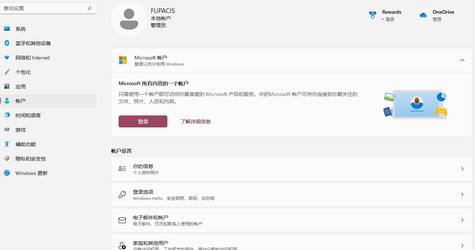
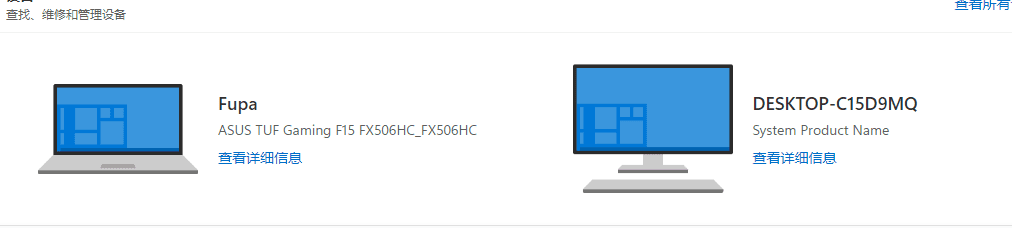
I have a Chinese friend who switched from his Microsoft account to a local account because he couldn't stand having to enter a password every time he turned on his computer. I asked him if the computer that he switched to a local account was listed in the devices page of his Microsoft account, and his screenshot told me it was, even though he was using a local account (as you can see there is no email address under his username) on that computer, just like my previous situation.
20230531131343.png
20230531131334.png

Very curious what the logic behind this is that triggers this situation.
 

My Computer My Computer

At a glance

Windows 11, Windows 10
OS
Windows 11, Windows 10
Back
Top Bottom