Solved .bat file needed or something


The-Hive

The First Three Star Guru
Guru
VIP
Local time
12:37 PM
Posts
11,607
Location
Wiltshire UK
OS
Windows 11 Pro
Hi Guys, can anyone help me, I need to run awcc.exe about 15 seconds after the computer starts can anyone suggest anything or help me write it. If I drop awcc.exe into the start up folder it starts too quickly any help??
 

My Computers My Computers

  • At a glance

    Windows 11 Pro13th Gen Core i9 13900HX32GB DDR5 @4800MHz 2x16GBGeforce RTX 4090HX 16GB
    OS
    Windows 11 Pro
    Computer type
    Laptop
    Manufacturer/Model
    Alienware M18 R1
    CPU
    13th Gen Core i9 13900HX
    Memory
    32GB DDR5 @4800MHz 2x16GB
    Graphics Card(s)
    Geforce RTX 4090HX 16GB
    Sound Card
    Nvidia HD / Realtek ALC3254
    Monitor(s) Displays
    18" QHD+
    Screen Resolution
    25660 X 1600
    Hard Drives
    C: KIOXIA (Toshiba) 2TB KXG80ZNV2T04 NVMe PCIe M.2 SSD
    D: KIOXIA (Toshiba) 2TB KXG80ZNV2T04 NVMe PCIe M.2 SSD
    Case
    Dark Metallic Moon
    Keyboard
    Alienware M Series per-key AlienFX RGB
    Mouse
    Alienware AW610M
    Browser
    Chrome and Firefox
    Antivirus
    Norton
    Other Info
    Killer E3000 Ethernet Controller
    Killer Killer AX1690 Wi-Fi Network Adaptor Wi-Fi 6E
    Bluetooth 5.2
    Alienware Z01G Graphic Amplifier
  • At a glance

    Windows 11 Pro10th Gen i-9 10900 K32Gb Dual Channel DDR4 @ 8843MHzNvidia RTX 2080 Super
    Operating System
    Windows 11 Pro
    Computer type
    Laptop
    Manufacturer/Model
    Alienware Area 51m R2
    CPU
    10th Gen i-9 10900 K
    Memory
    32Gb Dual Channel DDR4 @ 8843MHz
    Graphics card(s)
    Nvidia RTX 2080 Super
    Sound Card
    Nvidia
    Screen Resolution
    1920 x 1080
    Hard Drives
    Hard Drive C: Samsung 2TB SSD PM981a NVMe
    Hard Drive D:Samsung 2TB SSD 970 EVO Plus
    Mouse
    Alienware 610M
    Browser
    Chrome
    Antivirus
    Norton

My Computers My Computers

  • At a glance

    Windows 11 21H2AMD Ryzen 3 3100Corsair 8GB x 2 (16GB)Asus Nvidia Geforce GTX 1650 Super
    OS
    Windows 11 21H2
    Computer type
    PC/Desktop
    Manufacturer/Model
    Chillblast
    CPU
    AMD Ryzen 3 3100
    Motherboard
    Asus ROG Strix b450-f
    Memory
    Corsair 8GB x 2 (16GB)
    Graphics Card(s)
    Asus Nvidia Geforce GTX 1650 Super
    Monitor(s) Displays
    Dell 27" 1440p
    Screen Resolution
    1440p
    Hard Drives
    Seagate Barracuda 1TB
    256GB NVME Seagate Barracuda
    Browser
    Firefox / Edge
    Antivirus
    Windows Defender
  • At a glance

    Windows 8.1Amd E24GB
    Operating System
    Windows 8.1
    Computer type
    Laptop
    Manufacturer/Model
    HP
    CPU
    Amd E2
    Memory
    4GB
    Hard Drives
    128GB SSD
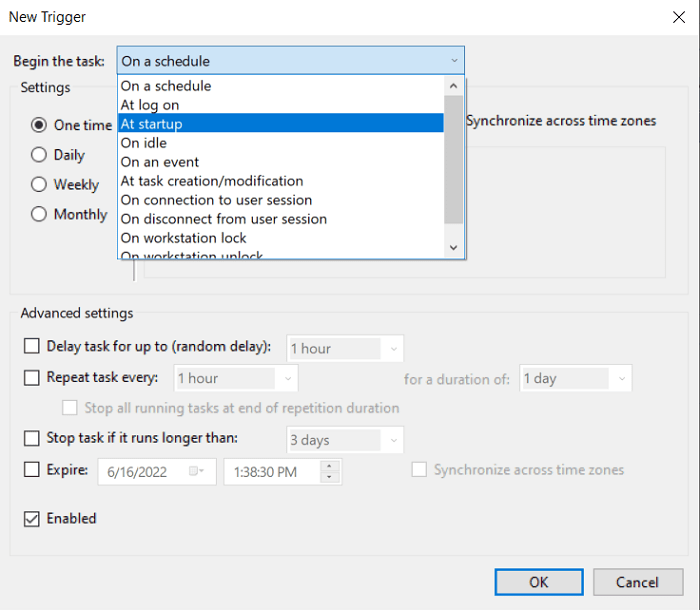
could you use taskscheduler.

a cmd file in startup with a 15 second delay would be visible.
 

My Computers My Computers

  • At a glance

    Win7,Win11i7-97002x16gb 3600mhz
    OS
    Win7,Win11
    Computer type
    PC/Desktop
    CPU
    i7-9700
    Motherboard
    gigabyte b365m ds3h
    Memory
    2x16gb 3600mhz
    Monitor(s) Displays
    benq gw2480
    PSU
    bequiet pure power 11 400CM
    Cooling
    cryorig m9i
  • At a glance

    win7,win11i5-84002x8gb 3200
    Operating System
    win7,win11
    Computer type
    PC/Desktop
    CPU
    i5-8400
    Motherboard
    gigabyte b365m ds3h
    Memory
    2x8gb 3200
    PSU
    xfx pro 450

My Computers My Computers

  • At a glance

    Windows 11 Pro 25H2 26200.8655i9-10900 10 core 20 threads32 gbnone-Intel UHD Graphics 630
    OS
    Windows 11 Pro 25H2 26200.8655
    Computer type
    PC/Desktop
    Manufacturer/Model
    Dell Optiplex 7080
    CPU
    i9-10900 10 core 20 threads
    Motherboard
    DELL 0J37VM
    Memory
    32 gb
    Graphics Card(s)
    none-Intel UHD Graphics 630
    Sound Card
    Integrated Realtek
    Monitor(s) Displays
    Benq 27
    Screen Resolution
    2560x1440
    Hard Drives
    2x1tb Solidigm m.2 nvme /External drives 512gb Samsung m.2 sata+2tb Kingston m2.nvme
    PSU
    500w
    Case
    MT
    Cooling
    Dell Premium
    Keyboard
    Logitech wired
    Mouse
    Logitech wireless
    Internet Speed
    so slow I'm too embarrassed to tell
    Browser
    #1 Edge #2 Firefox
    Antivirus
    Defender+MWB Premium
  • At a glance

    Windows 11 Pro 24H2 26200.8457AMD Ryzen 7 6800U32 gbintegrated
    Operating System
    Windows 11 Pro 24H2 26200.8457
    Computer type
    PC/Desktop
    Manufacturer/Model
    Beelink Mini PC SER5
    CPU
    AMD Ryzen 7 6800U
    Memory
    32 gb
    Graphics card(s)
    integrated
    Sound Card
    integrated
    Monitor(s) Displays
    Benq 27
    Screen Resolution
    2560x1440
    Hard Drives
    1TB Crucial nvme
    Keyboard
    Logitech wired
    Mouse
    Logitech wireless
    Internet Speed
    still too embarrassed to tell
    Browser
    Firefox
    Antivirus
    Defender
    Other Info
    System 3 is non compliant Dell 9020 i7-4770/24gb ram Win11 PRO 26200.8457
You can create a batch file with something like the following: obviously tweak to what you need...

Batch:
@ECHO OFF
timeout /t 15 /nobreak
awcc.exe

If you don't have timeout or it doesn't work, (I know some systems used to have problems, don't know if it's included in Win11 by default) you can use the following instead:

Batch:
@ECHO OFF
ping /n 1 /w 15000 localhost >nul
awcc.exe
For Ping, the 15000 is in ms, so change accordingly if you need more/less time
 

My Computers My Computers

  • At a glance

    Windows 11 Pro βIntel® Core™ i7-1165G732 GB DDR4-3200 SDRAMIntel® Iris® Xᵉ Graphics
    OS
    Windows 11 Pro β
    Computer type
    Laptop
    Manufacturer/Model
    HP Pavilion Laptop 15-eg0070wm
    CPU
    Intel® Core™ i7-1165G7
    Memory
    32 GB DDR4-3200 SDRAM
    Graphics Card(s)
    Intel® Iris® Xᵉ Graphics
    Screen Resolution
    1920x1080
    Hard Drives
    2TB PCIe® NVMe™ M.2 SSD
  • At a glance

    macOS Ventura3.4 GHz Quad-Core Intel Core i540 GB 2400 MHz DDR4Radeon Pro 570 4 GB
    Operating System
    macOS Ventura
    Computer type
    PC/Desktop
    Manufacturer/Model
    Apple iMac 27" 5K (2017)
    CPU
    3.4 GHz Quad-Core Intel Core i5
    Memory
    40 GB 2400 MHz DDR4
    Graphics card(s)
    Radeon Pro 570 4 GB
    Monitor(s) Displays
    27" 5K, 34" UW
    Screen Resolution
    Mon 1: 5120 × 2880 Mon 2: 2560 x 1080
    Hard Drives
    32GB NVME, 1TB SSD
To Timeout, or not to Timeout, that is the question.
Does it exist, and if it does, how would I use it?
To answer that question, I ran RUN >CMD>Enter, and at the command prompt I typed in TIMEOUT /?
Here's the result of that query:

Timeout.jpg
I hope that helps. Now that I know how it works, I may just use it myself.
Cheers Mates!
TM :cool:
 

My Computers My Computers

  • At a glance

    Windows 11 Pro13th Gen Core i9 13900HX32GB DDR5 @4800MHz 2x16GBGeforce RTX 4090HX 16GB
    OS
    Windows 11 Pro
    Computer type
    Laptop
    Manufacturer/Model
    Alienware M18 R1
    CPU
    13th Gen Core i9 13900HX
    Memory
    32GB DDR5 @4800MHz 2x16GB
    Graphics Card(s)
    Geforce RTX 4090HX 16GB
    Sound Card
    Nvidia HD / Realtek ALC3254
    Monitor(s) Displays
    18" QHD+
    Screen Resolution
    25660 X 1600
    Hard Drives
    C: KIOXIA (Toshiba) 2TB KXG80ZNV2T04 NVMe PCIe M.2 SSD
    D: KIOXIA (Toshiba) 2TB KXG80ZNV2T04 NVMe PCIe M.2 SSD
    Case
    Dark Metallic Moon
    Keyboard
    Alienware M Series per-key AlienFX RGB
    Mouse
    Alienware AW610M
    Browser
    Chrome and Firefox
    Antivirus
    Norton
    Other Info
    Killer E3000 Ethernet Controller
    Killer Killer AX1690 Wi-Fi Network Adaptor Wi-Fi 6E
    Bluetooth 5.2
    Alienware Z01G Graphic Amplifier
  • At a glance

    Windows 11 Pro10th Gen i-9 10900 K32Gb Dual Channel DDR4 @ 8843MHzNvidia RTX 2080 Super
    Operating System
    Windows 11 Pro
    Computer type
    Laptop
    Manufacturer/Model
    Alienware Area 51m R2
    CPU
    10th Gen i-9 10900 K
    Memory
    32Gb Dual Channel DDR4 @ 8843MHz
    Graphics card(s)
    Nvidia RTX 2080 Super
    Sound Card
    Nvidia
    Screen Resolution
    1920 x 1080
    Hard Drives
    Hard Drive C: Samsung 2TB SSD PM981a NVMe
    Hard Drive D:Samsung 2TB SSD 970 EVO Plus
    Mouse
    Alienware 610M
    Browser
    Chrome
    Antivirus
    Norton
I need to run awcc.exe about 15 seconds after the computer starts

Rod,

Not knowing anything about awcc.exe or why you want to have a pause before it runs, I hesitated to post at all.

You might consider using the trigger
At log on
for your TS task because that will achieve a pause between startup & running the task. There'd be nothing to stop you using a
TimeOut /T 15
pause within your batch file as well but it might no longer be needed.

I think the response from Dell in this thread will be of interest to you and might affect your decision to have a pause before starting awcc.exe
Aurora R10, AWCC.exe stopped working - Alienware-DellForums


If you do still need to delay it then
- I agree with the others that Task scheduler is the appropriate tool.
- I do not agree with the suggestion that you use the Delay function in the trigger settings. It's a random value and all you do is choose the maximum delay. I don't think that it fulfils your needs. I am still on 21H2 and I can see that HDMI's dialog box makes no mention of the random aspect of this so perhaps it's been changed in 22H2? Glaskuter's linked article shows examples of both versions of the dialog.
- If you don't want to see it or would like to minimise it to the Taskbar then see Make Task scheduler run a batch file minimised and with a specific icon - TenForums I have just re-tested an example in Windows 11 and all seems well.
- If you want general guidance about the batch file itself or about Task scheduler then just say so. Both are going to behave in the same way as they would with Windows 10.


All the best,
Denis
 
Last edited:

My Computer My Computer

At a glance

Windows 11 Home x64 Version 25H2 Build 26200....
OS
Windows 11 Home x64 Version 25H2 Build 26200.8037
Bat File.png
 

My Computers My Computers

  • At a glance

    Win 11 Home ♦♦♦26200.8655 ♦♦♦♦♦♦♦25H2AMD Ryzen 7 3700XG.Skill (F4-3200C14D-16GTZKW)EVGA RTX 2070 (08G-P4-2171-KR)
    OS
    Win 11 Home ♦♦♦26200.8655 ♦♦♦♦♦♦♦25H2
    Computer type
    PC/Desktop
    Manufacturer/Model
    Built by Ghot® [May 2020]
    CPU
    AMD Ryzen 7 3700X
    Motherboard
    Asus Pro WS X570-ACE (BIOS 5302)
    Memory
    G.Skill (F4-3200C14D-16GTZKW)
    Graphics Card(s)
    EVGA RTX 2070 (08G-P4-2171-KR)
    Sound Card
    Realtek ALC1220P / ALC S1220A
    Monitor(s) Displays
    Dell U3011 30"
    Screen Resolution
    2560 x 1600
    Hard Drives
    2x Samsung 860 EVO 500GB,
    WD 4TB Black FZBX - SATA III,
    WD 8TB Black FZBX - SATA III,
    DRW-24B1ST CD/DVD Burner
    PSU
    PC Power & Cooling 750W Quad EPS12V
    Case
    Cooler Master ATCS 840 Tower
    Cooling
    CM Hyper 212 EVO (push/pull)
    Keyboard
    Ducky DK9008 Shine II Blue LED
    Mouse
    Logitech Optical M-100
    Internet Speed
    300/300
    Browser
    Firefox (latest)
    Antivirus
    Bitdefender Total Security
    Other Info
    Speakers: Klipsch Pro Media 2.1
  • At a glance

    Windows XP Pro 32bit w/SP3AMD Athlon 64 X2 5000+ (OC'd @ 3.2Ghz)TWIN2X2048-6400C4DHX (2 x 1GB, DDR2 800)EVGA 256-P2-N758-TR GeForce 8600GT SSC
    Operating System
    Windows XP Pro 32bit w/SP3
    Computer type
    PC/Desktop
    Manufacturer/Model
    Built by Ghot® (not in use)
    CPU
    AMD Athlon 64 X2 5000+ (OC'd @ 3.2Ghz)
    Motherboard
    ASUS M2N32-SLI Deluxe Wireless Edition
    Memory
    TWIN2X2048-6400C4DHX (2 x 1GB, DDR2 800)
    Graphics card(s)
    EVGA 256-P2-N758-TR GeForce 8600GT SSC
    Sound Card
    Onboard
    Monitor(s) Displays
    ViewSonic G90FB Black 19" Professional (CRT)
    Screen Resolution
    up to 2048 x 1536
    Hard Drives
    WD 36GB 10,000rpm Raptor SATA
    Seagate 80GB 7200rpm SATA
    Lite-On LTR-52246S CD/RW
    Lite-On LH-18A1P CD/DVD Burner
    PSU
    PC Power & Cooling Silencer 750 Quad EPS12V
    Case
    Generic Beige case, 80mm fans
    Cooling
    ZALMAN 9500A 92mm CPU Cooler
    Keyboard
    Logitech Classic Keybooard 200
    Mouse
    Logitech Optical M-BT96a
    Internet Speed
    300/300
    Browser
    Firefox 3.x ??
    Antivirus
    Symantec (Norton)
    Other Info
    Still assembled, still runs. Haven't turned it on for 15 years?
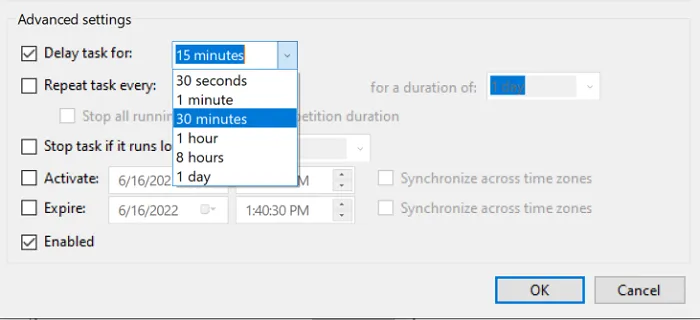
You know waaay more than I do but could it not be done through task scheduler using timed delay?

I just type in 15 sec. rather than select from the pulldown menu.

delay-task.png
 

My Computers My Computers

  • At a glance

    11 Homei7 13650HX16GB DDR5GeForce RTX 4060 Mobile
    OS
    11 Home
    Computer type
    Laptop
    Manufacturer/Model
    Asus TUF Gaming F16 (2024)
    CPU
    i7 13650HX
    Memory
    16GB DDR5
    Graphics Card(s)
    GeForce RTX 4060 Mobile
    Sound Card
    Eastern Electric MiniMax DAC Supreme; Emotiva UMC-200; Astell & Kern AK240
    Monitor(s) Displays
    Sony Bravia XR-55X90J
    Screen Resolution
    3840×2160
    Hard Drives
    512GB SSD internal
    37TB external
    PSU
    Li-ion
    Cooling
    2× Arc Flow Fans, 4× exhaust vents, 5× heatpipes
    Keyboard
    Logitech K800
    Mouse
    Logitech G402
    Internet Speed
    30Mbit/s up, 500Mbit/s down
    Browser
    FF
    Antivirus
    What's an antivirus?
  • At a glance

    11 Homei5 1135G716GB DDR4Intel Iris Xe
    Operating System
    11 Home
    Computer type
    Laptop
    Manufacturer/Model
    Medion S15450
    CPU
    i5 1135G7
    Memory
    16GB DDR4
    Graphics card(s)
    Intel Iris Xe
    Sound Card
    Eastern Electric MiniMax DAC Supreme; Emotiva UMC-200; Astell & Kern AK240
    Monitor(s) Displays
    Sony Bravia XR-55X90J
    Screen Resolution
    3840×2160
    Hard Drives
    2TB SSD internal
    37TB external
    PSU
    Li-ion
    Keyboard
    Logitech K800
    Mouse
    Logitech G402
    Internet Speed
    30Mbit/s up, 500Mbit/s down
    Browser
    FF

My Computers My Computers

  • At a glance

    11 Homei7 13650HX16GB DDR5GeForce RTX 4060 Mobile
    OS
    11 Home
    Computer type
    Laptop
    Manufacturer/Model
    Asus TUF Gaming F16 (2024)
    CPU
    i7 13650HX
    Memory
    16GB DDR5
    Graphics Card(s)
    GeForce RTX 4060 Mobile
    Sound Card
    Eastern Electric MiniMax DAC Supreme; Emotiva UMC-200; Astell & Kern AK240
    Monitor(s) Displays
    Sony Bravia XR-55X90J
    Screen Resolution
    3840×2160
    Hard Drives
    512GB SSD internal
    37TB external
    PSU
    Li-ion
    Cooling
    2× Arc Flow Fans, 4× exhaust vents, 5× heatpipes
    Keyboard
    Logitech K800
    Mouse
    Logitech G402
    Internet Speed
    30Mbit/s up, 500Mbit/s down
    Browser
    FF
    Antivirus
    What's an antivirus?
  • At a glance

    11 Homei5 1135G716GB DDR4Intel Iris Xe
    Operating System
    11 Home
    Computer type
    Laptop
    Manufacturer/Model
    Medion S15450
    CPU
    i5 1135G7
    Memory
    16GB DDR4
    Graphics card(s)
    Intel Iris Xe
    Sound Card
    Eastern Electric MiniMax DAC Supreme; Emotiva UMC-200; Astell & Kern AK240
    Monitor(s) Displays
    Sony Bravia XR-55X90J
    Screen Resolution
    3840×2160
    Hard Drives
    2TB SSD internal
    37TB external
    PSU
    Li-ion
    Keyboard
    Logitech K800
    Mouse
    Logitech G402
    Internet Speed
    30Mbit/s up, 500Mbit/s down
    Browser
    FF
Rod,

Not knowing anything about awcc.exe or why you want to have a pause before it runs, I hesitated to post at all.

You might consider using the trigger
At log on
for your TS task because that will achieve a pause between startup & running the task. There'd be nothing to stop you using a
TimeOut /T 15
pause within your batch file as well but it might no longer be needed.

I think the response from Dell in this thread will be of interest to you and might affect your decision to have a pause before starting awcc.exe
Aurora R10, AWCC.exe stopped working - Alienware-DellForums


If you do still need to delay it then
- I agree with the others that Task scheduler is the appropriate tool.
- I do not agree with the suggestion that you use the Delay function in the trigger settings. It's a random value and all you do is choose the maximum delay. I don't think that it fulfils your needs. I am still on 21H2 and I can see that HDMI's dialog box makes no mention of the random aspect of this so perhaps it's been changed in 22H2? Glaskuter's linked article shows examples of both versions of the dialog.
- If you don't want to see it or would like to minimise it to the Taskbar then see Make Task scheduler run a batch file minimised and with a specific icon - TenForums I have just re-tested an example in Windows 11 and all seems well.
- If you want general guidance about the batch file itself or about Task scheduler then just say so. Both are going to behave in the same way as they would with Windows 10.


All the best,
Denis
Thanks Denis. The problem I have is since the win 11 upgrade to 22h2 it now starts suspended. when I try most things it takes over the screen for a long time at startup. If I click on the apps icon it then works. However I think I am wrong as it is the service I want to start, not the app ( I hope that makes sense )
 

My Computers My Computers

  • At a glance

    Windows 11 Pro13th Gen Core i9 13900HX32GB DDR5 @4800MHz 2x16GBGeforce RTX 4090HX 16GB
    OS
    Windows 11 Pro
    Computer type
    Laptop
    Manufacturer/Model
    Alienware M18 R1
    CPU
    13th Gen Core i9 13900HX
    Memory
    32GB DDR5 @4800MHz 2x16GB
    Graphics Card(s)
    Geforce RTX 4090HX 16GB
    Sound Card
    Nvidia HD / Realtek ALC3254
    Monitor(s) Displays
    18" QHD+
    Screen Resolution
    25660 X 1600
    Hard Drives
    C: KIOXIA (Toshiba) 2TB KXG80ZNV2T04 NVMe PCIe M.2 SSD
    D: KIOXIA (Toshiba) 2TB KXG80ZNV2T04 NVMe PCIe M.2 SSD
    Case
    Dark Metallic Moon
    Keyboard
    Alienware M Series per-key AlienFX RGB
    Mouse
    Alienware AW610M
    Browser
    Chrome and Firefox
    Antivirus
    Norton
    Other Info
    Killer E3000 Ethernet Controller
    Killer Killer AX1690 Wi-Fi Network Adaptor Wi-Fi 6E
    Bluetooth 5.2
    Alienware Z01G Graphic Amplifier
  • At a glance

    Windows 11 Pro10th Gen i-9 10900 K32Gb Dual Channel DDR4 @ 8843MHzNvidia RTX 2080 Super
    Operating System
    Windows 11 Pro
    Computer type
    Laptop
    Manufacturer/Model
    Alienware Area 51m R2
    CPU
    10th Gen i-9 10900 K
    Memory
    32Gb Dual Channel DDR4 @ 8843MHz
    Graphics card(s)
    Nvidia RTX 2080 Super
    Sound Card
    Nvidia
    Screen Resolution
    1920 x 1080
    Hard Drives
    Hard Drive C: Samsung 2TB SSD PM981a NVMe
    Hard Drive D:Samsung 2TB SSD 970 EVO Plus
    Mouse
    Alienware 610M
    Browser
    Chrome
    Antivirus
    Norton
You can start a service via PowerShell inside the batch file if that's what you need... (sadly I don't remember how to do it off the top of my head)
 

My Computers My Computers

  • At a glance

    Windows 11 Pro βIntel® Core™ i7-1165G732 GB DDR4-3200 SDRAMIntel® Iris® Xᵉ Graphics
    OS
    Windows 11 Pro β
    Computer type
    Laptop
    Manufacturer/Model
    HP Pavilion Laptop 15-eg0070wm
    CPU
    Intel® Core™ i7-1165G7
    Memory
    32 GB DDR4-3200 SDRAM
    Graphics Card(s)
    Intel® Iris® Xᵉ Graphics
    Screen Resolution
    1920x1080
    Hard Drives
    2TB PCIe® NVMe™ M.2 SSD
  • At a glance

    macOS Ventura3.4 GHz Quad-Core Intel Core i540 GB 2400 MHz DDR4Radeon Pro 570 4 GB
    Operating System
    macOS Ventura
    Computer type
    PC/Desktop
    Manufacturer/Model
    Apple iMac 27" 5K (2017)
    CPU
    3.4 GHz Quad-Core Intel Core i5
    Memory
    40 GB 2400 MHz DDR4
    Graphics card(s)
    Radeon Pro 570 4 GB
    Monitor(s) Displays
    27" 5K, 34" UW
    Screen Resolution
    Mon 1: 5120 × 2880 Mon 2: 2560 x 1080
    Hard Drives
    32GB NVME, 1TB SSD
How to create a task scheduler event for opening program
Here’s how to create a task scheduler event to open a program


1. Open Task Scheduler (In search bar within Start Menu)

2. Create Task

3. Go to the Triggers tab

4. Click New

5. Begin the task: At logon/At startup And Tick “Delay task for:”

6. Enter 15 minutes and click OK

7. Head to the Actions tab And choose Action: Start a program

8. Browse And Choose app, click OK

9. Go to the General tab And Choose a name

10. Click OK

Done
 

My Computers My Computers

  • At a glance

    Windows 11 21H2AMD Ryzen 3 3100Corsair 8GB x 2 (16GB)Asus Nvidia Geforce GTX 1650 Super
    OS
    Windows 11 21H2
    Computer type
    PC/Desktop
    Manufacturer/Model
    Chillblast
    CPU
    AMD Ryzen 3 3100
    Motherboard
    Asus ROG Strix b450-f
    Memory
    Corsair 8GB x 2 (16GB)
    Graphics Card(s)
    Asus Nvidia Geforce GTX 1650 Super
    Monitor(s) Displays
    Dell 27" 1440p
    Screen Resolution
    1440p
    Hard Drives
    Seagate Barracuda 1TB
    256GB NVME Seagate Barracuda
    Browser
    Firefox / Edge
    Antivirus
    Windows Defender
  • At a glance

    Windows 8.1Amd E24GB
    Operating System
    Windows 8.1
    Computer type
    Laptop
    Manufacturer/Model
    HP
    CPU
    Amd E2
    Memory
    4GB
    Hard Drives
    128GB SSD
Thanks Denis. The problem I have is since the win 11 upgrade to 22h2 it now starts suspended.
Perhaps the Dell user forums can help with that?

If I click on the apps icon it then works. However I think I am wrong as it is the service I want to start, not the app ( I hope that makes sense )
Sorry, confused again.
it works ... I think I am wrong ... service ... not the app
Is running the command you mentioned in your OP what you want to do or not?
If it is then test things out by running that command in a command prompt and, if it does what you want, use a batch file to do the same and, if that does what you want, set up a TS task to automate the thing.

You have not mentioned whether or not you need to give that command Admin permission to run. This is not a big deal but must be taken into account when setting it up in Task scheduler.

Denis
 
Last edited:

My Computer My Computer

At a glance

Windows 11 Home x64 Version 25H2 Build 26200....
OS
Windows 11 Home x64 Version 25H2 Build 26200.8037

My Computers My Computers

  • At a glance

    Windows 11 21H2AMD Ryzen 3 3100Corsair 8GB x 2 (16GB)Asus Nvidia Geforce GTX 1650 Super
    OS
    Windows 11 21H2
    Computer type
    PC/Desktop
    Manufacturer/Model
    Chillblast
    CPU
    AMD Ryzen 3 3100
    Motherboard
    Asus ROG Strix b450-f
    Memory
    Corsair 8GB x 2 (16GB)
    Graphics Card(s)
    Asus Nvidia Geforce GTX 1650 Super
    Monitor(s) Displays
    Dell 27" 1440p
    Screen Resolution
    1440p
    Hard Drives
    Seagate Barracuda 1TB
    256GB NVME Seagate Barracuda
    Browser
    Firefox / Edge
    Antivirus
    Windows Defender
  • At a glance

    Windows 8.1Amd E24GB
    Operating System
    Windows 8.1
    Computer type
    Laptop
    Manufacturer/Model
    HP
    CPU
    Amd E2
    Memory
    4GB
    Hard Drives
    128GB SSD
- I do not agree with the suggestion that you use the Delay function in the trigger settings. It's a random value and all you do is choose the maximum delay. I don't think that it fulfils your needs. I am still on 21H2 and I can see that HDMI's dialog box makes no mention of the random aspect of this so perhaps it's been changed in 22H2? Glaskuter's linked article shows examples of both versions of the dialog.
There is no random aspect to the "Delay task for:" option that appears under Advanced settings on the Triggers tab of a task in Task Scheduler. I know for a fact that Microsoft has a real bad tendency to keep making all sorts of stuff that never works. But this thing really does work. It's a small miracle. :D
 

My Computers My Computers

  • At a glance

    11 Homei7 13650HX16GB DDR5GeForce RTX 4060 Mobile
    OS
    11 Home
    Computer type
    Laptop
    Manufacturer/Model
    Asus TUF Gaming F16 (2024)
    CPU
    i7 13650HX
    Memory
    16GB DDR5
    Graphics Card(s)
    GeForce RTX 4060 Mobile
    Sound Card
    Eastern Electric MiniMax DAC Supreme; Emotiva UMC-200; Astell & Kern AK240
    Monitor(s) Displays
    Sony Bravia XR-55X90J
    Screen Resolution
    3840×2160
    Hard Drives
    512GB SSD internal
    37TB external
    PSU
    Li-ion
    Cooling
    2× Arc Flow Fans, 4× exhaust vents, 5× heatpipes
    Keyboard
    Logitech K800
    Mouse
    Logitech G402
    Internet Speed
    30Mbit/s up, 500Mbit/s down
    Browser
    FF
    Antivirus
    What's an antivirus?
  • At a glance

    11 Homei5 1135G716GB DDR4Intel Iris Xe
    Operating System
    11 Home
    Computer type
    Laptop
    Manufacturer/Model
    Medion S15450
    CPU
    i5 1135G7
    Memory
    16GB DDR4
    Graphics card(s)
    Intel Iris Xe
    Sound Card
    Eastern Electric MiniMax DAC Supreme; Emotiva UMC-200; Astell & Kern AK240
    Monitor(s) Displays
    Sony Bravia XR-55X90J
    Screen Resolution
    3840×2160
    Hard Drives
    2TB SSD internal
    37TB external
    PSU
    Li-ion
    Keyboard
    Logitech K800
    Mouse
    Logitech G402
    Internet Speed
    30Mbit/s up, 500Mbit/s down
    Browser
    FF
Back
Top Bottom