Battery drain on power off laptop


Mr Livre

Member
Local time
10:52 PM
Posts
5
OS
Windows 11 pro
Hello I have a Acer Nitro ANV15-51 under Windows 11 24H2 Pro build 26100.4770 functionnalities pack 1000.26100.197.0
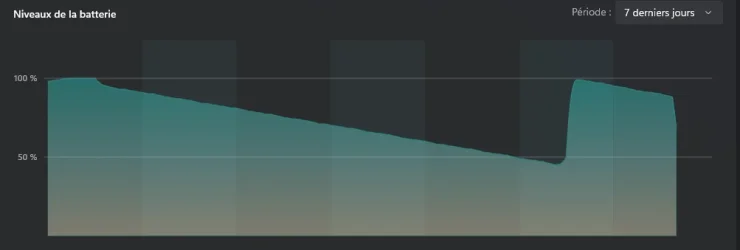
My issue is battery drain when I don't use the PC for a certain time (a week)
On powercfg /a I'm in mode S3
My setting for power button are complet shutdown
but my battery drain
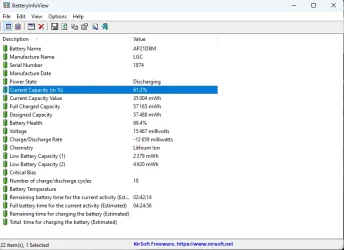
I put battery windows usage and BateryIbfoView report in attachements
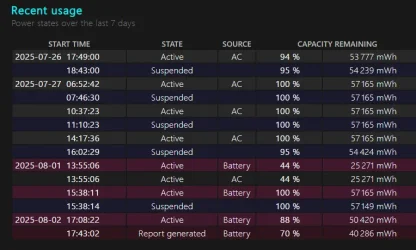
Here are the result for powercfg /batteryreport
Capture d'écran 2025-08-02 180854.webp


I don't understand why it go in suspended mode instead off

Thanks for your help
 
Windows Build/Version
26.100.4770

Attachments

  • Capture d'écran 2025-08-02 174514.webp
    Capture d'écran 2025-08-02 174514.webp
    6.7 KB · Views: 0
  • Capture d'écran 2025-08-02 180316.webp
    Capture d'écran 2025-08-02 180316.webp
    44.2 KB · Views: 0

My Computer

System One

  • OS
    Windows 11 pro
    Computer type
    PC/Desktop
    Manufacturer/Model
    Assembled
    CPU
    AMD Ryzen 9 9950X
    Motherboard
    ASUS ROG STRIX X870-F GAMING WIFI
    Memory
    Kingston FURY Beast 64 Go (2 x 32 Go) DDR5 6000 MHz CL30
    Graphics Card(s)
    MSI GeForce RTX 4070 TI SUPER 16G GAMING X SLIM
    Monitor(s) Displays
    AOC Gaming U27G3X
    Screen Resolution
    4k
    Hard Drives
    Crucial T705 2 To
    PSU
    ASUS ROG Thor 1600W Titanium
    Case
    Antec P101 Silent
    Cooling
    Cooler Master MasterLiquid 360L Core ARGB Black Edition
    Keyboard
    Logitech G413 SE
    Mouse
    Logitech G pro wireless
    Internet Speed
    2gb Fiber
    Browser
    Chrome
    Antivirus
    Bitdefender
I don't understand why it go in suspended mode instead off

Really not sure I am understanding.
If you're trying to shut it down from the power button either you are not holding the button down long enough so the laptop is going to sleep rather than shutting off ( I highly suspect this is the issue), there's an issue with your power settings, or issue with power button. Try shutting it down using the power menu or create a shutdown shortcut on your desktop to see if it works from there..
 

My Computers

System One System Two

  • OS
    Windows 11 Pro 25H2
    Computer type
    PC/Desktop
    Manufacturer/Model
    Dell Optiplex 7080
    CPU
    i9-10900 10 core 20 threads
    Motherboard
    DELL 0J37VM
    Memory
    32 gb
    Graphics Card(s)
    none-Intel UHD Graphics 630
    Sound Card
    Integrated Realtek
    Monitor(s) Displays
    Benq 27
    Screen Resolution
    2560x1440
    Hard Drives
    2x1tb Solidigm m.2 nvme /External drives 512gb Samsung m.2 sata+2tb Kingston m2.nvme
    PSU
    500w
    Case
    MT
    Cooling
    Dell Premium
    Keyboard
    Logitech wired
    Mouse
    Logitech wireless
    Internet Speed
    so slow I'm too embarrassed to tell
    Browser
    #1 Edge #2 Firefox
    Antivirus
    Defender+MWB Premium
  • Operating System
    Windows 11 Pro 24H2 26200.8457
    Computer type
    PC/Desktop
    Manufacturer/Model
    Beelink Mini PC SER5
    CPU
    AMD Ryzen 7 6800U
    Memory
    32 gb
    Graphics card(s)
    integrated
    Sound Card
    integrated
    Monitor(s) Displays
    Benq 27
    Screen Resolution
    2560x1440
    Hard Drives
    1TB Crucial nvme
    Keyboard
    Logitech wired
    Mouse
    Logitech wireless
    Internet Speed
    still too embarrassed to tell
    Browser
    Firefox
    Antivirus
    Defender
    Other Info
    System 3 is non compliant Dell 9020 i7-4770/24gb ram Win11 PRO 26200.8457
I use the start menu "turn off" to power off not the power button
 

My Computer

System One

  • OS
    Windows 11 pro
    Computer type
    PC/Desktop
    Manufacturer/Model
    Assembled
    CPU
    AMD Ryzen 9 9950X
    Motherboard
    ASUS ROG STRIX X870-F GAMING WIFI
    Memory
    Kingston FURY Beast 64 Go (2 x 32 Go) DDR5 6000 MHz CL30
    Graphics Card(s)
    MSI GeForce RTX 4070 TI SUPER 16G GAMING X SLIM
    Monitor(s) Displays
    AOC Gaming U27G3X
    Screen Resolution
    4k
    Hard Drives
    Crucial T705 2 To
    PSU
    ASUS ROG Thor 1600W Titanium
    Case
    Antec P101 Silent
    Cooling
    Cooler Master MasterLiquid 360L Core ARGB Black Edition
    Keyboard
    Logitech G413 SE
    Mouse
    Logitech G pro wireless
    Internet Speed
    2gb Fiber
    Browser
    Chrome
    Antivirus
    Bitdefender
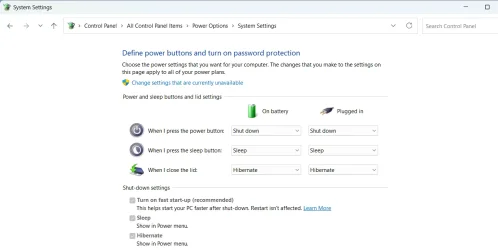
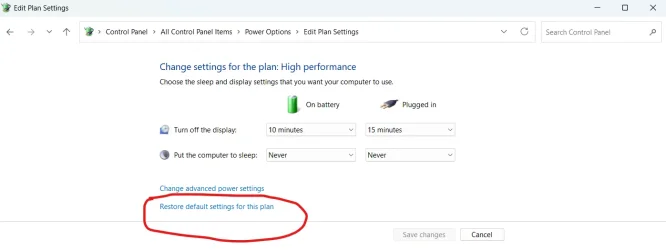
Can you show what is in your power plan?

1754152894544.webp
 

My Computers

System One System Two

  • OS
    Windows 11 Pro 25H2 26200.8524
    Computer type
    Laptop
    Manufacturer/Model
    Acemagic LX15PRO
    CPU
    AMD Ryzen 7 5825U with Radeon Graphics
    Memory
    16GB
    Screen Resolution
    1920 x 1080
    Hard Drives
    SSD 2TB
    Internet Speed
    30 Mbps
    Browser
    Brave
    Antivirus
    Webroot Secure Anywhere
    Other Info
    System 3

    Acer Swift SF114-34 laptop
    OS Windows 11 Pro 26200.8524
    CPU Pentium Silver N6000
    RAM 4GB
    SSD Samsung 970 EVO Plus SSD 2TB (an upgrade)
  • Operating System
    Windows 11 Pro 23H2 22631.2506
    Computer type
    Laptop
    Manufacturer/Model
    HP Mini 210-1090NR PC (bought in late 2009!)
    CPU
    Atom N450 1.66GHz
    Memory
    2GB
    Browser
    Brave
    Antivirus
    Webroot
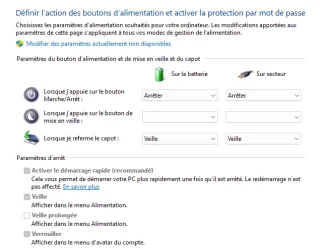
Of course
Capture d'écran 2025-08-02 184942.webp
 

My Computer

System One

  • OS
    Windows 11 pro
    Computer type
    PC/Desktop
    Manufacturer/Model
    Assembled
    CPU
    AMD Ryzen 9 9950X
    Motherboard
    ASUS ROG STRIX X870-F GAMING WIFI
    Memory
    Kingston FURY Beast 64 Go (2 x 32 Go) DDR5 6000 MHz CL30
    Graphics Card(s)
    MSI GeForce RTX 4070 TI SUPER 16G GAMING X SLIM
    Monitor(s) Displays
    AOC Gaming U27G3X
    Screen Resolution
    4k
    Hard Drives
    Crucial T705 2 To
    PSU
    ASUS ROG Thor 1600W Titanium
    Case
    Antec P101 Silent
    Cooling
    Cooler Master MasterLiquid 360L Core ARGB Black Edition
    Keyboard
    Logitech G413 SE
    Mouse
    Logitech G pro wireless
    Internet Speed
    2gb Fiber
    Browser
    Chrome
    Antivirus
    Bitdefender
Your system specs say desktop but the computer with the problem seems to be a laptop? Can you fill in the system 2 specs?

In the power plan, I suggest you reset it to defaults. It seems odd to me that the 'mise on veille' option is blank.

1754155280235.webp
 

My Computers

System One System Two

  • OS
    Windows 11 Pro 25H2 26200.8524
    Computer type
    Laptop
    Manufacturer/Model
    Acemagic LX15PRO
    CPU
    AMD Ryzen 7 5825U with Radeon Graphics
    Memory
    16GB
    Screen Resolution
    1920 x 1080
    Hard Drives
    SSD 2TB
    Internet Speed
    30 Mbps
    Browser
    Brave
    Antivirus
    Webroot Secure Anywhere
    Other Info
    System 3

    Acer Swift SF114-34 laptop
    OS Windows 11 Pro 26200.8524
    CPU Pentium Silver N6000
    RAM 4GB
    SSD Samsung 970 EVO Plus SSD 2TB (an upgrade)
  • Operating System
    Windows 11 Pro 23H2 22631.2506
    Computer type
    Laptop
    Manufacturer/Model
    HP Mini 210-1090NR PC (bought in late 2009!)
    CPU
    Atom N450 1.66GHz
    Memory
    2GB
    Browser
    Brave
    Antivirus
    Webroot
Thanks I didn't see that, I try that change and see the results.
 

My Computer

System One

  • OS
    Windows 11 pro
    Computer type
    PC/Desktop
    Manufacturer/Model
    Assembled
    CPU
    AMD Ryzen 9 9950X
    Motherboard
    ASUS ROG STRIX X870-F GAMING WIFI
    Memory
    Kingston FURY Beast 64 Go (2 x 32 Go) DDR5 6000 MHz CL30
    Graphics Card(s)
    MSI GeForce RTX 4070 TI SUPER 16G GAMING X SLIM
    Monitor(s) Displays
    AOC Gaming U27G3X
    Screen Resolution
    4k
    Hard Drives
    Crucial T705 2 To
    PSU
    ASUS ROG Thor 1600W Titanium
    Case
    Antec P101 Silent
    Cooling
    Cooler Master MasterLiquid 360L Core ARGB Black Edition
    Keyboard
    Logitech G413 SE
    Mouse
    Logitech G pro wireless
    Internet Speed
    2gb Fiber
    Browser
    Chrome
    Antivirus
    Bitdefender

Latest Support Threads

Back
Top Bottom