BD-DVD SATA Drive disappeared after populating PCIe2.0x16 slot with NVMe M.2-to-PCIe adapter card.


suatcini54

Well-known member
Power User
VIP
Local time
1:16 PM
Posts
598
OS
Windows 11 Pro build 26200.8524
I bought a M.2 NVMe-to-PCIe adapter card and fitted it in PCIe 2.0 x16 slot running at x4 speed. Before the change I disabled the other drives in BIOS except the DVD drive. They are still disabled.

M.2 NVMe drive has Windows 11 Build 26200.5761 on it.

When I started the PC, Windows 11 re-configured itself ( so I assume) and started to run properly.

M.2 NVMe drive was previously on a native M.2 slot and was running at x2 speed. I wanted to increase speed a little bit. Now it is running at x4 speed.
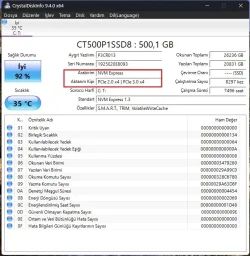
Crucial_NVMe-2.webp

But this operation had a negative side effect. My BD-DVD drive connected at SATA 1 port has disappeared from Device Manager and Windows Explorer. Instead, a new disk drive appeared and asks me to initialize this disk drive when I start Disk Management tool.
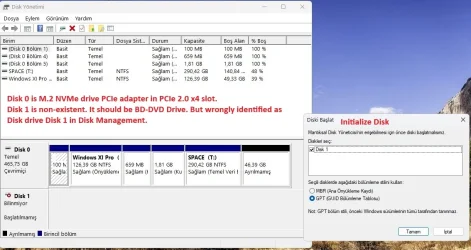
Disk_1.webp

When I select to use GPT (GUID Partition Table) and press O.K., I get an error: Virtual Disk Manager /Wrong operation.
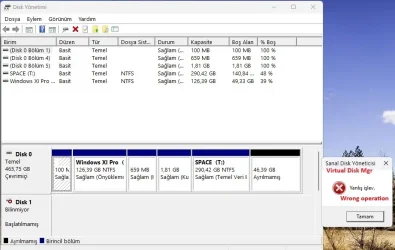
Disk_1_1.webp

Did anyone else here have a disappearing DVD drive before and is there a solution other than removing the DVD drive or M.2-to-PCIe adapter ?
 

My Computers

System One System Two

  • OS
    Windows 11 Pro build 26200.8524
    Computer type
    PC/Desktop
    Manufacturer/Model
    Home Built
    CPU
    Intel i7-4790
    Motherboard
    Asus H97 Pro Gamer with add-on TPM1.2 module
    Memory
    Teams DDR3-1600 4x4 GB
    Graphics Card(s)
    MSI Nvidia GeForce GTX 1050Ti
    Sound Card
    Realtek ALC1150
    Monitor(s) Displays
    Dell P2425D
    Screen Resolution
    2560 by 1440 pixels
    Hard Drives
    Corsair NVMe M.2 Core XT 1000 GB (Windows 11 v.25H2); Samsung SATA Evo 870 500 GB (Windows 11 v.25H2);
    PSU
    Corsair HX850
    Case
    Gigabyte Solo 210
    Cooling
    Zalman CNPS7X Tower
    Keyboard
    Microsoft AIO Wireless (includes touchpad)
    Mouse
    HP S1000 Plus Wireless
    Internet Speed
    500 Mb fiber optic
    Browser
    Chrome; MS Edge
    Antivirus
    Windows Defender
  • Operating System
    MacOS 12 Monterey
    Computer type
    Laptop
    Manufacturer/Model
    Apple Macbook Air
    CPU
    Intel Core i5
    Memory
    8 GB
    Graphics card(s)
    Intel integrated
    Screen Resolution
    1440 by 900 pixels
    Hard Drives
    128 GB
    Keyboard
    Built-in
    Mouse
    Microsoft Wireless
    Internet Speed
    802.11 ac
    Browser
    Chrome; Safari
    Antivirus
    N/A
I do know that using NVME drives takes a SATA port up when used.
 

My Computer

System One

  • OS
    Win 11 Pro 25H2 26200.8524
    Computer type
    PC/Desktop
    Manufacturer/Model
    Custom
    CPU
    Intel i5-12400F
    Motherboard
    MSI PRO B760M P
    Memory
    2 x16gb DDR4 Patriot Viper Elite II 4000MHz
    Graphics Card(s)
    ASUS GeForce RTX 3060 Dual OC 12GB
    Sound Card
    onboard Realtek
    Monitor(s) Displays
    KTC 32 inch 180Hz Curved Gaming Monitor
    Screen Resolution
    2560x1440
    Hard Drives
    1x SP 512GB NVME (Windows)
    1x 2TB SSD (Downloads)
    1x 2TB BX500 (Games)
    1x 2TB NVME (Steam)
    1x 1TB NVME (Macrium, Stuff)
    PSU
    CORSAIR RM750e (2025) Platinum Fully Modular
    Case
    CORSAIR Frame 4000D RS White
    Cooling
    Thermalright Assassin X120 SE ARGB White
    Keyboard
    Z-88 RGB Mechanical White
    Mouse
    Red Dragon 612 Predator RGB
    Internet Speed
    750/50
    Browser
    Chrome
    Antivirus
    Windows
Thank you @Dwarfr66 for your prompt reply.

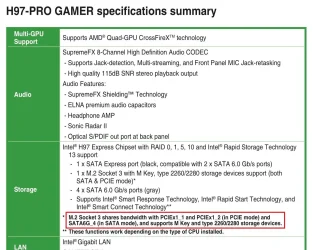
According to my M/B manual, PCIe NVMe drive takes 2 PCIe x1 slots out in PCIe mode and takes SATA 4 port out in SATA mode. Since my adapter card is for M.2 PCIe NVMe drives, it does not touch SATA ports. Besides, my DVD drive is in SATA port 1 and not in SATA port 4 even if I have used M.2 SATA drive.

WhatsApp Görsel 2025-09-02 saat 13.18.36_f275330b.webp
 

My Computers

System One System Two

  • OS
    Windows 11 Pro build 26200.8524
    Computer type
    PC/Desktop
    Manufacturer/Model
    Home Built
    CPU
    Intel i7-4790
    Motherboard
    Asus H97 Pro Gamer with add-on TPM1.2 module
    Memory
    Teams DDR3-1600 4x4 GB
    Graphics Card(s)
    MSI Nvidia GeForce GTX 1050Ti
    Sound Card
    Realtek ALC1150
    Monitor(s) Displays
    Dell P2425D
    Screen Resolution
    2560 by 1440 pixels
    Hard Drives
    Corsair NVMe M.2 Core XT 1000 GB (Windows 11 v.25H2); Samsung SATA Evo 870 500 GB (Windows 11 v.25H2);
    PSU
    Corsair HX850
    Case
    Gigabyte Solo 210
    Cooling
    Zalman CNPS7X Tower
    Keyboard
    Microsoft AIO Wireless (includes touchpad)
    Mouse
    HP S1000 Plus Wireless
    Internet Speed
    500 Mb fiber optic
    Browser
    Chrome; MS Edge
    Antivirus
    Windows Defender
  • Operating System
    MacOS 12 Monterey
    Computer type
    Laptop
    Manufacturer/Model
    Apple Macbook Air
    CPU
    Intel Core i5
    Memory
    8 GB
    Graphics card(s)
    Intel integrated
    Screen Resolution
    1440 by 900 pixels
    Hard Drives
    128 GB
    Keyboard
    Built-in
    Mouse
    Microsoft Wireless
    Internet Speed
    802.11 ac
    Browser
    Chrome; Safari
    Antivirus
    N/A
You can put bd drive on external usb case
 

My Computer

System One

  • OS
    Windows 11 Pro
    Computer type
    PC/Desktop
    CPU
    Intel i9 13900KS
    Motherboard
    Asus Maximus Z790 Hero
    Memory
    G.Skill DDR5 32gb 6400mhz
    Graphics Card(s)
    MSI RTX4090 Suprim Liquid
    Sound Card
    Sound Blaster ZxR
    Monitor(s) Displays
    MSI mpg321ur-qd
    Screen Resolution
    4K 144 hz
    Hard Drives
    Samsung 980 Pro 1TB and 2TB and Samsung 860 Pro 4TB
    PSU
    Corsair RMx Shift 1200watt
    Case
    Cooler Master COSMOS C700P
    Cooling
    Asus Ryujin II
    Keyboard
    Logitech G413
    Mouse
    Asus ROG Strix Impact II
    Internet Speed
    100Mbps
    Browser
    Egde Chromium
    Antivirus
    Kaspersky
Thank you @valkryie999 for the advice. I think there must be some confusion in Windows 11's way of handling hardware. Since Windows has been running for a long time - more than 6 years - on the PC and there have been many upgrades and updates, I decided to re-install Windows 11 from scratch and see if BD-DVD drive was still unrecognized or recognized as hard disk drive.
 

My Computers

System One System Two

  • OS
    Windows 11 Pro build 26200.8524
    Computer type
    PC/Desktop
    Manufacturer/Model
    Home Built
    CPU
    Intel i7-4790
    Motherboard
    Asus H97 Pro Gamer with add-on TPM1.2 module
    Memory
    Teams DDR3-1600 4x4 GB
    Graphics Card(s)
    MSI Nvidia GeForce GTX 1050Ti
    Sound Card
    Realtek ALC1150
    Monitor(s) Displays
    Dell P2425D
    Screen Resolution
    2560 by 1440 pixels
    Hard Drives
    Corsair NVMe M.2 Core XT 1000 GB (Windows 11 v.25H2); Samsung SATA Evo 870 500 GB (Windows 11 v.25H2);
    PSU
    Corsair HX850
    Case
    Gigabyte Solo 210
    Cooling
    Zalman CNPS7X Tower
    Keyboard
    Microsoft AIO Wireless (includes touchpad)
    Mouse
    HP S1000 Plus Wireless
    Internet Speed
    500 Mb fiber optic
    Browser
    Chrome; MS Edge
    Antivirus
    Windows Defender
  • Operating System
    MacOS 12 Monterey
    Computer type
    Laptop
    Manufacturer/Model
    Apple Macbook Air
    CPU
    Intel Core i5
    Memory
    8 GB
    Graphics card(s)
    Intel integrated
    Screen Resolution
    1440 by 900 pixels
    Hard Drives
    128 GB
    Keyboard
    Built-in
    Mouse
    Microsoft Wireless
    Internet Speed
    802.11 ac
    Browser
    Chrome; Safari
    Antivirus
    N/A
Have you tried to move the BD-DVD drive to a different SATA port?

BTW, my original motherboard had one M.2 port. I added a 2nd M.2 drive by installing a PCIe card with a M.2 port. I had no conflicts with the BD-DVD SATA drive.
 

My Computers

System One System Two

  • OS
    Windows 11 Pro 25H2 (26200.6901)
    Computer type
    Laptop
    Manufacturer/Model
    ASUS TUF Gaming A15 (2022)
    CPU
    AMD Ryzen 7 6800H with Radeon 680M GPU (486MB RAM)
    Memory
    Crucial DDR5-4800 (2400MHz) 32GB (2 x 16GB)
    Graphics Card(s)
    NVIDIA RTX 3060 Laptop (6GB RAM)
    Sound Card
    n/a
    Monitor(s) Displays
    15.6-inch
    Screen Resolution
    1920x1080 300Hz
    Hard Drives
    2 x Samsung 990 Evo Plus (2TB M.2 NVME SSD)
    PSU
    n/a
    Mouse
    Wireless Mouse M510
    Internet Speed
    2100Mbps/300Mbps
    Browser
    Firefox
    Antivirus
    Malwarebytes
  • Operating System
    Windows 11 Pro 25H2 (26200.8246)
    Computer type
    PC/Desktop
    Manufacturer/Model
    Custom build
    CPU
    AMD Ryzen 7 5700X3D
    Motherboard
    ASUS ROG Strix B550-F Gaming WiFi II
    Memory
    G.SKILL Flare X 32GB (2x16GB) DDR4
    Graphics card(s)
    ASUS ROG-STRIX-RTX3060TI-08G-V2-GAMING (RTX 3060-Ti, 8GB RAM)
    Monitor(s) Displays
    Samsung G50D IPS 27"
    Screen Resolution
    1440p/180Hz
    Hard Drives
    SAMSUNG 990 EVO Plus (2TB] M.2 NVME SSD
    SAMSUNG 990 EVO Plus (4TB) M.2 NVME SSD
    PSU
    Corsair RM750x (750 watts)
    Case
    Cooler Master MasterCase 5
    Cooling
    Scythe Mugen 6
    Keyboard
    Logitech K520 (MK540 keyboard/mouse combo)
    Mouse
    Logitech M310 (MK540 keyboard/mouse combo)
    Internet Speed
    2100 Mbps down / 300 Mbps up
    Browser
    Firefox, Edge, Chrome
    Antivirus
    Malwarebytes (Premium)
    Other Info
    ASUS Blu-ray Burner BW-16D1HT (SATA) || Western Digital Easystore 20TB USB 3.0 external hard drive used with Acronis True Image 2025 backup software || HP OfficeJet Pro 6975 Printer/Scanner
@MisterEd No, I haven't tested another SATA port. I clean-installed Windows 11 24H2 because that was easier than installing a SATA cable to an empty SATA port in a crowded PC case. Surprisingly, the mysterious drive has gone after clean-installation. Then I started to install hardware drivers. Asus chipset driver installation unfortunately re-created the mysterious drive again. I believe Asus chipset driver plus Crucial NVMe drive in NVMe-to-PCIe adapter card did not get along well. End of story.

Anyway, thanks for the idea.
 

My Computers

System One System Two

  • OS
    Windows 11 Pro build 26200.8524
    Computer type
    PC/Desktop
    Manufacturer/Model
    Home Built
    CPU
    Intel i7-4790
    Motherboard
    Asus H97 Pro Gamer with add-on TPM1.2 module
    Memory
    Teams DDR3-1600 4x4 GB
    Graphics Card(s)
    MSI Nvidia GeForce GTX 1050Ti
    Sound Card
    Realtek ALC1150
    Monitor(s) Displays
    Dell P2425D
    Screen Resolution
    2560 by 1440 pixels
    Hard Drives
    Corsair NVMe M.2 Core XT 1000 GB (Windows 11 v.25H2); Samsung SATA Evo 870 500 GB (Windows 11 v.25H2);
    PSU
    Corsair HX850
    Case
    Gigabyte Solo 210
    Cooling
    Zalman CNPS7X Tower
    Keyboard
    Microsoft AIO Wireless (includes touchpad)
    Mouse
    HP S1000 Plus Wireless
    Internet Speed
    500 Mb fiber optic
    Browser
    Chrome; MS Edge
    Antivirus
    Windows Defender
  • Operating System
    MacOS 12 Monterey
    Computer type
    Laptop
    Manufacturer/Model
    Apple Macbook Air
    CPU
    Intel Core i5
    Memory
    8 GB
    Graphics card(s)
    Intel integrated
    Screen Resolution
    1440 by 900 pixels
    Hard Drives
    128 GB
    Keyboard
    Built-in
    Mouse
    Microsoft Wireless
    Internet Speed
    802.11 ac
    Browser
    Chrome; Safari
    Antivirus
    N/A
@MisterEd No, I haven't tested another SATA port. I clean-installed Windows 11 24H2 because that was easier than installing a SATA cable to an empty SATA port in a crowded PC case. Surprisingly, the mysterious drive has gone after clean-installation. Then I started to install hardware drivers. Asus chipset driver installation unfortunately re-created the mysterious drive again. I believe Asus chipset driver plus Crucial NVMe drive in NVMe-to-PCIe adapter card did not get along well. End of story.

Anyway, thanks for the idea.
I understand that problem. If I have three desktop computers. They all have ASUS motherboards. It is a real pain to get at the SATA ports on the motherboard. I usually have to practically dismantle the computer to get at these ports.

BTW, a few hours ago I was working on an old computer. It has 2 Samsung 870 EVO SSDs connected to SATA ports. It has 2 external HDDs connected to USB 3.0 ports on a PCIe card. had to replace a dual USB 3.0 front panel bracket. After I was done I put the card back in. When I booted again I was shocked to see that only one of the Samsung SSDs showed up. Neither of the external HDDs showed up either.

When I checked inside the computer I saw the problem. I had plugged the PCIe card into a PCIe x16 instead of a PCIe x1 slot. It made sense that the external HDDs did not show up but I don't know why one of the SSDs connected to SATA did not show up. After I moved the card to the PCIe x1 slot and booted the computer all 4 drives showed up as expected.

BTW, I have one desktop computer which I replaced the motherboard with a ASUS PRIME X370-PRO motherboard. In a previous setup it booted from the onboard M.2 NVME SSD connector. I connected a 2nd M.2 NVME SSD using a PCIe adapter card. Currently the computer has 3 SATA SSDs. When I am ready to upgrade to Windows 11 I will put the 2 M.2 NVME SSDs back in. It worked fine in the past so I expected no problems.
 

My Computers

System One System Two

  • OS
    Windows 11 Pro 25H2 (26200.6901)
    Computer type
    Laptop
    Manufacturer/Model
    ASUS TUF Gaming A15 (2022)
    CPU
    AMD Ryzen 7 6800H with Radeon 680M GPU (486MB RAM)
    Memory
    Crucial DDR5-4800 (2400MHz) 32GB (2 x 16GB)
    Graphics Card(s)
    NVIDIA RTX 3060 Laptop (6GB RAM)
    Sound Card
    n/a
    Monitor(s) Displays
    15.6-inch
    Screen Resolution
    1920x1080 300Hz
    Hard Drives
    2 x Samsung 990 Evo Plus (2TB M.2 NVME SSD)
    PSU
    n/a
    Mouse
    Wireless Mouse M510
    Internet Speed
    2100Mbps/300Mbps
    Browser
    Firefox
    Antivirus
    Malwarebytes
  • Operating System
    Windows 11 Pro 25H2 (26200.8246)
    Computer type
    PC/Desktop
    Manufacturer/Model
    Custom build
    CPU
    AMD Ryzen 7 5700X3D
    Motherboard
    ASUS ROG Strix B550-F Gaming WiFi II
    Memory
    G.SKILL Flare X 32GB (2x16GB) DDR4
    Graphics card(s)
    ASUS ROG-STRIX-RTX3060TI-08G-V2-GAMING (RTX 3060-Ti, 8GB RAM)
    Monitor(s) Displays
    Samsung G50D IPS 27"
    Screen Resolution
    1440p/180Hz
    Hard Drives
    SAMSUNG 990 EVO Plus (2TB] M.2 NVME SSD
    SAMSUNG 990 EVO Plus (4TB) M.2 NVME SSD
    PSU
    Corsair RM750x (750 watts)
    Case
    Cooler Master MasterCase 5
    Cooling
    Scythe Mugen 6
    Keyboard
    Logitech K520 (MK540 keyboard/mouse combo)
    Mouse
    Logitech M310 (MK540 keyboard/mouse combo)
    Internet Speed
    2100 Mbps down / 300 Mbps up
    Browser
    Firefox, Edge, Chrome
    Antivirus
    Malwarebytes (Premium)
    Other Info
    ASUS Blu-ray Burner BW-16D1HT (SATA) || Western Digital Easystore 20TB USB 3.0 external hard drive used with Acronis True Image 2025 backup software || HP OfficeJet Pro 6975 Printer/Scanner
Could be that the power supply cannot provide enough power for the DVD drive to work properly? Try another SATA power cable, if you have available. Also try another SATA port. It might also be that you accidentally disconnected the SATA cable from the DVD or the motherboard (not good connection) and is not identified properly. Try removing it and connect it again. See BIOS if you have to configure anything at the storage section. If the issue is due to chipset driver, you may need to reinstall Windows. This time don't install the driver from Asus, let Windows Update find anything missing. Install only the graphics drivers for best performance.
 
Last edited:

My Computers

System One System Two

  • OS
    Windows 11 Pro 23H2 (5699), 25H2 (8457)
    Computer type
    Laptop
    Manufacturer/Model
    Acer Extensa 5630EZ
    CPU
    Mobile DualCore Intel Core 2 Duo T7250, 2000 MHz
    Motherboard
    Acer Extensa 5630
    Memory
    4GB
    Graphics Card(s)
    Mobile Intel(R) GMA 4500M (Mobile 4 series)
    Sound Card
    Realtek ALC268 @ Intel 82801IB ICH9 - High Definition Audio Controller
    Monitor(s) Displays
    1
    Screen Resolution
    1280x800
    Hard Drives
    Samsung SSD 850 EVO 250GB SATA Device (250 GB, SATA-III)
    Internet Speed
    VDSL 50 Mbps
    Browser
    MICROSOFT EDGE
    Antivirus
    WINDOWS DEFENDER
    Other Info
    Legacy MBR installation, no TPM, no Secure Boot, no WDDM 2.0 graphics drivers, no SSE4.2, cannot get more unsupported ;) This is only my test laptop. I had installed Windows 11 here before upgrading my main PC. For my main PC I use everyday see my 2nd system specs.
  • Operating System
    Windows 11 Pro v25H2 (build 26200.8457)
    Computer type
    PC/Desktop
    Manufacturer/Model
    Custom-built PC
    CPU
    Intel Core-i7 3770 3.40GHz s1155 (3rd generation)
    Motherboard
    Asus P8H61 s1155 ATX
    Memory
    2x Kingston Hyper-X Blu 8GB DDR3-1600
    Graphics card(s)
    GIGABYTE GeForce RTX 3050 WINDFORCE OC V2 6GB (GV-N3050WF2OCV2-6GD)
    Sound Card
    Realtek HD audio (ALC887)
    Monitor(s) Displays
    Sony Bravia KDL-19L4000 19" LCD TV via VGA
    Screen Resolution
    1440x900 32-bit 60Hz
    Hard Drives
    WD Blue SA510 2.5 1000GB SSD as system disk, Western Digital Caviar Purple 4TB SATA III (WD40PURZ) as second
    PSU
    Thermaltake Litepower RGB 550W Full Wired
    Case
    SUPERCASE MIDI-TOWER
    Cooling
    Deepcool Gamma Archer CPU cooler, 1x 8cm fan at the back
    Keyboard
    Mitsumi 101-key PS/2
    Mouse
    Sunnyline OptiEye PS/2
    Internet Speed
    100Mbps
    Browser
    Microsoft Edge, Mozilla Firefox
    Antivirus
    Microsoft Windows Defender
    Other Info
    Legacy BIOS (MBR) installation, no TPM, no Secure Boot, WDDM 3.0 graphics drivers, WEI score 7.4
Thank you both @MisterEd and @spapakons for your advice.

DVD drive works well in the other Windows 11 installation on the same PC. So cable connection seems secured. Besides cable heads have latches to secure against accidental removal.

I believe the NVMe drive in NVMe-to-PCIe adapter did not go well in the secondary PCIe 2.0 x16 slot (works at x4 speed). So I removed the adapter and ordered an NVMe-to-USB adapter. I will not re-insert this drive into its native M.2 socket on the motherboard and will use the drive itself as a take-along data drive.
 

My Computers

System One System Two

  • OS
    Windows 11 Pro build 26200.8524
    Computer type
    PC/Desktop
    Manufacturer/Model
    Home Built
    CPU
    Intel i7-4790
    Motherboard
    Asus H97 Pro Gamer with add-on TPM1.2 module
    Memory
    Teams DDR3-1600 4x4 GB
    Graphics Card(s)
    MSI Nvidia GeForce GTX 1050Ti
    Sound Card
    Realtek ALC1150
    Monitor(s) Displays
    Dell P2425D
    Screen Resolution
    2560 by 1440 pixels
    Hard Drives
    Corsair NVMe M.2 Core XT 1000 GB (Windows 11 v.25H2); Samsung SATA Evo 870 500 GB (Windows 11 v.25H2);
    PSU
    Corsair HX850
    Case
    Gigabyte Solo 210
    Cooling
    Zalman CNPS7X Tower
    Keyboard
    Microsoft AIO Wireless (includes touchpad)
    Mouse
    HP S1000 Plus Wireless
    Internet Speed
    500 Mb fiber optic
    Browser
    Chrome; MS Edge
    Antivirus
    Windows Defender
  • Operating System
    MacOS 12 Monterey
    Computer type
    Laptop
    Manufacturer/Model
    Apple Macbook Air
    CPU
    Intel Core i5
    Memory
    8 GB
    Graphics card(s)
    Intel integrated
    Screen Resolution
    1440 by 900 pixels
    Hard Drives
    128 GB
    Keyboard
    Built-in
    Mouse
    Microsoft Wireless
    Internet Speed
    802.11 ac
    Browser
    Chrome; Safari
    Antivirus
    N/A
If rearranging the buses fails, I suggest connecting the BD drive to USB internally. Years ago I wanted to have as many DVD drives as possible in a year 2009 computer with tons of SATA ports. This was more or less to avoid... USB sticks!!!! (they were expensive in that age, and I like optical drives myself, several DVDs working in parallel have a good bandwidth, this was to backup my disk images to external storage). Well, one could say, if you have 14 or 18 SATA ports, 1 IDE port for 2 drives, and 2 SATA disks using it all, the limit for the DVDs is the case lol.

The problem is that, simplifying, the limit for optical drives (unlike HDDs or SSDs) is the NUMBER OF BUSES, not the number of ports (and this btw might be related to your problem, but Idk the map of buses and ports in your motherboard; if you have a spare SSD or HDD, you might try it in place of your BD drive and see if it works correctly and the problem is that optical drives are buses hogs).

How many buses did I have available for my DVD drives in parallel?

- 1 IDE bus.
- 1 "main" SATA bus (provided by the motherboard's south bridge).
- 1 "additional" SATA bus (provided by an independent controller that the motherboard had).
- The USB bus, 2.0 btw (I did never try printing, scanning or using games through USB controllers while attending the 4 DVD recorders in parallel, so Idk what would have happened, keyboard and mouse were PS/2).

To connect the latter of my recorders (it was IDE, but the critical adapter could attend SATA too) I found this:

- IDE/SATA to USB-A male adapter.
- USB-A female to internal USB plug (a short cable of maybe 10 cm).

I operated this more or less monthly during several years.

PS: are you dual booting? It wouldn't surprise me that there's a difference depending on if the new drive has a working/active Windows installation or it's "like a data drive" b/c the working/active Windows is in another drive. I cannot concrete more but I've heard weird stories with M2 to PCIe adapters.
 

My Computer

System One

  • OS
    Windows 11
    Manufacturer/Model
    MeLE Quieter 2Q (fanless miniPC)
    CPU
    Celeron J4125 (10th gen)
    Memory
    8GB DDR4
    Monitor(s) Displays
    Samsung SyncMaster T260
    Screen Resolution
    1920x1200
    Hard Drives
    256GB eMMC (Windows)
    2TB USB3 HDD Toshiba (Data)
If it is a drivers issue, I would reinstall Windows. Since it is a fresh installation is it much faster and better than trying to fix it. But don't install the chipset drivers this time. Windows should find automatically any chipset driver for that old motherboard. I would only download and install the graphics driver since I want the full package, not only the basic driver from Windows Update.
 

My Computers

System One System Two

  • OS
    Windows 11 Pro 23H2 (5699), 25H2 (8457)
    Computer type
    Laptop
    Manufacturer/Model
    Acer Extensa 5630EZ
    CPU
    Mobile DualCore Intel Core 2 Duo T7250, 2000 MHz
    Motherboard
    Acer Extensa 5630
    Memory
    4GB
    Graphics Card(s)
    Mobile Intel(R) GMA 4500M (Mobile 4 series)
    Sound Card
    Realtek ALC268 @ Intel 82801IB ICH9 - High Definition Audio Controller
    Monitor(s) Displays
    1
    Screen Resolution
    1280x800
    Hard Drives
    Samsung SSD 850 EVO 250GB SATA Device (250 GB, SATA-III)
    Internet Speed
    VDSL 50 Mbps
    Browser
    MICROSOFT EDGE
    Antivirus
    WINDOWS DEFENDER
    Other Info
    Legacy MBR installation, no TPM, no Secure Boot, no WDDM 2.0 graphics drivers, no SSE4.2, cannot get more unsupported ;) This is only my test laptop. I had installed Windows 11 here before upgrading my main PC. For my main PC I use everyday see my 2nd system specs.
  • Operating System
    Windows 11 Pro v25H2 (build 26200.8457)
    Computer type
    PC/Desktop
    Manufacturer/Model
    Custom-built PC
    CPU
    Intel Core-i7 3770 3.40GHz s1155 (3rd generation)
    Motherboard
    Asus P8H61 s1155 ATX
    Memory
    2x Kingston Hyper-X Blu 8GB DDR3-1600
    Graphics card(s)
    GIGABYTE GeForce RTX 3050 WINDFORCE OC V2 6GB (GV-N3050WF2OCV2-6GD)
    Sound Card
    Realtek HD audio (ALC887)
    Monitor(s) Displays
    Sony Bravia KDL-19L4000 19" LCD TV via VGA
    Screen Resolution
    1440x900 32-bit 60Hz
    Hard Drives
    WD Blue SA510 2.5 1000GB SSD as system disk, Western Digital Caviar Purple 4TB SATA III (WD40PURZ) as second
    PSU
    Thermaltake Litepower RGB 550W Full Wired
    Case
    SUPERCASE MIDI-TOWER
    Cooling
    Deepcool Gamma Archer CPU cooler, 1x 8cm fan at the back
    Keyboard
    Mitsumi 101-key PS/2
    Mouse
    Sunnyline OptiEye PS/2
    Internet Speed
    100Mbps
    Browser
    Microsoft Edge, Mozilla Firefox
    Antivirus
    Microsoft Windows Defender
    Other Info
    Legacy BIOS (MBR) installation, no TPM, no Secure Boot, WDDM 3.0 graphics drivers, WEI score 7.4
Back
Top Bottom