Best FREE Easy To use Backup & Recovery suggestions please.


My Computers My Computers

  • At a glance

    Windows 11 WorkstationRyzen 9 5950XCorsair Vengeance RGB PRO Black 64GB (4x16GB)...ASUS AMD Radeon RX 6900 XT 16GB ROG Strix LC OC
    OS
    Windows 11 Workstation
    Computer type
    PC/Desktop
    Manufacturer/Model
    doofenshmirtz evil incorporated
    CPU
    Ryzen 9 5950X
    Motherboard
    Asus ROG Crosshair VIII Formula
    Memory
    Corsair Vengeance RGB PRO Black 64GB (4x16GB) 3600MHz AMD Ryzen Tuned DDR4
    Graphics Card(s)
    ASUS AMD Radeon RX 6900 XT 16GB ROG Strix LC OC
    Sound Card
    Sound BlasterX Katana
    Monitor(s) Displays
    3 x27" Dell U2724D & 1 x 34" Dell U3415W
    Hard Drives
    Samsung 980 Pro 1TB M.2 2280 PCI-e 4.0 x4 NVMe Solid State
    Drive
    PSU
    ASUS ROG THOR 850W 80 Plus Platinum
    Case
    ASUS ROG Strix Helios Midi-Tower ARGB Gaming Case
    Cooling
    ASUS ROG Strix LC Performance RGB AIO CPU Liquid Cooler - 360mm
    Keyboard
    Logi Ergo
    Mouse
    Logitech MX Vertical
    Internet Speed
    1000/200 Mbps
    Browser
    Chrome
    Antivirus
    Windows Defender, Malwarebytes Pro
    Other Info
    HP M281 Printer
    Logitech Brio Stream webcam
    Logitech G Yeti orb mic
  • At a glance

    Windows 11 ProSnapdragon X2 Plus64GB
    Operating System
    Windows 11 Pro
    Computer type
    Laptop
    Manufacturer/Model
    Surface Laptop
    CPU
    Snapdragon X2 Plus
    Memory
    64GB
    Monitor(s) Displays
    15"
  • Nothing to see here.

Free -- easy even for die hard Windows users

Gparted (stand alone bootable iso) --- create a bootable usb via rufus etc.


complete GUI full partition manager --GUI almost identical to typical Windows partition managers plus support for a lot more file systems. -- Copy, re-size, check and repair data etc etc. Plus for those who want to use it there's a built in terminal based on debian -- so you can use the dd command or other stuff if you are up to it.

It's 100% freeware. The only snag is that unlike commercial backup systems you don't get compression or differential / incremental facilities but the OP wanted a FREE easy to use system. I've used this for years and it's always worked 100%.

cheers
jimbo
That's interesting - how does GParted make a system image? I have GParted within Parted Magic - is the standalone one different/more features?
 

My Computers My Computers

  • At a glance

    Windows 11 Home 25H2Core i5-1035G132gb
    OS
    Windows 11 Home 25H2
    Computer type
    Laptop
    Manufacturer/Model
    HP Pavilion 14-ce3606sa
    CPU
    Core i5-1035G1
    Memory
    32gb
    Hard Drives
    Samsung 870 evo sata ssd
    Cooling
    Could be better
    Internet Speed
    50 mbps Starlink
    Browser
    Firefox
    Other Info
    Originally came installed with a 500gb H10 Optane ssd
  • At a glance

    Windows 11 HomeIntel Core i5-1035G116gb
    Operating System
    Windows 11 Home
    Computer type
    Laptop
    Manufacturer/Model
    HP Pavilion ce3606sa
    CPU
    Intel Core i5-1035G1
    Memory
    16gb
    Hard Drives
    Hynix Gold P31 2TB
    Internet Speed
    200mbps Starlink
    Browser
    Firefox
    Antivirus
    Defender
I think a major issue is GParted doesn't offer anything but full backups, that would consume a lot of disk in sort order if you have a large quantity of data! The free Hasleo Backup Suite has those capabilities and is very easy to use.
 

My Computers My Computers

  • At a glance

    Win 11 Pro 25H2, Build 26200.8655Intel Core i5 1450064GB DDR4GeForce RTX 4060
    OS
    Win 11 Pro 25H2, Build 26200.8655
    Computer type
    PC/Desktop
    Manufacturer/Model
    Home Brew
    CPU
    Intel Core i5 14500
    Motherboard
    Gigabyte B760M G P WIFI
    Memory
    64GB DDR4
    Graphics Card(s)
    GeForce RTX 4060
    Sound Card
    Chipset Realtek
    Monitor(s) Displays
    LG 45" Ultragear, Acer 24" 1080p
    Screen Resolution
    5120x1440, 1920x1080
    Hard Drives
    Crucial P310 2TB 2280 PCIe Gen4 3D NAND NVMe M.2 SSD (O/S)
    Silicon Power 2TB US75 NVMe PCIe Gen4 M.2 2280 SSD (backup)
    Crucial BX500 2TB 3D NAND (2nd backup)
    Seagate 4TB Ironwolf, rotating HDD archive files
    External off-line backup Drives: 2 NVMe 4TB drives in external enclosures
    PSU
    Thermaltake Toughpower GF3 750W
    Case
    LIAN LI LANCOOL 216 E-ATX PC Case
    Cooling
    Lots of fans!
    Keyboard
    Microsoft Comfort Curve 2000
    Mouse
    Logitech G305
    Internet Speed
    Verizon FiOS 1GB
    Browser
    Firefox
    Antivirus
    Malware Bytes & Windows Defender Security
  • At a glance

    Win 11 Pro 25H2, Build 26200.8524Intel Core i5 1440032GB DDR5Intel 700 Embedded GPU
    Operating System
    Win 11 Pro 25H2, Build 26200.8524
    Computer type
    PC/Desktop
    Manufacturer/Model
    Home Brew
    CPU
    Intel Core i5 14400
    Motherboard
    Gigabyte B760M DS3H AX
    Memory
    32GB DDR5
    Graphics card(s)
    Intel 700 Embedded GPU
    Sound Card
    Realtek Embedded
    Monitor(s) Displays
    27" HP 1080p
    Screen Resolution
    1920x1080
    Hard Drives
    Crucial P310 2TB 2280 PCIe Gen4 eD NAND PCIe SSD
    Samsung EVO 990 2TB NVMe Gen4 SSD
    Samsung 2TB SATA SSD
    PSU
    Thermaltake Smart BM3 650W
    Case
    Okinos Micro ATX Case
    Cooling
    Fans
    Keyboard
    Microsoft Comfort Curve 2000
    Mouse
    Logitech G305
    Internet Speed
    Verizon FiOS 1GB
    Browser
    Firefox
    Antivirus
    Malware Bytes & Windows Defender Security
This thread looks helpful re Hasleo


My Computers My Computers

  • At a glance

    Windows 11 Home 25H2Core i5-1035G132gb
    OS
    Windows 11 Home 25H2
    Computer type
    Laptop
    Manufacturer/Model
    HP Pavilion 14-ce3606sa
    CPU
    Core i5-1035G1
    Memory
    32gb
    Hard Drives
    Samsung 870 evo sata ssd
    Cooling
    Could be better
    Internet Speed
    50 mbps Starlink
    Browser
    Firefox
    Other Info
    Originally came installed with a 500gb H10 Optane ssd
  • At a glance

    Windows 11 HomeIntel Core i5-1035G116gb
    Operating System
    Windows 11 Home
    Computer type
    Laptop
    Manufacturer/Model
    HP Pavilion ce3606sa
    CPU
    Intel Core i5-1035G1
    Memory
    16gb
    Hard Drives
    Hynix Gold P31 2TB
    Internet Speed
    200mbps Starlink
    Browser
    Firefox
    Antivirus
    Defender
This thread looks helpful re Hasleo

I loaded Hasleo and just followed my nose, piece of cake. It's patterned very similar to a lot of other backup utilities.
 

My Computers My Computers

  • At a glance

    Win 11 Pro 25H2, Build 26200.8655Intel Core i5 1450064GB DDR4GeForce RTX 4060
    OS
    Win 11 Pro 25H2, Build 26200.8655
    Computer type
    PC/Desktop
    Manufacturer/Model
    Home Brew
    CPU
    Intel Core i5 14500
    Motherboard
    Gigabyte B760M G P WIFI
    Memory
    64GB DDR4
    Graphics Card(s)
    GeForce RTX 4060
    Sound Card
    Chipset Realtek
    Monitor(s) Displays
    LG 45" Ultragear, Acer 24" 1080p
    Screen Resolution
    5120x1440, 1920x1080
    Hard Drives
    Crucial P310 2TB 2280 PCIe Gen4 3D NAND NVMe M.2 SSD (O/S)
    Silicon Power 2TB US75 NVMe PCIe Gen4 M.2 2280 SSD (backup)
    Crucial BX500 2TB 3D NAND (2nd backup)
    Seagate 4TB Ironwolf, rotating HDD archive files
    External off-line backup Drives: 2 NVMe 4TB drives in external enclosures
    PSU
    Thermaltake Toughpower GF3 750W
    Case
    LIAN LI LANCOOL 216 E-ATX PC Case
    Cooling
    Lots of fans!
    Keyboard
    Microsoft Comfort Curve 2000
    Mouse
    Logitech G305
    Internet Speed
    Verizon FiOS 1GB
    Browser
    Firefox
    Antivirus
    Malware Bytes & Windows Defender Security
  • At a glance

    Win 11 Pro 25H2, Build 26200.8524Intel Core i5 1440032GB DDR5Intel 700 Embedded GPU
    Operating System
    Win 11 Pro 25H2, Build 26200.8524
    Computer type
    PC/Desktop
    Manufacturer/Model
    Home Brew
    CPU
    Intel Core i5 14400
    Motherboard
    Gigabyte B760M DS3H AX
    Memory
    32GB DDR5
    Graphics card(s)
    Intel 700 Embedded GPU
    Sound Card
    Realtek Embedded
    Monitor(s) Displays
    27" HP 1080p
    Screen Resolution
    1920x1080
    Hard Drives
    Crucial P310 2TB 2280 PCIe Gen4 eD NAND PCIe SSD
    Samsung EVO 990 2TB NVMe Gen4 SSD
    Samsung 2TB SATA SSD
    PSU
    Thermaltake Smart BM3 650W
    Case
    Okinos Micro ATX Case
    Cooling
    Fans
    Keyboard
    Microsoft Comfort Curve 2000
    Mouse
    Logitech G305
    Internet Speed
    Verizon FiOS 1GB
    Browser
    Firefox
    Antivirus
    Malware Bytes & Windows Defender Security
I would rather backup files and folders than my entire system (personal preference), so I ran a test using Acronis (limited WD only version) and Hasleo.

While both backup programs were able to backup the files/folders I needed, I went with Hasleo because it doesn't have a program running in my system tray all the time, so less overall used resources.

Either program will backup up your files/folders, so my recommendation is use whatever program you like.

For the record, I was also using Personal Backup and while it did have the same issue that Acronis WD did (constant program in system tray), it made perfect backups that I used several times.
 

My Computer My Computer

At a glance

Windows 11 Pro 25H2 (26200.8457)AMD Ryzen 7 7800X3D32gb Team Group (T-Force) DDR5-6000Zotac nVidia GeForce RTX 4070 SUPER - 12gb
OS
Windows 11 Pro 25H2 (26200.8457)
Computer type
PC/Desktop
Manufacturer/Model
Pre-built
CPU
AMD Ryzen 7 7800X3D
Motherboard
MSI Pro B650-VC WiFi
Memory
32gb Team Group (T-Force) DDR5-6000
Graphics Card(s)
Zotac nVidia GeForce RTX 4070 SUPER - 12gb
Sound Card
Sound BlasterX G6
Monitor(s) Displays
Koorui G2421V and ViewSonic VX2453
Screen Resolution
P:2560x1440 S:1920x1080
Hard Drives
WD Blue SN5000 - 500gb NVME
WD Blue SN580 - 2TB NVME
Seagate 4TB HDD - ST4000VN008-2DR166
Keyboard
Mountain Everest
Mouse
Logitech G502 Hero
Internet Speed
T-Mobile Home Internet
Browser
Firefox
Other Info
QNAP TS-469 Pro NAS
TP-Link W7200 (2 unit mesh network)
Elgato Streamdeck
@gwc28

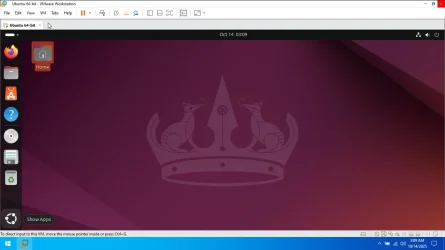
I like your avatar. It reminds me of my Linux Ubuntu browser.
Goes to look at gwc28's avatar - he doesn't have one! He has a default initial. What is your ubuntu browser?
 

My Computers My Computers

  • At a glance

    Windows 11 Home 25H2Core i5-1035G132gb
    OS
    Windows 11 Home 25H2
    Computer type
    Laptop
    Manufacturer/Model
    HP Pavilion 14-ce3606sa
    CPU
    Core i5-1035G1
    Memory
    32gb
    Hard Drives
    Samsung 870 evo sata ssd
    Cooling
    Could be better
    Internet Speed
    50 mbps Starlink
    Browser
    Firefox
    Other Info
    Originally came installed with a 500gb H10 Optane ssd
  • At a glance

    Windows 11 HomeIntel Core i5-1035G116gb
    Operating System
    Windows 11 Home
    Computer type
    Laptop
    Manufacturer/Model
    HP Pavilion ce3606sa
    CPU
    Intel Core i5-1035G1
    Memory
    16gb
    Hard Drives
    Hynix Gold P31 2TB
    Internet Speed
    200mbps Starlink
    Browser
    Firefox
    Antivirus
    Defender
Goes to look at gwc28's avatar - he doesn't have one! He has a default initial. What is your ubuntu browser?
It is not so much the letter but the color of the logo.
I don’t mean browser, I mean operating system.

Ubuntu is the Linux OS on my virtual machine.

1760379487169.webp
 
Last edited:

My Computer My Computer

At a glance

Win 7,8.1,10,11, Mint, Kde Plasma, DebianIntel(R) Core(TM) i7-6500U CPU @ 2.50GHz16 GBIntel(R) HD Graphics 520/Nvidia GeForce 930M
OS
Win 7,8.1,10,11, Mint, Kde Plasma, Debian
Computer type
Laptop
Manufacturer/Model
Dell
CPU
Intel(R) Core(TM) i7-6500U CPU @ 2.50GHz
Memory
16 GB
Graphics Card(s)
Intel(R) HD Graphics 520/Nvidia GeForce 930M
Sound Card
Intel(R) Display Audio/RealtekAudio
Monitor(s) Displays
Generic Pnp Monitor
Screen Resolution
1366 X 768
Hard Drives
ST2000LM024-1EJ164
Keyboard
Eng (US)
Mouse
Sanwa Supply
Browser
Firefox
Antivirus
Avast One
Other Info
Too many laptops with different system specifications.
I would rather backup files and folders than my entire system (personal preference), so I ran a test using Acronis (limited WD only version) and Hasleo.
Users who want/need more flexibility keep their data on a separate drive from the OS. Then the backup of data vs entire system is not an issue. Data is backed on a frequency and method provides easy recovery, and a separate process is used for the OS. Maybe the same tools or different.
 

My Computer My Computer

At a glance

Windows 11 ProIntel Core Ultra16GBIntel(R) Arc Graphics
OS
Windows 11 Pro
Computer type
Laptop
Manufacturer/Model
ASUS Zenbook 14 OLED
CPU
Intel Core Ultra
Memory
16GB
Graphics Card(s)
Intel(R) Arc Graphics
Sound Card
Realtek High Definition Audio(SST)
Screen Resolution
2880 x 1800
Hard Drives
500 GB NVMe SSD
Internet Speed
1,500Mbps
Browser
Firefox, Edge
Antivirus
Windows Defender
Users who want/need more flexibility keep their data on a separate drive from the OS. Then the backup of data vs entire system is not an issue. Data is backed on a frequency and method provides easy recovery, and a separate process is used for the OS. Maybe the same tools or different.
Honestly, for me I don't mind spending the time (and a cuppa or two) doing software installs and such. My file/folder backups are settings that I don't need to keep reinstalling (OBS Scenes, RTSS profiles, My Documents, etc.) because trying to reconfigure those would be nearly impossible.
 

My Computer My Computer

At a glance

Windows 11 Pro 25H2 (26200.8457)AMD Ryzen 7 7800X3D32gb Team Group (T-Force) DDR5-6000Zotac nVidia GeForce RTX 4070 SUPER - 12gb
OS
Windows 11 Pro 25H2 (26200.8457)
Computer type
PC/Desktop
Manufacturer/Model
Pre-built
CPU
AMD Ryzen 7 7800X3D
Motherboard
MSI Pro B650-VC WiFi
Memory
32gb Team Group (T-Force) DDR5-6000
Graphics Card(s)
Zotac nVidia GeForce RTX 4070 SUPER - 12gb
Sound Card
Sound BlasterX G6
Monitor(s) Displays
Koorui G2421V and ViewSonic VX2453
Screen Resolution
P:2560x1440 S:1920x1080
Hard Drives
WD Blue SN5000 - 500gb NVME
WD Blue SN580 - 2TB NVME
Seagate 4TB HDD - ST4000VN008-2DR166
Keyboard
Mountain Everest
Mouse
Logitech G502 Hero
Internet Speed
T-Mobile Home Internet
Browser
Firefox
Other Info
QNAP TS-469 Pro NAS
TP-Link W7200 (2 unit mesh network)
Elgato Streamdeck
Users who want/need more flexibility keep their data on a separate drive from the OS. Then the backup of data vs entire system is not an issue. Data is backed on a frequency and method provides easy recovery, and a separate process is used for the OS. Maybe the same tools or different.
To me, personally, adding more flexibility means choosing to avoid the kind of unnecessary restrictions that would otherwise force me to keep my data on a separate drive. A free and easy to use solution to this is the bootable Rescue Media of Acronis True Image. It's free to use if you own an eligible storage product from a brand that offers the free license. These brands include major ones like WD, Crucial, Sabrent, Kingston, ADATA, Acer, and Seagate. Oftentimes you'll find that the official product page of the storage product (like a SSD) contains a free download link if the product is eligible.

That said, the bootable Rescue Media of Acronis keeps working even after you completely uninstall the Acronis software from your PC. The icon in the taskbar's notification area will be gone, and all the various background services will be gone. And stays that way so, it adds zero bloat then. Even the system image backups themselves [that you can create with the bootable Rescue Media of Acronis] have zero bloat in them, as you can use its convenient and easy to use GUI to specify what files you want to be excluded from the image that you want to create.

Personally, I, don't need to make a system backup very often. So, the extra effort of having to boot into the bootable environment each time doesn't hold me back in any significant way. Much to the contrary, it saves the potential risk of needing to troubleshoot or worse. That's just because the bootable (WinRE/WinPE-based) environment is separate and isolated from Windows and various processes running on Windows that might otherwise interfere with the image creation process. It also is why I don't trust anything else for creating an image.

I also use FastCopy for copying personal files (also including the copying of image files) with its file hash code verification and per-file error logging abilities. So, FastCopy and the option to specify exclusions in Acronis are what I prefer to use to maximize on flexibility and ease of use without the need to sacrifice on reliability when it's not necessary to sacrifice on it. That plus the fact that there is no bloat, even in the slightest. And the speed is not half bad either. And it's free. And and and...
 

My Computers My Computers

  • At a glance

    11 Homei7 13650HX16GB DDR5GeForce RTX 4060 Mobile
    OS
    11 Home
    Computer type
    Laptop
    Manufacturer/Model
    Asus TUF Gaming F16 (2024)
    CPU
    i7 13650HX
    Memory
    16GB DDR5
    Graphics Card(s)
    GeForce RTX 4060 Mobile
    Sound Card
    Eastern Electric MiniMax DAC Supreme; Emotiva UMC-200; Astell & Kern AK240
    Monitor(s) Displays
    Sony Bravia XR-55X90J
    Screen Resolution
    3840×2160
    Hard Drives
    512GB SSD internal
    37TB external
    PSU
    Li-ion
    Cooling
    2× Arc Flow Fans, 4× exhaust vents, 5× heatpipes
    Keyboard
    Logitech K800
    Mouse
    Logitech G402
    Internet Speed
    30Mbit/s up, 500Mbit/s down
    Browser
    FF
    Antivirus
    What's an antivirus?
  • At a glance

    11 Homei5 1135G716GB DDR4Intel Iris Xe
    Operating System
    11 Home
    Computer type
    Laptop
    Manufacturer/Model
    Medion S15450
    CPU
    i5 1135G7
    Memory
    16GB DDR4
    Graphics card(s)
    Intel Iris Xe
    Sound Card
    Eastern Electric MiniMax DAC Supreme; Emotiva UMC-200; Astell & Kern AK240
    Monitor(s) Displays
    Sony Bravia XR-55X90J
    Screen Resolution
    3840×2160
    Hard Drives
    2TB SSD internal
    37TB external
    PSU
    Li-ion
    Keyboard
    Logitech K800
    Mouse
    Logitech G402
    Internet Speed
    30Mbit/s up, 500Mbit/s down
    Browser
    FF
@hdmi interesting strategy. If I understand this correctly with the OS & data on the same drive
1. OS backup is performed with exclusion of data folders
2. Data is backup up with a separate process (FastCopy or whatever

This is good as everything has a backup and is recoverable.

If an OS recovery is required it is restored from the backup, but this process would leave leave the drive without the data. So the data would have to be separately restored from its backup.

All quite doable, but I want the flexibility to restore the OS at any hint of trouble without having mess with my data, and the added amount of time that would be required for that operation. Different stokes for different folks I guess.
 

My Computer My Computer

At a glance

Windows 11 ProIntel Core Ultra16GBIntel(R) Arc Graphics
OS
Windows 11 Pro
Computer type
Laptop
Manufacturer/Model
ASUS Zenbook 14 OLED
CPU
Intel Core Ultra
Memory
16GB
Graphics Card(s)
Intel(R) Arc Graphics
Sound Card
Realtek High Definition Audio(SST)
Screen Resolution
2880 x 1800
Hard Drives
500 GB NVMe SSD
Internet Speed
1,500Mbps
Browser
Firefox, Edge
Antivirus
Windows Defender
One thing that I get minor amusement from is all the gnashing of teeth over "system bloat". I agree that there are some instances where that's excessive, but in the greater scheme of things, is it really that big a deal? I have quite a number of applications installed that have quite a few tasks running, I've made no big thing about trying to trim every last bit of "fat".

My processor usages bounces around from 1% to 4% if I just fire up Task Manager and let everything settle down. Yes, there's lots of background processes running (115), but so what? I'm using 19% of my memory and probably 2-3% of my CPU on average. Exactly how excited should I get about cutting a couple of percent off either processor or memory usage?
 

My Computers My Computers

  • At a glance

    Win 11 Pro 25H2, Build 26200.8655Intel Core i5 1450064GB DDR4GeForce RTX 4060
    OS
    Win 11 Pro 25H2, Build 26200.8655
    Computer type
    PC/Desktop
    Manufacturer/Model
    Home Brew
    CPU
    Intel Core i5 14500
    Motherboard
    Gigabyte B760M G P WIFI
    Memory
    64GB DDR4
    Graphics Card(s)
    GeForce RTX 4060
    Sound Card
    Chipset Realtek
    Monitor(s) Displays
    LG 45" Ultragear, Acer 24" 1080p
    Screen Resolution
    5120x1440, 1920x1080
    Hard Drives
    Crucial P310 2TB 2280 PCIe Gen4 3D NAND NVMe M.2 SSD (O/S)
    Silicon Power 2TB US75 NVMe PCIe Gen4 M.2 2280 SSD (backup)
    Crucial BX500 2TB 3D NAND (2nd backup)
    Seagate 4TB Ironwolf, rotating HDD archive files
    External off-line backup Drives: 2 NVMe 4TB drives in external enclosures
    PSU
    Thermaltake Toughpower GF3 750W
    Case
    LIAN LI LANCOOL 216 E-ATX PC Case
    Cooling
    Lots of fans!
    Keyboard
    Microsoft Comfort Curve 2000
    Mouse
    Logitech G305
    Internet Speed
    Verizon FiOS 1GB
    Browser
    Firefox
    Antivirus
    Malware Bytes & Windows Defender Security
  • At a glance

    Win 11 Pro 25H2, Build 26200.8524Intel Core i5 1440032GB DDR5Intel 700 Embedded GPU
    Operating System
    Win 11 Pro 25H2, Build 26200.8524
    Computer type
    PC/Desktop
    Manufacturer/Model
    Home Brew
    CPU
    Intel Core i5 14400
    Motherboard
    Gigabyte B760M DS3H AX
    Memory
    32GB DDR5
    Graphics card(s)
    Intel 700 Embedded GPU
    Sound Card
    Realtek Embedded
    Monitor(s) Displays
    27" HP 1080p
    Screen Resolution
    1920x1080
    Hard Drives
    Crucial P310 2TB 2280 PCIe Gen4 eD NAND PCIe SSD
    Samsung EVO 990 2TB NVMe Gen4 SSD
    Samsung 2TB SATA SSD
    PSU
    Thermaltake Smart BM3 650W
    Case
    Okinos Micro ATX Case
    Cooling
    Fans
    Keyboard
    Microsoft Comfort Curve 2000
    Mouse
    Logitech G305
    Internet Speed
    Verizon FiOS 1GB
    Browser
    Firefox
    Antivirus
    Malware Bytes & Windows Defender Security
@gunrunnerjohn I agree with ^^. The obsession likely started in the good old DOS days when you knew what every file on the floppy was, and worked hard to optimize the limited amount of available space. And the culture propagated from there. Maybe it is going away now that upgrading to a 2TB SSD is a casual event.
 

My Computer My Computer

At a glance

Windows 11 ProIntel Core Ultra16GBIntel(R) Arc Graphics
OS
Windows 11 Pro
Computer type
Laptop
Manufacturer/Model
ASUS Zenbook 14 OLED
CPU
Intel Core Ultra
Memory
16GB
Graphics Card(s)
Intel(R) Arc Graphics
Sound Card
Realtek High Definition Audio(SST)
Screen Resolution
2880 x 1800
Hard Drives
500 GB NVMe SSD
Internet Speed
1,500Mbps
Browser
Firefox, Edge
Antivirus
Windows Defender
@hdmi interesting strategy. If I understand this correctly with the OS & data on the same drive
1. OS backup is performed with exclusion of data folders
2. Data is backup up with a separate process (FastCopy or whatever

This is good as everything has a backup and is recoverable.
Some of the files that are excluded from the image don't need to be backed up, though. E.g., leftover junk files like temporary files, cache files that will be automatically rebuilt, page files, etc.. If you keep at least some of your personal files in a folder on your C: drive [instead of on your D: drive], for example, then you could always decide to exclude that folder from image.

Some applications might store data on the C: drive, and, even if it were always possible to relocate that data to a different drive, it's not always feasible. I selectively put my personal files on my D: drive, and I customize my system images by specifying some exclusions accordingly. Selectively = most of them but not all of them. It [the bootable Rescue Media of Acronis] doesn't force anyone to use the ability to specify exclusions, but I use the ability. (Extra flexibility gets added in this case by being allowed to choose between using the ability and not using it.)
If an OS recovery is required it is restored from the backup, but this process would leave leave the drive without the data. So the data would have to be separately restored from its backup.
FastCopy is a copy tool. Copying folders and files lets me access them directly without needing to restore or mount an image. All that's needed to gain immediate, full access is a working PC. The total size of those specific personal files that I keep on my C: drive is rather limited, as I still use my D: drive to store the bulk of personal files. If Windows gets so badly corrupted that restoring from image looks like it will probably be the way to go, after the restore I can copy the excluded data to my C: drive in next to no time with just a few mouseclicks.
All quite doable, but I want the flexibility to restore the OS at any hint of trouble without having mess with my data, and the added amount of time that would be required for that operation. Different stokes for different folks I guess.
I have no idea what you mean by "mess with my data". The whole idea behind having 1:1 copies of the data is to completely avoid the mess that might otherwise result from the dependency on the image plus the imaging software that is required to restore or mount the image. FastCopy uses "Diff (Size/date)" mode by default. When using this operation mode FastCopy treats each file in the source such a way that a copy is made if size or date is different or if it does not exist. It's pretty straightforward IMO. Also, there is no "added amount of time", at least not as far as I can see.
 

My Computers My Computers

  • At a glance

    11 Homei7 13650HX16GB DDR5GeForce RTX 4060 Mobile
    OS
    11 Home
    Computer type
    Laptop
    Manufacturer/Model
    Asus TUF Gaming F16 (2024)
    CPU
    i7 13650HX
    Memory
    16GB DDR5
    Graphics Card(s)
    GeForce RTX 4060 Mobile
    Sound Card
    Eastern Electric MiniMax DAC Supreme; Emotiva UMC-200; Astell & Kern AK240
    Monitor(s) Displays
    Sony Bravia XR-55X90J
    Screen Resolution
    3840×2160
    Hard Drives
    512GB SSD internal
    37TB external
    PSU
    Li-ion
    Cooling
    2× Arc Flow Fans, 4× exhaust vents, 5× heatpipes
    Keyboard
    Logitech K800
    Mouse
    Logitech G402
    Internet Speed
    30Mbit/s up, 500Mbit/s down
    Browser
    FF
    Antivirus
    What's an antivirus?
  • At a glance

    11 Homei5 1135G716GB DDR4Intel Iris Xe
    Operating System
    11 Home
    Computer type
    Laptop
    Manufacturer/Model
    Medion S15450
    CPU
    i5 1135G7
    Memory
    16GB DDR4
    Graphics card(s)
    Intel Iris Xe
    Sound Card
    Eastern Electric MiniMax DAC Supreme; Emotiva UMC-200; Astell & Kern AK240
    Monitor(s) Displays
    Sony Bravia XR-55X90J
    Screen Resolution
    3840×2160
    Hard Drives
    2TB SSD internal
    37TB external
    PSU
    Li-ion
    Keyboard
    Logitech K800
    Mouse
    Logitech G402
    Internet Speed
    30Mbit/s up, 500Mbit/s down
    Browser
    FF
I have no idea what you mean by "mess with my data". The whole idea behind having 1:1 copies of the data is to completely avoid the mess that might otherwise result from the dependency on the image plus the imaging software that is required to restore or mount the image. FastCopy uses "Diff (Size/date)" mode by default. When using this operation mode FastCopy treats each file in the source such a way that a copy is made if size or date is different or if it does not exist. It's pretty straightforward IMO. Also, there is no "added amount of time", at least not as far as I can see.
Your post said that you "selectively put your personal files on the D:" drive, so we are in sync. My response to the original poster was addressing the situation of OS and data in the same partition.

This the configuration with my 1TB SSD that is logically partitioned into 120MB for the OS, and most of the rest for data (650MB used) in another logical drive.
- the OS has a full backup monthly, and weekly incremental backups
- the data has a full backup every 3 months, a weekly incremental backups
A restore of the OS takes 12-15 minutes (no messing with the data), and the system is ready to be used normally at the end. I have done a restore a few times every year. The restore process would take a LOT longer if the OS and data was in one partition.

I have never had to do a full data restore (except for new PC or SSD), but have done selective individual file restores.
 

My Computer My Computer

At a glance

Windows 11 ProIntel Core Ultra16GBIntel(R) Arc Graphics
OS
Windows 11 Pro
Computer type
Laptop
Manufacturer/Model
ASUS Zenbook 14 OLED
CPU
Intel Core Ultra
Memory
16GB
Graphics Card(s)
Intel(R) Arc Graphics
Sound Card
Realtek High Definition Audio(SST)
Screen Resolution
2880 x 1800
Hard Drives
500 GB NVMe SSD
Internet Speed
1,500Mbps
Browser
Firefox, Edge
Antivirus
Windows Defender
I put all the stuff that is reasonable to relocate to my data drive there, but as stated, there are a few applications that you might miss. Truthfully, anything important as far as your data should be fairly easy to relocate. All my development source files for software, hardware design, and 3D design are easily stored on the data drive. Stuff like my email data base is also easily relocated.
 

My Computers My Computers

  • At a glance

    Win 11 Pro 25H2, Build 26200.8655Intel Core i5 1450064GB DDR4GeForce RTX 4060
    OS
    Win 11 Pro 25H2, Build 26200.8655
    Computer type
    PC/Desktop
    Manufacturer/Model
    Home Brew
    CPU
    Intel Core i5 14500
    Motherboard
    Gigabyte B760M G P WIFI
    Memory
    64GB DDR4
    Graphics Card(s)
    GeForce RTX 4060
    Sound Card
    Chipset Realtek
    Monitor(s) Displays
    LG 45" Ultragear, Acer 24" 1080p
    Screen Resolution
    5120x1440, 1920x1080
    Hard Drives
    Crucial P310 2TB 2280 PCIe Gen4 3D NAND NVMe M.2 SSD (O/S)
    Silicon Power 2TB US75 NVMe PCIe Gen4 M.2 2280 SSD (backup)
    Crucial BX500 2TB 3D NAND (2nd backup)
    Seagate 4TB Ironwolf, rotating HDD archive files
    External off-line backup Drives: 2 NVMe 4TB drives in external enclosures
    PSU
    Thermaltake Toughpower GF3 750W
    Case
    LIAN LI LANCOOL 216 E-ATX PC Case
    Cooling
    Lots of fans!
    Keyboard
    Microsoft Comfort Curve 2000
    Mouse
    Logitech G305
    Internet Speed
    Verizon FiOS 1GB
    Browser
    Firefox
    Antivirus
    Malware Bytes & Windows Defender Security
  • At a glance

    Win 11 Pro 25H2, Build 26200.8524Intel Core i5 1440032GB DDR5Intel 700 Embedded GPU
    Operating System
    Win 11 Pro 25H2, Build 26200.8524
    Computer type
    PC/Desktop
    Manufacturer/Model
    Home Brew
    CPU
    Intel Core i5 14400
    Motherboard
    Gigabyte B760M DS3H AX
    Memory
    32GB DDR5
    Graphics card(s)
    Intel 700 Embedded GPU
    Sound Card
    Realtek Embedded
    Monitor(s) Displays
    27" HP 1080p
    Screen Resolution
    1920x1080
    Hard Drives
    Crucial P310 2TB 2280 PCIe Gen4 eD NAND PCIe SSD
    Samsung EVO 990 2TB NVMe Gen4 SSD
    Samsung 2TB SATA SSD
    PSU
    Thermaltake Smart BM3 650W
    Case
    Okinos Micro ATX Case
    Cooling
    Fans
    Keyboard
    Microsoft Comfort Curve 2000
    Mouse
    Logitech G305
    Internet Speed
    Verizon FiOS 1GB
    Browser
    Firefox
    Antivirus
    Malware Bytes & Windows Defender Security
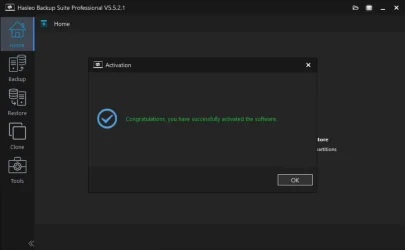
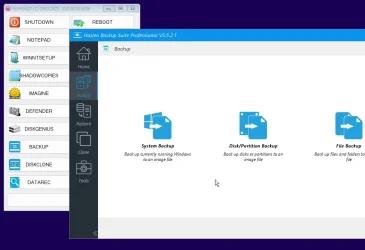
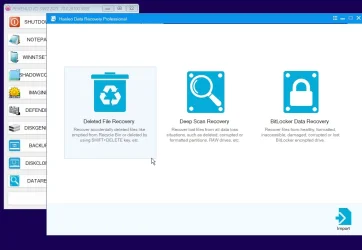
Hasleo Pro just landed in my Inbox.

0008125.webp
 

My Computers My Computers

  • At a glance

    Windows 11 Pro
    OS
    Windows 11 Pro
    Computer type
    PC/Desktop
    Manufacturer/Model
    ASUS ROG Strix
  • At a glance

    Windows 11 Pro
    Operating System
    Windows 11 Pro
    Computer type
    Laptop
    Manufacturer/Model
    ASUS VivoBook
  • ASUS VivoBook 'Lite' ~ Windows 11 Home
Captured_003.webp


Captured_000.webp


Captured_001.webp


Captured_002.webp


Captured_000.webp
 
Last edited:

My Computers My Computers

  • At a glance

    Win7,Win11i7-97002x16gb 3600mhz
    OS
    Win7,Win11
    Computer type
    PC/Desktop
    CPU
    i7-9700
    Motherboard
    gigabyte b365m ds3h
    Memory
    2x16gb 3600mhz
    Monitor(s) Displays
    benq gw2480
    PSU
    bequiet pure power 11 400CM
    Cooling
    cryorig m9i
  • At a glance

    win7,win11i5-84002x8gb 3200
    Operating System
    win7,win11
    Computer type
    PC/Desktop
    CPU
    i5-8400
    Motherboard
    gigabyte b365m ds3h
    Memory
    2x8gb 3200
    PSU
    xfx pro 450

Latest Support Threads

Back
Top Bottom