Bing & Edge


elbmek

Well-known member
Member
VIP
Local time
10:44 AM
Posts
988
Location
Sutton Coldfield England
OS
Win 11 x 64 Home
nothing important, purely cosmetic but - how do I remove anything at all to do with Bing. I dont use it, and don't like it. Also, can I uninstall Edge without damage?
 

My Computers My Computers

  • At a glance

    Win 11 x 64 HomeAMD Ryzen 5 7600 6-Core ProcessorDDR 5. 32GB (2 x16GB)GeForce RTX 5060i
    OS
    Win 11 x 64 Home
    Computer type
    PC/Desktop
    Manufacturer/Model
    pc specialists build (updated various times)
    CPU
    AMD Ryzen 5 7600 6-Core Processor
    Motherboard
    Gigabyte Technology Co., Ltd. Product:B650M K
    Memory
    DDR 5. 32GB (2 x16GB)
    Graphics Card(s)
    GeForce RTX 5060i
    Sound Card
    2 channel HD Audio + Mic/Hphone jack
    Monitor(s) Displays
    coolermaster 27 inch
    Screen Resolution
    1920 x 1080
    Hard Drives
    three external 3TBs, 4 TBs and 5tb. (Storage) Samsung SSD 970 (C).
    Case
    Coolermaster
    Cooling
    internal fans
    Keyboard
    Logi K270 & Logitech gamer G213
    Mouse
    M310 and Logi Gamer G203
    Internet Speed
    530.85mbps download. 52.70 upload
    Browser
    Opera, Vivaldi, Chrome & Firefox
    Antivirus
    Kaspersky Premium
    Other Info
    Build: 26100.ge_release 240331-1435
  • At a glance

    Android
    Operating System
    Android
    Computer type
    Tablet
    Manufacturer/Model
    Samsung
    Keyboard
    logi K270, when in use.
    Mouse
    Logi M220
    Internet Speed
    500
    Browser
    Opera.Edge. Chrome.Vivaldi
    Antivirus
    Kaspersky Premium
Both are very hard to completely remove, and EDGE will get upset if you try.


BING keeps popping up everywhere it can. The best thing is just chase it around like a game of whack-a-mole, and disable it when it shows up.

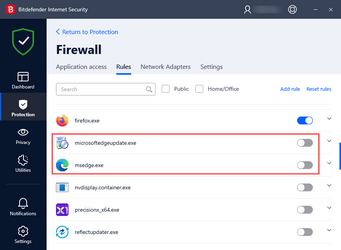
EDGE can have detrimental effects if you try to remove it. My solution was to just use a 3rd party AV/firewall, that could "block" EDGE from accessing the internet. This way... if some other Microsoft App, absolutely needs EDGE... it's still there to use.

I use Bitdefender Internet Security for things like this. It has 13 modules, of which I only use three.
The AV, the Threat Defense and the firewall. The firewall has a setting that allows me to "block ALL".
Then, I go back and just allow the things that I or Windows "need" to function.

In my case... the only things I "need" to allow internet access for are: Firefox and svchost.exe.
There are about 3-4 other things that I allow, only when absolutely needed.
Like, winstore.app.exe if I need to use the MS Store.

Here is a pic showing EDGE being blocked...

Image1.png


The "Application Access" tab, shows me which programs are trying to access the internet.
The "Rules" tab is where I can allow or deny those programs access to the internet.

There are some other programs with good firewalls, like Tiny Wall and SimpleWall, (free I believe), but they start to get a bit too complex. About 15 years ago... Zonealarm free was the best firewall ever made... now it's junk.
It too had the ability to block ALL, then gave you the allow or deny options.
Now though, they've added so much useless stuff to the program, that it's all but useless.


The short answer is... disable BING when you see it pop up somewhere, and either find a way to "block" EDGE from accessing the internet or just leave it alone.
 

My Computers My Computers

  • At a glance

    Win 11 Home ♦♦♦26200.8737 ♦♦♦♦♦♦♦25H2AMD Ryzen 7 3700XG.Skill (F4-3200C14D-16GTZKW)EVGA RTX 2070 (08G-P4-2171-KR)
    OS
    Win 11 Home ♦♦♦26200.8737 ♦♦♦♦♦♦♦25H2
    Computer type
    PC/Desktop
    Manufacturer/Model
    Built by Ghot® [May 2020]
    CPU
    AMD Ryzen 7 3700X
    Motherboard
    Asus Pro WS X570-ACE (BIOS 5302)
    Memory
    G.Skill (F4-3200C14D-16GTZKW)
    Graphics Card(s)
    EVGA RTX 2070 (08G-P4-2171-KR)
    Sound Card
    Realtek ALC1220P / ALC S1220A
    Monitor(s) Displays
    Dell U3011 30"
    Screen Resolution
    2560 x 1600
    Hard Drives
    2x Samsung 860 EVO 500GB,
    WD 4TB Black FZBX - SATA III,
    WD 8TB Black FZBX - SATA III,
    DRW-24B1ST CD/DVD Burner
    PSU
    PC Power & Cooling 750W Quad EPS12V
    Case
    Cooler Master ATCS 840 Tower
    Cooling
    CM Hyper 212 EVO (push/pull)
    Keyboard
    Ducky DK9008 Shine II Blue LED
    Mouse
    Logitech Optical M-100
    Internet Speed
    300/300
    Browser
    Firefox (latest)
    Antivirus
    Bitdefender Total Security
    Other Info
    Speakers: Klipsch Pro Media 2.1
  • At a glance

    Windows XP Pro 32bit w/SP3AMD Athlon 64 X2 5000+ (OC'd @ 3.2Ghz)TWIN2X2048-6400C4DHX (2 x 1GB, DDR2 800)EVGA 256-P2-N758-TR GeForce 8600GT SSC
    Operating System
    Windows XP Pro 32bit w/SP3
    Computer type
    PC/Desktop
    Manufacturer/Model
    Built by Ghot® (not in use)
    CPU
    AMD Athlon 64 X2 5000+ (OC'd @ 3.2Ghz)
    Motherboard
    ASUS M2N32-SLI Deluxe Wireless Edition
    Memory
    TWIN2X2048-6400C4DHX (2 x 1GB, DDR2 800)
    Graphics card(s)
    EVGA 256-P2-N758-TR GeForce 8600GT SSC
    Sound Card
    Onboard
    Monitor(s) Displays
    ViewSonic G90FB Black 19" Professional (CRT)
    Screen Resolution
    up to 2048 x 1536
    Hard Drives
    WD 36GB 10,000rpm Raptor SATA
    Seagate 80GB 7200rpm SATA
    Lite-On LTR-52246S CD/RW
    Lite-On LH-18A1P CD/DVD Burner
    PSU
    PC Power & Cooling Silencer 750 Quad EPS12V
    Case
    Generic Beige case, 80mm fans
    Cooling
    ZALMAN 9500A 92mm CPU Cooler
    Keyboard
    Logitech Classic Keybooard 200
    Mouse
    Logitech Optical M-BT96a
    Internet Speed
    300/300
    Browser
    Firefox 3.x ??
    Antivirus
    Symantec (Norton)
    Other Info
    Still assembled, still runs. Haven't turned it on for 15 years?
I don't use Edge or Bing either. I don't uninstall them, I just mostly ignore them. Once in a while, Edge will get started up by something, but I just toss it away and make sure there is nothing left of it with the Task Manager. Edge uses up space on my hard drive. But so what, I have plenty of space.

I use Chrome for browsing and have my preferences set to "Google". To keep Bing out of the picture when browsing, I use a extension called "Chrometana". The extension automatically redirects any Bing searches. Seems to work well for me as I never see any Bing searches.
 

My Computers My Computers

  • At a glance

    Windows 11 Home, 25H2, Latest OS BuildIntel(R) Core(TM) i3-8145U CPU @ 2.10GHz 2.30...8GB
    OS
    Windows 11 Home, 25H2, Latest OS Build
    Computer type
    Laptop
    Manufacturer/Model
    HP 15-dw0xx
    CPU
    Intel(R) Core(TM) i3-8145U CPU @ 2.10GHz 2.30 GHz
    Memory
    8GB
    Screen Resolution
    1366 x 768
    Hard Drives
    930 GB
    Keyboard
    Built In
    Mouse
    Wireless Logitech M325S
    Browser
    Chrome 139.0.7258.128
    Antivirus
    Windows Defender
    Other Info
    Cygwin64
  • At a glance

    Windows 10 Home, Version 22H2, Build19045.3693AMD E-300 with Radeon HD Graphics 1.30 GHz10GBRadeon HD Graphics 1.30 GHz
    Operating System
    Windows 10 Home, Version 22H2, Build19045.3693
    Computer type
    PC/Desktop
    Manufacturer/Model
    HP Pavilion
    CPU
    AMD E-300 with Radeon HD Graphics 1.30 GHz
    Memory
    10GB
    Graphics card(s)
    Radeon HD Graphics 1.30 GHz
    Sound Card
    Realtek
    Monitor(s) Displays
    15"
    Screen Resolution
    1280 x 1024
    Hard Drives
    700 GB
    Keyboard
    Wireless
    Mouse
    Wireless
    Browser
    Chrome
    Antivirus
    Windows Defender
    Other Info
    This computer is connected to my IC-735 radio.

Latest Support Threads

Back
Top Bottom