Biometrics (Windows Hello) working on Windows but will not work for Password Managers (Nordpass/Keeper/Roboform)


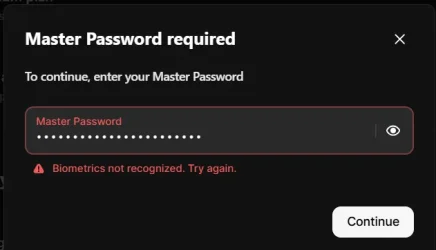
@glasskuter - Biometrics is activated on the PC and working. The issue occurs when attempting to enable biometric login as per the video at point 1:15 when on entering the master password I get the message 'Biometrics not recognised. Try again' this has been with Nordpass support for months now with no resolution.
 

My Computer

System One

  • OS
    Windows 11 Pro 25H2
    Computer type
    PC/Desktop
    Manufacturer/Model
    Dell Optiplex
    CPU
    Intel(R) Core(TM) i7-10700
    Memory
    16GB
    Monitor(s) Displays
    Dell U2722DE
    Screen Resolution
    2560x1440
    Hard Drives
    NVMe Kioxia 512GB
    Keyboard
    Logi MX Keys
    Mouse
    Logi MX Vertical
    Internet Speed
    76
    Browser
    Edge/Chrome/Firefox
    Antivirus
    Bitdefender
I get the message 'Biometrics not recognised.


IMO that would indicate biometrics is not allowed within your Nordpass settings. Even if fingerprint works for Windows login, NordPass requires its own permission toggle to "unlock" the vault. Have you tried using Hello pin with Nordpass? Does that work?

To use your fingerprint with NordPass (or any Password manager) you must manually link which Windows Hello credential you want to use (pin, face. fingerprint) within the app or browser extension settings. This has to be done on every device you use. If you use multiple browsers, it must be done for each browser extension.

If all the above is set up correctly, the only other suggestion I would know to try is
1. Make sure your Nordpass is fully updated.
2. Go into Nordpass settings and toggle off whatever setting controlls unlocking with windows hello
3. In Windows settings>accounts>passkeys delete any keys relating to Nordpass.
4. restart
5. Within Nordpass setting toggle back on the setting relating to "unlock with Windows hello"
6. Enter your Master Password when prompted to re-authorize the biometric link
 

My Computers

System One System Two

  • OS
    Windows 11 Pro 25H2
    Computer type
    PC/Desktop
    Manufacturer/Model
    Dell Optiplex 7080
    CPU
    i9-10900 10 core 20 threads
    Motherboard
    DELL 0J37VM
    Memory
    32 gb
    Graphics Card(s)
    none-Intel UHD Graphics 630
    Sound Card
    Integrated Realtek
    Monitor(s) Displays
    Benq 27
    Screen Resolution
    2560x1440
    Hard Drives
    2x1tb Solidigm m.2 nvme /External drives 512gb Samsung m.2 sata+2tb Kingston m2.nvme
    PSU
    500w
    Case
    MT
    Cooling
    Dell Premium
    Keyboard
    Logitech wired
    Mouse
    Logitech wireless
    Internet Speed
    so slow I'm too embarrassed to tell
    Browser
    #1 Edge #2 Firefox
    Antivirus
    Defender+MWB Premium
  • Operating System
    Windows 11 Pro 24H2 26200.8457
    Computer type
    PC/Desktop
    Manufacturer/Model
    Beelink Mini PC SER5
    CPU
    AMD Ryzen 7 6800U
    Memory
    32 gb
    Graphics card(s)
    integrated
    Sound Card
    integrated
    Monitor(s) Displays
    Benq 27
    Screen Resolution
    2560x1440
    Hard Drives
    1TB Crucial nvme
    Keyboard
    Logitech wired
    Mouse
    Logitech wireless
    Internet Speed
    still too embarrassed to tell
    Browser
    Firefox
    Antivirus
    Defender
    Other Info
    System 3 is non compliant Dell 9020 i7-4770/24gb ram Win11 PRO 26200.8457
Thanks for your reply. NordPass support have responded that from the logs they see Windows is rejecting Biometrics instantly. This seems odd since Windows Hello fingerprint sign in is working perfectly.
You say that you must 'manually link' the credential within the app settings - where/how is that done?

Perhaps I haven't explained the problem very well but it is after turning on the 'log in with Windows Hello' switch in NP settings and entering my NP master password that the error appears.
 

My Computer

System One

  • OS
    Windows 11 Pro 25H2
    Computer type
    PC/Desktop
    Manufacturer/Model
    Dell Optiplex
    CPU
    Intel(R) Core(TM) i7-10700
    Memory
    16GB
    Monitor(s) Displays
    Dell U2722DE
    Screen Resolution
    2560x1440
    Hard Drives
    NVMe Kioxia 512GB
    Keyboard
    Logi MX Keys
    Mouse
    Logi MX Vertical
    Internet Speed
    76
    Browser
    Edge/Chrome/Firefox
    Antivirus
    Bitdefender
You say that you must 'manually link' the credential within the app settings - where/how is that done?
First let me say I have no experience with Nordpass or any other PW manager other than Roboform. Roboform offers a desktop application where I can manage Roboform as well as in the browser extensions. That's the app I was referring to. I'm flying by the seat of my pants with NP.

As I asked in post 22, have you tested NP using Windows Hello Pin instead of fingerprint? Does Windows also reject that Windows Hello method?

Are you using any 3rd party AV software/firewall that could be interfering in some way?
 

My Computers

System One System Two

  • OS
    Windows 11 Pro 25H2
    Computer type
    PC/Desktop
    Manufacturer/Model
    Dell Optiplex 7080
    CPU
    i9-10900 10 core 20 threads
    Motherboard
    DELL 0J37VM
    Memory
    32 gb
    Graphics Card(s)
    none-Intel UHD Graphics 630
    Sound Card
    Integrated Realtek
    Monitor(s) Displays
    Benq 27
    Screen Resolution
    2560x1440
    Hard Drives
    2x1tb Solidigm m.2 nvme /External drives 512gb Samsung m.2 sata+2tb Kingston m2.nvme
    PSU
    500w
    Case
    MT
    Cooling
    Dell Premium
    Keyboard
    Logitech wired
    Mouse
    Logitech wireless
    Internet Speed
    so slow I'm too embarrassed to tell
    Browser
    #1 Edge #2 Firefox
    Antivirus
    Defender+MWB Premium
  • Operating System
    Windows 11 Pro 24H2 26200.8457
    Computer type
    PC/Desktop
    Manufacturer/Model
    Beelink Mini PC SER5
    CPU
    AMD Ryzen 7 6800U
    Memory
    32 gb
    Graphics card(s)
    integrated
    Sound Card
    integrated
    Monitor(s) Displays
    Benq 27
    Screen Resolution
    2560x1440
    Hard Drives
    1TB Crucial nvme
    Keyboard
    Logitech wired
    Mouse
    Logitech wireless
    Internet Speed
    still too embarrassed to tell
    Browser
    Firefox
    Antivirus
    Defender
    Other Info
    System 3 is non compliant Dell 9020 i7-4770/24gb ram Win11 PRO 26200.8457
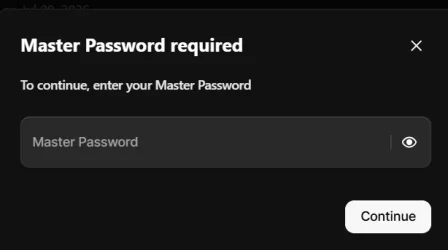
@glasskuter - The NordPass browser extension is stand-alone i.e. although there is a desktop app it is not necessary to install it to install and use the browser extension. (and I haven't) . As for using the Windows PIN, NP specifically asks for the Master Password when setting the 'login with WIndows Hello' toggle ( I did try the PIN but it was rejected as invalid) So I have reset Edge settings and re-installed windows - same problem. Images attached show sequence of events.
 

Attachments

  • Screenshot 2026-02-27 100709.webp
    Screenshot 2026-02-27 100709.webp
    3.4 KB · Views: 1
  • Screenshot 2026-02-27 100748.webp
    Screenshot 2026-02-27 100748.webp
    7.8 KB · Views: 1
  • Screenshot 2026-02-27 100850.webp
    Screenshot 2026-02-27 100850.webp
    11.1 KB · Views: 1

My Computer

System One

  • OS
    Windows 11 Pro 25H2
    Computer type
    PC/Desktop
    Manufacturer/Model
    Dell Optiplex
    CPU
    Intel(R) Core(TM) i7-10700
    Memory
    16GB
    Monitor(s) Displays
    Dell U2722DE
    Screen Resolution
    2560x1440
    Hard Drives
    NVMe Kioxia 512GB
    Keyboard
    Logi MX Keys
    Mouse
    Logi MX Vertical
    Internet Speed
    76
    Browser
    Edge/Chrome/Firefox
    Antivirus
    Bitdefender
Sorry then, I know of nothing else to suggest to try.
 

My Computers

System One System Two

  • OS
    Windows 11 Pro 25H2
    Computer type
    PC/Desktop
    Manufacturer/Model
    Dell Optiplex 7080
    CPU
    i9-10900 10 core 20 threads
    Motherboard
    DELL 0J37VM
    Memory
    32 gb
    Graphics Card(s)
    none-Intel UHD Graphics 630
    Sound Card
    Integrated Realtek
    Monitor(s) Displays
    Benq 27
    Screen Resolution
    2560x1440
    Hard Drives
    2x1tb Solidigm m.2 nvme /External drives 512gb Samsung m.2 sata+2tb Kingston m2.nvme
    PSU
    500w
    Case
    MT
    Cooling
    Dell Premium
    Keyboard
    Logitech wired
    Mouse
    Logitech wireless
    Internet Speed
    so slow I'm too embarrassed to tell
    Browser
    #1 Edge #2 Firefox
    Antivirus
    Defender+MWB Premium
  • Operating System
    Windows 11 Pro 24H2 26200.8457
    Computer type
    PC/Desktop
    Manufacturer/Model
    Beelink Mini PC SER5
    CPU
    AMD Ryzen 7 6800U
    Memory
    32 gb
    Graphics card(s)
    integrated
    Sound Card
    integrated
    Monitor(s) Displays
    Benq 27
    Screen Resolution
    2560x1440
    Hard Drives
    1TB Crucial nvme
    Keyboard
    Logitech wired
    Mouse
    Logitech wireless
    Internet Speed
    still too embarrassed to tell
    Browser
    Firefox
    Antivirus
    Defender
    Other Info
    System 3 is non compliant Dell 9020 i7-4770/24gb ram Win11 PRO 26200.8457
Understood, thanks for your time.
 

My Computer

System One

  • OS
    Windows 11 Pro 25H2
    Computer type
    PC/Desktop
    Manufacturer/Model
    Dell Optiplex
    CPU
    Intel(R) Core(TM) i7-10700
    Memory
    16GB
    Monitor(s) Displays
    Dell U2722DE
    Screen Resolution
    2560x1440
    Hard Drives
    NVMe Kioxia 512GB
    Keyboard
    Logi MX Keys
    Mouse
    Logi MX Vertical
    Internet Speed
    76
    Browser
    Edge/Chrome/Firefox
    Antivirus
    Bitdefender
When you clean installed windows did you sign in using a microsoft account? What happens when you switch to a local account?


What browser are you using? Is windows hello turned on in the settings?

Chrome: open Chrome Settings, navigate to Autofill and passwords > Google Password Manager > Settings, and toggle on "Use Windows Hello when filling passwords


My Computers

System One System Two

  • OS
    Windows 11 Pro
    Computer type
    PC/Desktop
    Manufacturer/Model
    Custom Built
    CPU
    Ryzen 7 5700 X3D
    Motherboard
    MSI MPG B550 GAMING PLUS
    Memory
    64 GB DDR4 3600mhz Gskill Ripjaws V
    Graphics Card(s)
    RTX 4070 Super , 12GB VRAM Asus EVO Overclock
    Monitor(s) Displays
    Gigabyte M27Q (rev. 2.0) 2560 x 1440 @ 170hz HDR
    Hard Drives
    2TB Samsung nvme ssd
    4TB Western Digital nvme ssd
    PSU
    CORSAIR RMx SHIFT Series™ RM750x 80 PLUS Gold Fully Modular ATX Power Supply
    Case
    CORSAIR 3500X ARGB Mid-Tower ATX PC Case – Black
    Cooling
    ID-COOLING FROSTFLOW X 240 CPU Water Cooler
    Keyboard
    Logitech G213
    Mouse
    Logitech G203
    Internet Speed
    1.2gbps Fiber 😎
  • Operating System
    Chrome OS
    Computer type
    Laptop
    Manufacturer/Model
    HP Chromebook
    CPU
    Intel Pentium Quad Core
    Memory
    4GB LPDDR4
    Monitor(s) Displays
    14 Inch HD SVA anti glare micro edge display
    Hard Drives
    64 GB emmc
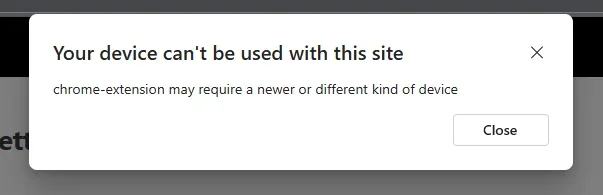
Browser is Edge but same behaviour in Chrome and Firefox. Just tested running in Administrator (obviously Local) account and got a new, different, and interesting result suggesting the fingerprint scanner I have is incompatible (see image)- (it's a Kensington Verimark)
 

Attachments

  • Screenshot 2026-02-27 165932.webp
    Screenshot 2026-02-27 165932.webp
    8.1 KB · Views: 1

My Computer

System One

  • OS
    Windows 11 Pro 25H2
    Computer type
    PC/Desktop
    Manufacturer/Model
    Dell Optiplex
    CPU
    Intel(R) Core(TM) i7-10700
    Memory
    16GB
    Monitor(s) Displays
    Dell U2722DE
    Screen Resolution
    2560x1440
    Hard Drives
    NVMe Kioxia 512GB
    Keyboard
    Logi MX Keys
    Mouse
    Logi MX Vertical
    Internet Speed
    76
    Browser
    Edge/Chrome/Firefox
    Antivirus
    Bitdefender
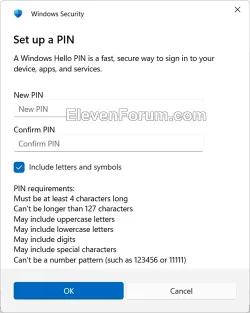
1.) Check dell update / support assist / or their website and download the fingerprint reader driver again. Also, you could just not use the fingerprint and just test using a pin for windows hello which can just be a password.

1772216381608.webp

2.) Also, try updating your bios.

3.) If you go into start, and search tpm and then click on security processor troubleshooting, are error messages there?


My Computers

System One System Two

  • OS
    Windows 11 Pro
    Computer type
    PC/Desktop
    Manufacturer/Model
    Custom Built
    CPU
    Ryzen 7 5700 X3D
    Motherboard
    MSI MPG B550 GAMING PLUS
    Memory
    64 GB DDR4 3600mhz Gskill Ripjaws V
    Graphics Card(s)
    RTX 4070 Super , 12GB VRAM Asus EVO Overclock
    Monitor(s) Displays
    Gigabyte M27Q (rev. 2.0) 2560 x 1440 @ 170hz HDR
    Hard Drives
    2TB Samsung nvme ssd
    4TB Western Digital nvme ssd
    PSU
    CORSAIR RMx SHIFT Series™ RM750x 80 PLUS Gold Fully Modular ATX Power Supply
    Case
    CORSAIR 3500X ARGB Mid-Tower ATX PC Case – Black
    Cooling
    ID-COOLING FROSTFLOW X 240 CPU Water Cooler
    Keyboard
    Logitech G213
    Mouse
    Logitech G203
    Internet Speed
    1.2gbps Fiber 😎
  • Operating System
    Chrome OS
    Computer type
    Laptop
    Manufacturer/Model
    HP Chromebook
    CPU
    Intel Pentium Quad Core
    Memory
    4GB LPDDR4
    Monitor(s) Displays
    14 Inch HD SVA anti glare micro edge display
    Hard Drives
    64 GB emmc
Thanks but the fingerprint reader works fine for Windows Hello, and I can login without issues, whether with fingerprint or PIN. I can live with using a PIN to unlock NordPass if I have to. BIOS is up to date and latest Verimark driver installed, will check for TPM errors & see if NP support have any suggestions re sensor compatibilty
 

My Computer

System One

  • OS
    Windows 11 Pro 25H2
    Computer type
    PC/Desktop
    Manufacturer/Model
    Dell Optiplex
    CPU
    Intel(R) Core(TM) i7-10700
    Memory
    16GB
    Monitor(s) Displays
    Dell U2722DE
    Screen Resolution
    2560x1440
    Hard Drives
    NVMe Kioxia 512GB
    Keyboard
    Logi MX Keys
    Mouse
    Logi MX Vertical
    Internet Speed
    76
    Browser
    Edge/Chrome/Firefox
    Antivirus
    Bitdefender

Latest Support Threads

Back
Top Bottom